2005 CHEVROLET MALIBU oil level
[x] Cancel search: oil levelPage 132 of 434
Oil Pressure Light.........................................3-44
Security Light...............................................3-44
Cruise Control Light......................................3-45
Highbeam On Light.......................................3-45
Service Vehicle Soon Light............................3-45
Fuel Gage...................................................3-46
Driver Information Center (DIC).......................3-47
DIC Operation and Displays...........................3-47
DIC Warnings and Messages.........................3-52
Audio System(s).............................................3-54
Setting the Time for Radios without Radio
Data Systems (RDS)..................................3-54
Setting the Time for Radios with Radio Data
Systems (RDS).........................................3-55
Radio with CD (Base Level)...........................3-55
Radio with CD (Up Level)..............................3-60Radio with Cassette and CD..........................3-71
Radio with Six-Disc CD.................................3-84
Rear Seat Entertainment System....................3-99
Rear Seat Audio (RSA) (Without Rear
Seat Entertainment).................................3-115
Rear Seat Audio (RSA) (With Entertainment
System)..................................................3-117
Theft-Deterrent Feature................................3-118
Audio Steering Wheel Controls......................3-119
Radio Reception.........................................3-120
Care of the Cassette Tape Player.................3-120
Care of Your CDs and DVDs........................3-121
Care of the CD and DVD Player...................3-121
Fixed Mast Antenna (MAXX Only).................3-122
Backglass Antenna (Sedan Only)..................3-122
XM™ Satellite Radio Antenna System............3-122
Section 3 Instrument Panel
3-2
Page 186 of 434
DIC Warnings and Messages
These messages will appear if there is a problem
detected in one of your vehicle’s systems.
Any message will clear when the vehicle’s condition is
no longer present. The warning message will come back
on the next time the vehicle is turned off and back on
if the condition is still present. With most messages,
a warning chime will sound when the message is
displayed. Your vehicle may have other warning
messages.
AUTO LIGHTS OFF:This message is displayed if the
automatic headlamp system is disabled with the
headlamp switch.
AUTO LIGHTS ON:This message is displayed if the
automatic headlamp system is enabled with the
headlamp switch.
BRAKE FLUID:This message will display if the ignition
is in ON to inform the driver that the brake uid level
is low. Have the brake system serviced by your
GM dealer as soon as possible.CHANGE OIL SOON:This message is displayed when
the life of the engine oil has expired and it should be
changed.
When you acknowledge the Change Engine Oil
message by clearing it from the display, you still must
reset the engine oil life system separately. See
Engine Oil Life System on page 5-18,Engine Oil on
page 5-15, andScheduled Maintenance on page 6-4for
more information.
CHECK GAS CAP:This message will appear if the gas
cap has not been fully tightened. You should recheck
your gas cap to make sure that it is on properly. A few
driving trips with the cap properly installed should
turn the display off.
DOOR AJAR:This message is displayed if one or
more of the vehicle’s doors are not closed properly.
When this message appears, you should make sure that
the door is closed completely.
ENGINE DISABLED:This message is displayed if the
starting of the engine is disabled. Have your vehicle
serviced by your GM dealer immediately.
3-56
Page 277 of 434
The exit ramp can be curved, sometimes quite sharply.
The exit speed is usually posted. Reduce your speed
according to your speedometer, not to your sense
of motion. After driving for any distance at higher
speeds, you may tend to think you are going slower
than you actually are.
Before Leaving on a Long Trip
Make sure you are ready. Try to be well rested. If you
must start when you are not fresh — such as after
a day’s work — do not plan to make too many miles that
rst part of the journey. Wear comfortable clothing
and shoes you can easily drive in.
Is your vehicle ready for a long trip? If you keep it
serviced and maintained, it is ready to go. If it needs
service, have it done before starting out. Of course, you
will nd experienced and able service experts in GM
dealerships all across North America. They will be ready
and willing to help if you need it.Here are some things you can check before a trip:
Windshield Washer Fluid:Is the reservoir full?
Are all windows clean inside and outside?
Wiper Blades:Are they in good shape?
Fuel, Engine Oil, Other Fluids:Have you checked
all levels?
Lamps:Are they all working? Are the lenses clean?
Tires:They are vitally important to a safe,
trouble-free trip. Is the tread good enough for
long-distance driving? Are the tires all inated to the
recommended pressure?
Weather Forecasts:What is the weather outlook
along your route? Should you delay your trip a
short time to avoid a major storm system?
Maps:Do you have up-to-date maps?
4-21
Page 315 of 434
A. Engine Air Cleaner/Filter. SeeEngine Air
Cleaner/Filter on page 5-20.
B. Engine Oil Fill Cap. See “When to Add Engine Oil”
underEngine Oil on page 5-15.
C. Engine Oil Dipstick. See “Checking Engine Oil”
underEngine Oil on page 5-15.
D. Engine Coolant Surge Tank. SeeCooling System on
page 5-26.
E. Brake Fluid Reservoir. See “Brake Fluid” under
Brakes on page 5-32.
F. Battery. SeeBattery on page 5-35.
G. Engine Compartment Fuse Block. SeeEngine
Compartment Fuse Block on page 5-86.
H. Windshield Washer Fluid Reservoir. See “Adding
Washer Fluid” underWindshield Washer Fluid
on page 5-30.Engine Oil
Checking Engine Oil
It is a good idea to check your engine oil every time you
get fuel. In order to get an accurate reading, the oil
must be warm and the vehicle must be on level ground.
The engine oil dipstick handle is a yellow loop. See
Engine Compartment Overview on page 5-12for
the location of the engine oil dipstick.
1. Turn off the engine and give the oil several minutes
to drain back into the oil pan. If you do not do this,
the oil dipstick might not show the actual level.
2. Pull the dipstick and clean it with a paper towel or
cloth, then push it back in all the way. Remove it
again, keeping the tip down and check the level.
5-15
Page 316 of 434
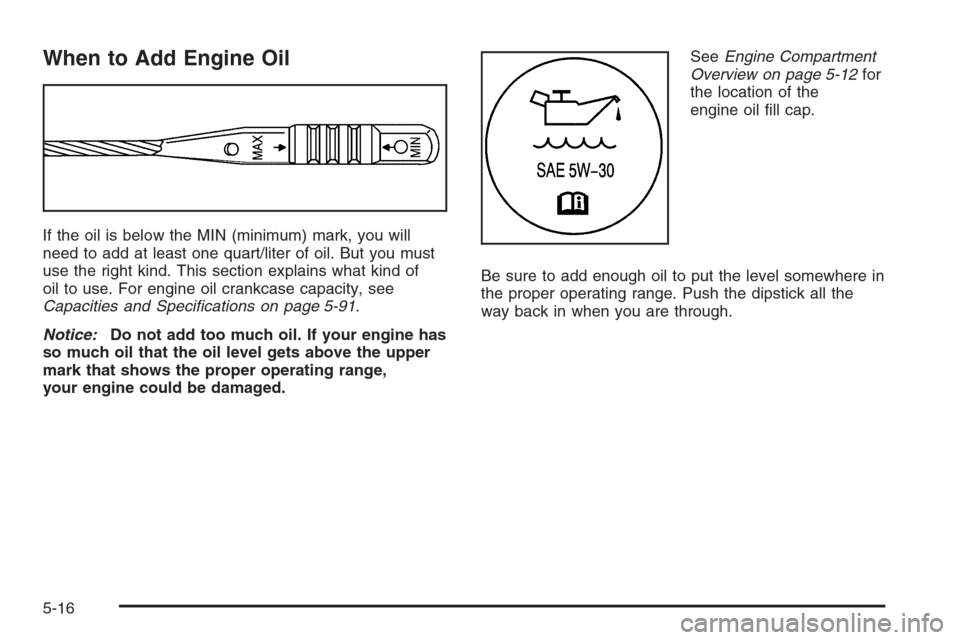
When to Add Engine Oil
If the oil is below the MIN (minimum) mark, you will
need to add at least one quart/liter of oil. But you must
use the right kind. This section explains what kind of
oil to use. For engine oil crankcase capacity, see
Capacities and Specications on page 5-91.
Notice:Do not add too much oil. If your engine has
so much oil that the oil level gets above the upper
mark that shows the proper operating range,
your engine could be damaged.SeeEngine Compartment
Overview on page 5-12for
the location of the
engine oil ll cap.
Be sure to add enough oil to put the level somewhere in
the proper operating range. Push the dipstick all the
way back in when you are through.
5-16
Page 318 of 434
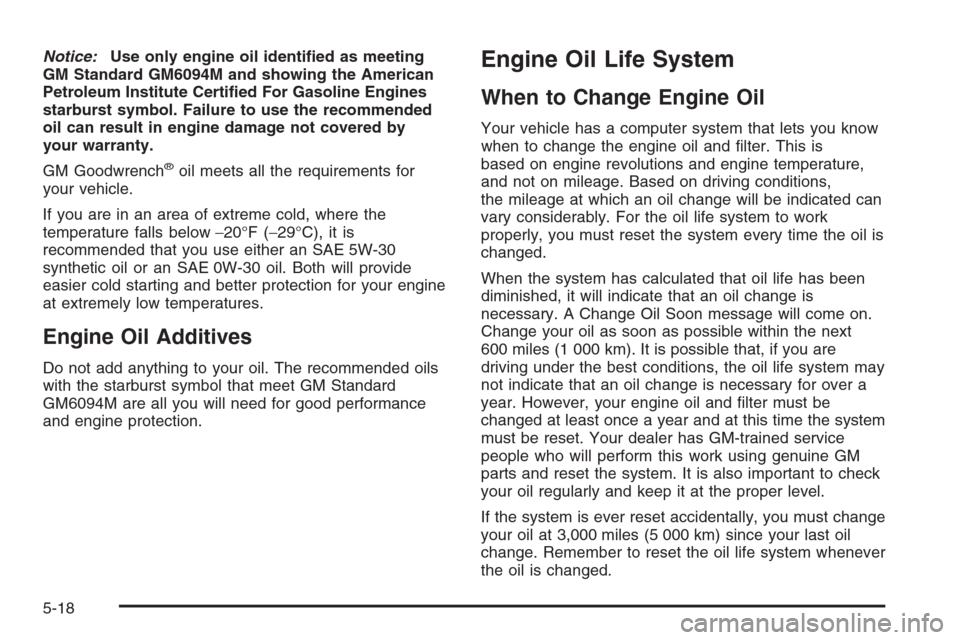
Notice:Use only engine oil identied as meeting
GM Standard GM6094M and showing the American
Petroleum Institute Certied For Gasoline Engines
starburst symbol. Failure to use the recommended
oil can result in engine damage not covered by
your warranty.
GM Goodwrench
®oil meets all the requirements for
your vehicle.
If you are in an area of extreme cold, where the
temperature falls below−20°F (−29°C), it is
recommended that you use either an SAE 5W-30
synthetic oil or an SAE 0W-30 oil. Both will provide
easier cold starting and better protection for your engine
at extremely low temperatures.
Engine Oil Additives
Do not add anything to your oil. The recommended oils
with the starburst symbol that meet GM Standard
GM6094M are all you will need for good performance
and engine protection.
Engine Oil Life System
When to Change Engine Oil
Your vehicle has a computer system that lets you know
when to change the engine oil and lter. This is
based on engine revolutions and engine temperature,
and not on mileage. Based on driving conditions,
the mileage at which an oil change will be indicated can
vary considerably. For the oil life system to work
properly, you must reset the system every time the oil is
changed.
When the system has calculated that oil life has been
diminished, it will indicate that an oil change is
necessary. A Change Oil Soon message will come on.
Change your oil as soon as possible within the next
600 miles (1 000 km). It is possible that, if you are
driving under the best conditions, the oil life system may
not indicate that an oil change is necessary for over a
year. However, your engine oil and lter must be
changed at least once a year and at this time the system
must be reset. Your dealer has GM-trained service
people who will perform this work using genuine GM
parts and reset the system. It is also important to check
your oil regularly and keep it at the proper level.
If the system is ever reset accidentally, you must change
your oil at 3,000 miles (5 000 km) since your last oil
change. Remember to reset the oil life system whenever
the oil is changed.
5-18
Page 327 of 434
{CAUTION:
An electric engine cooling fan under the hood
can start up even when the engine is not
running and can injure you. Keep hands,
clothing and tools away from any underhood
electric fan.
If the coolant inside the coolant surge tank is boiling, do
not do anything else until it cools down. The vehicle
should be parked on a level surface.
The coolant level should be at or above the FULL
COLD mark on the front of the coolant surge tank. If it
is not, you may have a leak at the pressure cap or in the
radiator hoses, heater hoses, radiator, water pump or
somewhere else in the cooling system.
{CAUTION:
Heater and radiator hoses, and other engine
parts, can be very hot. Do not touch them. If
you do, you can be burned.
Do not run the engine if there is a leak. If you
run the engine, it could lose all coolant. That
could cause an engine re, and you could be
burned. Get any leak xed before you drive the
vehicle.
If there seems to be no leak, with the engine on, check
to see if the electric engine cooling fans are running.
If the engine is overheating, both fans should be
running. If they are not, your vehicle needs service.
Notice:Engine damage from running your engine
without coolant is not covered by your warranty.
Notice:Using coolant other than DEX-COOL
®may
cause premature engine, heater core or radiator
corrosion. In addition, the engine coolant may
require changing sooner, at 30,000 miles (50 000 km)
or 24 months, whichever occurs rst. Any repairs
would not be covered by your warranty. Always use
DEX-COOL
®(silicate-free) coolant in your vehicle.
5-27
Page 391 of 434
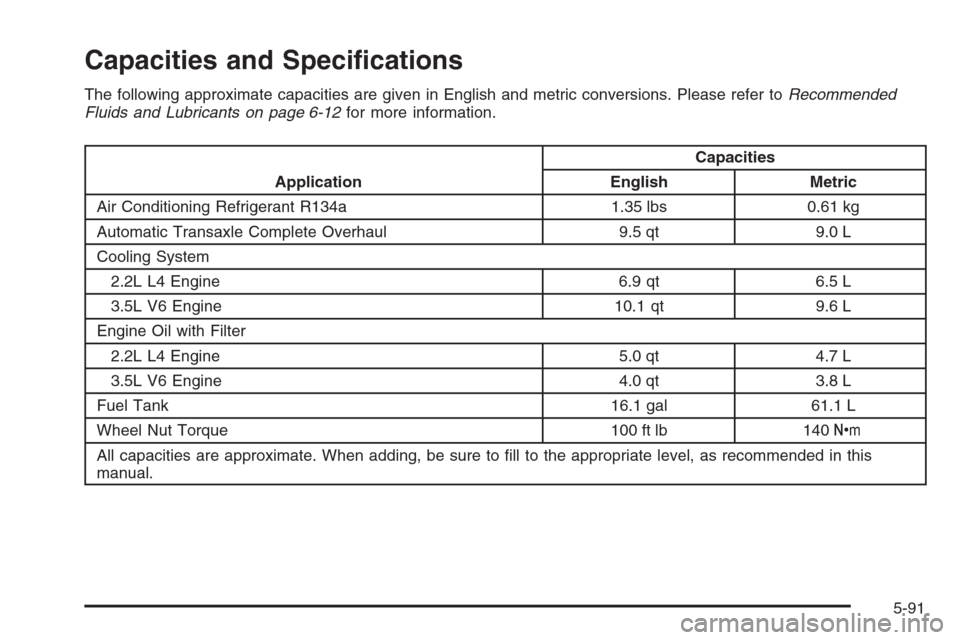
Capacities and Specications
The following approximate capacities are given in English and metric conversions. Please refer toRecommended
Fluids and Lubricants on page 6-12for more information.
ApplicationCapacities
English Metric
Air Conditioning Refrigerant R134a 1.35 lbs 0.61 kg
Automatic Transaxle Complete Overhaul 9.5 qt 9.0 L
Cooling System
2.2L L4 Engine 6.9 qt 6.5 L
3.5L V6 Engine 10.1 qt 9.6 L
Engine Oil with Filter
2.2L L4 Engine 5.0 qt 4.7 L
3.5L V6 Engine 4.0 qt 3.8 L
Fuel Tank 16.1 gal 61.1 L
Wheel Nut Torque 100 ft lb 140Y
All capacities are approximate. When adding, be sure to ll to the appropriate level, as recommended in this
manual.
5-91