2005 CHEVROLET KODIAK lock
[x] Cancel search: lockPage 99 of 374
Four-Wheel Drive
If your vehicle has four-wheel drive, you can send your
engine’s driving power to all four wheels for extra
traction. To get the most satisfaction out of four-wheel
drive, you must be familiar with its operation. Read the
part that follows before using four-wheel drive.
You should use two-wheel drive high for most normal
driving conditions.
Notice:Driving on clean, dry pavement in
four-wheel drive for an extended period of time may
cause premature wear on your vehicle’s powertrain.
Do not drive on clean, dry pavement in four-wheel
drive for extended periods of time.
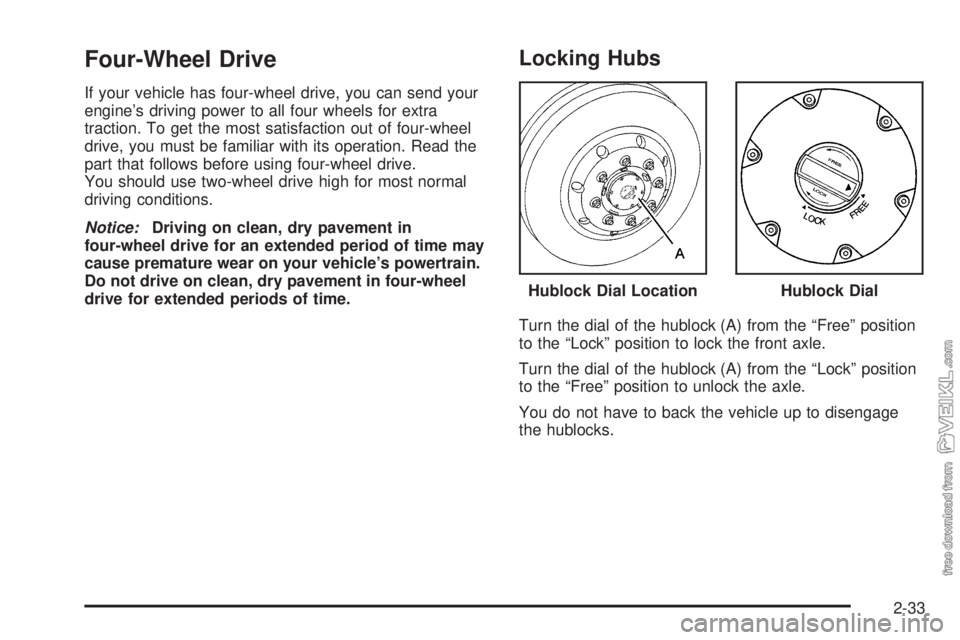
Locking Hubs
Turn the dial of the hublock (A) from the “Free” position
to the “Lock” position to lock the front axle.
Turn the dial of the hublock (A) from the “Lock” position
to the “Free” position to unlock the axle.
You do not have to back the vehicle up to disengage
the hublocks.Hublock Dial Location
Hublock Dial
2-33
Page 100 of 374

Electronic Transfer Case
If your vehicle is equipped
with four-wheel drive, the
transfer case knob is
located to the right of the
steering wheel on the
instrument panel. Use this
knob to shift into and
out of four-wheel drive.
Recommended Transfer Case Settings
Driving ConditionsTransfer Case Settings
2m4m4nN
Normal YES
Severe YES
Extreme YES
Vehicle in Tow* YES
*SeeTowing Your Vehicle on page 4-35for further
information.An indicator light will show you which position the
transfer case is in. The indicator lights will come on
briefly when you turn on the ignition and one will stay on.
If the lights do not come on, you should take your
vehicle to your dealer for service. An indicator light will
flash while shifting the transfer case. It will remain
illuminated when the shift is complete. If for some
reason the transfer case cannot make a requested shift,
it will return to the last chosen setting.
2
m(Two-Wheel High):This setting is for driving in
most street and highway situations. The transfer
case does not drive the front axle in two-wheel drive.
The front-axle will spin if the front wheel hubs are
locked. Be sure to unlock the hubs to achieve the best
fuel economy.
4
m(Four-Wheel High):Use Four-Wheel High when
you need extra traction, such as on snowy or icy roads or
in most off-road situations. Be sure the front wheel hubs
are locked when you want to drive in Four-Wheel High.
2-34
Page 101 of 374

4n(Four-Wheel Low):This setting sends maximum
power to all four wheels. You might choose Four-Wheel
Low if you are driving off-road in deep sand, deep mud,
and climbing or descending steep hills. Be sure the
front wheel hubs are locked when you want to drive in
Four-Wheel Low.
{CAUTION:
Shifting the transfer case to NEUTRAL can
cause your vehicle to roll even if the
transmission is in PARK (P). You or someone
else could be injured. If you are going to leave
your vehicle, set the parking brake and shift
the transmission to PARK (P) and make sure
the transfer case is in a drive gear.Notice:If your vehicle has an Allison
®transmission
and you try to put the transmission in PARK (P)
while the transfer case is in Four-Wheel Low,
the transmission may not go into PARK (P) and
could damage your vehicle. When parking your
vehicle, make sure the transfer case is in Two-Wheel
High or Four-Wheel High.
NEUTRAL:Shift the vehicle’s transfer case to
NEUTRAL only when towing your vehicle.
Shifting Into Four-Wheel High
Turn the knob to four-wheel high. This can be done
at 3 mph or less and when you are shifting out of
Four-Wheel Low. The indicator light will flash while
shifting. It will remain illuminated when the shift is
complete.
Shifting Into Two-Wheel High
Turn the knob to Two-Wheel High. This can be done
at 3 mph or less and when you are shifting out of
Four-Wheel Low.
2-35
Page 103 of 374

Shifting Into NEUTRAL
Before shifting the transfer case to NEUTRAL, first
make sure the vehicle is parked so that it will not roll.
1. Set the parking brake.
2. Start the vehicle.
3. Put the transmission in NEUTRAL (N).
4. Shift the transfer case to Two-Wheel High.
5. Turn the transfer case knob all of the way past
Four-Wheel Low and hold it there for a minimum
of 10 seconds. The neutral indicator light will
come on.
6. Shift the transmission to REVERSE (R) for
one second, then shift the transmission to
DRIVE (D) for one second.
7. Turn the ignition to OFF.
8. Place the transmission shift lever in PARK. (P).
9. Turn the ignition to LOCK.
Shifting Out of NEUTRAL
To shift the transfer case out of NEUTRAL, do the
following:
1. Set the parking brake and apply the regular
brake pedal.
2. Turn the ignition to RUN with the engine off.
3. Put the transmission in NEUTRAL (N).
4. Turn the transfer case knob to the desired shift
position (Two-Wheel High, Four-Wheel High,
Four-Wheel Low).
5. After the transfer case has shifted out of NEUTRAL,
the indicator light will go out.
6. Release the parking brake.
7. Start the engine and shift the transmission lever to
the desired position.
Excessively shifting the transfer case into or out of the
different modes may cause the transfer case to enter the
shift protection mode. This will protect the transfer case
from possible damage and will only allow the transfer
case to respond to one shift per 10 seconds. The transfer
case may stay in this mode for up to three minutes.
2-37
Page 111 of 374

Mirrors
Manual Rearview Mirror
If your vehicle has this feature, pull the tab under the
mirror toward you to reduce glare from headlamps
behind you after dark. Push the tab away from you to
restore the mirror to the daytime position.
Outside Manual Mirrors
Adjust the outside rearview mirrors so you can see a
little of the side of your vehicle, and the area beside your
vehicle from a comfortable driving position. All mirrors
can be folded in to enter narrow passageways.
Outside Power Mirrors
If you have outside power mirrors, they can be adjusted
from the inside of the vehicle.
The control for this
feature is located on the
driver’s door.
Select the mirror you want to move by turning the
switch clockwise to adjust the passenger’s side mirror,
or counterclockwise to adjust the driver’s side mirror.
The center position is neutral.
Then, adjust the mirror by pressing the outer arrows on
the switch until the mirror is in the desired position.
2-45
Page 113 of 374

Storage Areas
Your vehicle includes a number of storage
compartments.
Some vehicles have storage areas in the instrument
panel. Another small storage area may be located
overhead. Other models may have more storage area
underneath the front passenger’s bench seat. Lift the
seat cushion to use the storage area.
Your vehicle may have a storage tray located behind
the driver and passenger seats.
All models have storage pockets and cupholders on
each of the doors. Some models may have additional
cupholders in the center floor console.
All models also have storage compartments located
beneath the floorboard on both sides of the vehicle.
Center Console Storage Area
Your vehicle may have a center console compartment if
you have the bucket or suspension seats.
The back of your center bench seat may also fold
forward to reveal a console compartment.
The release strap for the
center console is located
between the center seat
and passenger’s seat.
To expose the storage compartment, pull the strap to
release the seatback. Then fold the seatback forward.
To open the storage compartment, press the release
button and lift the lid rearward. With the lid closed, it can
be used as a clipboard to hold papers in place.
Before returning the seatback to the upright position,
make sure the console is snapped shut. Lift the seatback
all the way up until it clicks. Push and pull on the seatback
to make sure the seat is locked in place.
2-47
Page 115 of 374

Instrument Panel Overview...............................3-4
Hazard Warning Flashers................................3-6
Other Warning Devices...................................3-6
Horn.............................................................3-6
Tilt Wheel.....................................................3-7
Turn Signal/Multifunction Lever.........................3-7
Turn and Lane-Change Signals........................3-8
Headlamp High/Low-Beam Changer..................3-8
Windshield Wipers..........................................3-9
Windshield Washer.......................................3-10
Cruise Control..............................................3-10
Exterior Lamps.............................................3-14
Headlamps on Reminder................................3-15
Daytime Running Lamps (DRL).......................3-15
Marker Lamps..............................................3-16
Instrument Panel Brightness...........................3-16
Dome Lamps...............................................3-16
Entry Lighting...............................................3-17
Reading Lamps............................................3-17
Instrument Panel Switchbank..........................3-18
Accessory Power Outlets...............................3-19
Ashtrays and Cigarette Lighter........................3-20
Climate Controls............................................3-20
Climate Control System.................................3-20
Outlet Adjustment.........................................3-23
Rear Heating System....................................3-24Warning Lights, Gages, and Indicators............3-24
Instrument Panel Cluster................................3-25
Speedometer and Odometer...........................3-26
Trip Odometer..............................................3-26
Tachometer.................................................3-26
Engine Speed Limiter....................................3-26
Safety Belt Reminder Light.............................3-27
Safety Belt Reminder Tone............................3-27
Airbag Readiness Light..................................3-27
Airbag Off Light............................................3-28
Charging System Light..................................3-30
Voltmeter Gage............................................3-30
Service Transmission Warning Light................3-31
Range Inhibit Warning Indicator......................3-31
Brake System Warning Light..........................3-31
Anti-Lock Brake System Warning Light.............3-34
Trailer Anti-Lock Brake System Warning Light.....3-34
Engine Coolant Temperature Gage..................3-35
Low Coolant Warning Light............................3-35
Wait to Start Indicator (Diesel Engine).............3-36
Malfunction Indicator Lamp.............................3-36
Oil Pressure Gage........................................3-37
Low Oil Level Light.......................................3-38
Change Engine Oil Light................................3-38
Engine Overspeed Warning Light....................3-39
Engine Shutdown Warning Light.....................3-39
Section 3 Instrument Panel
3-1
Page 116 of 374

Transmission Temperature Gage.....................3-39
Exhaust Brake Indicator Light.........................3-40
Differential Lock Indicator Light.......................3-40
Reduced Engine Power Light.........................3-41
Highbeam On Light.......................................3-41
Daytime Running Lamps (DRL) Indicator Light.....3-41
Low Washer Fluid Warning Light.....................3-42
Check Gages Warning Light...........................3-42
Fuel Gage...................................................3-42
Water in Fuel Warning Light...........................3-43
Air Filter Restriction Indicator..........................3-43
Air Pressure Gage........................................3-44
Hourmeter Gage...........................................3-44Audio System(s).............................................3-44
Setting the Time...........................................3-45
AM-FM Radio...............................................3-45
Radio with Cassette......................................3-48
Radio with CD..............................................3-53
Theft-Deterrent Feature (Non-RDS Radios).......3-57
Radio Reception...........................................3-57
Care of the Cassette Tape Player...................3-58
Care of Your CDs.........................................3-59
Care of the CD Player...................................3-59
Fixed Mast Antenna......................................3-59
Chime Level Adjustment................................3-59
Section 3 Instrument Panel
3-2