2005 CHEVROLET EQUINOX ECO mode
[x] Cancel search: ECO modePage 150 of 364
Setting the Time
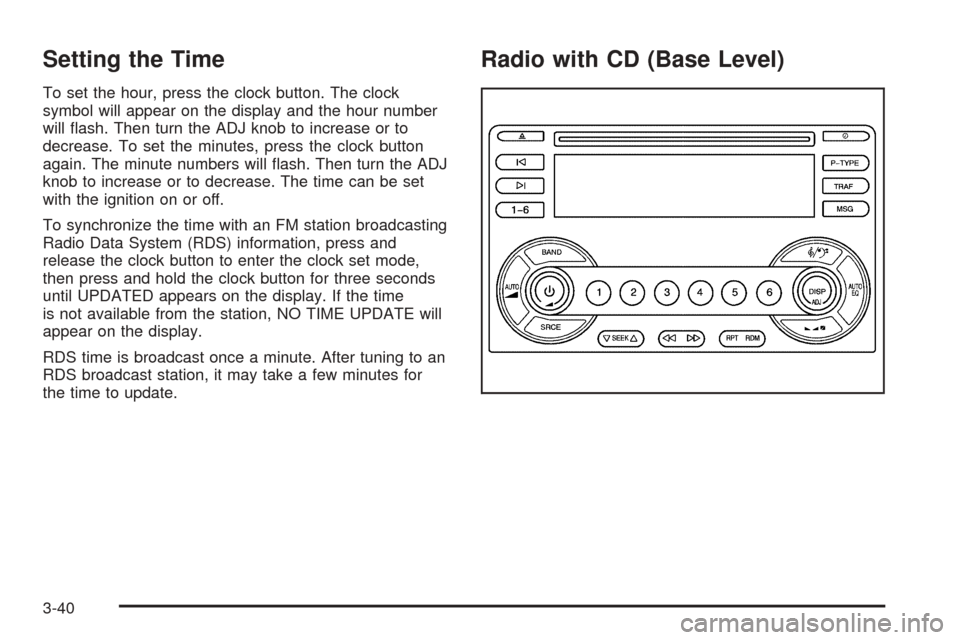
To set the hour, press the clock button. The clock
symbol will appear on the display and the hour number
will ash. Then turn the ADJ knob to increase or to
decrease. To set the minutes, press the clock button
again. The minute numbers will ash. Then turn the ADJ
knob to increase or to decrease. The time can be set
with the ignition on or off.
To synchronize the time with an FM station broadcasting
Radio Data System (RDS) information, press and
release the clock button to enter the clock set mode,
then press and hold the clock button for three seconds
until UPDATED appears on the display. If the time
is not available from the station, NO TIME UPDATE will
appear on the display.
RDS time is broadcast once a minute. After tuning to an
RDS broadcast station, it may take a few minutes for
the time to update.
Radio with CD (Base Level)
3-40
Page 152 of 364
Then as you drive, automatic volume increases the
volume, as necessary, to overcome noise at any speed.
The volume level should always sound the same to
you as you drive. AUTO VOL NONE will appear on the
display if the radio cannot determine the vehicle
speed or if the engine is not running. To turn automatic
volume off, press this button until AUTO VOL OFF
appears on the display.
DISP (Display):For RDS, press the DISP knob to
change what appears on the display while using RDS.
The display options are station name, RDS station
frequency, PTY, and the name of the program
(if available).
For XM™ (if equipped), press the DISP knob while in
XM™ mode to retrieve four different categories of
information related to the current song or channel: Artist,
Song Title, Category or PTY, Channel Number/
Channel Name.
Finding a Station
BAND:Press this button to switch between FM1, FM2,
AM, or XM1 or XM2 (if equipped). The display will
show the selection.
ADJ (Adjust):Turn this knob to select radio stations.
xSEEKw:Press the down or up arrow to go to the
previous or to the next station and stay there.To scan stations, press and hold either arrow for
two seconds until SCAN appears on the display and
you hear a beep. The radio will go to a station, play for
a few seconds, then go on to the next station. Press
either arrow again to stop scanning. If no station can be
found during scan, NOT FOUND will appear on the
display and the radio will go back to the last tuned
station.
The radio will only seek and scan stations with a strong
signal that are in the selected band.
1–6 (Preset Pushbuttons):Press this button to play
stations that are programmed on the radio preset
pushbuttons.
The radio will only seek preset stations with a strong
signal that are in the selected band.
Setting Preset Stations
Up to 30 stations (six FM1, six FM2, and six AM,
six XM1 and six XM2 (if equipped)), can be programmed
on the six numbered pushbuttons, by performing the
following steps:
1. Turn the radio on.
2. Press BAND to select FM1, FM2, AM, or XM1
or XM2.
3. Tune in the desired station.
4. Press AUTO EQ to select the equalization.
3-42
Page 153 of 364
5. Press and hold one of the six numbered
pushbuttons until you hear a beep. Whenever that
numbered pushbutton is pressed, the station
that was set will return and the equalization that
was selected will be stored for that pushbutton.
6. Repeat the steps for each pushbutton.
Setting the Tone
(Bass/Midrange/Treble)
P
/Q(Bass/Treble):Press this button until BASS, MID,
or TREBLE appears on the display. Turn the ADJ
knob to increase or to decrease. The display will show
the bass, mid, or treble level. If a station is weak or
noisy, decrease the treble.
To adjust bass, midrange, or treble to the middle
position, select BASS, MID, or TREBLE. Then press
and hold this button for more than two seconds. You will
hear one beep and the tone control will be adjusted to
the middle position.
To adjust all tone controls to the middle position, push
and hold the tone button when no tone control is
displayed. ALL CENTERED will appear on the display
and you will hear one beep. The bass, midrange,
and treble will be adjusted to the middle position.
AUTO EQ (Automatic Equalization):Press this button
to select customized equalization settings designed
for country, jazz, talk, pop, rock, and classical.To return to the manual mode, press and release the
AUTO EQ button until TONE Custom appears on
the display. You can also manually adjust the bass,
midrange, and treble using the tone button.
Adjusting the Speakers (Balance/Fade)
S
(Balance/Fade):To adjust the balance
between the right and the left speakers, push and
release the balance and fade button until BAL appears
on the display. Turn the ADJ knob to move the
sound toward the right or the left speakers.
To adjust the fade between the front and the rear
speakers, push and release the balance and fade button
until FADE appears on the display. Turn the ADJ
knob to move the sound toward the front or the rear
speakers.
To adjust the balance and the fade to the middle
position, select BAL or FADE. Then press and hold this
button for more than two seconds. You will hear a
beep and the speaker control will be adjusted to the
middle position.
To adjust both speaker controls to the middle position,
push and hold the tone button when no speaker
control is displayed. ALL CENTERED will appear on the
display and you will hear a beep. The balance and
fade will be adjusted to the middle position.
3-43
Page 154 of 364
Finding a Program Type (PTY) Station
(RDS and XM™)
To select and nd a desired PTY perform the following:
1. Press the P-TYPE button to activate program
type select mode. P-TYPE and a program type
will appear on the display.
2. Turn the ADJ knob to select a PTY.
3. Once the desired PTY is displayed, press the
SEEK up arrow to select the PTY and to take
you to the PTYs rst station.
4. To go to another station within that PTY press the
SEEK up arrow again. If the radio cannot nd the
desired PTY, NOT FOUND will appear on the
display and the radio will return to the last station
you were listening to.
5. Press the P-TYPE button or wait 15 seconds, to
exit program type select mode.
If PTY times out and is no longer on the display, go
back to Step 1.
If both PTY and TRAF are on, the radio will search for
stations with the selected PTY and traffic
announcements.BAND (Alternate Frequency):Alternate frequency
allows the radio to switch to a stronger station with the
same program type. To turn alternate frequency on,
press and hold BAND for two seconds. FM ALT FREQ
ON and AF will appear on the display. The radio
may switch to stations with a stronger frequency.
To turn alternate frequency off, press and hold BAND
again for two seconds. FM ALT FREQ OFF will appear
on the display and AF will disappear from the display.
The radio will not switch to other stations.
This function does not apply for XM™ Satellite Radio
Service.
RDS Messages
ALERT!:Alert warns of local or national emergencies.
When an alert announcement comes on the current
radio station, ALERT! will appear on the display. You will
hear the announcement, even if the volume is low or
a CD is playing. If a CD is playing, play will stop during
the announcement. Alert announcements cannot be
turned off.
ALERT! will not be affected by tests of the emergency
broadcast system. This feature is not supported by
all RDS stations.
3-44
Page 159 of 364
\(Fast Forward):Press and hold this button to
advance quickly within a track. You will hear sound at a
reduced volume. Release the button to play the
passage. The elapsed time of the track will appear on
the display.
RPT (Repeat):Press this button once to hear a track
over again. RPT ON will appear on the display. The
current track will continue to repeat. Press RPT again to
turn off repeat play. RPT OFF will appear on the
display and RPT will disappear from the display.
RDM (Random):Press this button to hear the tracks in
random, rather than sequential, order. TRACK, TRK#,
and RDM will appear on the display. TRACK and
the track number will appear on the display when each
track starts to play. Press RDM again to turn off
random play. RDM OFF will appear on the display and
RDM will disappear from the display.
xSEEKw:Press the down arrow to go to the start
of the current track or to the previous track. If this
button is pressed more than once, the player will
continue moving backward through the CD.
Press the up arrow to go to the start of the next track. If
this button is pressed more than once, the player will
continue moving forward through the CD.
If either arrow is held for more than two seconds, the
CD will enter CD scan mode and the CD will playthe rst ten seconds of each track. Press either arrow
again to stop scanning.
DISP (Display):Press this knob to see how long the
current track has been playing. The track number,
and the elapsed time of the track will appear on the
display. To change the default on the display, track or
elapsed time, press the knob until you see the
display you want, then hold the knob for two seconds.
The radio will produce one beep and the selected
display will now be the default. Pressing this knob
will also display text on commercially recorded CDs
(if available).
AUTO EQ (Automatic Equalization):Press this button
to select the desired equalization setting while playing
a CD. The equalization will be automatically recalled
whenever a CD is played. For more information,
see AUTO EQ listed previously in this section.
BAND:Press this button to listen to the radio when a
CD is playing. The inactive CD will remain safely
inside the radio for future listening.
SRCE (Source):Press this button to play a CD when
listening to the radio. CD will appear on the display.
Z(Eject):Press this button to eject a CD. Eject may
be activated with either the ignition or radio off. CDs
may be loaded with the ignition and radio off if this
button is pressed rst.
3-49
Page 162 of 364
Then as you drive, automatic volume increases the
volume, as necessary, to overcome noise at any speed.
The volume level should always sound the same to
you as you drive. AUTO VOL NONE will appear on the
display if the radio cannot determine the vehicle
speed or if the engine is not running. To turn off
automatic volume, press this button until AUTO VOL
OFF appears on the display.
DISP (Display):For RDS, press this knob to change
what appears on the display while using RDS. The
display options are station name, RDS station frequency,
PTY, and the name of the program (if available).
For XM™ (if equipped), press the DISP knob while in
XM™ mode to retrieve four different categories of
information related to the current song or channel: Artist,
Song Title, Category or PTY, Channel Number/
Channel Name.
Finding a Station
BAND:Press this button to switch between FM1, FM2,
AM, or XM1 or XM2 (if equipped). The display will
show the selection.
ADJ (Adjust):Turn this knob to select radio stations.
xSEEKw:Press the down or up arrow to go to the
previous or to the next station and stay there.To scan stations, press and hold either arrow for
two seconds until SCAN appears on the display and you
hear a beep. The radio will go to a station, play for a
few seconds, then go on to the next station. Press either
arrow again to stop scanning. If no station can be found
during scan, NOT FOUND will appear on the display and
the radio will go back to the last tuned station.
The radio will only seek and scan stations with a strong
signal that are in the selected band.
Setting Preset Stations
Up to 30 stations (six FM1, six FM2, and six AM,
six XM1 and six XM2 (if equipped)), can be programmed
on the six numbered pushbuttons, by performing the
following steps:
1. Turn the radio on.
2. Press BAND to select FM1, FM2, AM, or XM1
or XM2.
3. Tune in the desired station.
4. Press AUTO EQ to select the equalization.
5. Press and hold one of the six numbered
pushbuttons until you hear a beep. Whenever that
numbered pushbutton is pressed, the station
that was set will return and the equalization that
was selected will be stored for that pushbutton.
6. Repeat the steps for each pushbutton.
3-52
Page 163 of 364
Setting the Tone
(Bass/Midrange/Treble)
P
/Q(Bass/Treble):Press this button until BASS, MID,
or TREBLE appears on the display. Turn the ADJ
knob to increase or to decrease. The display will show
the bass, mid, or treble level. If a station is weak or
noisy, decrease the treble.
To adjust bass, midrange, or treble to the middle
position, select BASS, MID, or TREBLE. Then press
and hold this button for more than two seconds. You will
hear one beep and the tone control will be adjusted to
the middle position.
To adjust all tone controls to the middle position, push
and hold the tone button when no tone control is
displayed. ALL CENTERED will appear on the display
and you will hear one beep. The bass, midrange,
and treble will be adjusted to the middle position.
AUTO EQ (Automatic Equalization):Press this button
to select customized equalization settings designed
for country, jazz, talk, pop, rock, and classical.
To return to the manual mode, press and release the
AUTO EQ button until TONE Custom appears on
the display. Manually adjust the bass, midrange, and
treble using the tone button.
Adjusting the Speakers (Balance/Fade)
S
(Balance/Fade):To adjust the balance
between the right and the left speakers, push and
release the balance and fade button until BAL appears
on the display. Turn the ADJ knob to move the
sound toward the right or the left speakers.
To adjust the fade between the front and the rear
speakers, push and release the balance and fade button
until FADE appears on the display. Turn the ADJ
knob to move the sound toward the front or the rear
speakers.
To adjust the balance or the fade to the middle position,
select BAL or FADE. Then press and hold this button
for more than two seconds. You will hear one beep and
the speaker control will be adjusted to the middle
position.
To adjust both speaker controls to the middle position,
push and hold the tone button when no speaker
control is displayed. ALL CENTERED will appear on the
display and you will hear one beep. The balance and
the fade will be adjusted to the middle position.
3-53
Page 164 of 364
Finding a Program Type (PTY) Station
(RDS and XM™)
To select and nd a desired PTY perform the following:
1. Press the P-TYPE button to activate program
type select mode. P-TYPE and a program type
will appear on the display.
2. Turn the ADJ knob to select a PTY.
3. Once the desired PTY is displayed, press the
SEEK up arrow to take you to the PTYs rst station.
4. To go to another station within that PTY press the
SEEK up arrow again. If the radio cannot nd the
desired PTY, NOT FOUND will appear on the
display and the radio will return to the last station
that was playing.
5. Press the P-TYPE button or wait 15 seconds, to
exit program type select mode.BAND (Alternate Frequency):Alternate frequency
allows the radio to switch to a stronger station with the
same program type. To turn alternate frequency on,
press and hold BAND for two seconds. FM ALT FREQ
ON and AF will appear on the display. The radio
may switch to stations with a stronger frequency.
To turn alternate frequency off, press and hold BAND
again for two seconds. FM ALT FREQ OFF will appear
on the display and AF will disappear from the display.
The radio will not switch to other stations.
This function does not apply for XM™ Satellite Radio
Service.
RDS Messages
ALERT!:Alert warns of local or national emergencies.
When an alert announcement comes on the current
radio station, ALERT! will appear on the display. You will
hear the announcement, even if the volume is low or
a CD is playing. If a CD is playing, play will stop during
the announcement. Alert announcements cannot be
turned off.
ALERT! will not be affected by tests of the emergency
broadcast system. This feature is not supported by
all RDS stations.
3-54