2005 CADILLAC STS 5-5
[x] Cancel search: 5-5Page 1 of 446

Seats and Restraint Systems........................... 1-1
Front Seats
............................................... 1-2
Rear Seats
............................................... 1-7
Safety Belts
.............................................. 1-8
Child Restraints
.......................................1-26
Airbag System
.........................................1-45
Restraint System Check
............................1-56
Features and Controls..................................... 2-1
Keys
........................................................ 2-2
Doors and Locks
......................................2-11
Windows
.................................................2-16
Theft-Deterrent Systems
............................2-19
Starting and Operating Your Vehicle
...........2-22
Mirrors
....................................................2-35
OnStar
®System
......................................2-39
HomeLink®Wireless Control System
...........2-41
Storage Areas
.........................................2-45
Sunroof
..................................................2-46
Vehicle Personalization
.............................2-47
Instrument Panel............................................. 3-1
Instrument Panel Overview
.......................... 3-4
Climate Controls
......................................3-50
Warning Lights, Gages, and Indicators
........3-60
Driver Information Center (DIC)
..................3-73
Audio System(s)
.......................................3-92Driving Your Vehicle....................................... 4-1
Your Driving, the Road, and Your Vehicle
..... 4-2
Towing
...................................................4-35
Service and Appearance Care.......................... 5-1
Service
..................................................... 5-3
Fuel
......................................................... 5-5
Checking Things Under the Hood
...............5-10
All-Wheel Drive
........................................5-42
Rear Axle
...............................................5-44
Front Axle
...............................................5-45
Headlamp Aiming
.....................................5-46
Bulb Replacement
....................................5-48
Windshield Replacement
...........................5-51
Windshield Wiper Blade Replacement
.........5-51
Tires
......................................................5-53
Appearance Care
.....................................5-85
Vehicle Identication
.................................5-94
Electrical System
......................................5-95
Capacities and Specications
...................5-106
Maintenance Schedule..................................... 6-1
Maintenance Schedule
................................ 6-2
Customer Assistance and Information.............. 7-1
Customer Assistance and Information
........... 7-2
Reporting Safety Defects
...........................7-10
Index................................................................ 1
2005 Cadillac STS Owner ManualM
Page 148 of 446

x(Delay Adjustment):Use this band to set the
length of the delay between wipes when using the delay
feature. The closer you move the band toward mist,
the longer the delay. The windshield wiper lever must be
in delay for this feature to work.
6(Low Speed):Put the lever in this position for
slow, steady wiping cycles.
1(High Speed):Put the lever in this position for
rapid wiping cycles.
If the windshield wipers are in use for about six seconds
while you are driving, the exterior lamps will come on
automatically if the exterior lamp control is in AUTO.
SeeWiper Activated Headlamps on page 3-37for more
information.
Be sure to clear ice and snow from the wiper blades
before using them. If they’re frozen to the windshield,
gently loosen or thaw them. If the blades do become
damaged, install new blades. For more information, see
Windshield Wiper Blade Replacement on page 5-51.
Heavy snow or ice can overload the wiper motor.
A circuit breaker will stop the motor until it cools down.
Clear away snow or ice to prevent an overload.
Rainsense™ II Wipers
If your vehicle has this feature, the moisture sensor is
mounted on the interior side of the windshield behind the
rearview mirror. It is used to automatically operate the
wipers by monitoring the amount of moisture build-up on
the windshield. Wipes occur as needed to clear the
windshield depending on driving conditions and
the sensitivity setting. In light rain or snow, fewer wipes
will occur. In heavy rain or snow, wipes will occur
more frequently. The Rainsense™ wipers operate in a
delay mode as well as a continuous low or high
speed as needed. If the system is left on for long periods
of time, occasional wipes may occur without any
moisture on the windshield. This is normal and indicates
that the Rainsense™ system is activated.
To activate the Rainsense™ system, turn the wiper
band to delay mode and select one of the four sensitivity
levels indicated on the wiper stalk. The position
closest to off is the lowest sensitivity setting, level one.
This allows more rain or snow to collect on the
windshield between wipes. Turning the wiper band away
from you to higher sensitivity levels increases the
sensitivity of the system and frequency of wipes. The
highest sensitivity setting, level four is closest to low.
3-14
Page 180 of 446

Polarized sunglasses could make the HUD image
harder to see.
As light shines out from the HUD, it is possible for light
to shine back in. In rare occurrences, when the sun
is at a specic angle and position, the sun’s rays can
shine back into the HUD. When this occurs, the display
device within the HUD will be temporarily illuminated.
The event will end when the vehicle’s angle to the
sun changes.
Clean the inside of the windshield as needed to remove
any dirt or lm that reduces the sharpness or clarity
of the HUD image.
To clean the HUD, spray household glass cleaner
on a soft, clean cloth. Wipe the HUD lens gently,
then dry it.
Notice:When cleaning, be careful not to scratch
the HUD or camera lenses. Do not spray glass
cleaner directly on the HUD lens because the
cleaner could leak inside the unit and cause
damage.If the ignition is on and you cannot see the HUD image,
check to see if:
Something is covering the HUD unit.
The brightness is adjusted properly.
The HUD image is adjusted to the proper height.
Ambient light in the direction your vehicle is facing
is low.
A fuse is blown. SeeFuses and Circuit Breakers on
page 5-95.
Keep in mind that your windshield is part of the HUD
system. SeeWindshield Replacement on page 5-51.
The following Adaptive Cruise Control message
may appear in the HUD:
PEDAL APPLIED ACC OVERRIDE:This message
indicates that you are pressing your foot on the
accelerator pedal and overriding Adaptive Cruise
Control. While you are doing this, the system will not
automatically apply the brakes. Once you remove your
foot from the accelerator pedal, Adaptive Cruise
Control will return to normal operation and be able to
apply the brakes, if needed.
You may also see an Adaptive Cruise Control active
symbol, alert symbol or vehicle ahead symbol. See
Adaptive Cruise Control on page 3-20for more
information.
3-46
Page 203 of 446
If the Light Is Flashing
The following may prevent more serious damage to
your vehicle:
Reducing vehicle speed
Avoiding hard accelerations
Avoiding steep uphill grades
If the light stops ashing and remains on steady, see
“If the Light Is On Steady” following.
If the light continues to ash, when it is safe to do so,
stop the vehicle. Find a safe place to park your vehicle.
Turn the engine off, wait at least 10 seconds and
restart the engine. If the light remains on steady, see
“If the Light Is On Steady” following. If the light is
still ashing, follow the previous steps, and see your
dealer for service as soon as possible.
If the Light Is On Steady
You also may be able to correct the emission system
malfunction by considering the following:
Did you recently put fuel into your vehicle?
If so, reinstall the fuel cap, making sure to fully install
the cap. SeeFilling the Tank on page 5-8. The
diagnostic system can determine if the fuel cap has
been left off or improperly installed. A loose or missing
fuel cap will allow fuel to evaporate into the atmosphere.
A few driving trips with the cap properly installed
should turn the light off.Did you just drive through a deep puddle of water?
If so, your electrical system may be wet. The condition
will usually be corrected when the electrical system
dries out. A few driving trips should turn the light off.
Have you recently changed brands of fuel?
If so, be sure to fuel your vehicle with quality fuel. See
Gasoline Octane on page 5-5. Poor fuel quality will
cause your engine not to run as efficiently as designed.
You may notice this as stalling after start-up, stalling
when you put the vehicle into gear, misring, hesitation
on acceleration, or stumbling on acceleration. (These
conditions may go away once the engine is warmed up.)
This will be detected by the system and cause the
light to turn on.
If you experience one or more of these conditions,
change the fuel brand you use. It will require at least
one full tank of the proper fuel to turn the light off.
If none of the above steps have made the light turn off,
your dealer can check the vehicle. Your dealer has
the proper test equipment and diagnostic tools to x
any mechanical or electrical problems that may
have developed.
3-69
Page 271 of 446

Hydroplaning usually happens at higher speeds. There
just is not a hard and fast rule about hydroplaning.
The best advice is to slow down when it is raining.
Driving Through Deep Standing Water
Notice:If you drive too quickly through deep
puddles or standing water, water can come in
through your engine’s air intake and badly damage
your engine. Never drive through water that is
slightly lower than the underbody of your vehicle.
If you cannot avoid deep puddles or standing water,
drive through them very slowly.
Driving Through Flowing Water
{CAUTION:
Flowing or rushing water creates strong forces.
If you try to drive through owing water, as
you might at a low water crossing, your vehicle
can be carried away. As little as six inches of
owing water can carry away a smaller vehicle.
If this happens, you and other vehicle
occupants could drown. Do not ignore police
warning signs, and otherwise be very cautious
about trying to drive through owing water.
Some Other Rainy Weather Tips
Besides slowing down, allow some extra following
distance. And be especially careful when you
pass another vehicle. Allow yourself more clear
room ahead, and be prepared to have your
view restricted by road spray.
Have good tires with proper tread depth.
SeeTires on page 5-53.
4-19
Page 277 of 446
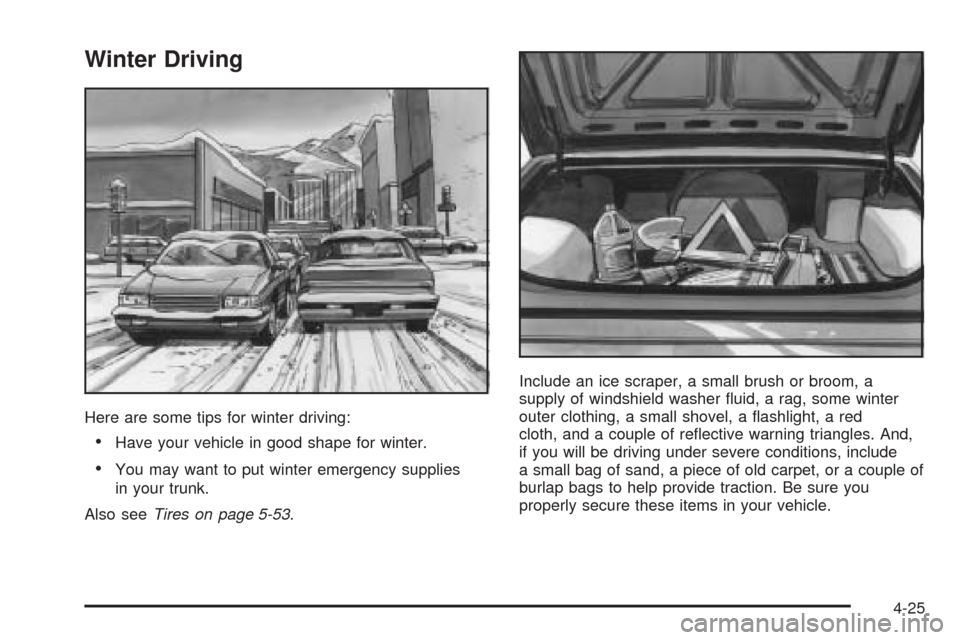
Winter Driving
Here are some tips for winter driving:
Have your vehicle in good shape for winter.
You may want to put winter emergency supplies
in your trunk.
Also seeTires on page 5-53.Include an ice scraper, a small brush or broom, a
supply of windshield washer uid, a rag, some winter
outer clothing, a small shovel, a ashlight, a red
cloth, and a couple of reective warning triangles. And,
if you will be driving under severe conditions, include
a small bag of sand, a piece of old carpet, or a couple of
burlap bags to help provide traction. Be sure you
properly secure these items in your vehicle.
4-25
Page 279 of 446
Whatever the condition — smooth ice, packed, blowing,
or loose snow — drive with caution.
Traction control improves your ability to accelerate when
driving on a slippery road. Even though your vehicle
has a traction control system (TCS), you will want
to slow down and adjust your driving to the road
conditions. Under certain conditions, you may want to
turn the TCS off, such as when driving through
deep snow and loose gravel, to help maintain vehicle
motion at lower speeds. SeeTraction Control System
(TCS) on page 4-8,StabiliTrak
®System on page 4-10,
Rocking Your Vehicle to Get It Out on page 4-30,
and “Winter Tires” underTires on page 5-53.
Your anti-lock brake system (ABS) improves your
vehicle’s stability when you make a hard stop on a
slippery road. Even though you have ABS, you will want
to begin stopping sooner than you would on dry
pavement. SeeAnti-Lock Brake System (ABS) on
page 4-6.
Allow greater following distance on any
slippery road.
Watch for slippery spots. The road might be ne
until you hit a spot that is covered with ice. On
an otherwise clear road, ice patches may appear inshaded areas where the sun cannot reach, such as
around clumps of trees, behind buildings, or
under bridges. Sometimes the surface of a curve or
an overpass may remain icy when the surrounding
roads are clear. If you see a patch of ice ahead
of you, brake before you are on it. Try not to brake
while you are actually on the ice, and avoid
sudden steering maneuvers.
If You Are Caught in a Blizzard
If you are stopped by heavy snow, you could be in a
serious situation. You should probably stay with
your vehicle unless you know for sure that you are near
help and you can hike through the snow. Here are
some things to do to summon help and keep yourself
and your passengers safe:
Turn on your hazard ashers.
Tie a red cloth to your vehicle to alert police that
you have been stopped by the snow.
Put on extra clothing or wrap a blanket around you.
If you do not have blankets or extra clothing, make
body insulators from newspapers, burlap bags,
rags, oor mats — anything you can wrap around
yourself or tuck under your clothing to keep warm.
4-27
Page 283 of 446

Tire and Loading Information Label
A vehicle specic Tire and Loading Information label is
attached to the vehicle’s center pillar (B-pillar). With
the driver’s door open, you will nd the label attached
below the door lock post (striker). The tire and
loading information label shows the number of occupant
seating positions (A), and the maximum vehicle
capacity weight (B) in kilograms and pounds.The Tire and Loading Information label also shows the
tire size of the original equipment tires (C) and the
recommended cold tire ination pressures (D). For more
information on tires and ination seeTires on page 5-53
andInation - Tire Pressure on page 5-60.
There is also important loading information on the
Certication label. It tells you the Gross Vehicle Weight
Rating (GVWR) and the Gross Axle Weight Rating
(GAWR) for the front and rear axle; see “Certication
Label” later in this section.
Steps for Determining Correct Load Limit
1. Locate the statement “The combined weight of
occupants and cargo should never exceed
XXX pounds” on your vehicle placard.
2. Determine the combined weight of the driver and
passengers that will be riding in your vehicle.
3. Subtract the combined weight of the driver and
passengers from XXX kilograms or XXX pounds.
4. The resulting gure equals the available amount of
cargo and luggage load capacity. For example, if
the “XXX” amount equals 1400 lbs and there will be
ve 150 lb passengers in your vehicle, the amount
of available cargo and luggage load capacity is
650 lbs (1400−750 (5 x 150) = 650 lbs). Label Example
4-31