2004 VOLKSWAGEN GOLF PLUS set
[x] Cancel search: setPage 22 of 541
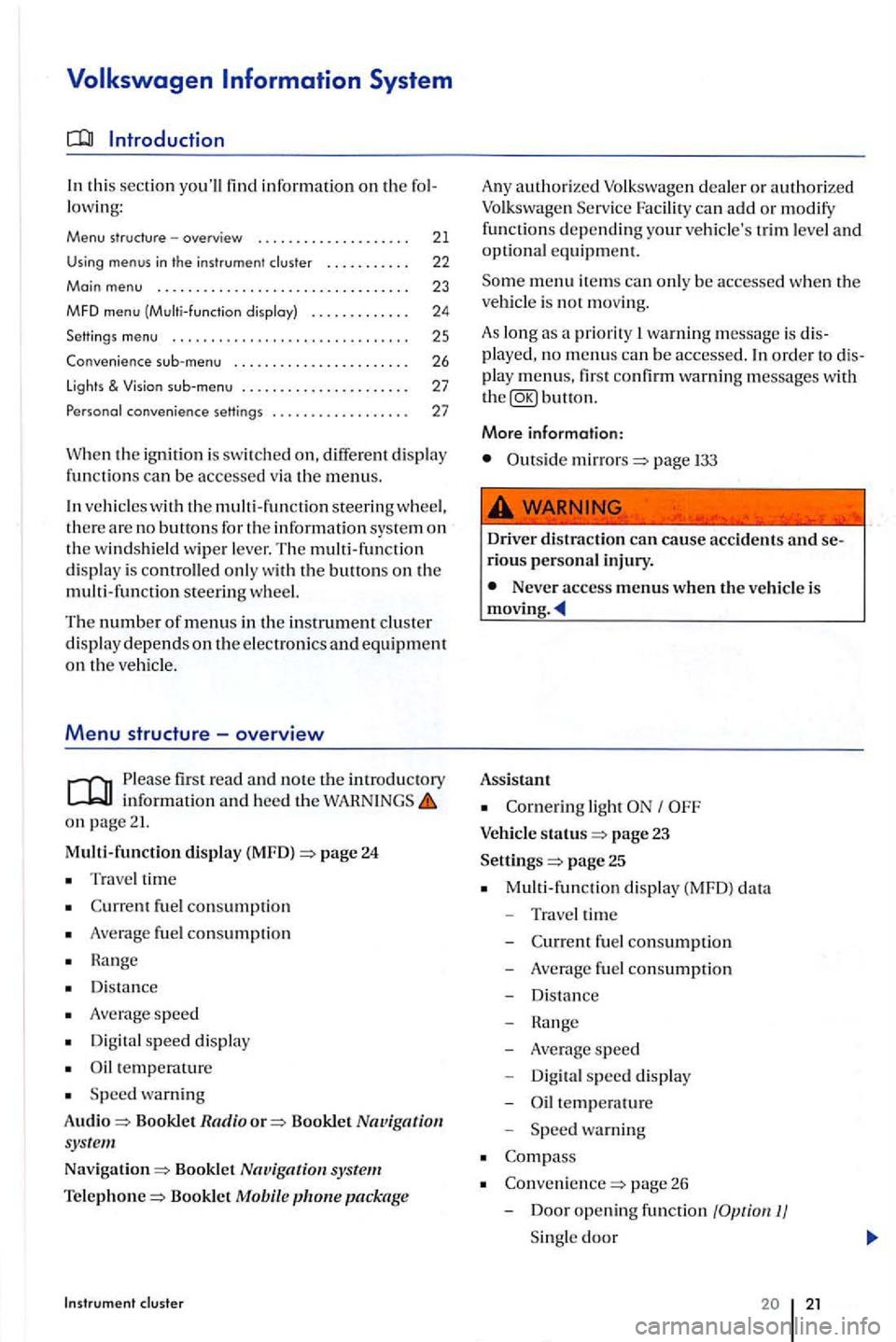
th is sec tion you'll find information on the fo l
l owi ng:
Menu structure -overview . . . . . . . . . . . . . . . . . . . . 21
Using menus in th e instrument cluster . . . . . . . . . . . 22
Main menu ... .... ....................•.....
MFD menu (Multi -function disploy)
Settings
menu ........... ......... .•..•.....
Convenience menu ....... ............... .
lights &
co nvenience settings ................. .
23
24
25
26
27
27
W he n the ig nition is sw itch ed on, different disp lay functions can be accessed via the m enus.
ve hicl es with the m ulti -fun ctio n steerin g w heel, the re are no buttons fo r the information sys te m on the w indshi eld wiper l ever. The multi-functi on
d is pl ay is controlled onl y w ith the buttons on the
multi -fun ction steerin g wheel.
The number of menus in the in strument clu ste r
d is p lay dep ends on the e lec tronic s and equipment on the ve hicl e.
Menu structure -overview
Please firs t read and note the in tr od uctory informati on and heed the on page 21.
Multi-function display (MFD) =>page 24
Trave l time
fu el con sumptio n
Average fuel consumptio n
H a nge
D is tan
ce
A ve rage speed
Digit al speed displ ay
temperature
S peed wa rnin g
Audio
=> Bookl et Radio o r=> Booklet Nav igation sys te m
Nav igation=> Booklet
package
A ny authorize d can ad d o r m odify
functions d ep endin g your ve hicle's trim le ve l and optional e qui pm ent.
m enu item s can onl y be ac cessed whe n the
ve hicl e is not movi ng.
As lon g as a priority warning m essage is dis
pla yed, no m enus can be accessed. order to dis
pla y m enus, first co nfirm warning messages with button.
More information:
Outside mirrors=> page
Driver distract ion can cause ac cid ents and serious personal inju ry.
Never access menus when the ve hicl e is
Assistant
light
status page 23
Settings
=> page 25
M ulti-fun cti on displ ay (MFD) data
- Traveltime
-
-Average s p eed
- Digita l s p
eed display
- Oil te m pe
rature
Spee d warning
page 26
- D
oor opening function
Page 23 of 541
Auto matic close
Autom atic open
- Doo r opening fun cti on 2)
Manual
A
uto mati c
-
-Window operation
All
Dri ve r
- Mirr or l
owering func tion I
- Mirror adjustment
Syn chronous
Indi vidual
Factory settin g
Using menus in the instrument cluster
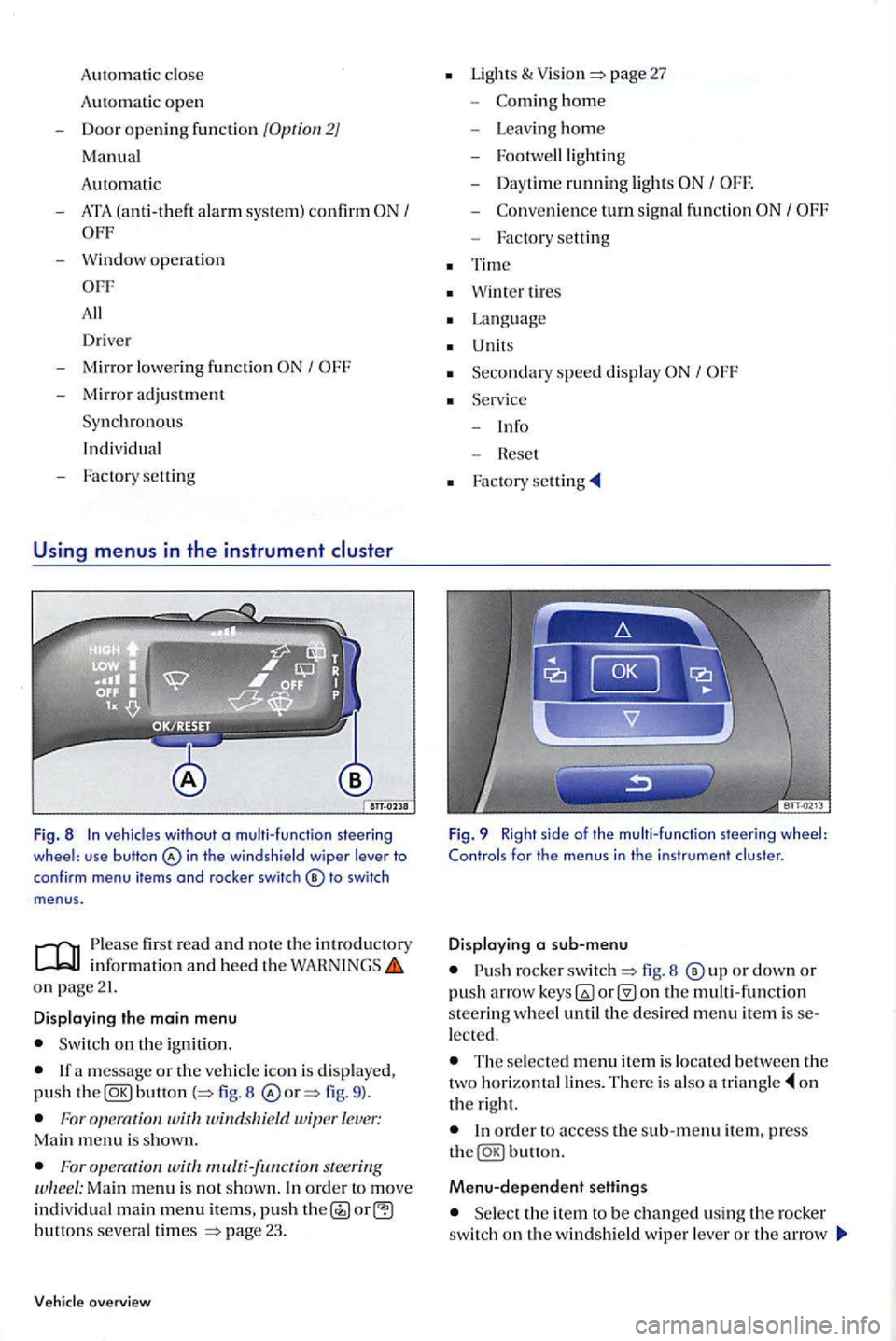
Fig. 8 In veh icles without o multi-function steering wheel: use button in th e windshield wiper lever to
conf irm menu items and rocker switch
firs t read and n o te th e in trodu ctory
on page21.
Displaying the main menu
Switch on the ignition.
button 8 fig. 9 ).
For wit windsltield wiper lever: Main menu is shown.
For s teering Ma in menu is no t show n. In ord er t o move individual main menu items, push button s severa l times page 23.
overview
Lights & page 27
-hom e
- Leav ing ho m e
- Footwe lllig
hting
- Day time ru
nning light s I
-turn signal fun ction
- Factory setting
Tim e
Wint er tires
Language
U nits
Seco n
dary speed displa y I
Fig. 9 Right side of the multi-function steering wheel: Controls for the menus in the instrument cluster.
Displaying a sub-menu
rocke r fig. 8 o r down or push arro w on the multi -function s teerin g w heel until the desired menu item is lected.
The selecte d m enu item is locate d b etween the
two horizonta l lines. The re is also a o n
t h e right.
Menu-dependent settings
Se lect the ite m to be changed usin g th e rocker switch on the windshield wipe r lever or th e arrow
Page 24 of 541

Return ing to th e main menu
key
s on the steerin g wheel. Keep the switch depressed in order to increase or crease values more qui ckly as needed. menu in order to leave the sub-menu. Se lect or confirm the selection w ith the Foropemtion Keep rocker switch depressed.
Main menu
For steering
first read and note the introd uctory inform ation and heed the on page 21.
Menu Fun ction
MFO and seuings for the multi-functio n dis play (MFD). page24
Book let Radio
Audio S
tatio n indicator when th e Bookle t display in mode. Navigation
system
Information displays on the nav igatio n sys te m : Booklet When destination guidance is acti ve, turn arrows and gar system
Navigation bars are s hown. T he ill us tration is similar to the symbol display
in the navigat ion syste m. destinatio n gu idance is inactive , driving direction (compass funct ion) and the current street name are displayed.
Bookle t Telephone Information and seuings of the mobile phone package. bile
light
warning and information m essages.
Vehicle status Thi
s m enu item i s only displa yed when warnin g or information 1 6
m essages are available. The number o f available mess ages is
s hown in the display. Examp le: 1/ 1 or 2/2.
seuings are possibl e, such as conve nie nce, Lights & Settings Vision
, time, speed warning for winter ti res, la ng uage, units and -page25
Instrument cluste r 22 23
Page 26 of 541

Menu
mph
Function
km/h to km/ h) is exceeded, an acoustic warn ing sounds, and a visua l wa rnin g may also appear in the in strument cluster display.
Switching between th e displays bunon or wa it 5 seconds. The speed will then be
saved and the warning activated.
rocker switch on windshield wip er
l ever. To deacriua re, The set speed is l eted.
s tee rin g Manually erasing memory 1 or 2
Select the m emory to be e rase d.
Storing
speed for the speed warning the
Select the Warning
the
lecting them in the men u. In addition. the
m eas ure m ent units di splayed can be shown in th er the English or metric page 25 .
fun ctio n steering wheel. After that, pres s the
Settings menu
first read and no te the introductory informatio n and heed the WAHNINGS on page
menu Functio n
Multi-function Setting s for c
hoosing whic h MFD data are to be dis play ed in th e in strumen t
di sp lay (MFD) data page 24.
Compass th e compass on ve hicles without a factory-installed navigation system. To calibrate, note any r e levant messages appe a rin g on the in strument cluste r display.
Conveni ence fun ction sellings
page 27.
applicabl e, an Sin
th e top of the d is pla y indicates daylight savings tim e.
Winter tires
visua l and acou st ic speed warning. thi s func tion only when w inter tires are in stalled that have a speed ratin g o f le ss than veh icle speed.
Languag e
units for temperature, fuel consumption and di sta nces.
Secondary speed Activat e or deactiva te secondary speed display.
Service Query se rvice messages or reset se rv ice interva l display.
Fact ory Hesets the funct ions in the
24 25
Page 27 of 541
sub-menu
first read and note the introduc to ry information and heed the o n page 21.
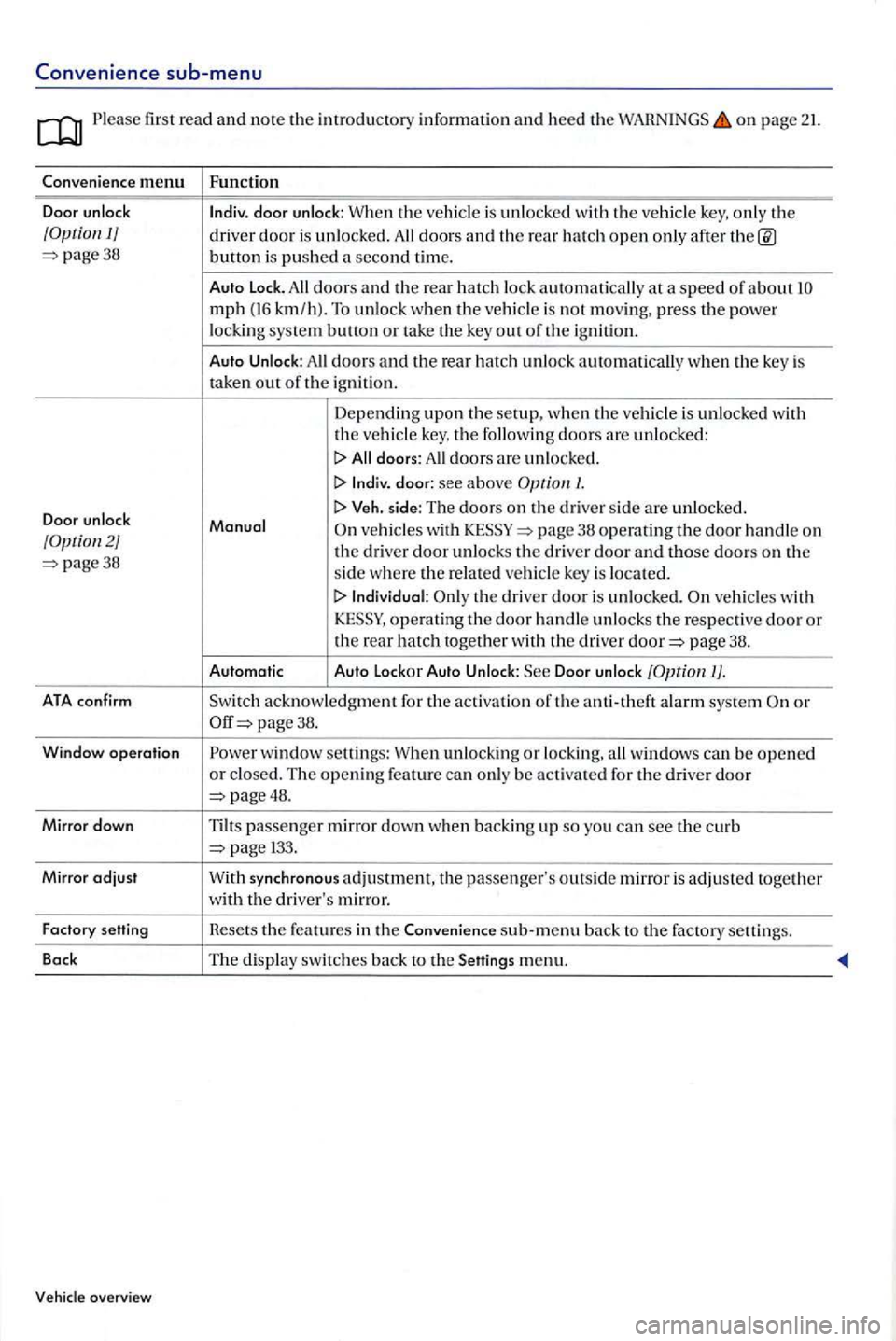
C onve nience m enu Functi on
Door unlock
lndiv. door unlock: When
the ve hicl e is unl ocked with th e ve hicl e key, only th e 1/ d river door is unlocked. All doors an d the hatch open only after page38 button is push ed secon d time.
Auto
Lock . doors and the rear hat c h lock automatic all y a speed of about mph (16 km /h ). To unlo ck when the vehicle is not moving, press t h e power locking syste m b u!!on or take the ke y out of the ign itio n.
Aut o
Unlock : doors and the rear hatch unlock automatically when the key is
ta ken our of th e ign ition .
Depending upon the setup, w hen the vehicle is un locked with the vehicle key, the following doors are u nlocked:
I> All doors: All door s are unlocked.
I> lndiv. d oo r: see a bove /.
Door unlock I> Veh . side: The doors on the d rive r sid e are unlocked .
Manu of ve hicles wit h th e dri ver door unlock s the drive r door an d those d oo rs on th e page38 sid e w here r e la te d ve hicl e key is located.
I> In di vidual: the driver door is unloc ked. ve hicle s w ith
page 38.
Automat ic Auto
Lockor Auto Unloc k: Door unlock
ATA co nfir m acknowledgment for the activat io n of th e anti-th eft alarm sys tem page 38.
W
ind ow opera tio n w indow se!!i ngs: When unlocking or locking, windows can be open ed or closed . The opening feature can only be activa ted for the driver door page48.
M irror dow n
Tilts passenger mirror clow n when backing u p so yo u can see curb
menu.
Page 28 of 541
Lights & sub-menu
Ple ase first read and note the introductory in formation and heed the on page 21.
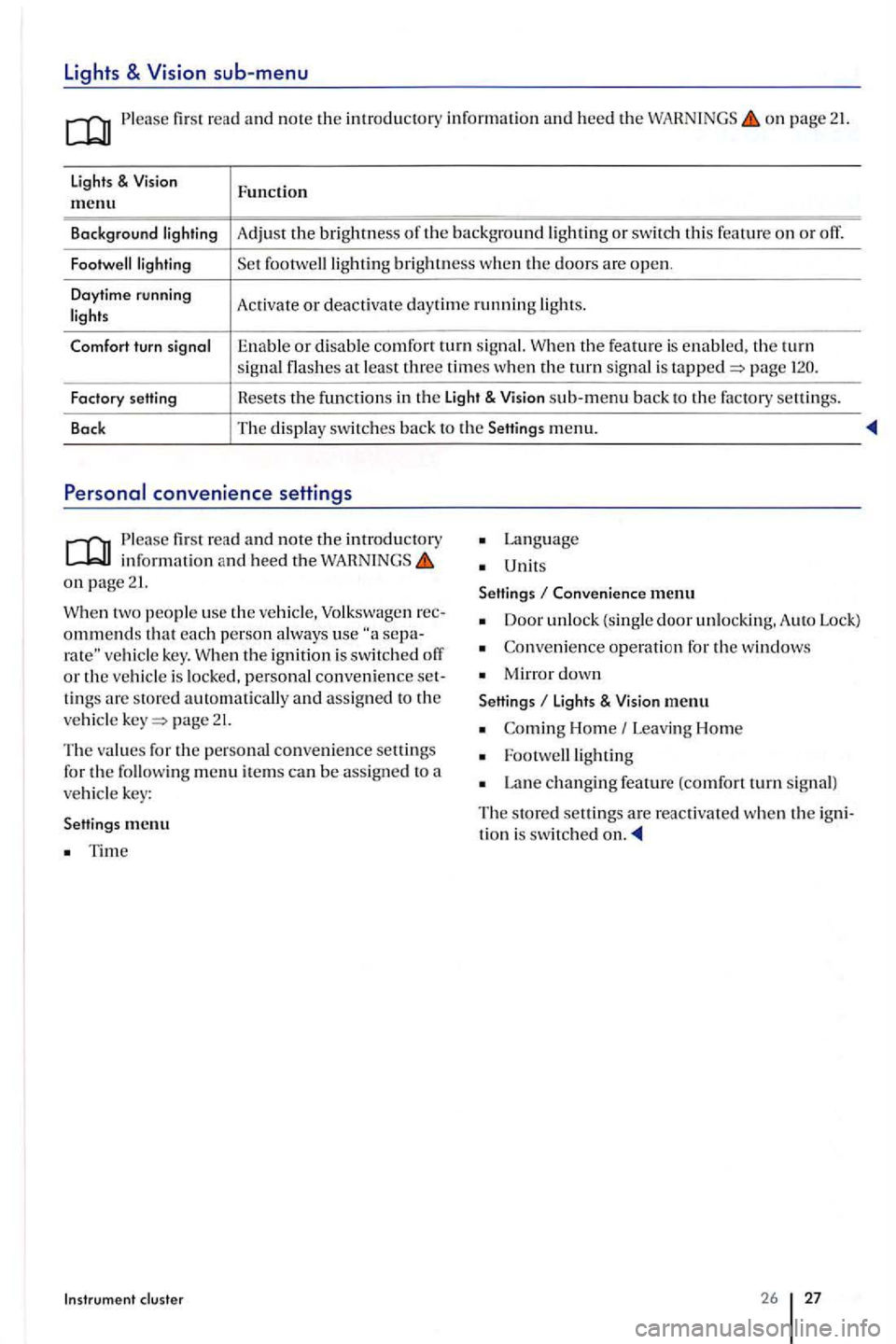
lights & Function m enu
Background Adjust the brightness th e background or swit ch thi s feature o n or off.
brightness w he n the doors are open .
Daytime running
Activate or deac tivate day tim e running
the feature is enable d . the turn signal at least three times when the turn sig nal is page
Factory setting Hesets the f
u nctions in th e Light & sub-m enu back to the factory settin gs.
Back The
display switc hes back to the Setting s menu.
Please first re ad and note the introductory in fo rmatio n and heed the on page 21.
two people use th e ve hicle, Volkswage n ommends that each p erson a lways use vehicle key. th e ignition is swit ch ed o ff or the vehicl e is locked, personal convenience tings are store d automatically and assign ed to the
ve hicl e page 21.
The values for the personal convenience settings
for the followin g m enu item s can be assig n ed to a vehicl e key:
Settings me
nu
Tim e
Instrum ent cluster
Lan g uage
Unit s
Settings
Conven ience menu
Door unlock (single door unlockin g. A uto Lock)
Co nveni ence operati on for the windows
Mirro r down
Settings li ght s & menu
Home Leavi ng Hom e
Lan e changing feature (comfort turn s ig n al)
The s tore d settings are reac tiva ted whe n the tion i s switched
26 27
Page 36 of 541
Folding the key bit in or out
Press ing page 34, fig. releases the
k ey bit.
To
fold th e key bit
this button in emergencies! After pushin g th e button, the horn will sound and the turn signal s will the button aga in to
sw itch off the panic fe ature.
Replacement keys
The ve hicl e id entifi cation number is required to
ge t a replacement k ey or an additiona l vehicle key.
No more th an eight ve hicl e keys , w hi ch have been
cut. coded and syn chroni zed can be used with your ve hicle .
E a c h n
ew key contains a microchip and must be coded w ith the data from the ve hicle's electroni c immobilizer. A key will not work if it does not co n
t a in a mi crochip o r co ntains a chip that is not coded, even if the key bit was cut co rrectly.
You can obtain additional or duplicate remote co ntrol keys from authorize d Volkswagen dealers,
authorize d Volkswage n Service Facilities and from certain indep end ent repai r facilities and locksmiths which are qualifi ed to make these remote control keys.
Eac h key must be programmed to wo rk with your pag e 37.
key
Fig . 13 key .
Opening and closing
To find the nearest qualifi ed ind ep endent repair fac ility, locksmith or Volkswag en d eal er w hi ch ca n
c ut and co de re placement keys call the tomer H otlin e at
cu stomers can contact an authorized Volkswagen dea ler or Volksw age n Serv ice Facility or call the Volk swage n
Note
The vehicle keys contain electrica l components.
the buttons on the ve hicl e key onl y when one of th e fun ctions is re all y needed .
S ince terrain and condition s vary , pressing a button on the key whe n it is not ne cess ary may un
l ock the vehicle or set off the panic alarm, eve n if
yo u think yo u are out of rang e.
m key fun ctions can be te mporaril y dis
bad weather. as well as a weak battery can reduce the operating range.
fir st read and note the introductory information and heed the WAHNINGS on page 34.
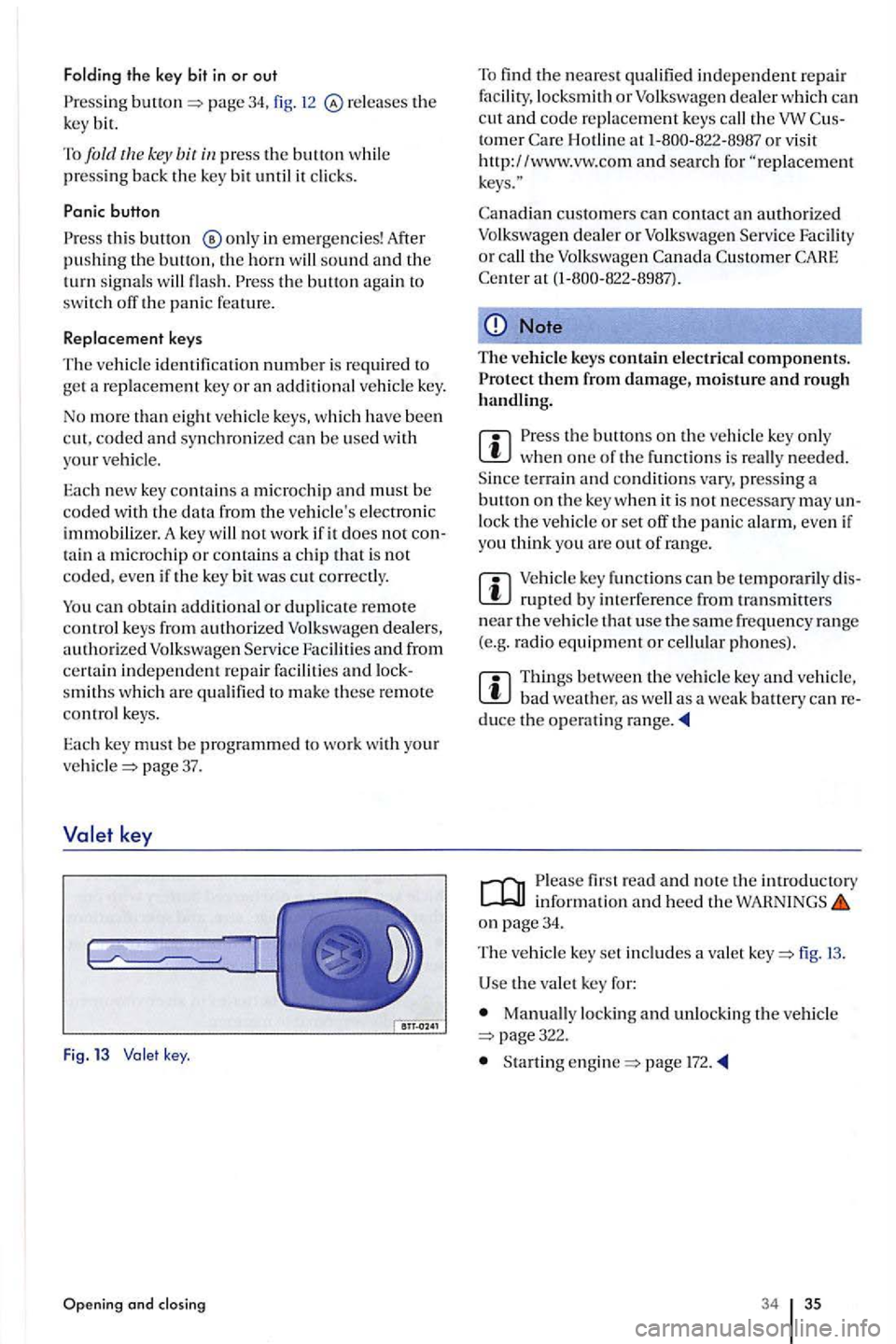
The ve hicl e key set includes a valet fig.
U se the va le t key for:
Manually locking and unlock ing the v ehicle page322.
Startin g page l72.
34 35
Page 39 of 541
Power
Introducti on
In t his section you'll fin d information on th e fol
low ing:
Descr ip tio n of the power system . . . . . . . . . 39
Unlocking and locking the veh icle from outside 39
Unlocking and locking the vehicle from the inside
. . . . . 41
alarm system . . . . . . . . . . . . . . . . . . . . . . 42
The powe r locki ng sys te m works properly on ly
w he n all doors and t he rear ha tc h co mpl ete ly
cl osed. When th e driver door is open, th e vehicle b e locke d with the vehicle key.
Leavi ng the vehi cle unlocke d for long perio ds of
no n-use (for examp le, in your garage) can ca use th e veh icle battery to discharge so that the engine
ca n n o longer be sta rt ed.
More information:
Pe rsonal comfort settin g in t he Volkswagen Informatio n pag e 21
Vehicle key page 34
Powe r page
Power page 51
Trailer p age 152
Eme rge ncy clos ing a nd pag e 322
Before drivi ng
Improper use of powe r locks can res ult in se
r io us perso nal inju ry.
Th e powe r locki ng button locks all doo rs.
Lockin g th e doo rs f ro m the insid e ca n h elp pre
ven t unintended d oor o penin g during a colli
s io n and ca n also prevent un wa nted entry from th e outsid e. Lock ed d oors ca n, however, d e lay
a ss istance to vehicl e occupant s and resc ue from
th e outsid e in an accid ent or o ther em erge ncy .
Neve r le a ve childr en or an yone who cannot help themselves behind in the ve hicl e. All do ors
can be lo ck ed fro m th e in side w ith the power
l oc k button. T his co uld leave people trapped in ve hicl e in an em erge ncy. Dep endin g on the
tim e of peopl e trappe d in the ve hicl e ca n b e
ex po sed t o very high or very lo w t emperatures.
A close d ve hicl e ca n beco me very hot or very d ep ending on the seaso n. Particularly i n
th e summer, heat build -up in lh e passe nge r and lu ggage compartment of a parked ve hicl e ca n
res ult in temperatures in the ve hicle that are much hi gher tha n th e o utside temperatures .
T e mperatures can quickly reac h leve ls that can cause unconsci ousn ess and deatJ1, parti cularly
t o s mall childr en .
Neve r all ow passe nge rs to re main in a lo ck e d
ve hicl e. Locked doors ca n delay ass is ta nce to ve
hicle occupants and r esc ue f ro m the o ut side in
th e event of an emerge ncy. In an em erge ncy an y perso n still insid e th e vehicle might no t b e a ble
t o ge t