Page 173 of 339

’04 AVALON U (L/O 0408)
165
2004 AVALON from Aug. ’04 Prod. (OM41412U)
NOTICE
To ensure correct audio system op-
erations:
�Be careful not to spill beverages
over the audio system.
� Do not put anything other than a
cassette tape or Compact Disc into
the slot.
� The use of a cellular phone inside
or near the vehicle may cause a
noise from the speakers of the au-
dio system which you are listening
to. However, this does not indicate
a malfunction.
RADIO RECEPTION
Usually, a problem with radio reception
does not mean there is a problem with
your radio—it is just the normal result of
conditions outside the vehicle.
For example, nearby buildings and terrain
can interfere with FM reception. Power
lines or telephone wires can interfere with
AM signals. The farther you are from a
station, the weaker its signal will be. In
addition, reception conditions change
constantly as your vehicle moves. Here are some common reception prob-
lems that you may experience.
FM
Fading and drifting stations—Generally, the
effective range of FM is about 40 km (25
miles). Once outside this range, you may
notice fading and drifting, which increase
with the distance from the radio transmit-
ter. They are often accompanied by distor-
tion.
Multipath—FM signals are reflective,
making it possible for two signals to reach
your antenna at the same time. If this
happens, the signals will cancel each oth-
er out, causing a momentary flutter or
loss of reception.
Static and fluttering—These occur when
signals are blocked by buildings, trees, or
other large objects. Increasing the bass
level may reduce static and fluttering.
Station swapping—If the FM signal you
are listening to is interrupted or weak-
ened, and there is another strong station
nearby on the FM band, your radio may
tune in the second station until the origi-
nal signal can be picked up again.
AM
Fading—AM broadcasts are reflected by
the upper atmosphereespecially at night.
These reflected signals can interfere with
those received directly from the radio sta-
tion, causing the radio station to sound
alternately strong and weak.
Station interference—When a reflected sig-
nal and a signal received directly from a
radio station are very nearly the same
frequency, they can interfere with each
other, making it difficult to hear the broad-
cast.
Static—AM is easily affected by external
sources of electrical noise, such as high
tension power lines, lightening, or electri-
cal motors. This results in static.
Car audio system operating
hints
Page 183 of 339
’04 AVALON U (L/O 0408)
175
2004 AVALON from Aug. ’04 Prod. (OM41412U)
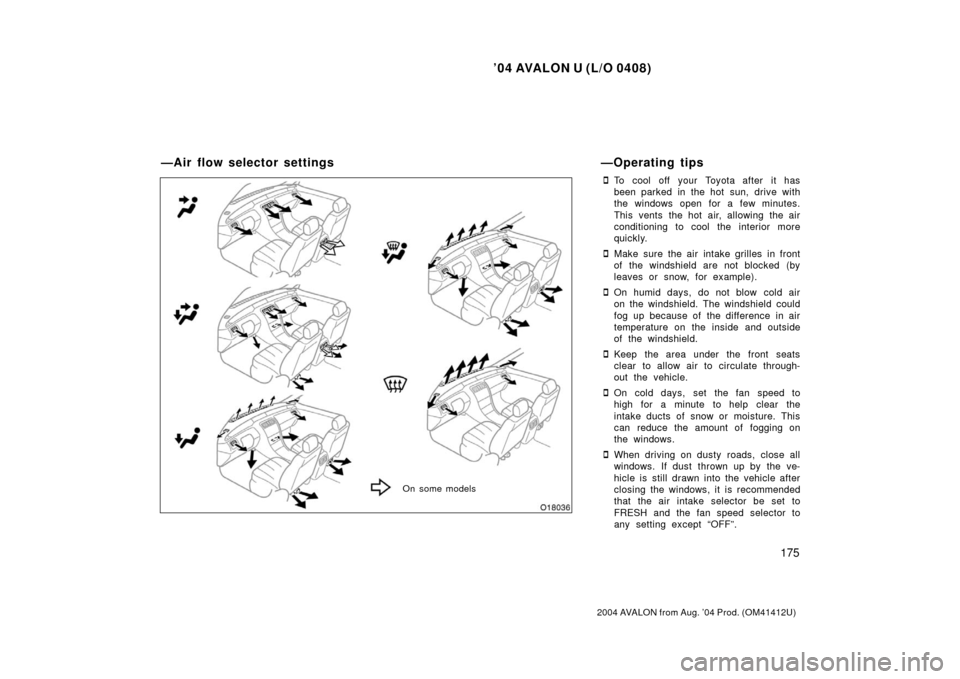
�To cool off your Toyota after it has
been parked in the hot sun, drive with
the windows open for a few minutes.
This vents the hot air, allowing the air
conditioning to cool the interior more
quickly.
�Make sure the air intake grilles in front
of the windshield are not blocked (by
leaves or snow, for example).
�On humid days, do not blow cold air
on the windshield. The windshield could
fog up because of the difference in air
temperature on the inside and outside
of the windshield.
�Keep the area under the front seats
clear to allow air to circulate through-
out the vehicle.
�On cold days, set the fan speed to
high for a minute to help clear the
intake ducts of snow or moisture. This
can reduce the amount of fogging on
the windows.
�When driving on dusty roads, close all
windows. If dust thrown up by the ve-
hicle is still drawn into the vehicle after
closing the windows, it is recommended
that the air intake selector be set to
FRESH and the fan speed selector to
any setting except “OFF”.
—Air flow selector settings
On some models
—Operating tips
Page 190 of 339
’04 AVALON U (L/O 0408)
182
2004 AVALON from Aug. ’04 Prod. (OM41412U)
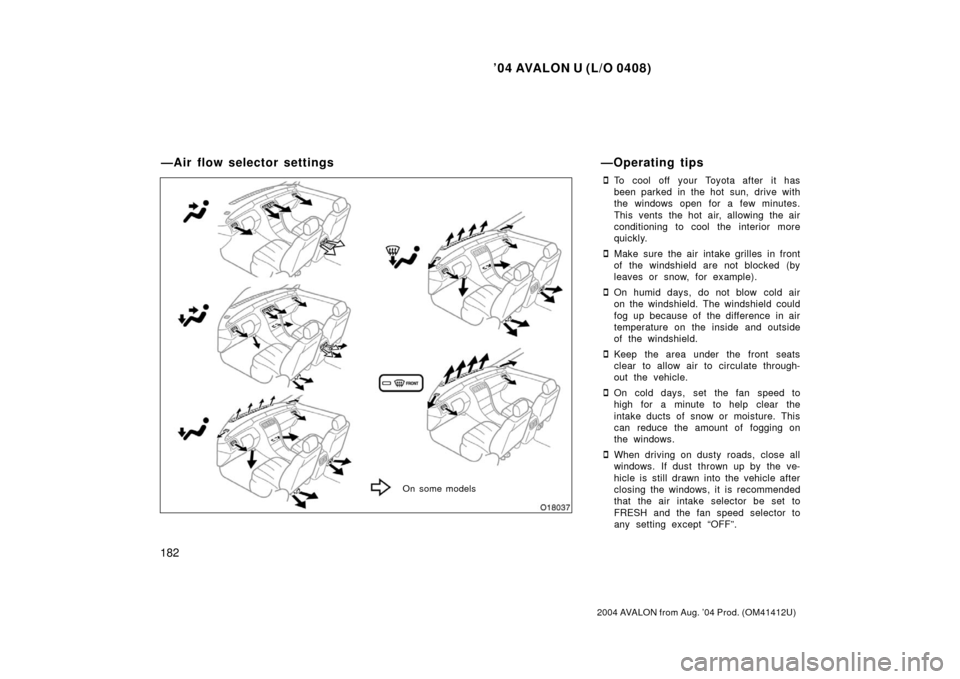
�To cool off your Toyota after it has
been parked in the hot sun, drive with
the windows open for a few minutes.
This vents the hot air, allowing the air
conditioning to cool the interior more
quickly.
�Make sure the air intake grilles in front
of the windshield are not blocked (by
leaves or snow, for example).
�On humid days, do not blow cold air
on the windshield. The windshield could
fog up because of the difference in air
temperature on the inside and outside
of the windshield.
�Keep the area under the front seats
clear to allow air to circulate through-
out the vehicle.
�On cold days, set the fan speed to
high for a minute to help clear the
intake ducts of snow or moisture. This
can reduce the amount of fogging on
the windows.
�When driving on dusty roads, close all
windows. If dust thrown up by the ve-
hicle is still drawn into the vehicle after
closing the windows, it is recommended
that the air intake selector be set to
FRESH and the fan speed selector to
any setting except “OFF”.
On some models
—Air flow selector settings—Operating tips
Page 196 of 339

’04 AVALON U (L/O 0408)
188
2004 AVALON from Aug. ’04 Prod. (OM41412U)
OPERATION OF INSTRUMENTS AND
CONTROLS
Other equipment
Multiinformation display189
. . . . . . . . . . . . . . . . . . . . . . . . . . . . . . . . . . . .
Clock 198
. . . . . . . . . . . . . . . . . . . . . . . . . . . . . . . . . . . . \
. . . . . . . . . . . . . . . . . .
Outside temperature display 198
. . . . . . . . . . . . . . . . . . . . . . . . . . . . . . . . .
Cigarette lighter and ashtray 198
. . . . . . . . . . . . . . . . . . . . . . . . . . . . . . . . .
Power outlet 199
. . . . . . . . . . . . . . . . . . . . . . . . . . . . . . . . . . . . \
. . . . . . . . . . .
Glove box 202
. . . . . . . . . . . . . . . . . . . . . . . . . . . . . . . . . . . . \
. . . . . . . . . . . . . .
Garage door opener 202
. . . . . . . . . . . . . . . . . . . . . . . . . . . . . . . . . . . . \
. . . .
Auxiliary box 205
. . . . . . . . . . . . . . . . . . . . . . . . . . . . . . . . . . . . \
. . . . . . . . . . .
Front cup holder 207
. . . . . . . . . . . . . . . . . . . . . . . . . . . . . . . . . . . . \
. . . . . . . .
Rear cup holder 208
. . . . . . . . . . . . . . . . . . . . . . . . . . . . . . . . . . . . \
. . . . . . . .
Floor mat 210
. . . . . . . . . . . . . . . . . . . . . . . . . . . . . . . . . . . . \
. . . . . . . . . . . . . .
SECTION 1 10
Page 197 of 339
’04 AVALON U (L/O 0408)
189
2004 AVALON from Aug. ’04 Prod. (OM41412U)
1. Outside temperature display
2. Clock
3. Compass
4. Calendar
5. Cruise information display
6. “LIGHT” button
7. “MODE” button
8. “RESET/ADJ” button
9. “DISPLAY” button
Multiinformation display—
Page 198 of 339

’04 AVALON U (L/O 0408)
190
2004 AVALON from Aug. ’04 Prod. (OM41412U)
Operate the multiinformation display
with the ignition switch on.
When the ignition switch is turned to
“ON”, the last previously used mode dis-
played just before the ignition switch is
turned off will appear.
If the electrical power source has been
disconnected from the multiinformation
display, the display will automatically be
set to the initial mode.
When the instrument panel lights are
turned on, the brightness of the display
will be reduced.“LIGHT” button
This button is used to select the illumi-
nation pattern of the display.
Every time you push the “LIGHT” button,
the display illuminates in the following or-
der.1. All the parts of the display are illumi- nated.
2. Clock, outside temperature display and compass are illuminated.
3. Illumination is off.
“MODE” and “RESET/ADJ” buttons
These buttons are used to select the
item to be reset or adjusted.
Every time you push the “MODE” button,
the display toggles in the following order.
1. Hour
2. Minute
3. Year
4. Month
5. Day
6. English or metric unit selection of the outside temperature display and cruise
information display
7. Compass deviation calibration (zone)
8. Compass circling calibration
—Before using the
multiinformation display
Page 199 of 339

’04 AVALON U (L/O 0408)
191
2004 AVALON from Aug. ’04 Prod. (OM41412U)
When the item desired to be corrected
appears, reset or adjust it by pushing the
“RESET/ADJ” button.
“DISPLAY” button
This button is used to toggle the func-
tions of the cruise information display.
Every time you push the “DISPLAY” but-
ton, the display toggles.
For more details, see “—Cruise
information display”.
CAUTION
Do not adjust the display while the
vehicle is moving. Be sure to adjust
the display only when the vehicle is
stopped.The digital clock indicates the time.
If the electrical power source has been
disconnected, the time display will auto-
matically be set to 1:00 a.m.
To reset the hour: Push the “MODE” but-
ton until the hour display appears and
blinks. Then push the “RESET/ADJ” but-
ton.
To reset the minutes: Push the “MODE”
button until the minute display appears
and blinks. Then push the “RESET/ADJ”
button.
After resetting the clock, push the “MODE”
button until the display returns to normal
calendar mode.The digital calendar indicates the date.
If the electrical power source has been
disconnected, the calendar display will au-
tomatically be set to “THU JAN 1”.
To reset the year: Push the “MODE” but-
ton until the year display appears and
blinks. Then push the “RESET/ADJ” but-
ton. (After the year 2021 appears, the
number returns to 2002.)
To reset the month: Push the “MODE”
button until the month display appears and
blinks. Then push the “RESET/ADJ” but-
ton.
To reset the day: Push the “MODE” button
until the day display appears and blinks.
Then push the “RESET/ADJ” button.
—Clock—Calendar
Page 205 of 339

’04 AVALON U (L/O 0408)
197
2004 AVALON from Aug. ’04 Prod. (OM41412U)
CALIBRATING THE COMPASS (circling
calibration)
Sometimes the direction display on the
compass may not change after a turn. To
rectify this, stop the vehicle and push the
“MODE” button several times until
“COMPASS” appears and blinks on the
display. Then push the “RESET/ADJ” but-
ton. “CALIBRATE” appears and blinks to-
gether with the compass display.Drive the vehicle in a circle until the blink-
ing stops. If there is not enough space to
drive in a circle, drive around the block
until the blinking stops.
When the compass and the calendar dis-
play return to normal mode, calibration is
complete.
If you want to cancel the calibration be-
fore it is complete, push the “MODE” but-
ton again.Perform circling calibration just after
you have purchased your Toyota. And
then always perform circling calibration
after the battery has been removed, re-
placed or disconnected.
�Do not perform circling calibration of
the compass in a place where the
earth’s magnetic field is subject to in-
terference by artificial magnetic fields
(underground parking, under a steel
tower, between buildings, roof parking,
near a crossing, near a large vehicle,
etc.).
�During calibration, do not operate elec-
tric systems (moon roof, power win-
dows, etc.) as they may interfere with
the calibration.
CAUTION
�When doing the circling calibration,
be sure to secure a wide space,
and watch out for people and ve-
hicles in the neighborhood. Do not
violate any local traffic rules while
performing circling calibration.
�Do not adjust the display while the
vehicle is moving. Be sure to adjust
the display only when the vehicle is
stopped.
