Page 206 of 339
’04 AVALON U (L/O 0408)
198
2004 AVALON from Aug. ’04 Prod. (OM41412U)
To reset the hour: Push the “MODE” but-
ton until the hour display blinks. Then
push the “ADJ” button.
To reset the minutes: Push the “MODE”
button until the minute display blinks.
Then push the “ADJ” button.
The key must be in the “ON” position.
If the electrical power source has been
disconnected from the clock, the time dis-
play will automatically be set to 1:00 (one
o’clock).
When the instrument panel lights are
turned on, the brightness of the time in-
dication will be reduced.The key must be in the “ON” position.
When the instrument panel lights are
turned on, the brightness of the display
will be reduced.
To change the display between “�C” to
“ � F”, push the “MODE” button until the
display blinks. Then push the “ADJ” button
to select “ �C” or “ �F”.With bucket front seat
With bench type front seat
Clock Outside temperature display Cigarette lighter and ashtray
Page 210 of 339
’04 AVALON U (L/O 0408)
202
2004 AVALON from Aug. ’04 Prod. (OM41412U)
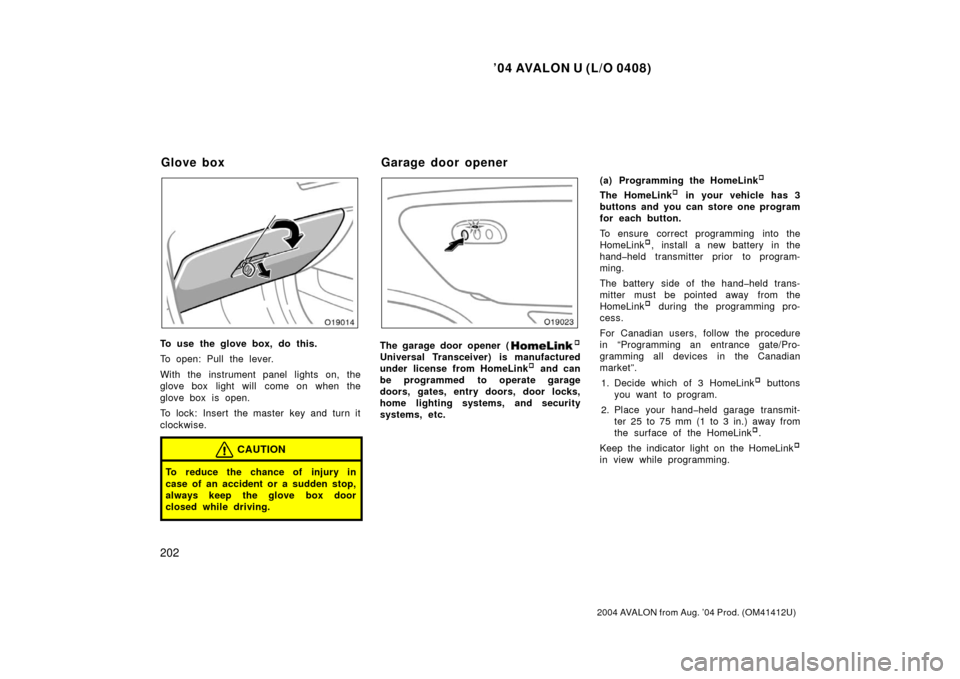
To use the glove box, do this.
To open: Pull the lever.
With the instrument panel lights on, the
glove box light will come on when the
glove box is open.
To lock: Insert the master key and turn it
clockwise.
CAUTION
To reduce the chance of injury in
case of an accident or a sudden stop,
always keep the glove box door
closed while driving.
The garage door opener (�
Universal Transceiver) is manufactured
under license from HomeLink� and can
be programmed to operate garage
doors, gates, entry doors, door locks,
home lighting systems, and security
systems, etc. (a) Programming the HomeLink
�
The HomeLink� in your vehicle has 3
buttons and you can store one program
for each button.
To ensure correct programming into the
HomeLink
�, install a new battery in the
handheld transmitter prior to program-
ming.
The battery side of the handheld trans-
mitter must be pointed away from the
HomeLink
� during the programming pro-
cess.
For Canadian users, follow the procedure
in “Programming an entrance gate/Pro-
gramming all devices in the Canadian
market”.
1. Decide which of 3 HomeLink
� buttons
you want to program.
2. Place your handheld garage transmit- ter 25 to 75 mm (1 to 3 in.) away from
the surface of the HomeLink
�.
Keep the indicator light on the HomeLink
�
in view while programming.
Glove box Garage door opener
Page 212 of 339
’04 AVALON U (L/O 0408)
204
2004 AVALON from Aug. ’04 Prod. (OM41412U)
6. Test the operation of the HomeLink� by
pressing the newly programmed button.
Check to see if the gate/device oper-
ates correctly.
7. Repeat steps 1 through 6 for each re- maining HomeLink
� button to program
another device.
Programming other devices
To program other devices such as home
security systems, home door locks or
lighting, contact your authorized Toyota
dealer for assistance.
Reprogramming a button
Individual HomeLink
� buttons cannot be
erased, however, to reprogram a single
button, follow the procedure “Programming
the HomeLink
�”.
(b) Operating the HomeLink
�
To operate the HomeLink�, press the
appropriate HomeLink� button to activate
the programmed device. The HomeLink�
indicator light should come on. The
HomeLink� continues to send the signal
for up to 20 seconds as long as the
button is pressed. (c) Erasing the entire HomeLink
�
memory (all three programs)
To erase all previously programmed codes
at one time, press and hold down the 2
outside buttons for 20 seconds until the
indicator light flashes.
If you sell your vehicle, be sure to erase
the programs stored in the HomeLink
�
memory.
CAUTION
�When programming the HomeLink�
Universal Transceiver, you may be
operating a garage door or other
device. Make sure people and ob-
jects are out of the way of the ga-
rage door or other device to pre-
vent potential harm or damage.
�Do not use this HomeLink� Univer-
sal Transceiver with any garage
door opener that lacks the safety
stop and reverse feature as re-
quired by federal safety standards.
(This includes any garage door
opener model manufactured before
April 1, 1982.) A garage door open-
er which cannot detect an object
(signaling the door to stop and re-
verse), does not meet current feder-
al safety standards. Using a garage
door opener without these features
increases risk of serious injury or
death.
Page 214 of 339
’04 AVALON U (L/O 0408)
206
2004 AVALON from Aug. ’04 Prod. (OM41412U)
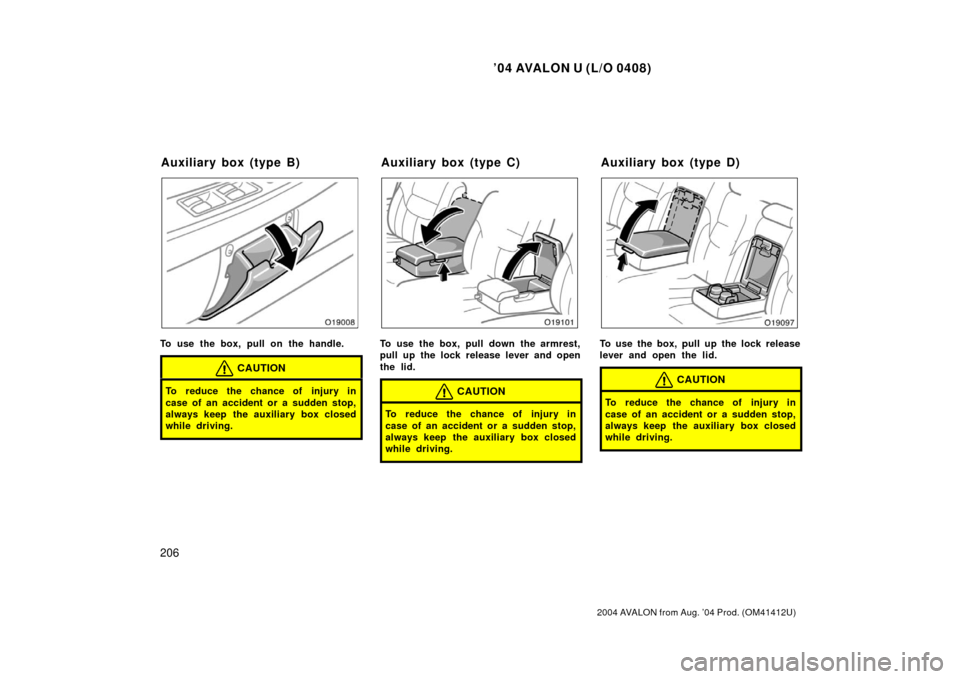
To use the box, pull on the handle.
CAUTION
To reduce the chance of injury in
case of an accident or a sudden stop,
always keep the auxiliary box closed
while driving.
To use the box, pull down the armrest,
pull up the lock release lever and open
the lid.
CAUTION
To reduce the chance of injury in
case of an accident or a sudden stop,
always keep the auxiliary box closed
while driving.
To use the box, pull up the lock release
lever and open the lid.
CAUTION
To reduce the chance of injury in
case of an accident or a sudden stop,
always keep the auxiliary box closed
while driving.
Auxiliary box (type B)Auxiliary box (type C)Auxiliary box (type D)
Page 216 of 339
’04 AVALON U (L/O 0408)
208
2004 AVALON from Aug. ’04 Prod. (OM41412U)
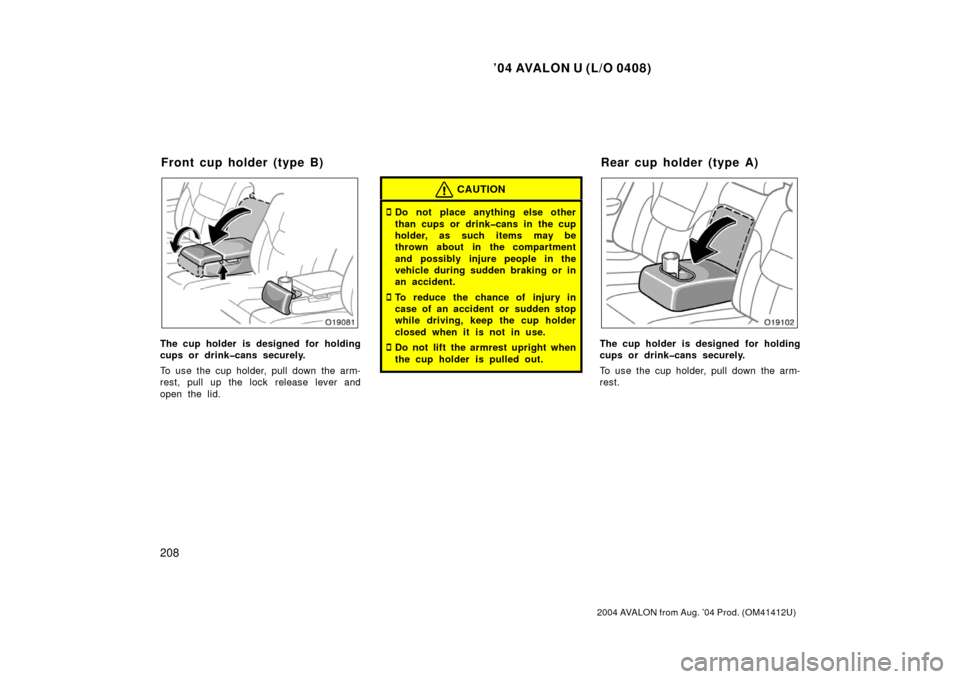
The cup holder is designed for holding
cups or drinkcans securely.
To use the cup holder, pull down the arm-
rest, pull up the lock release lever and
open the lid.
CAUTION
�Do not place anything else other
than cups or drinkcans in the cup
holder, as such items may be
thrown about in the compartment
and possibly injure people in the
vehicle during sudden braking or in
an accident.
�To reduce the chance of injury in
case of an accident or sudden stop
while driving, keep the cup holder
closed when it is not in use.
�Do not lift the armrest upright when
the cup holder is pulled out.The cup holder is designed for holding
cups or drinkcans securely.
To use the cup holder, pull down the arm-
rest.
Front cup holder (type B)Rear cup holder (type A)
Page 217 of 339
’04 AVALON U (L/O 0408)
209
2004 AVALON from Aug. ’04 Prod. (OM41412U)
CAUTION
�Do not place anything else other
than cups or drinkcans in the cup
holder, as such items may be
thrown about in the compartment
and possibly injure people in the
vehicle during sudden braking or in
an accident.
�To reduce the chance of injury in
case of an accident or sudden stop
while driving, keep the cup holder
closed when it is not in use.
�Do not lift the armrest upright when
the cup holder is pulled out.
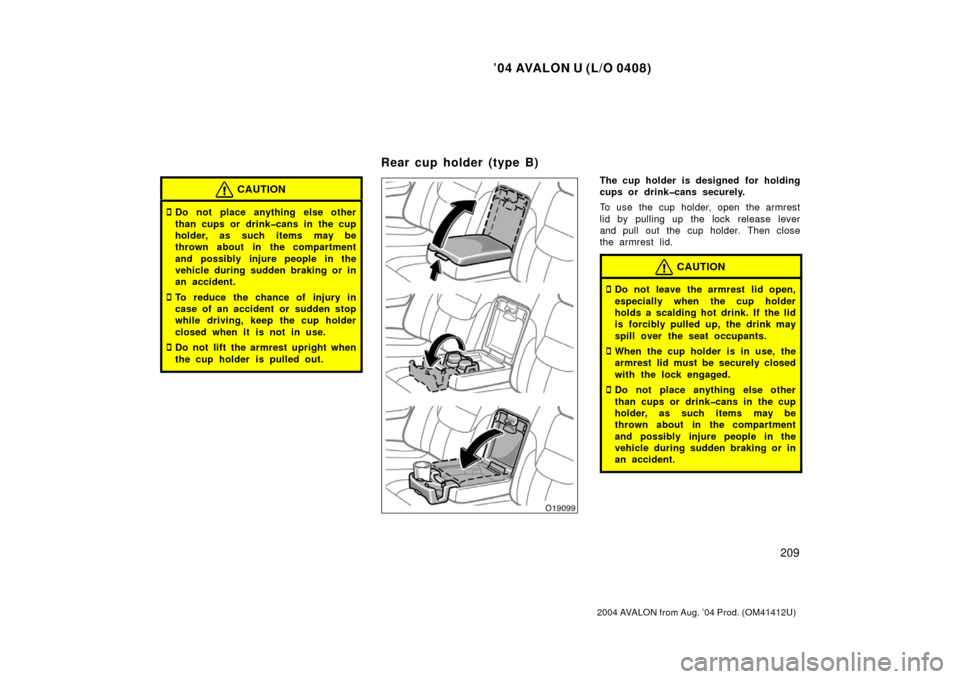
The cup holder is designed for holding
cups or drinkcans securely.
To use the cup holder, open the armrest
lid by pulling up the lock release lever
and pull out the cup holder. Then close
the armrest lid.
CAUTION
�Do not leave the armrest lid open,
especially when the cup holder
holds a scalding hot drink. If the lid
is forcibly pulled up, the drink may
spill over the seat occupants.
�When the cup holder is in use, the
armrest lid must be securely closed
with the lock engaged.
�Do not place anything else other
than cups or drinkcans in the cup
holder, as such items may be
thrown about in the compartment
and possibly injure people in the
vehicle during sudden braking or in
an accident.
Rear cup holder (type B)
Page 218 of 339
’04 AVALON U (L/O 0408)
210
2004 AVALON from Aug. ’04 Prod. (OM41412U)
�To reduce the chance of injury in
case of an accident or sudden stop
while driving, keep the cup holder
closed when it is not in use.
�Do not lift the armrest upright when
the cup holder is pulled out.
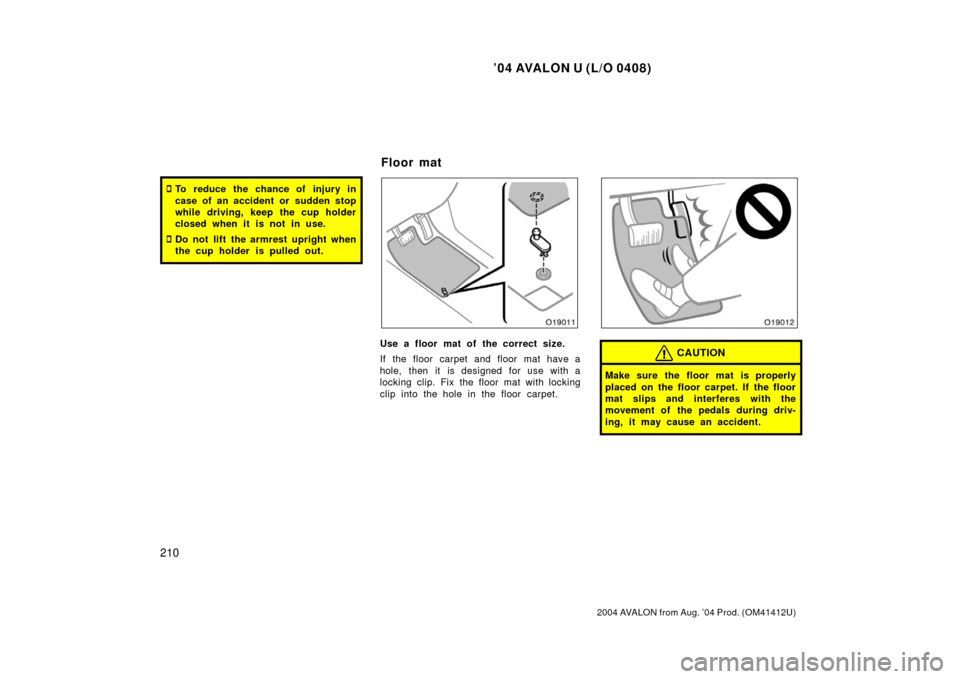
Use a floor mat of the correct size.
If the floor carpet and floor mat have a
hole, then it is designed for use with a
locking clip. Fix the floor mat with locking
clip into the hole in the floor carpet.CAUTION
Make sure the floor mat is properly
placed on the floor carpet. If the floor
mat slips and interferes with the
movement of the pedals during driv-
ing, it may cause an accident.
Floor mat
Page 227 of 339
’04 AVALON U (L/O 0408)
219
2004 AVALON from Aug. ’04 Prod. (OM41412U)
The tandem master cylinder brake system
is a hydraulic system with two separate
subsystems. If either subsystem should
fail, the other will still work. However, the
pedal will be harder to press, and your
stopping distance will increase. Also, the
brake system warning light may come on.
CAUTION
Do not drive your vehicle with only a
single brake system. Have your
brakes fixed immediately.
BRAKE BOOSTER
The brake booster uses engine vacuum to
powerassist the brakes. If the engine
should quit while you are driving, you can
bring the vehicle to a stop with normal
pedal pressure. There is enough reserved
vacuum for one or two stops—but no
more!
CAUTION
�Do not pump the brake pedal if the
engine stalls. Each push on the
pedal uses up your reserved vacu-
um.
�Even if the power assist is com-
pletely lost, the brakes will still
work. But you will have to push the
pedal hard, much harder than nor-
mal. And your braking distance will
increase.
ANTILOCK BRAKE SYSTEM
(with “ABS” warning light)
The antilock brake system is designed
to help prevent lockup of the wheels
during a sudden braking or braking on
slippery road surfaces. This assists in
providing directional stability and steer-
ing performance of the vehicle under
these circumstances.
Effective way to press the ABS brake
pedal: When the antilock brake system
function is in action, you may feel the
brake pedal pulsating and hear a noise.
In this situation, to let the antilock
brake system work for you, just hold the
brake pedal down more firmly. Do not
pump the brake in a panic stop. This
will result in reduced braking performan-
ce.
The antilock brake system becomes op-
erative after the vehicle has accelerated
to a speed in excess of approximately 10
km/h (6 mph). It stops operating when the
vehicle decelerates to a speed below
approximately 5 km/h (3 mph).
Brake system