2004 SUBARU IMPREZA ECO mode
[x] Cancel search: ECO modePage 242 of 491

5-29
Audio
– CONTINUED –
immediately to skip to the beginning of the next track.
Each time the knob is turned and released, the indicat-
ed track number will increase. "Skipping backward
Turn the “TRACK” knob (24) counterclockwise and re-
lease it immediately to skip to the beginning of the cur-
rent track. If you continue to turn and release the knob,
the indicated truck number will decrease. " Fast forwarding
Turn the “TRACK” knob (24) clockwise and hold it con-
tinuously for more than 2 seconds to fast forward the disc.
Release the knob to stop fast forwarding. " Fast reversing
Turn the “TRACK” knob (24) counterclockwise and
hold it continuously for more than 2 seconds to fast re-
verse the disc.
Release the knob to stop fast reverse. ! Repeat playback
Press the “RPT” button (25) while a song is playing to
play the song repeatedly. The “RPT” indicator will
come on and the song will be played continuously. To
cancel the repeat mode, press the button again. Then
the “RPT” indicator goes out, and normal playback mode is restored. !
Random playback
Press the “RDM” button (23) while a disc is being
played back to play all songs on the disc in a random
order. The “RDM” indicator will come on and all songs
on the disc will be played in a random order.
To cancel the random mode, press the button again.
Then the “RDM” indicator goes out, and normal play-
back mode is restored. ! Scan
When the “SCAN” button (19) is pressed while the disc
is being played back, you can hear the first 10 seconds
of each track to search for the desired program. To
continue listening to the program, press the “SCAN”
button again. After all tracks on the disc have been
scanned, normal playback mode is restored. ! How to unload CDs from the player
" Ejecting a CD from the player
Of the discs loaded, you can select and remove only
one disc.
1. Press the “DISC SELECT” button (26) of the disc
whose “DISC” indicator is ON.
2. Press the “EJECT” button (22). Then the “DISC” in-
dicator associated with the disc you have selected will
Page 246 of 491

5-33
Audio
– CONTINUED –
2. Press the “Eject button” (4). The selected disc will
be ejected and the indicator light will begin blinking.
3. To remove another disc, repeat step 1 and 2
choosing a different “Disc select” button.
(To remove discs when the ignition switch is in the
“Lock” position, press the “Eject” button, and the first
disc will be ejected. Press the “Eject” button again,
and the next disc will be ejected and so on. At this
time, the “Disc select” buttons are disabled.) !To remove all discs at one time
1. Press and hold the “Eject” button (4) until all “Disc”
indicators begin blinking (about 1.5 seconds), and the
first disc will be ejected.
2. When the disc is removed, the next one will be
ejected, and so on. ! To replace a playing disc with another
Simply press the desired one of “Disc select” buttons
(3) (numbered from 1 to 6) or press the “DISC select”
button on the radio unit to select the desired disc, and
the disc will begin to play. ! Disc indicators
Lit: when the corresponding storage tray is occupied
by a disc.
Blinking: Disc player is either in loading, eject or
changing mode. OFF: No disc is loaded or the ignition switch is in the
“LOCK” position. "
Open/Closed disc slot indicator
When the disc slot is open, the disc indicators on both
sides of the slot illuminate. ! Function control
Refer to CD changer control operating instructions de-
scribed in the “Type B audio set (if equipped)” section.
Page 271 of 491
7-2
Starting and operating
Starting and operatingFuel
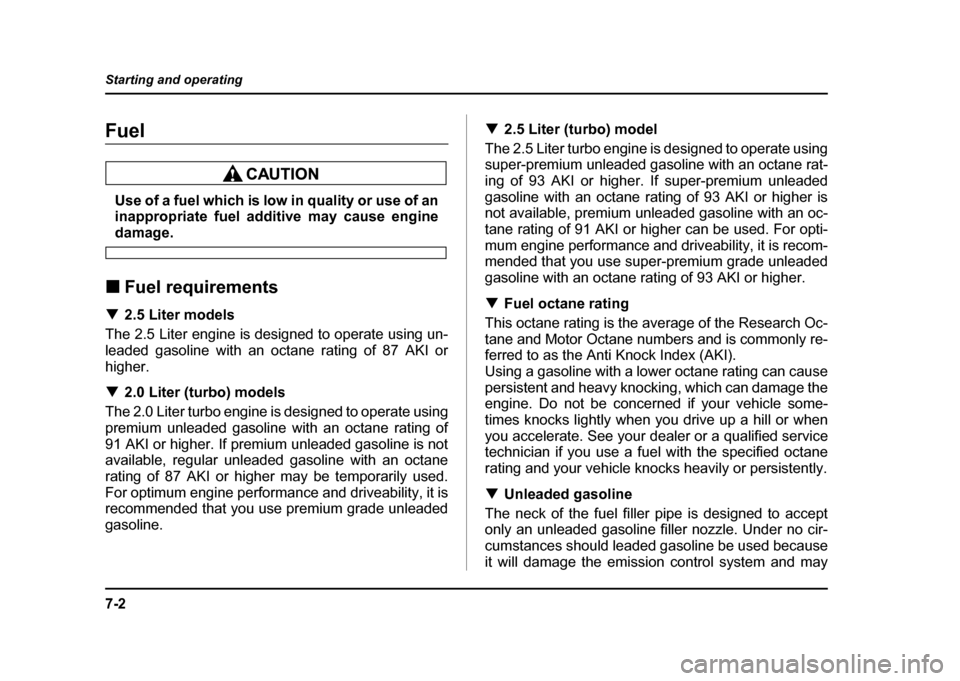
Use of a fuel which is low in quality or use of an
inappropriate fuel additive may cause engine
damage.
! Fuel requirements
! 2.5 Liter models
The 2.5 Liter engine is designed to operate using un-
leaded gasoline with an octane rating of 87 AKI or
higher. ! 2.0 Liter (turbo) models
The 2.0 Liter turbo engine is designed to operate using
premium unleaded gasoline with an octane rating of
91 AKI or higher. If premium unleaded gasoline is not
available, regular unleaded gasoline with an octane
rating of 87 AKI or higher may be temporarily used.
For optimum engine performance and driveability, it is
recommended that you use premium grade unleaded
gasoline. !
2.5 Liter (turbo) model
The 2.5 Liter turbo engine is designed to operate using
super-premium unleaded gasoline with an octane rat-
ing of 93 AKI or higher. If super-premium unleaded
gasoline with an octane rating of 93 AKI or higher is
not available, premium unleaded gasoline with an oc-
tane rating of 91 AKI or higher can be used. For opti-
mum engine performance and driveability, it is recom-
mended that you use super-premium grade unleaded
gasoline with an octane rating of 93 AKI or higher. ! Fuel octane rating
This octane rating is the average of the Research Oc-
tane and Motor Octane numbers and is commonly re-
ferred to as the Anti Knock Index (AKI).
Using a gasoline with a lower octane rating can cause
persistent and heavy knocking, which can damage the
engine. Do not be concerned if your vehicle some-
times knocks lightly when you drive up a hill or when
you accelerate. See your dealer or a qualified service
technician if you use a fuel with the specified octane
rating and your vehicle knocks heavily or persistently. ! Unleaded gasoline
The neck of the fuel filler pipe is designed to accept
only an unleaded gasoline filler nozzle. Under no cir-
cumstances should leaded gasoline be used because
it will damage the emission control system and may
Page 285 of 491
7-16
Starting and operating
!
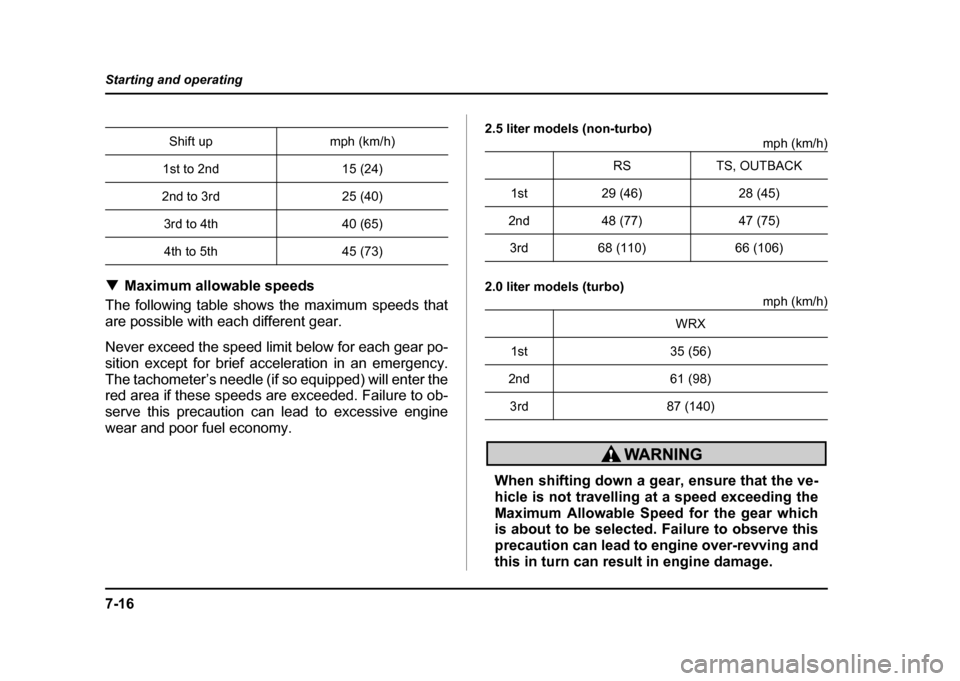
Maximum allowable speeds
The following table shows the maximum speeds that
are possible with each different gear.
Never exceed the speed limit below for each gear po-
sition except for brief acceleration in an emergency.
The tachometer’s needle (if so equipped) will enter the
red area if these speeds are exceeded. Failure to ob-
serve this precaution can lead to excessive engine
wear and poor fuel economy. 2.5 liter models (non-turbo)
mph (km/h)
2.0 liter models (turbo) mph (km/h)
When shifting down a gear, ensure that the ve-
hicle is not travelling at a speed exceeding the
Maximum Allowable Speed for the gear which
is about to be selected. Failure to observe this
precaution can lead to engine over-revving and
this in turn can result in engine damage.
Shift up mph (km/h)
1st to 2nd 15 (24)
2nd to 3rd 25 (40) 3rd to 4th 40 (65)4th to 5th 45 (73)
RS TS, OUTBACK
1st 29 (46) 28 (45)
2nd 48 (77) 47 (75) 3rd 68 (110) 66 (106)
WRX
1st 35 (56)
2nd 61 (98) 3rd 87 (140)
Page 290 of 491
7-21
Starting and operating
– CONTINUED –
mode.
NOTE "If the differential-limiting factor is large during
cornering maneuvers, a small speed difference
between the front and rear wheels may cause tight
corner braking (a phenomenon accompanied by
vibration and noise). This phenomenon does not
indicate a problem. It will disappear if the differen-
tial-action limiting factor is reduced. " Use the center-differential indicator light only as
a rough indication of the differential-action limit-
ing factor. ! Temporary release
When the driver stop the vehicle and pulls the parking-
brake lever after manually setting the differential-ac-
tion limiting factor, the factor is temporarily minimized.
The indicator in the combination meter continues to
show the driver’s selected differential-action limiting
factor. When the driver releases the parking-brake le-
ver, the factor set by the driver is restored.
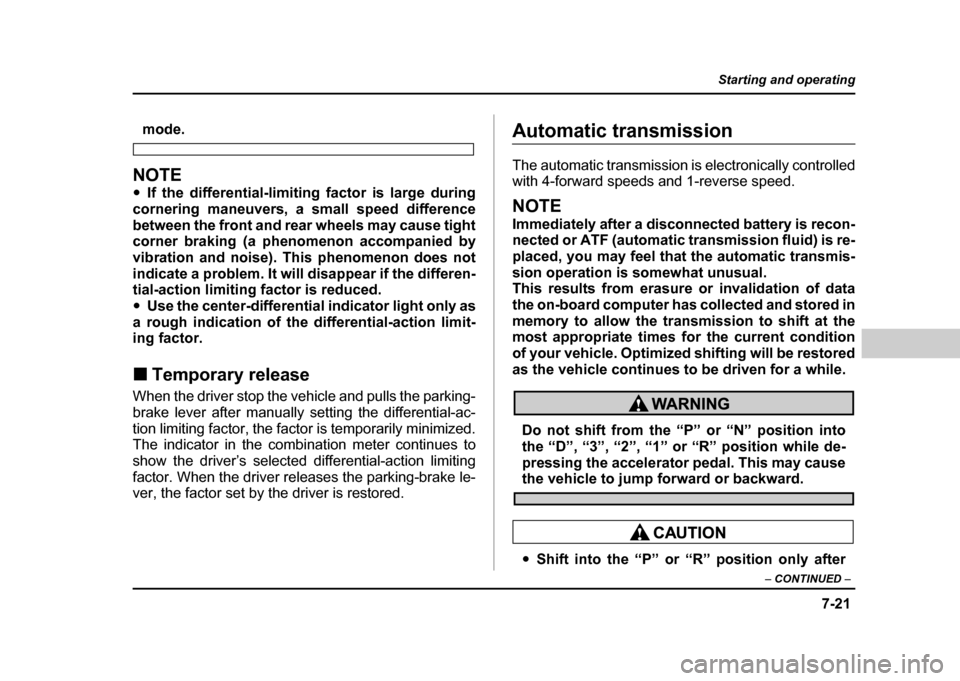
Automatic transmission
The automatic transmission is electronically controlled
with 4-forward speeds and 1-reverse speed.
NOTE
Immediately after a disconnected battery is recon-
nected or ATF (automatic transmission fluid) is re-
placed, you may feel that the automatic transmis-
sion operation is somewhat unusual.
This results from erasure or invalidation of data
the on-board computer has collected and stored in
memory to allow the transmission to shift at the
most appropriate times for the current condition
of your vehicle. Optimized shifting will be restored
as the vehicle continues to be driven for a while.
Do not shift from the “P” or “N” position into
the “D”, “3”, “2”, “1” or “R” position while de-
pressing the accelerator pedal. This may cause
the vehicle to jump forward or backward.
" Shift into the “P” or “R” position only after
Page 294 of 491
7-25
Starting and operating
– CONTINUED –
The transmission automatically shifts into a suitable
gear from 1st to 3rd according to the vehicle speed
and the acceleration you require.
When more acceleration is required in this position,
press the accelerator pedal fully to the floor and hold
that position. The transmission will automatically
downshift to 2nd or 1st gear. When you release the
pedal, the transmission will return to the original gear position. !2 (Second)
This position is for using engine braking when going
down a hill or for climbing a steep grade.
In this position, the transmission holds in the 2nd gear.
Use this position when starting off from a standstill on
slippery road surfaces such as mud or snow. It will en-
sure greater traction. ! 1 (First)
This position is for driving up or down very steep
grades, or driving through mud or sand, or on slippery
surfaces. In this position, the transmission holds in the
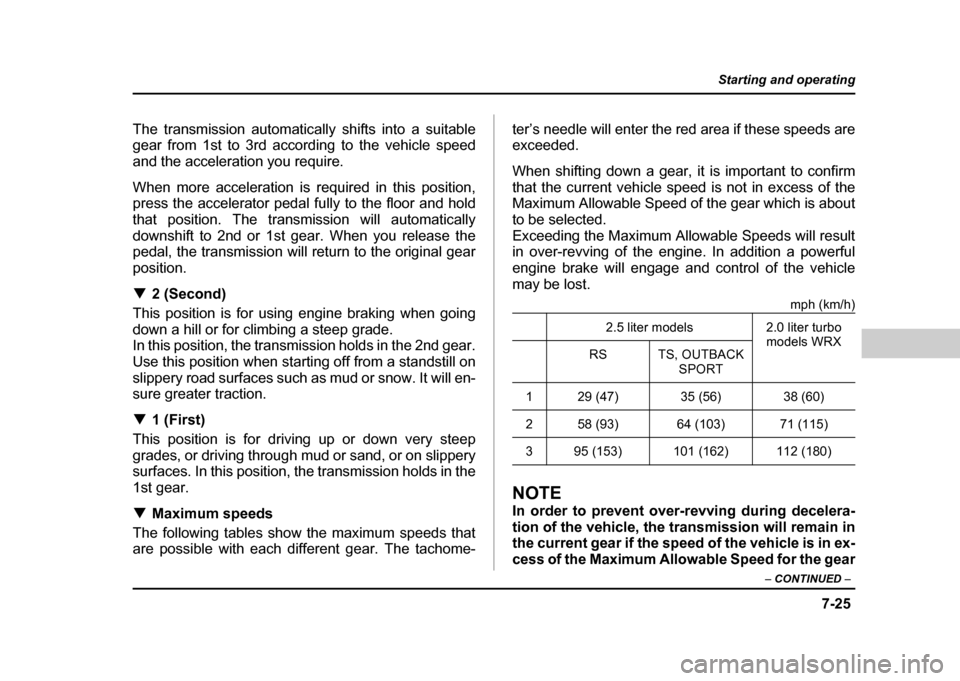
1st gear. ! Maximum speeds
The following tables show the maximum speeds that
are possible with each different gear. The tachome- ter’s needle will enter the red area if these speeds are
exceeded.
When shifting down a gear, it is important to confirm
that the current vehicle speed is not in excess of the
Maximum Allowable Speed of the gear which is about
to be selected.
Exceeding the Maximum Allowable Speeds will result
in over-revving of the engine. In addition a powerful
engine brake will engage and control of the vehicle
may be lost.
mph (km/h)
NOTE
In order to prevent over-revving during decelera-
tion of the vehicle, the transmission will remain in
the current gear if the speed of the vehicle is in ex-
cess of the Maximum Allowable Speed for the gear2.5 liter models 2.0 liter turbo
models WRX
RS TS, OUTBACK
SPORT
1 29 (47) 35 (56) 38 (60)
2 58 (93) 64 (103) 71 (115)
3 95 (153) 101 (162) 112 (180)
Page 312 of 491

8-1
8
Driving tips
New vehicle break-in driving – the first 1,000 miles (1,600 km) ................ 8-2
Fuel economy hints ...................................... 8-2
Engine exhaust gas (Carbon monoxide) .... 8-3
Catalytic converter ....................................... 8-4
Periodic inspections .................................... 8-6
Driving in foreign countries ......................... 8-6
Driving tips for AWD vehicles ..................... 8-7
Off road driving ............................................ 8-8 All AWD models except OUTBACK SPORT and vehicles with 17 inch tires ..................... 8-9
OUTBACK SPORT ............................................. 8-9
Winter driving ............................................... 8-11 Operation during cold weather ........................ 8-11
Driving on snowy and icy roads ...................... 8-13
Corrosion protection ........................................ 8-14
Snow tires .......................................................... 8-14
Tire chains ......................................................... 8-16
Rocking the vehicle .......................................... 8-16
Loading your vehicle ................................... 8-17 Vehicle capacity weight .................................... 8-19
GVWR and GAWR (Gross Vehicle Weight Rating and Gross Axle Weight Rating) ........ 8-20
Roof rail and crossbar (if equipped) ............... 8-21
Trailer hitch (if equipped) ............................ 8-25 Connecting a trailer .......................................... 8-25
When you do not tow a trailer .......................... 8-28
Trailer towing ................................................ 8-29 Warranties and maintenance ........................... 8-29 Maximum load limits ........................................ 8-29
Trailer hitches ................................................... 8-34
Connecting a trailer .......................................... 8-35
Trailer towing tips ............................................. 8-37
Page 325 of 491
8-14
Driving tips
!
Wiper operation when snowing
Before driving in cold weather, make sure the wiper
blades are not frozen to the windshield or rear window.
If the wiper blades are frozen to the windshield or rear
window, use the defroster with the airflow control dial
in the “ ” position and the temperature control dial
set for maximum warmth until the wiper blades are
completely thawed out. If your vehicle is equipped with
a wiper deicer, it is helpful to thaw the windshield wiper
blades. To thaw out the rear wiper blade, use the rear
window defogger.
When driving in snow, if frozen snow starts to stick on
the surface of the windshield despite wiper operation,
use the defroster with the airflow control dial in “ ”
and the temperature control dial set for maximum
warmth. After the windshield gets warmed enough to
melt the frozen snow on it, wash it away using the
windshield washer.
Snow stuck on the wiper arm prevents the wiper from
working effectively. If snow is stuck on the wiper arm,
pull off the road to a safe place, then remove it. If you
stop the car at road side, use the hazard warning
flasher to alert other drivers.
We recommend use of non-freezing type wiper blades
(winter blades) during the seasons you could have snow and sub-zero temperatures. Blades of this type
give superior wiping performance in snowy conditions.
Be sure to use blades that are suitable for your vehi-cle. !
Corrosion protection
Refer to the “Corrosion protection” section (chapter
10). ! Snow tires
! All models except WRX-STi
"When replacing original tires with winter
(snow) tires, make sure you use only the same
size, construction and load range as the origi-
nal tires listed on the tire placard. Using other
sizes and construction may affect speedome-
ter/odometer calibration and clearance be-
tween the body and tires. It also may be danger-
ous and lead to loss of vehicle control. " You must install four winter tires that are of
the same size, construction, brand, and load
range. Mixing other sizes or constructions may
result in severe mechanical damage to the drive