2004 SUBARU IMPREZA air condition
[x] Cancel search: air conditionPage 1 of 491

Foreword
Congratulations on choosing a SUBARU vehicle. This Owner’s Man-
ual has all the information necessary to keep your SUBARU in excel-
lent condition and to properly maintain the emission control system
for minimizing emission pollutants. We urge you to read this manual
carefully so that you may understand your vehicle and its operation.
For information not found in this Owner’s Manual, such as details
concerning repairs or adjustments, please contact the dealer from
whom you purchased your SUBARU or the nearest SUBARU dealer. The information, specifications and illustrations found in this manual
are those in effect at the time of printing. FUJI HEAVY INDUSTRIES
LTD. reserves the right to change specifications and designs at any
time without prior notice and without incurring any obligation to
make the same or similar changes on vehicles previously sold. This
Owner’s Manual applies to all models and covers all equipment, in-
cluding factory installed options. Some explanations, therefore may
be for equipment not installed in your vehicle.
Please leave this manual in the vehicle at the time of resale. The next
owner will need the information found herein.FUJI HEAVY INDUSTRIES LTD., TOKYO, JAPAN
and are registered trademarks of FUJI HEAVY INDUSTRIES, LTD.
© copyright 2002 FUJI HEAVY INDUSTRIES LTD.
Page 5 of 491

2
How to use this owner’s manual !Using your Owner’s manual
Before you operate your vehicle, carefully read this
manual. To protect yourself and extend the service life
of your vehicle, follow the instructions in this manual.
Failure to observe these instructions may result in se-
rious injury and damage to your vehicle.
This manual is composed of fourteen chapters. Each
chapter begins with a brief table of contents, so you
can usually tell at a glance if that chapter contains the
information you want.
Chapter 1: Seat, seatbelt and SRS airbags
This chapter informs you how to use the seat and seat-
belt and contains precautions for the SRS airbags.
Chapter 2: Keys and doors
This chapter informs you how to operate the keys,
locks and windows.
Chapter 3: Instruments and controls
This chapter informs you about the operation of instru-
ment panel indicators and how to use the instruments
and other switches.
Chapter 4: Climate Control
This chapter informs you how to operate the climate
control.
Chapter 5: Audio This chapter informs you how to operate your audio system.
Chapter 6: Interior equipment
This chapter informs you how to operate interior
equipment.
Chapter 7: Starting and operating
This chapter informs you how to start and operate your SUBARU.
Chapter 8: Driving tips
This chapter informs you how to drive your SUBARU
in various conditions and explains some safety tips on
driving.
Chapter 9: In case of emergency
This chapter informs you what to do if you have a prob-
lem while driving, such as a flat tire or engine over-
heating.
Chapter 10: Appearance care
This chapter informs you how to keep your SUBARU
looking good.
Chapter 11: Maintenance and service
This chapter informs you when you need to take your
SUBARU to the dealer for scheduled maintenance
and informs you how to keep your SUBARU running
properly.
Chapter 12: Specifications
This chapter informs you about dimension and capac-
ities of your SUBARU.
Page 12 of 491
9
–
CONTINUED –
are entering the vehicle, have the problem
checked and corrected as soon as possible. If
you must drive under these conditions, drive
only with all windows fully open. "Keep the trunk lid or rear gate closed while
driving to prevent exhaust gas from entering
the vehicle.
! Drinking and driving
Drinking and then driving is very dangerous.
Alcohol in the bloodstream delays your reac-
tion and impairs your perception, judgment and
attentiveness. If you drive after drinking – even
if you drink just a little – it will increase the risk
of being involved in a serious or fatal accident,
injuring or killing yourself, your passengers
and others. In addition, if you are injured in the
accident, alcohol may increase the severity of
that injury.
Please don’t drink and drive.
Drunken driving is one of the most frequent causes of accidents. Since alcohol affects all people differently,
you may have consumed too much alcohol to drive
safely even if the level of alcohol in your blood is below
the legal limit. The safest thing you can do is never
drink and drive. However if you have no choice but to
drive, stop drinking and sober up completely before
getting behind the wheel. !
Drugs and driving
There are some drugs (over the counter and
prescription) that can delay your reaction time
and impair your perception, judgment and at-
tentiveness. If you drive after taking them, it
may increase your, your passengers’ and other
persons’ risk of being involved in a serious or
fatal accident.
If you are taking any drugs, check with your doctor or
pharmacist or read the literature that accompanies the
medication to determine if the drug you are taking can
impair your driving ability. Do not drive after taking any
medications that can make you drowsy or otherwise
affect your ability to safely operate a motor vehicle. If
Page 13 of 491
10
you have a medical condition that requires you to take
drugs, please consult with your doctor.
Never drive if you are under the influence of any illicit
mind-altering drugs. For your own health and well-be-
ing, we urge you not to take illegal drugs in the first
place and to seek treatment if you are addicted to
those drugs. !Driving when tired or sleepy
When you are tired or sleepy, your reaction will
be delayed and your perception, judgment and
attentiveness will be impaired. If you drive
when tired or sleepy, your, your passengers’
and other persons’ chances of being involved
in a serious accident may increase.
Please do not continue to drive but instead find a safe
place to rest if you are tired or sleepy. On long trips,
you should make periodic rest stops to refresh your-
self before continuing on your journey. When possible,
you should share the driving with others. !
Modification of your vehicle
Your vehicle should not be modified. Modifica-
tion could affect its performance, safety or du-
rability, and may even violate governmental
regulations. In addition, damage or perfor-
mance problems resulting from modification
may not be covered under warranties.
! Mobile phones and driving
Do not use a hand-held phone while driving; it
may distract your attention from driving and
can lead to an accident. If you use a hand-held
phone, pull off the road and park in the safe
place before using your phone. In some States/
Provindes, only hands-free phones may legally
be used while driving.
Page 143 of 491
3-6
Instruments and controls
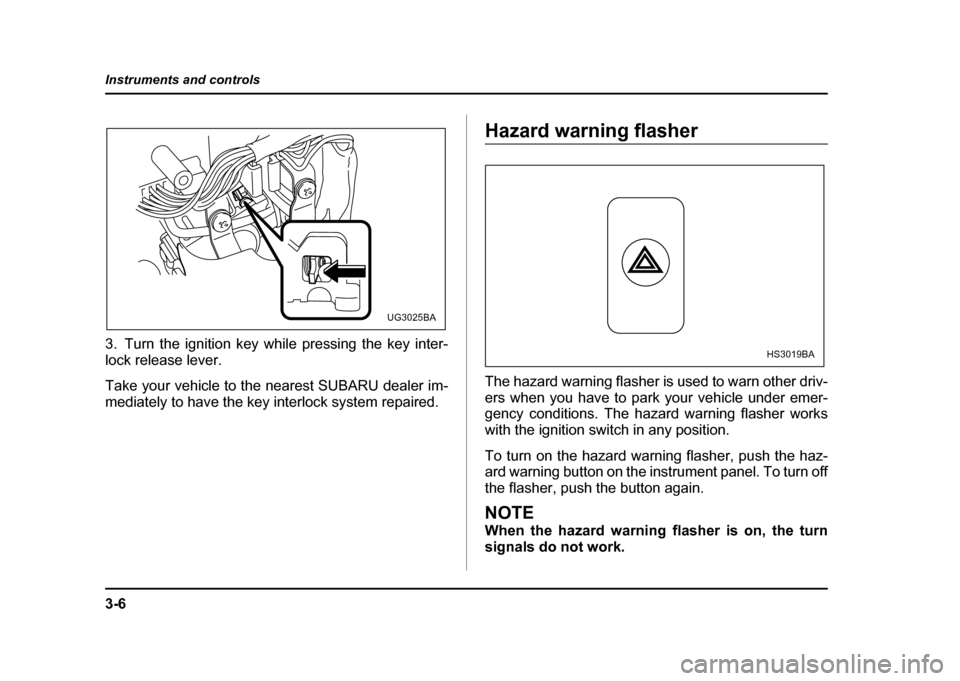
3. Turn the ignition key while pressing the key inter-
lock release lever.
Take your vehicle to the nearest SUBARU dealer im-
mediately to have the key interlock system repaired.
Hazard warning flasher
The hazard warning flasher is used to warn other driv-
ers when you have to park your vehicle under emer-
gency conditions. The hazard warning flasher works with the ignition switch in any position.
To turn on the hazard warning flasher, push the haz-
ard warning button on the instrument panel. To turn off
the flasher, push the button again.
NOTE
When the hazard warning flasher is on, the turn
signals do not work.
UG3025BA
HS3019BA
Page 183 of 491

3-46
Instruments and controls
detect it and make the reflection surface of the mirror
dimmer to help prevent you from being blinded. For
this reason, use care not to cover the sensors with
stickers, or other similar items. Periodically wipe the
sensors clean using a piece of dry soft cotton cloth or
an applicator. "
Compass calibration
1. For optimum calibration, switch off all nonessential
electrical accessories (rear window defogger, heater/
air conditioning system, spotlight, etc.) and ensure all
doors are shut.
2. Drive to an open, level area away from large metal-
lic objects or structures and make certain the ignition
switch is in the “ON” position.
3. Press and hold the left button for 3 seconds then re-
lease, and the compass will enter the calibration
mode. “CAL” and direction will be displayed.
4. Drive slowly in a circle until “CAL” disappears from
the display (about two or three circles). The compass
is now calibrated.
5. Further calibration may be necessary should out-
side. Influences cause the mirror to read inaccurately.
You will know that this has occurred if your compass
begins to read in only limited directions. Should you
encounter this situation, return to step one of the
above procedure and recalibrate the mirror. "
Compass zone adjustment
Compass calibration zones
1. The zone setting is factory preset to Zone 8. Refer
to the “Compass calibration zone” map shown above
or one attached to the end of this manual to verify that
the compass zone setting is correct for your geograph-ical location.
2. Press and hold the right button for 3 seconds then
release, and the word “ZONE” will briefly appear and
then the zone number will be displayed.
3. Press the right hand button repeatedly to cycle the
display through all possible zone settings. Stop cycling
when the correct zone setting for your location is dis-
10
9
8
7
6
5
4
3
1112
13
HGF048AA
Page 190 of 491

4-1
4
Climate control
Ventilator ....................................................... 4-2 Air flow selection .............................................. 4-2
Center and side ventilators .............................. 4-3
Manual climate control system (if equipped) 4-4 Control panel ..................................................... 4-4
Heater operation ............................................... 4-6
Air conditioner operation (if equipped) .......... 4-9
Semi-automatic climate control system (if equipped) ............................................... 4-11Control panel ..................................................... 4-11
Operating method ............................................. 4-14
Temperature sensors ....................................... 4-18
Operating tips for heater and air conditioner 4-19 Cleaning ventilation grille ................................ 4-19
Efficient cooling after parking in direct sunlight ........................................................... 4-19
Lubrication oil circulation in the refrigerant
circuit .............................................................. 4-19
Checking air conditioning system before summer season .............................................. 4-19
Cooling and dehumidifying in high humidity and low temperature weather conditions .... 4-20
Air conditioner compressor shut-off when
engine is heavily loaded ................................ 4-20
Refrigerant for your climate control system .. 4-20
Air filtration system (if equipped) ................ 4-20 Replacing an air filter ....................................... 4-21
Page 193 of 491
4-4
Climate control
Manual climate control system (if
equipped) !
Control panel
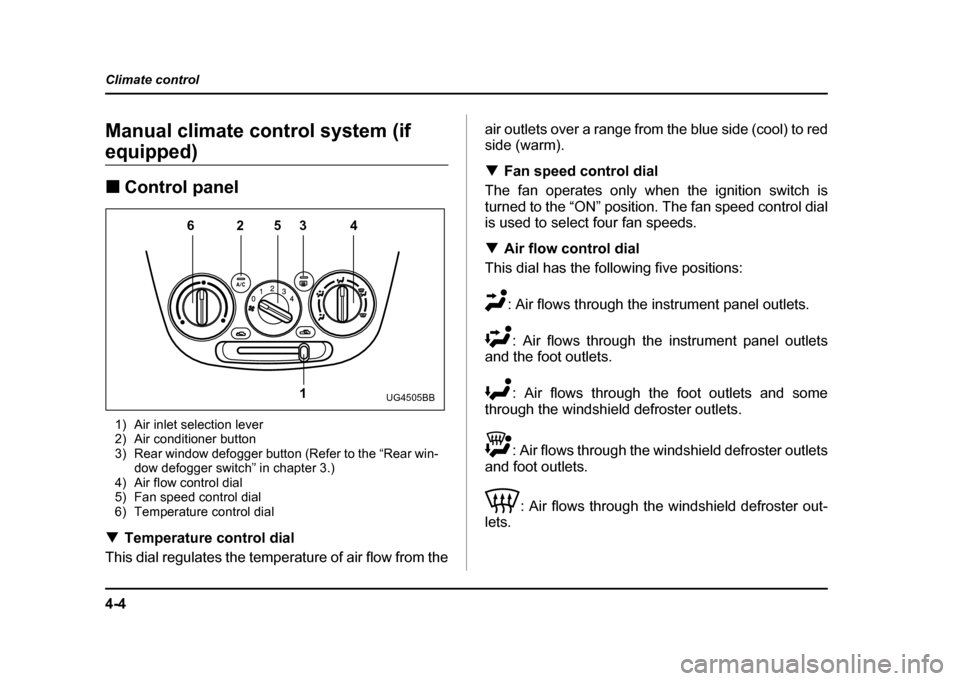
1) Air inlet selection lever
2) Air conditioner button
3) Rear window defogger button (Refer to the “Rear win- dow defogger switch” in chapter 3.)
4) Air flow control dial
5) Fan speed control dial
6) Temperature control dial
! Temperature control dial
This dial regulates the temperature of air flow from the air outlets over a range from the blue side (cool) to red side (warm). !
Fan speed control dial
The fan operates only when the ignition switch is
turned to the “ON” position. The fan speed control dial
is used to select four fan speeds. ! Air flow control dial
This dial has the following five positions:
: Air flows through the instrument panel outlets.: Air flows through the instrument panel outlets
and the foot outlets.
: Air flows through the foot outlets and some
through the windshield defroster outlets.
: Air flows through the windshield defroster outlets
and foot outlets.
: Air flows through the windshield defroster out-
lets.
6253 4
1
UG4505BB