2004 SUBARU FORESTER starter
[x] Cancel search: starterPage 1086 of 2870
SC(H4SO)-11
STARTING/CHARGING SYSTEM
Starter
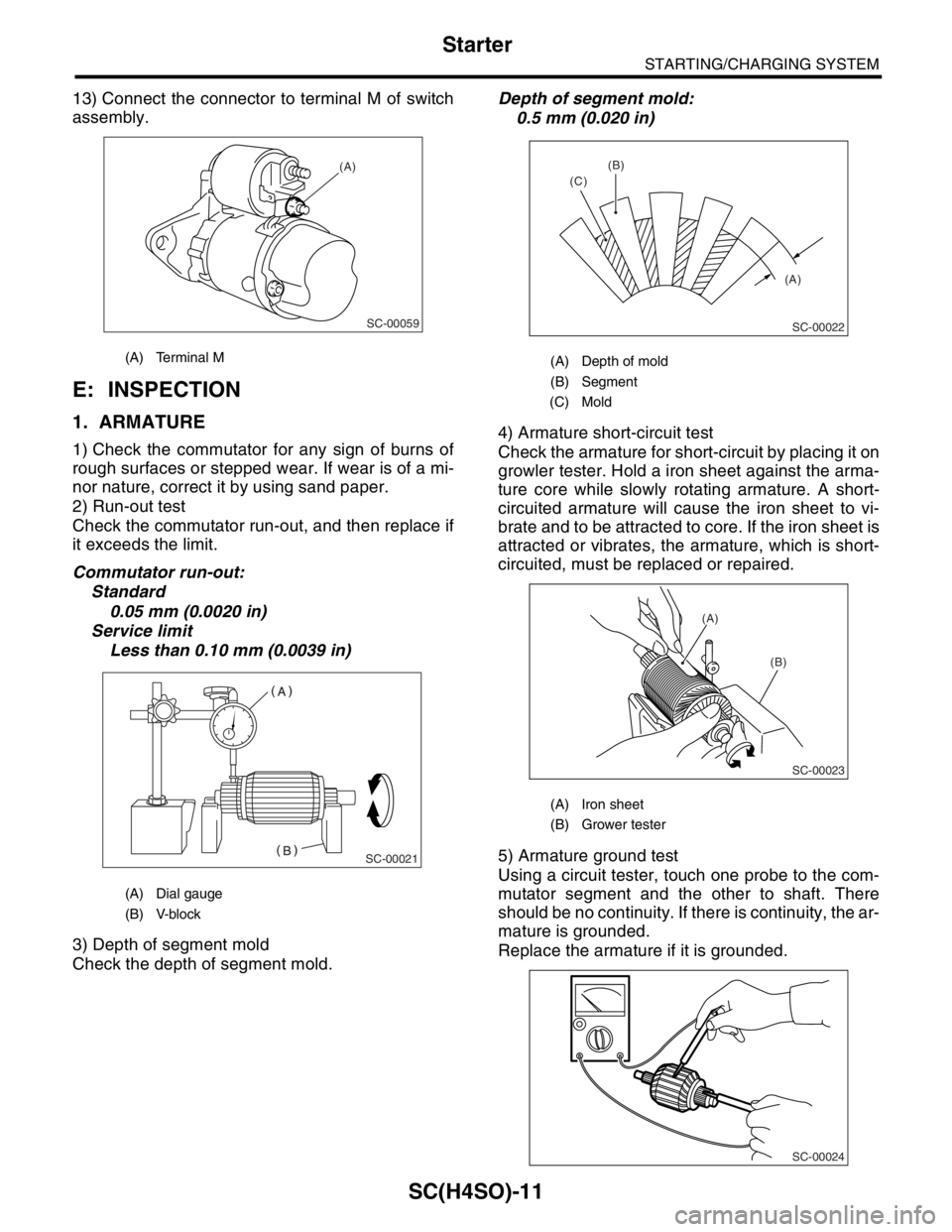
13) Connect the connector to terminal M of switch
assembly.
E: INSPECTION
1. ARMATURE
1) Check the commutator for any sign of burns of
rough surfaces or stepped wear. If wear is of a mi-
nor nature, correct it by using sand paper.
2) Run-out test
Check the commutator run-out, and then replace if
it exceeds the limit.
Commutator run-out:
Standard
0.05 mm (0.0020 in)
Service limit
Less than 0.10 mm (0.0039 in)
3) Depth of segment mold
Check the depth of segment mold.Depth of segment mold:
0.5 mm (0.020 in)
4) Armature short-circuit test
Check the armature for short-circuit by placing it on
growler tester. Hold a iron sheet against the arma-
ture core while slowly rotating armature. A short-
circuited armature will cause the iron sheet to vi-
brate and to be attracted to core. If the iron sheet is
attracted or vibrates, the armature, which is short-
circuited, must be replaced or repaired.
5) Armature ground test
Using a circuit tester, touch one probe to the com-
mutator segment and the other to shaft. There
should be no continuity. If there is continuity, the ar-
mature is grounded.
Replace the armature if it is grounded.
(A) Terminal M
(A) Dial gauge
(B) V-block
SC-00059
(A)
SC-00021
(A) Depth of mold
(B) Segment
(C) Mold
(A) Iron sheet
(B) Grower tester
(A) (B)
(C)
SC-00022
(A)
(B)
SC-00023
SC-00024
Page 1087 of 2870
SC(H4SO)-12
STARTING/CHARGING SYSTEM
Starter
2. YOKE
Make sure the pole is set in position.
3. OVERRUNNING CLUTCH
Inspect the teeth of pinion for wear and damage.
Replace if it is damaged. Rotate the pinion in direc-
tion of rotation (counterclockwise). It should rotate
smoothly. But in opposite direction, it should be
locked.
CAUTION:
Do not clean the overrunning clutch with oil to
prevent grease from flowing out.
4. BRUSH AND BRUSH HOLDER
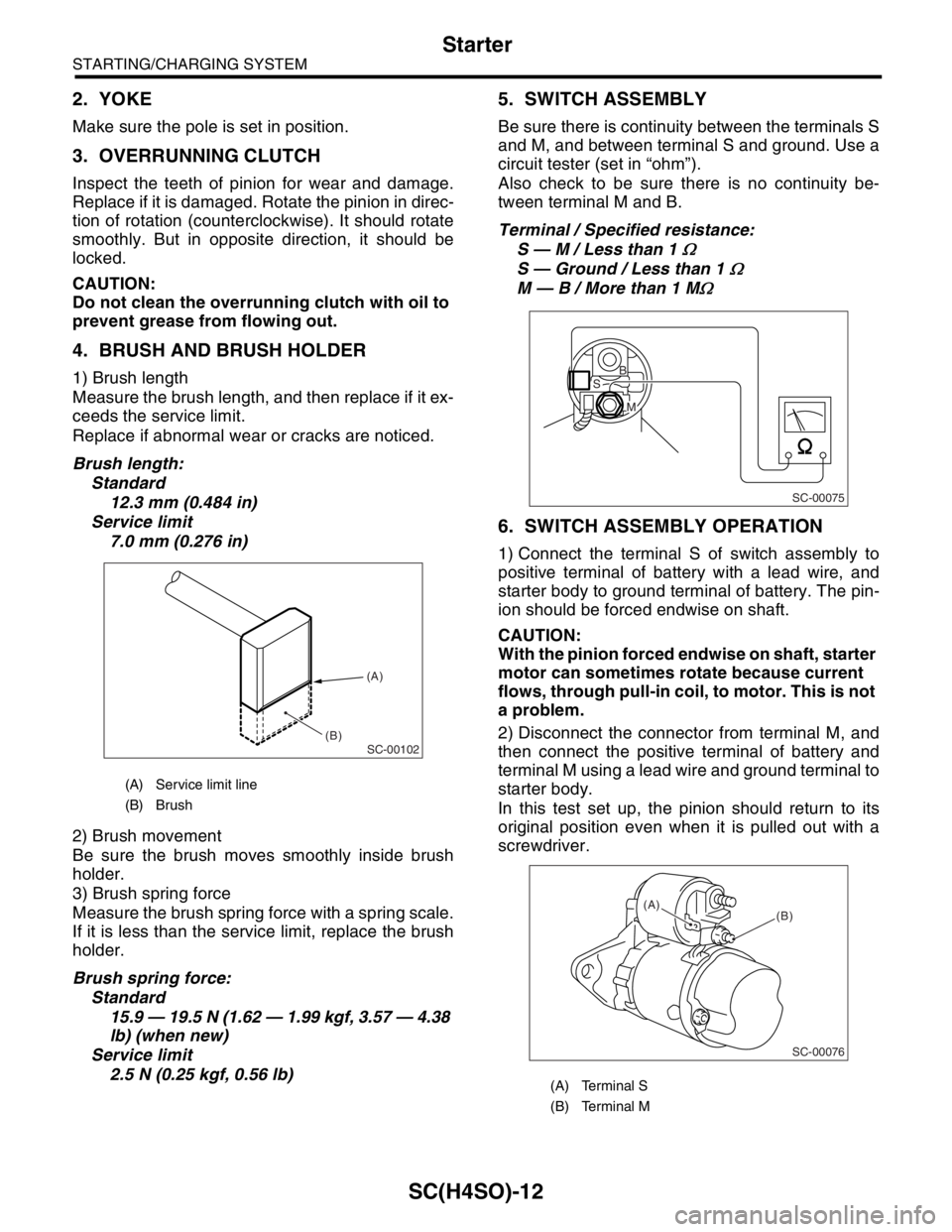
1) Brush length
Measure the brush length, and then replace if it ex-
ceeds the service limit.
Replace if abnormal wear or cracks are noticed.
Brush length:
Standard
12.3 mm (0.484 in)
Service limit
7.0 mm (0.276 in)
2) Brush movement
Be sure the brush moves smoothly inside brush
holder.
3) Brush spring force
Measure the brush spring force with a spring scale.
If it is less than the service limit, replace the brush
holder.
Brush spring force:
Standard
15.9 — 19.5 N (1.62 — 1.99 kgf, 3.57 — 4.38
lb) (when new)
Service limit
2.5 N (0.25 kgf, 0.56 lb)
5. SWITCH ASSEMBLY
Be sure there is continuity between the terminals S
and M, and between terminal S and ground. Use a
circuit tester (set in “ohm”).
Also check to be sure there is no continuity be-
tween terminal M and B.
Terminal / Specified resistance:
S — M / Less than 1
Ω
S — Ground / Less than 1 Ω
M — B / More than 1 MΩ
6. SWITCH ASSEMBLY OPERATION
1) Connect the terminal S of switch assembly to
positive terminal of battery with a lead wire, and
starter body to ground terminal of battery. The pin-
ion should be forced endwise on shaft.
CAUTION:
With the pinion forced endwise on shaft, starter
motor can sometimes rotate because current
flows, through pull-in coil, to motor. This is not
a problem.
2) Disconnect the connector from terminal M, and
then connect the positive terminal of battery and
terminal M using a lead wire and ground terminal to
starter body.
In this test set up, the pinion should return to its
original position even when it is pulled out with a
screwdriver.
(A) Service limit line
(B) Brush
SC-00102
(A)
(B)
(A) Terminal S
(B) Terminal M
SC-00075
B
M
S
SC-00076
(B) (A)
Page 1088 of 2870
SC(H4SO)-13
STARTING/CHARGING SYSTEM
Starter
7. PINION GAP
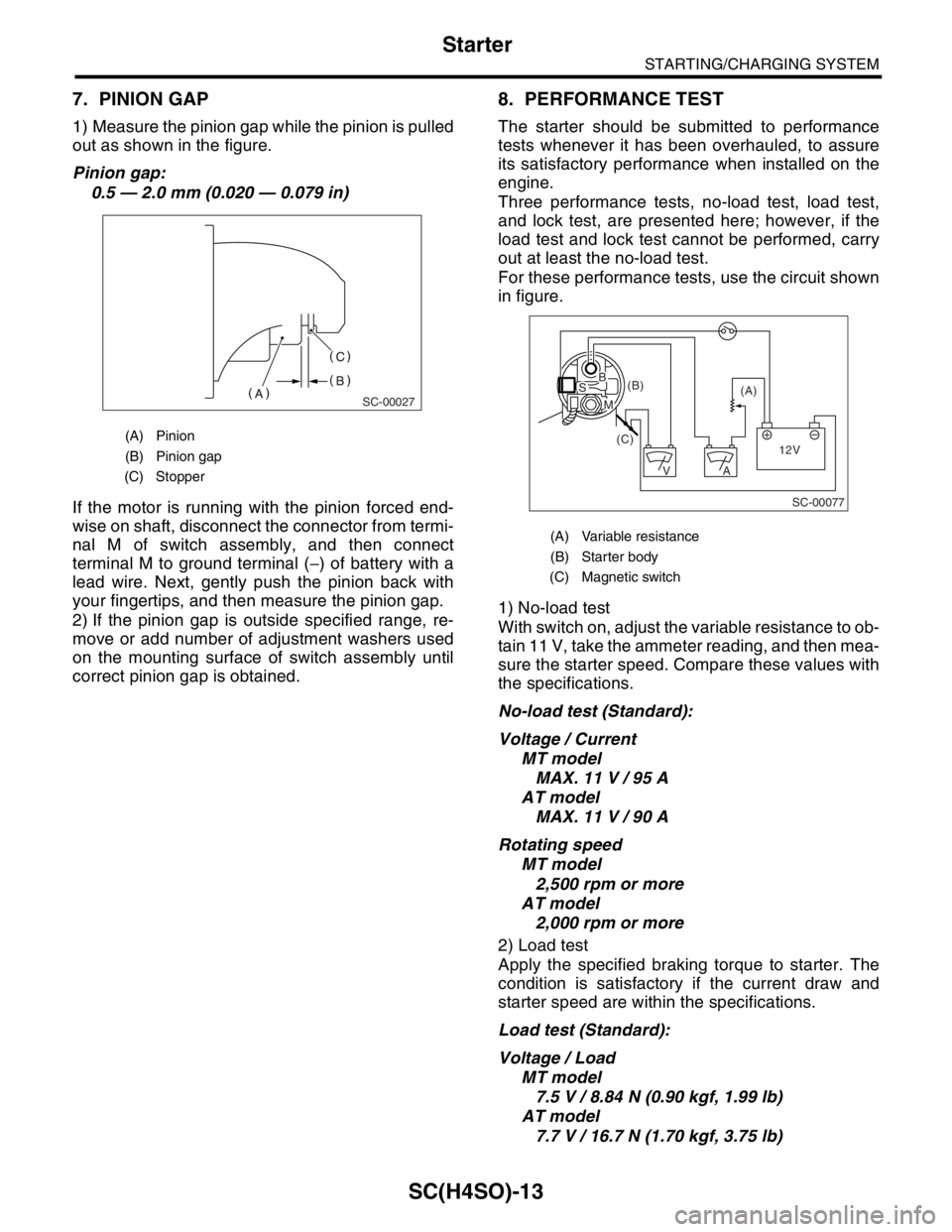
1) Measure the pinion gap while the pinion is pulled
out as shown in the figure.
Pinion gap:
0.5 — 2.0 mm (0.020 — 0.079 in)
If the motor is running with the pinion forced end-
wise on shaft, disconnect the connector from termi-
nal M of switch assembly, and then connect
terminal M to ground terminal (−) of battery with a
lead wire. Next, gently push the pinion back with
your fingertips, and then measure the pinion gap.
2) If the pinion gap is outside specified range, re-
move or add number of adjustment washers used
on the mounting surface of switch assembly until
correct pinion gap is obtained.
8. PERFORMANCE TEST
The starter should be submitted to performance
tests whenever it has been overhauled, to assure
its satisfactory performance when installed on the
engine.
Three performance tests, no-load test, load test,
and lock test, are presented here; however, if the
load test and lock test cannot be performed, carry
out at least the no-load test.
For these performance tests, use the circuit shown
in figure.
1) No-load test
With switch on, adjust the variable resistance to ob-
tain 11 V, take the ammeter reading, and then mea-
sure the starter speed. Compare these values with
the specifications.
No-load test (Standard):
Voltage / Current
MT model
MAX. 11 V / 95 A
AT model
MAX. 11 V / 90 A
Rotating speed
MT model
2,500 rpm or more
AT model
2,000 rpm or more
2) Load test
Apply the specified braking torque to starter. The
condition is satisfactory if the current draw and
starter speed are within the specifications.
Load test (Standard):
Voltage / Load
MT model
7.5 V / 8.84 N (0.90 kgf, 1.99 lb)
AT model
7.7 V / 16.7 N (1.70 kgf, 3.75 lb)
(A) Pinion
(B) Pinion gap
(C) Stopper
SC-00027
(A) Variable resistance
(B) Starter body
(C) Magnetic switch
SC-00077
(A) (B)
(C)
12V +
AV
BS
M
Page 1089 of 2870

SC(H4SO)-14
STARTING/CHARGING SYSTEM
Starter
Current / Speed
MT model
300 A / 870 rpm or more
AT model
400 A / 710 rpm or more
3) Lock test
With the starter stalled, or not rotating, measure the
torque developed and current draw when the volt-
age is adjusted to the specified voltage.
Lock test (Standard):
Voltage / Current
MT model
4 V / 680 A or less
AT model
3.5 V / 960 A or less
Torque
MT model
17.0 N (1.73 kgf, 3.82 lb) or more
AT model
31.0 N (3.16 kgf, 6.97 lb) or more
Page 1114 of 2870
EN(H4SO)-16
ENGINE (DIAGNOSTIC)
Electrical Component Location
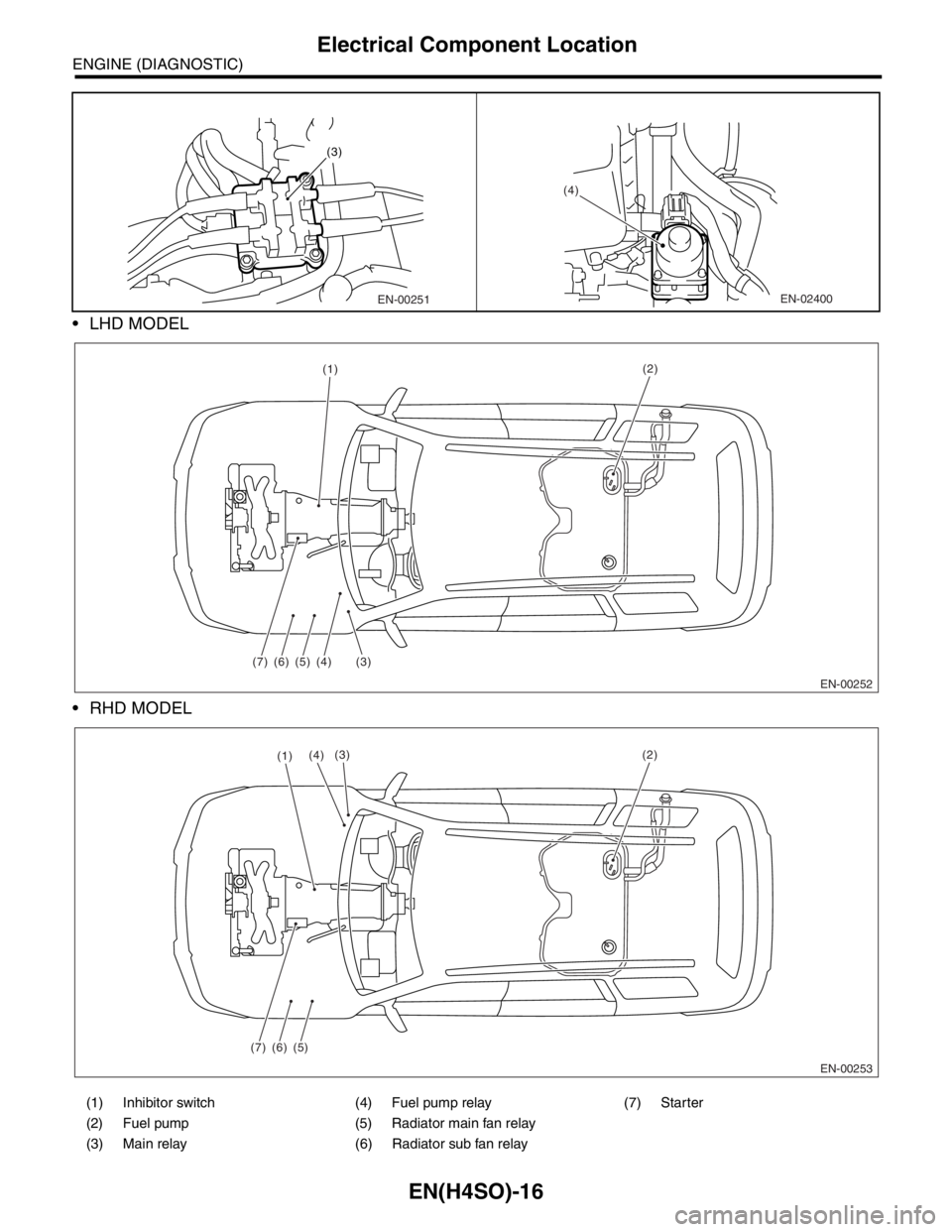
LHD MODEL
RHD MODEL
(1) Inhibitor switch (4) Fuel pump relay (7) Starter
(2) Fuel pump (5) Radiator main fan relay
(3) Main relay (6) Radiator sub fan relay
EN-00251
(3)
(4)
EN-02400
EN-00252 (1)
(3) (7) (6)(5)(4)
(2)
EN-00253
(7) (6)(5)
(2)(3)(4)(1)
Page 1119 of 2870
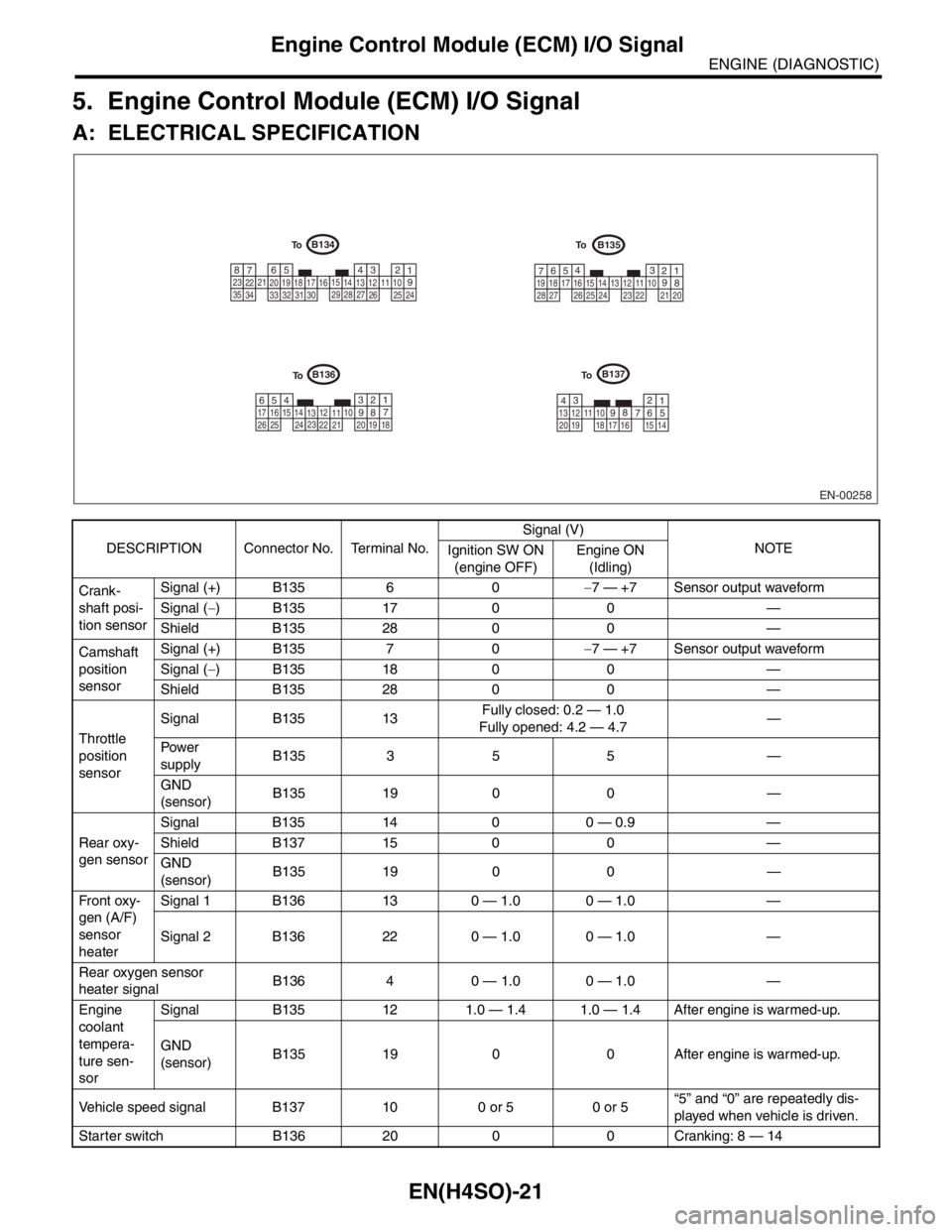
EN(H4SO)-21
ENGINE (DIAGNOSTIC)
Engine Control Module (ECM) I/O Signal
5. Engine Control Module (ECM) I/O Signal
A: ELECTRICAL SPECIFICATION
DESCRIPTION Connector No. Terminal No.Signal (V)
NOTE
Ignition SW ON
(engine OFF)Engine ON
(Idling)
Crank-
shaft posi-
tion sensorSignal (+) B135 6 0−7 — +7 Sensor output waveform
Signal (−) B135 17 0 0 —
Shield B135 28 0 0 —
Camshaft
position
sensorSignal (+) B135 7 0−7 — +7 Sensor output waveform
Signal (−) B135 18 0 0 —
Shield B135 28 0 0 —
Throttle
position
sensorSignal B135 13Fully closed: 0.2 — 1.0
Fully opened: 4.2 — 4.7—
Pow er
supplyB135 3 5 5 —
GND
(sensor)B135 19 0 0 —
Rear oxy-
gen sensorSignal B135 14 0 0 — 0.9 —
Shield B137 15 0 0 —
GND
(sensor)B135 19 0 0 —
Fr o nt ox y-
gen (A/F)
sensor
heaterSignal 1 B136 13 0 — 1.0 0 — 1.0 —
Signal 2 B136 22 0 — 1.0 0 — 1.0 —
Rear oxygen sensor
heater signalB136 4 0 — 1.0 0 — 1.0 —
Engine
coolant
tempera-
ture sen-
sorSignal B135 12 1.0 — 1.4 1.0 — 1.4 After engine is warmed-up.
GND
(sensor)B135 19 0 0 After engine is warmed-up.
Vehicle speed signal B137 10 0 or 5 0 or 5“5” and “0” are repeatedly dis-
played when vehicle is driven.
Starter switch B136 20 0 0 Cranking: 8 — 14
EN-00258
B135B134
B137B136
1234567891011121314151617181920
1 2 3 4
5
6
7 8
910 11 12 13 14 15
16
17 18
19 20 21
22 23
24
25 26 27
28
29
30 31 32
33
34 351 2 3
4
5
6
7
8 910 11
12
13 14
15 16 17
18 19
20
21 22
23 24 25
26 27
28
1 2
3
4 5 6
7
8
910
11 12
13 14 15 16
17
18 19 20 21 22 23
24
25 26
To
To
To To
Page 1129 of 2870

EN(H4SO)-31
ENGINE (DIAGNOSTIC)
Subaru Select Monitor
NOTE:
For detailed operation procedure, refer to the “SUBARU SELECT MONITOR OPERATION MANUAL”.
Engine torque control permission signalAT coordinate permission sig-
nalON or OFF
Rear oxygen sensor rich signal Rear O2 monitor ON or OFF
Starter switch signal Starter SW ON or OFF
Idle switch signal Soft idle SW ON or OFF
Crankshaft position sensor signal Crankshaft position signal ON or OFF
Camshaft position sensor signal Camshaft position signal ON or OFF
Rear defogger switch signal Rear defogger SW ON or OFF
Blower fan switch signal Blower fan SW ON or OFF
Small light switch signal Light SW ON or OFF
AT vehicle ID signal AT/MT identification terminal AT or MT
A/C middle pressure switch signal A/C middle pressure SW ON or OFFDescription Display Unit of measure
Page 1132 of 2870
![SUBARU FORESTER 2004 Service Repair Manual EN(H4SO)-34
ENGINE (DIAGNOSTIC)
Subaru Select Monitor
7. LED OPERATION MODE FOR ENGINE
1) On the «Main Menu» display screen, select the {Each System Check} and press the [YES] key.
2) On the «Syste](/manual-img/17/57426/w960_57426-1131.png "SUBARU FORESTER 2004 Service Repair Manual EN(H4SO)-34
ENGINE (DIAGNOSTIC)
Subaru Select Monitor
7. LED OPERATION MODE FOR ENGINE
1) On the «Main Menu» display screen, select the {Each System Check} and press the [YES] key.
2) On the «Syste")
EN(H4SO)-34
ENGINE (DIAGNOSTIC)
Subaru Select Monitor
7. LED OPERATION MODE FOR ENGINE
1) On the «Main Menu» display screen, select the {Each System Check} and press the [YES] key.
2) On the «System Selection Menu» display screen, select the {Engine} and press the [YES] key.
3) Press the [YES] key after the information of engine type was displayed.
4) On the «Engine Diagnosis» display screen, select the {Current Data Display/Save}, and then press the
[YES] key.
5) On the «Data Display Menu» display screen, select the {Data & LED Display} and press the [YES] key.
6) Using the scroll key, scroll the display screen up or down until the desired data is shown.
A list of the support data is shown in the following table.
NOTE:
For detailed operation procedure, refer to the “SUBARU SELECT MONITOR OPERATION MANUAL”.
Description Display Message LED “ON” requirements
Ignition switch signal Ignition SW ON or OFF When ignition switch is ON
Test mode connector signal Test mode signal ON or OFF When test mode connector is connected.
Neutral position switch signal Neutral SW ON or OFF When neutral position signal is entered.
Air conditioning switch signal A/C SW ON or OFF When air conditioning switch is ON
Air conditioning relay signal A/C Compressor Relay ON or OFF When air conditioning relay is in function.
Radiator main fan relay signal Radiator fan relay 1 ON or OFF When radiator main fan relay is in function.
Fuel pump relay signal Fuel pump relay ON or OFF When fuel pump relay is in function.
Knocking signal Knock signal ON or OFF When knocking signal is input.
Radiator sub fan relay signal Radiator fan relay 2 ON or OFF When radiator sub fan relay is in function.
Engine torque control signal #1 AT coordinate request signal 1 ON or OFFWhen engine torque control signal 1 is
entered
Engine torque control signal #2 AT coordinate request signal 2 ON or OFFWhen engine torque control signal 2 is
entered
Engine torque control permission
signalAT coordinate permission sig-
nalON or OFFWhen engine torque control permission sig-
nal is entered.
Front oxygen (A/F) sensor rich sig-
nalFront O2 Rich Signal #1 ON or OFFWhen front oxygen (A/F) sensor mixture ratio
is rich.
Rear oxygen sensor rich signal RrO2 monitor ON or OFFWhen rear oxygen sensor mixture ratio is
rich.
Starter switch signal Starter SW ON or OFF When starter switch signal is entered.
Idle switch signal Idle Switch Signal ON or OFF When idle switch signal is entered.
Crankshaft position sensor signal Crankshaft position signal ON or OFFWhen crankshaft position sensor signal is
input.
Camshaft position sensor signal Camshaft position signal ON or OFFWhen camshaft position sensor signal is
entered.