Page 60 of 173

This kit enables you to use a Bluetooth mobile telephone, in "hands-free" mode. It consists of:
- a shoe* Alocated in the upper compartment of the front armrest, intended
to accommodate the mobile telephone,
- a microphone Blocated in the front courtesy light.
The shoe* holds the NOKIA 6310(i) telephone and connects its aerial to the roof aerial. The hands-free telephone kit uses the following on-board functions:
- the audio system of the RM2 audio equipment,
- the steering wheel control or the multi-function display control keypad,
- the multi-function display which displays the telephone's main functions.
HANDS-FREE TELEPHONE KIT
Using the steering wheel control
* According to model. Movement of the lever Command carried out
1
- Upwards Increase volume
2- Downwards Decrease volume
3 - Forwards Upwards selection of a previous page of the
directory - Press for more than 2 seconds:
access to the first page of the directory
4 - Rearwards Downw ards selection of a following page of
the directory - Press for more than 2 seconds:
access to the last page of the directory
5 - Pressing the end Confirmation of the current selection -
Press for more than 2 seconds: rapid
access to the directories
6- Rotation (clockwise) Selection of the next element
7 - Rotation (anti-clockwise) Selection of the previous element
YOUR 607 IN DETAIL
63
02-02-2004
Page 62 of 173

02-02-2004
When the telephone has been matched, it appears on the list"Select a Bluetooth telephone".
Note: to delete a match, select
"Delete a pairing" from the
"Hands-free operation" menu.
YOUR 607 IN DETAIL
65
Matching the Bluetooth telephone with the hands-free kit When a telephone is used with the hands-free kit for the first time, youmust match your telephone and thehands-free kit.
You can match up to 3 telephones with the hands-free kit. Note: this operation can only be car-
ried out with the engine off, key in the ignition or accessories position andwith no telephone connected to thehands-free kit. - activate the Bluetooth function on your telephone,
- carry out a search for Bluetooth accessories present from your telephone,
- select the accessory which appears with the name of yourvehicle. A superimposed confirmation display appears on the screen.
- accept the match by selecting the
"YES" tab using the ring and by
confirming by pressing the end of the steering wheel control,
- enter the authentication code "1234" on the telephone.
When this procedure has been com-pleted, a superimposed displayinforms you of the success or failureof the matching operation.
Page 63 of 173
02-02-2004
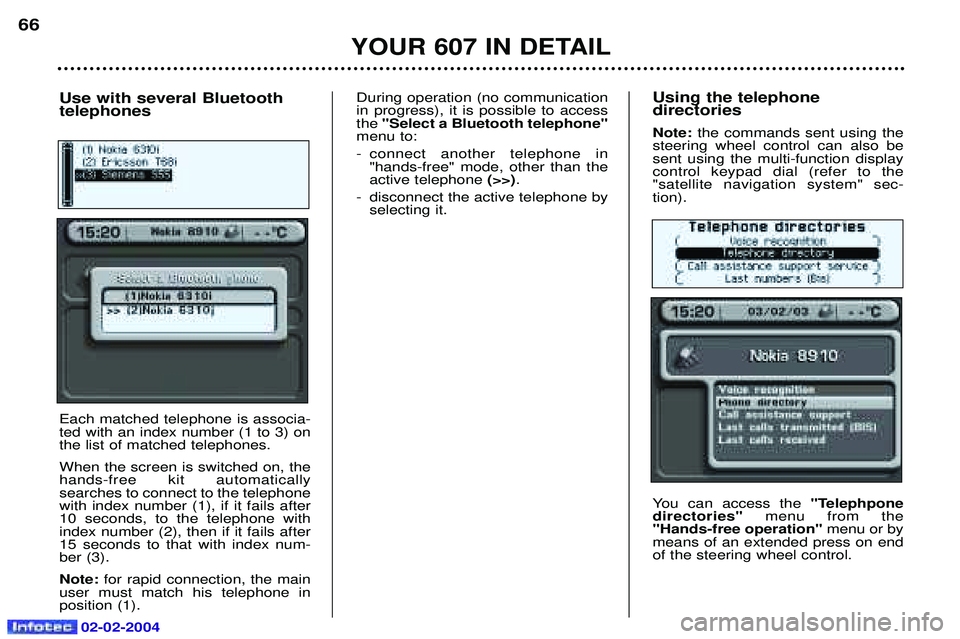
Using the telephone directories Note: the commands sent using the
steering wheel control can also be sent using the multi-function displaycontrol keypad dial (refer to the"satellite navigation system" sec-tion).
You can access the "Telephpone
directories" menu from the
"Hands-free operation" menu or by
means of an extended press on end of the steering wheel control.
YOUR 607 IN DETAIL
66
Use with several Bluetooth telephones Each matched telephone is associa- ted with an index number (1 to 3) onthe list of matched telephones. When the screen is switched on, the hands-free kit automaticallysearches to connect to the telephonewith index number (1), if it fails after10 seconds, to the telephone withindex number (2), then if it fails after15 seconds to that with index num-ber (3). Note: for rapid connection, the main
user must match his telephone in position (1). During operation (no communicationin progress), it is possible to accessthe
"Select a Bluetooth telephone"
menu to:
- connect another telephone in "hands-free" mode, other than the active telephone (>>).
- disconnect the active telephone by selecting it.
Page 67 of 173
02-02-2004
YOUR 607 IN DETAIL
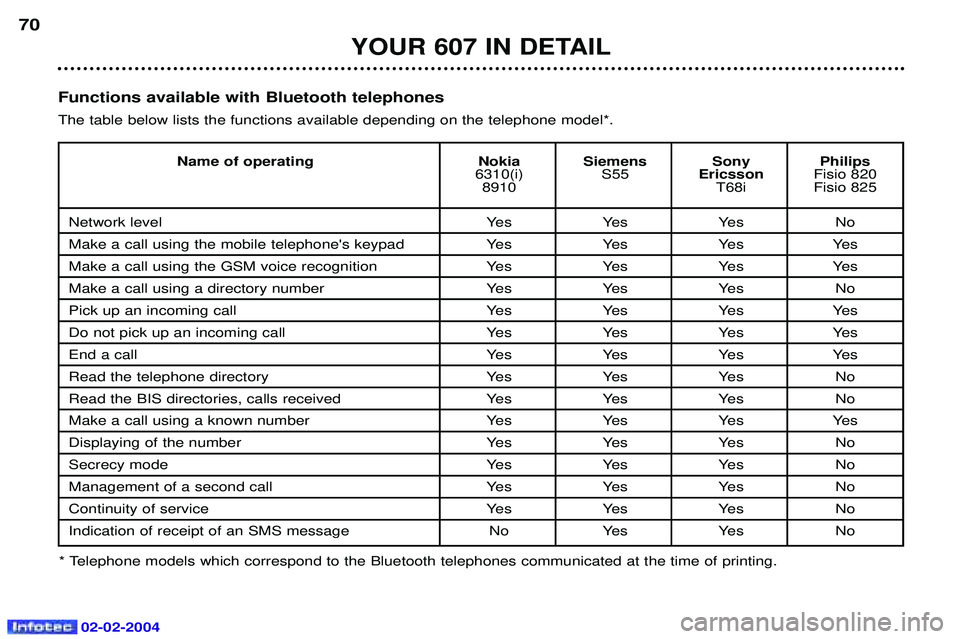
70Functions available with Bluetooth telephones The table below lists the functions available depending on the telephone model*.
* Telephone models which correspond to the Bluetooth telephones communicated at the time of printing. Name of operating Nokia Siemens Sony Philips
6310(i) S55EricssonFisio 820
8910 T68i Fisio 825
Network level Yes Yes Yes No
Make a call using the mobile telephone's keypad Yes Yes Yes Yes
Make a call using the GSM voice recognition Yes Yes Yes Yes
Make a call using a directory number Yes Yes Yes No
Pick up an incoming call Yes Yes Yes Yes
Do not pick up an incoming call Yes Yes Yes Yes
End a callYes Yes Yes Yes
Read the telephone directory Yes Yes Yes No
Read the BIS directories, calls received Yes Yes Yes No
Make a call using a known number Yes Yes Yes Yes
Displaying of the number Yes Yes Yes No
Secrecy modeYes Yes Yes No
Management of a second call Yes Yes Yes No
Continuity of service Yes Yes Yes No
Indication of receipt of an SMS message No Yes Yes No