2004 NISSAN TITAN steering wheel
[x] Cancel search: steering wheelPage 71 of 328

18. Power outlet/Cigarette lighter
(accessory) (P. 2-32/P. 2-33)
19. Vehicle dynamic control (VDC) off
switch (if so equipped) (P. 2-29)
20. Tow mode switch (P. 2-31)
21. Electronic locking rear differential
system switch (if so equipped)
(P .2-30)
22. Shift selector lever (console)
(if so equipped) (P. 5-9)
23. Power outlet (P. 2-32)
24. Passenger air bag status light (P. 2-17)
25. Hazard lights (P. 2-27)
26. 4WD shift switch (if so equipped)
(P. 5-20)
27. Shift selector lever (column)
(if so equipped) (P. 5-9)
28. Instrument brightness control (P. 2-26)
29. Tilt steering wheel control (P. 3-13)
30. Cargo lamp switch (P. 2-28)
31. Rear sonar system off switch (if so
equipped) (P. 2-31)
32. Pedal position adjustment switch
(if so equipped) (P. 3-13)
*: Refer to the separate Navigation System Own-
er’s Manual (if so equipped) .
See the page number indicated in paren-
theses for operating details.
1. Warning/indicator lights
2. Tachometer
3. Speedometer
4. Engine coolant temperature gauge
5. Fuel gauge
6. Engine oil pressure gauge7. Automatic transmission fluid tempera-
ture gauge (if so equipped)
8. Odometer/Twin trip odometer
9. Voltmeter
LIC0540
METERS AND GAUGES
Instruments and controls2-3
ZREVIEW COPY:Ð2004 Titan(tzw)
Owners Manual(owners)ÐUSA English(nna)
02/20/04Ðtbrooks
X
Page 96 of 328
The flashers will operate with the ignition switch
in any position.
Some state laws may prohibit the use of
the hazard warning flasher switch while
driving.
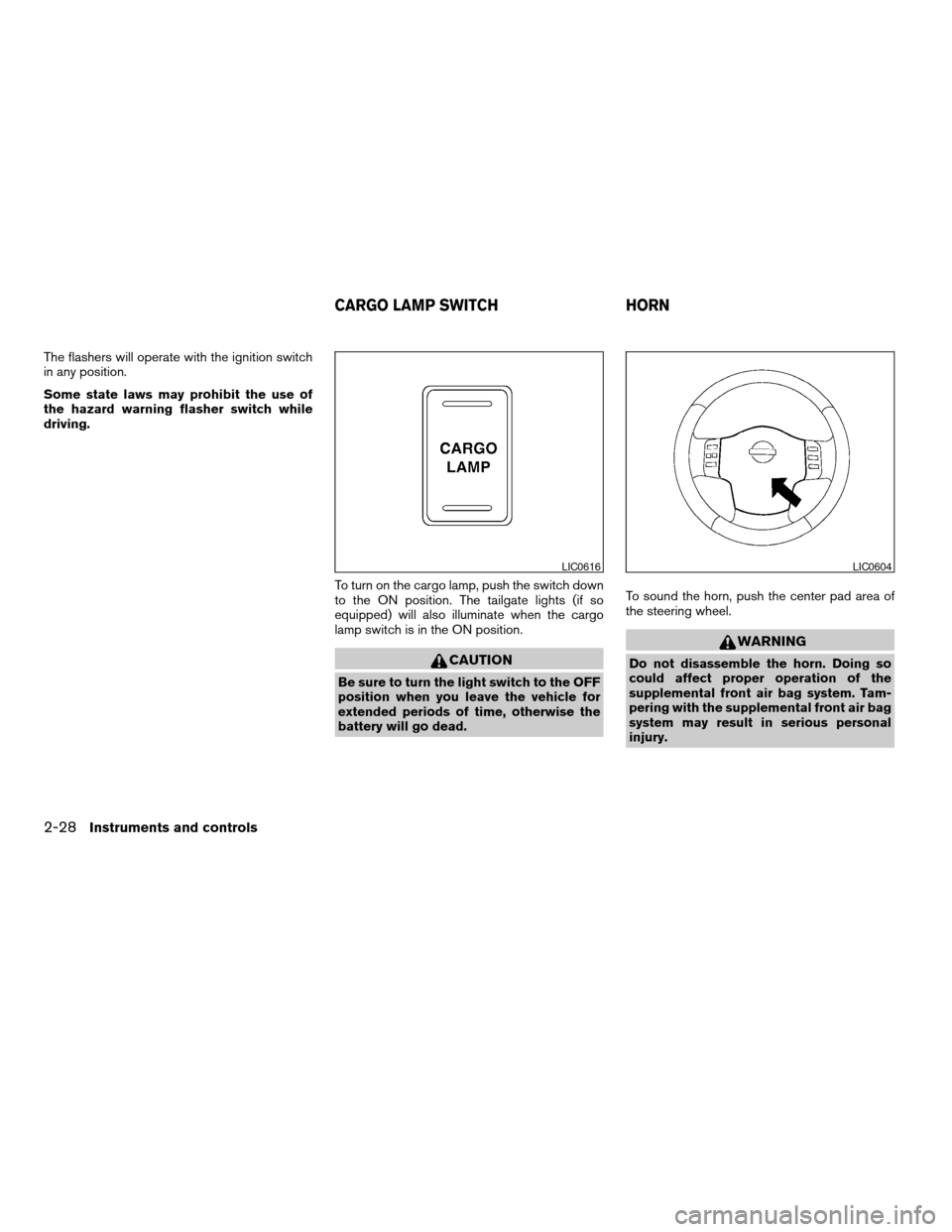
To turn on the cargo lamp, push the switch down
to the ON position. The tailgate lights (if so
equipped) will also illuminate when the cargo
lamp switch is in the ON position.
CAUTION
Be sure to turn the light switch to the OFF
position when you leave the vehicle for
extended periods of time, otherwise the
battery will go dead.To sound the horn, push the center pad area of
the steering wheel.
WARNING
Do not disassemble the horn. Doing so
could affect proper operation of the
supplemental front air bag system. Tam-
pering with the supplemental front air bag
system may result in serious personal
injury.
LIC0616LIC0604
CARGO LAMP SWITCH HORN
2-28Instruments and controls
ZREVIEW COPY:Ð2004 Titan(tzw)
Owners Manual(owners)ÐUSA English(nna)
02/20/04Ðtbrooks
X
Page 121 of 328

3 Pre-driving checks and adjustments
Keys .............................................3-2
Nissan vehicle immobilizer system (NVIS)
keys..........................................3-2
Doors............................................3-3
Locking with key................................3-3
Locking with inside lock knob....................3-4
Locking with power door lock switch
(if so equipped)................................3-4
Wide Open doors (if so equipped)...............3-5
Child safety rear door lock
(Crew Cab models only)........................3-6
Remote keyless entry system (if so equipped).........3-7
How to use remote keyless entry system..........3-7
Battery replacement...........................3-10
Hood...........................................3-11
Fuel filler lid......................................3-11
Fuel filler cap..................................3-11Steering wheel...................................3-13
Tilt operation (if so equipped)...................3-13
Pedal position adjustment (if so equipped)..........3-13
Sun visors.......................................3-14
Vanity mirrors.................................3-15
Mirrors..........................................3-15
Inside mirror (if so equipped)....................3-15
Automatic anti-glare inside mirror
(if so equipped)...............................3-16
Outside mirrors...............................3-16
Truck box........................................3-19
Tailgate.......................................3-19
Tie down hooks...............................3-21
Automatic drive positioner (if so equipped)..........3-21
Memory storage function.......................3-22
Entry/exit function.............................3-23
System operation..............................3-23
ZREVIEW COPY:Ð2004 Titan(tzw)
Owners Manual(owners)ÐUSA English(nna)
03/01/04Ðskoniecz
X
Page 133 of 328
TILT OPERATION (if so equipped)
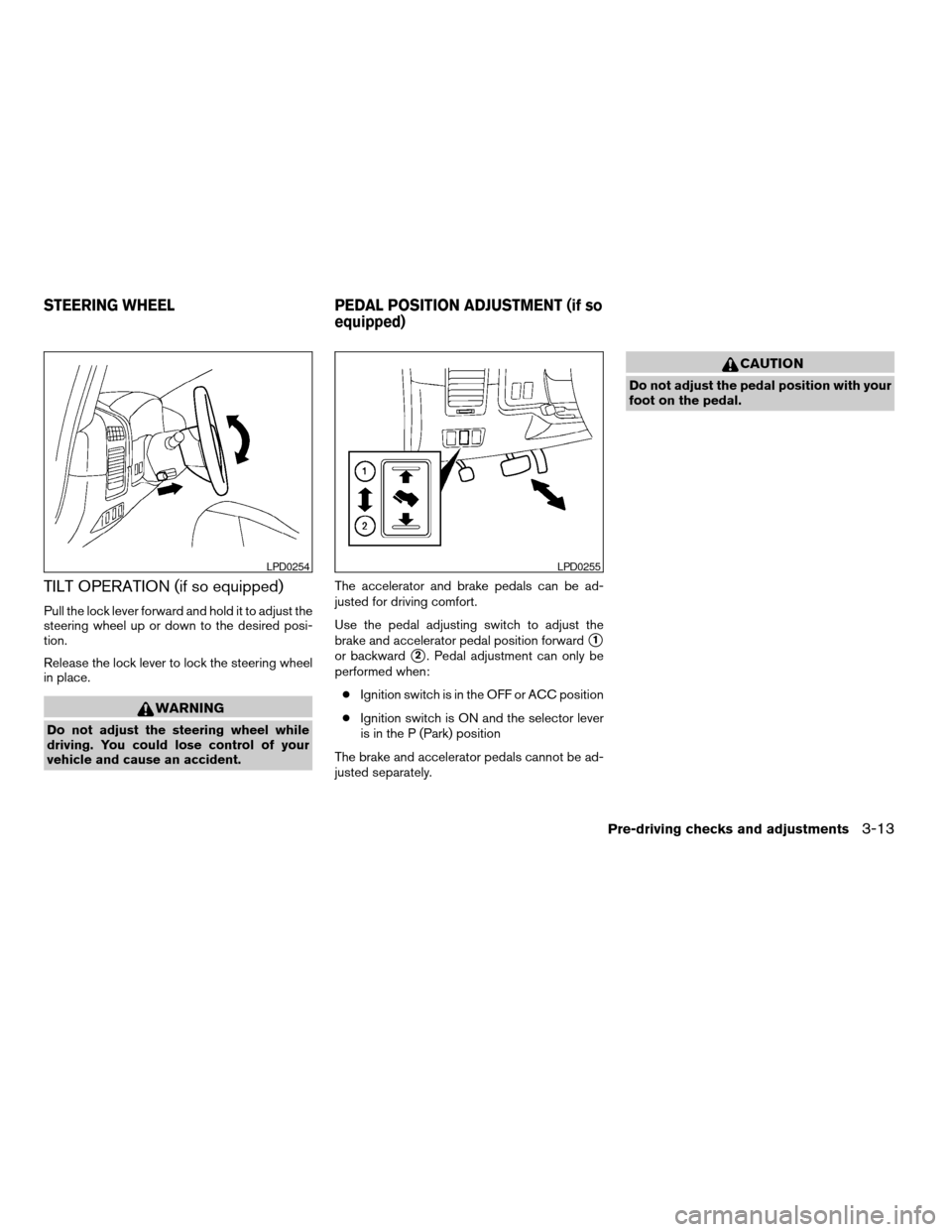
Pull the lock lever forward and hold it to adjust the
steering wheel up or down to the desired posi-
tion.
Release the lock lever to lock the steering wheel
in place.
WARNING
Do not adjust the steering wheel while
driving. You could lose control of your
vehicle and cause an accident.The accelerator and brake pedals can be ad-
justed for driving comfort.
Use the pedal adjusting switch to adjust the
brake and accelerator pedal position forward
s1
or backwards2. Pedal adjustment can only be
performed when:
cIgnition switch is in the OFF or ACC position
cIgnition switch is ON and the selector lever
is in the P (Park) position
The brake and accelerator pedals cannot be ad-
justed separately.
CAUTION
Do not adjust the pedal position with your
foot on the pedal.
LPD0254LPD0255
STEERING WHEEL PEDAL POSITION ADJUSTMENT (if so
equipped)
Pre-driving checks and adjustments3-13
ZREVIEW COPY:Ð2004 Titan(tzw)
Owners Manual(owners)ÐUSA English(nna)
02/23/04Ðdebbie
X
Page 145 of 328

4 Display screen, heater, air conditioner
and audio systems
Control panel buttons (if so equipped)...............4-2
Names of the components.......................4-3
How to use joystick and “ENTER” button..........4-3
How to use “PREV” button......................4-3
Setting up the start-up screen...................4-3
How to use the “TRIP” button....................4-4
How to use the “SETTING” button................4-6
button..................................4-11
Ventilators.......................................4-11
Heater and air conditioner (manual).................4-12
Controls......................................4-12
Heater operation..............................4-13
Air conditioner operation.......................4-15
Air flow charts.................................4-16
Servicing air conditioner...........................4-19
Audio system....................................4-19
Radio........................................4-19
FM radio reception............................4-19
AM radio reception............................4-20
Satellite radio reception (if so equipped).........4-20Audio operation precautions....................4-20
FM-AM radio with compact disc (CD) player
(if so equipped)...............................4-22
FM-AM-SAT radio with compact disc (CD)
changer (Type A, B, C and D)
(if so equipped)...............................4-29
CD care and cleaning..........................4-35
Steering wheel switch for audio control
(if so equipped)...............................4-36
Rear audio controls (if so equipped).............4-37
Antenna......................................4-38
NISSAN mobile entertainment system (MES)
(if so equipped)..................................4-38
Digital video disc (DVD) player controls..........4-39
Remote control................................4-40
Flip-down screen..............................4-40
Playing a digital video disc (DVD)...............4-42
Care and maintenance.........................4-45
How to handle the DVD........................4-45
Car phone or CB radio............................4-47
ZREVIEW COPY:Ð2004 Titan(tzw)
Owners Manual(owners)ÐUSA English(nna)
02/23/04Ðdebbie
X
Page 180 of 328

1. Volume control switch
2. MODE select switch
3. POWER on/off switch
4. Tuning switch
STEERING WHEEL SWITCH FOR
AUDIO CONTROL (if so equipped)
The audio system can be operated using the
controls on the steering wheel.
POWER on/off switch
With the ignition key turned to the ACC or ON
position, push the POWER switch to turn the
audio system on or off.
MODE select switch
Push the mode select switch to change the mode
in the following sequence: DVD (if so equipped) ,
AM, FM, SAT (if so equipped) and CD.
Volume control switch
Push the volume control switch up or down to
increase or decrease the volume.
Tuning
Memory change (radio):
Push the tuning switch (
or) for less
than 1.5 seconds to change the radio frequency.
Seek tuning (radio):
Push the tuning switch (
or) for
more than 1.5 seconds to seek the next or previ-
ous radio station.
FF, REW:
Push the tuning switch (
or) for less
1.5 seconds to return to the beginning of the
present program or skip to the next program.
Push several times to skip back or skip through
programs.
To stop the FF or REW function, press the
orbutton for less than 1.5 seconds again.When playing a CD in the CD changer (if so
equipped) , push the tuning switch (
or) for more than 1.5 seconds to change
between discs when multiple CDs are loaded.
Memory change (radio):
Push the tuning switch
orfor less
than 1.5 seconds to change to the next preset
station in memory.
Seek tuning (radio):
Push the tuning switch
orfor more
than 1.5 seconds to seek the next or previous
radio station.
Next/Previous track (CD):
Push the tuning switch
orfor less
than 1.5 seconds to return to the beginning of the
present track or skip to the next track. Push
several times to skip back or skip through tracks.
This system searches for the blank intervals be-
tween selections. If there is a blank interval within
1 program or there is no interval between pro-
grams, the system may not stop in the desired or
expected location.
Change disc (CD) (if so equipped):
Push the tuning switch
orfor more
than 1.5 seconds to change the playing disc up
or down.
LHA0269
4-36Display screen, heater, air conditioner and audio systems
ZREVIEW COPY:Ð2004 Titan(tzw)
Owners Manual(owners)ÐUSA English(nna)
02/23/04Ðdebbie
X
Page 193 of 328

5 Starting and driving
Precautions when starting and driving................5-2
Exhaust gas (carbon monoxide)..................5-2
Three-way catalyst..............................5-2
On-pavement and off-road driving
precautions....................................5-3
Low tire pressure warning system................5-3
Avoiding collision and rollover....................5-5
Drinking alcohol/drugs and driving................5-5
Driving safety precautions.......................5-5
Ignition switch.....................................5-7
Automatic transmission..........................5-7
Key positions..................................5-8
Nissan vehicle immobilizer system (NVIS).........5-8
Before starting the engine..........................5-8
Starting the engine................................5-9
Driving the vehicle.................................5-9
Engine protection mode.........................5-9
Automatic transmission.........................5-10
Parking brake....................................5-16
Cruise control....................................5-17
Precautions on cruise control...................5-17
Cruise control operations.......................5-17Break-in schedule................................5-19
Increasing fuel economy...........................5-19
Using four wheel drive (4WD).............5-20
Transfer case shifting procedures...............5-20
Electronic locking rear differential system
(if so equipped)..................................5-25
Parking/parking on hills............................5-26
Power steering...................................5-27
Brake system....................................5-27
Brake precautions.............................5-27
Anti-lock brake system (ABS)...................5-28
Vehicle dynamic control (VDC) system
(if so equipped)..................................5-29
Rear sonar system (if so equipped).................5-30
Cold weather driving..............................5-31
Freeing a frozen door lock......................5-31
Anti-freeze....................................5-31
Battery.......................................5-31
Draining of coolant water.......................5-31
Tire equipment................................5-32
Special winter equipment.......................5-32
Driving on snow or ice.........................5-32
ZREVIEW COPY:Ð2004 Titan(tzw)
Owners Manual(owners)ÐUSA English(nna)
02/23/04Ðdebbie
X
Page 196 of 328
on the Tire and Loading Information label to turn
the low tire pressure warning light OFF.
Frequently check the tire pressure information
display on the display screen (if so equipped) and
adjust pressure of each tire properly. (The order
of the tire pressure figures displayed on the
screen does not correspond with the actual order
of the tire position.) See “Tire pressure informa-
tion” in the “Display screen, heater, air condi-
tioner and audio systems” section for tire pres-
sure monitor. If you select the tire pressure
information in the display (if so equipped) , the
FLAT TIRE warning message will be displayed.
Low tire pressure warning
If the vehicle is being driven with very low tire
pressure (lower than 28 psi, 193 kPa) , the low
tire pressure warning light comes on and the
chime sounds for about 10 seconds.
For additional information regarding the above
warning, see “Warning/indicator lights and au-
dible reminders” in the “Instruments and con-
trols” section.
WARNING
cIf the low tire pressure warning light
flashes while driving, avoid sudden
steering maneuvers or abrupt braking,
reduce vehicle speed, pull off the road
to a safe location and stop the vehicle
as soon as possible. Serious vehicle
damage could occur and may lead to an
accident and could result in serious
personal injury. Check the tire pressure
for all four tires. Adjust the tire pressure
to the recommended COLD tire pres-
sure shown on the Tire and Loading
Information label to turn the low tire
pressure warning light OFF. If you have
a flat tire, replace it with a spare tire as
soon as possible. (See “Flat tire” in the
“In case of emergency” section for
changing a flat tire.)
cWhen a spare tire is mounted or a wheel
is replaced, tire pressure will not be
indicated and the low tire pressure
warning system will not function. Con-
tact your NISSAN dealer as soon as
possible for tire replacement and/or
system resetting.cDo not inject any tire liquid or aerosol
tire sealant into the tires, as this may
cause a malfunction of the tire pressure
sensors.
CAUTION
Do not place metalized film or any metal
parts (antenna, etc.) on the windows. This
may cause poor reception of the signals
from the tire pressure sensors, and the
low tire pressure warning system will not
function properly.
FCC Notice:
Changes or modifications not expressly ap-
proved by the manufacturer compliance
could void the user’s authority to operate
the equipment.
This device complies with Part 15 of the
FCC Rules and RSS-210 of Industry
Canada.
Operation is subject to the following two
conditions: (1) This device may not cause
harmful interface, and (2) this device must
accept any interference received, including
interference that may cause undesired op-
eration of the device.
5-4Starting and driving
ZREVIEW COPY:Ð2004 Titan(tzw)
Owners Manual(owners)ÐUSA English(nna)
02/23/04Ðdebbie
X