2004 NISSAN QUEST warning
[x] Cancel search: warningPage 62 of 320
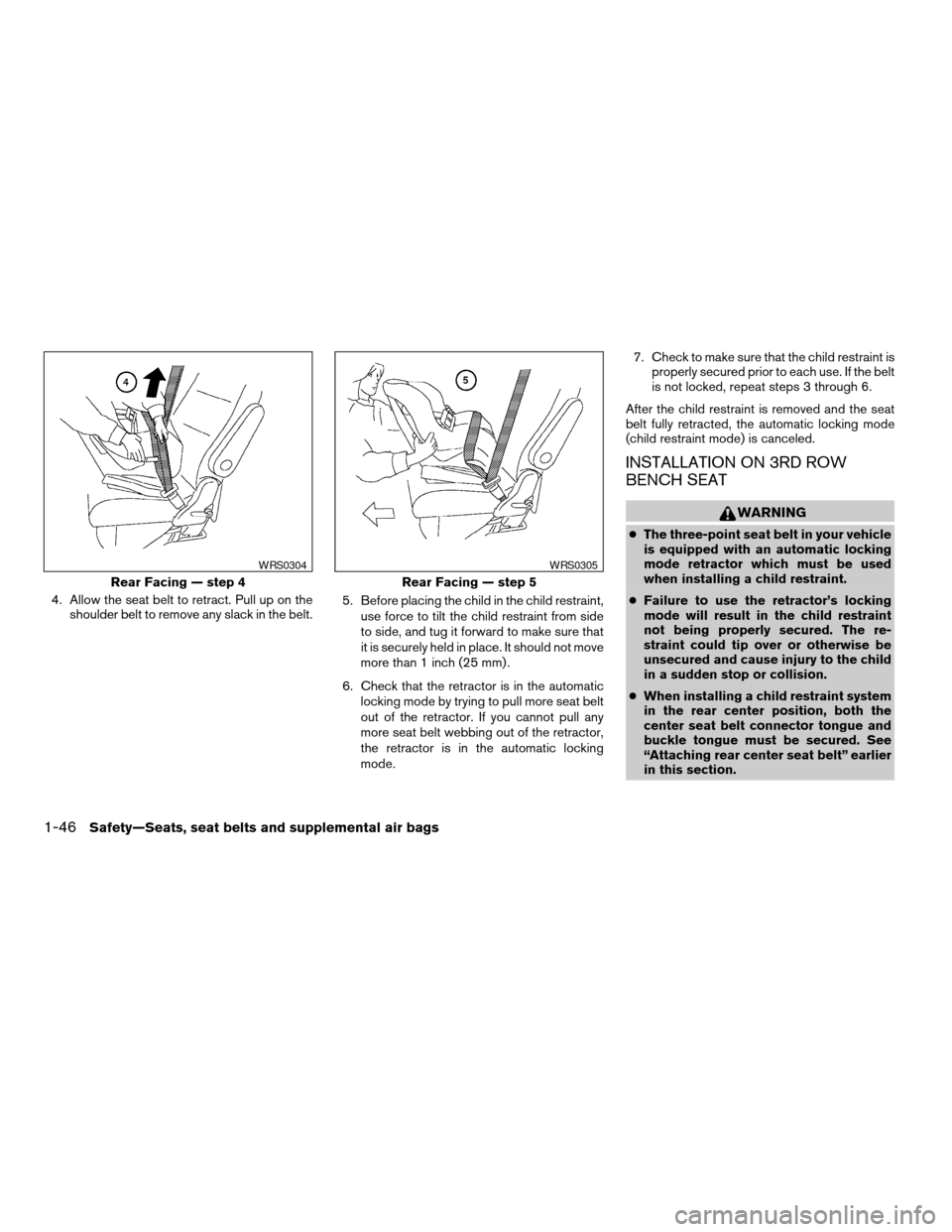
4. Allow the seat belt to retract. Pull up on the
shoulder belt to remove any slack in the belt.5. Before placing the child in the child restraint,
use force to tilt the child restraint from side
to side, and tug it forward to make sure that
it is securely held in place. It should not move
more than 1 inch (25 mm) .
6. Check that the retractor is in the automatic
locking mode by trying to pull more seat belt
out of the retractor. If you cannot pull any
more seat belt webbing out of the retractor,
the retractor is in the automatic locking
mode.7. Check to make sure that the child restraint is
properly secured prior to each use. If the belt
is not locked, repeat steps 3 through 6.
After the child restraint is removed and the seat
belt fully retracted, the automatic locking mode
(child restraint mode) is canceled.
INSTALLATION ON 3RD ROW
BENCH SEAT
WARNING
cThe three-point seat belt in your vehicle
is equipped with an automatic locking
mode retractor which must be used
when installing a child restraint.
cFailure to use the retractor’s locking
mode will result in the child restraint
not being properly secured. The re-
straint could tip over or otherwise be
unsecured and cause injury to the child
in a sudden stop or collision.
cWhen installing a child restraint system
in the rear center position, both the
center seat belt connector tongue and
buckle tongue must be secured. See
“Attaching rear center seat belt” earlier
in this section.
Rear Facing — step 4
WRS0304
Rear Facing — step 5
WRS0305
1-46Safety—Seats, seat belts and supplemental air bags
ZREVIEW COPY:Ð2004 Quest(van)
Owners Manual(owners)ÐUSA English(nna)
10/08/03Ðtbrooks
X
Page 63 of 320
Front facing
WARNING
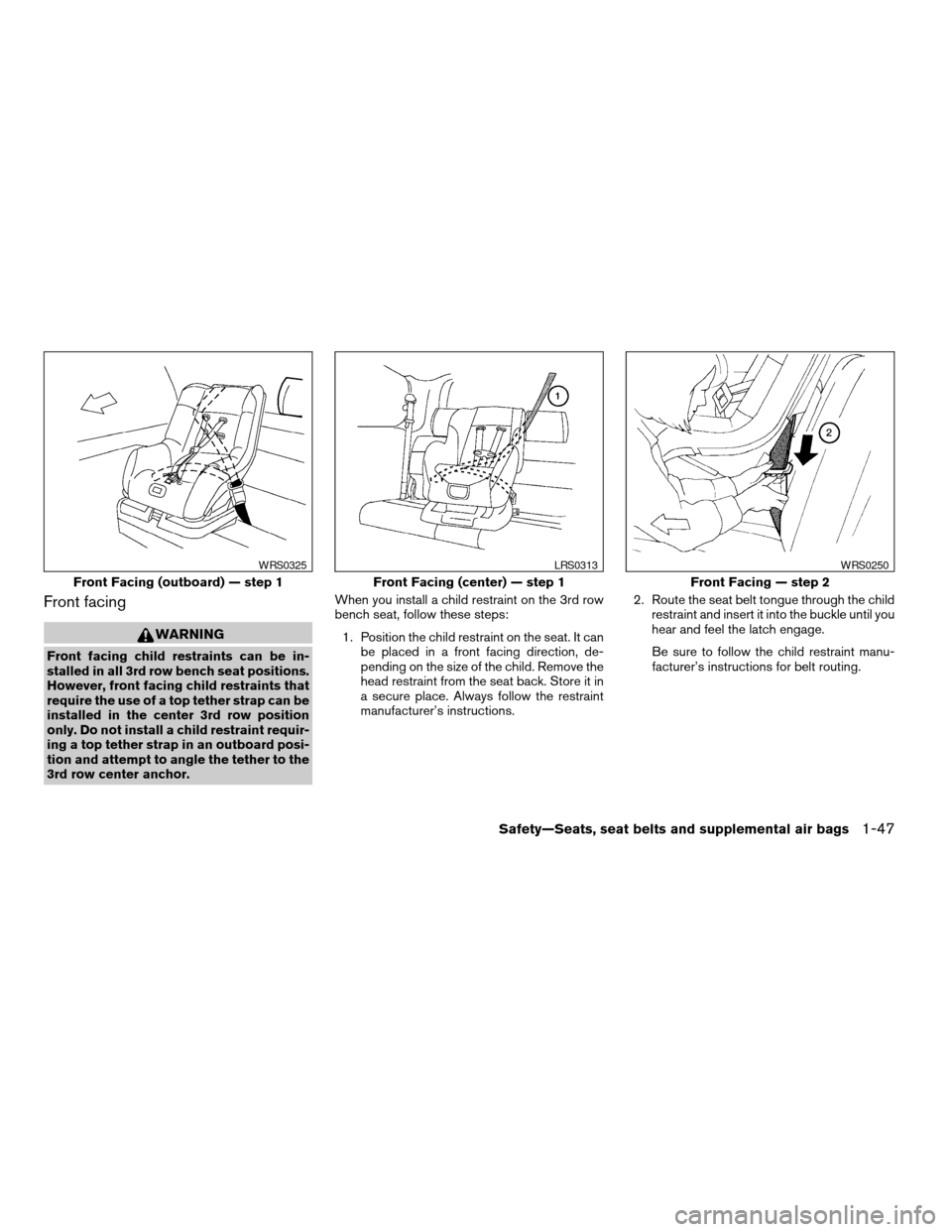
Front facing child restraints can be in-
stalled in all 3rd row bench seat positions.
However, front facing child restraints that
require the use of a top tether strap can be
installed in the center 3rd row position
only. Do not install a child restraint requir-
ing a top tether strap in an outboard posi-
tion and attempt to angle the tether to the
3rd row center anchor.When you install a child restraint on the 3rd row
bench seat, follow these steps:
1. Position the child restraint on the seat. It can
be placed in a front facing direction, de-
pending on the size of the child. Remove the
head restraint from the seat back. Store it in
a secure place. Always follow the restraint
manufacturer’s instructions.2. Route the seat belt tongue through the child
restraint and insert it into the buckle until you
hear and feel the latch engage.
Be sure to follow the child restraint manu-
facturer’s instructions for belt routing.
Front Facing (outboard) — step 1
WRS0325
Front Facing (center) — step 1
LRS0313
Front Facing — step 2
WRS0250
Safety—Seats, seat belts and supplemental air bags1-47
ZREVIEW COPY:Ð2004 Quest(van)
Owners Manual(owners)ÐUSA English(nna)
10/08/03Ðtbrooks
X
Page 68 of 320
WARNING
cAttach LATCH system compatible child
restraints only at the locations shown. If
a child restraint is not secured properly,
your child could be seriously injured or
killed in an accident.
cThe LATCH system anchors are de-
signed to withstand only those loads
imposed by correctly fitted child re-
straints. Under no circumstance are
they to be used for adult seat belts or
harnesses.Some child restraints include two rigid or
webbing-mounted attachments that can be con-
nected to two anchors located at certain seating
positions in your vehicle. This system is known as
the LATCH (Lower Anchors and Tethers for CHil-
dren) system. This system may also be referred to
as the ISOFIX or ISOFIX compatible system.
With this system, you do not have to use a vehicle
seat belt to secure the child restraint. Your vehicle
is equipped with special anchor points that are
used with LATCH system compatible child re-
straints. Check your child restraint for a label
stating that it is compatible with the LATCH sys-
tem. This information may also be in the child
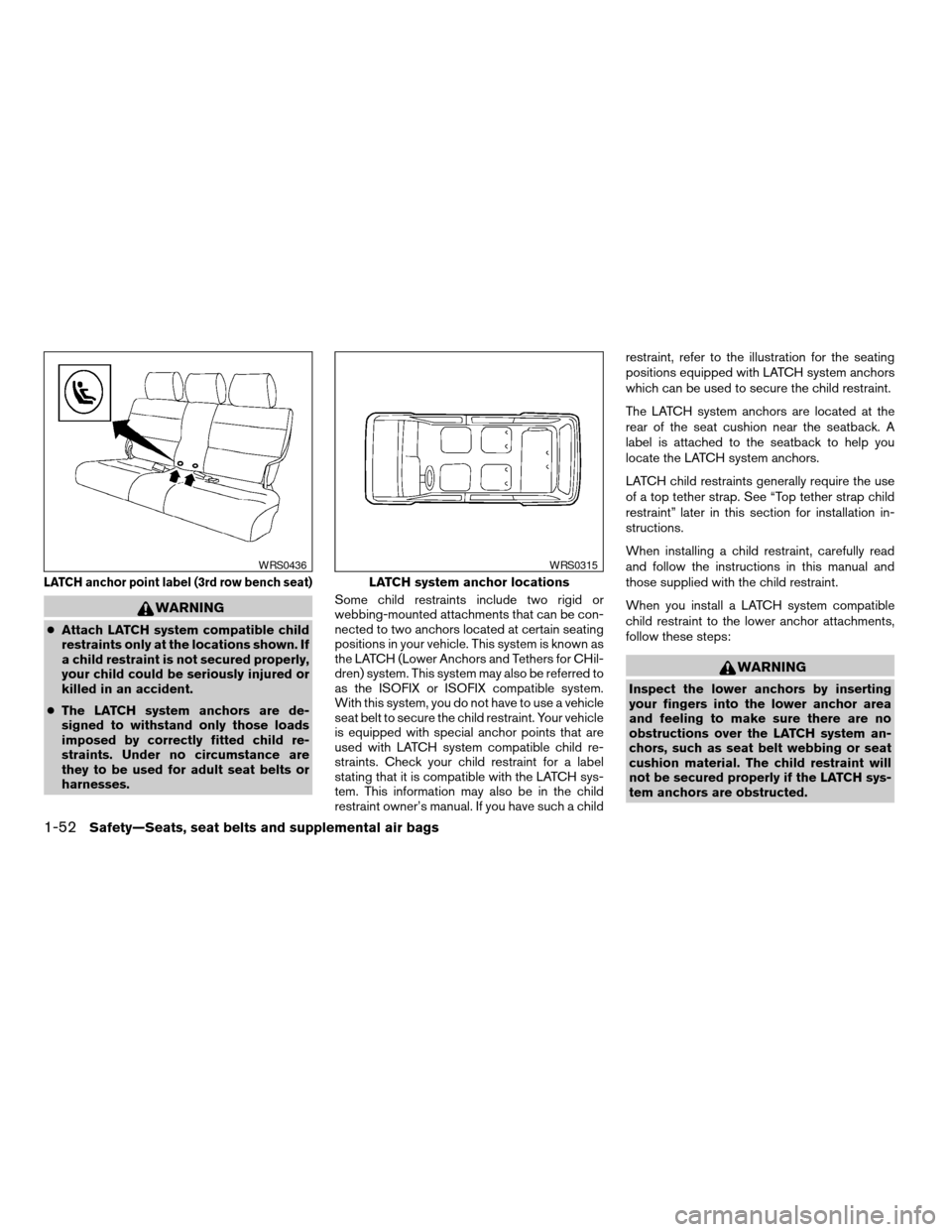
restraint owner’s manual. If you have such a childrestraint, refer to the illustration for the seating
positions equipped with LATCH system anchors
which can be used to secure the child restraint.
The LATCH system anchors are located at the
rear of the seat cushion near the seatback. A
label is attached to the seatback to help you
locate the LATCH system anchors.
LATCH child restraints generally require the use
of a top tether strap. See “Top tether strap child
restraint” later in this section for installation in-
structions.
When installing a child restraint, carefully read
and follow the instructions in this manual and
those supplied with the child restraint.
When you install a LATCH system compatible
child restraint to the lower anchor attachments,
follow these steps:
WARNING
Inspect the lower anchors by inserting
your fingers into the lower anchor area
and feeling to make sure there are no
obstructions over the LATCH system an-
chors, such as seat belt webbing or seat
cushion material. The child restraint will
not be secured properly if the LATCH sys-
tem anchors are obstructed.
LATCH anchor point label (3rd row bench seat)
WRS0436
LATCH system anchor locations
WRS0315
1-52Safety—Seats, seat belts and supplemental air bags
ZREVIEW COPY:Ð2004 Quest(van)
Owners Manual(owners)ÐUSA English(nna)
10/08/03Ðtbrooks
X
Page 69 of 320
1. To install the LATCH system compatible
child restraint, insert the child restraint
LATCH system anchor attachments into the
anchor points on the seat. If the child re-
straint is equipped with a top tether, see
“Top tether strap child restraint” later in this
section for installation instructions.
2. After attaching the child restraint and before
placing the child in it, use force to tilt the
child restraint from side to side and tug it
forward to make sure that the child restraint
is securely held in place. It should not move
more than 1 inch.
3. Check to make sure that the child restraint is
properly secured prior to each use.
TOP TETHER STRAP CHILD
RESTRAINT
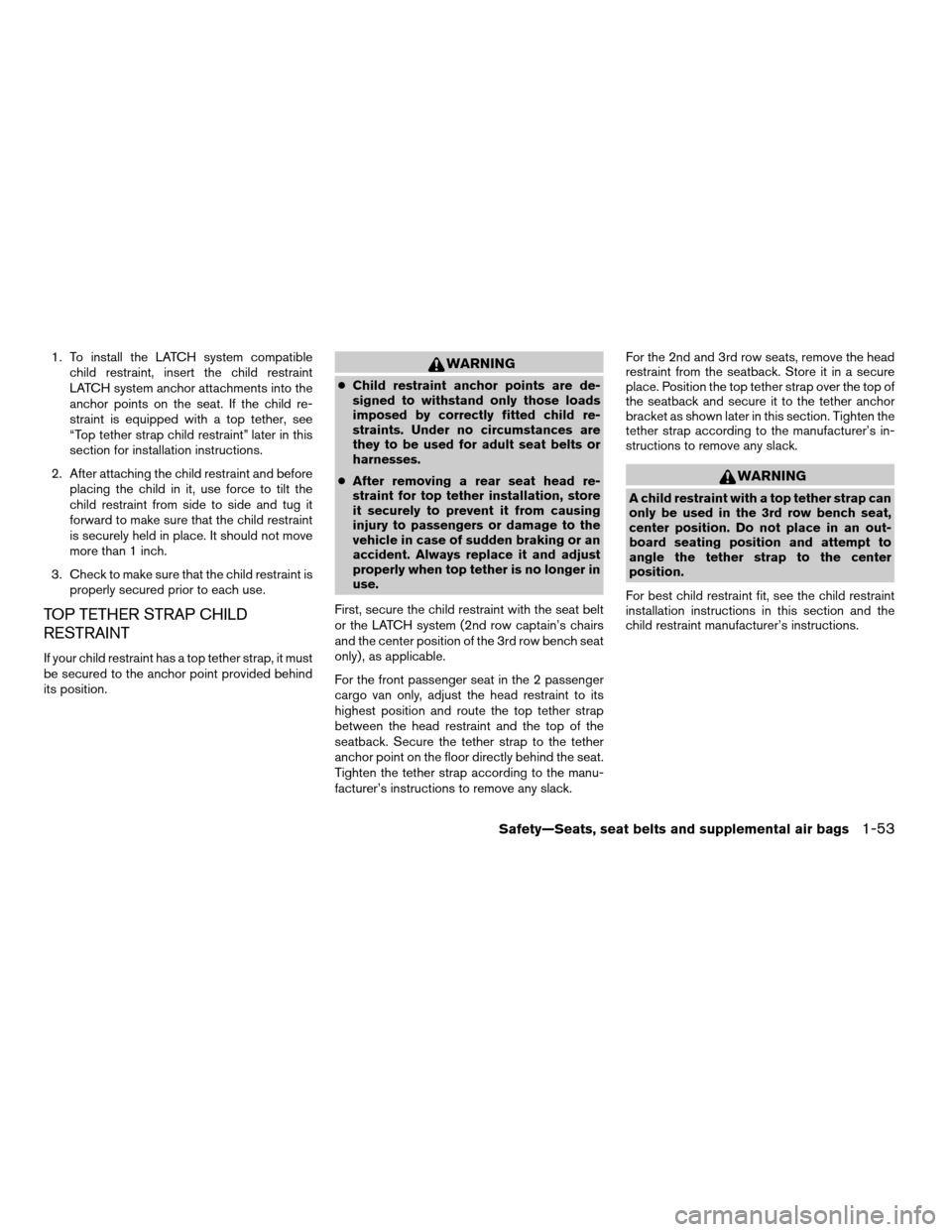
If your child restraint has a top tether strap, it must
be secured to the anchor point provided behind
its position.
WARNING
cChild restraint anchor points are de-
signed to withstand only those loads
imposed by correctly fitted child re-
straints. Under no circumstances are
they to be used for adult seat belts or
harnesses.
cAfter removing a rear seat head re-
straint for top tether installation, store
it securely to prevent it from causing
injury to passengers or damage to the
vehicle in case of sudden braking or an
accident. Always replace it and adjust
properly when top tether is no longer in
use.
First, secure the child restraint with the seat belt
or the LATCH system (2nd row captain’s chairs
and the center position of the 3rd row bench seat
only) , as applicable.
For the front passenger seat in the 2 passenger
cargo van only, adjust the head restraint to its
highest position and route the top tether strap
between the head restraint and the top of the
seatback. Secure the tether strap to the tether
anchor point on the floor directly behind the seat.
Tighten the tether strap according to the manu-
facturer’s instructions to remove any slack.For the 2nd and 3rd row seats, remove the head
restraint from the seatback. Store it in a secure
place. Position the top tether strap over the top of
the seatback and secure it to the tether anchor
bracket as shown later in this section. Tighten the
tether strap according to the manufacturer’s in-
structions to remove any slack.
WARNING
A child restraint with a top tether strap can
only be used in the 3rd row bench seat,
center position. Do not place in an out-
board seating position and attempt to
angle the tether strap to the center
position.
For best child restraint fit, see the child restraint
installation instructions in this section and the
child restraint manufacturer’s instructions.
Safety—Seats, seat belts and supplemental air bags1-53
ZREVIEW COPY:Ð2004 Quest(van)
Owners Manual(owners)ÐUSA English(nna)
10/08/03Ðtbrooks
X
Page 71 of 320
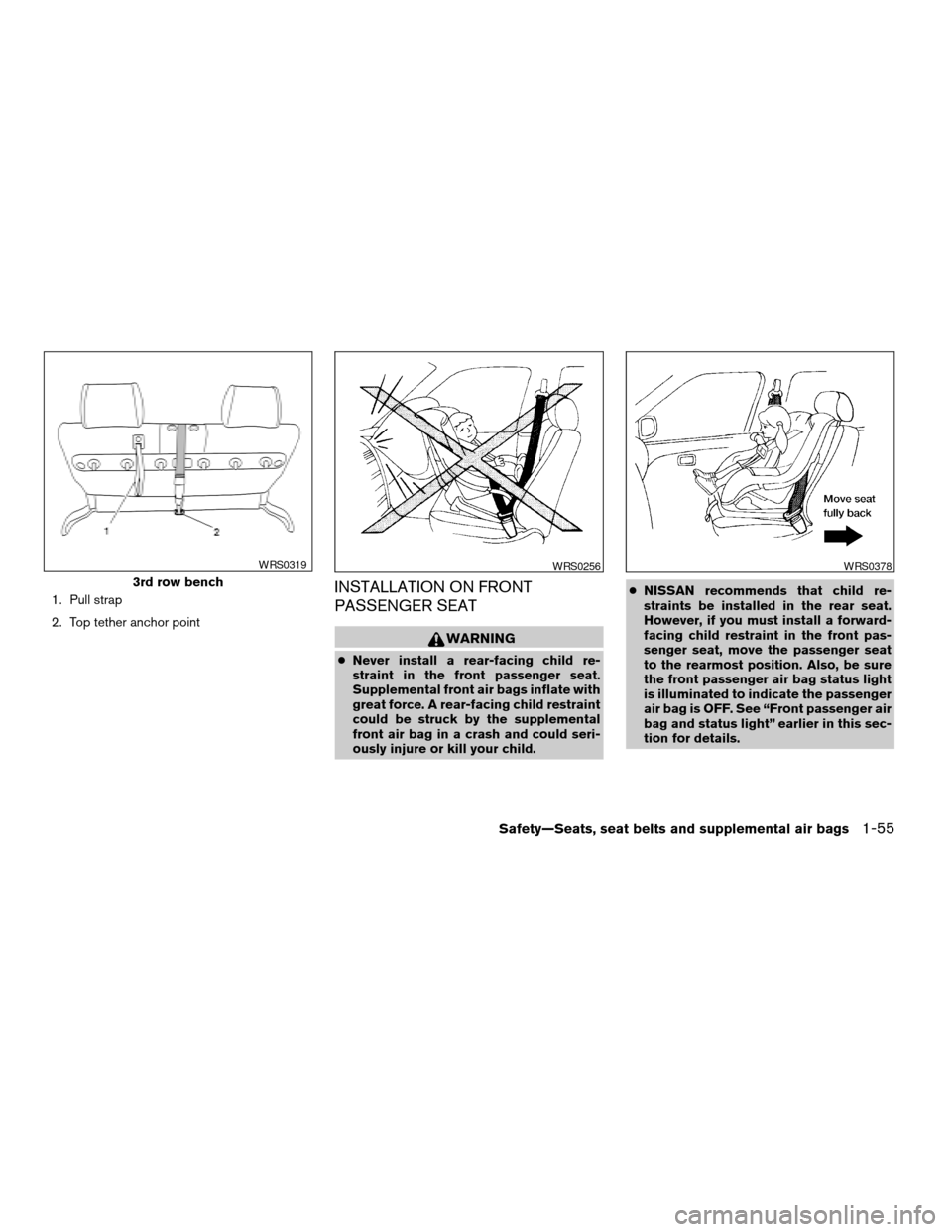
1. Pull strap
2. Top tether anchor pointINSTALLATION ON FRONT
PASSENGER SEAT
WARNING
cNever install a rear-facing child re-
straint in the front passenger seat.
Supplemental front air bags inflate with
great force. A rear-facing child restraint
could be struck by the supplemental
front air bag in a crash and could seri-
ously injure or kill your child.cNISSAN recommends that child re-
straints be installed in the rear seat.
However, if you must install a forward-
facing child restraint in the front pas-
senger seat, move the passenger seat
to the rearmost position. Also, be sure
the front passenger air bag status light
is illuminated to indicate the passenger
air bag is OFF. See “Front passenger air
bag and status light” earlier in this sec-
tion for details.
3rd row bench
WRS0319WRS0256WRS0378
Safety—Seats, seat belts and supplemental air bags1-55
ZREVIEW COPY:Ð2004 Quest(van)
Owners Manual(owners)ÐUSA English(nna)
10/08/03Ðtbrooks
X
Page 76 of 320

2 Instruments and controls
Instrument panel...................................2-2
Meters and gauges................................2-3
Speedometer and odometer.....................2-4
Tachometer....................................2-4
Engine coolant temperature gauge...............2-4
Fuel gauge....................................2-5
Warning/indicator lights and audible reminders.......2-6
Checking bulbs................................2-6
Warning lights.................................2-6
Indicator lights.................................2-9
Audible reminders.............................2-12
Security system..................................2-12
Nissan vehicle immobilizer system (NVIS)........2-12
Windshield wiper and washer switch...............2-13
Switch operation..............................2-13
Rear window wiper and washer switch..............2-14
Rear window and outside mirror (if so equipped)
defroster switch..................................2-15
Headlight and turn signal switch....................2-15
Headlight control switch........................2-15
Daytime running light system (Canada only)......2-18
Instrument brightness control...................2-18
Turn signal switch.............................2-19Fog light switch (if so equipped)................2-19
Cornering light................................2-19
Hazard warning flasher switch.....................2-20
Horn............................................2-20
Heated seat (if so equipped).......................2-21
Traction control system (TCS) off switch
(if so equipped)..................................2-22
Vehicle dynamic control (VDC) off switch
(if so equipped)..................................2-22
Rear sonar system off switch (if so equipped)........2-22
Power outlet.....................................2-23
Storage.........................................2-25
Note holder...................................2-25
Upper instrument panel storage
compartment..................................2-25
Lower instrument panel storage trays............2-26
Passenger seat storage tray (if so equipped).....2-26
Center console................................2-27
Glove box....................................2-28
Sunglasses holder.............................2-28
Convenience hook.............................2-29
Map pockets..................................2-29
Seatback pockets.............................2-30
ZREVIEW COPY:Ð2004 Quest(van)
Owners Manual(owners)ÐUSA English(nna)
10/08/03Ðtbrooks
X
Page 78 of 320

1. Driver side, center and passenger side
ventilators (P. 4-17)
2. Headlight and turn signal switch
(P. 2-15)
3. Steering wheel switch for audio control
(if so equipped) (P. 4-41)
4. Driver supplemental air bag/horn
(P. 1-15, P. 2-20)
5. Cruise control main/set switches
(P. 5-12)
6. Windshield wiper/washer switch and
rear window wiper/washer switch
(P. 2-13, 2-14)
7. Meters and gauges (P. 2-3)
8. Display screen/Navigation system*
(P. 4-2, P. 4-8)
9. Warning/indicator lights (P. 2-6)
10. Front passenger supplemental air bag
(P. 1-15)
11. Glove box (P. 2-28)
12. Climate controls (P. 4-17, 4-27)
13. Hazard warning flasher switch
(P. 2-20)
14. Audio system controls (P. 4-30)
15. Display screen/Navigation system*
controls (P. 4-2, 4-8)
16. Shift selector lever (P. 5-7)
WIC0599
INSTRUMENT PANEL
2-2Instruments and controls
ZREVIEW COPY:Ð2004 Quest(van)
Owners Manual(owners)ÐUSA English(nna)
10/08/03Ðtbrooks
X
Page 79 of 320

17. Tilt steering wheel control (P. 3-21)
18. Rear sonar system off switch (if so
equipped) (P. 2-22)
19. Vehicle dynamic control (VDC) off
switch (if so equipped) or Traction con-
trol system (TCS) off switch (if so
equipped) (P. 2-22, P. 2-22)
20. Lights on demand switch (P. 2-41)
21. Instrument brightness control (P. 2-18)
22. Outside mirror controls (P. 3-24)
*: Refer to the separate Navigation System Own-
er’s Manual (if so equipped) .
See the page number indicated in paren-
theses for operating details.
1. Tachometer
2. Warning/indicator lights
3. Speedometer
4. Odometer
5. Engine coolant temperature gauge/Fuel
gauge
LIC0459
METERS AND GAUGES
Instruments and controls2-3
ZREVIEW COPY:Ð2004 Quest(van)
Owners Manual(owners)ÐUSA English(nna)
10/08/03Ðtbrooks
X