2004 NISSAN ALTIMA warning
[x] Cancel search: warningPage 95 of 264
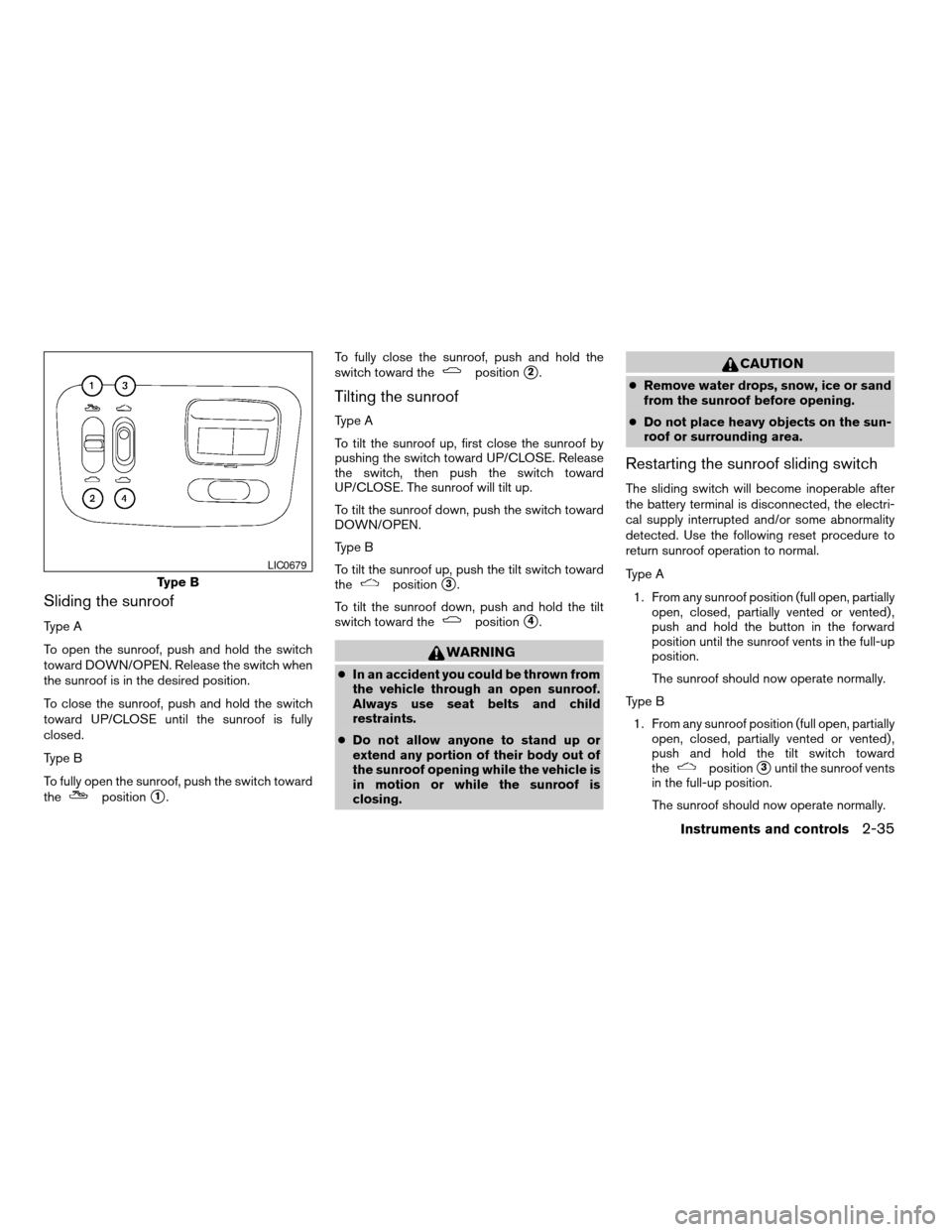
Sliding the sunroof
Type A
To open the sunroof, push and hold the switch
toward DOWN/OPEN. Release the switch when
the sunroof is in the desired position.
To close the sunroof, push and hold the switch
toward UP/CLOSE until the sunroof is fully
closed.
Type B
To fully open the sunroof, push the switch toward
the
positions1.To fully close the sunroof, push and hold the
switch toward the
positions2.
Tilting the sunroof
Type A
To tilt the sunroof up, first close the sunroof by
pushing the switch toward UP/CLOSE. Release
the switch, then push the switch toward
UP/CLOSE. The sunroof will tilt up.
To tilt the sunroof down, push the switch toward
DOWN/OPEN.
Type B
To tilt the sunroof up, push the tilt switch toward
the
positions3.
To tilt the sunroof down, push and hold the tilt
switch toward the
positions4.
WARNING
cIn an accident you could be thrown from
the vehicle through an open sunroof.
Always use seat belts and child
restraints.
cDo not allow anyone to stand up or
extend any portion of their body out of
the sunroof opening while the vehicle is
in motion or while the sunroof is
closing.
CAUTION
cRemove water drops, snow, ice or sand
from the sunroof before opening.
cDo not place heavy objects on the sun-
roof or surrounding area.
Restarting the sunroof sliding switch
The sliding switch will become inoperable after
the battery terminal is disconnected, the electri-
cal supply interrupted and/or some abnormality
detected. Use the following reset procedure to
return sunroof operation to normal.
Type A
1. From any sunroof position (full open, partially
open, closed, partially vented or vented) ,
push and hold the button in the forward
position until the sunroof vents in the full-up
position.
The sunroof should now operate normally.
Type B
1. From any sunroof position (full open, partially
open, closed, partially vented or vented) ,
push and hold the tilt switch toward
the
positions3until the sunroof vents
in the full-up position.
The sunroof should now operate normally.
Type B
LIC0679
Instruments and controls2-35
ZREVIEW COPY:Ð2004 Altima(l30)
Owners Manual(owners)ÐUSA English(nna)
10/10/03Ðtbrooks
X
Page 99 of 264
WARNING
cDo not use the HomeLinkTUniversal
Transceiver with any garage door
opener that lacks safety stop and re-
verse features as required by federal
safety standards. (These standards be-
came effective for opener models
manufactured after April 1, 1982) . A ga-
rage door opener which cannot detect
an object in the path of a closing garage
door and then automatically stop and
reverse, does not meet current federal
safety standards. Using a garage door
opener without these features in-
creases the risk of serious injury or
death.
cDuring the programming procedure
your garage door or security gate will
open and close (if the transmitter is
within range) . Make sure that people or
objects are clear of the garage door,
gate, etc. that you are programming.
cYour vehicle’s engine should be turned
off while programming the HomeLinkT
Universal Transceiver.
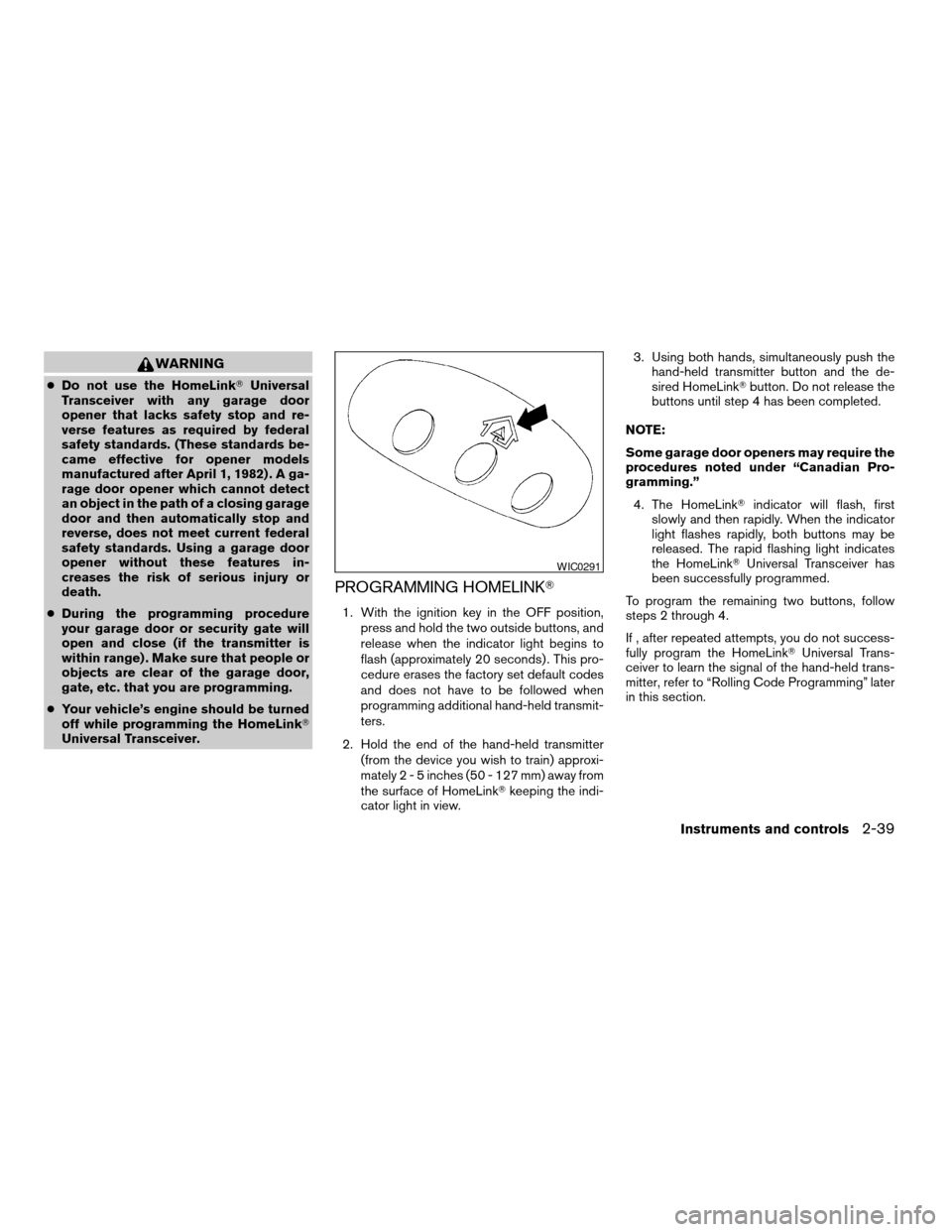
PROGRAMMING HOMELINKT
1. With the ignition key in the OFF position,
press and hold the two outside buttons, and
release when the indicator light begins to
flash (approximately 20 seconds) . This pro-
cedure erases the factory set default codes
and does not have to be followed when
programming additional hand-held transmit-
ters.
2. Hold the end of the hand-held transmitter
(from the device you wish to train) approxi-
mately2-5inches (50 - 127 mm) away from
the surface of HomeLinkTkeeping the indi-
cator light in view.3. Using both hands, simultaneously push the
hand-held transmitter button and the de-
sired HomeLinkTbutton. Do not release the
buttons until step 4 has been completed.
NOTE:
Some garage door openers may require the
procedures noted under “Canadian Pro-
gramming.”
4. The HomeLinkTindicator will flash, first
slowly and then rapidly. When the indicator
light flashes rapidly, both buttons may be
released. The rapid flashing light indicates
the HomeLinkTUniversal Transceiver has
been successfully programmed.
To program the remaining two buttons, follow
steps 2 through 4.
If , after repeated attempts, you do not success-
fully program the HomeLinkTUniversal Trans-
ceiver to learn the signal of the hand-held trans-
mitter, refer to “Rolling Code Programming” later
in this section.
WIC0291
Instruments and controls2-39
ZREVIEW COPY:Ð2004 Altima(l30)
Owners Manual(owners)ÐUSA English(nna)
10/10/03Ðtbrooks
X
Page 105 of 264
WARNING
cAlways have the doors locked while
driving. Along with the use of seat belts,
this provides greater safety in the event
of an accident by helping to prevent
persons from being thrown from the
vehicle. This also helps keep children
and others from unintentionally open-
ing the doors, and will help keep out
intruders.
cBefore opening any door, always look
for and avoid oncoming traffic.
cDo not leave children unattended inside
the vehicle. They could unknowingly ac-
tivate switches or controls. Unattended
children could become involved in seri-
ous accidents.
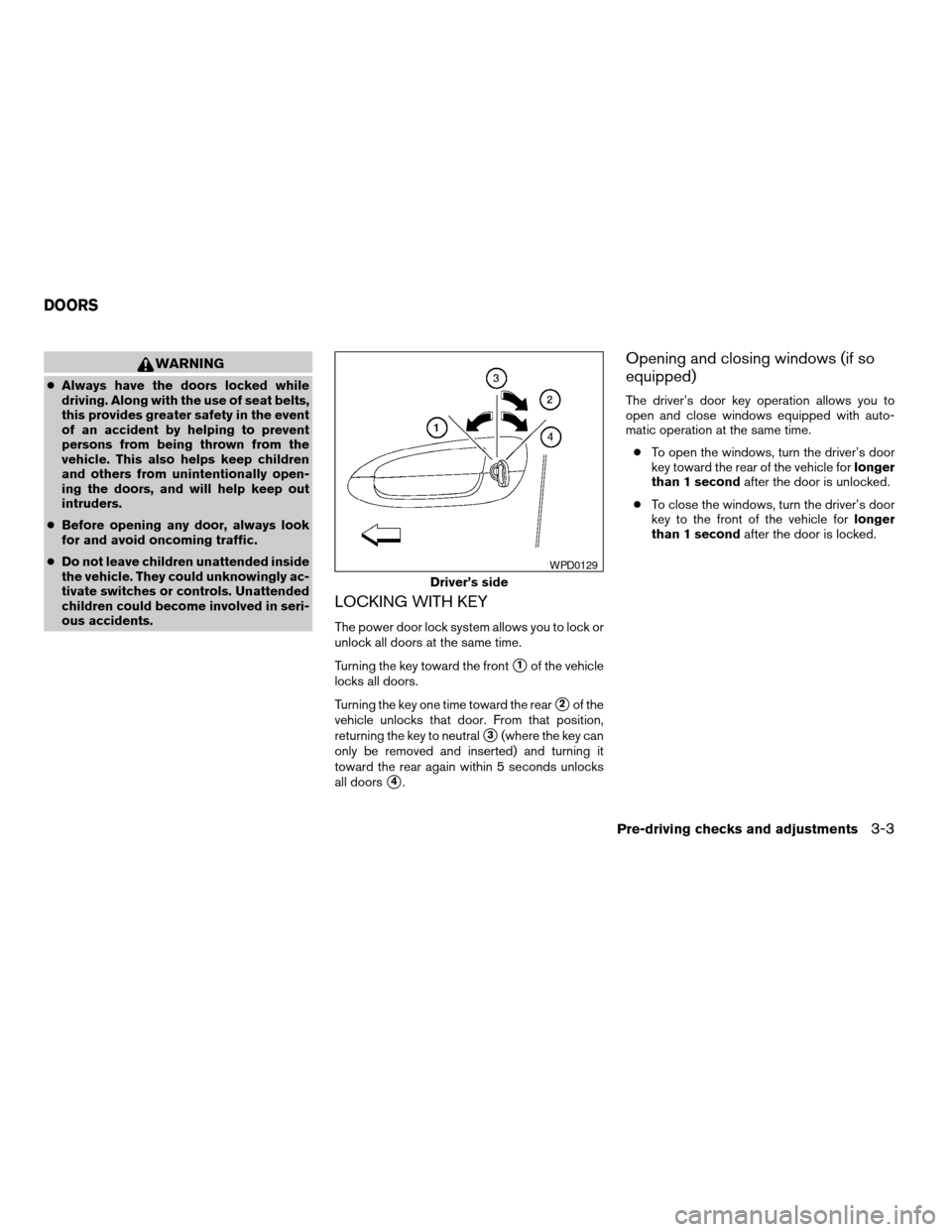
LOCKING WITH KEY
The power door lock system allows you to lock or
unlock all doors at the same time.
Turning the key toward the front
s1of the vehicle
locks all doors.
Turning the key one time toward the rear
s2of the
vehicle unlocks that door. From that position,
returning the key to neutral
s3(where the key can
only be removed and inserted) and turning it
toward the rear again within 5 seconds unlocks
all doors
s4.
Opening and closing windows (if so
equipped)
The driver’s door key operation allows you to
open and close windows equipped with auto-
matic operation at the same time.
cTo open the windows, turn the driver’s door
key toward the rear of the vehicle forlonger
than 1 secondafter the door is unlocked.
cTo close the windows, turn the driver’s door
key to the front of the vehicle forlonger
than 1 secondafter the door is locked.
Driver’s side
WPD0129
DOORS
Pre-driving checks and adjustments3-3
ZREVIEW COPY:Ð2004 Altima(l30)
Owners Manual(owners)ÐUSA English(nna)
10/13/03Ðtbrooks
X
Page 112 of 264
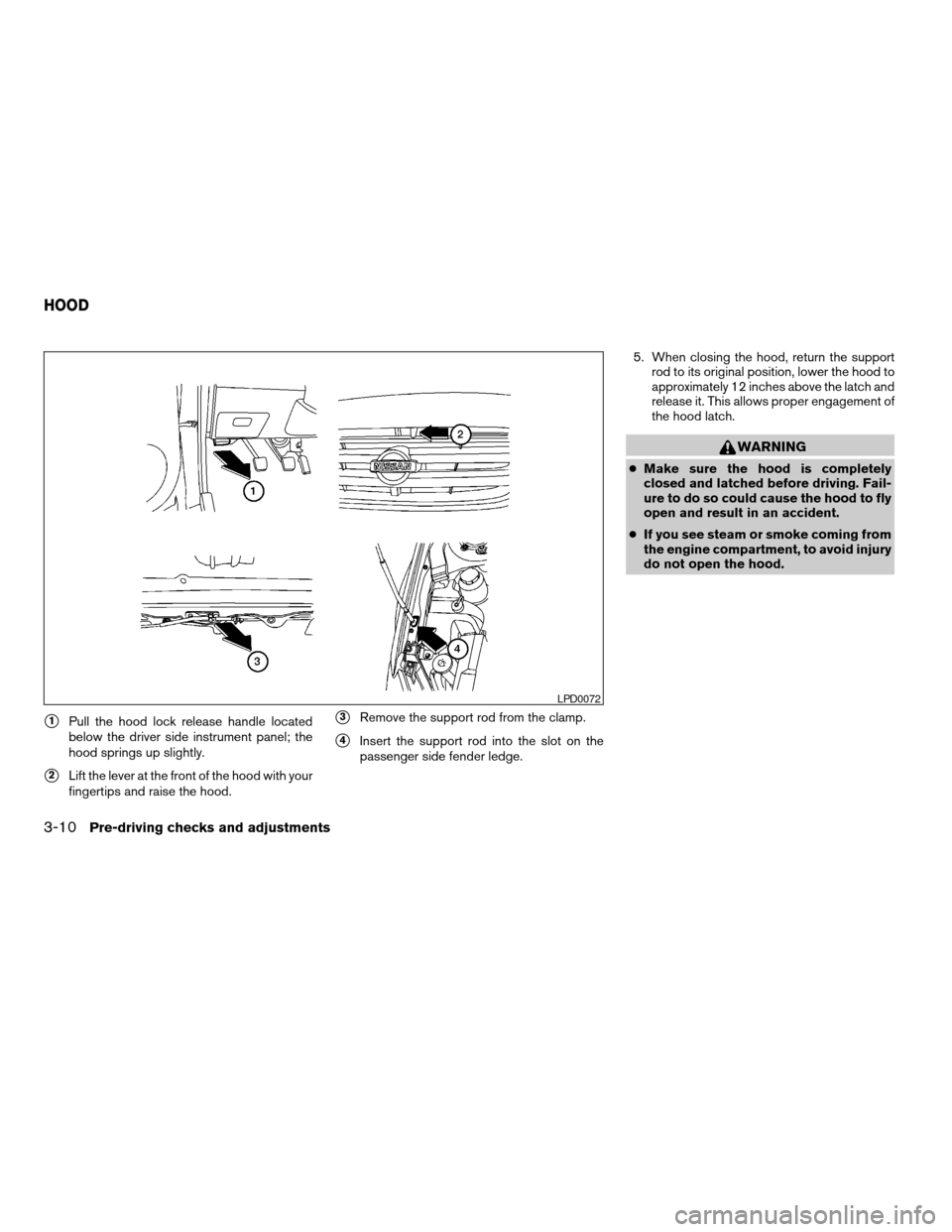
s1Pull the hood lock release handle located
below the driver side instrument panel; the
hood springs up slightly.
s2Lift the lever at the front of the hood with your
fingertips and raise the hood.
s3Remove the support rod from the clamp.
s4Insert the support rod into the slot on the
passenger side fender ledge.5. When closing the hood, return the support
rod to its original position, lower the hood to
approximately 12 inches above the latch and
release it. This allows proper engagement of
the hood latch.
WARNING
cMake sure the hood is completely
closed and latched before driving. Fail-
ure to do so could cause the hood to fly
open and result in an accident.
cIf you see steam or smoke coming from
the engine compartment, to avoid injury
do not open the hood.
LPD0072
HOOD
3-10Pre-driving checks and adjustments
ZREVIEW COPY:Ð2004 Altima(l30)
Owners Manual(owners)ÐUSA English(nna)
10/13/03Ðtbrooks
X
Page 113 of 264
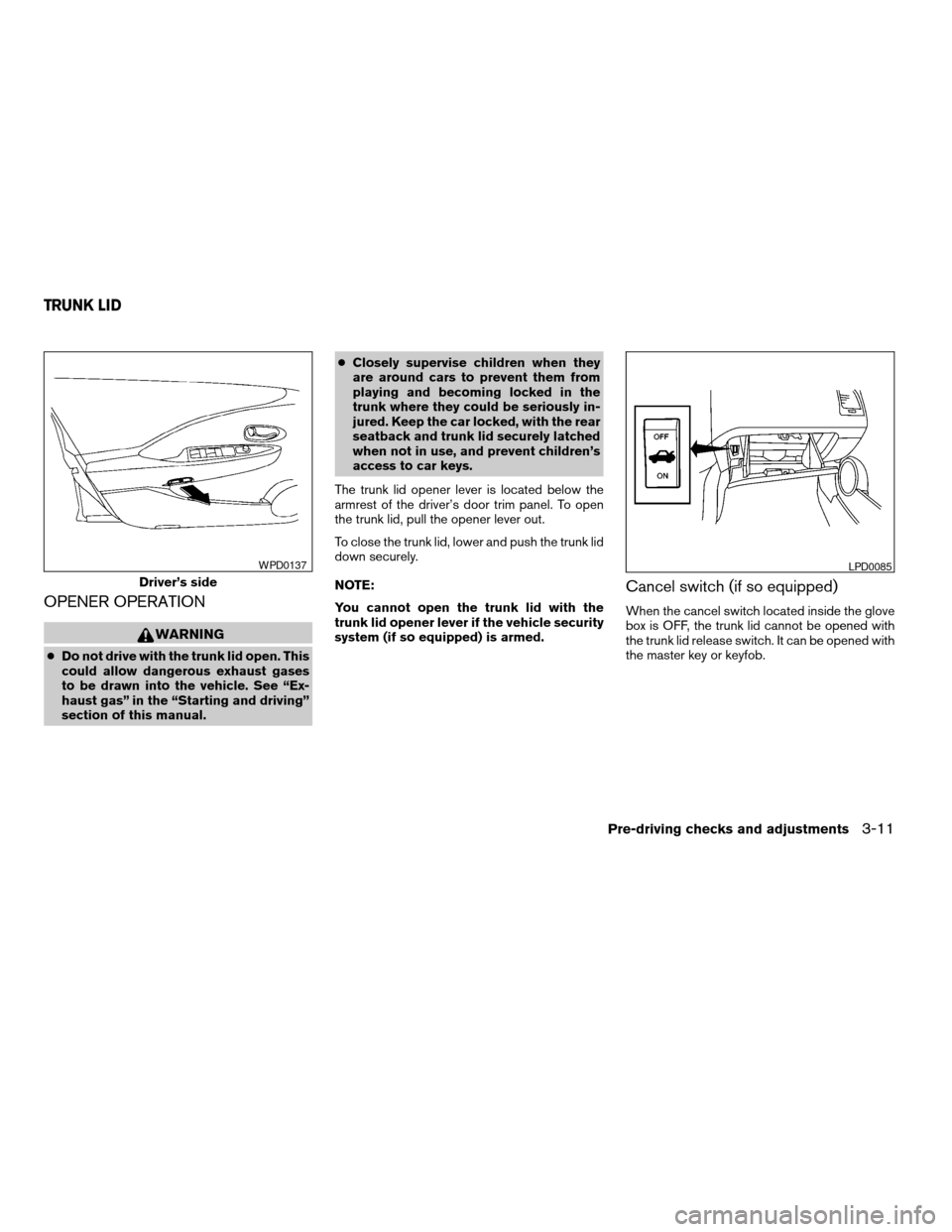
OPENER OPERATION
WARNING
cDo not drive with the trunk lid open. This
could allow dangerous exhaust gases
to be drawn into the vehicle. See “Ex-
haust gas” in the “Starting and driving”
section of this manual.cClosely supervise children when they
are around cars to prevent them from
playing and becoming locked in the
trunk where they could be seriously in-
jured. Keep the car locked, with the rear
seatback and trunk lid securely latched
when not in use, and prevent children’s
access to car keys.
The trunk lid opener lever is located below the
armrest of the driver’s door trim panel. To open
the trunk lid, pull the opener lever out.
To close the trunk lid, lower and push the trunk lid
down securely.
NOTE:
You cannot open the trunk lid with the
trunk lid opener lever if the vehicle security
system (if so equipped) is armed.
Cancel switch (if so equipped)
When the cancel switch located inside the glove
box is OFF, the trunk lid cannot be opened with
the trunk lid release switch. It can be opened with
the master key or keyfob.
Driver’s side
WPD0137LPD0085
TRUNK LID
Pre-driving checks and adjustments3-11
ZREVIEW COPY:Ð2004 Altima(l30)
Owners Manual(owners)ÐUSA English(nna)
10/13/03Ðtbrooks
X
Page 114 of 264
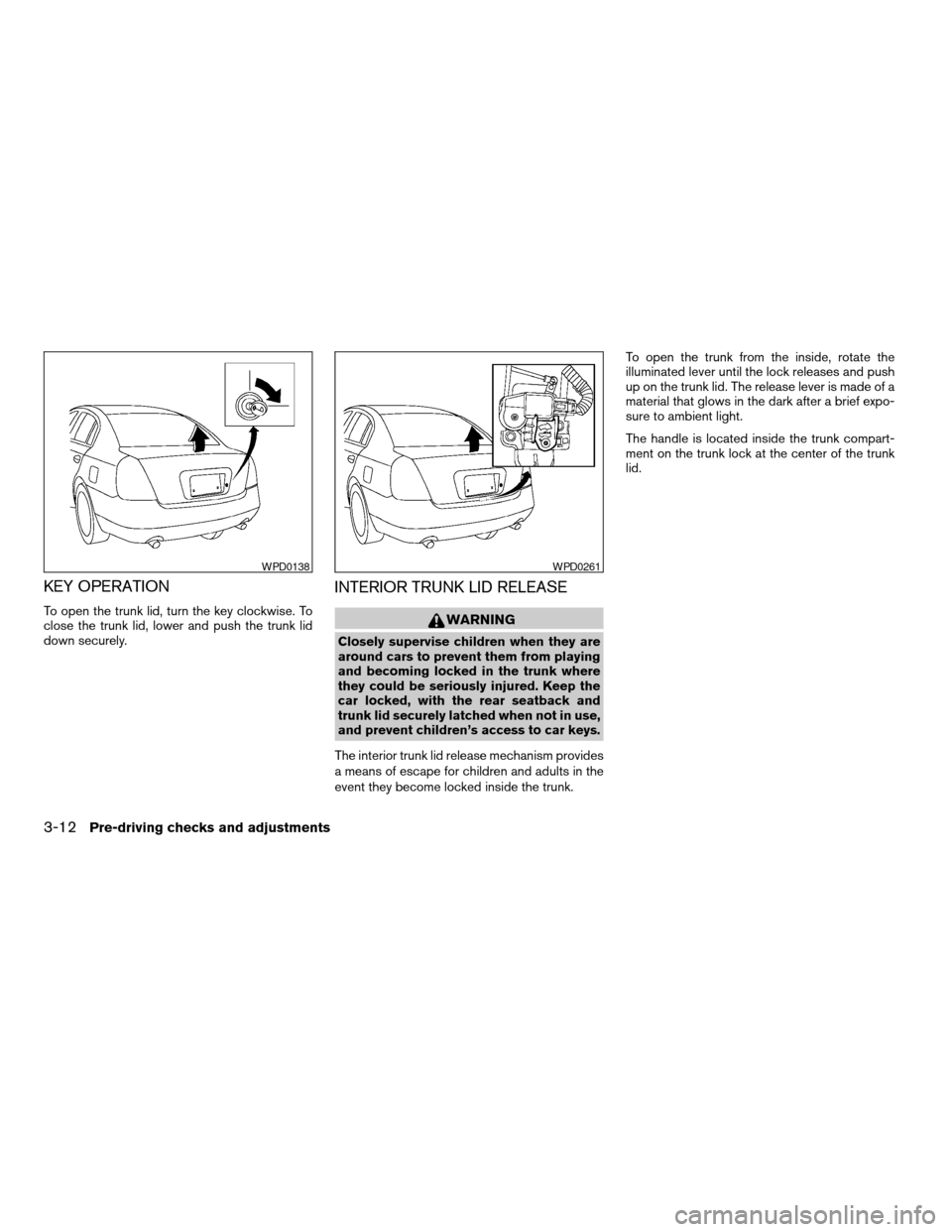
KEY OPERATION
To open the trunk lid, turn the key clockwise. To
close the trunk lid, lower and push the trunk lid
down securely.
INTERIOR TRUNK LID RELEASE
WARNING
Closely supervise children when they are
around cars to prevent them from playing
and becoming locked in the trunk where
they could be seriously injured. Keep the
car locked, with the rear seatback and
trunk lid securely latched when not in use,
and prevent children’s access to car keys.
The interior trunk lid release mechanism provides
a means of escape for children and adults in the
event they become locked inside the trunk.To open the trunk from the inside, rotate the
illuminated lever until the lock releases and push
up on the trunk lid. The release lever is made of a
material that glows in the dark after a brief expo-
sure to ambient light.
The handle is located inside the trunk compart-
ment on the trunk lock at the center of the trunk
lid.
WPD0138WPD0261
3-12Pre-driving checks and adjustments
ZREVIEW COPY:Ð2004 Altima(l30)
Owners Manual(owners)ÐUSA English(nna)
10/13/03Ðtbrooks
X
Page 115 of 264
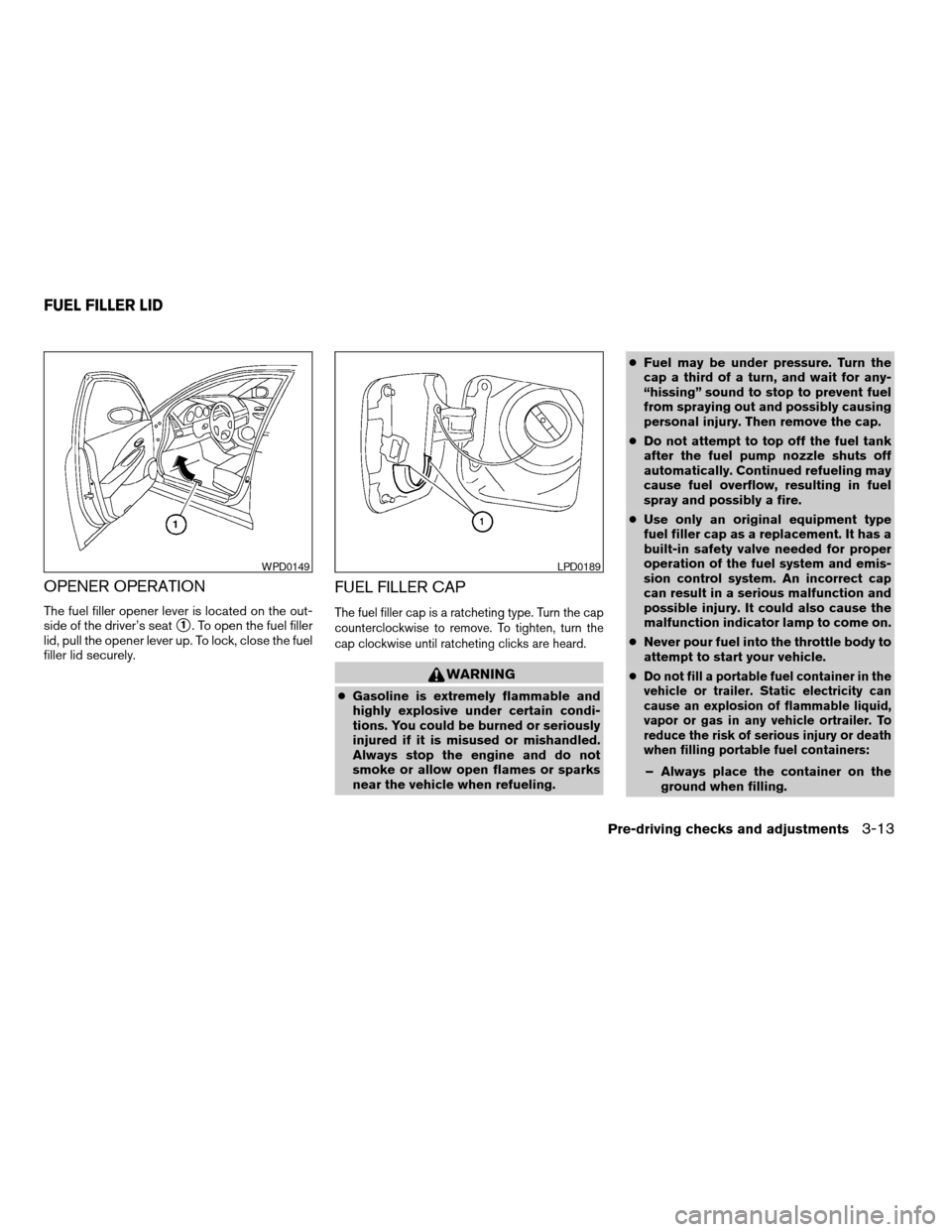
OPENER OPERATION
The fuel filler opener lever is located on the out-
side of the driver’s seat
s1. To open the fuel filler
lid, pull the opener lever up. To lock, close the fuel
filler lid securely.
FUEL FILLER CAP
The fuel filler cap is a ratcheting type. Turn the cap
counterclockwise to remove. To tighten, turn the
cap clockwise until ratcheting clicks are heard.
WARNING
cGasoline is extremely flammable and
highly explosive under certain condi-
tions. You could be burned or seriously
injured if it is misused or mishandled.
Always stop the engine and do not
smoke or allow open flames or sparks
near the vehicle when refueling.cFuel may be under pressure. Turn the
cap a third of a turn, and wait for any-
“hissing” sound to stop to prevent fuel
from spraying out and possibly causing
personal injury. Then remove the cap.
cDo not attempt to top off the fuel tank
after the fuel pump nozzle shuts off
automatically. Continued refueling may
cause fuel overflow, resulting in fuel
spray and possibly a fire.
cUse only an original equipment type
fuel filler cap as a replacement. It has a
built-in safety valve needed for proper
operation of the fuel system and emis-
sion control system. An incorrect cap
can result in a serious malfunction and
possible injury. It could also cause the
malfunction indicator lamp to come on.
cNever pour fuel into the throttle body to
attempt to start your vehicle.
c
Do not fill a portable fuel container in the
vehicle or trailer. Static electricity can
cause an explosion of flammable liquid,
vapor or gas in any vehicle ortrailer. To
reduce the risk of serious injury or death
when filling portable fuel containers:
– Always place the container on the
ground when filling.
WPD0149LPD0189
FUEL FILLER LID
Pre-driving checks and adjustments3-13
ZREVIEW COPY:Ð2004 Altima(l30)
Owners Manual(owners)ÐUSA English(nna)
10/13/03Ðtbrooks
X
Page 116 of 264
– Do not use electronic devices when
filling.
– Keep the pump nozzle in contact
with the container while you are fill-
ing it.
– Use only approved portable fuel con-
tainers for flammable liquid.
CAUTION
cIf fuel is spilled on the vehicle body,
flush it away with water to avoid paint
damage.
cTighten until the fuel filler cap clicks.
Failure to tighten the fuel filler cap
properly may cause the
mal-
function indicator lamp (MIL) to illumi-
nate. If the
lamp illuminates be-
cause the fuel filler cap is loose or
missing, tighten or install the cap and
continue to drive the vehicle.
The
lamp should turn off after a
few driving trips. If the
lamp
does not turn off after a few driving
trips, have the vehicle inspected by a
NISSAN dealer.cFor additional information, see the
“Malfunction indicator lamp (MIL)” in
the “Instruments and Controls” section
earlier in this manual.
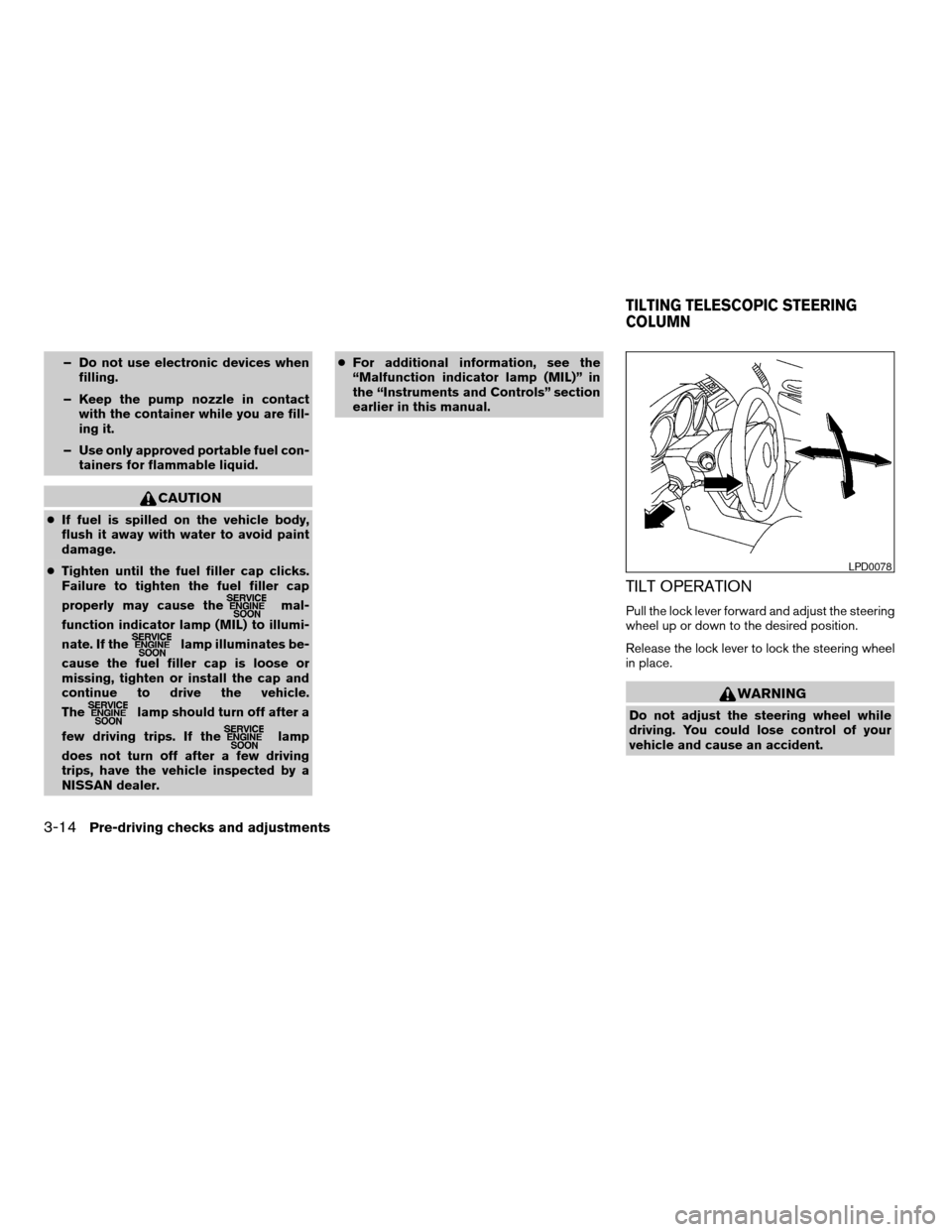
TILT OPERATION
Pull the lock lever forward and adjust the steering
wheel up or down to the desired position.
Release the lock lever to lock the steering wheel
in place.
WARNING
Do not adjust the steering wheel while
driving. You could lose control of your
vehicle and cause an accident.
LPD0078
TILTING TELESCOPIC STEERING
COLUMN
3-14Pre-driving checks and adjustments
ZREVIEW COPY:Ð2004 Altima(l30)
Owners Manual(owners)ÐUSA English(nna)
10/13/03Ðtbrooks
X