2004 NISSAN ALTIMA warning
[x] Cancel search: warningPage 55 of 264
LATCH (Lower Anchors and Tethers
for CHildren) SYSTEM
WARNING
cAttach LATCH system compatible child
restraints only at the locations shown. If
a child restraint is not secured properly,
your child could be seriously injured or
killed in an accident.
cDo not secure a child restraint in the
center rear seating position using the
LATCH system anchors. The child re-
straint will not be secured properly.cThe LATCH system anchors are de-
signed to withstand only those loads
imposed by correctly fitted child re-
straints. Under no circumstance are
they to be used for adult seat belts or
harnesses.
Some child restraints include two rigid or
webbing-mounted attachments that can be con-
nected to two anchors located at certain seating
positions in your vehicle. This system is known as
the LATCH (Lower Anchors and Tethers for CHil-
dren) system. This system may also be referred to
as the ISOFIX or ISOFIX compatible system.
With this system, you do not have to use a vehicle
seat belt to secure the child restraint. Your vehicle
is equipped with special anchor points that are
used with LATCH system compatible child re-
straints. Check your child restraint for a label
stating that it is compatible with the LATCH sys-
tem. This information may also be in the child
restraint owner’s manual. If you have such a child
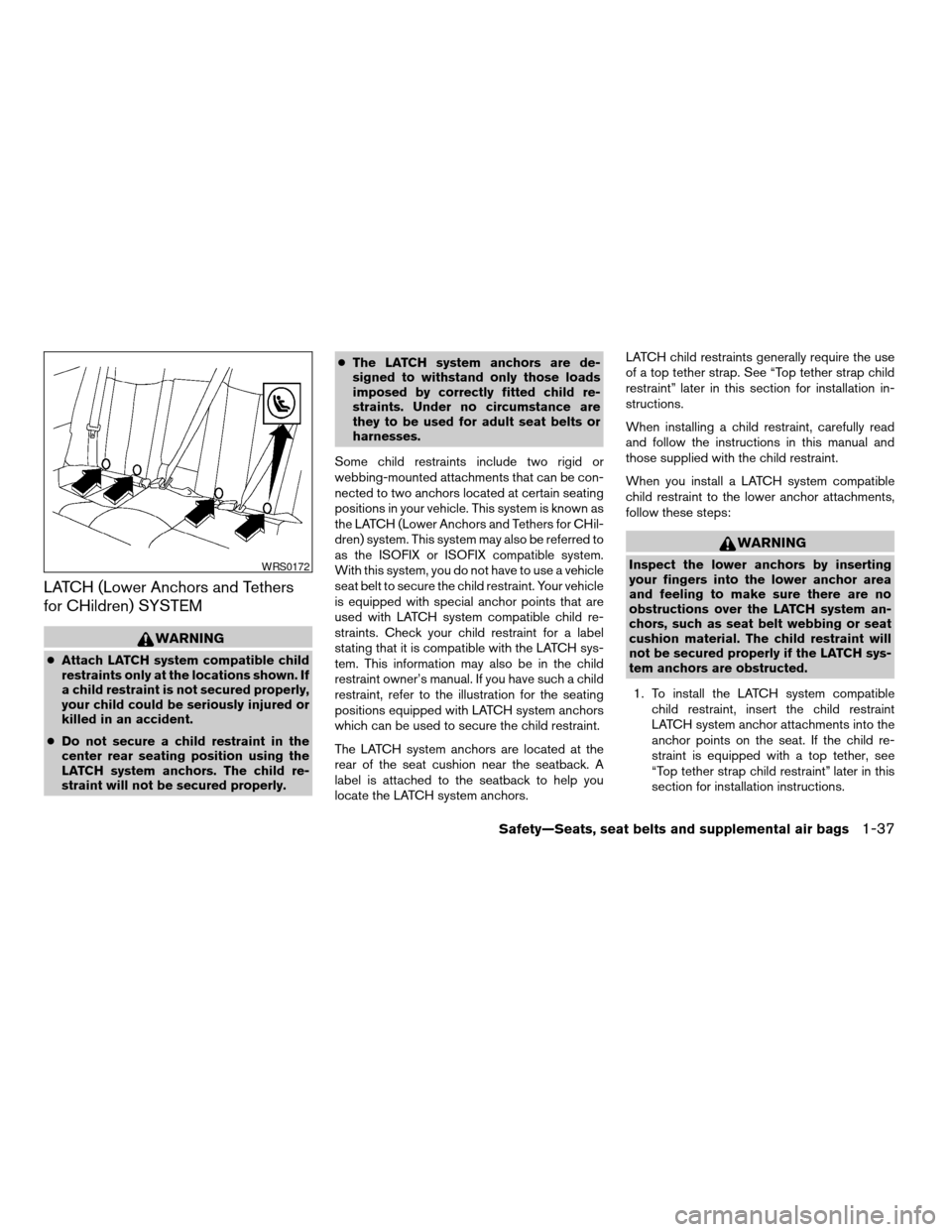
restraint, refer to the illustration for the seating
positions equipped with LATCH system anchors
which can be used to secure the child restraint.
The LATCH system anchors are located at the
rear of the seat cushion near the seatback. A
label is attached to the seatback to help you
locate the LATCH system anchors.LATCH child restraints generally require the use
of a top tether strap. See “Top tether strap child
restraint” later in this section for installation in-
structions.
When installing a child restraint, carefully read
and follow the instructions in this manual and
those supplied with the child restraint.
When you install a LATCH system compatible
child restraint to the lower anchor attachments,
follow these steps:
WARNING
Inspect the lower anchors by inserting
your fingers into the lower anchor area
and feeling to make sure there are no
obstructions over the LATCH system an-
chors, such as seat belt webbing or seat
cushion material. The child restraint will
not be secured properly if the LATCH sys-
tem anchors are obstructed.
1. To install the LATCH system compatible
child restraint, insert the child restraint
LATCH system anchor attachments into the
anchor points on the seat. If the child re-
straint is equipped with a top tether, see
“Top tether strap child restraint” later in this
section for installation instructions.WRS0172
Safety—Seats, seat belts and supplemental air bags1-37
ZREVIEW COPY:Ð2004 Altima(l30)
Owners Manual(owners)ÐUSA English(nna)
10/10/03Ðtbrooks
X
Page 56 of 264
2. After attaching the child restraint and before
placing the child in it, use force to tilt the
child restraint from side to side and tug it
forward to make sure that the child restraint
is securely held in place. It should not move
more than 1 inch.
3. Check to make sure that the child restraint is
properly secured prior to each use.
TOP TETHER STRAP CHILD
RESTRAINT
If your child restraint has a top tether strap, it must
be secured to the provided anchor point. First,
secure the child restraint with the rear seat belt.
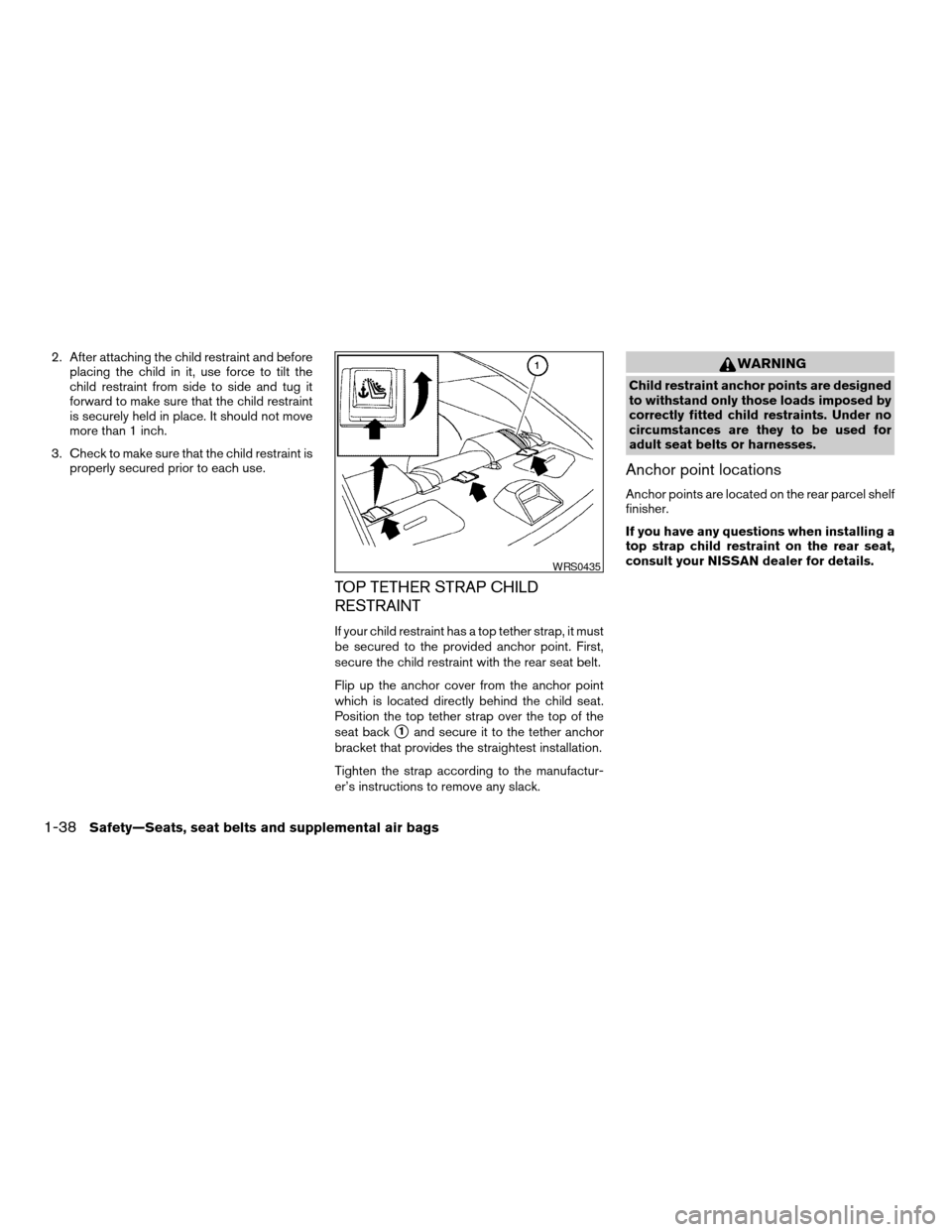
Flip up the anchor cover from the anchor point
which is located directly behind the child seat.
Position the top tether strap over the top of the
seat back
s1and secure it to the tether anchor
bracket that provides the straightest installation.
Tighten the strap according to the manufactur-
er’s instructions to remove any slack.
WARNING
Child restraint anchor points are designed
to withstand only those loads imposed by
correctly fitted child restraints. Under no
circumstances are they to be used for
adult seat belts or harnesses.
Anchor point locations
Anchor points are located on the rear parcel shelf
finisher.
If you have any questions when installing a
top strap child restraint on the rear seat,
consult your NISSAN dealer for details.
WRS0435
1-38Safety—Seats, seat belts and supplemental air bags
ZREVIEW COPY:Ð2004 Altima(l30)
Owners Manual(owners)ÐUSA English(nna)
10/10/03Ðtbrooks
X
Page 57 of 264
INSTALLATION ON FRONT
PASSENGER SEAT
WARNING
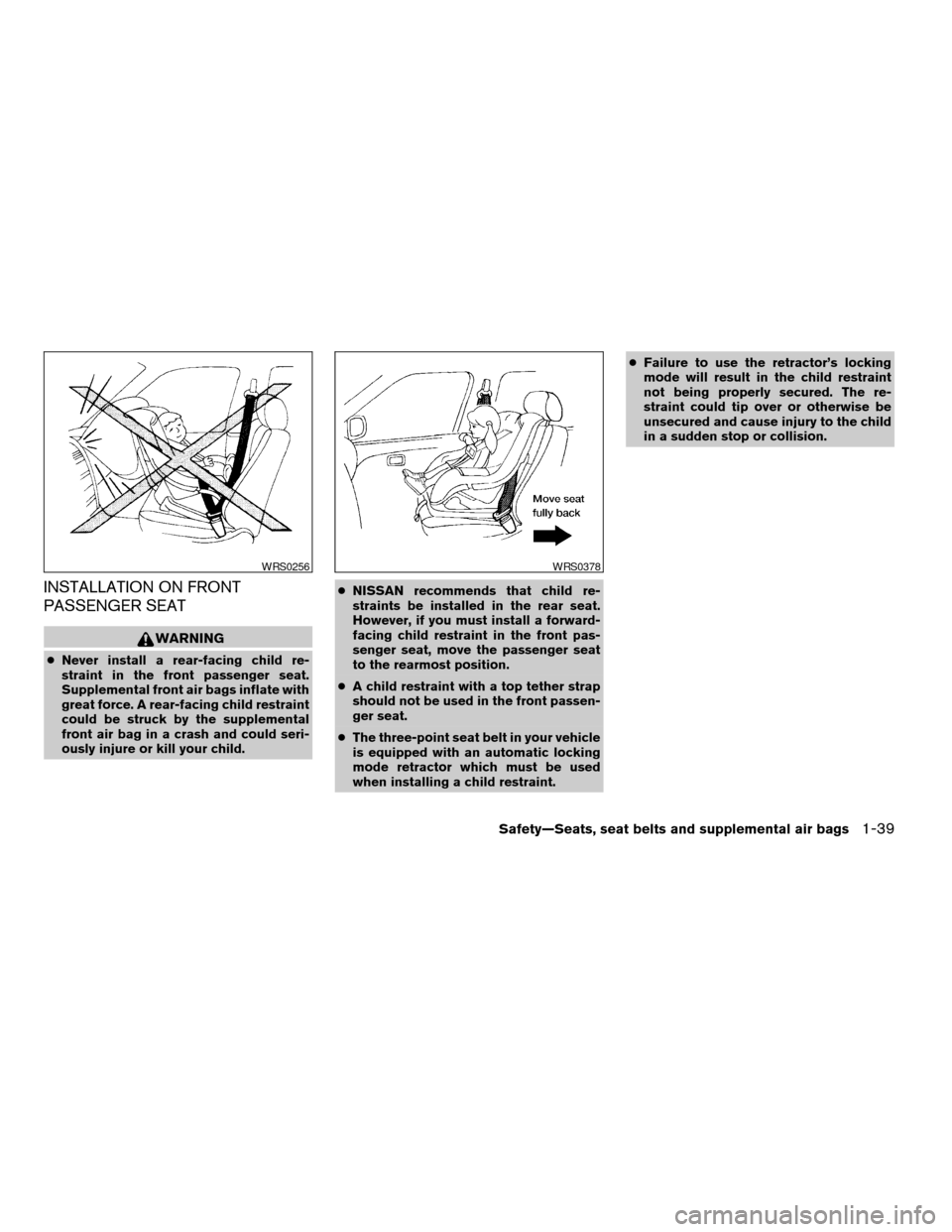
cNever install a rear-facing child re-
straint in the front passenger seat.
Supplemental front air bags inflate with
great force. A rear-facing child restraint
could be struck by the supplemental
front air bag in a crash and could seri-
ously injure or kill your child.cNISSAN recommends that child re-
straints be installed in the rear seat.
However, if you must install a forward-
facing child restraint in the front pas-
senger seat, move the passenger seat
to the rearmost position.
cA child restraint with a top tether strap
should not be used in the front passen-
ger seat.
cThe three-point seat belt in your vehicle
is equipped with an automatic locking
mode retractor which must be used
when installing a child restraint.cFailure to use the retractor’s locking
mode will result in the child restraint
not being properly secured. The re-
straint could tip over or otherwise be
unsecured and cause injury to the child
in a sudden stop or collision.
WRS0256WRS0378
Safety—Seats, seat belts and supplemental air bags1-39
ZREVIEW COPY:Ð2004 Altima(l30)
Owners Manual(owners)ÐUSA English(nna)
10/10/03Ðtbrooks
X
Page 60 of 264

2 Instruments and controls
Instrument panel...................................2-2
Meters and gauges................................2-3
Speedometer and odometer.....................2-4
Trip computer (if so equipped)...................2-5
Tachometer....................................2-6
Engine coolant temperature gauge...............2-7
Fuel gauge....................................2-8
Warning/indicator lights and audible reminders.......2-9
Checking bulbs................................2-9
Warning lights.................................2-9
Indicator lights................................2-11
Audible reminders.............................2-13
Security systems.................................2-13
Vehicle security system (if so equipped)..........2-13
Nissan vehicle immobilizer system (NVIS)........2-15
Windshield wiper and washer switch...............2-16
Switch operation..............................2-16
Rear window and outside mirror (if so equipped)
defroster switch..................................2-17
Headlight and turn signal switch....................2-18
Xenon headlights (if so equipped)...............2-18
Headlight control switch........................2-19
Daytime running light system (Canada only)......2-21Instrument brightness control...................2-21
Turn signal switch.............................2-22
Fog light switch (if so equipped)................2-22
Hazard warning flasher switch.....................2-23
Horn............................................2-24
Heated seat (if so equipped).......................2-24
Traction control system (TCS) off switch
(if so equipped)..................................2-25
Power outlet.....................................2-26
Storage.........................................2-27
Map pockets..................................2-27
Seatback pockets (if so equipped)..............2-27
Sunglasses holder.............................2-27
Cup holders..................................2-28
Glove box....................................2-29
Console box..................................2-29
Covered storage box...........................2-31
Cargo net (if so equipped)......................2-32
Windows........................................2-32
Power windows...............................2-32
Sunroof (if so equipped)...........................2-34
Automatic sunroof.............................2-34
Interior light......................................2-36
ZREVIEW COPY:Ð2004 Altima(l30)
Owners Manual(owners)ÐUSA English(nna)
10/13/03Ðtbrooks
X
Page 62 of 264

1. Headlight and turn signal switch
(P. 2-18)
2. Meters and gauges (P. 2-3)
3. Windshield wiper/washer switch
(P. 2-16)
4. Center ventilator (P. 4-2)
5. Audio system controls (if so equipped)
(P. 4-14)
6. Front passenger supplemental air bag
(P. 1-8)
7. Glove box (P. 2-29)
8. Heater and air conditioner (manual)
(P. 4-3)
9. Hazard warning flasher switch
(P. 2-23)
10. Power outlet (P. 2-26)
11. Rear window defroster switch (manual)
(P. 2-17)
12. Cruise control main/set switch (if so
equipped) (P. 5-12)
13. Driver supplemental air bag (P. 1-8)
14. Steering wheel switch for audio control
(if so equipped) (P. 4-29)
15. Tilt/telescopic steering wheel controls
(P. 3-14)
16. Traction control system (TCS) off
switch (if so equipped) (P. 2-25)
WIC0605
INSTRUMENT PANEL
2-2Instruments and controls
ZREVIEW COPY:Ð2004 Altima(l30)
Owners Manual(owners)ÐUSA English(nna)
10/13/03Ðtbrooks
X
Page 63 of 264

17. Instrument brightness control (P. 2-21)
18. Outside mirror remote control (P. 3-17)
19. Front defroster switch (automatic)
(P. 4-10)
20. Heater and air conditioner (automatic)
(P. 4-10)
21. Rear window defroster switch (auto-
matic) (P. 2-17)
1. Tachometer
2. Warning/indicator lights
3. Speedometer
4. Automatic transmission position indica-
tor lights (if so equipped)
5. Engine coolant temperature gauge6. Fuel gauge
7. Odometer/trip odometer
LIC0606
METERS AND GAUGES
Instruments and controls2-3
ZREVIEW COPY:Ð2004 Altima(l30)
Owners Manual(owners)ÐUSA English(nna)
10/13/03Ðtbrooks
X
Page 65 of 264

TRIP COMPUTER (if so equipped)
The display of the trip computer is situated in the
speedometer display. When the ignition is turned
to ON, the display scrolls all the modes of the trip
computer and then shows the mode chosen be-
fore the ignition switch is turned OFF.
If the battery terminal is disconnected,
push the trip computer mode switch more
than 1 second to activate the computer.
When the ignition switch is turned to ON, modes
of the trip computer can be selected by pushing
the trip mode switch on the steering wheel switch
for audio controls or by the trip computer change
button. The following modes can be selected:
Outside air temperature (ICY-°F or °C)
The outside air temperature is displayed in °F or
°C.
The outside air temperature mode includes a low
temperature warning feature: below 37°F (3°C) ,
the outside air temperature mode is automatically
selected and ICY will illuminate in order to draw
the driver’s attention. Press the mode switch if
you wish to return to the mode that was selectedbefore the warning occurred. The ICY indicator
will continue blinking as long as the temperature
remains below 39°F (4°C) .
The ambient temperature sensor is located in
front of the radiator. The sensor may be affected
by road or engine heat, wind directions and other
driving conditions. The display may differ from the
actual ambient temperature or the temperature
displayed on various signs or billboards.
Distance to empty (dte—mile or km)
The distance to empty (dte) mode provides you
with an estimation of the distance that can be
driven before refueling. The dte is constantly be-
ing calculated, based on the amount of fuel in the
fuel tank and the actual fuel consumption.
The display is updated every 30 seconds.
The dte mode includes a low range warning
feature: when the fuel level is low, the dte mode is
automatically selected and the digits blink in or-
der to draw the driver’s attention. Press the mode
switch if you wish to return to the mode that was
selected before the warning occurred. The dte
mark (dte) will remain blinking until the vehicle is
refueled.
When the fuel level drops even lower, the dte
display will change to (----) .
WIC0267
Instruments and controls2-5
ZREVIEW COPY:Ð2004 Altima(l30)
Owners Manual(owners)ÐUSA English(nna)
10/10/03Ðtbrooks
X
Page 66 of 264
NOTE:
cIf the amount of fuel added while the
ignition switch is OFF is small, the dis-
play just before the ignition switch is
turned OFF may continue to be dis-
played.
cWhen driving uphill or rounding curves,
the fuel in the tank shifts, which may
momentarily change the display.
Average fuel consumption (mpg or
l/100km)
The average fuel consumption mode shows the
average fuel consumption since the last reset.
Resetting is done by pressing the mode switch
for more than approximately 1 second. The dis-
play is updated every 30 seconds. At about the
first 1/3 miles (500 m) after a reset, the display
shows (----) .
Average speed (mph or km/h)
The average speed mode shows the average
vehicle speed since last reset. Resetting is done
by pressing the mode switch for more than ap-
proximately 1 second. The display is updated
every 30 seconds. The first 30 seconds after a
reset, the display shows (----) .
Journey time
The journey time mode shows the time since the
last reset. The displayed time can be reset by
pressing the mode switch for more than approxi-
mately 1 second.
NOTE:
If a low temperature warning and low range
warning occur simultaneously, other dis-
play modes switch automatically to the
outside temperature display.
When the mode switch is pushed, the dis-
play switches to the mode chosen before
the warning display, and the outside air
temperature indicator marked ICY will
blink.
TACHOMETER
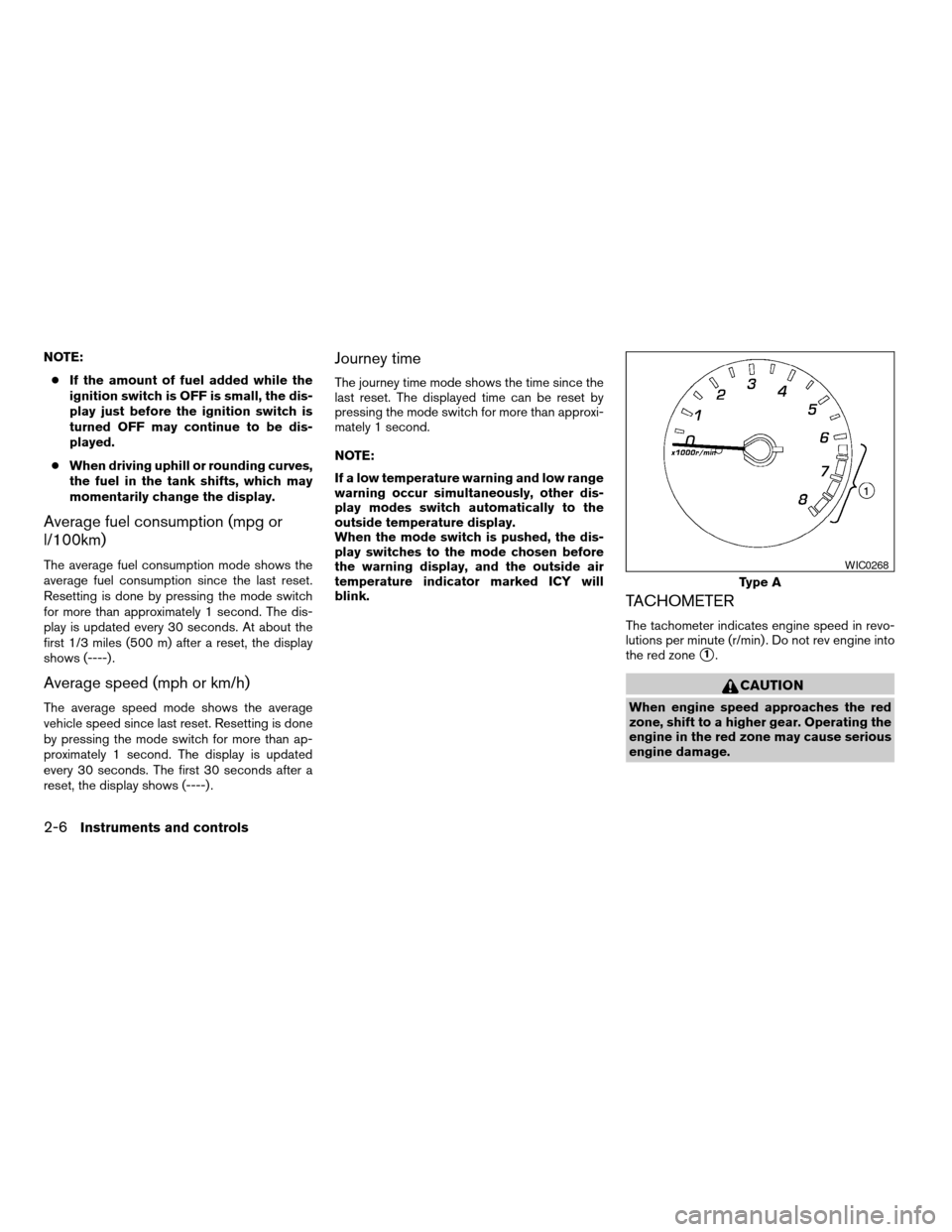
The tachometer indicates engine speed in revo-
lutions per minute (r/min) . Do not rev engine into
the red zone
s1.
CAUTION
When engine speed approaches the red
zone, shift to a higher gear. Operating the
engine in the red zone may cause serious
engine damage.
Type A
WIC0268
2-6Instruments and controls
ZREVIEW COPY:Ð2004 Altima(l30)
Owners Manual(owners)ÐUSA English(nna)
10/10/03Ðtbrooks
X