Page 187 of 442

187 Controls in detail
Automatic climate control*
The automatic climate control is a 4-zone
intelligent climate control system. Your ve-
hicle interior is divided into 4 zones.With the help of a sun sensor, the automat-
ic climate control determines the relation
of the sun to the vehicle and automatically
adjusts the inside temperature for every in-
dividual zone.
You can set the temperature for each of
the 4 zones separately. These settings can
be assigned to a SmartKey and stored in
memory (
�page 152).
The automatic climate control is operation-
al whenever the engine is running. It cools
the vehicle’s interior according to the an-
gle and intensity of the sun’s rays, the out-
side temperature and the selected
temperature. You can operate the climate
control system in either the automatic or
manual mode.
Warning!
G
When operating the automatic climate con-
trol, the air that enters the passenger com-
partment through the air vents in the
footwell can be very hot or very cold (de-
pending on the set temperature). This may
cause burn or frostbite to unprotected skin
in the immediate area of the air vents. Al-
ways keep sufficient distance between un-
protected parts of the body and the footwell
air vents. If necessary change the air flow
using the air distribution controls
(�page 186) to direct the air away from the
footwell air vents.
Page 188 of 442
188 Controls in detailAutomatic climate control*Nearly all dust particles, pollutants and
odors are filtered out before outside air en-
ters the passenger compartment through
the air distribution system.
The air conditioning will not engage (no
cooling) if the AC
OFF
mode is selected
(
�page 186).
Setting the temperature
Use temperature control3 for the left
side or5 for the right side to separately
adjust the air temperature on each side of
the passenger compartment. You should
raise or lower the temperature setting in
small increments, preferably starting
at 72°F (22°C).
Warning!
G
Follow the recommended settings for heat-
ing and cooling given on the following pag-
es. Otherwise the windows could fog up,
impairing visibility and endangering you and
others.
iSevere conditions (e.g. strong air pollu-
tion) may require replacement of the fil-
ter before its scheduled interval. A
clogged filter will reduce the air volume
to the interior.
If the vehicle interior is hot, ventilate
the interior before driving off.
Keep the air intake grille in front of the
windshield free of snow and debris.
Do not obstruct air flow by placing ob-
jects on the air flow-through exhaust
slots below the rear window.
iWhen operating the climate control
system in automatic mode, you will
only rarely need to adjust the tempera-
ture, air volume and air distribution.
Page 189 of 442
189 Controls in detail
Automatic climate control*
Increasing�
Push top of temperature control rocker
switch3 and / or5.
The automatic climate control system
will correspondingly adjust the interior
air temperature.
Decreasing
�
Push bottom of temperature control
rocker switch3 and / or5.
The automatic climate control system
will correspondingly adjust the interior
air temperature.
Heating:
Only in manual air distribution mode is it
possible to lower the temperature in the
headroom by adding outside air using
thumbwheel7 (
�page 184) in the dash-
board.
Adjusting air distribution
Use the air distribution controls1 and7
(�page 176) to separately adjust the air
distribution on each side of the passenger
compartment. The following symbols are
found on the controls:Adjusting manually
�
Press left or rightU.
The indicator lamp in theU button
goes out.
�
Turn air distribution controls on each
side of the passenger compartment to
the desired symbol.
Adjusting automatically
�
Press left or rightU button again.
The indicator lamp in theU button
illuminates. The air distribution is ad-
justed automatically.
Windshield fogged on the outside
�
Switch the windshield wipers on.
�
Press the left or rightU button.
Symbol
Function
a
Directs air through the center,
side and rear passenger com-
partment air vents
Z
Directs air to the windows
X
Directs air into the entire vehi-
cle interior
Y
Directs air to the footwells
Page 190 of 442
190 Controls in detailAutomatic climate control*Adjusting air volume
Adjusting manually
Nine blower speeds are available.�
Press� to decrease or Q to in-
crease air volume to the desired level.
The
Auto
display disappears and the
automatic mode is switched off. The
selected blower speed is shown in the
display.
Adjusting automatically
�
Press left or right U button.
The air volume is adjusted automatical-
ly.
Maximum cooling MAX COOL
If the left and right air distribution controls
as well as the airflow volume control are
set toU and there is a high need for
cooling, the display “MAX COOL” appears
in the front and rear display.
This provides the fastest possible cooling
of the vehicle interior (when windows and
sliding / pop-up roof* or panorama
sliding / pop-up roof* are closed).DefrostingActivating
�
Press buttonP.
The indicator lamp on the button
comes on.
or
Switch off air recirculation, if selected.
�
Press buttonO.
The indicator lamp on the button goes
out.
�
Close center air vents.
�
Adjust side air vents upwards.
Deactivating
�
Press buttonP.
The indicator lamp on the button goes
out. Defrosting is turned off.
iThese settings should only be selected
for a short time.
Page 195 of 442
195 Controls in detail
Automatic climate control*
The residual heat is automatically turned
off�
when the ignition is switched on
�
after about 30 minutes
�
if the battery voltage drops
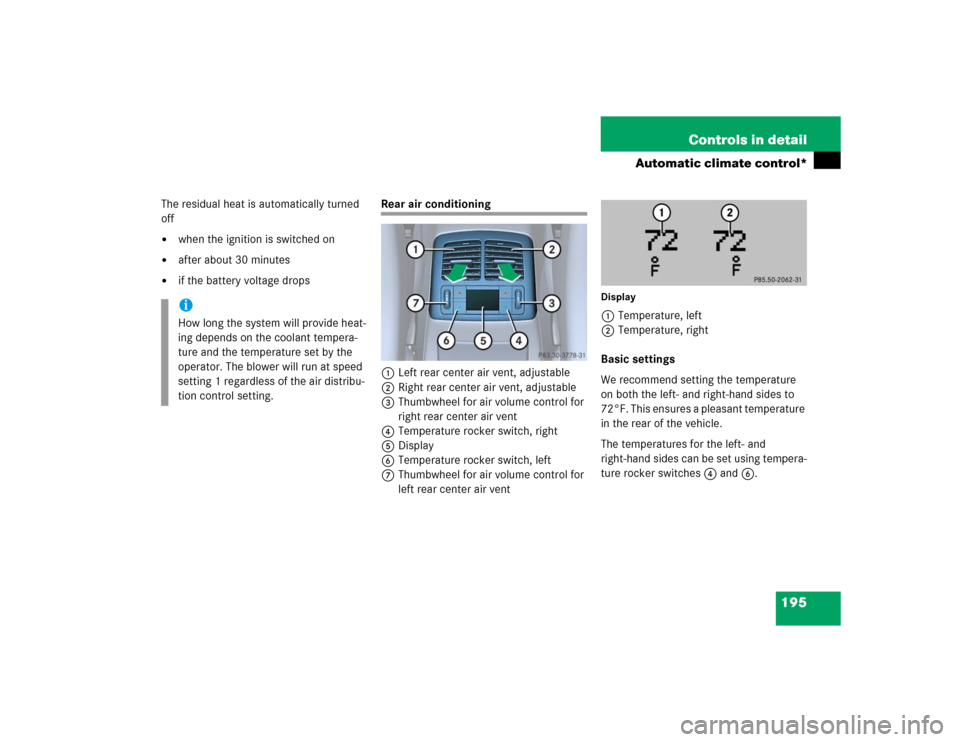
Rear air conditioning
1Left rear center air vent, adjustable
2Right rear center air vent, adjustable
3Thumbwheel for air volume control for
right rear center air vent
4Temperature rocker switch, right
5Display
6Temperature rocker switch, left
7Thumbwheel for air volume control for
left rear center air vent
Display1Temperature, left
2Temperature, right
Basic settings
We recommend setting the temperature
on both the left- and right-hand sides to
72°F. This ensures a pleasant temperature
in the rear of the vehicle.
The temperatures for the left- and
right-hand sides can be set using tempera-
ture rocker switches4 and6.
iHow long the system will provide heat-
ing depends on the coolant tempera-
ture and the temperature set by the
operator. The blower will run at speed
setting 1 regardless of the air distribu-
tion control setting.
Page 196 of 442
196 Controls in detailAutomatic climate control*Adjusting the rear settings with the
front control panelDisplay�
Press the™ button (
�page 186).
The display switches over.The temperature for the rear left- and
right-hand sides of the vehicle can be set
with temperature rocker switches3
and5.
The temperature display disappears ap-
proximately five seconds after the last
SmartKey confirmation and switches back
to the normal display.
iThe rear air conditioning will not cool
the air when AC
OFF
mode has been se-
lected in the front control panel.
iThe normal display will appear when
the™ button is pressed again.
Page 211 of 442
211 Controls in detail
Driving systems
�Driving systems
The following driving systems are ex-
plained on the following pages:�
Cruise control and Distronic*, with
which the vehicle can maintain a preset
speed
�
Airmatic* adjusts the vehicle suspen-
sion characteristics automatically and
controls the vehicle level
�
Parktronic system*, which assists the
driver during parking maneuvers
The BAS, ABS, ESP and SBC are described
in the “Safety and Security” section
(
�page 74).
Cruise control
The cruise control automatically maintains
the speed you set for your vehicle.
Use of cruise control is recommended for
driving at a constant speed for extended
periods of time. You can set any speed
over 20 mph (30 km / h).
The cruise control function is operated by
means of the cruise control lever.
The cruise control lever is the uppermost
lever found on the left-hand side of the
steering column (
�page 20).
Warning!
G
Cruise control is a convenience system de-
signed to assist the driver during vehicle op-
eration. The driver is and must always
remain responsible for the vehicle speed
and for safe brake operation.
Only use cruise control if the road, traffic
and weather conditions make it advisable to
travel at a steady speed.�
The use of cruise control can be danger-
ous on winding roads or in heavy traffic
because conditions do not allow safe
driving at a steady speed.
�
The use of cruise control can be danger-
ous on slippery roads. Rapid changes in
tire traction can result in wheel spin and
loss of control.
�
Deactivate cruise control when driving
in fog.
The “Resume” function should only be oper-
ated if the driver is fully aware of the previ-
ously set speed and wishes to resume this
particular preset speed.
Page 213 of 442
213 Controls in detail
Driving systems
Setting stored speed (“Resume”
function)�
Briefly push the cruise control lever to
position4.
The cruise control will resume the last
previously set speed.
�
Remove your foot from the accelerator
pedal.Setting a higher speed
�
Lift the cruise control lever to
position1 and hold it up until the de-
sired speed is reached.
�
Release the cruise control lever.
The new speed is set.
Setting a lower speed
�
Depress the cruise control lever to
position2 and hold it down until the
desired speed is reached.
�
Release the cruise control lever.
The new speed is set.Fine adjustment in 1 mph
(Canada: 1 km / h) increments
Faster
�
Briefly tip the cruise control lever in the
direction of arrow1.
Slower
�
Briefly tip the cruise control lever in the
direction of arrow2.
Warning!
G
The speed stored in memory should only be
set again if prevailing road conditions per-
mit. Possible acceleration or deceleration
differences arising from returning to preset
speed could cause an accident and / or seri-
ous injury to you and others.
iDepressing the accelerator pedal does
not deactivate cruise control. After
brief acceleration (e.g. for passing),
cruise control will resume the last
speed set.
iWhen you use the cruise control lever
to decelerate, the transmission will au-
tomatically downshift if the engine’s
braking power does not brake the vehi-
cle sufficiently.