Page 155 of 374

14. Cruise Indicator Light
This indicator lights when the speed control
system is turned ON.
15. Oil Pressure Warning Light
Shows low engine oil pressure. The light will come
on and remain on when the ignition switch is
turned from the OFF to the ON position, and the light
will turn off after the engine is started. If the bulb does
not come on, have the system checked by your autho-
rized dealer.
If the warning light comes on and remains on while
driving, stop the vehicle and shut off the engine. DO
NOT OPERATE THE VEHICLE UNTIL THE CAUSE IS
CORRECTED. Also, a single chime will sound.
16. Transmission Temperature Warning Light
This light indicates that there is excessive trans-
mission fluid temperature that might occur with
severe usage such as trailer towing or snow plowing. Ifthis light comes on, stop the vehicle and run the engine at
idle or faster, with the transmission in N (Neutral) until
the light goes off.
17. Part Time Indicator Light Ð If Equipped
This light alerts the driver that the vehicle is in
the PART TIME four±wheel drive high range
mode, and the front and rear driveshafts are
mechanically locked together forcing the front and rear
wheels to rotate at the same speed.
18. Brake Warning Light
This light monitors various brake functions,
including brake fluid level and parking brake
application. If the light comes on, it may indi-
cate that the parking brake is applied, or there
is a low brake fluid level. On vehicles equipped with
Anti-Lock brakes (ABS), it may also indicate an ABS
malfunction that could lead to reduced braking perfor-
mance.
UNDERSTANDING YOUR INSTRUMENT PANEL 155
4
Page 163 of 374

You can turn the tape player ON by inserting a cassette or
activating the MODE button (with a cassette in the radio),
but only when the ignition and radio are on.
Each time a cassette is inserted the tape player will begin
playing on the side of the cassette that is facing up in the
player.
Music Search
Pressing the SEEK button while playing a tape will start
the Music Search mode. Press the SEEK button up for the
next selection on the tape and down to return to the
beginning of the current selection, or return to the
beginning of the previous selection if the tape is within
the first 5 seconds of the current selection.
The SEEK symbol appears on the display when Music
Search is in operation. Music Search shuts off automati-
cally when a selection has been located.
Selective Music Search
Press the SEEK button up or down to move the track
number to skip forward or backward 1 to 7 selections.
Press the SEEK button once to move 1 selection, twice to
move 2 selections, etc.
Fast Forward And Rewind Buttons
Pressing the TUNE button up or down momentarily
activates Fast Forward or Rewind and makes the direc-
tional arrows appear on the display.
To stop Fast Forward or Rewind, press the TUNE button
again.
Time Button
Press the time button to toggle between station frequency
and time of day.
Pressing this button while playing a cassette tape will
change the side of the tape being played.
UNDERSTANDING YOUR INSTRUMENT PANEL 163
4
Page 170 of 374

If you insert a disc with the ignition ON and the radio
OFF, the display will show the time of day.
If the power is ON, the unit will switch from radio to CD
mode and begin to play when you insert the disc. The
display will show the track number and index time in
minutes and seconds. Play will begin at the start of track
one.
Seek
Press the top of the SEEK button for the next selection on
the CD. Press the bottom of the button to return to the
beginning of the current selection, or return to the
beginning of the previous selection if the CD is within the
first second of the current selection.
EJT Ð Eject
Press the EJT button and the disc will unload and move
to the entrance for easy removal. The unit will switch to
the radio mode.If you do not remove the disc within 15 seconds, it will be
reloaded. The unit will continue in radio mode.
The disc can be ejected with the radio and ignition OFF.
FF/TUNE/RW
Press FF (Fast Forward) and the CD player will begin to
fast forward until FF is released. The RW ( Reverse)
button works in a similar manner.
Random Play Ð RND/Program Button 4
Press the RND (button 4) button while the CD is playing
to activate Random Play. This feature plays the tracks on
the selected disc in random order to provide an interest-
ing change of pace.
Press the SEEK button to move to the next randomly
selected track.
Press the RND (button 4) button a second time to stop
Random Play.
170 UNDERSTANDING YOUR INSTRUMENT PANEL
Page 214 of 374

CAUTION!
To drive as safely as possible and to prolong the life
of your manual transmission, follow these tips:
²Before shifting from a forward gear into reverse, or
from reverse to a forward gear, stop vehicle com-
pletely. Otherwise, accelerated transmission wear may
result.
²Do not operate at sustained high engine or road
speeds in lower gears. Engine damage may result.
²Do not downshift into a low gear while traveling at too
high a speed for that gear. Engine, clutch, or transmis-
sion damage may result.
²Do not rest your foot on the clutch pedal. This causes
heat buildup and damages the clutch.
²When you slow down or go up a grade, downshift as
speed requires or the engine may overheat.
²Never hold the vehicle stopped on a hill by using the
clutch pedal. The clutch may be damaged.
²During cold weather, you may experience increased
effort in shifting until the transmission fluid warms
up. This is normal.
²Push in the clutch pedal completely when shifting.
Otherwise, transmission or clutch damage may result.
²When ªrockingº a stuck vehicle by shifting between a
forward gear and reverse, do not spin wheels faster
than 15 mph (24 km/h), or drivetrain damage may
result.
214 STARTING AND OPERATING
Page 216 of 374
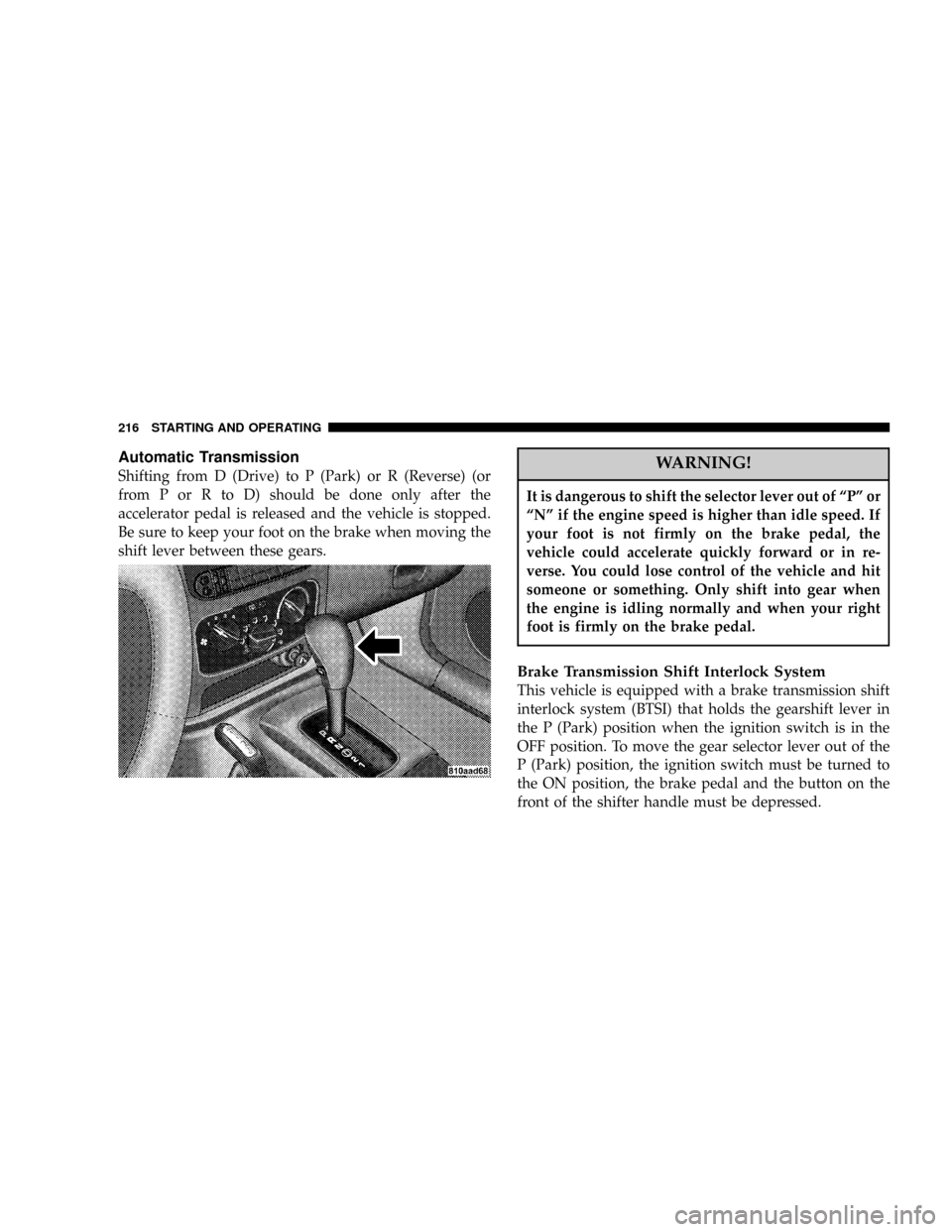
Automatic Transmission
Shifting from D (Drive) to P (Park) or R (Reverse) (or
from P or R to D) should be done only after the
accelerator pedal is released and the vehicle is stopped.
Be sure to keep your foot on the brake when moving the
shift lever between these gears.WARNING!
It is dangerous to shift the selector lever out of ªPº or
ªNº if the engine speed is higher than idle speed. If
your foot is not firmly on the brake pedal, the
vehicle could accelerate quickly forward or in re-
verse. You could lose control of the vehicle and hit
someone or something. Only shift into gear when
the engine is idling normally and when your right
foot is firmly on the brake pedal.
Brake Transmission Shift Interlock System
This vehicle is equipped with a brake transmission shift
interlock system (BTSI) that holds the gearshift lever in
the P (Park) position when the ignition switch is in the
OFF position. To move the gear selector lever out of the
P (Park) position, the ignition switch must be turned to
the ON position, the brake pedal and the button on the
front of the shifter handle must be depressed.
216 STARTING AND OPERATING
Page 218 of 374
²When shifting into P (Park), depress the button on the
shift lever and firmly move the lever all the way
forward until it stops.
²Look at the shift indicator window on the console to
ensure it is in the P (Park) position.
²When engaged in P (Park), you will not be able to
move the shifter rearward without depressing the shift
lever button.
CAUTION!
Before moving the shift lever out of P (Park), you
must turn the ignition from LOCK to ON so the
steering wheel and shift lever are released. Other-
wise, damage to the steering column or shifter could
result.
R (Reverse)
For moving the vehicle rearward. Always stop before
moving the lever to R (Reverse), except when rocking the
vehicle.
N (Neutral)
Engine may be started in this position.
WARNING!
Do not coast in N (Neutral) and never turn off the
ignition to coast down a hill. These are unsafe
practices that limit your response to changing traffic
or road conditions. You might lose control of the
vehicle.
218 STARTING AND OPERATING
Page 220 of 374

NOTE:If the vehicle is started in cold outside tempera-
tures, shifts into Overdrive may be delayed. Normal
Overdrive and shifting operation will resume when the
temperature of the transmission reaches the appropriate
temperature. Refer to the ªNoteº under ªTorque Con-
verter Clutchº later in this section.
If the transmission temperature gets too hot, the trans-
mission may downshift out of Overdrive or engage
overdrive at higher vehicle speeds until the transmission
cools down. After cooldown, Overdrive will resume
normal operation.
2 (Second)
For moderate grades and to assist braking on dry pave-
ment or in mud and snow. Begins at a stop in low gear
with automatic upshift to 2nd gear. Will not shift to 3rd.1 (First)
For hard pulling at low speeds in mud, sand, snow, or on
steep grades. Begins and stays in low gear with no
upshift. Provides engine compression braking at low
speeds.
CAUTION!
²Never race the engine with the brakes on and the
vehicle in gear, and never hold the vehicle on an
incline without applying the brakes. These prac-
tices can cause overheating and damage to the
transmission.
²When ªrockingº a stuck vehicle by moving be-
tween ªFirstº and R (Reverse), do not spin the
wheels faster than 15 mph (24 km/h), or drivetrain
damage may result.
220 STARTING AND OPERATING
Page 224 of 374
WARNING!
²Because 4-wheel drive provides improved trac-
tion, there is a tendency to exceed safe turning and
stopping speeds. Do not go faster than road con-
ditions permit.
²You or others could be injured if you leave the
vehicle unattended with the transfer case in the
Neutral (N) position without first fully engaging
the parking brake. The transfer case Neutral (N)
position disengages both the front and rear drive-
shafts from the powertrain and will allow the
vehicle to move despite the transmission position.
The parking brake should always be applied
when the driver is not in the vehicle.
Shift Positions
For additional information on the appropriate use of each
transfer case mode position see the information below:
2H
Rear Wheel Drive High Range - Normal street and
highway driving. Dry hard surfaced roads.
4H
4-Wheel-Drive High Range - Locks the front and rear
driveshafts together. Forces the front and rear wheels to
rotate at the same speed. Additional traction for loose,
slippery road surfaces only.
N
Neutral - Disengages both the front and rear driveshafts
from the powertrain. To be used for flat towing behind
another vehicle. Refer to ªRecreational Towingº in Sec-
tion 5 for more information.
224 STARTING AND OPERATING