Page 764 of 4449

NAVIGATION SYSTEM
AV-173
C
D
E
F
G
H
I
J
L
MA
B
AV
Revision: 2004 November 2004 FX35/FX45
in the unit, display the track of the vehicle on the map screen and compare it with the actual road configu-
ration.
�Sample tests
–
matching or by GPS>
Perform test pattern 1.
–;
Perform test pattern 1 & 2.
Compare the track of the vehicle on the map screen and the actual road configuration. For fairly accurate
tracking, plotting shall be made every several hundred meters.
–;
Perform test pattern 1 & 2.
Drive on a road of which distance is accurately known (by utilizing distance posts on a highway). Calculate
the rate of change (increased/decreased) of the distance by comparing with the actual distance.
Correction = 1 – A/B
A: Distance shown on the screen
B: Actual distance
YES or NO
YES >>�If adjustment is insufficient, perform adjustment again.
�If any error is found in the map, please let us know.
�Replace NAVI control unit.
NO >> Limit of the location detection capacity of the navigation system.
Example of Symptoms Judged Not MalfunctionAKS007KH
BASIC OPERATION
VEHICLE MARK
Symptom Cause Remedy
No image is shown. Display brightness adjustment is set fully to
DARK side.Adjust the display brightness.
No guide sound is heard.
Audio guide volume is too low or
too high.Volume control is set to OFF, MIN or MAX. Adjust the audio guide volume.
Audio guidance is not available while the vehicle
is driving on a dark pink route.System is not malfunction.
Screen is too dark.
Motion of the image is too slow.Temperature inside the vehicle is low. Wait until the temperature inside the vehicle
reaches the proper temperature.
Small black or bright spots appear
on the screen.Symptom peculiar to a liquid crystal display. System is not malfunction.
Symptom Cause Remedy
Map screen and BIRDVIEW™
Name of the place vary with the
screen.Some thinning of the character data is done to
prevent the display becoming to complex. In
some cases and in some locations, the display
contents may differ.
The same place name, street name, etc. may not
be displayed every time on account of the data
processing.System is not malfunction.
Vehicle mark is not positioned cor-
rectly.Vehicle is transferred by ferry or by towing after its
ignition switch is turned to OFF.Drive the vehicle for a while in the GPS sat-
ellite signal receiving condition.
Screen will not switch to nighttime
mode after the lighting switch is
turned ON.The daytime screen is selected by the “SWITCH
SCREENS” when the last time the screen dim-
ming setting is done.
Switching between daytime/nighttime screen may
be inhibited by the automatic illumination adjust-
ment function.Perform screen dimming and select the
nighttime screen by “SWITCH SCREENS”.
Map screen will not scroll in accor-
dance with the vehicle travel.Current location is not displayed. Press “MAP” button to display the current
location.
Vehicle mark will not be shown. Current location is not displayed. Press “MAP” button to display the current
location.
Page 773 of 4449
AV-182
NAVIGATION SYSTEM
Revision: 2004 November 2004 FX35/FX45
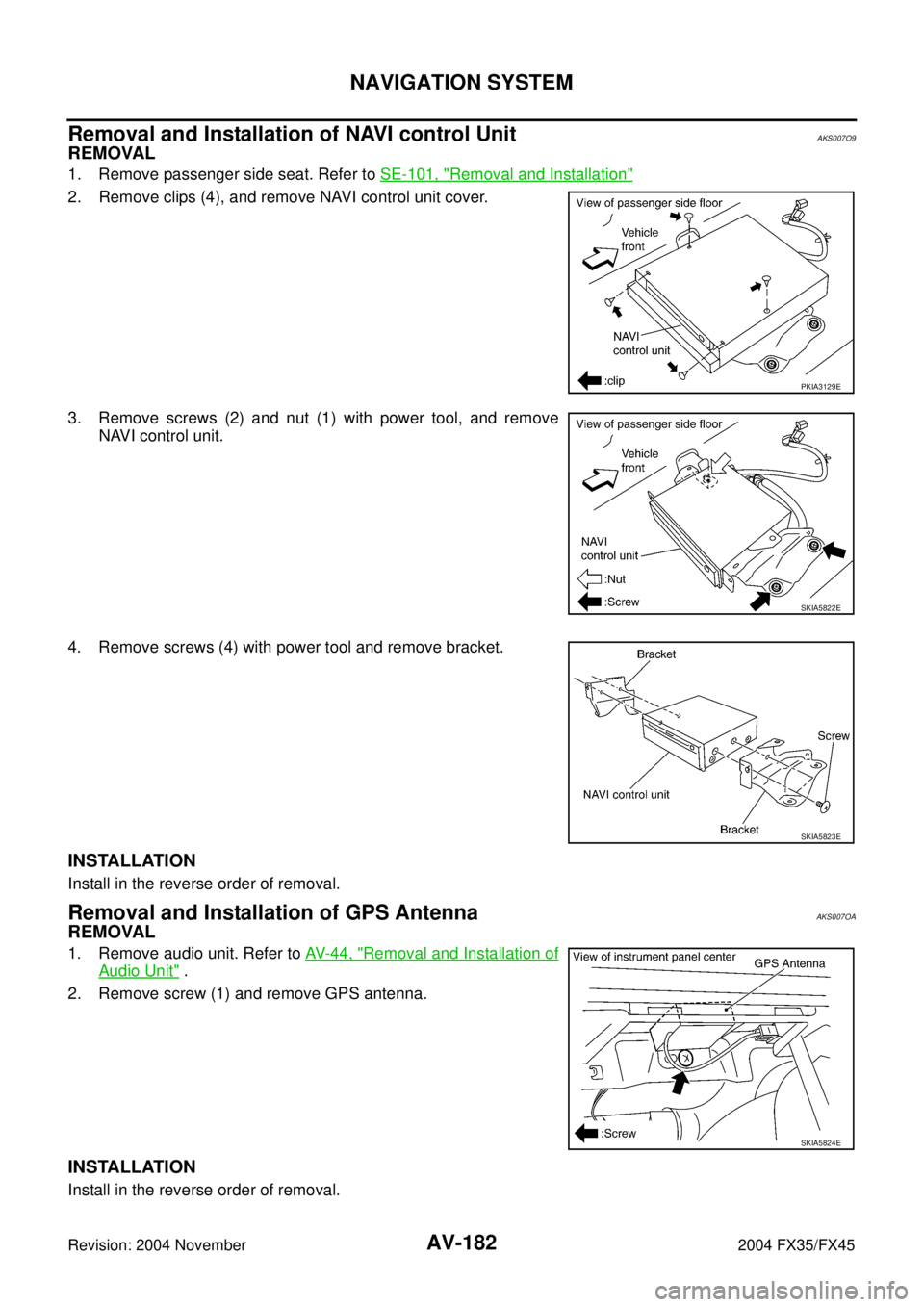
Removal and Installation of NAVI control UnitAKS007O9
REMOVAL
1. Remove passenger side seat. Refer to SE-101, "Removal and Installation"
2. Remove clips (4), and remove NAVI control unit cover.
3. Remove screws (2) and nut (1) with power tool, and remove
NAVI control unit.
4. Remove screws (4) with power tool and remove bracket.
INSTALLATION
Install in the reverse order of removal.
Removal and Installation of GPS AntennaAKS007OA
REMOVAL
1. Remove audio unit. Refer to AV- 4 4 , "Removal and Installation of
Audio Unit" .
2. Remove screw (1) and remove GPS antenna.
INSTALLATION
Install in the reverse order of removal.
PKIA3129E
SKIA5822E
SKIA5823E
SKIA5824E
Page 774 of 4449
NAVIGATION SYSTEM
AV-183
C
D
E
F
G
H
I
J
L
MA
B
AV
Revision: 2004 November 2004 FX35/FX45
Removal and Installation of A/C and AV SwitchAKS007OB
For A/C and AV switch removal and installation procedures, refer to AV- 4 5 , "Removal and Installation for A/C
and AV Switch" .
Removal and Installation of Display UnitAKS007OC
For display unit removal and installation procedures, refer to AV- 4 4 , "Removal and Installation of Audio Unit" .
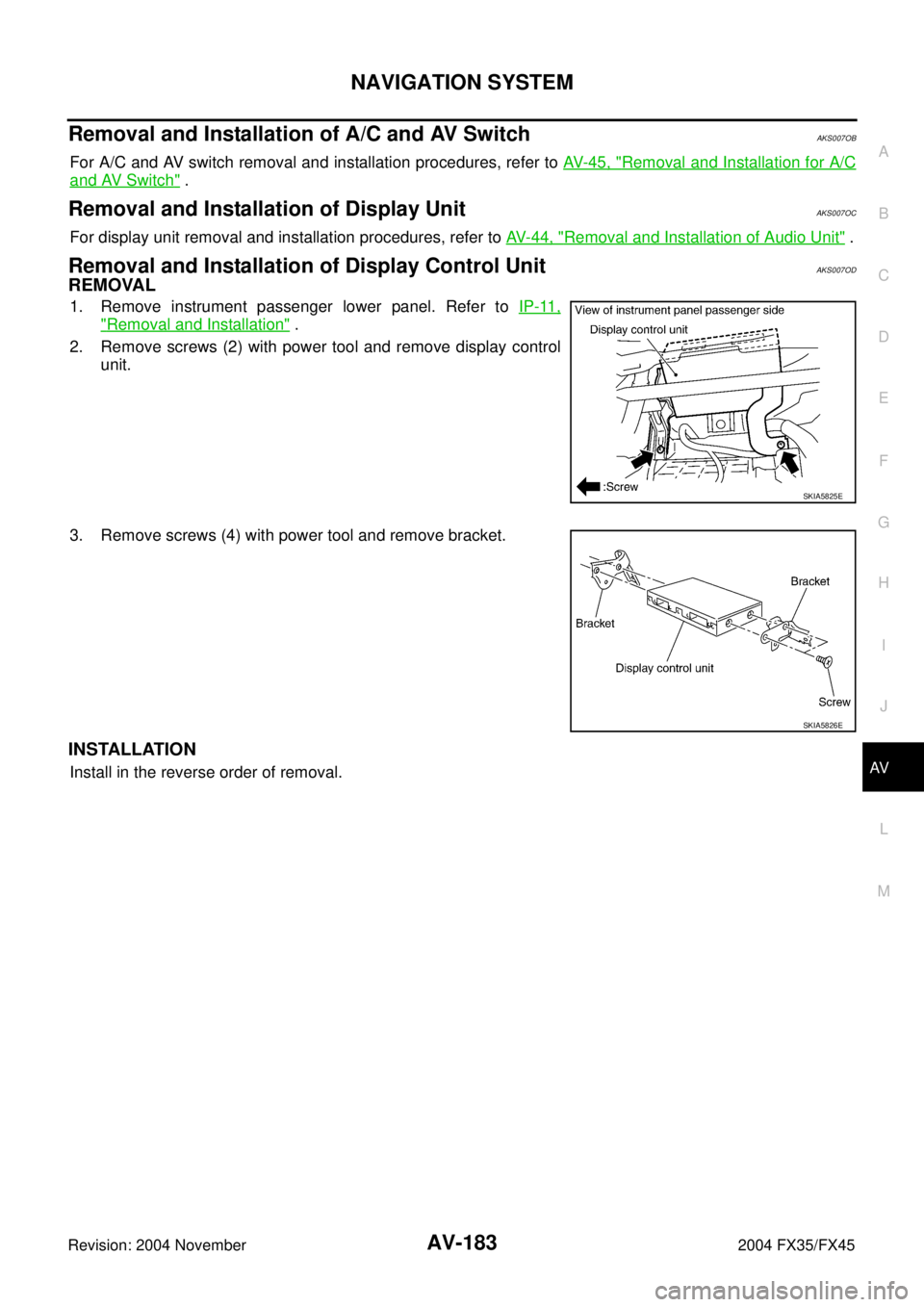
Removal and Installation of Display Control UnitAKS007OD
REMOVAL
1. Remove instrument passenger lower panel. Refer to IP-11,
"Removal and Installation" .
2. Remove screws (2) with power tool and remove display control
unit.
3. Remove screws (4) with power tool and remove bracket.
INSTALLATION
Install in the reverse order of removal.
SKIA5825E
SKIA5826E
Page 790 of 4449
INFINITI MOBILE ENTERTAINMENT SYSTEM
AV-199
C
D
E
F
G
H
I
J
L
MA
B
AV
Revision: 2004 November 2004 FX35/FX45
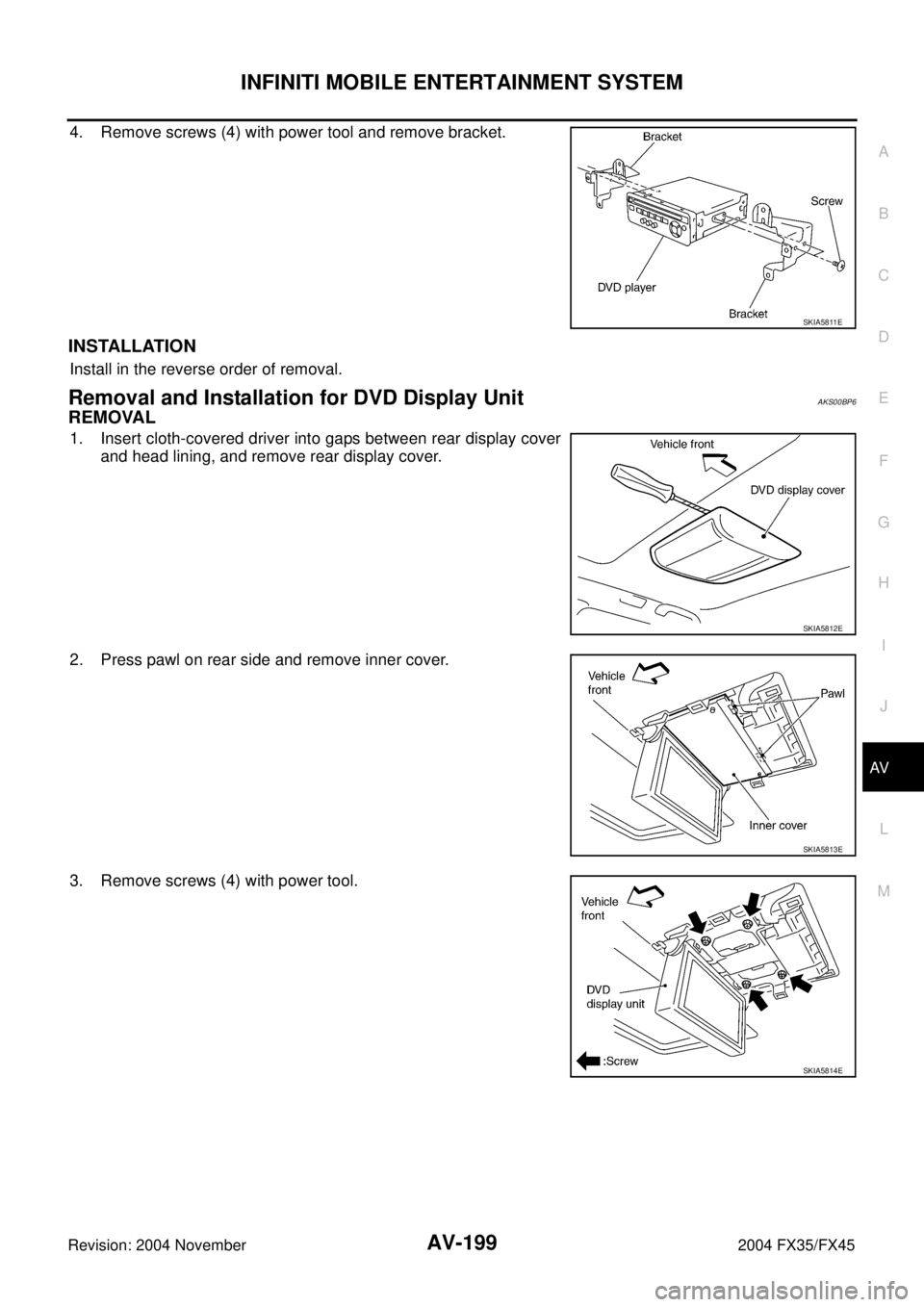
4. Remove screws (4) with power tool and remove bracket.
INSTALLATION
Install in the reverse order of removal.
Removal and Installation for DVD Display UnitAKS00BP6
REMOVAL
1. Insert cloth-covered driver into gaps between rear display cover
and head lining, and remove rear display cover.
2. Press pawl on rear side and remove inner cover.
3. Remove screws (4) with power tool.
SKIA5811E
SKIA5812E
SKIA5813E
SKIA5814E
Page 806 of 4449
BCM (BODY CONTROL MODULE)
BCS-15
C
D
E
F
G
H
I
J
L
MA
B
BCS
Revision: 2004 November 2004 FX35/FX45
Removal and Installation of BCMAKS0058E
REMOVAL
1. Remove the dash side finisher (LH). Refer to EI-37, "BODY
SIDE TRIM" in “EI Exterior/Interior.”
2. Disconnect BCM connector.
3. Remove bracket mounting screws (3) to remove BCM and fuse
block with bracket.
4. Raise the pawl of fuse block and remove bracket from fuse block
to remove BCM.
INSTALLATION
Install in the reverse order of removal.
NOTE:
When replacing BCM perform initialization of NATS system and registration of all NATS ignition key IDs.
SKIA4964E
SKIA4965E
Page 818 of 4449

SQUEAK AND RATTLE TROUBLE DIAGNOSIS
BL-11
C
D
E
F
G
H
J
K
L
MA
B
BL
Revision: 2004 November 2004 FX35/FX45
TRUNK
Trunk noises are often caused by a loose jack or loose items put into the trunk by the owner.
In addition look for:
1. Trunk lid dumpers out of adjustment
2. Trunk lid striker out of adjustment
3. The trunk lid torsion bars knocking together
4. A loose license plate or bracket
Most of these incidents can be repaired by adjusting, securing or insulating the item(s) or component(s) caus-
ing the noise.
SUNROOF/HEADLINING
Noises in the sunroof/headlining area can often be traced to one of the following:
1. Sunroof lid, rail, linkage or seals making a rattle or light knocking noise
2. Sunvisor shaft shaking in the holder
3. Front or rear windshield touching headlining and squeaking
Again, pressing on the components to stop the noise while duplicating the conditions can isolate most of these
incidents. Repairs usually consist of insulating with felt cloth tape.
SEATS
When isolating seat noise it's important to note the position the seat is in and the load placed on the seat when
the noise is present. These conditions should be duplicated when verifying and isolating the cause of the
noise.
Cause of seat noise include:
1. Headrest rods and holder
2. A squeak between the seat pad cushion and frame
3. The rear seatback lock and bracket
These noises can be isolated by moving or pressing on the suspected components while duplicating the con-
ditions under which the noise occurs. Most of these incidents can be repaired by repositioning the component
or applying urethane tape to the contact area.
UNDERHOOD
Some interior noise may be caused by components under the hood or on the engine wall. The noise is then
transmitted into the passenger room.
Causes of transmitted underhood noise include:
1. Any component mounted to the engine wall
2. Components that pass through the engine wall
3. Engine wall mounts and connectors
4. Loose radiator mounting pins
5. Hood bumpers out of adjustment
6. Hood striker out of adjustment
These noises can be difficult to isolate since they cannot be reached from the interior of the vehicle. The best
method is to secure, move or insulate one component at a time and test drive the vehicle. Also, engine RPM
or load can be changed to isolate the noise. Repairs can usually be made by moving, adjusting securing, or
insulating the component causing the noise.
Page 959 of 4449
BL-152
FRONT DOOR LOCK
Revision: 2004 November 2004 FX35/FX45
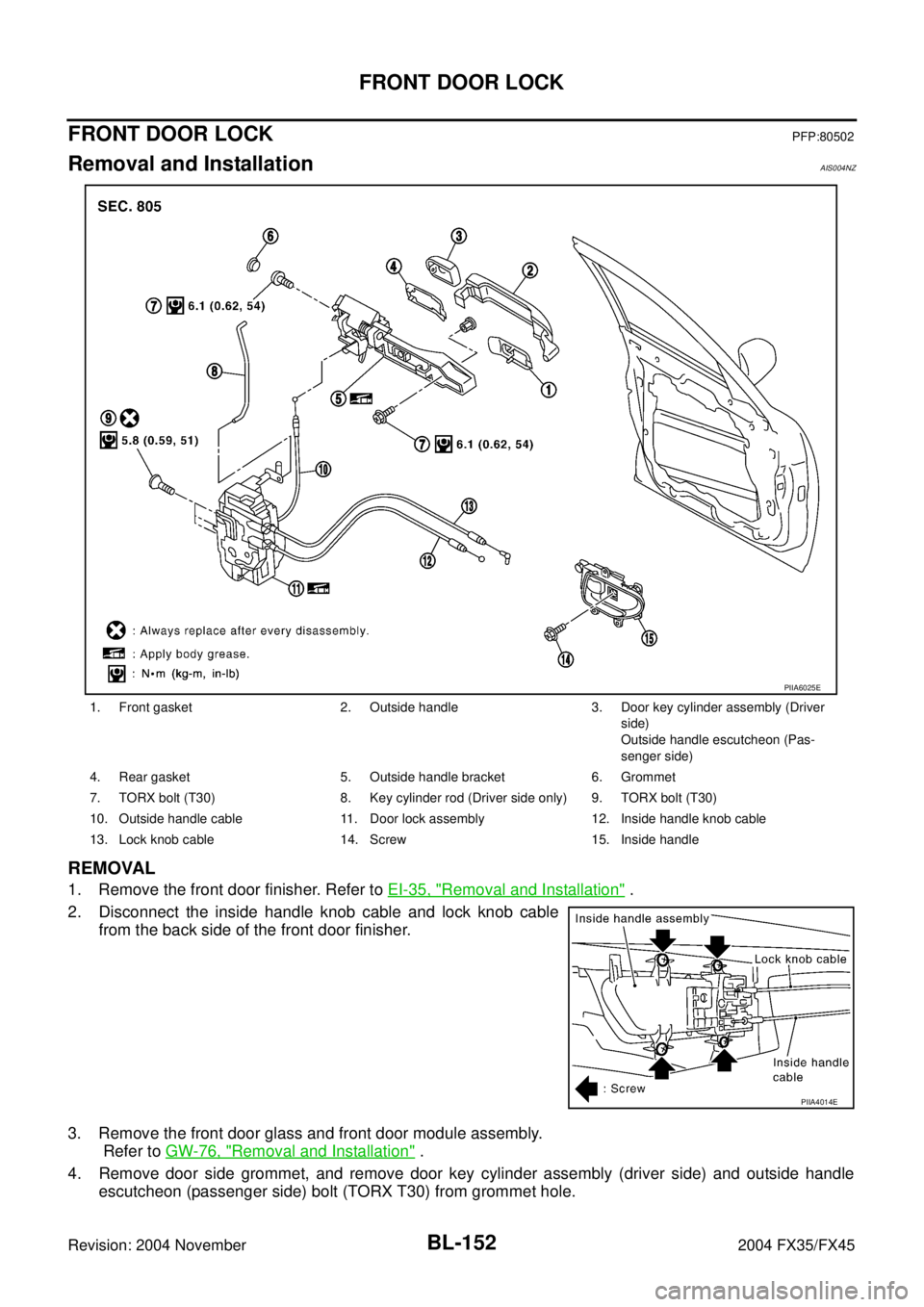
FRONT DOOR LOCKPFP:80502
Removal and InstallationAIS004NZ
REMOVAL
1. Remove the front door finisher. Refer to EI-35, "Removal and Installation" .
2. Disconnect the inside handle knob cable and lock knob cable
from the back side of the front door finisher.
3. Remove the front door glass and front door module assembly.
Refer to GW-76, "
Removal and Installation" .
4. Remove door side grommet, and remove door key cylinder assembly (driver side) and outside handle
escutcheon (passenger side) bolt (TORX T30) from grommet hole.
1. Front gasket 2. Outside handle 3. Door key cylinder assembly (Driver
side)
Outside handle escutcheon (Pas-
senger side)
4. Rear gasket 5. Outside handle bracket 6. Grommet
7. TORX bolt (T30) 8. Key cylinder rod (Driver side only) 9. TORX bolt (T30)
10. Outside handle cable 11. Door lock assembly 12. Inside handle knob cable
13. Lock knob cable 14. Screw 15. Inside handle
PIIA6025E
PIIA4014E
Page 961 of 4449
BL-154
FRONT DOOR LOCK
Revision: 2004 November 2004 FX35/FX45
10. Remove the TORX bolt (T30) of the outside handle bracket.
11. While pulling outside handle bracket, slide toward front of vehi-
cle to remove outside handle bracket.
12. Reach to separate outside handle cable connection.
13. Remove the TORX bolts (T30) of door lock assembly.
14. Disconnect the door lock actuator connector and remove door lock assembly.
INSTALLATION
Install in the reverse order of removal.
CAUTION:
To install each rod, be sure to rotate the rod holder until a click is felt.
PIIA7117E
PIIA3558E
PIIA6026E
PIIA1090E