Page 188 of 296

�µ�µ�µ
�µ �µ
�µ
This position mechani-
cally locks the transmission. Use
Park whenever you are turning of f or
starting the engine. To shif t out of
Park, you must press on the brake
pedal and have your f oot of f the
accelerator pedal. Pull the shif t lever
towards you, then move it out of
Park.
If you have done all of the above and
still cannot move the lever out of
Park, see Shif t Lock Release on page .
You must also pull the shif t lever
towards you to shift into Park. To
avoid transmission damage, come to
a complete stop bef ore shif ting into
Park. The shif t lever must be in Park
bef ore you can remove the key f rom
the ignition switch. Press the brake
pedal and pull the shif t lever towards
you to shift from Park to Reverse. To
shif t f rom Reverse to Natural, come
to a complete stop and then shift.
Use Neutral if you
need to restart a stalled engine, or if
it is necessary to stop brief ly with
the engine idling. Shif t to the Park
position if you need to leave your
vehicle for any reason. Press on the
brake pedal when you are moving
the shift lever from Neutral to
another gear.
Use this position f or
normal driving. The transmission
automatically selects a suitable gear
f or your speed and acceleration. You
may notice the transmission shif ting
up at higher speeds when the engine
is cold. This helps the engine warm
up f aster. This position is similar
to D, except only the first three
gears are selected instead of all f ive.
Use D when towing a trailer in hilly
terrain, or to provide engine braking
when going down a steep hill. D can
also keep the transmission f rom
cycling between third and f ourth
gears in stop-and-go driving.
This position locks
the transmission in second gear. It
does not downshif t to f irst gear
when you come to a stop.
Use Second gear: For more power when climbing.
To increase engine braking when
going down steep hills.
For starting out on a slippery
surf ace or in deep snow.
When driving downhill with a
trailer.
186
3
3
CONT INUED
Automatic Transmission
Driving
Park (P) Reverse (R)
Neutral (N)
Drive (D) Drive (D )
Second (2)3
185
Page 189 of 296
�µTo shif t f rom Second to
First, pull the shift lever towards you,
then shift to the lower gear. With the
lever in this position, the
transmission locks in First gear. By
upshif ting and downshif ting through
1, 2, D , and D, you can operate the
transmission much like a manual
transmission without a clutch pedal. If you exceed the maximum speed
f or the gear you are in, the engine
speed will enter into the tachometer’s
red zone. If this occurs, you may f eel
the engine cut in and out. This is
caused by a limiter in the engine’s
computer controls. The engine will
run normally when you reduce the
RPM below the red zone.This allows you to move the shif t
lever out of Park if the normal
method of pushing on the brake
pedal and pulling the shif t lever does
not work.
Set the Parking brake.
Remove the key from the ignition
switch.
1.
2.
3
Automatic Transmission
Driving
First (1)
Engine Speed Limiter Shift Lock Release
186
Page 190 of 296
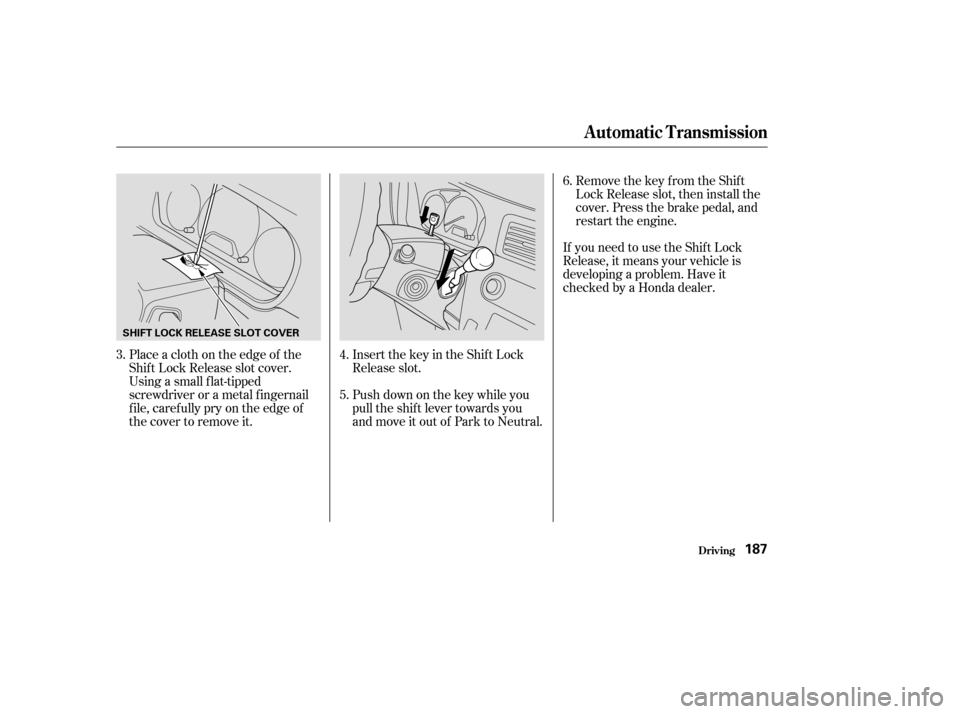
Place a cloth on the edge of the
Shif t Lock Release slot cover.
Using a small f lat-tipped
screwdriver or a metal f ingernail
f ile, caref ully pry on the edge of
the cover to remove it.Remove the key from the Shift
Lock Release slot, then install the
cover. Press the brake pedal, and
restart the engine.
If you need to use the Shif t Lock
Release, it means your vehicle is
developing a problem. Have it
checked by a Honda dealer.
Insert the key in the Shift Lock
Release slot.
Push down on the key while you
pull the shif t lever towards you
and move it out of Park to Neutral.
5. 6.
4.
3.
Automatic Transmission
Driving187
SHIFT LOCK RELEASE SLOT COVER
Page 191 of 296

Always use the parking brake when
you park your vehicle. Make sure
the parking brake is set f irmly or
your vehicle may roll if it is parked
on an incline.
Set the parking brake bef ore you put
the transmission in Park. This keeps
the vehicle from moving and putting
pressure on the parking mechanism
in the transmission.Make sure the windows are closed.
Turn of f the lights.
Place any packages, valuables, etc.
in the cargo area, or take them
with you.
Lock the doors and the tailgate.
Never park over dry leaves, tall
grass, or other f lammable
materials. The hot three way
catalytic converter could cause
these materials to catch on fire.If the vehicle is f acing uphill, turn
the f ront wheels away f rom the
curb.
If the vehicle is f acing downhill,
turn the front wheels toward the
curb.
Make sure the parking brake is
f ully released bef ore driving away.
Driving with the parking brake
partially set can overheat or
damage the rear brakes.
Driving
Parking T ips
Parking T ips
188
Page 193 of 296

�Î�Î
The Anti-lock Brake System (ABS)
helps prevent the brakes f rom
locking up and helps you retain
steering control by pumping the
brakes rapidly, much f aster than a
person can do it.
The ABS also balances the f ront-to-
rear braking distribution according
to vehicle loading.
this def eats the purpose of the ABS.
Let the ABS work f or you by always
keeping f irm, steady pressure on the
brake pedal as you steer away from
the hazard. This is sometimes
ref erred to as ‘‘stomp and steer.’’
You will f eel a pulsation in the brake
pedal when the ABS activates, and
you may hear some noise. This is
normal: it is the ABS rapidly
pumpingthebrakes.Ondry
pavement, you will need to press on
thebrakepedalveryhardbeforethe
ABS activates. However, you may
feel the ABS activate immediately if
you are trying to stop on snow or ice.
If the ABS indicator comes on, the
anti-lock f unction of the braking
system has shut down. The brakes
still work like a conventional system,
but without anti-lock. You should
have the dealer inspect your vehicle
as soon as possible.
You should never pump the brake pedal;
A nti-lock BrakesA ctivating the A nti-lock Brakes A BS Indicator
Driving
Anti-lock Brakes (ABS)
190
U.S. indicator shownABS INDICATOR
Page 194 of 296

If the ABS indicator and the brake
system indicator come on together,
and the parking brake is f ully
released, the front-to-rear braking
distribution system may also be shut
down.
Test your brakes as instructed on
page . If the brakes f eel normal,
drive slowly and have your vehicle
repaired by your Honda dealer as
soon as possible. Avoid sudden hard
braking which could cause the rear
wheels to lock up and possibly lead
to a loss of control.
The TCS indicator will come on
alongwiththeABSindicatorif there
is a problem with the anti-lock brake
system.It only helps with the
steering control during braking.
such as trying to take a
corner too f ast or making a sudden
lane change. Always drive at a safe
speed f or the road and weather
conditions.
Always steer moderately
when you are braking hard. Severe
or sharp steering wheel movement
can still cause your vehicle to veer
into oncoming traffic or off the road. on loose or
uneven surf aces, such as gravel or
snow, than a vehicle without anti-
lock. Slow down and allow a greater
distance between vehicles under
those conditions.
254
Anti-lock Brakes (ABS)
Driving
Import ant Saf et y Reminders
A BS does not reduce the time or
distance it takes to stop the
vehicle.
A BS will not prevent a skid that
results f rom changing direction
abruptly,
A BS cannot prevent the loss of
stability. A vehicle with A BS may require a
longer distance to stop
191
Page 196 of 296

This switch is under the side vent. It
letsyouturntheTractionControl
System on and of f . You cannot turn
of f the TCS while the TCS indicator
is f lashing.
Deactivate the system by pressing
the TCS On/Off switch. The TCS
indicator comes on as a reminder.
Pressing the switch again turns the
system back on.The Traction Control System turns
on every time you start the engine,
even if you turned it of f the last time
you drove the vehicle.
The TCS indicator comes on or
f lashes under the f ollowing condi-
tions:
When you turn the ignition switch
to ON (II).
When you manually turn of f TCS.
It f lashes when TCS is regulating
wheelspin.
If the system’s diagnostics senses
a problem with TCS, the indicator
will come on and stay on.
If the brakes overheat, the
indicator will come on. If the TCS indicator comes on and
stays on for more than 10 minutes
while driving, pull to the side of the
road when it is saf e and turn of f the
engine. Reset the system by
restarting the engine, and watch the
TCS indicator. If the indicator
remains on, or comes back on while
driving, have the system inspected
by your Honda dealer. You can still
drive the vehicle without TCS.
This indicator will come on along
with the ABS indicator if there is a
problem in the anti-lock brake
system (see
on page
).
The TCS indicator may occasionally
come on f or one or two seconds and
then go out. This is normal. 190
TCS ON/OFF Switch
TCS Indicator
ABS Indicator
Traction Control System (TCS)
Driving193
TCS ON/OFF SWITCH
Page 209 of 296

�Ì�Ì
�Î
�Ì�Î
�Ì
�Î
�Î
Maint enance206
Service the items listed at the indicated distance (or time, if given).
miles x 1,000
km x 1,000 15
2430
4845
72 75
120 135
216
Check engine oil and coolant
Check tires
Replace engine oil and oil filter
Rotate tires (follow pattern on page 232)
Check front and rear brake wear
Inspect the following items: Tie-rod ends, steering gearbox, and boots
Suspension components
Driveshaft boots
Check parking brake adjustment
Lubricate all hinges, locks and latches
Inspect the following items: Brake hoses and lines (including ABS)
All fluid levels and condition of fluids
Exhaust system
Fuel lines and connections
Lights and controls/vehicle underbody
Inspect drive belts
Replace dust and pollen filter
Replace air cleaner element
Replace spark plugs
Inspect valve clearance
Replace automatic transmission fluid
Inspect idle speed
Replace timing belt , and inspect water pump
Replace engine coolant
Replace brake fluid Check oil and coolant at each fuel stop
Check inflation and condition once a month
Every 3,750 miles (6,000 km) or every 6 months, whichever comes first Every 7,500 miles (12,000 km)
Every 7,500 miles (12,000 km) or every 6 months, whichever comes first
Every 15,000 miles (24,000 km) or every 1 year, whichever comes first
Every 30,000 miles (48,000 km) or every 2 years, whichever comes first
Every 15,000 miles (24,000 km) (Use normal schedule except in dusty condition) Inspect every 105,000 miles (168,000 km), otherwise adjust only if noisy 60
96
90
144 120
192
Every 30,000 miles (48,000 km) or every 2 years, whichever comes first
Every 105,000 miles (168,000 km) or every 7 years, whichever comes first
At 120,000 miles (192,000 km) or 10 years, then every 60,000 miles (96,000 km) or 5 years Every 3 years (independent of mileage) 105
168
150
240
See information on maintenance and emissions warranty, last column, page .
See dust and pollen filter on page for replacement information under special driving conditions.
See timing belt on page for replacement information under special driving conditions.
:
1:
2: 204
227
219
1
2
Maintenance Schedule for Severe Conditions