Page 58 of 296
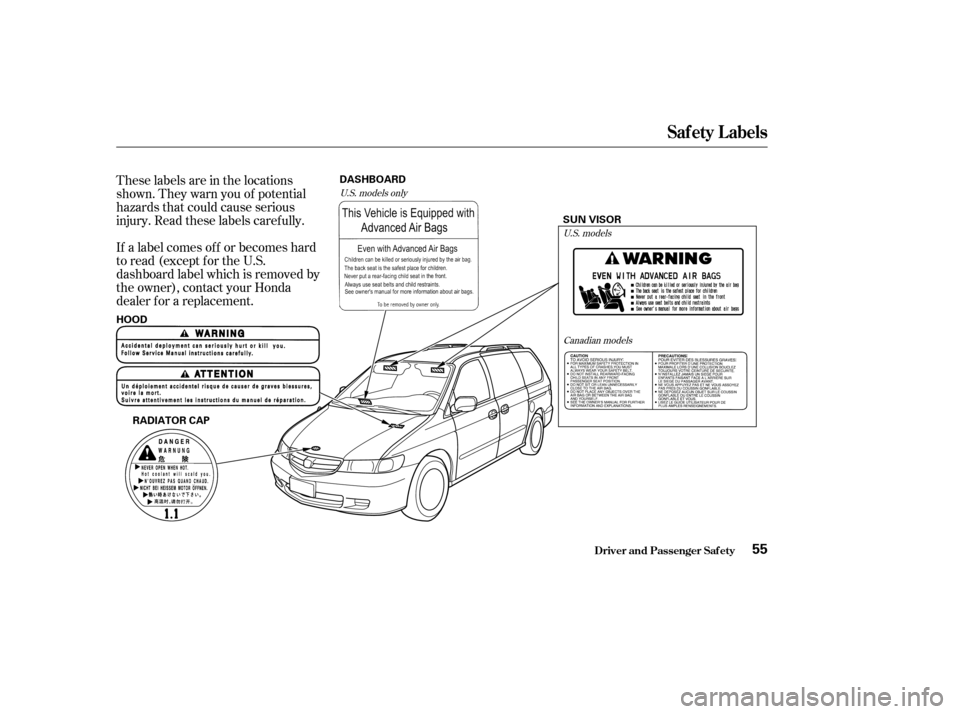
These labels are in the locations
shown. They warn you of potential
hazards that could cause serious
injury. Read these labels caref ully.
If a label comes of f or becomes hard
to read (except for the U.S.
dashboard label which is removed by
the owner), contact your Honda
dealer f or a replacement.U.S. models onlyU.S. models
Canadian models
Saf ety L abels
Driver and Passenger Saf ety55
RADIATOR CAP SUN VISOR
HOOD DASHBOARD
Page 65 of 296

This indicator has three f unctions:Itcomesonasareminderthatyou
have turned off the Traction
Control System.
It f lashes when the TCS is
regulating wheelspin.
If itcomesonandstaysonwhen
the Traction Control System is on,
it indicates that there is a problem
in the TCS.
This indicator also comes on when
you turn the ignition to ON (II) and
goes of f af ter the engine starts. See
page f or more inf ormation on
the TCS. This indicator comes on f or a f ew
seconds when you turn the ignition
switch to ON (II). It will then go of f
if you have inserted a properly-coded
ignition key. If it is not a properly-
coded key, the indicator will blink
and the engine will not start (see
page ).
This indicator also blinks several
times when you turn the ignition
switch f rom ON (II) to ACCESSORY
(I) or LOCK (0).
This indicator comes on f or a f ew
seconds when you turn the ignition
switch to ON (II). If it comes on at
any other time, there is a problem in
the power sliding door system. With
this indicator on, move the main
switch on the dashboard to the OFF
position, and have the system
checked by your Honda dealer as
soon as possible. You can still open
or close each sliding door manually.
For more inf ormation on the power
sliding doors, see page .
1.
2.
3.
192 76
84EX and EX-L models only
Instrument Panel Indicators
Inst rument s and Cont rols
Traction Control System
(T CS) IndicatorImmobilizer System
IndicatorPower Sliding Door
Indicator
62
Page 85 of 296
Youcanopenorcloseeachrear
sliding door with the remote
transmitter. The right button
controls the passenger’s side door
and the left button controls the
driver’s side door.If the power sliding door MAIN
switch on the dashboard is in the
OFF position, you cannot open or
close the sliding doors with the
remote transmitter. Avoid dropping or throwing the
transmitter.
Protect the transmitter from
extreme temperatures.
Do not immerse the transmitter in
any liquid.
If you lose a transmitter, the
replacement needs to be
reprogrammed by a Honda dealer.
Remote Transmitter
Inst rument s and Cont rols
Opening or Closing t he Power Sliding
Doors Remote Transmitter Care
82
DRIVER’S
SIDE
SLIDING
DOOR
BUTTONLED
PASSENGER’S
SIDE
SLIDING
DOOR
BUTTON POWER SLIDING DOOR MAIN SWITCH
Page 87 of 296

To open, pull the inside or outside
door handle, and slide the door back.
It will latch in the f ully open position.
When opening f rom the inside, the
childproof door lock must be
unlocked.
To close, pull either handle, and slide
the door closed. Make sure the door
is closed and latched securely bef ore
driving, and all passengers are clear
of the sliding doors bef ore closing
them.The doors on EX and EX-L models
are electrically powered and can be
operated with the remote transmitter,
the door handles, or the dashboard
switches. To operate the doors:
TheshiftlevermustbeinPark.
The MAIN switch must be in the
ON position.
The doors must be unlocked.
If you shif t out of Park while a door
is closing, you will hear a beep until
the door closes. Make sure both
door are closed bef ore you start
driving.
If you shif t out of Park while a door
is opening, you will hear a
continuous tone and the door will
stop moving. If you keep driving, the
tone will continue until you stop and
close the door. To open and close the power doors,
pull and release the inside or outside
door handles. They will close
automatically.
Each power sliding door has an auto-
reverse f eature. If a door meets
resistance while closing, it will beep
three times and reverse direction.
However, the door may not reverse
immediately and may cause some
bruising or discomf ort. Always make
sure passengers and objects are
clear of the doors bef ore closing
them.
Also check that passengers,
especially children, do not have their
hands on the edge of the sliding door
or on the door pillar. The auto-
reverse motor stops working when
the door is about to latch so the
motor can pull the door shut.
LX models
Sliding Doors
Inst rument s and Cont rols
Opening and Closing Manual
Sliding Doors
Power Sliding Doors
A ut o-Reverse
84
Page 88 of 296
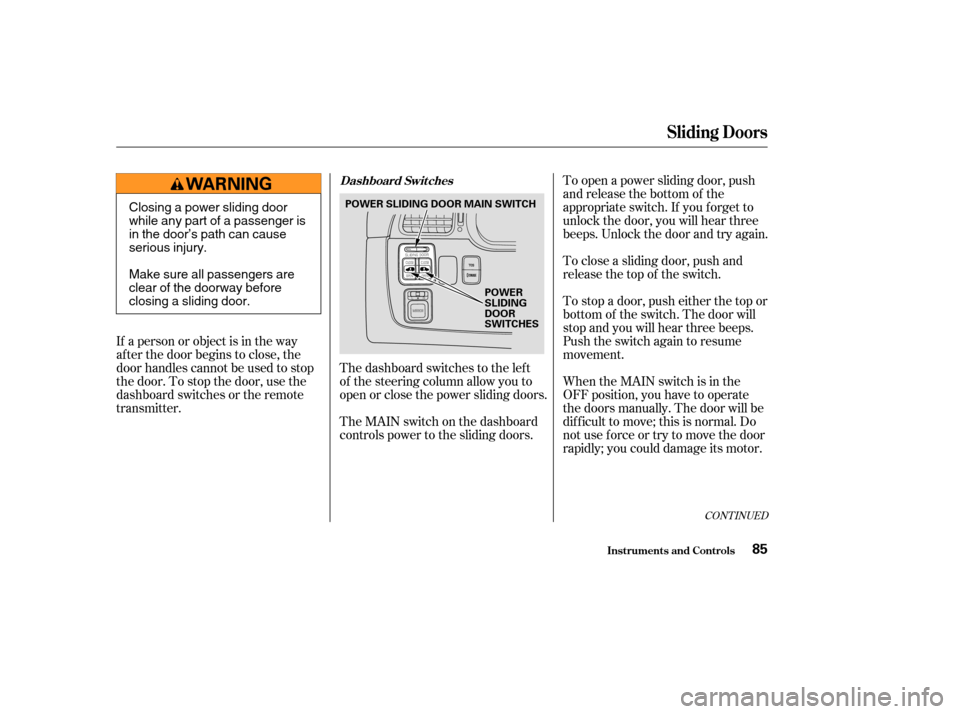
The dashboard switches to the lef t
of the steering column allow you to
open or close the power sliding doors.
The MAIN switch on the dashboard
controls power to the sliding doors.To open a power sliding door, push
and release the bottom of the
appropriate switch. If you f orget to
unlock the door, you will hear three
beeps. Unlock the door and try again.
To close a sliding door, push and
release the top of the switch.
To stop a door, push either the top or
bottom of the switch. The door will
stop and you will hear three beeps.
Push the switch again to resume
movement.
When the MAIN switch is in the
OFF position, you have to operate
the doors manually. The door will be
dif f icult to move; this is normal. Do
not use f orce or try to move the door
rapidly; you could damage its motor.
If a person or object is in the way
af ter the door begins to close, the
door handles cannot be used to stop
the door. To stop the door, use the
dashboard switches or the remote
transmitter.
CONT INUED
Sliding Doors
Inst rument s and Cont rols
Dashboard Switches
85
POWER
SLIDING
DOOR
SWITCHES
POWER SLIDING DOOR MAIN SWITCH
Closing a power sliding door
while any part of a passenger is
in the door’s path can cause
serious injury.
Make sure all passengers are
clear of the doorway before
closing a sliding door.
Page 121 of 296
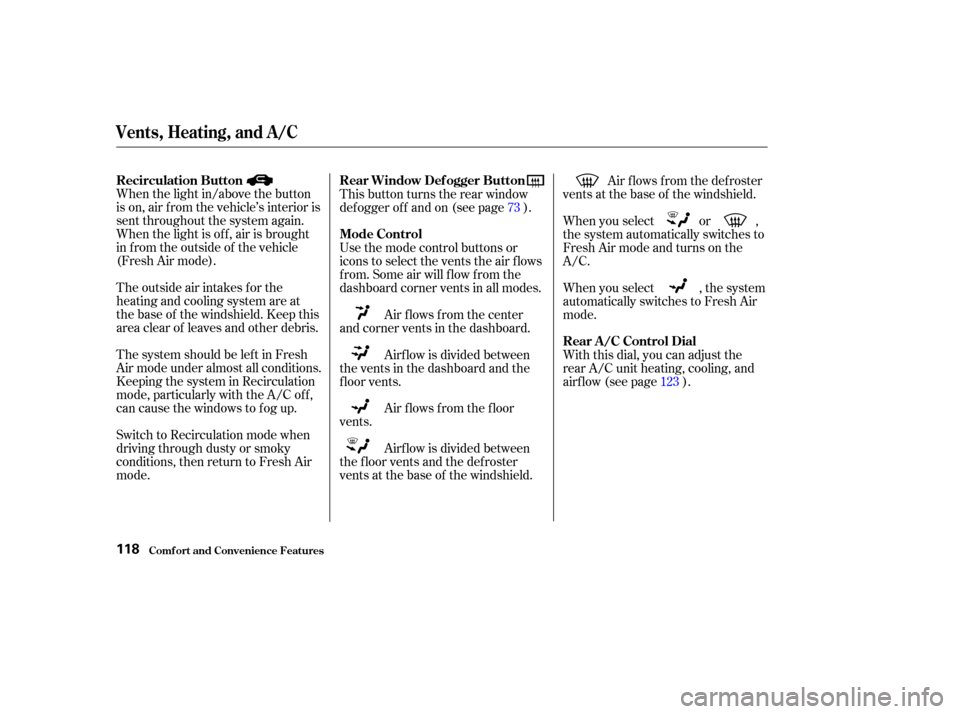
When the light in/above the button
is on, air f rom the vehicle’s interior is
sent throughout the system again.
When the light is of f , air is brought
in f rom the outside of the vehicle
(Fresh Air mode).
The outside air intakes f or the
heating and cooling system are at
the base of the windshield. Keep this
area clear of leaves and other debris.
ThesystemshouldbeleftinFresh
Air mode under almost all conditions.
Keeping the system in Recirculation
mode, particularly with the A/C of f ,
can cause the windows to fog up.
Switch to Recirculation mode when
driving through dusty or smoky
conditions, then return to Fresh Air
mode.This button turns the rear window
def ogger of f and on (see page ).
Use the mode control buttons or
icons to select the vents the air f lows
f rom. Some air will f low f rom the
dashboard corner vents in all modes.
Air flows from the center
and corner vents in the dashboard.
Air f lows f rom the f loor
vents. Air f lows f rom the def roster
vents at the base of the windshield.
When you select or ,
the system automatically switches to
Fresh Air mode and turns on the
A/C.
When you select , the system
automatically switches to Fresh Air
mode.
With this dial, you can adjust the
rear A/C unit heating, cooling, and
airflow (see page ).
Airf low is divided between
the vents in the dashboard and the
f loor vents.
Airf low is divided between
the f loor vents and the def roster
vents at the base of the windshield. 73
123
Vents, Heating, and A/C
Comf ort and Convenience Feat ures
Recirculation Button Rear Window Def ogger Button
Mode Control
Rear A /C Control Dial
118
Page 124 of 296

�Û�Ý �µ
Select . The system
automatically switches to Fresh
Air mode and turns on the A/C.
Select .
Set the f an and temperature
controls to maximum level.
To clear the windows f aster, you can
close the dashboard corner vents by
rotating the wheel next it. This will
send more warm air to the
windshield def roster vents. Once the
windshield is clear, select the Fresh
Air mode to avoid f ogging the
windows.
For your saf ety, make sure you have
a clear view through all the windows
bef ore driving. The Automatic Climate Control
system can adjust the f an speed and
airflow levels to maintain the interior
temperature you select.
Press the Auto button. With
Navigation System, the light in the
button comes on.
Set the desired temperature by
turning the Temperature Control
dial. You will see FULL AUTO in
the system’s display.
Set the desired temperature by
pressing to raise the
temperature or to lower the
temperature. The selected
temperature will show in the
temperature display on the control
panel. The system automatically selects the
proper mix of conditioned and/or
heated air to raise or lower the
interior temperature to the
temperature you selected.
If you set the temperature to its
lower limit or its highest limit, the
system runs at f ull cooling or heating
only. It does not regulate the interior
temperature.
In cold weather, the f an will not
come on automatically until the
heater starts to develop warm air.
When the
system is in FULL AUTO, the rear
A/C passenger control dials cannot
be used. Turning the rear A/C
controldialonthefrontpanel
disables the FULL AUTO f unction.
1.
2.
1.
2.
3.
Without Navigation System
With Navigation System
EX and EX-L models
Vents, Heating, and A/C
Comf ort and Convenience Feat ures
T o Remove Exterior Frost or Ice
From the Windows
Using A utomatic Climate Control
Rear A /C Cont rol
121
Page 128 of 296
Theclimatecontrolsystemhastwo
sensors. A sunlight sensor is in the
top of the dashboard, and a
temperature sensor is next to the
steering column. Do not cover the
sensors or spill any liquid on them.
The direction and quantity of airf low
f rom each rear ceiling vent is
adjustable.
To adjust the direction of the air
coming f rom a rear ceiling vent,
move the tab in the center of each
vent back-and-f orth, and rotate the
vent with the tab. The lever next to
each vent can be opened and closed
to regulate the amount of airf low.
Rear Climate Control, Climate Control Sensors
Comf ort and Convenience Feat ures
Sunlight and T emperature
Sensors
Rear Ceiling Vents
125
SUNLIGHT SENSOR TEMPERATURE SENSOR
TAB
LEVER