Page 201 of 256

Fill the f uel tank.
Change the engine oil and f ilter.
Wash and dry the exterior
completely.
Cleantheinterior.Makesurethe
carpeting, floor mats, etc. are
completely dry.
Leave the parking brake off. Put
the transmission in Reverse
(5-speed manual) or Park
(automatic).Block the rear wheels.
If the vehicle is to be stored f or a
longer period, it should be
supported on jackstands so the
tires are of f the ground.
Cover the vehicle with a
‘‘breathable’’ cover, one made
f rom a porous material such as
cotton. Non-porous materials, such
as plastic sheeting, trap moisture,
which can damage the paint.
If you need to park your vehicle f or
an extended period (more than one
month), there are several things you
should do to prepare it f or storage.
Proper preparation helps prevent
deterioration and makes it easier to
get your vehicle back on the road. If
possible, store your vehicle indoors. Leave one window open slightly (if
the vehicle is being stored
indoors).
Disconnect the battery.
Support the f ront and rear wiper
blade arms with a f olded towel or
ragsotheydonottouchthe
windshield.
To minimize sticking, apply a
silicone spray lubricant to all door
and tailgate seals. Also, apply a
vehiclebodywaxtothepainted
surfaces that mate with the door
and tailgate seals.If possible, run the engine
periodically until it reaches f ull
operating temperature (the
cooling f an cycles on and of f
twice). Pref erably do this once a
month.
If you store your vehicle f or 12
months or longer, have your Honda
dealer perf orm the inspections called
f or in the 24 months maintenance
schedule (Normal Conditions) as
soon as you take it out of storage
(see page ). The replacements
called f or in the maintenance
schedule are not needed unless the
vehicle has actually reached that
time or mileage. 168
Vehicle Storage
Maint enance197
Page 211 of 256

Diagnosing why your engine won’t
start f alls into two areas, depending
on what you hear when you turn the
key to START (III):You hear nothing, or almost
nothing. The engine’s starter
motor does not operate at all, or
operates very slowly.
You can hear the starter motor
operating normally, or the starter
motor sounds like it is spinning
f aster than normal, but the engine
does not start up and run. When you turn the ignition switch to
START (III), you do not hear the
normal noise of the engine trying to
start. You may hear a clicking sound
or series of clicks, or nothing at all.
Check the transmission interlock.
If you have a manual transmission,
the clutch pedal must be pushed
all the way to the f loor or the
starter will not operate. With an
automatic transmission, it must be
in Park or Neutral.
Check these things:
Turn the ignition switch to ON (II).
Turn on the headlights and check
their brightness. If the headlights
are very dim or don’t light at all,
the battery is discharged. See on page . Turn the ignition switch to START
(III). If the headlights do not dim,
check the condition of the f uses. If
the f uses are OK, there is
probably something wrong with
the electrical circuit f or the
ignition switch or starter motor.
You will need a qualif ied
technician to determine the
problem (see
on page ).
If the headlights dim noticeably or
go out when you try to start the
engine, either the battery is dis-
charged or the connections are
corroded. Check the condition of the
battery and terminal connections
(see page ). You can then try
jump starting the vehicle from a
booster battery (see page ).
209 216
196 209
Nothing Happens or the Starter
Motor Operates Very Slowly
Jump Starting Emergency T owing
T aking Care of t he Unexpect ed
If theEngineWon’tStart
207
Page 213 of 256

�´�´
Although this seems like a simple
procedure, you should take several
precautions.
You cannot start a Honda with an
automatic transmission by pushing
or pulling it. Open the hood and check the
physical condition of the battery.
In very cold weather, check the
condition of the electrolyte. If it
seems slushy or like ice, do not try
jump starting until it thaws.
Connect one jumper cable to the
positive ( ) terminal on your
battery. Connect the other end to
the positive ( ) terminal on the
booster battery.
Turn of f all the electrical acces-
sories: heater, A/C, stereo system,
lights, etc. Put the transmission in
Neutral or Park, and set the
parking brake.
1.
2.
3.
CONT INUED
To Jump Start Your Vehicle:
Jump Starting
T aking Care of t he Unexpect ed209
NOTICE:
A battery can explode if you do
not follow the correct procedure,
seriously injuring anyone
nearby.
Keep all sparks, open flames,
and smoking materials away
from the battery. If a battery sits in extreme
cold, the electrolyte inside can f reeze.
Attempting to jump start with a f rozen
battery can cause it to rupture.
Page 214 of 256
�µ
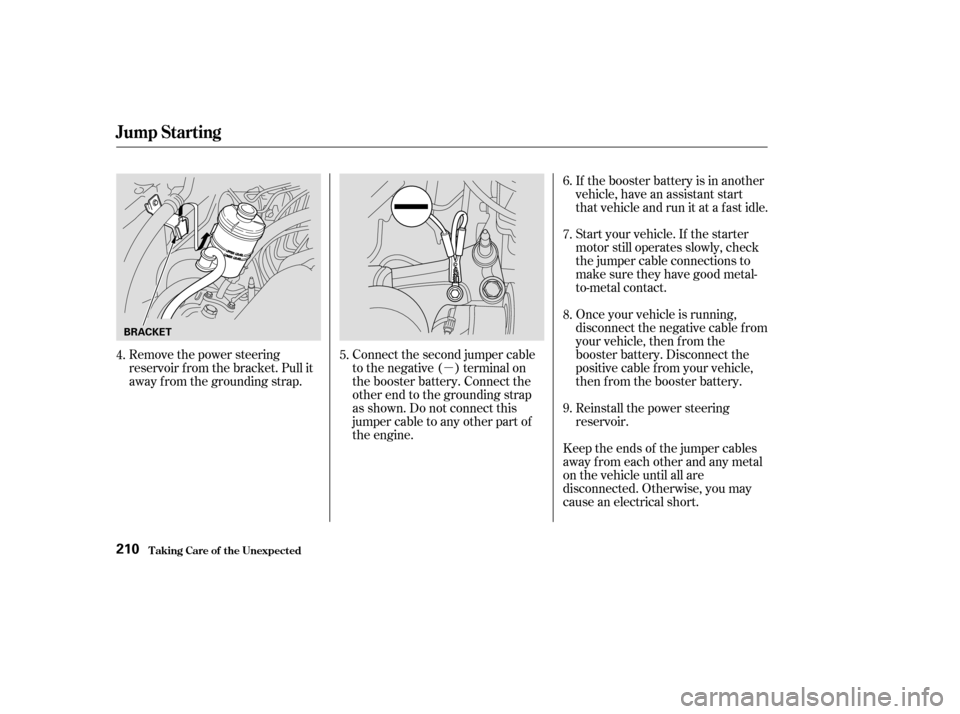
Remove the power steering
reservoir f rom the bracket. Pull it
away f rom the grounding strap. Connect the second jumper cable
to the negative ( ) terminal on
the booster battery. Connect the
other end to the grounding strap
as shown. Do not connect this
jumper cable to any other part of
the engine.If the booster battery is in another
vehicle, have an assistant start
that vehicle and run it at a fast idle.
Start your vehicle. If the starter
motor still operates slowly, check
the jumper cable connections to
make sure they have good metal-
to-metal contact.
Once your vehicle is running,
disconnect the negative cable f rom
your vehicle, then f rom the
booster battery. Disconnect the
positive cable f rom your vehicle,
then from the booster battery.
Keep the ends of the jumper cables
away from each other and any metal
on the vehicle until all are
disconnected. Otherwise, you may
cause an electrical short. Reinstall the power steering
reservoir.
4.
5. 6.
7.
8.
9.
Jump Starting
T aking Care of t he Unexpect ed210
BRACKET
Page 217 of 256

Let the vehicle sit f or a minute.
Open the hood, and check the oil
level (see page ). An engine
very low on oil can lose pressure
during cornering and other driving
maneuvers.
If necessary, add oil to bring the
level back to the full mark on the
dipstick (see page ).If the charging system
indicator comes on brightly
when the engine is running, the
battery is not being charged.
Immediately turn of f all electrical
accessories. Try not to use other
electrically operated controls such as
the power windows. Keep the engine
running; starting the engine will
discharge the battery rapidly.
Go to a service station or garage
where you can get technical
assistance.
This light should never
come on when the engine is
running. If it starts f lashing or stays
on, the oil pressure has dropped very
low. Serious engine damage is
possible and you should take
immediate action. Saf ely pull of f the road, and shut
of f the engine. Turn on the hazard
warning lights.
Start the engine, and watch the oil
pressure light. If it does not go out
within ten seconds, turn off the
engine. There is a mechanical
problem that needs to be repaired
bef ore you can continue driving.
(See
on page
).
1.
2.
4. 3.
173
216 127
L ow Oil Pressure Indicator
Emergency T owingCharging System Indicator
L ow Oil Pressure Indicator, Charging System Indicator
T aking Care of t he Unexpect ed213
NOTICE:
Running the engine with low
oil pressure can cause serious
mechanical damage almost immediately.
Turn of f the engine as soon as you can
saf ely get the vehicle stopped.
Page 218 of 256

To check if they are set, turn the
ignition to ON (II), without starting
the engine. The Malf unction
Indicator Lamp will come on f or 20
seconds. If it then goes of f , the
readiness codes are set. If it blinks 5
times, the readiness codes are not
set. If possible, do not take your
vehicle f or a state emissions test
until the readiness codes are set.
Refer to State Emissions Testing for
more inf ormation, on page .
If the indicator comes on
while driving, it means one
of the engine’s emission control
systems may have a problem. Even
though you may f eel no dif f erence in
your vehicle’s perf ormance, it can
reduce your f uel economy and cause
increased emissions. Continued
operation may cause serious damage.
If you have recently ref ueled your
vehicle, the indicator coming on
could be a loose or missing f uel f ill
cap. Tighten the cap until it clicks at
least three times. Tightening the cap
will not turn the indicator turn of f
immediately; it takes at least three
days of normal driving. If the indicator comes on repeatedly,
even though it may turn of f as you
continue driving, have the vehicle
checked by the dealer as soon as
possible.
Your vehicle has certain ‘‘readiness
codes’’ that are part of the on-board
diagnostics f or the emissions
systems. In some states, part of the
emissions testing is to make sure
these codes are set. If they are not
set, the test cannot be completed.If your vehicle battery has been
disconnected or gone dead, these
codes are erased. It takes at least
three days of driving under various
conditions to set the codes again.
234
T aking Care of t he Unexpect ed
Readiness Codes
Malf unction Indicator L amp
214
NOTICE:If you keep driving with the
Malf unction Indicator Lamp on, you
can damage your vehicle’s emission
controls and the engine. Those repairs
may not be covered by your vehicle’s
warranties.
Page 226 of 256
�µ
�µ
�µ
No. Amps. Circuits Protected
1
2
3
4
5
6
7
8
9
10
11
12
13
14
15
16
17
18
19
20 20 A
15 A
15 A
20 A
15 A
15 A
15 A
10 A
30 A
20 A
40 A
40 A
40 A
15 A
20 A
15 A
30 A
100 A 50 A Condenser Fan
Small Light
Interior Light
Cooling Fan
Hazard
FI ECU
Horn, Stop
Not Used
Back Up
ABS Motor
Rear Defroster
Heater Motor
Power Window
Option
Lef t Headlight
Door Lock
Right Headlight
ABS F/S
Battery
Ignition 1
Spare Fuses
21 257.5A 30A
Fuse Locations
T aking Care of t he Unexpect ed222
UNDER-HOOD FUSE BOX
Page 231 of 256

�µ�µ�µ
�µ
�µ
�µ
�µ
�µ
�µ
�µ
�µ
�µ
�µ
�µ
�µ
�µ
�µ
Specif ications
T echnical Inf ormation227
Air Conditioning
Lights
Battery Fuses
Alignment
Tires
HFC-134a (R-134a)
17.0 18.7 oz (480 530 g) SP-10
12 V
12 V 60/55 W
21/5 W
36 AH/5 HR
12 V 12 V
12 V
12 V
12 V
12 V
12 V
12 V
12 V
21 W
3CP
8W
4CP
8W
5W
21 W
21/5 W
21 W
12 V 3 CP
12 V
45 AH/20 HR 26 psi (180 kPa , 1.8 kgf/cm
)
26 psi (180 kPa , 1.8 kgf/cm)
P205/70R15 95S 1°45’
1°
0°
0.08 in (2.0 mm) 0.0in(0mm)
12 V
Refrigerant type
Charge quantity
Lubricant type
Headlights
Front turn signal/side marker
lights
Parking lights
Rear turn signal lights
Stop/Taillights
Back-up lights
License plate light
Ceiling light
Spotlights
Cargo area Light
Rear side marker lights
High-mount brake light
Capacity
Interior
Under-hood
Toe-in
Camber
Caster
Size
Pressure
See page
221or the fuse label
attached to the inside of the fuse
box door under the steering
column.
See page 222or the fuse box
cover.
Front
Rear
Front
Rear
Front
Front/Rear
Front
Rear
(H4/HB2)
