Page 142 of 256

Apply the parking brake.
In cold weather, turn of f all
electrical accessories to reduce
the drain on the battery.
Push the clutch pedal down all the
way.
Make sure the shif t lever is in
Park. Press on the brake pedal.Without touching the accelerator
pedal, turn the ignition key to the
START (III) position. Do not hold
the key in START for more than
15 seconds at a time. If the engine
does not start right away, pause
f or at least 10 seconds bef ore
trying again.
If the engine does not start within
15 seconds, or starts but stalls
right away, repeat step 4 with the
accelerator pedal pressed halfway
down. If the engine starts, release
pressure on the accelerator pedal
so the engine does not race.If the engine still does not start,
press the accelerator pedal all the
way down and hold it there while
starting in order to clear f looding.
If the engine still does not start,
return to step 5.
1.
2.
3. 4.
5.6.
Manual Transmission:
Automatic Transmission:
Starting the Engine
Driving138
NOTICE: The engine is harder to start
in cold weather. Also, the thinner air
f ound at altitudes above 8,000 f eet
(2,400 meters) adds to this problem.
Page 146 of 256

�µ�µ
This position mechani-
cally locks the transmission. Use
Park whenever you are turning of f or
starting the engine. To shif t out of
Park, you must press on the brake
pedal and have your f oot of f the
accelerator pedal. If you have done all of the above and
still cannot move the lever out of
Park, see
on
page .
To avoid transmission damage, come
to a complete stop bef ore shif ting
into Park. The shif t lever must be in
Park bef ore you can remove the key
from the ignition switch.
To shift from Park
to Reverse, press the pedal, then
move the shift lever. To shif t from
Reverse to Neutral, come to a
completestop,andthenshift. Your vehicle has a reverse lockout so
you cannot accidentally shif t to
Reverse when the vehicle speed
exceeds 5 mph (8 km/h).
If you cannot shif t to Reverse when
the vehicle is stopped, press the
brake pedal and slowly shift to
Neutral, and then to Reverse.
If there is a problem in the reverse
lockout system, or your vehicle’s
battery is disconnected or goes dead,
you cannot shif t to Reverse. (Ref er
to Shif t Lock Release on page ).
144
144
To shift from:
PtoR
RtoN
NtoD Dto2 2to1
1to2
2toD
DtoN NtoR RtoP Do this:
Press the brake pedal, then
move the shift lever.
Move the lever.
Park (P) Shif t L ock Release
Reverse (R)
Automatic Transmission
Driving142
Page 161 of 256

Your Honda can be towed behind a
motorhome at legal highway speeds
up to 65 mph(100 km/h). Do not
exceed 65 mph(100km/h).
Otherwise, severe transmission
damage will occur. To avoid damage
to the 4WD system, it must be towed
with all f our wheels on the ground
(f lat towing).
When purchasing a tow bar, make
sure you select a reputable
manuf acturer and installer. Follow
the manufacturer’s attachment
instructions caref ully.Perf orm the f ollowing procedure
everyday immediately bef ore you
begin towing. Otherwise severe
automatic transmission damage will
occur.
Check the transmission f luid level
(see page ).
Start the engine.
Press on the brake pedal. Move
the shif t lever through all its
positions.
ShifttoD,thentoN.Letthe
engine run f or three minutes, then
turn it off.
Leave the ignition switch in
ACCESSORY (I) so the steering
wheel does not lock. Make sure
the radio and any items plugged
into the accessory power sockets
are turned of f so you do not run
down the battery. If you tow more than 8 hours in one
day, you should repeat the above
procedure at least every 8 hours
(when you stop f or f uel, etc.)
Release the parking brake. 179
Do not overf ill.
Driving
Towing Your Vehicle Behind a Motorhome
Ext ended T owing
157
NOTICE:
NOTICE:T he steering system can be
damaged if the steering wheel is locked.
Leave the ignition switch in Accessory
(I), and make sure the steering wheel
turns f reely bef ore you begin towing.
Failure to f ollow the above
instructions exactly will result in severe
automatic transmission damage. If you
cannot shif t the transmission or start
the engine, your vehicle must be
transported on a f lat-bed truck or
trailer.
Page 162 of 256

When towing your CR-V f or long
periods, remove the 7.5A Accessory/
Radio f use to reduce drain on battery.
This f use in located in the interior
f use box and is shown as number 8
below.
Only remove the fuse after you have
perf ormed the transmission shif ting
procedure, and the key is in the
ACCESSORY (I) position. Store the
f use in an obvious location (center
tray, coin pockets, etc) as a reminder
to re-install the fuse before driving
the vehicle.If youtowaCR-Vwithanautomatic
transmission, the transmission f luid
must be changed every two years or
30,000 miles (48,000 km), whichever
comes f irst.
Towing Your Vehicle Behind a Motorhome
Driving
Automatic Transmission
Ext ended T owing
158
NOTICE:INTERIOR FUSE BOX
ACC/RADIO FUSEThis f use MUST be re-
installed bef ore driving the vehicle.
Failure to re-install the f use may allow
youtoremovethekeywiththe
transmission in gear.
Severe automatic transmission damage
will occur if the vehicle is shif ted f rom
reverse to neutral and then towed with
the drive wheels on the ground.
Page 167 of 256

This section explains why it is
important to keep your vehicle well
maintained and how to f ollow basic
maintenance saf ety precautions.
This section also includes
Maintenance Schedules f or normal
driving and severe driving conditions,
a Maintenance Record, and instruc-
tions f or simple maintenance tasks
you may want to take care of
yourself .
If you have the skills and tools to per-
f orm more complex maintenance
tasks on your Honda, you may want
to purchase the Service Manual. See
page f or inf ormation on how to
obtain a copy, or see your Honda
dealer.......................
Maintenance Saf ety .164
.................
Maintenance Schedule . 165
....................
Maintenance Record .170
..............................
Fluid Locations .172
........................
Adding Engine Oil .173
.........
Changing the Oil and Filter . 174
..............................
Engine Coolant .176
....................
Windshield Washers .178
.......................
Transmission Fluid .179
................
Brake and Clutch Fluid . 181
....................
Power Steering Fluid . 182
....................................
Hood Latch .182
.............................................
Lights .183
.......................................
Seat Belts .187
.....................................
Floor Mats .188
..................
Dust and Pollen Filter . 188
.................................
Wiper Blades .189
...............................................
Tires .190
...................
Checking the Battery . 196
.............................
Vehicle Storage .197
243
Maintenance
Maint enance163
Page 168 of 256

All service items not detailed in this
section should be perf ormed by a
Honda technician or other qualif ied
mechanic.
To eliminate potential hazards, read
the instructions bef ore you begin,
and make sure you have the tools
and skills required.Make sure your vehicle is parked
on level ground, the parking brake
is set, and the engine is of f .
To clean parts, use a commercially
available degreaser or parts
cleaner, not gasoline.
To reduce the possibility of f ire or
explosion, keep cigarettes, sparks,
and f lames away f rom the battery
and all f uel-related parts. Let the
engine and exhaust system cool
bef ore touching any parts.
Do
not run the engine unless
instructed to do so. Be sure there is
adequate ventilation whenever you
operate the engine.
Wear eye protection and
protective clothing when working
with the battery or compressed air.
Maintenance Saf ety
Maint enance
Important Saf ety Precautions Potential Vehicle Hazards
Burns f rom hot parts.
Injury f rom moving parts. Carbon Monoxide poison f rom
engine exhaust.
164
Improperly maintaining this
vehicle or failing to correct a
problem before driving can
cause a crash in which you can
be seriously hurt or killed.
Always follow the inspection
and maintenance
recommendations, and
schedules in this owner’s
manual.
Page 189 of 256
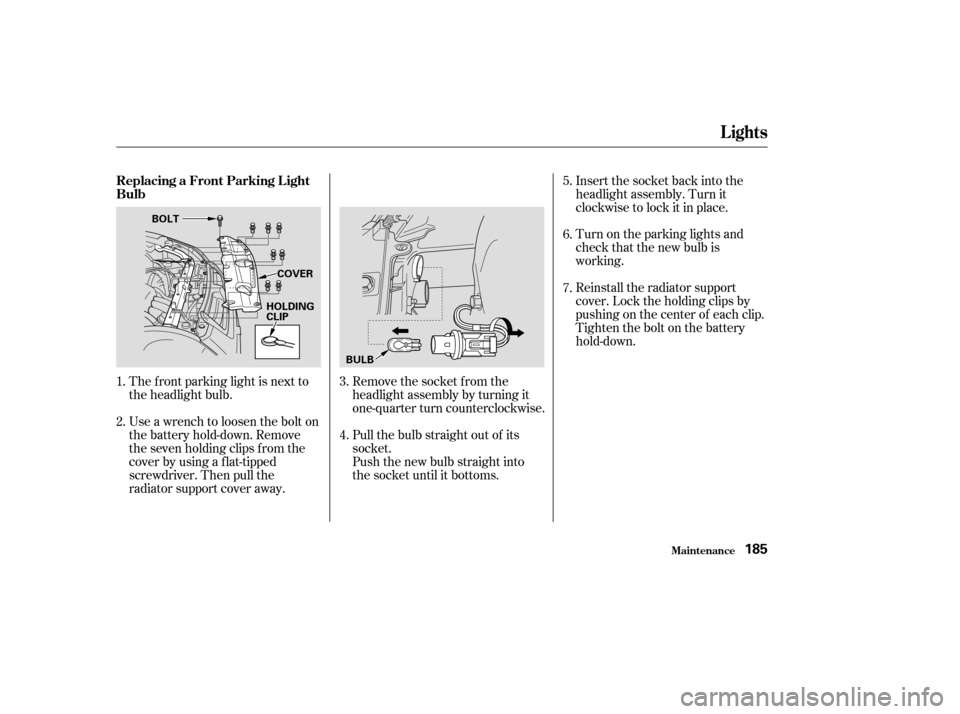
The f ront parking light is next to
the headlight bulb.Remove the socket from the
headlight assembly by turning it
one-quarter turn counterclockwise.
Pull the bulb straight out of its
socket.
Push the new bulb straight into
the socket until it bottoms.Insert the socket back into the
headlight assembly. Turn it
clockwise to lock it in place.
Turn on the parking lights and
check that the new bulb is
working.
Reinstall the radiator support
cover. Lock the holding clips by
pushing on the center of each clip.
Tighten the bolt on the battery
hold-down.
Use a wrench to loosen the bolt on
the battery hold-down. Remove
the seven holding clips f rom the
cover by using a flat-tipped
screwdriver. Then pull the
radiator support cover away.
1.
2.
3.
4.5.
6.
7.
Replacing a Front Parking L ight
Bulb
Lights
Maint enance185
BOLT
BULB
HOLDING
CLIP
COVER
Page 200 of 256
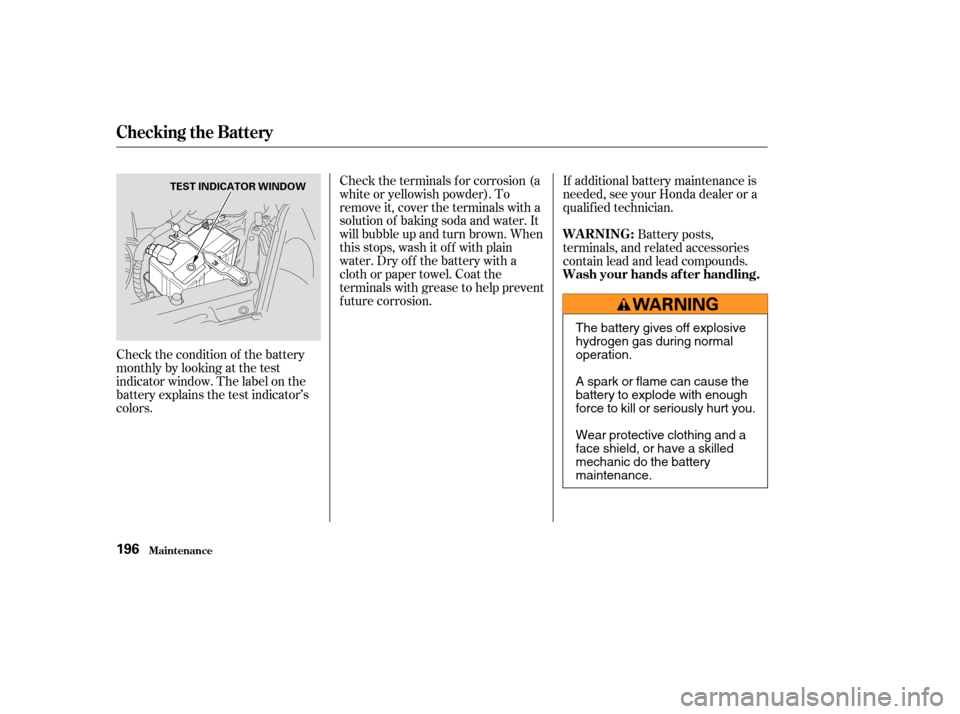
Check the condition of the battery
monthlybylookingatthetest
indicator window. The label on the
battery explains the test indicator’s
colors.Check the terminals f or corrosion (a
white or yellowish powder). To
remove it, cover the terminals with a
solution of baking soda and water. It
will bubble up and turn brown. When
this stops, wash it of f with plain
water. Dry off the battery with a
cloth or paper towel. Coat the
terminals with grease to help prevent
f uture corrosion.
If additional battery maintenance is
needed, see your Honda dealer or a
qualif ied technician.
Battery posts,
terminals, and related accessories
contain lead and lead compounds.
Checking the Battery
Maint enance
WARNING:
Wash your hands af ter handling.
196
TEST INDICATOR WINDOW
The battery gives off explosive
hydrogen gas during normal
operation.
A spark or flame can cause the
battery to explode with enough
force to kill or seriously hurt you.
Wear protective clothing and a
face shield, or have a skilled
mechanic do the battery
maintenance.