Page 78 of 256
�µ
�µ �µ
�µ
See page for information on
cargo loading. Keep the tailgate and
the hatch glass closed at all times
while driving to avoid damaging the
tailgate and the hatch glass, and to
prevent exhaust gas f rom getting
into the interior. See
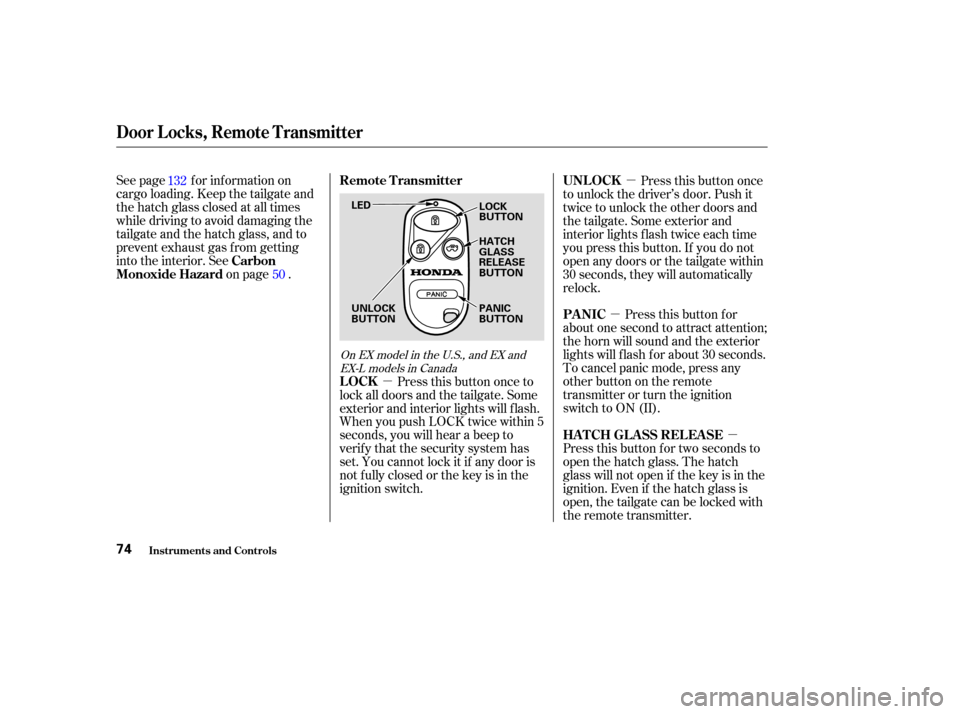
on page . Pressthisbuttononce
to unlock the driver’s door. Push it
twice to unlock the other doors and
the tailgate. Some exterior and
interior lights f lash twice each time
you press this button. If you do not
open any doors or the tailgate within
30 seconds, they will automatically
relock.
Pressthisbuttonfor
about one second to attract attention;
thehornwillsoundandtheexterior
lights will f lash f or about 30 seconds.
To cancel panic mode, press any
other button on the remote
transmitter or turn the ignition
switch to ON (II).
Press this button for two seconds to
open the hatch glass. The hatch
glass will not open if the key is in the
ignition. Even if the hatch glass is
open, the tailgate can be locked with
the remote transmitter.
Press this button once to
lock all doors and the tailgate. Some
exterior and interior lights will f lash.
When you push LOCK twice within 5
seconds, you will hear a beep to
verify that the security system has
set. You cannot lock it if any door is
not f ully closed or the key is in the
ignition switch.
132
50
On EX model in the U.S., and EX andEX-L models in Canada
Carbon
Monoxide Hazard UNL OCK
PA NIC
HATCH GLASS RELEASE
LOCK Remote Transmitter
Door Locks, Remote Transmitter
Inst rument s and Cont rols74
LED
UNLOCK
BUTTON LOCK
BUTTON
HATCH
GLASS
RELEASE
BUTTON
PANIC
BUTTON
Page 93 of 256
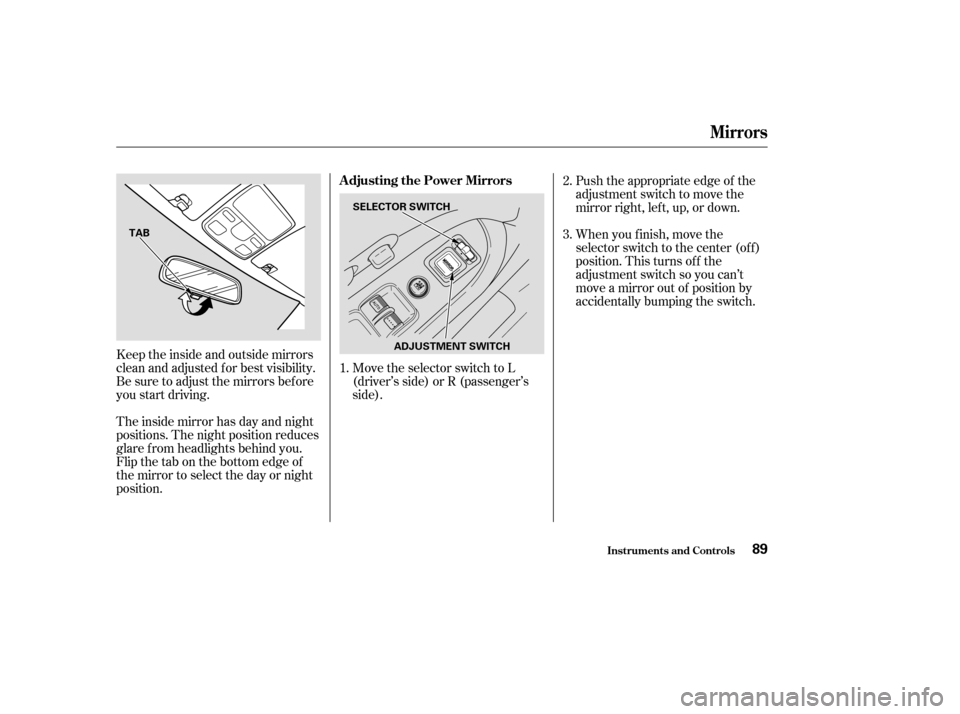
Keeptheinsideandoutsidemirrors
clean and adjusted f or best visibility.
Be sure to adjust the mirrors bef ore
you start driving.
The inside mirror has day and night
positions. The night position reduces
glare f rom headlights behind you.
Flip the tab on the bottom edge of
the mirror to select the day or night
position.Move the selector switch to L
(driver’s side) or R (passenger’s
side).Push the appropriate edge of the
adjustment switch to move the
mirrorright,left,up,ordown.
When you f inish, move the
selector switch to the center (off)
position. This turns of f the
adjustment switch so you can’t
move a mirror out of position by
accidentally bumping the switch.
3.
1. 2.
Mirrors
Inst rument s and Cont rols
Adjusting the Power Mirrors
89
TAB
SELECTOR SWITCH
ADJUSTMENT SWITCH
Page 109 of 256

You can use the instrument panel
brightness control knob to adjust the
illumination of the audio system (see
page ). The audio system
illuminates when the parking lights
are on, even if the radio is of f .
Press the knob to get it
to pop out. Turn it to adjust the
Treble level. Pull it out slightly
f arther to adjust the Balance, or side-
to-side strength. Push the knob back
in when you are done adjusting the
sound.
Press the MODE (TUNE) knob
repeatedly to display the Bass (BAS),
Treble (TRE), Fader (FAD), and
Balance (BAL) settings.
Eachmodeisshowninthedisplayas
it changes. Turn the MODE (TUNE)
knob to adjust the setting to your
liking. When the level reaches the
center, you will see ‘‘C’’ in the display.
The system will automatically return
the display to the selected audio
mode about 5 seconds af ter you stop
adjusting a mode. 66
On EX model in the U.S., and EX and
EX-L models in Canada
Playing the Radio
A udio System L ighting
TRE/BAL:
Comf ort and Convenience Feat ures105
Page 134 of 256

Modif ying your vehicle, or installing
some non-Honda accessories, can
make your vehicle unsaf e. Bef ore
you make any modif ications or add
anyaccessories,besuretoreadthe
f ollowing inf ormation.When properly installed, cellular
phones, alarms, two-way radios, and
low-powered audio systems should
not interf ere with your vehicle’s
computer controlled systems, such
as the SRS and anti-lock brake
system.However, if electronic accessories
are improperly installed, or exceed
your vehicle’s electrical system
capacity, they can interf ere with the
operation of your vehicle, or even
cause the airbags to deploy.
Bef ore installing any accessory:
Be sure electronic accessories do
not overload electrical circuits
(see page ) or interf ere with
proper operation.
Have the installer contact your
Honda dealer f or assistance bef ore
installing any electronic accessory. Make sure the accessory does not
obscure any lights, or interf ere
with proper vehicle operation or
perf ormance.
Your dealer has Honda accessories
that allow you to personalize your
vehicle. These accessories have
been designed and approved f or your
vehicle, and are covered by warranty.
Although aftermarket accessories
may f it on your vehicle, they may not
meet f actory specif ications, and
could adversely af f ect your vehicle’s
handling and stability (see
‘‘Modif ications’’ on page f or
additional information).
218
131
Bef ore Driving
A ccessories and Modif ications
130
Improper accessories or
modifications can affect your
vehicle’s handling, stability, and
performance, and cause a
crash in which you can be hurt
or killed.
Follow all instructions in this
owner’s manual regarding
accessories and modifications.
Page 141 of 256
Check that any items you may be
carrying with you inside are stored
properly or f astened down
securely. Visually check the tires. If a tire
looks low, use a gauge to check its
pressure. Check that the hood, tailgate and
hatch glass are f ully closed. Make sure all windows, mirrors,
and outside lights are clean and
unobstructed. Remove f rost, snow,
or ice.
Youshoulddothefollowingchecks
and adjustments bef ore you drive
your vehicle.
Check the seat adjustment (see
page ).
Check the adjustment of the
inside and outside mirrors (see
page ).
Check the steering wheel
adjustment (see page ).Make sure the doors and tailgate
are securely closed and locked.
Fasten your seat belt. Check that
your passengers have f astened
their seat belts (see page ).
When you start the engine, check
the gauges and indicator lights in
the instrument panel (see page
).
1.
2.
3.
4. 5.
6.
7.
8.
9.
10.
77
89 68 15
55
Driving Guidelines
Driving
Preparing to Drive
137
Page 150 of 256

Always use the parking brake when
you park your vehicle. Make sure
the parking brake is set f irmly or
your vehicle may roll if it is parked
on an incline.
If your vehicle has an automatic
transmission, set the parking brake
bef ore you put the transmission in
Park. This keeps the vehicle f rom
moving and putting pressure on the
parking mechanism in the
transmission.Make sure the moonroof and the
windows are closed.
Turn of f the lights.
Place any packages, valuables, etc.
in the cargo area, or take them
with you.
Lock the doors and the tailgate.
Make sure the hatch glass is
closed securely.
Never park over dry leaves, tall
grass, or other f lammable
materials. The hot three way
catalytic converter could cause
these materials to catch on fire.If the vehicle is f acing uphill, turn
the f ront wheels away f rom the
curb.
If the vehicle is f acing downhill,
turn the front wheels toward the
curb.
Make sure the parking brake is
f ully released bef ore driving away.
Driving with the parking brake
partially set can overheat or
damage the rear brakes.
Parking T ips
Driving
Parking T ips
146
Page 151 of 256

Your Honda is equipped with disc
brakes at all f our wheels. A power
assist helps reduce the ef f ort needed
on the brake pedal. The ABS (on
vehicles equipped with ABS) helps
you retain steering control when
braking very hard.
Resting your f oot on the pedal keeps
the brakes applied lightly, builds up
heat, and reduces their ef f ectiveness.
It also keeps your brake lights on all
the time, conf using drivers behind
you.Constant application of the brakes
when going down a long hill builds
up heat and reduces their ef f ective-
ness. Use the engine to assist the
brakes by taking your f oot of f the
accelerator and downshif ting to a
lower gear.
Check your brakes af ter driving
through deep water. Apply the
brakes moderately to see if they f eel
normal. If not, apply them gently and
f requently until they do. Be extra
cautious and alert in your driving.
The hydraulic system that operates
the brakes has two separate circuits.
Each circuit works diagonally across
the vehicle (the lef t-f ront brake is
connected with the right-rear brake,
etc.). If one circuit should develop a
problem, you will still have braking
at two wheels.
Braking System
Driving
Braking System Design
147
Front
Page 157 of 256
�µ�µ
CONT INUED
Check trailer light requirements f or
the areas where you plan to tow. Many states and Canadian provinces
require special outside mirrors when
towing a trailer. Even if they don’t,
you should install special mirrors if
you cannot clearly see behind you, or
if the trailer creates a blind spot.
Askyourtrailersalesorrental
agency if any other items are
recommended or required f or your
towing situation.
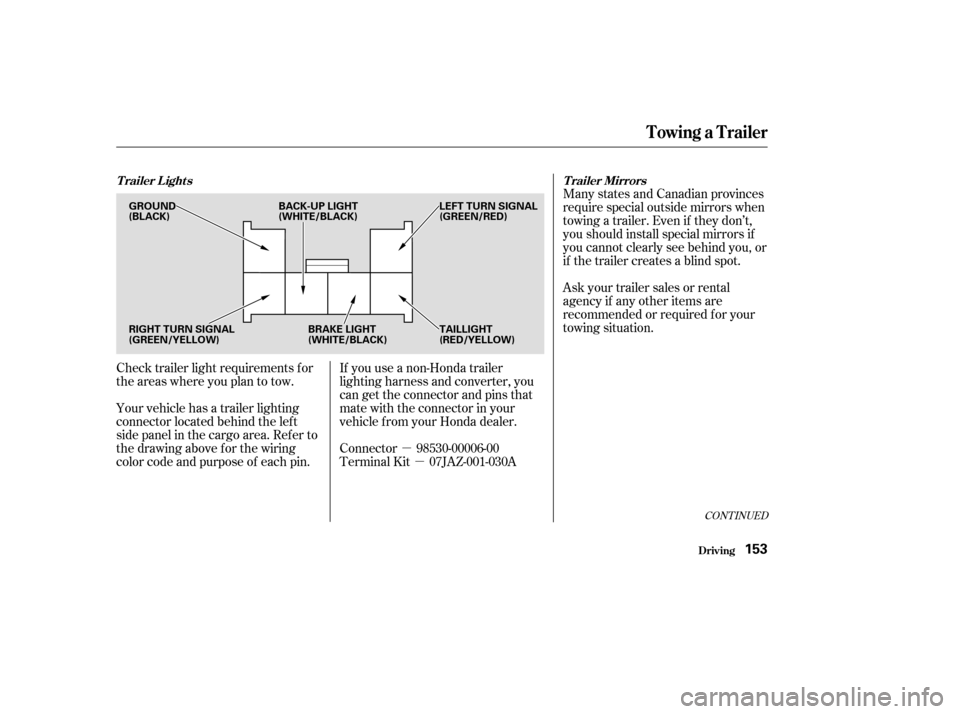
Your vehicle has a trailer lighting
connector located behind the lef t
side panel in the cargo area. Ref er to
thedrawingaboveforthewiring
color code and purpose of each pin. If you use a non-Honda trailer
lighting harness and converter, you
can get the connector and pins that
mate with the connector in your
vehicle f rom your Honda dealer.
Connector 98530-00006-00
Terminal Kit 07JAZ-001-030A
Towing a Trailer
Driving
Trailer Lights
Trailer Mirrors
153
GROUND
(BLACK)LEFT TURN SIGNAL
(GREEN/RED)
RIGHT TURN SIGNAL
(GREEN/YELLOW) BRAKE LIGHT
(WHITE/BLACK)TAILLIGHT
(RED/YELLOW)
BACK-UP LIGHT
(WHITE/BLACK)