Page 125 of 256

Even with the cruise control turned
on, you can still use the accelerator
pedal to speed up f or passing. Af ter
completing the pass, take your foot
of f the accelerator pedal. The vehicle
will return to the set cruising speed.
Resting your f oot on the brake or
clutch pedal will cause the cruise
control to cancel.Youcancancelthecruisecontrolin
any of these ways:
Tap the brake or clutch pedal.
Push the CANCEL button on the
steering wheel.
Press the Cruise Control Master
Switch. When you push the CANCEL button,
or tap the brake or clutch pedal, the
system remembers the previously-
set cruising speed. To return to that
speed, accelerate to above 25 mph
(40 km/h) and then press and
release the RESUME/accel button.
The CRUISE CONTROL light comes
on. The vehicle will accelerate to the
same cruising speed as bef ore.
Pressing the Cruise Control Master
Switch turns the system of f and
erases the previous cruising speed.
Cancelling the Cruise Control Resuming the Set Speed
Cruise Control
Comf ort and Convenience Feat ures121
Page 130 of 256
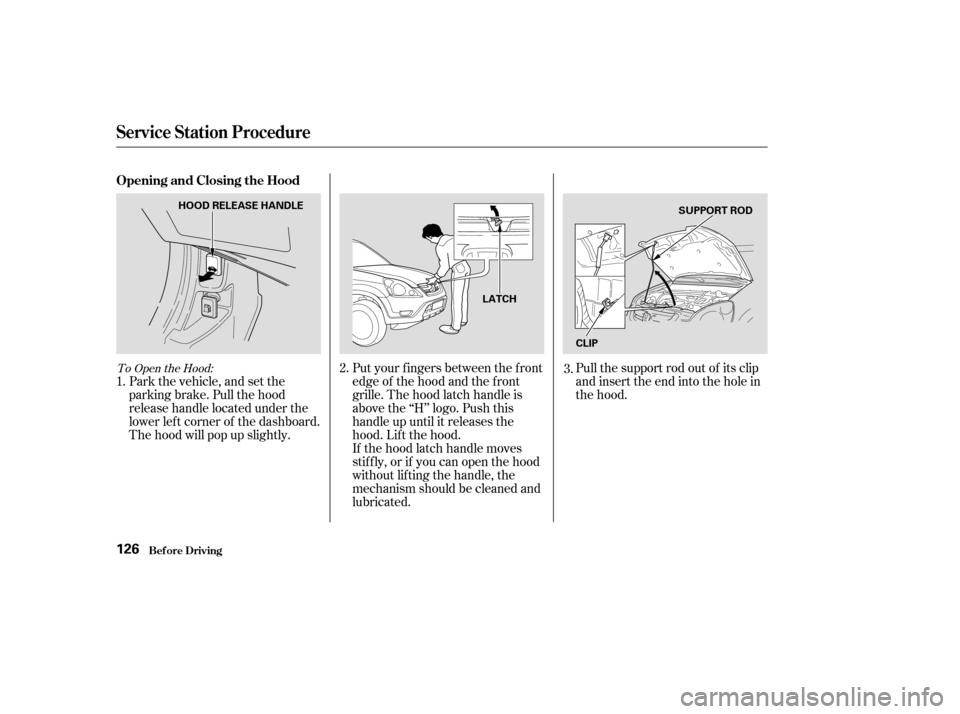
To Open the Hood:
Park the vehicle, and set the
parking brake. Pull the hood
release handle located under the
lower lef t corner of the dashboard.
The hood will pop up slightly.Put your f ingers between the f ront
edge of the hood and the f ront
grille. The hood latch handle is
above the ‘‘H’’ logo. Push this
handle up until it releases the
hood. Lif t the hood.
If the hood latch handle moves
stif f ly, or if you can open the hood
without lifting the handle, the
mechanism should be cleaned and
lubricated.Pull the support rod out of its clip
and insert the end into the hole in
the hood.
1. 2.
3.
Service Station Procedure
Bef ore Driving
Opening and Closing the Hood
126
HOOD RELEASE HANDLE
LATCHSUPPORT ROD
CLIP
Page 134 of 256

Modif ying your vehicle, or installing
some non-Honda accessories, can
make your vehicle unsaf e. Bef ore
you make any modif ications or add
anyaccessories,besuretoreadthe
f ollowing inf ormation.When properly installed, cellular
phones, alarms, two-way radios, and
low-powered audio systems should
not interf ere with your vehicle’s
computer controlled systems, such
as the SRS and anti-lock brake
system.However, if electronic accessories
are improperly installed, or exceed
your vehicle’s electrical system
capacity, they can interf ere with the
operation of your vehicle, or even
cause the airbags to deploy.
Bef ore installing any accessory:
Be sure electronic accessories do
not overload electrical circuits
(see page ) or interf ere with
proper operation.
Have the installer contact your
Honda dealer f or assistance bef ore
installing any electronic accessory. Make sure the accessory does not
obscure any lights, or interf ere
with proper vehicle operation or
perf ormance.
Your dealer has Honda accessories
that allow you to personalize your
vehicle. These accessories have
been designed and approved f or your
vehicle, and are covered by warranty.
Although aftermarket accessories
may f it on your vehicle, they may not
meet f actory specif ications, and
could adversely af f ect your vehicle’s
handling and stability (see
‘‘Modif ications’’ on page f or
additional information).
218
131
Bef ore Driving
A ccessories and Modif ications
130
Improper accessories or
modifications can affect your
vehicle’s handling, stability, and
performance, and cause a
crash in which you can be hurt
or killed.
Follow all instructions in this
owner’s manual regarding
accessories and modifications.
Page 150 of 256

Always use the parking brake when
you park your vehicle. Make sure
the parking brake is set f irmly or
your vehicle may roll if it is parked
on an incline.
If your vehicle has an automatic
transmission, set the parking brake
bef ore you put the transmission in
Park. This keeps the vehicle f rom
moving and putting pressure on the
parking mechanism in the
transmission.Make sure the moonroof and the
windows are closed.
Turn of f the lights.
Place any packages, valuables, etc.
in the cargo area, or take them
with you.
Lock the doors and the tailgate.
Make sure the hatch glass is
closed securely.
Never park over dry leaves, tall
grass, or other f lammable
materials. The hot three way
catalytic converter could cause
these materials to catch on fire.If the vehicle is f acing uphill, turn
the f ront wheels away f rom the
curb.
If the vehicle is f acing downhill,
turn the front wheels toward the
curb.
Make sure the parking brake is
f ully released bef ore driving away.
Driving with the parking brake
partially set can overheat or
damage the rear brakes.
Parking T ips
Driving
Parking T ips
146
Page 151 of 256

Your Honda is equipped with disc
brakes at all f our wheels. A power
assist helps reduce the ef f ort needed
on the brake pedal. The ABS (on
vehicles equipped with ABS) helps
you retain steering control when
braking very hard.
Resting your f oot on the pedal keeps
the brakes applied lightly, builds up
heat, and reduces their ef f ectiveness.
It also keeps your brake lights on all
the time, conf using drivers behind
you.Constant application of the brakes
when going down a long hill builds
up heat and reduces their ef f ective-
ness. Use the engine to assist the
brakes by taking your f oot of f the
accelerator and downshif ting to a
lower gear.
Check your brakes af ter driving
through deep water. Apply the
brakes moderately to see if they f eel
normal. If not, apply them gently and
f requently until they do. Be extra
cautious and alert in your driving.
The hydraulic system that operates
the brakes has two separate circuits.
Each circuit works diagonally across
the vehicle (the lef t-f ront brake is
connected with the right-rear brake,
etc.). If one circuit should develop a
problem, you will still have braking
at two wheels.
Braking System
Driving
Braking System Design
147
Front
Page 157 of 256
�µ�µ
CONT INUED
Check trailer light requirements f or
the areas where you plan to tow. Many states and Canadian provinces
require special outside mirrors when
towing a trailer. Even if they don’t,
you should install special mirrors if
you cannot clearly see behind you, or
if the trailer creates a blind spot.
Askyourtrailersalesorrental
agency if any other items are
recommended or required f or your
towing situation.
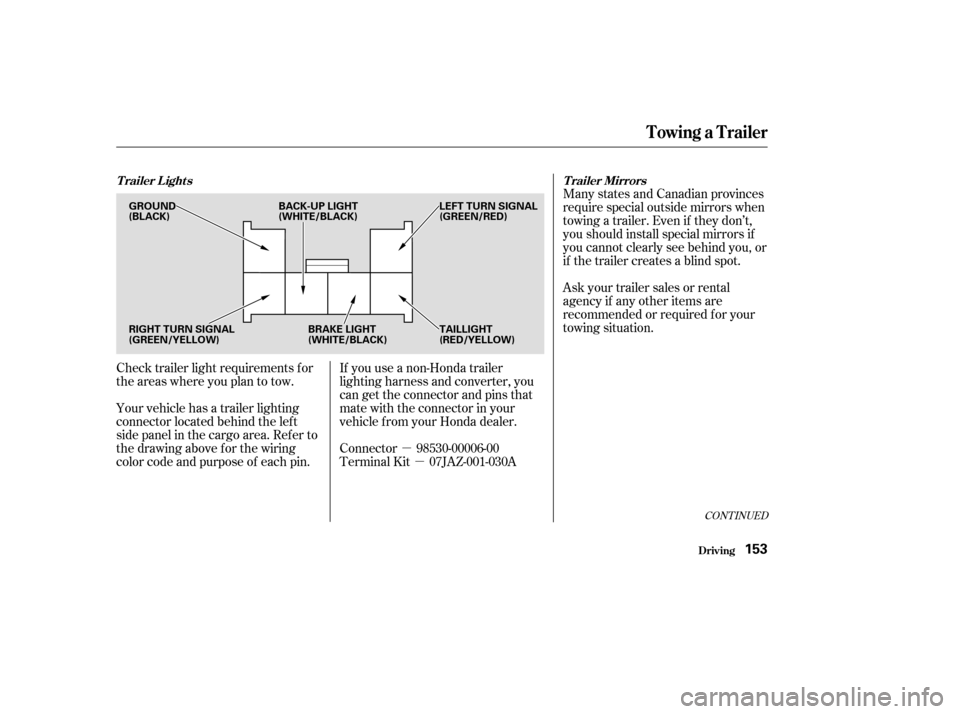
Your vehicle has a trailer lighting
connector located behind the lef t
side panel in the cargo area. Ref er to
thedrawingaboveforthewiring
color code and purpose of each pin. If you use a non-Honda trailer
lighting harness and converter, you
can get the connector and pins that
mate with the connector in your
vehicle f rom your Honda dealer.
Connector 98530-00006-00
Terminal Kit 07JAZ-001-030A
Towing a Trailer
Driving
Trailer Lights
Trailer Mirrors
153
GROUND
(BLACK)LEFT TURN SIGNAL
(GREEN/RED)
RIGHT TURN SIGNAL
(GREEN/YELLOW) BRAKE LIGHT
(WHITE/BLACK)TAILLIGHT
(RED/YELLOW)
BACK-UP LIGHT
(WHITE/BLACK)
Page 158 of 256
When preparing to tow, and bef ore
driving away, be sure to check the
f ollowing:The vehicle has been properly
serviced, and the tires, brakes,
suspension, and cooling system
are in good operating condition.
If you tow f requently, f ollow the
Severe Conditions maintenance
schedule.
The trailer has been properly
serviced and is in good condition.
Thehitch,safetychains,andany
other attachments are secure.
Allitemsonandinthetrailerare
properly secured and cannot shif t
while you drive. The lights and brakes on your
vehicle and the trailer are working
properly.
Your vehicle tires and spare are
properly inf lated (see page ),
and the trailer tires and spare are
inflated as recommended by the
trailer maker.
All weights and loads are within
limits (see page ). 151 190
Towing a Trailer
Driving
Pre-T ow Checklist
154
Page 167 of 256

This section explains why it is
important to keep your vehicle well
maintained and how to f ollow basic
maintenance saf ety precautions.
This section also includes
Maintenance Schedules f or normal
driving and severe driving conditions,
a Maintenance Record, and instruc-
tions f or simple maintenance tasks
you may want to take care of
yourself .
If you have the skills and tools to per-
f orm more complex maintenance
tasks on your Honda, you may want
to purchase the Service Manual. See
page f or inf ormation on how to
obtain a copy, or see your Honda
dealer.......................
Maintenance Saf ety .164
.................
Maintenance Schedule . 165
....................
Maintenance Record .170
..............................
Fluid Locations .172
........................
Adding Engine Oil .173
.........
Changing the Oil and Filter . 174
..............................
Engine Coolant .176
....................
Windshield Washers .178
.......................
Transmission Fluid .179
................
Brake and Clutch Fluid . 181
....................
Power Steering Fluid . 182
....................................
Hood Latch .182
.............................................
Lights .183
.......................................
Seat Belts .187
.....................................
Floor Mats .188
..................
Dust and Pollen Filter . 188
.................................
Wiper Blades .189
...............................................
Tires .190
...................
Checking the Battery . 196
.............................
Vehicle Storage .197
243
Maintenance
Maint enance163