Page 94 of 301
Theyaremosteffectivewhenyou
adjust them so the back of the
occupant’s head rests against the
center of the restraint.
The f ront and rear head restraints
adjust f or height. You need both
hands to adjust the restraint. Do not
attempt to adjust it while driving. To
raise it, pull upward. To lower the
restraint, push the release button
sideways and push the restraint
down.The back of the rear seat folds down,
giving you direct access to the trunk.
The seat-back can be released f rom
inside the vehicle or inside the trunk.When storing cargo, you can move
therearcentershoulderbeltoutof
the way by removing the belt f rom
the guide.
To fold down the seat-back from
inside the vehicle, insert the master
keyinthelockontherearshelf.
Turn the key clockwise, pull down
the top of the seat-back, then release
the key.
Folding Rear Seat
Seats
Inst rument s and Cont rols95
MASTER KEY
GUIDE
�����—�����—�����y�
�
�������
���y���
�(�������
���y���������y
Page 95 of 301
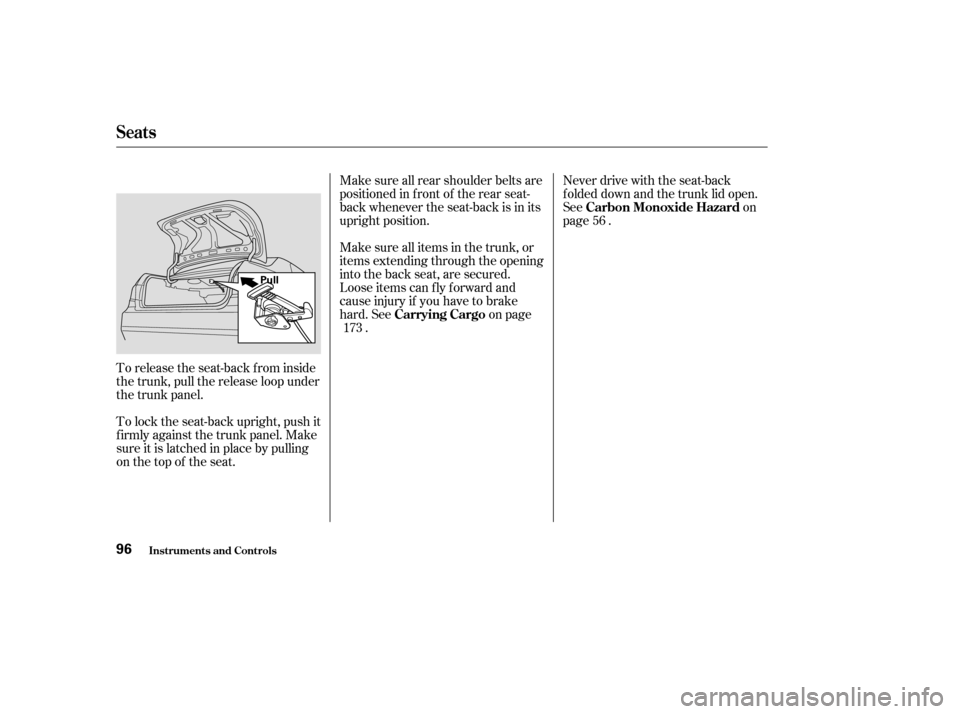
To release the seat-back from inside
the trunk, pull the release loop under
the trunk panel.
To lock the seat-back upright, push it
f irmly against the trunk panel. Make
sure it is latched in place by pulling
on the top of the seat.Make sure all rear shoulder belts are
positioned in f ront of the rear seat-
back whenever the seat-back is in its
upright position.
Make sure all items in the trunk, or
items extending through the opening
into the back seat, are secured.
Looseitemscanflyforwardand
cause injury if you have to brake
hard. See on page
. Never drive with the seat-back
f olded down and the trunk lid open.
See on
page .
56
173 Carrying Cargo Carbon Monoxide Hazard
Seats
Inst rument s and Cont rols96
Pull
�����—�����—�����y�
�
�����������y���
�(�������
���y���������y
Page 96 of 301
For security, this cover can be
locked and unlocked only with the
master key. To lock the cover, insert
thekeyandturnitclockwise.
Never drive with this cover open and
the trunk lid open.
See on
page .
The trunk pass-through cover can be
opened f rom either side; it f olds
f orward onto the center armrest.
Open the cover by sliding the knob
downward and pushing or pulling on
the cover. To close the cover, swing
it up and push f irmly on the top.
Make sure it latches properly.
Make sure all items in the trunk and
those extending through the pass-
through are secured. 56
On all LX and EX models
T runk Pass-through Cover
Carbon Monoxide Hazard
Seats
Inst rument s and Cont rols97
KNOB
LID
KEY CYLINDER
�����—�����—�����y�
�
���������
�y���
�(�������
���y���
�����y
Page 100 of 301

The power window system has a key-
of f delay f unction. The windows will
stilloperateforuptotenminutes
after you turn off the ignition.
Opening either f ront door cancels
the delay function. You must turn
the ignition switch to ON (II) again
bef ore you can raise or lower the
windows.You can open all of the windows
from the outside with the remote
transmitter.
Press the UNLOCK button once
to unlock the driver’s door.
Press the UNLOCK button a
second time, and hold it. The
passenger’s doors unlock, and all
f our windows start to open. To
stop the windows, release the
button.
To open the windows f urther,
press the button again.
You cannot close the windows with
the remote transmitter. To open:
You can open and close the windows
with the key in the driver’s door lock.
Insert the key in the driver’s door
lock.
Turn the key clockwise, then
release it.
1. 2. 3.
1. 2.
All models except U.S. and Canada DX
Power Window Control
Operations
Opening t he Windows wit h t heRemote Transmitter
Opening/Closing t he Windows wit hthe Key
Power Windows
Inst rument s and Cont rols101
UNLOCK BUTTON
Open
Close
�����—�����—�����y�
�
����
��
���y���
�(�������
���y���
�����y
Page 101 of 301

Turnthekeyclockwiseagain,and
hold it. All f our windows start to
open. To stop the windows,
release the key.
To open the windows f urther, turn
andholdthekeyagain.
To close: Insert the key in the driver’s door
lock.
Turn the key counterclockwise,
then release it.
Turn the key counterclockwise
again, and hold it. All four
windowsstarttoclose.Tostopthe
windows, release the key.
To close the windows f urther, turn
andholdthekeyagain. The moonroof has two positions: it
can be tilted up in the back f or
ventilation, or it can be slid back into
the roof . Use the switch under the
lef t dashboard vent to operate the
moonroof . The ignition switch must
be ON (II). To tilt up the back of the moonroof ,
press and hold the center button
( ). To close the moonroof ,
press and hold the upper button
( ). To open the moonroof ,
press and hold the lower button
( ). Release the button when
the moonroof gets to the desired
position. Make sure everyone’s
hands are away f rom the moonroof
bef ore opening or closing it.
1. 2.3. 4.
3.4.
On all EX and EX-V6 models
Moonroof
Power Windows, Moonroof
Inst rument s and Cont rols102
MOONROOF SWITCH
Opening or closing the
moonroof on someone’s hands
or fingers can cause seriousinjury.
Make sure all hands and fingers
are clear of the moonroof
before opening or closing it.
�����—�����—�����y�
�
����
����
�y���
�(�������
���y���
�����y
Page 104 of 301

The ceiling lights have a three or
two-position switch; ON (f or three-
position), Door Activated, and OFF.
In the Door Activated (center or left)
position, the lights come on when
you:
After all doors are closed tightly, the
light dims slightly, then f ades out in
about 30 seconds.Open any door.
Unlock the doors with the key or
remote transmitter. The f ront ceiling light also contains
two spotlights. Push the spotlight
lenses to turn it on and off.
The courtesy light between the
spotlights comes on when you turn
the parking lights on. To adjust its
brightness, turn the Select/Reset
knob on the instrument panel. Push on the spotlight lenses to turn
the light on and of f .
The courtesy lights in the f ront
doors and around the ignition switch
come on when you open any door.
Af ter you close the door, the ignition
switch light stays on f or several
seconds.On EX and EX-V6
On LX models
Ceiling L ight
Individual Interior L ights
Interior Lights
Inst rument s and Cont rols105
DOOR ACTIVATEDON
OFF DOOR ACTIVATED
COURTESY LIGHT
�����—�����—�����y�
�
���������
�y���
�(�������
���y���
�����y
Page 107 of 301
To open the sunglasses holder, push
on the f ront edge. Make sure the
holder is closed while you are driving.
Some larger styles of sunglasses
may not f it in the holder.Open the glove box by pulling the
handle to the lef t. Close it with a f irm
push. Lock or unlock the glove box
with the master key.
The glove box light comes on when
the parking lights are on.
On all models except U.S. and Canada
DX
Sunglasses Holder Glove Box
Interior Convenience Item
Inst rument s and Cont rols108
GLOVE BOX
An open glove box can cause
serious injury to your passenger
inacrash,evenifthe
passenger is wearing the seatbelt.
Always keep the glove box
closed while driving.
�����—�����—�����y�
�
�����������y���
�(�������
���y���
�
�
�y
Page 108 of 301

The security system helps to dis-
courage vandalism and thef t of your
Honda.
The heating and air conditioning
systems in your Honda provide a
comf ortable driving environment in
all weather conditions.
The standard audio system has
many f eatures. This section de-
scribes those f eatures and how to
use them.
Your Honda has an anti-thef t audio
system that requires a code number
to enable it.
.............
Vents, Heating, and A/C . 110
...........................
Air Flow Buttons . 112
.............
Vents, Heating, and A/C . 115
..........
Dual Temperature Control . 119
..............
Climate Control Sensors . 121
..........................
Playing the Radio . 122
..............................
To the Radio . 124
....................
To Select a Station . 124
.................
Adjusting the Sound . 127
....................
Radio Frequencies . 128
........................
Radio Reception . 128
..................................
Playing a CD . 130
..........
Playing a CD, CD Changer . 132
.............................
To Play a CD . 132
...............
To Stop Playing a CD . 135
Removing CD’s from the
.................................
Changer . 135
Operating the Optional CD .................................
Changer . 136
.........
CD Player Error Messages . 137
.....
CD Changer Error Messages . 138
.....................
Protecting your CDs . 139
.................
General Inf ormation . 139
.........................
Protecting CD’s . 139
...............................
Playing a Tape . 140
..........................
To Play a Tape . 142 ............
To Stop Playing a Tape . 142
............
Tape Search Functions . 143
.....
Caring the Tape and Player . 144
Playing the XM Satellite ......................................
Radio . 145
...............
Satellite Digital Radio . 145
...
To Play XM Satellite Radio . 146
..................
To Select a Channel . 146
..............
Satellite Radio Signals . 148
Receiving Satellite Radio
....................................
Service . 149
.............
Steering Wheel Controls . 151
.................
Radio Thef t Protection . 152
..........................
Setting the Clock . 153
............................
Security System . 154
...............................
Cruise Control . 155
HomeLink Universal
................................
Transceiver . 158
On all models except 4-cylinder LX
model
Features
Features109
TM
TM
�����—�����—�����y�
�
�����������y���
�(�������
���y���
�
���y