2004 GMC CANYON ignition
[x] Cancel search: ignitionPage 160 of 420

Daytime Running Lamps
Indicator Light
This light turns on
whenever the Daytime
Running Lamps are on.
See “Daytime Running Lamps (DRL)” underExterior
Lamps on page 3-12for more information.
Fuel Gage
When the ignition is on,
the fuel gage tells you
about how much fuel you
have remaining in the
fuel tank.Here are four things that some owners ask about.
None of these indicate a problem with your fuel gage:
At the gas station, the gas pump shuts off before
the gage reads full.
It takes a little more or less fuel to ll up than the
gage indicated. For example, the gage may have
indicated the tank was half full, but it actually took a
little more or less than half the tank’s capacity to
ll the tank.
The gage moves a little when you turn a corner or
speed up.
The gage does not go back to empty when you turn
off the ignition.
When the fuel in the fuel tank is low, you will see a
LOW FUEL message on the Driver Information
Center (DIC) display. SeeDIC Warnings and
Messages on page 3-39for more information.
3-36
Page 161 of 420

Driver Information Center (DIC)
The DIC display is located on the instrument panel
cluster. The DIC can display information such as the trip
odometer, and personalization features.
DIC Controls and Displays
The Driver Information Center (DIC) comes on when the
ignition is on. After a short delay the DIC will display
the current driver and the information that was last
displayed before the engine was turned off.
If a problem is detected, a warning message will appear
on the display. Pressing and releasing the trip
odometer reset stem on the DIC will acknowledge any
current warning or service messages.
The DIC has different modes which can be accessed by
pressing the trip odometer reset stem on the DIC.
These modes are explained following. The DIC trip
odometer reset stem is located on the instrument panel
cluster next to the DIC display. To scroll through the
available functions, press and release the reset stem.
Trip Information
Odometer
The odometer is automatically displayed on the DIC
when you start the vehicle. The odometer shows
the total distance the vehicle has been driven in either
miles or kilometers.
Trip Odometer
Press and release the reset stem until TRIP appears
on the DIC display. This shows the current distance
traveled since the last reset of the trip odometer in either
miles or kilometers.
Press and hold the reset stem for approximately
four seconds to reset the trip odometer.
3-37
Page 162 of 420

GM Oil Life System™
Press the reset stem until OIL LIFE appears (ashing)
on the display. The GM Oil Life System™ shows
an estimate of the oil’s remaining useful life. It will show
100% when the system is reset after an oil change.
It will alert you to change your oil on a schedule
consistent with your driving conditions.
Always reset the engine oil life after an oil change.
To reset the oil life system press and hold the reset
stem while OIL LIFE is displayed. The system will
reset and a beep will sound.
The DIC does not replace the need to maintain your
vehicle as recommended in the Maintenance Schedule
in this manual. The oil change reminder will not
detect dusty conditions or engine malfunctions that may
affect the oil. Also, the oil change reminder does not
measure how much oil you have in your engine. So, be
sure to check your oil level often. SeeEngine Oil on
page 5-13for more information.
Automatic Door Locks
With the vehicle’s engine off, and the ignition in the
LOCK position, press and hold the power door
lock button for approximately 3 seconds until the DIC
displays the current door lock mode. Then press
the reset stem for approximately two seconds to switch
modes. The following are the mode choices:
Mode 1 (default):Lock all doors when the vehicle is
shifted out of PARK (P) with an automatic transmission,
or when vehicle speed is greater than 15 mph
(24km/h) with a manual transmission. Doors will unlock
when the vehicle is shifted into PARK (P) with an
automatic transmission, or when the ignition key is
removed on a manual transmission.
Mode 2:Turns off the automatic door locks.
Mode 3:Lock all doors when the vehicle is shifted out
of PARK (P) with an automatic transmission, or
when vehicle speed is greater than 15 mph (24km/h)
with a manual transmission. Driver’s door will unlock
when the vehicle is shifted into PARK (P) with an
automatic transmission, or when the ignition key is
removed on a manual transmission.
Mode 4:Lock all doors when the vehicle is shifted out
of PARK (P) with an automatic transmission, or
when the vehicle speed is greater than 15 mph (24km/h)
with a manual transmission. No doors will unlock.
3-38
Page 167 of 420

Setting the Time for Radios without
Radio Data Systems (RDS)
Press and hold HR until the correct hour appears on the
display. Press and hold MIN until the correct minute
appears on the display. To display the time with
the ignition off, press RCL, HR, or MIN and the time will
appear on the display for a few seconds. There is an
initial two-second delay before the clock goes into
time-set mode.
Setting the Time for Radios with
Radio Data Systems (RDS)
Your radio may have a button marked with an H or
HR to represent hours and an M or MN to represent
minutes.
Press and hold the hour button until the correct hour
appears on the display. Press and hold the minute
button until the correct minute appears on the display.
The time may be set with the ignition on or off.
To synchronize the time with an FM station broadcasting
Radio Data System (RDS) information, press and hold
the hour and minute buttons at the same time until
RDS TIME appears on the display. To accept this time,
press and hold the hour and minute buttons, at the
same time, for another 2 seconds. If the time is
not available from the station, NO UPDAT will appear
on the display.
RDS time is broadcast once a minute. Once you have
tuned to an RDS broadcast station, it may take a
few minutes for your time to update.
3-43
Page 168 of 420

AM-FM Radio
Playing the Radio
PWR (Power):Press this knob to turn the system
on and off.
VOL (Volume):Turn this knob to increase or to
decrease volume.
RCL (Recall):Press this knob to switch the display
between the radio station frequency and the time.
Time display is available with the ignition turned off.
Finding a Station
AM FM:Press this button to switch between FM1, FM2,
or AM. The display will show your selection.
TUNE:Turn this knob to select radio stations.
oSEEKp:Press the right or the left arrow to go to
the next or to the previous station and stay there.
To scan stations, press and hold either SEEK arrow for
two seconds until you hear a beep. The radio will go
to a station, play for a few seconds, then go on to
the next station. Press either SEEK arrow again to
stop scanning.
To scan preset stations, press and hold either SEEK
arrow for more than four seconds until you hear
two beeps. The radio will go to the rst preset station
stored on the pushbuttons, play for a few seconds,
then go on to the next preset station. Press either
SEEK arrow again to stop scanning presets.
The radio will seek and scan only to stations that are
in the selected band and only to those with a strong
signal.
3-44
Page 177 of 420

Radio Messages
CAL ERR (Calibration Error):Your audio system has
been calibrated for your vehicle from the factory.
If CAL ERR appears on the display, it means that your
radio has not been congured properly for your
vehicle and must be returned to the dealer for service.
LOCKED:This message is displayed when the
THEFTLOCK
®system has locked up. You must return
to the dealer for service.
Playing a CD
Insert a CD partway into the slot, label side up.
The player will pull it in and the CD should begin playing.
The CD symbol will appear on the display. If you want
to insert a CD with the ignition off, rst press the
eject button or the DISPL knob.
If you turn off the ignition or radio with a CD in the
player, it will stay in the player. When you turn on the
ignition or radio, the CD will start playing, where it
stopped, if it was the last selected audio source.As each new track starts to play, the track number will
appear on the display.
The CD player can play the small 8 cm single CDs with
an adapter ring. Full-size CDs and the smaller CDs
are loaded in the same manner.
If playing a CD-R the sound quality may be reduced
due to CD-R quality, the method of recording, the quality
of the music that has been recorded, and the way the
CD-R has been handled. You may experience an
increase in skipping, difficulty in nding tracks and/or
difficulty in loading and ejecting. If these problems occur
try a known good CD.
Do not add paper labels to CDs, they could get caught
in the CD player.
Do not play 3 inch CDs without a standard adapter CD.
If an error appears on the display, see “CD Messages”
later in this section.
3-53
Page 179 of 420
qSCANr:Press and hold either SCAN arrow for
more than two seconds until SCAN appears on the
display and you hear a beep. Use this feature to listen
to 10 seconds of each track of the CD. Press either
SCAN arrow again, to stop scanning.
DISPL (Display):Press this knob to see how long the
current track has been playing. ET and the elapsed
time of the track will appear on the display. To change
the default on the display (track or elapsed time),
press this knob until you see the display you want, then
hold the knob for two seconds. The radio will produce
one beep and the selected display will now be the
default.
BAND:Press this button to listen to the radio when a
CD is playing. The inactive CD will remain safely
inside the radio for future listening.
CD AUX (Auxiliary):Press this button to play a CD
when listening to the radio. The CD symbol will appear
on the display when a CD is loaded.
Z(Eject):Press this button to stop a CD when it
is playing or to eject a CD when it is not playing.
Eject may be activated with either the ignition or radio
off. CDs may be loaded with the radio and ignition off
if this button is pressed rst.
CD Messages
If the CD comes out, it could be for one of the following
reasons:
It is very hot. When the temperature returns to
normal, the CD should play.
You are driving on a very rough road. When the
road becomes smooth, the CD should play.
The CD is dirty, scratched, wet, or upside down.
The air is very humid. If so, wait about an hour
and try again.
There may have been a problem while burning
the CD.
The label may be caught in the CD player.
If the CD is not playing correctly, for any other reason,
try a known good CD.
If any error occurs repeatedly or if an error cannot be
corrected, contact your dealer. If your radio displays an
error message, write it down and provide it to your
dealer when reporting the problem.
3-55
Page 180 of 420
Radio with Six-Disc CD
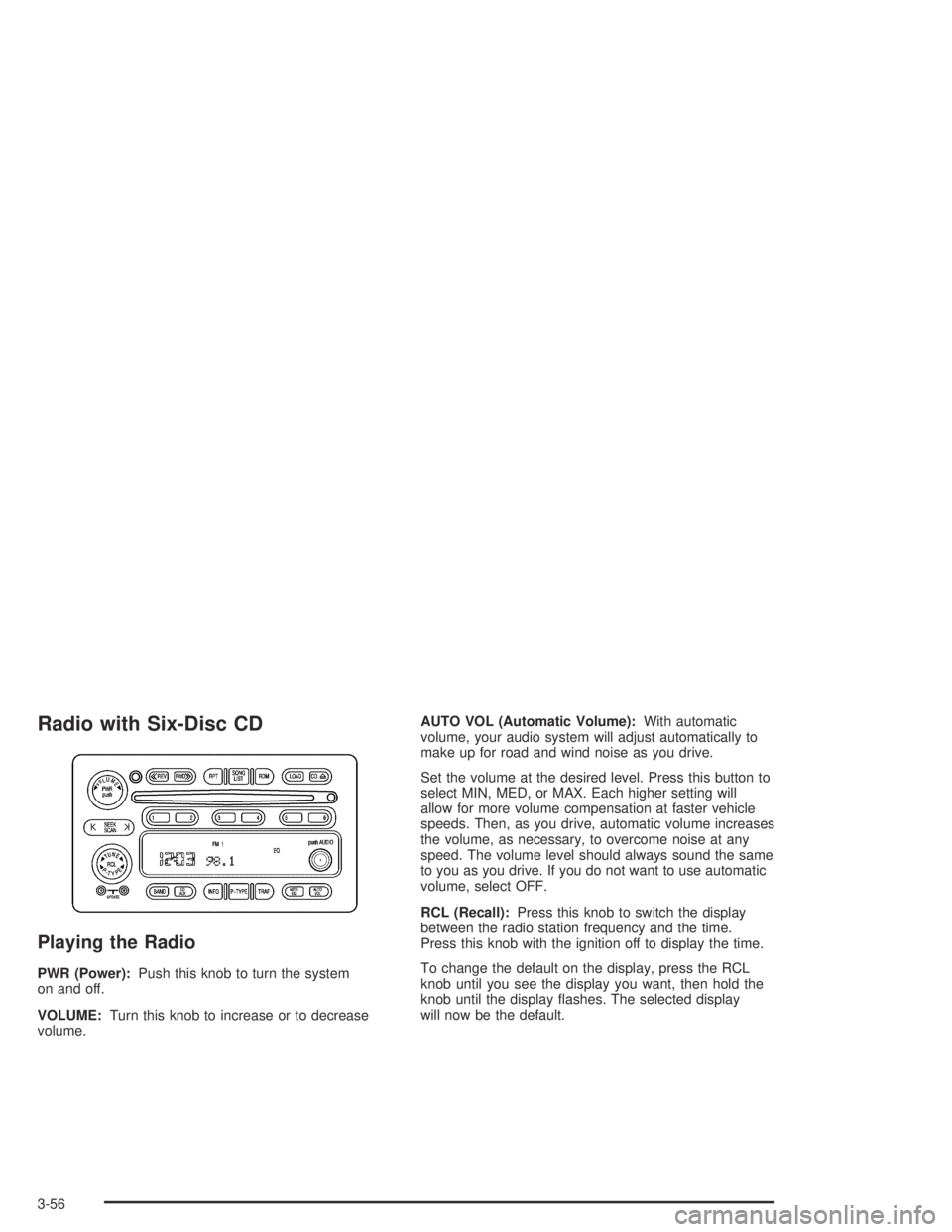
Playing the Radio
PWR (Power):Push this knob to turn the system
on and off.
VOLUME:Turn this knob to increase or to decrease
volume.AUTO VOL (Automatic Volume):With automatic
volume, your audio system will adjust automatically to
make up for road and wind noise as you drive.
Set the volume at the desired level. Press this button to
select MIN, MED, or MAX. Each higher setting will
allow for more volume compensation at faster vehicle
speeds. Then, as you drive, automatic volume increases
the volume, as necessary, to overcome noise at any
speed. The volume level should always sound the same
to you as you drive. If you do not want to use automatic
volume, select OFF.
RCL (Recall):Press this knob to switch the display
between the radio station frequency and the time.
Press this knob with the ignition off to display the time.
To change the default on the display, press the RCL
knob until you see the display you want, then hold the
knob until the display ashes. The selected display
will now be the default.
3-56