Page 1 of 240
Introduction 4
Instrument Cluster 10
Warning and control lights 10
Gauges 14
Entertainment Systems 18
AM/FM stereo with CD 18
AM/FM stereo with in-dash six CD 25
Climate Controls 33
Manual heating and air conditioning 33
Rear window defroster 34
Lights 35
Headlamps 35
Turn signal control 38
Bulb replacement 38
Driver Controls 43
Windshield wiper/washer control 43
Steering wheel adjustment 44
Power windows 45
Mirrors 46
Speed control 46
Locks and Security 54
Keys 54
Locks 54
Anti-theft system 57
2004 Mustang(mus)
Owners Guide (post-2002-fmt)
USA English(fus)
Table of Contents
1
Page 8 of 240
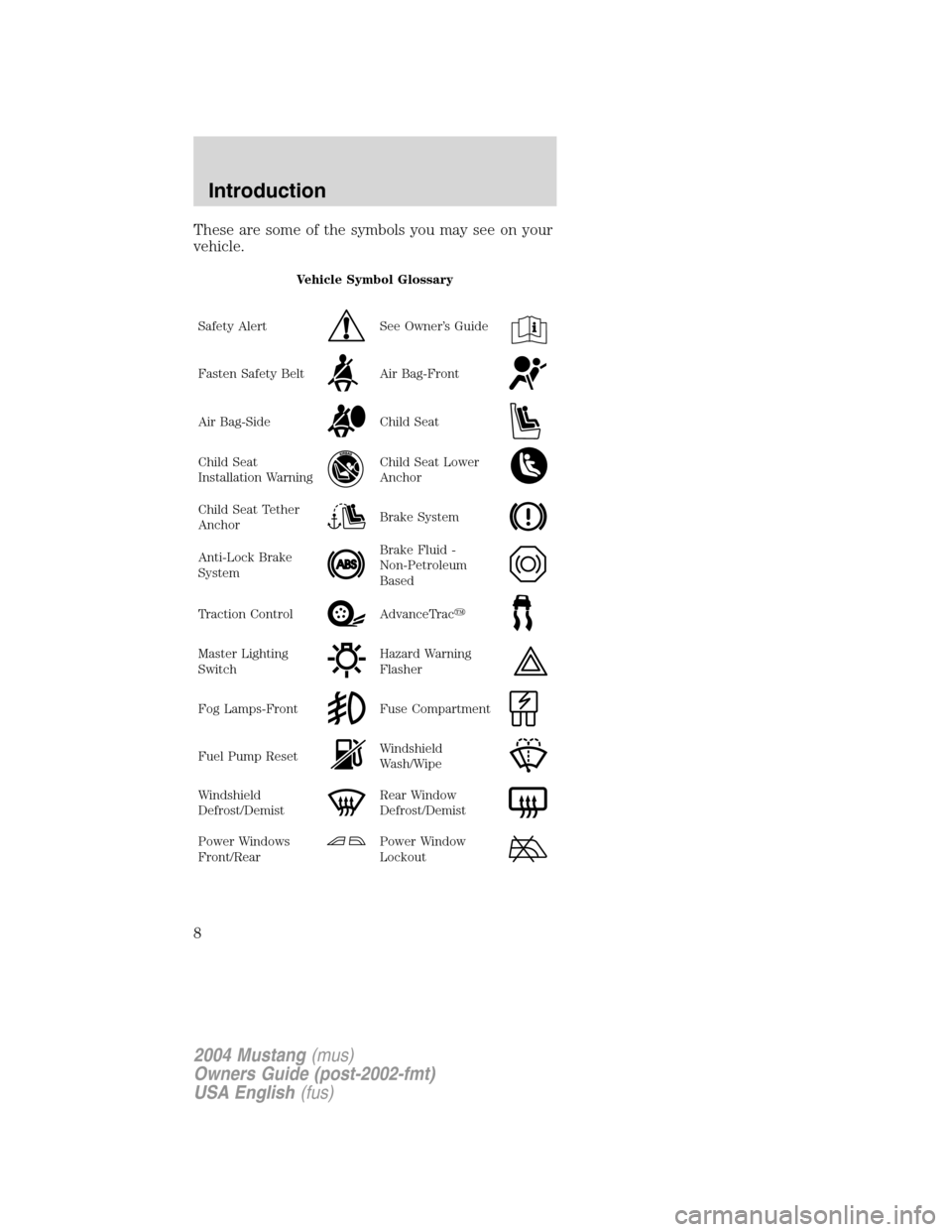
These are some of the symbols you may see on your
vehicle.
Vehicle Symbol Glossary
Safety Alert
See Owner’s Guide
Fasten Safety BeltAir Bag-Front
Air Bag-SideChild Seat
Child Seat
Installation WarningChild Seat Lower
Anchor
Child Seat Tether
AnchorBrake System
Anti-Lock Brake
SystemBrake Fluid -
Non-Petroleum
Based
Traction ControlAdvanceTrac�
Master Lighting
SwitchHazard Warning
Flasher
Fog Lamps-FrontFuse Compartment
Fuel Pump ResetWindshield
Wash/Wipe
Windshield
Defrost/DemistRear Window
Defrost/Demist
Power Windows
Front/RearPower Window
Lockout
2004 Mustang(mus)
Owners Guide (post-2002-fmt)
USA English(fus)
Introduction
8
Page 9 of 240
Vehicle Symbol Glossary
Child Safety Door
Lock/Unlock
Interior Luggage
Compartment
Release Symbol
Panic AlarmEngine Oil
Engine CoolantEngine Coolant
Temperature
Do Not Open When
HotBattery
Avoid Smoking,
Flames, or SparksBattery Acid
Explosive GasFan Warning
Power Steering
FluidMaintain Correct
Fluid LevelMAX
MIN
Emission SystemEngine Air Filter
Passenger
Compartment Air
FilterJack
Check fuel capLow tire warning
2004 Mustang(mus)
Owners Guide (post-2002-fmt)
USA English(fus)
Introduction
9
Page 12 of 240
brake indicates low brake fluid level and the brake
system should be inspected immediately by your
servicing dealership.
Driving a vehicle with the brake system
warning light on is dangerous. A significant
decrease in braking performance may occur. It will
take you longer to stop the vehicle. Have the
vehicle checked by your dealer immediately.
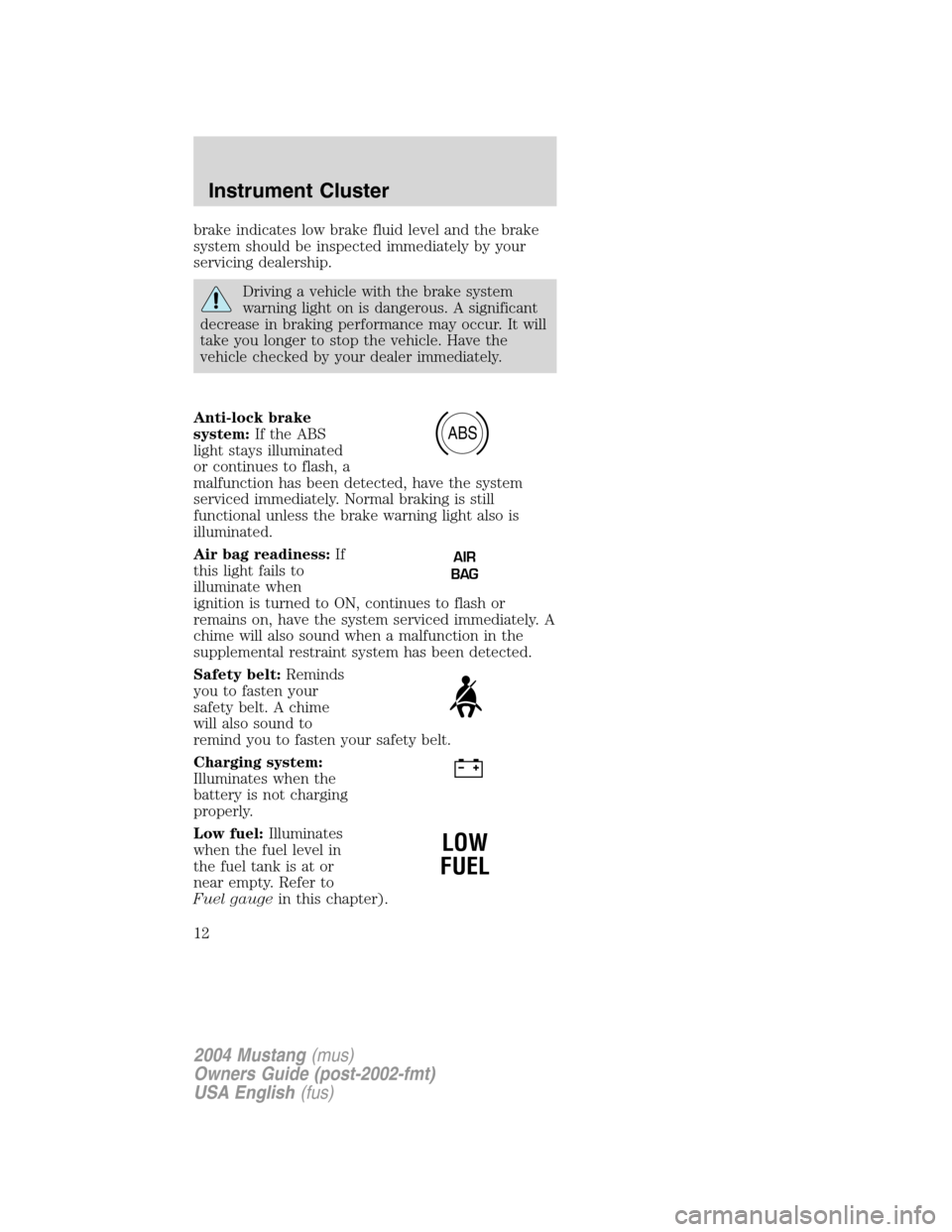
Anti-lock brake
system:If the ABS
light stays illuminated
or continues to flash, a
malfunction has been detected, have the system
serviced immediately. Normal braking is still
functional unless the brake warning light also is
illuminated.
Air bag readiness:If
this light fails to
illuminate when
ignition is turned to ON, continues to flash or
remains on, have the system serviced immediately. A
chime will also sound when a malfunction in the
supplemental restraint system has been detected.
Safety belt:Reminds
you to fasten your
safety belt. A chime
will also sound to
remind you to fasten your safety belt.
Charging system:
Illuminates when the
battery is not charging
properly.
Low fuel:Illuminates
when the fuel level in
the fuel tank is at or
near empty. Refer to
Fuel gaugein this chapter).
ABS
AIR
BAG
LOW
FUEL
2004 Mustang(mus)
Owners Guide (post-2002-fmt)
USA English(fus)
Instrument Cluster
12
Page 13 of 240

Overdrive off:
Illuminates when the
overdrive function of
the transmission has been turned off, refer to the
Drivingchapter. If the light flashes steadily or does
not illuminate, have the transmission serviced soon,
or damage may occur.
Traction Control�
active:Illuminates
when the Traction
Control�system is
active. If the light
remains on, have the system serviced immediately.
Anti-theft system:
Flashes when the
Securilock�Passive
Anti-theft System has been activated.
Turn signal:
Illuminates when the
left or right turn signal
or the hazard lights are turned on. If the indicators
stay on or flash faster, check for a burned out bulb.
High beams:
Illuminates when the
high beam headlamps
are turned on.
Key-in-ignition warning chime:Sounds when the
key is left in the ignition in the OFF/LOCK or ACC
position and the driver’s door is opened.
Headlamps on warning chime:Sounds when the
headlamps or parking lamps are on, the ignition is
off (the key is not in the ignition) and the driver’s
door is opened.O/D
OFF
2004 Mustang(mus)
Owners Guide (post-2002-fmt)
USA English(fus)
Instrument Cluster
13
Page 21 of 240
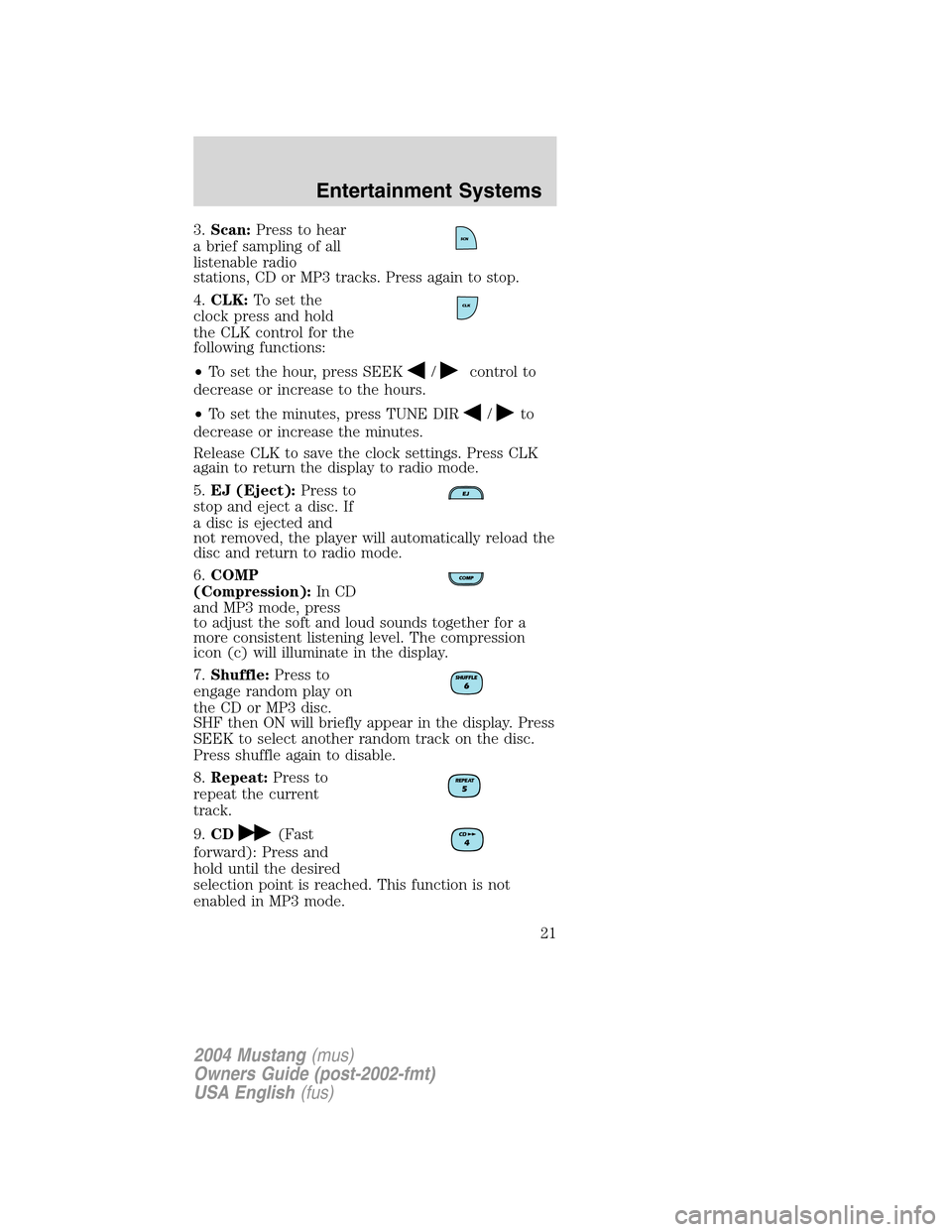
3.Scan:Press to hear
a brief sampling of all
listenable radio
stations, CD or MP3 tracks. Press again to stop.
4.CLK:To set the
clock press and hold
the CLK control for the
following functions:
•To set the hour, press SEEK
/control to
decrease or increase to the hours.
•To set the minutes, press TUNE DIR
/to
decrease or increase the minutes.
Release CLK to save the clock settings. Press CLK
again to return the display to radio mode.
5.EJ (Eject):Press to
stop and eject a disc. If
a disc is ejected and
not removed, the player will automatically reload the
disc and return to radio mode.
6.COMP
(Compression):In CD
and MP3 mode, press
to adjust the soft and loud sounds together for a
more consistent listening level. The compression
icon (c) will illuminate in the display.
7.Shuffle:Press to
engage random play on
the CD or MP3 disc.
SHF then ON will briefly appear in the display. Press
SEEK to select another random track on the disc.
Press shuffle again to disable.
8.Repeat:Press to
repeat the current
track.
9.CD
(Fast
forward): Press and
hold until the desired
selection point is reached. This function is not
enabled in MP3 mode.
2004 Mustang(mus)
Owners Guide (post-2002-fmt)
USA English(fus)
Entertainment Systems
21
Page 28 of 240
9.Menu:Press MENU
and SEL to access
clock mode, RDS
on/off, Traffic, Program type, Show type and
Compression modes.
Traffic:Allows you to hear traffic broadcasts. With
the feature ON, press SEEK or SCAN to find a
station broadcasting a traffic report (if it is
broadcasting RDS data).Traffic information is not
available in most U.S. markets.
FIND Program type:Allows you to search
RDS-equipped stations for a certain category of
music format: Classic, Country, Info, Jazz, Oldies,
R&B, Religious, Rock, Soft, Top 40.
Show TYPE:Displays the station’s call letters and
format.
Compression:Brings soft and loud CD passages
together for a more consistent listening level.
Setting the clock:Press MENU until SELECT
HOUR or SELECT MINUTE is displayed. Use SEL to
manually increase (
) or decrease () the
hours/minutes. Press MENU again to disengage clock
mode.
10.Memory presets:
To set a station: Select
frequency band
AM/FM; tune to a station, press and hold a preset
button until sound returns. In CD mode, press to
access the desired disc.
11.SAT (if
equipped):Your
Audiophile radio comes
equipped with Satellite Ready capability. The kit to
enable the Satellite reception is available through
your Ford dealer. Detailed satellite instructions are
included with the dealer installed kit.
12.AM/FM:Press to
select AM/FM
frequency band.
2004 Mustang(mus)
Owners Guide (post-2002-fmt)
USA English(fus)
Entertainment Systems
28
Page 36 of 240
Always remember to turn on your
headlamps at dusk or during inclement
weather. The Daytime Running Light (DRL)
System does not activate your tail lamps and
generally may not provide adequate lighting during
these conditions. Failure to activate your
headlamps under these conditions may result in a
collision.
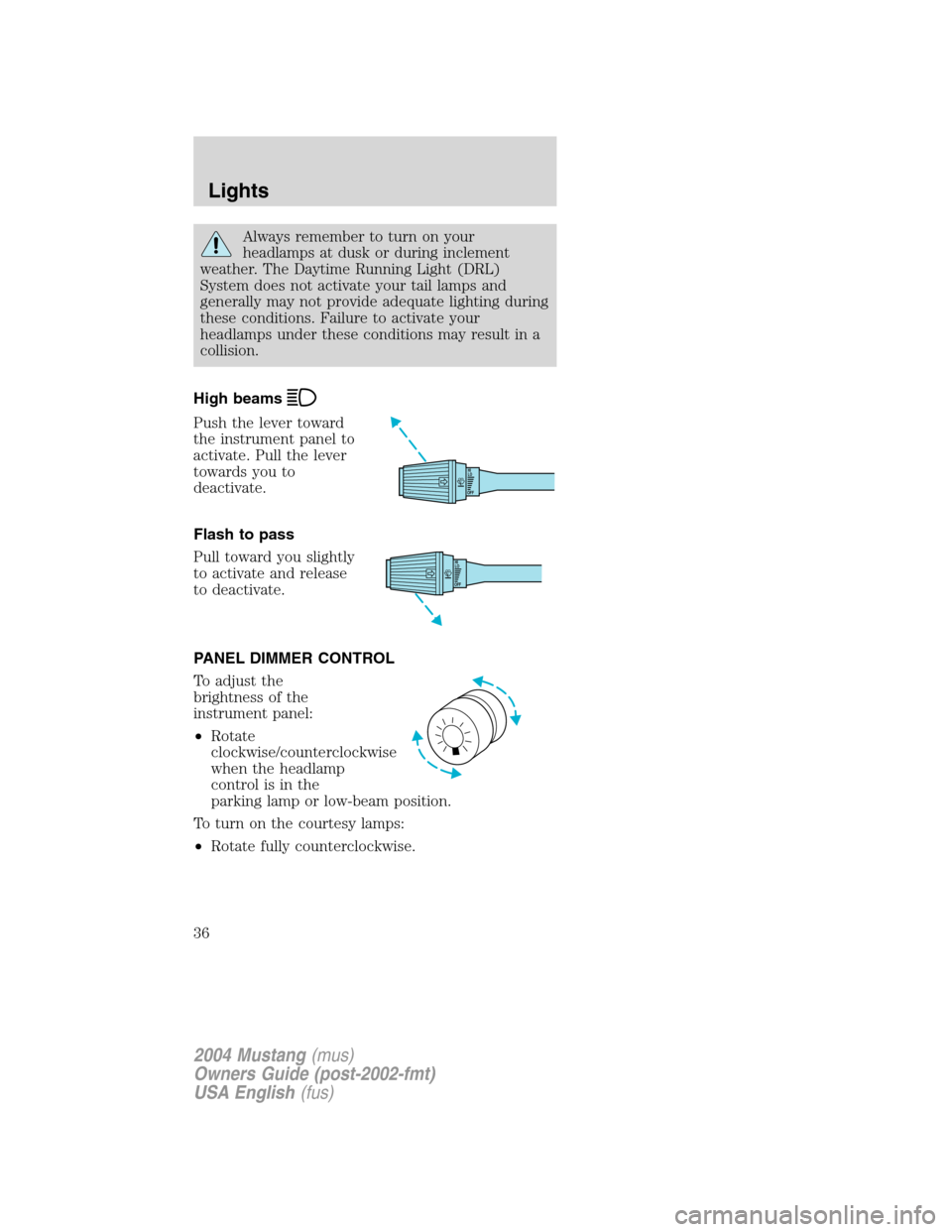
High beams
Push the lever toward
the instrument panel to
activate. Pull the lever
towards you to
deactivate.
Flash to pass
Pull toward you slightly
to activate and release
to deactivate.
PANEL DIMMER CONTROL
To adjust the
brightness of the
instrument panel:
•Rotate
clockwise/counterclockwise
when the headlamp
control is in the
parking lamp or low-beam position.
To turn on the courtesy lamps:
•Rotate fully counterclockwise.
OFFHI
LO
OFFHI
LO
2004 Mustang(mus)
Owners Guide (post-2002-fmt)
USA English(fus)
Lights
36