2004 FORD F150 seats
[x] Cancel search: seatsPage 7 of 280
Front seat mounted rear facing child or infant seats should
NEVERbe used in front of a passenger side air bag unless the
air bag can be and is turned OFF.
Using your vehicle with a snowplow
For more information and guidelines for using your vehicle with a
snowplow, refer to theDrivingchapter.
F150 SuperCrew Owners: Snowplowing
Your vehicle is not recommended for snowplowing. Ford makes no
representation as to the suitability of your vehicle for snowplowing, in
particular regarding the potential for exceeding vehicle weight limits,
airbag (SRS) deployment sensitivity, vehicle crash integrity, or
powertrain durability. The Snowplow Package Option is not available.
Using your vehicle as an ambulance
Do not use this vehicle as an ambulance.
Your vehicle is not equipped with the Ford Ambulance Preparation Package.
Notice to owners of pickup trucks and utility type vehicles
Utility vehicles have a significantly higher rollover rate than
other types of vehicles.
Before you drive your vehicle, please read this Owner's Guide carefully.
Your vehicle is not a passenger car. As with other vehicles of this type,
failure to operate this vehicle correctly may result in loss of vehicle
control, vehicle rollover, personal injury or death.
Be sure to readDriving off roadin theDrivingchapter.
MIDDLE EAST/NORTH AFRICA VEHICLE SPECIFIC INFORMATION
For your particular global region, your vehicle may be equipped with
features and options that are different from the ones that are described
in this Owner Guide; therefore, a supplement has been supplied that
complements this book. By referring to the pages in the provided
supplement, you can properly identify those features, recommendations
and specifications that are unique to your vehicle.Refer to this Owner
Guide for all other required information and warnings.
Introduction
7
Page 27 of 280
Treble:Press to adjust the treble setting. Use//SEEK,
SEEK
.
Bass:Press to adjust the bass setting. Use
//SEEK,
SEEK
.
Balance:Press to adjust the audio between the left and right speakers.
Use
//SEEK, SEEK.
Fade:Press to adjust the audio between the front and rear speakers.
Use
//SEEK, SEEK.
RDS(Available on Audiophile radios only): Allows you to search
RDS-equipped stations for a certain category of music format: Classic,
Country, Info, Jazz, Oldies, R&B, Religious, Rock, Soft, Top 40.
Speed sensitive volume:Radio volume automatically changes slightly
with vehicle speed to compensate for road and wind noise. Press MENU
to access and use
//SEEK, SEEKto adjust.
Traffic(Available on Audiophile radios only): Allows you to hear traffic
broadcasts. With the feature ON, press SEEK or SCAN to find a station
broadcasting a traffic report (if it is broadcasting RDS data).Traffic
information is not available in most U.S. markets.
Compression:Brings soft and loud CD passages together for a more
consistent listening level.
Ambiance(Available on Audiophile radios only): This feature gives the
feeling of ªbeing thereº to your music, creating increased clarity as well
as an open and spacious feel to the music. Press MENU to access then
use
//SEEK, SEEKto adjust. Turn the volume control to
increase/decrease the level of ambiance.
Occupancy mode:(Available on Audiophile radios only): Press MENU to
access. Use
//SEEK, SEEKselect and optimize sound for
ALL SEATS, DRIVER SEAT or REAR SEATS.
Autoset:Allows you to set the strongest local radio stations without
losing your original manually set preset stations for AM/FM1/FM2 . Press
MENU to access. Use
//SEEK, SEEKto set.
When the six strongest stations are filled, the station stored in preset 1
will begin playing. If there are less than six strong stations, the system
will store the last one in the remaining presets.
Entertainment Systems
27
Page 32 of 280
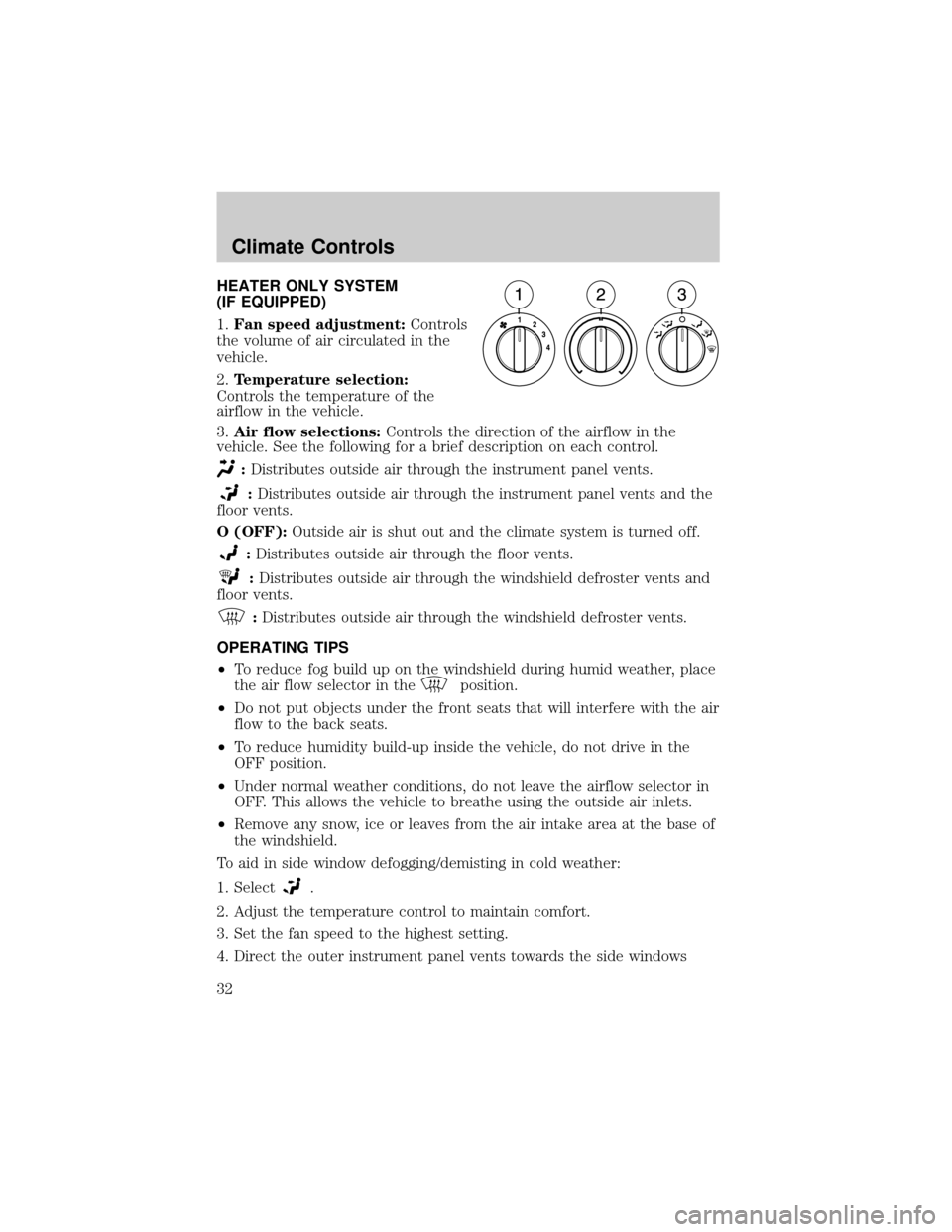
HEATER ONLY SYSTEM
(IF EQUIPPED)
1.Fan speed adjustment:Controls
the volume of air circulated in the
vehicle.
2.Temperature selection:
Controls the temperature of the
airflow in the vehicle.
3.Air flow selections:Controls the direction of the airflow in the
vehicle. See the following for a brief description on each control.
:Distributes outside air through the instrument panel vents.
:Distributes outside air through the instrument panel vents and the
floor vents.
O (OFF):Outside air is shut out and the climate system is turned off.
:Distributes outside air through the floor vents.
:Distributes outside air through the windshield defroster vents and
floor vents.
:Distributes outside air through the windshield defroster vents.
OPERATING TIPS
²To reduce fog build up on the windshield during humid weather, place
the air flow selector in the
position.
²Do not put objects under the front seats that will interfere with the air
flow to the back seats.
²To reduce humidity build-up inside the vehicle, do not drive in the
OFF position.
²Under normal weather conditions, do not leave the airflow selector in
OFF. This allows the vehicle to breathe using the outside air inlets.
²Remove any snow, ice or leaves from the air intake area at the base of
the windshield.
To aid in side window defogging/demisting in cold weather:
1. Select
.
2. Adjust the temperature control to maintain comfort.
3. Set the fan speed to the highest setting.
4. Direct the outer instrument panel vents towards the side windows
Climate Controls
Climate Controls
32
Page 34 of 280
4.Recirculated air: Used to manually enable or disable
recirculated air operation. When activated, recirculates air in the cabin
thereby reducing the amount of time to cool down or warn up the
interior of the vehicle. May also help reduce undesired odors from
reaching the interior of the vehicle. Engages automatically with MAX A/C
or can be engaged manually in any mode except Defrost. Recirculation
may turn off automatically in all airflow selections except MAX A/C.
5.A/C (if equipped):Press to activate/deactivate air conditioning. Use
with recirculated air to improve cooling performance. Engages
automatically in MAX A/C, Defrost and Floor/Defrost.
6.Fan speed adjustment:Controls the volume of air circulated in the
vehicle.
OPERATING TIPS
²To reduce fog build up on the windshield during humid weather, place
the air flow selector in the
position.
²Do not put objects under the front seats that will interfere with the
airflow to the back seats.
²To reduce humidity build-up inside the vehicle, do not drive in
recirculated air mode without the A/C running.
²Remove any snow, ice or leaves from the air intake area at the base of
the windshield.
To aid in side window defogging/demisting in cold weather:
1. Select
2. Select A/C
3. Adjust the temperature control to maintain comfort.
4. Set the fan speed to the highest setting.
5. Direct the outer instrument panel vents towards the side windows
To increase airflow to the outer instrument panel vents, close the vents
located in the middle of the instrument panel.
Do not place objects on top of the instrument panel as these
objects may become projectiles in a collision or sudden stop.
Climate Controls
34
Page 37 of 280
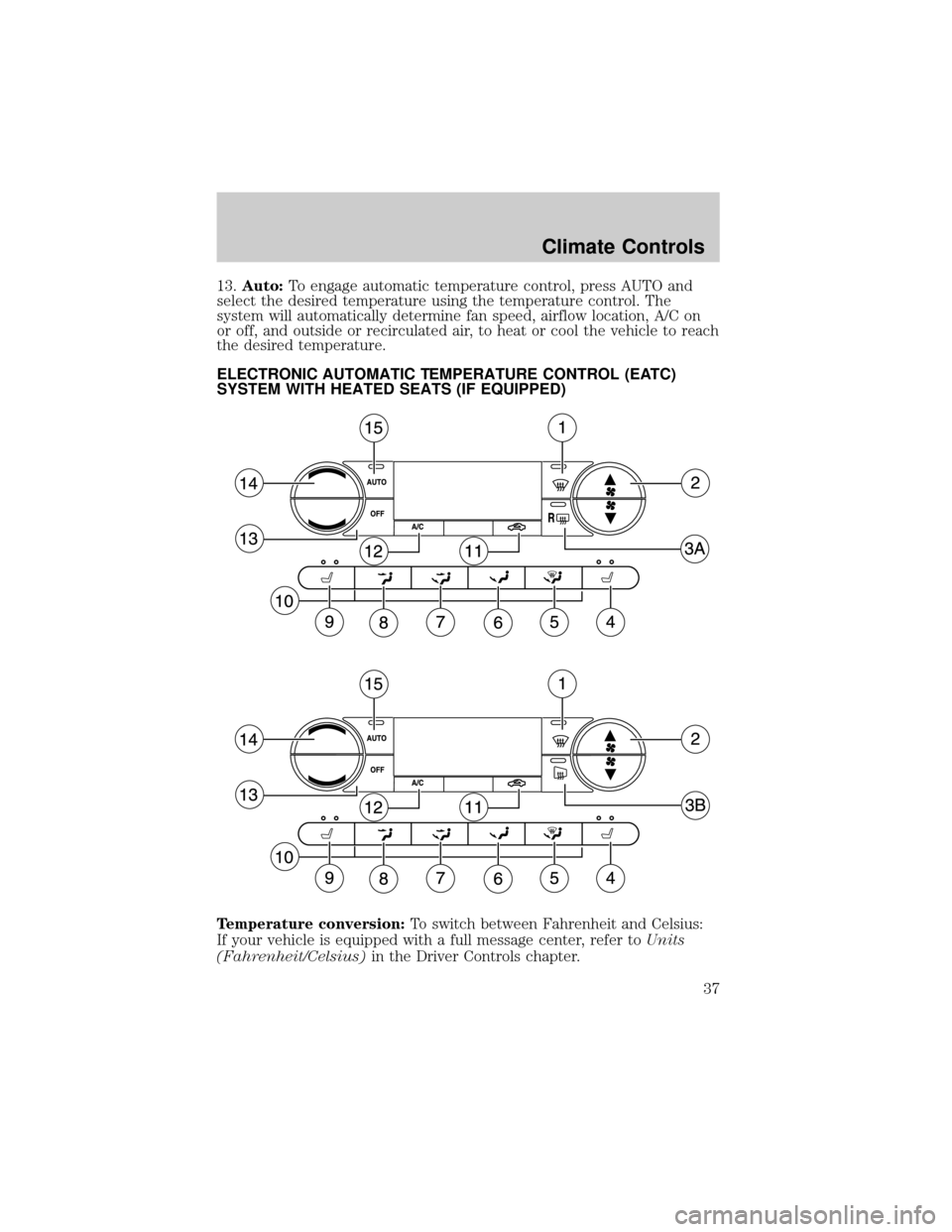
13.Auto:To engage automatic temperature control, press AUTO and
select the desired temperature using the temperature control. The
system will automatically determine fan speed, airflow location, A/C on
or off, and outside or recirculated air, to heat or cool the vehicle to reach
the desired temperature.
ELECTRONIC AUTOMATIC TEMPERATURE CONTROL (EATC)
SYSTEM WITH HEATED SEATS (IF EQUIPPED)
Temperature conversion:To switch between Fahrenheit and Celsius:
If your vehicle is equipped with a full message center, refer toUnits
(Fahrenheit/Celsius)in the Driver Controls chapter.
Climate Controls
37
Page 39 of 280

11.Recirculation control:Press to activate/deactivate air
recirculation in the cabin. Recirculated air may reduce the amount of
time to cool down the interior of the vehicle and may also help reduce
undesired odors from reaching the interior of the vehicle. Recirculation
can be engaged manually in any other airflow selection except Defrost.
Recirculation may turn off automatically in all airflow selections.
12.A/C control:Press to activate/deactivate air conditioning. Use with
recirculated air to improve cooling performance. Engages automatically
in AUTO, Defrost and Floor/Defrost.
13.OFF:Outside air is shut out and the fan will not operate.
14.Temperature control:Press to increase/decrease the temperature
in the vehicle cabin.
15.Auto:Press to engage automatic temperature control. Select the
desired temperature using the temperature control. The system will
automatically determine fan speed, airflow location, A/C on or off, and
outside or recirculated air, to heat or cool the vehicle to reach the
desired temperature.
OPERATING TIPS
²To reduce fog build up on the windshield during humid weather, place
the air flow selector in the
position.
²Do not put objects under the front seats that will interfere with the
airflow to the back seats.
²To reduce humidity build-up inside the vehicle, do not drive in
recirculated air mode without the A/C running.
²Remove any snow, ice or leaves from the air intake area at the base of
the windshield.
To aid in side window defogging/demisting in cold weather:
1. Select
2. Select A/C
3. Adjust the temperature control to maintain comfort.
4. Set the fan speed to the highest setting.
5. Direct the outer instrument panel vents towards the side windows
To increase airflow to the outer instrument panel vents, close the vents
located in the middle of the instrument panel.
Climate Controls
39
Page 56 of 280
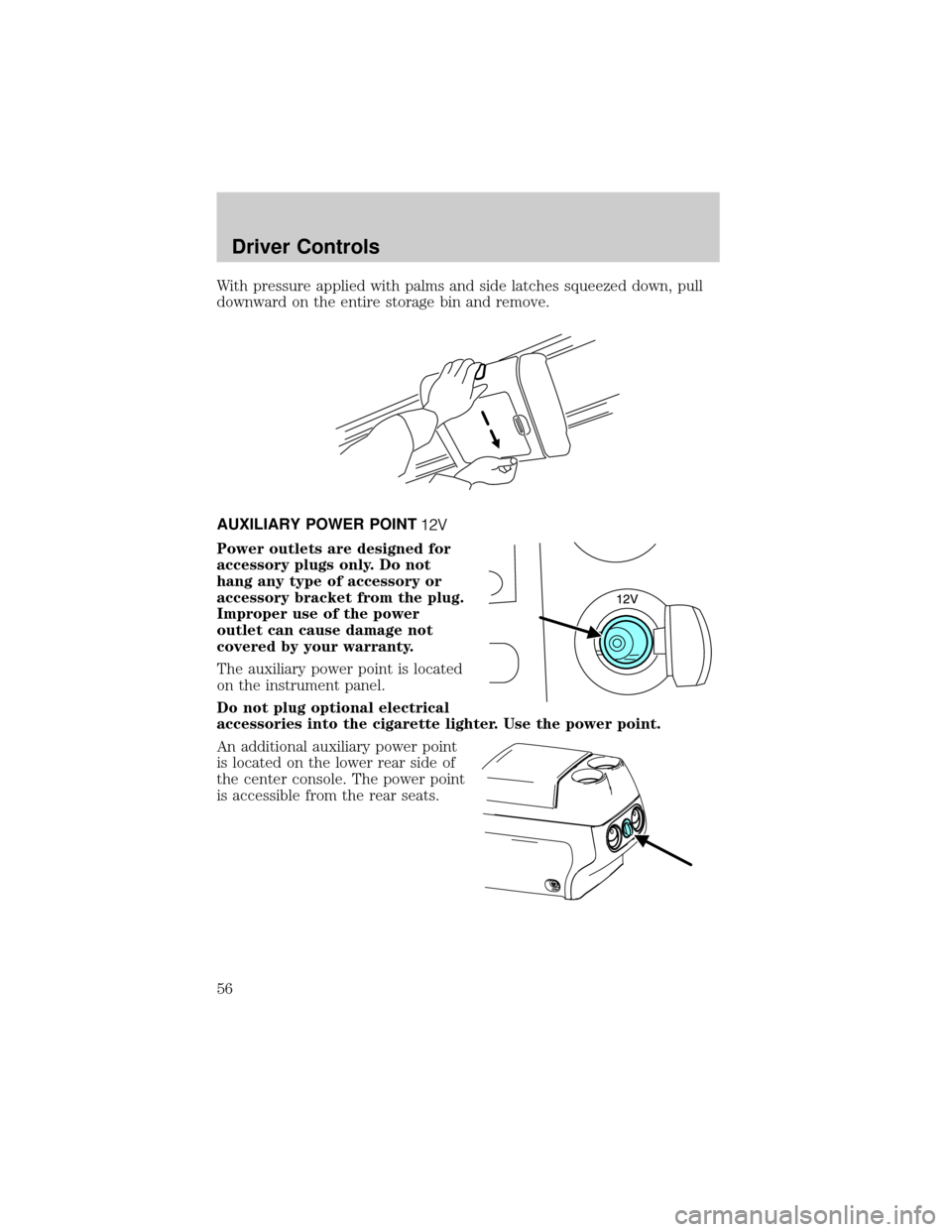
With pressure applied with palms and side latches squeezed down, pull
downward on the entire storage bin and remove.
AUXILIARY POWER POINT
Power outlets are designed for
accessory plugs only. Do not
hang any type of accessory or
accessory bracket from the plug.
Improper use of the power
outlet can cause damage not
covered by your warranty.
The auxiliary power point is located
on the instrument panel.
Do not plug optional electrical
accessories into the cigarette lighter. Use the power point.
An additional auxiliary power point
is located on the lower rear side of
the center console. The power point
is accessible from the rear seats.
Driver Controls
56
Page 100 of 280

Press the control to move the seat
forward, backward, up or down.
Memory seats/adjustable pedals (if equipped)
This system allows automatic
positioning of the driver seat and
adjustable pedals to two
programmable positions.
The memory seat control is located
on the driver's seat.
²To program position one, move
the driver seat, and adjustable
pedals to the desired position.
Press the SET control. The SET
control indicator light will briefly illuminate. While the light is
illuminated, press control 1.
²To program position two, repeat the previous procedure using control
2.
A position can only be recalled when the transmission gearshift is in
Park. A memory position may be programmed at any time.
Heated seats (if equipped)
To operate the heated seats, do the following:
²Push control located on the
instrument panel to set at high
heat.
²Push control again to set at low heat.
²Push again to deactivate.
The indicator light on the control will illuminate when activated.
The system automatically shuts off after 10 minutes.
Seating and Safety Restraints
100