Page 4 of 248
CALIFORNIA Proposition 65 Warning
WARNING:Engine exhaust, some of its constituents, and
certain vehicle components contain or emit chemicals known to
the State of California to cause cancer and birth defects or other
reproductive harm. In addition, certain fluids contained in vehicles and
certain products of component wear contain or emit chemicals known
to the State of California to cause cancer and birth defects or other
reproductive harm.
CONGRATULATIONS
Congratulations on acquiring your new Ford. Please take the time to get
well acquainted with your vehicle by reading this handbook. The more
you know and understand about your vehicle, the greater the safety and
pleasure you will derive from driving it.
For more information on Ford Motor Company and its products visit the
following website:
•In the United States: www.ford.com
•In Canada: www.ford.ca
•In Australia: www.ford.com.au
•In Mexico: www.ford.com.mx
Additional owner information is given in separate publications.
ThisOwner’s Guidedescribes every option and model variant available
and therefore some of the items covered may not apply to your
particular vehicle. Furthermore, due to printing cycles it may describe
options before they are generally available.
Remember to pass on thisOwner’s Guidewhen reselling the vehicle. It
is an integral part of the vehicle.
Fuel pump shut-off switch:In the event of an accident the
safety switch will automatically cut off the fuel supply to the
engine. The switch can also be activated through sudden vibration (e.g.
collision when parking). To reset the switch, refer to theFuel pump
shut-off switchin theRoadside Emergencieschapter.
2004 Crown Victoria(cro)
Owners Guide (post-2002-fmt)
USA English(fus)
Introduction
Introduction
4
Page 8 of 248
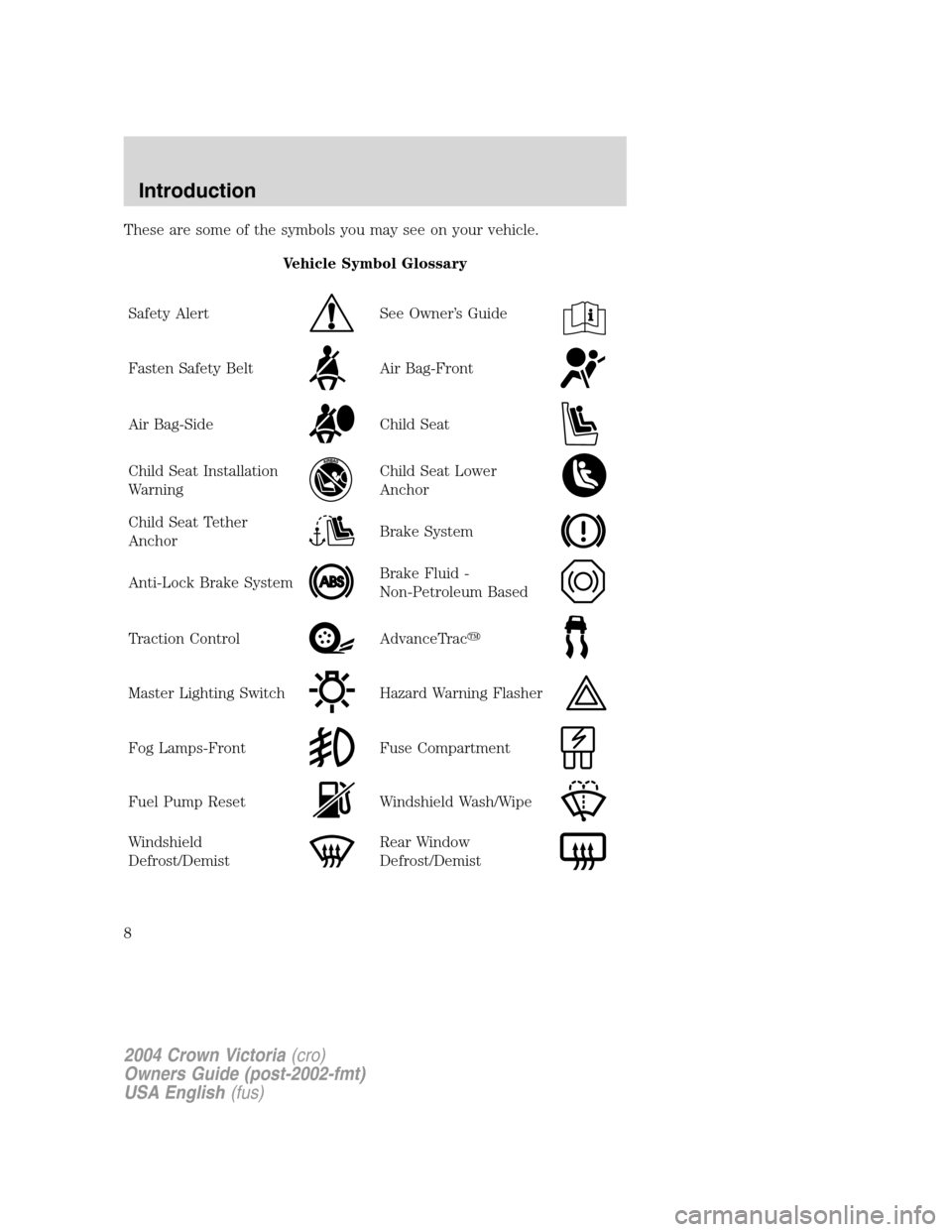
These are some of the symbols you may see on your vehicle.
Vehicle Symbol Glossary
Safety Alert
See Owner’s Guide
Fasten Safety BeltAir Bag-Front
Air Bag-SideChild Seat
Child Seat Installation
WarningChild Seat Lower
Anchor
Child Seat Tether
AnchorBrake System
Anti-Lock Brake SystemBrake Fluid -
Non-Petroleum Based
Traction ControlAdvanceTrac�
Master Lighting SwitchHazard Warning Flasher
Fog Lamps-FrontFuse Compartment
Fuel Pump ResetWindshield Wash/Wipe
Windshield
Defrost/DemistRear Window
Defrost/Demist
2004 Crown Victoria(cro)
Owners Guide (post-2002-fmt)
USA English(fus)
Introduction
8
Page 17 of 248
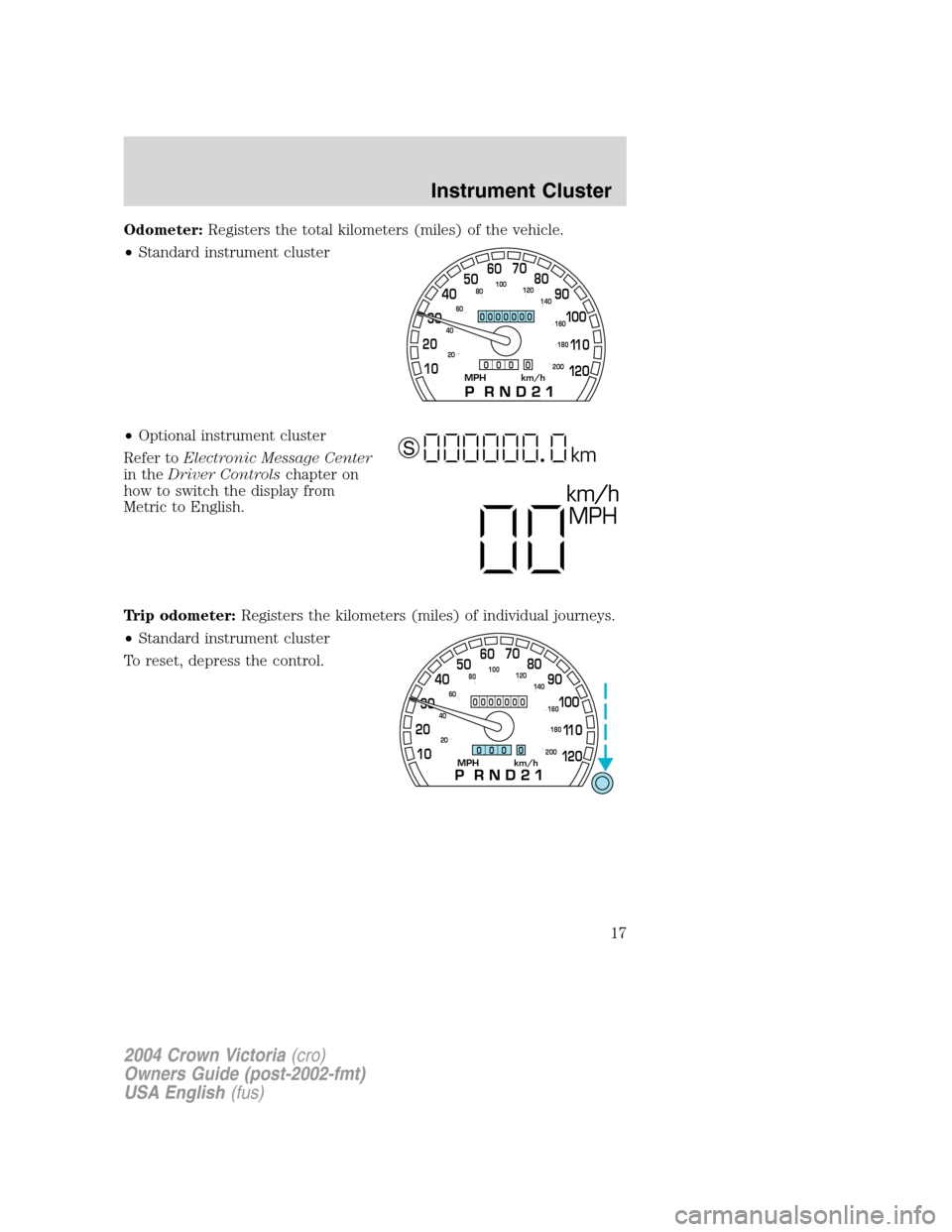
Odometer:Registers the total kilometers (miles) of the vehicle.
•Standard instrument cluster
•Optional instrument cluster
Refer toElectronic Message Center
in theDriver Controlschapter on
how to switch the display from
Metric to English.
Trip odometer:Registers the kilometers (miles) of individual journeys.
•Standard instrument cluster
To reset, depress the control.
MPH km/h10 203040506070
80
90
10 0
11 0
12 0
20 406080100
120
140
160
180
200
0000000
0 0 0 0
km/h
MPH
km S
MPH km/h10 203040506070
80
90
10 0
11 0
12 0
20 406080100
120
140
160
180
200
0000000
0 0 0 0
2004 Crown Victoria(cro)
Owners Guide (post-2002-fmt)
USA English(fus)
Instrument Cluster
17
Page 24 of 248
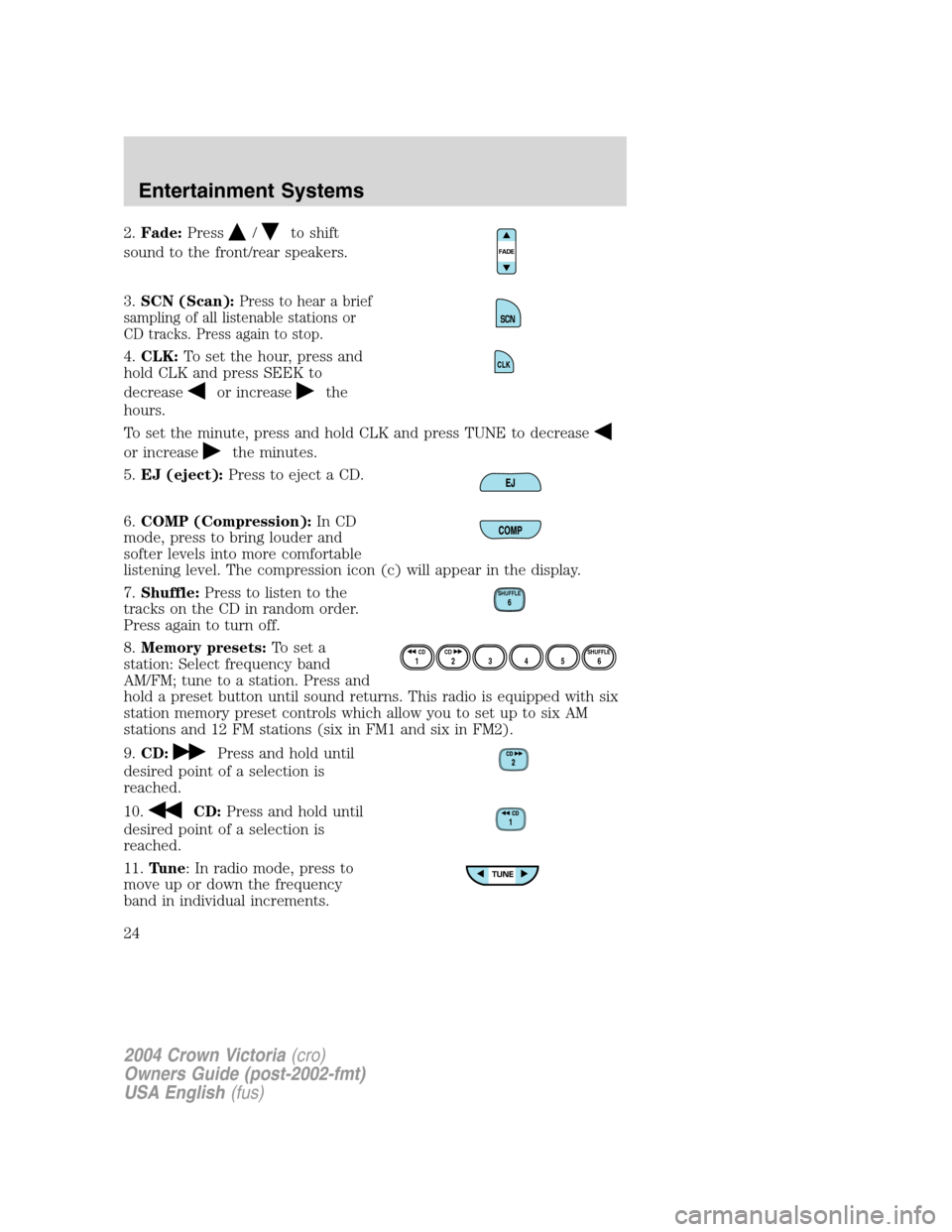
2.Fade:Press/to shift
sound to the front/rear speakers.
3.SCN (Scan):
Press to hear a brief
sampling of all listenable stations or
CD tracks. Press again to stop.
4.CLK:To set the hour, press and
hold CLK and press SEEK to
decrease
or increasethe
hours.
To set the minute, press and hold CLK and press TUNE to decrease
or increasethe minutes.
5.EJ (eject):Press to eject a CD.
6.COMP (Compression):In CD
mode, press to bring louder and
softer levels into more comfortable
listening level. The compression icon (c) will appear in the display.
7.Shuffle:Press to listen to the
tracks on the CD in random order.
Press again to turn off.
8.Memory presets:To set a
station: Select frequency band
AM/FM; tune to a station. Press and
hold a preset button until sound returns. This radio is equipped with six
station memory preset controls which allow you to set up to six AM
stations and 12 FM stations (six in FM1 and six in FM2).
9.CD:
Press and hold until
desired point of a selection is
reached.
10.
CD:Press and hold until
desired point of a selection is
reached.
11.Tune: In radio mode, press to
move up or down the frequency
band in individual increments.
CLK
SHUFFLE6
12 3456SHUFFLE CD CD
2004 Crown Victoria(cro)
Owners Guide (post-2002-fmt)
USA English(fus)
Entertainment Systems
24
Page 26 of 248
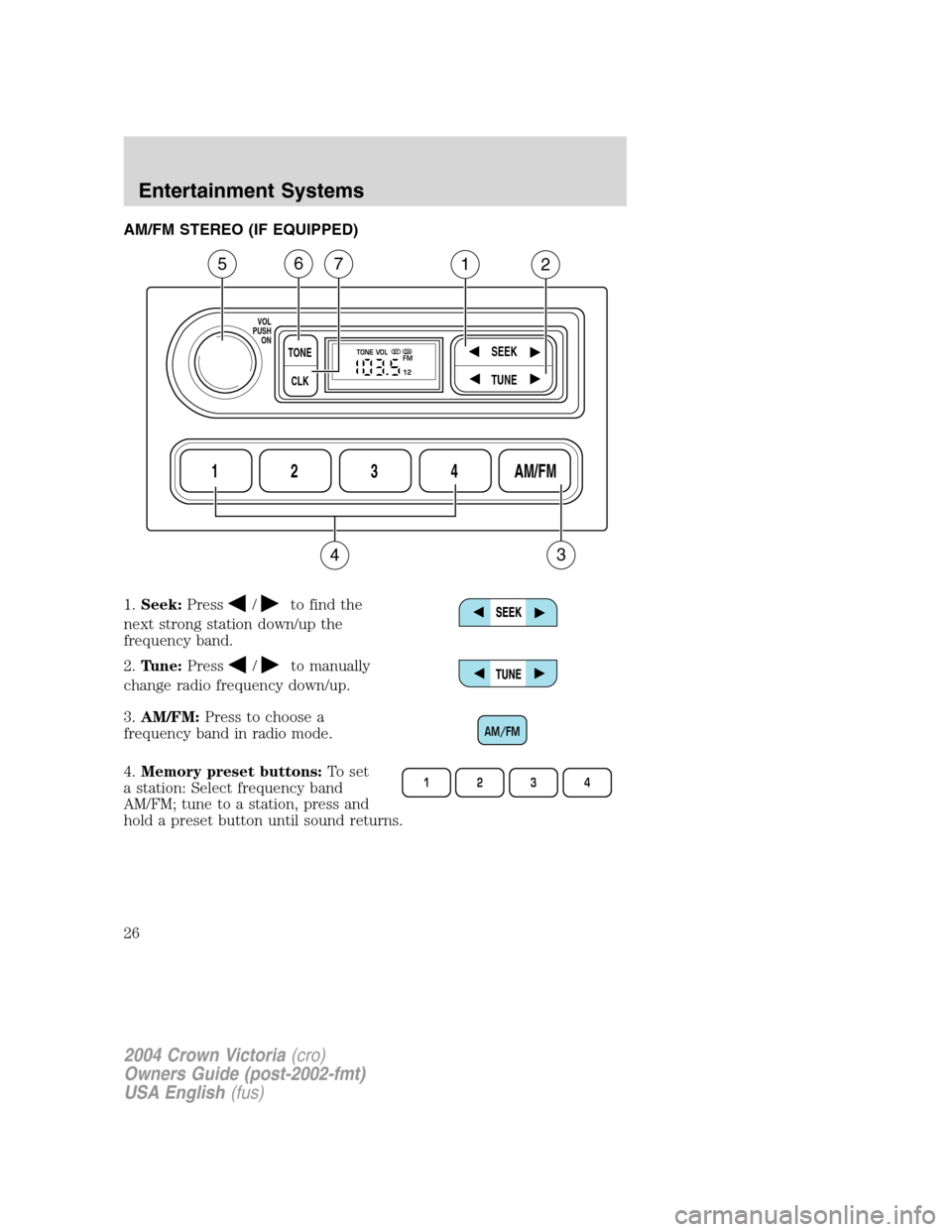
AM/FM STEREO (IF EQUIPPED)
1.Seek:Press
/to find the
next strong station down/up the
frequency band.
2.Tune:Press
/to manually
change radio frequency down/up.
3.AM/FM:Press to choose a
frequency band in radio mode.
4.Memory preset buttons:To set
a station: Select frequency band
AM/FM; tune to a station, press and
hold a preset button until sound returns.
1234AM/FM
SEEKTONE
CLK
TUNE
TONE VOL
12 FMSTDX
VOL
PUSH
ON
5
3
67
4
12
AM/FM
1234
2004 Crown Victoria(cro)
Owners Guide (post-2002-fmt)
USA English(fus)
Entertainment Systems
26
Page 29 of 248
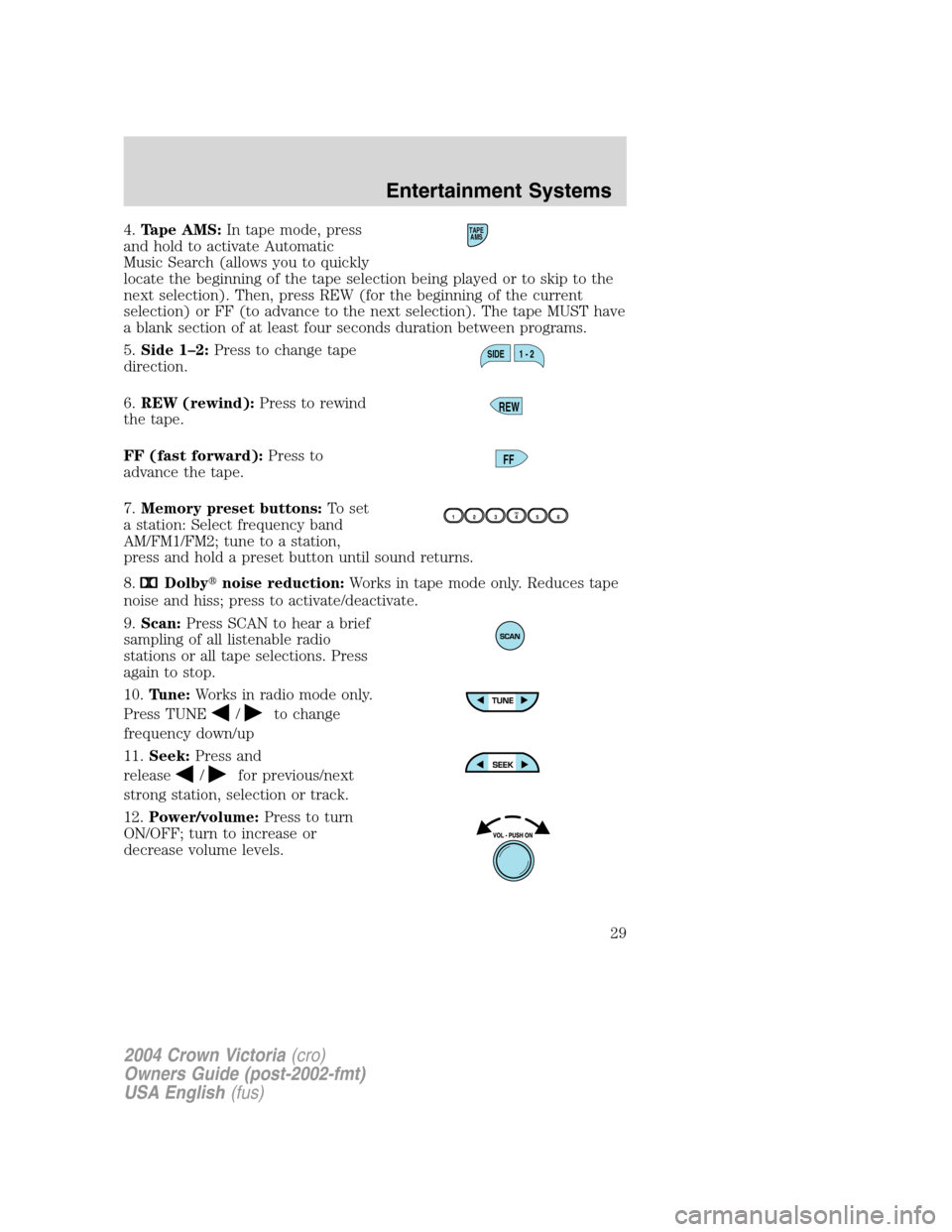
4.Tape AMS:In tape mode, press
and hold to activate Automatic
Music Search (allows you to quickly
locate the beginning of the tape selection being played or to skip to the
next selection). Then, press REW (for the beginning of the current
selection) or FF (to advance to the next selection). The tape MUST have
a blank section of at least four seconds duration between programs.
5.Side 1–2:Press to change tape
direction.
6.REW (rewind):Press to rewind
the tape.
FF (fast forward):Press to
advance the tape.
7.Memory preset buttons:To set
a station: Select frequency band
AM/FM1/FM2; tune to a station,
press and hold a preset button until sound returns.
8.
Dolby�noise reduction:Works in tape mode only. Reduces tape
noise and hiss; press to activate/deactivate.
9.Scan:Press SCAN to hear a brief
sampling of all listenable radio
stations or all tape selections. Press
again to stop.
10.Tune:Works in radio mode only.
Press TUNE
/to change
frequency down/up
11.Seek:Press and
release
/for previous/next
strong station, selection or track.
12.Power/volume:Press to turn
ON/OFF; turn to increase or
decrease volume levels.
TAPE
AMS
SIDE 1 - 2
REW
FF
2004 Crown Victoria(cro)
Owners Guide (post-2002-fmt)
USA English(fus)
Entertainment Systems
29
Page 51 of 248
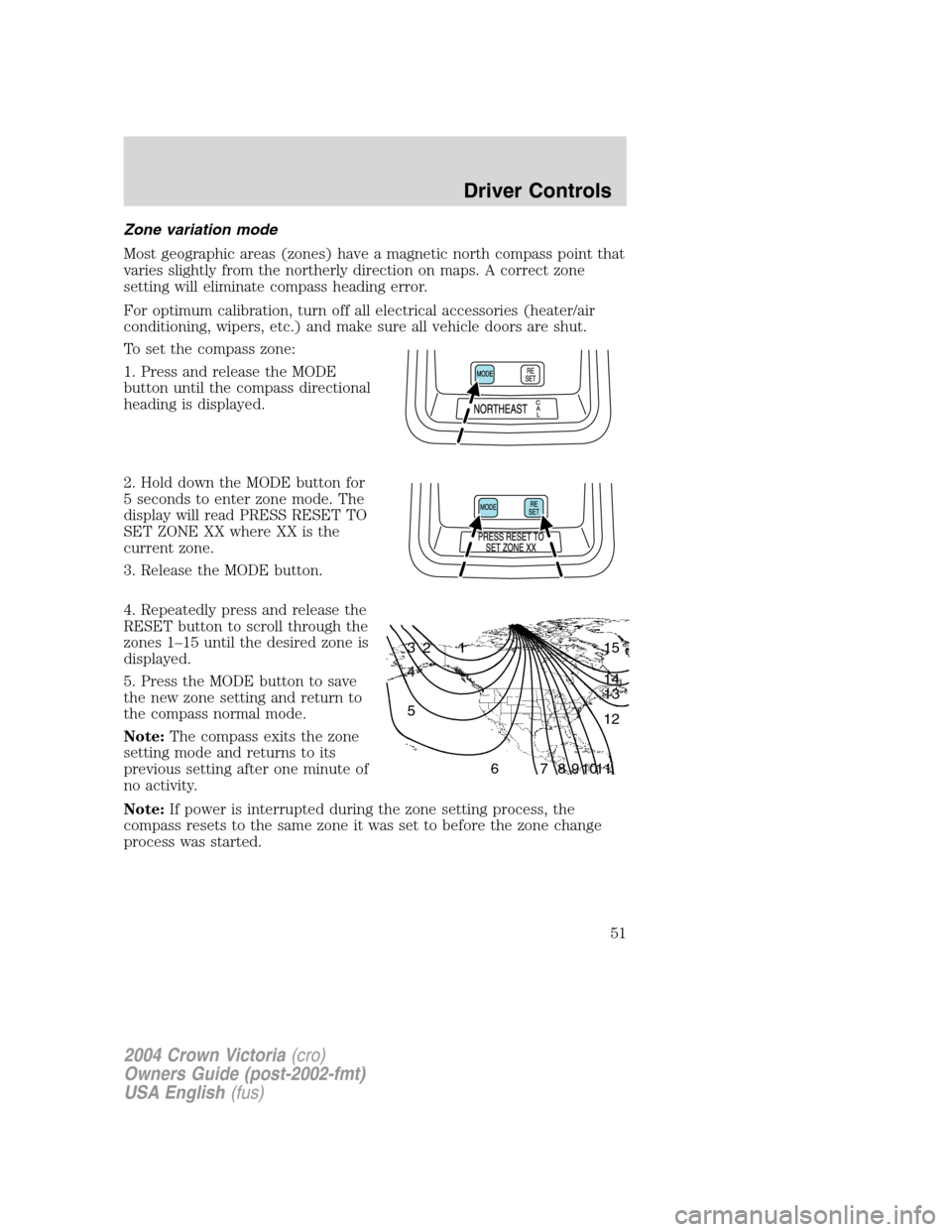
Zone variation mode
Most geographic areas (zones) have a magnetic north compass point that
varies slightly from the northerly direction on maps. A correct zone
setting will eliminate compass heading error.
For optimum calibration, turn off all electrical accessories (heater/air
conditioning, wipers, etc.) and make sure all vehicle doors are shut.
To set the compass zone:
1. Press and release the MODE
button until the compass directional
heading is displayed.
2. Hold down the MODE button for
5 seconds to enter zone mode. The
display will read PRESS RESET TO
SET ZONE XX where XX is the
current zone.
3. Release the MODE button.
4. Repeatedly press and release the
RESET button to scroll through the
zones 1–15 until the desired zone is
displayed.
5. Press the MODE button to save
the new zone setting and return to
the compass normal mode.
Note:The compass exits the zone
setting mode and returns to its
previous setting after one minute of
no activity.
Note:If power is interrupted during the zone setting process, the
compass resets to the same zone it was set to before the zone change
process was started.
1 2 3
4
5
6 7 8 9 101112 13 14 15
2004 Crown Victoria(cro)
Owners Guide (post-2002-fmt)
USA English(fus)
Driver Controls
51
Page 52 of 248
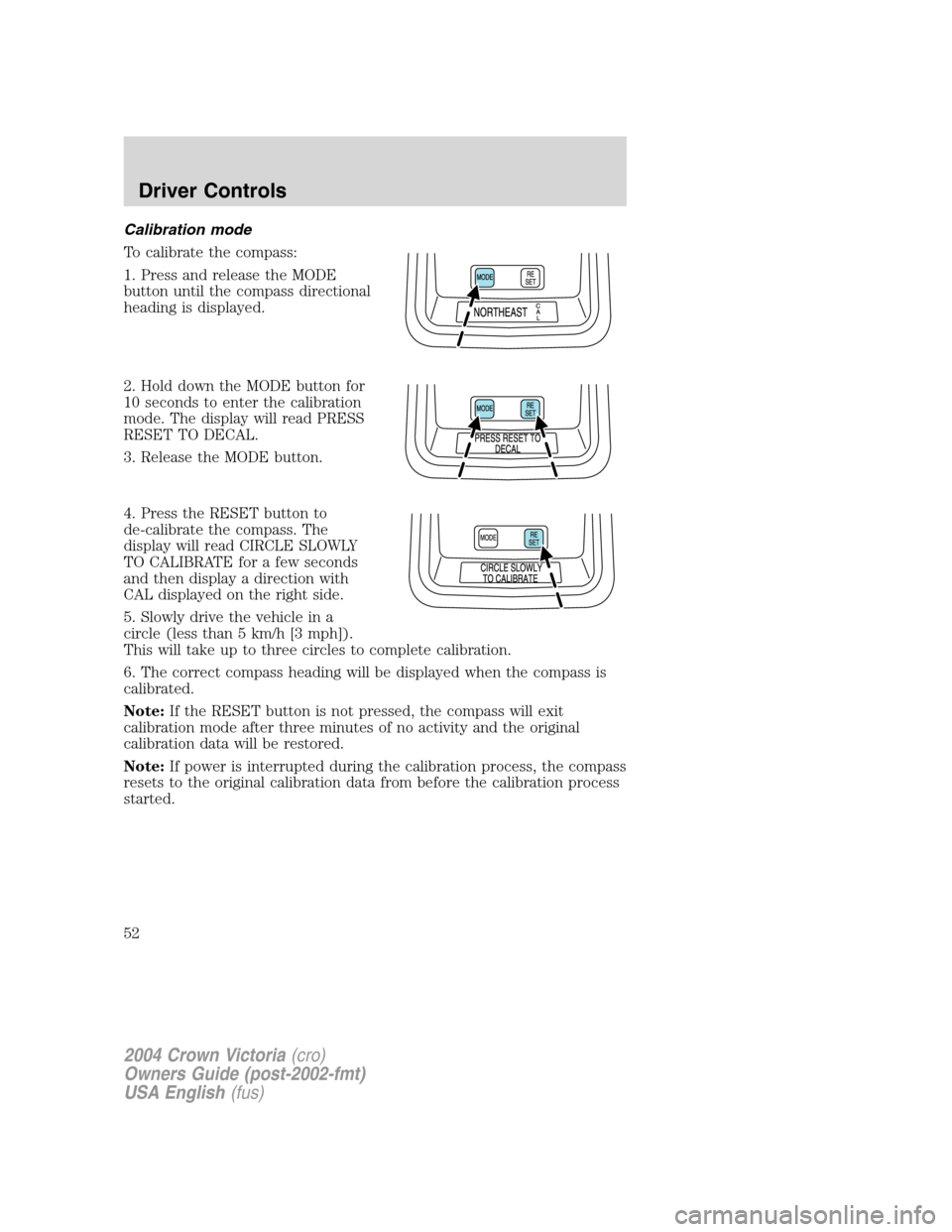
Calibration mode
To calibrate the compass:
1. Press and release the MODE
button until the compass directional
heading is displayed.
2. Hold down the MODE button for
10 seconds to enter the calibration
mode. The display will read PRESS
RESET TO DECAL.
3. Release the MODE button.
4. Press the RESET button to
de-calibrate the compass. The
display will read CIRCLE SLOWLY
TO CALIBRATE for a few seconds
and then display a direction with
CAL displayed on the right side.
5. Slowly drive the vehicle in a
circle (less than 5 km/h [3 mph]).
This will take up to three circles to complete calibration.
6. The correct compass heading will be displayed when the compass is
calibrated.
Note:If the RESET button is not pressed, the compass will exit
calibration mode after three minutes of no activity and the original
calibration data will be restored.
Note:If power is interrupted during the calibration process, the compass
resets to the original calibration data from before the calibration process
started.
2004 Crown Victoria(cro)
Owners Guide (post-2002-fmt)
USA English(fus)
Driver Controls
52