Page 129 of 426
STORAGE
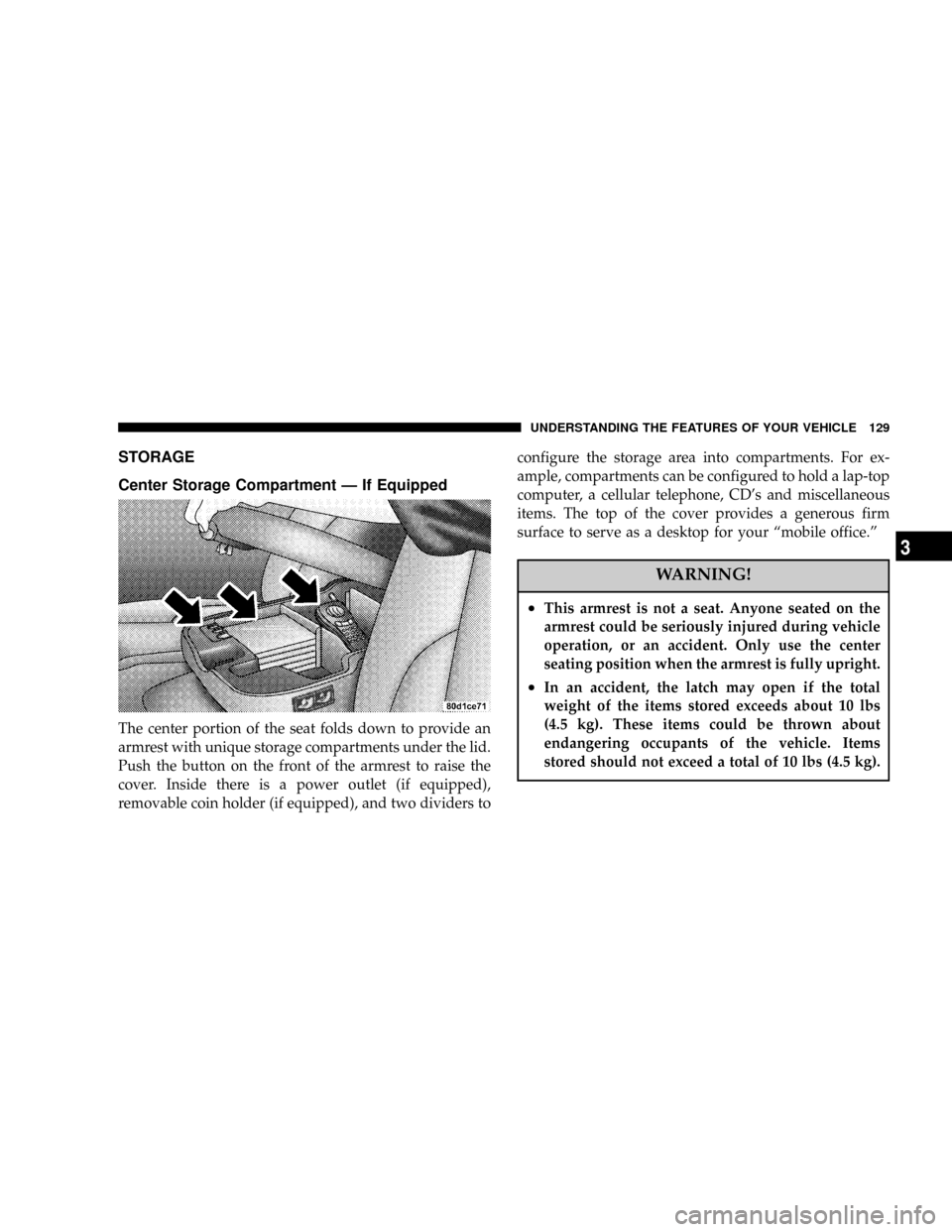
Center Storage Compartment Ð If Equipped
The center portion of the seat folds down to provide an
armrest with unique storage compartments under the lid.
Push the button on the front of the armrest to raise the
cover. Inside there is a power outlet (if equipped),
removable coin holder (if equipped), and two dividers toconfigure the storage area into compartments. For ex-
ample, compartments can be configured to hold a lap-top
computer, a cellular telephone, CD's and miscellaneous
items. The top of the cover provides a generous firm
surface to serve as a desktop for your ªmobile office.º
WARNING!
²This armrest is not a seat. Anyone seated on the
armrest could be seriously injured during vehicle
operation, or an accident. Only use the center
seating position when the armrest is fully upright.
²In an accident, the latch may open if the total
weight of the items stored exceeds about 10 lbs
(4.5 kg). These items could be thrown about
endangering occupants of the vehicle. Items
stored should not exceed a total of 10 lbs (4.5 kg).
UNDERSTANDING THE FEATURES OF YOUR VEHICLE 129
3
Page 139 of 426

NPinch Roller Release...................164
NNoise Reduction......................164
NOperating Instructions Ð CD Player........164
NInserting The Compact Disc..............164
NSeek Button.........................165
NEJT CD (Eject) Button..................165
NFF/Tune/RW........................166
NProgram Button 4 (Random Play)..........166
NMode..............................166
NTape CD Button......................166
NTime Button.........................167
NScan Button.........................167NCD Changer Control Capability Ð If
Equipped...........................167
mSales Code RBKÐAM/ FM Stereo Radio With
CD Player And CD Changer Controls........168
NRadio Operation......................168
NCD Player Operation...................171
NCD Changer Control Capability Ð If
Equipped...........................172
NRadio Display Messages................174
mSales Code RBQÐAM/FM Stereo Radio With
6 - Disc CD Changer....................175
NRadio Operation......................175
NCD Player Operation...................177
UNDERSTANDING YOUR INSTRUMENT PANEL 139
4
Page 140 of 426
mRemote Sound System Controls Ð If Equipped . . 181
NRadio Operation......................182
NTape Player.........................182
NCD Player..........................182
mCassette Tape And Player Maintenance.......183
mCompact Disc Maintenance................184
mRadio Operation And Cellular Phones........184
mClimate Controls.......................185NHeater Only Ð Fleet Vehicles.............185
NAir ConditioningÐIf Equipped...........187
NElectric Rear Window Defroster And Heated
Sideview Mirrors Ð If Equipped..........191
NAir Conditioning With Dual Zone Temperature
Control Ð If Equipped.................191
NOperating Tips.......................196
NOperating Tips Chart...................198
140 UNDERSTANDING YOUR INSTRUMENT PANEL
Page 148 of 426

If brake failure is indicated, immediate repair is necessary
and continued operation of the vehicle in this condition is
dangerous.
Acceleration which causes the rear wheels to slip for a
period of time may result in the red brake light illumi-
nating and a brake switch code being set on ABS
equipped vehicles. Depressing the brake pedal should
extinguish the red brake light.
19. Wait To Start Indicator
The Wait To Start Indicator will illuminate when
the ignition key is first turned to the ON position.
Wait until the Wait To Start Indicator turns OFF then start
the vehicle.
20. Odometer/Trip Odometer
The odometer shows the total distance the vehicle has
been driven.If the odometer reading is changed during repair or
replacement, be sure to keep a record of the reading
before and after the service so that the correct mileage can
be determined.
The trip odometer shows individual trip mileage. To
toggle between the odometer and the trip odometer,
press the Odometer/Trip Odometer Button. To reset the
Trip Odometer, press and hold the button while in trip
mode, until the Trip Odometer resets.
NOTE:There is also an engine hour function. This
indicates the total number of hours the engine has been
running. To display the engine hours perform the follow-
ing: Place the ignition in RUN, but do not start the
engine. With the odometer value displayed, hold the trip
button down for a period of 6 seconds. The odometer will
change to trip value first, then it will display the engine
148 UNDERSTANDING YOUR INSTRUMENT PANEL
Page 155 of 426

You can turn the tape player ON by inserting a cassette or
activating the MODE button (with a cassette in the radio),
but only when the ignition and radio are on.
Each time a cassette is inserted the tape player will begin
playing on the side of the cassette that is facing up in the
player.
Music Search
Pressing the SEEK button while playing a tape will start
the Music Search mode. Press the SEEK button up for the
next selection on the tape and down to return to the
beginning of the current selection, or return to the
beginning of the previous selection if the tape is within
the first 5 seconds of the current selection.
The SEEK symbol appears on the display when Music
Search is in operation. Music Search shuts off automati-
cally when a selection has been located.
Selective Music Search
Press the SEEK button up or down to move the track
number to skip forward or backward 1 to 7 selections.
Press the SEEK button once to move 1 selection, twice to
move 2 selections, etc.
Fast Forward And Rewind Buttons
Pressing the TUNE button up or down momentarily
activates Fast Forward or Rewind and makes the direc-
tional arrows appear on the display.
To stop Fast Forward or Rewind, press the TUNE button
again.
Time Button
Press the time button to toggle between station frequency
and time of day.
Pressing this button while playing a cassette tape will
change the side of the tape being played.
UNDERSTANDING YOUR INSTRUMENT PANEL 155
4
Page 157 of 426
Random can be cancelled by pressing the button a second
time or by ejecting the CD from the changer.
CD Diagnostic Indicators
When driving over a very rough road, the CD player may
skip momentarily. Skipping will not damage the disc or
the player, and play will resume automatically.
As a safeguard and to protect your CD player, one of the
following warning symbols may appear on your display.
A CD HOT symbol indicates the player is too hot.
CD HOT will pause the operation. Play can be resumed
when the operating temperature is corrected or another
MODE is selected.An ERR symbol will appear on the display if the laser is
unable to read the Disc data for the following reasons:
²Excessive vibration
²Disc inserted upside down
²Damaged disc
²Water condensation on optics
Radio Display Messages
Your radio has been designed to display certain messages
when a problem is detected with the CD player.
UNDERSTANDING YOUR INSTRUMENT PANEL 157
4
Page 162 of 426

To Set The Radio Push-button Memory
When you are receiving a station that you wish to
commit to push-button memory, press the SET button.
SET 1 will show in the display window. Select the
push-button you wish to lock onto this station and press
and release that button. If a station is not selected within
5 seconds after pressing the SET button, the station will
continue to play but will not be locked into push-button
memory.
You may add a second station to each push-button by
repeating the above procedure with this exception: Press
the SET button twice and SET 2 will show in the display
window. Each button can be set for SET 1 and SET 2 in
both AM and FM. This allows a total of 10 AM and 10 FM
stations to be locked into memory. You can recall the
stations stored in SET 2 memory by pressing the push-
button twice.
To Change From Clock To Radio Mode
Press the Time button to change the display between
radio frequency and time.
Operating Instructions Ð Tape Player
Insert the cassette with the exposed tape side toward the
right and the mechanical action of the player will gently
pull the cassette into the play position.
NOTE:When subjected to extremely cold temperatures,
the tape mechanism may require a few minutes to warm
up for proper operation. Sometimes poor playback may
be experienced due to a defective cassette tape. Clean and
demagnetize the tape heads at least twice a year.
Seek Button
Press the SEEK button up for the next selection on the
tape and down to return to the beginning of the current
selection.
162 UNDERSTANDING YOUR INSTRUMENT PANEL
Page 168 of 426
CD Diagnostic Indicators
When driving over a very rough road, the CD player may
skip momentarily. Skipping will not damage the disc or
the player, and play will resume automatically.
As a safeguard and to protect your CD player, one of the
following warning symbols may appear on your display.
A CD HOT symbol indicates the player is too hot.
CD HOT will pause the operation. Play can be resumed
when the operating temperature is corrected or another
MODE is selected.
An ERR symbol will appear on the display if the laser is
unable to read the Disc data for the following reasons:
²Excessive vibration
²Disc inserted upside down
²Damaged disc
²Water condensation on optics
SALES CODE RBKÐAM/ FM STEREO RADIO
WITH CD PLAYER AND CD CHANGER CONTROLS
Radio Operation
Power/Volume Control
Press the ON/VOL control to turn the radio on. Turn the
volume control clockwise to increase the volume.
168 UNDERSTANDING YOUR INSTRUMENT PANEL