2004 CHRYSLER 300 M wheel
[x] Cancel search: wheelPage 89 of 277

Tire Pressure Monitor System — If Equipped
The Tire Pressure Monitor (TPM) system uses wireless
technology to monitor tire pressure levels. Sensors,
mounted to each wheel as part of the valve stem transmit
tire pressure readings to a receiver located in the over-
head console.
The tire pressure is shown in the Electronic Vehicle
Information Center (EVIC) display. The TPM system
remains active even if it is not displayed in the EVIC.CAUTION!
The TPM system is designed to monitor your tire
pressure and will not function as a tire pressure
gauge while adjusting the pressure in your tires.
There will be a delay between the instant you adjust
the air pressure in a tire and when the system
updates the display.
NOTE:The TPM system can inform you about a low or
high tire pressure condition, but it does not replace
normal tire maintenance. The TPM system is not in-
tended to provide you with notification of rapid pressure
loss.
1. If any tire pressure has exceeded the low or high
pressure (refer to “Starting and Operating, Tires Sec-
tion”), the TPM system will display a message in the
EVIC and sound a chime. It will then go into the tire
pressure display screen and flash the pressure value of
the tire that is low or high. This will be displayed for the
rest of the ignition cycle, or until either the C/T, MENU,
STEP, or RESET button is pressed.
UNDERSTANDING THE FEATURES OF YOUR VEHICLE 89
3
Page 95 of 277

Tilt Mirrors Down
When this feature is selected, and the vehicle is placed in
reverse, the driver’s exterior mirror will tilt downward to
improve visibility of rear wheel area. Once reverse is
disengaged, the driver’s exterior mirror will return to it’s
original position. Pressing the STEP button when in this
display will select “YES” or “NO”.
Train Remote
NOTE:
As a safety feature, successful training of at least
one transmitter will erase all previously trained transmit-
ters.
When this feature is selected the driver can choose to
train up to four remote keyless entry transmitters. Press-
ing the STEP button when in this display will select
“YES” or “NO”. When “YES” is selected and the MENU
button is pressed; the EVIC will display “PRESS RE-
MOTE LOCK & UNLOCK THEN PRESS UNLOCK”,
followed by a chime to indicate the training sequence can
commence. You have approximately 30 seconds to train
up to four transmitters; after each transmitter is trained a
chime will sound indicating that the training was suc-
cessful. If remote link to memory is “YES,” the firsttransmitter trained will be associated with memory set-
ting 1 and the second transmitter trained will be associ-
ated with memory setting 2. Additional transmitters will
not be associated with a memory setting. When you have
finished training the transmitters, press the MENU but-
ton again and the EVIC will display “TRAIN DONE, x
TRAINED”. (Where x = 1,2,3, or 4) If no transmitters are
trained within approximately 30 seconds the EVIC will
display “TRAIN TIMEOUT”.Retrain Tire Sensors? (Available with TPM System
Only)
WARNING!
Death or serious injury can occur if magnetically
sensitive devices are exposed to this magnet. Mag-
nets can affect pacemakers.
NOTE:If a wheel rotation is not followed by the retrain
procedure, the system will not properly inform you of the
correct vehicle location for a low or high pressure tire.
UNDERSTANDING THE FEATURES OF YOUR VEHICLE 95
3
Page 114 of 277

7. Turn Signal Indicators
The arrow will flash in unison with the exterior
turn signal, when using the turn signal lever.
8. High Beam Indicator
This light shows that the headlights are on high
beam. Pull the turn signal lever towards the
steering wheel to switch the headlights from high or
low beam.
9. Seat Belt Reminder Light
The light will come on after the ignition is
turned on. The light will remain lit until the seat
belt is fastened.
10. Door Ajar Light
This light shows that a door is not completely
closed. A warning chime will sound if the vehicle
is moving with a door partially closed.
11. Speedometer
Shows vehicle speed in miles-per-hour or kilometers-per-
hour.
12. Low Washer Fluid Light
This symbol will light whenever the fluid reser-
voir is less than 1/4 filled. Adding washer fluid
will cause the light to go out the next time the
ignition is cycled. A warning chime will sound when
the light comes on.
13. Cruise (Speed Control) Light
This light shows that the Speed Control System is ON.
14. Temperature Light
This light warns of an overheated engine cool-
ant condition. A warning chime will sound
when the light comes on.
15. Engine Coolant Temperature Gauge
The temperature gauge shows engine coolant
temperature. Any reading within the 5 gauge
marks between Hot and Cold shows that the
engine cooling system is operating properly. The
gauge pointer may show a higher than normal tem-
perature when driving in hot weather, up mountain
grades, in heavy stop and go traffic, or when towing a
trailer.
114 UNDERSTANDING YOUR INSTRUMENT PANEL
Page 119 of 277

Two Types of Signals
There are two basic types of radio signals... AM or
Amplitude Modulation, in which the transmitted sound
causes the amplitude, or height, of the radio waves to
vary... and FM or Frequency Modulation, in which the
frequency of the wave is varied to carry the sound.
Electrical Disturbances
Radio waves may pick up electrical disturbances during
transmission. They mainly affect the wave amplitude,
and thus remain a part of the AM reception. They
interfere very little with the frequency variations that
carry the FM signal.
AM Reception
AM sound is based on wave amplitude, so AM reception
can be disrupted by such things as lightning, power lines
and neon signs.
FM Reception
Because FM transmission is based on frequency varia-
tions, interference that consists of amplitude variations
can be filtered out, leaving the reception relatively clear,
which is the major feature of FM radio.
NOTE:On vehicles so equipped the radio, steering
wheel radio controls and 6 disc CD/DVD changer if
equipped, will remain active for up to 45 seconds after
the ignition switch has been turned off. Opening a
vehicle front door will cancel this feature.
SALES CODE RAZ—AM/ FM STEREO RADIO
WITH CASSETTE TAPE PLAYER AND CD PLAYER
— IF EQUIPPED
Operating Instructions — Radio
NOTE:
Power to operate the radio is controlled by the
ignition switch. It must be in the ON or ACC position to
operate the radio.
UNDERSTANDING YOUR INSTRUMENT PANEL 119
4
Page 142 of 277
•Pressing the AM/FM button while in the tape or CD
mode will select the radio mode.
•If in the CD mode and the last CD is ejected, the radio
will tune to the last station selected.
Removing Discs from the CD Changer
If there is a single CD in the changer, press the EJT button
and the CD will eject. If the CD is not removed within 15
seconds, it will automatically reload into the CD changer.
To eject additional CDs from the changer, first select the
numbered button where the CD is located and then press
the EJT button.
CD Changer Operation with the Changer Off
The CD changer is able to load and eject discs with the
ignition power off. However, while the ignition is off, one
of the six numbered buttons must be pressed first.
REMOTE SOUND SYSTEM CONTROLS — IF
EQUIPPED
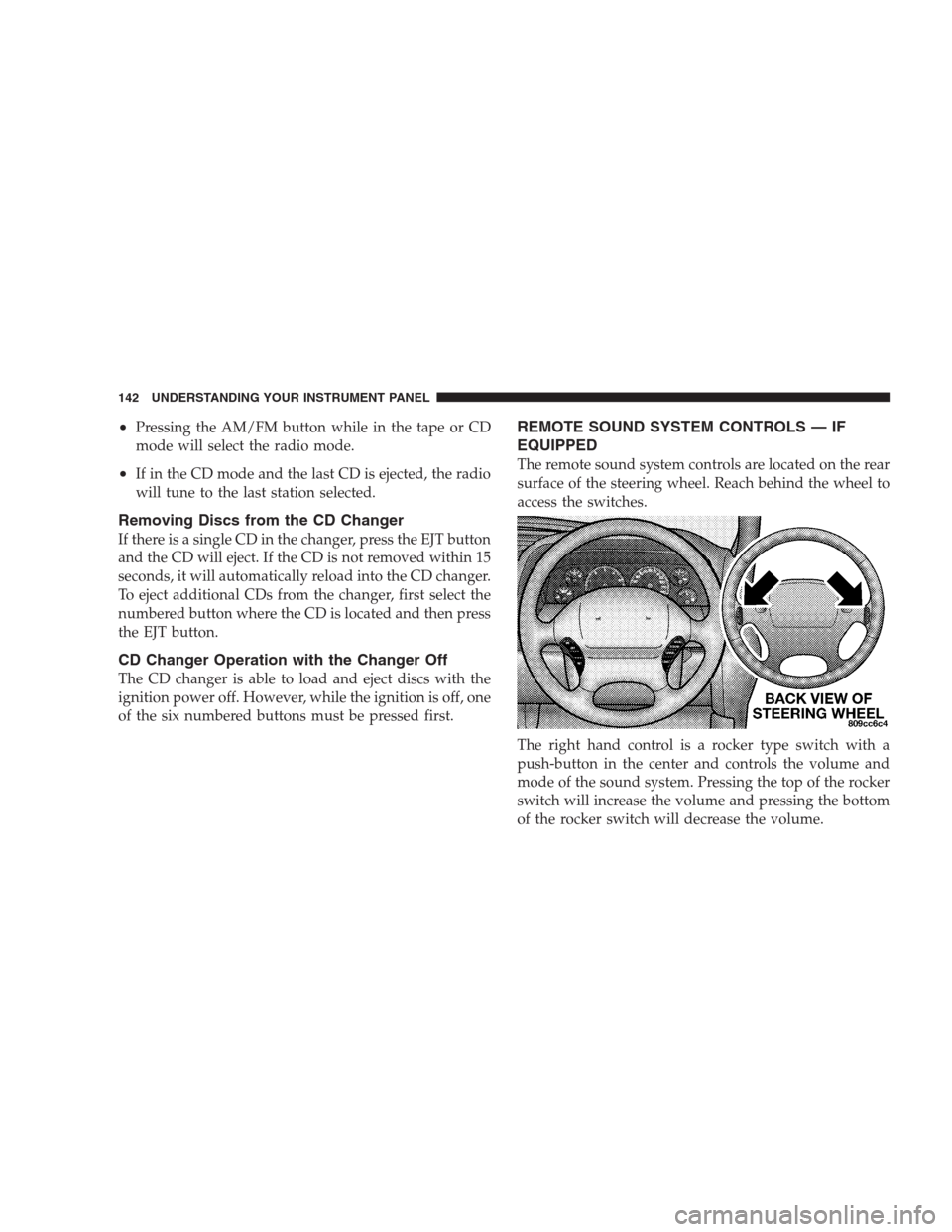
The remote sound system controls are located on the rear
surface of the steering wheel. Reach behind the wheel to
access the switches.
The right hand control is a rocker type switch with a
push-button in the center and controls the volume and
mode of the sound system. Pressing the top of the rocker
switch will increase the volume and pressing the bottom
of the rocker switch will decrease the volume.
142 UNDERSTANDING YOUR INSTRUMENT PANEL
Page 161 of 277

PARKING BRAKE
When the parking brake is applied with the ignition on,
the red Brake light in the instrument cluster will come on.
NOTE:This light only shows that the parking brake is
applied. It does not show the degree of brake application.
Before leaving the vehicle, make sure that the parking
brake is fully applied and place the gear selector in the
Park position.
To release the parking brake, pull the release lever
located on the lower edge of the instrument panel.When parking on a hill, you must set the parking brake
beforeplacing the gear selector in Park. If you don’t, the
load on the transmission locking mechanism may make it
difficult to move the selector out of Park. As an added
precaution, turn the front wheels toward the curb on a
downhill grade and away from the curb on an uphill
grade.
The parking brake should always be applied when the
driver is not in the vehicle.
STARTING AND OPERATING 161
5
Page 163 of 277

Anti-Lock Brake System (ABS)
The ABS gives increased vehicle stability and brake
performance under most braking conditions. The system
automatically “pumps” the brakes during severe braking
conditions to prevent wheel lock-up.
All vehicle wheels and tires must be the same size and
tires must be properly inflated to produce accurate
signals for the ABS computer. However, the system will
compensate when the compact spare is in use.
During stops where ABS is activated, a vibration of the
brake pedal may be felt and associated system noises
may be heard.
WARNING!
Pumping of the brake pedal will diminish the effec-
tiveness of Anti-lock brakes and may lead to an
accident. Pumping makes the stopping distance
longer. Just press firmly on your brake pedal when
you need to slow down or stop.
POWER STEERING
Your vehicle is equipped with power assisted steering as
standard equipment. The power assisted steering system
of your vehicle provides mechanical steering capability
in the event power assist is lost.
If for some reason the hydraulic pressure is interrupted,
it will still be possible to steer your vehicle. Under these
conditions you will observe a substantial increase in
steering effort.
TRACTION CONTROL
The Traction Control System reduces wheel slip and
maintains traction at the driving (front) wheels. The
system reduces wheel slip by engaging the brake on the
wheel that is losing traction while spinning. The traction
system operates at speeds below 35 mph (56 km/h).
The system is always in the “stand by” mode unless:
•The Traction Control switch has been used to turn the
system off;
•There is a Anti-Lock Brake System malfunction;
•There is a Traction Control System malfunction;
STARTING AND OPERATING 163
5
Page 166 of 277
![CHRYSLER 300 M 2004 1.G Owners Manual period. The cold inflation pressure must not exceed the
maximum values molded into the tire side wall.
Tire pressure may increase from 2 to 6 psi [.13 to.41 bars]
(13 to 40 kPa) during operation. Do N](/manual-img/25/8462/w960_8462-165.png "CHRYSLER 300 M 2004 1.G Owners Manual period. The cold inflation pressure must not exceed the
maximum values molded into the tire side wall.
Tire pressure may increase from 2 to 6 psi [.13 to.41 bars]
(13 to 40 kPa) during operation. Do N")
period. The cold inflation pressure must not exceed the
maximum values molded into the tire side wall.
Tire pressure may increase from 2 to 6 psi [.13 to.41 bars]
(13 to 40 kPa) during operation. Do NOT reduce this
normal pressure build up or your tire pressure will be too
low.
The tire pressures shown on the tire label apply only to
the tire sizes listed on the label.
Tire Pressure Monitor System — If Equipped
The Tire Pressure Monitor System (TPM) monitors the
pressure in all 4 road tires and the full size spare. The
TPM system uses wireless technology to monitor tire
pressure levels. Sensors, mounted to each wheel as part
of the valve stem, transmit tire pressure readings to a
receiver located in the overhead console. The tire pres-
sure status is shown in the Electronic Vehicle Information
Center (EVIC) display. Pressure in the spare tire, al-
though monitored, is not displayed in the EVIC. Refer to
“Understanding the Features of Your Vehicle, Electronic
Vehicle Information Center (EVIC)” for more informa-
tion. The TPM system functions even when the EVIC is
not set on the tire pressure display screen.The TPM system informs you of a low or high tire
pressure condition. If this occurs, correct your tire infla-
tion pressure as soon as possible, and inspect all of your
tires. Be sure to use a high quality gauge when adjusting
pressure. The TPM system is designed to periodically
monitor your tire pressure but cannot be expected to
function as a tire pressure gauge. There can be a delay
between the instant you adjust the air pressure in a tire
and when the system updates the display. The TPM
system is not intended to provide you with notification of
rapid air loss.
The following chart indicates the TPM system pressure
levels. A threshold is the level at which the TPM system
provides you with an indication.
300M 300M Special
High Pressure
Threshold45 psi (310 kPa) 45 psi (310 kPa)
Placard Pressure 30 psi (207 kPa) 32 psi (220 kPa)
Low Pressure
Threshold24 psi (165 kPa) 26 psi (179 kPa)
NOTE:A TPM system does not replace normal tire
maintenance.
166 STARTING AND OPERATING