2004 CHEVROLET MALIBU buttons
[x] Cancel search: buttonsPage 223 of 426
Menu Bar
The menu bar is displayed across the top of the screen.
It allows adjustments to the audio and video settings.
Use the remote control left and right arrow buttons
to select. The movie may stop while selections are
being made.
Current Subtitle Language:The subtitle language
may be selected as Off, English, Spanish, or French.
The actual subtitle language is dependent on whether
a DVD supports the selected language.
Current Audio Language:The audio language may
be selected as Off, English, Spanish, or French.
The actual audio language is dependent on whether
a DVD supports the selected language.
Smart Color:This color setting may be selected without
changing the default from the color settings menu.
Sound Mode:This analog output may be changed
without changing the default from the analog
output menu.
Frame-by-Frame:The DVD will pause and may be
viewed frame-by-frame, in forward or reverse, by
using the remote control arrow buttons. Press play to
resume play of the DVD. DVD audio will not be available
during selection.Slow Motion:The DVD will pause and may be
viewed in slow motion, at various speeds, in forward or
reverse, by using the remote control arrow buttons.
Press play to resume play of the DVD. DVD audio will
not be available during selection.
Scan Speeds:The DVD may be viewed in fast motion,
at various speeds, in forward or reverse, by using the
remote control arrow buttons. Press play to resume play
of the DVD. DVD audio will not be available during
selection.
Enlarge Picture:The DVD will pause and the frame
may be enlarged by using the remote control arrow key
buttons. Pressing the enter button on the remote
control allows panning of the frame using the remote
control arrow buttons. Press play to resume play of the
DVD. DVD audio will not be available during selection.
Title:Move between DVD titles by using the remote
control arrow buttons.
Chapter:Move between DVD chapters by using the
remote control arrow buttons.
3-107
Page 224 of 426
Time Search:The user can jump to different areas of
a DVD by using the remote control arrow and enter
buttons to select a specic time position.
Not all DVDs support all of the feature defaults in the
setup menus. In the event a feature is not supported,
defaults will be provided by the DVD media.
Exit the setup menu by pressing the return button on
the remote control. If you make changes to the
setup menu, the DVD will resume play from the
beginning.
Battery Replacement
To change the remote control batteries, do the following:
1. Unclip the battery door located on the back of the
remote control.
2. Remove the batteries from the compartment.
3. Replace the two AA batteries. Make sure that they
are installed correctly, using the diagram on the
inside of the battery compartment.
If the remote control is to be stored for a long period
of time, remove the batteries and keep them in a cool,
dry place.
Tips and Trouble
Problem Recommended Action
No power. The ignition may not be in
run, accessory or RAP.
The parental control button
might have been pressed.
Disc will not play. The system might be off.
The parental control button
might have been pressed.
The system might be in
auxiliary source mode.
Press the AUX button to
toggle between the DVD
player and the auxiliary
source. The disc is upside
down or is not compatible.
No sound. The volume on the
headphones could be too
low. Adjust the volume on
the right earpiece on the
wireless headphones.
If the DVD system is being
heard through the vehicle
speakers, adjust the
volume from the radio.
The radio must have the
RSE channel enabled by
using the SRCE button.
3-108
Page 225 of 426
Problem Recommended Action
The picture does not
ll the screen. There
are black borders on
the top and bottom or
on both sides or it
looks stretched out.Press and release the
size control button on the
remote control. This will
ll the screen. If there are
borders on the top and
bottom, the movie may
have been made that way
for a standard screen.
I ejected the disc and
tried to take it out,
but it was pulled back
into the slot.Eject the disc again.
The language in the
audio or on the screen
is wrong.Press the main display
menu button on the
DVD player or the remote
control and change the
audio or language selection
on the DVD menu.
The remote control
does not work.Point the remote control
directly at the transmitter
window. The batteries
could be weak or put in
wrong. The parental control
button might have been
pressed. (The remote
control will not work the
RSA control, only the
RSE system).Problem Recommended Action
How do I get subtitles
on or off?Press the display button
on the remote control to
go to the DVDs main
menu. Then follow the
screen prompts.
After stopping the
player, I push the play
button but sometimes
the DVD starts where
I left off, and sometimes
at the beginning.Press the stop button on
the remote control to
resume where the DVD
left off. Press the stop
button twice to start the
DVD at the beginning.
If the power is off and the
DVD is still in the player,
press the play button.
The DVD is playing
but there is no picture
or sound. The auxiliary
source is running but
there is no picture
or sound.Press and release the
AUX button on the remote
control or the SRCE and
play buttons on the DVD
player to get to auxiliary
input. Check to make sure
that the auxiliary source is
connected to the inputs
properly.
The audio or video
skips or jumps.The DVD could be dirty
or scratched. Try cleaning
the DVD.
3-109
Page 228 of 426
Rear Seat Radio Controls
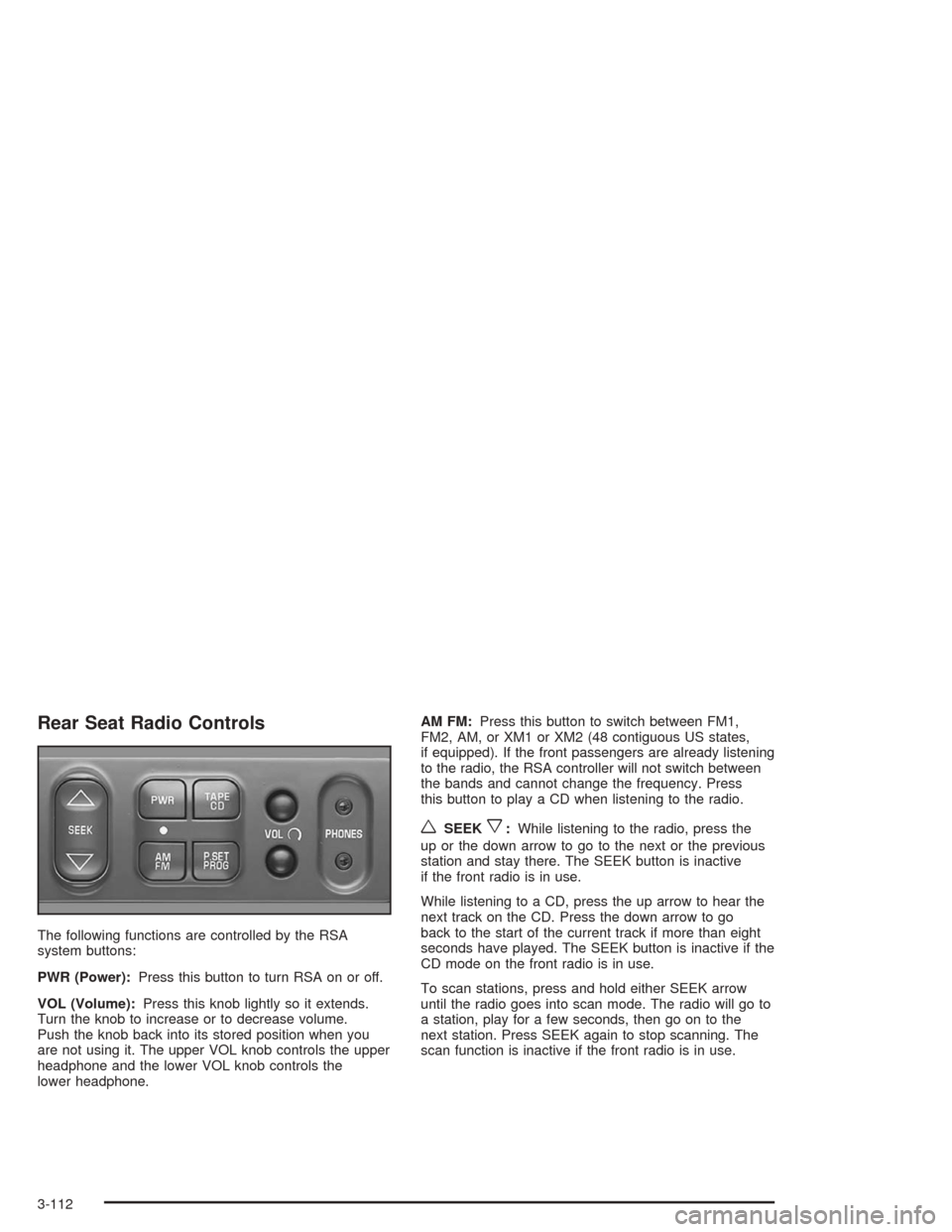
The following functions are controlled by the RSA
system buttons:
PWR (Power):Press this button to turn RSA on or off.
VOL (Volume):Press this knob lightly so it extends.
Turn the knob to increase or to decrease volume.
Push the knob back into its stored position when you
are not using it. The upper VOL knob controls the upper
headphone and the lower VOL knob controls the
lower headphone.AM FM:Press this button to switch between FM1,
FM2, AM, or XM1 or XM2 (48 contiguous US states,
if equipped). If the front passengers are already listening
to the radio, the RSA controller will not switch between
the bands and cannot change the frequency. Press
this button to play a CD when listening to the radio.
wSEEKx:While listening to the radio, press the
up or the down arrow to go to the next or the previous
station and stay there. The SEEK button is inactive
if the front radio is in use.
While listening to a CD, press the up arrow to hear the
next track on the CD. Press the down arrow to go
back to the start of the current track if more than eight
seconds have played. The SEEK button is inactive if the
CD mode on the front radio is in use.
To scan stations, press and hold either SEEK arrow
until the radio goes into scan mode. The radio will go to
a station, play for a few seconds, then go on to the
next station. Press SEEK again to stop scanning. The
scan function is inactive if the front radio is in use.
3-112
Page 229 of 426
P.SET PROG (Preset Program):The front passengers
must be listening to something different for each of
these functions to work:
Press this button to scan through the preset radio
stations set on the pushbuttons on the main radio.
The radio will go to a preset station stored on
your pushbuttons, play for a few seconds, then go
on to the next preset station. Press this button
again to stop scanning presets.
If your vehicle has the Radio with Six-Disc CD,
when a CD is playing, press this button to select
the next CD, if multiple CDs are loaded.
TAPE CD:Press this button to play a CD when
listening to the radio.
Rear Seat Audio (RSA)
(With Entertainment System)
This feature allows rear seat passengers to listen to
and control any of the music sources: radio, cassette
tapes and CDs. However, the rear seat passengers
can only control the music sources that the front seat
passengers are not listening to. For example, rear
seat passengers may listen to and control a cassette
tape or CD through headphones, while the driver listens
to the radio through the front speakers. The rear seat
passengers have control of the volume for each
set of headphones.
The front seat audio controls always have priority over
the RSA controls. If the front seat passengers switch
the source for the main radio to a remote source,
the RSA will not be able to control the remote source.
The rear speakers will be muted when the RSA power
is turned on. You may operate the RSA functions
even when the main radio is off.
3-113
Page 230 of 426
Rear Seat Audio Controls
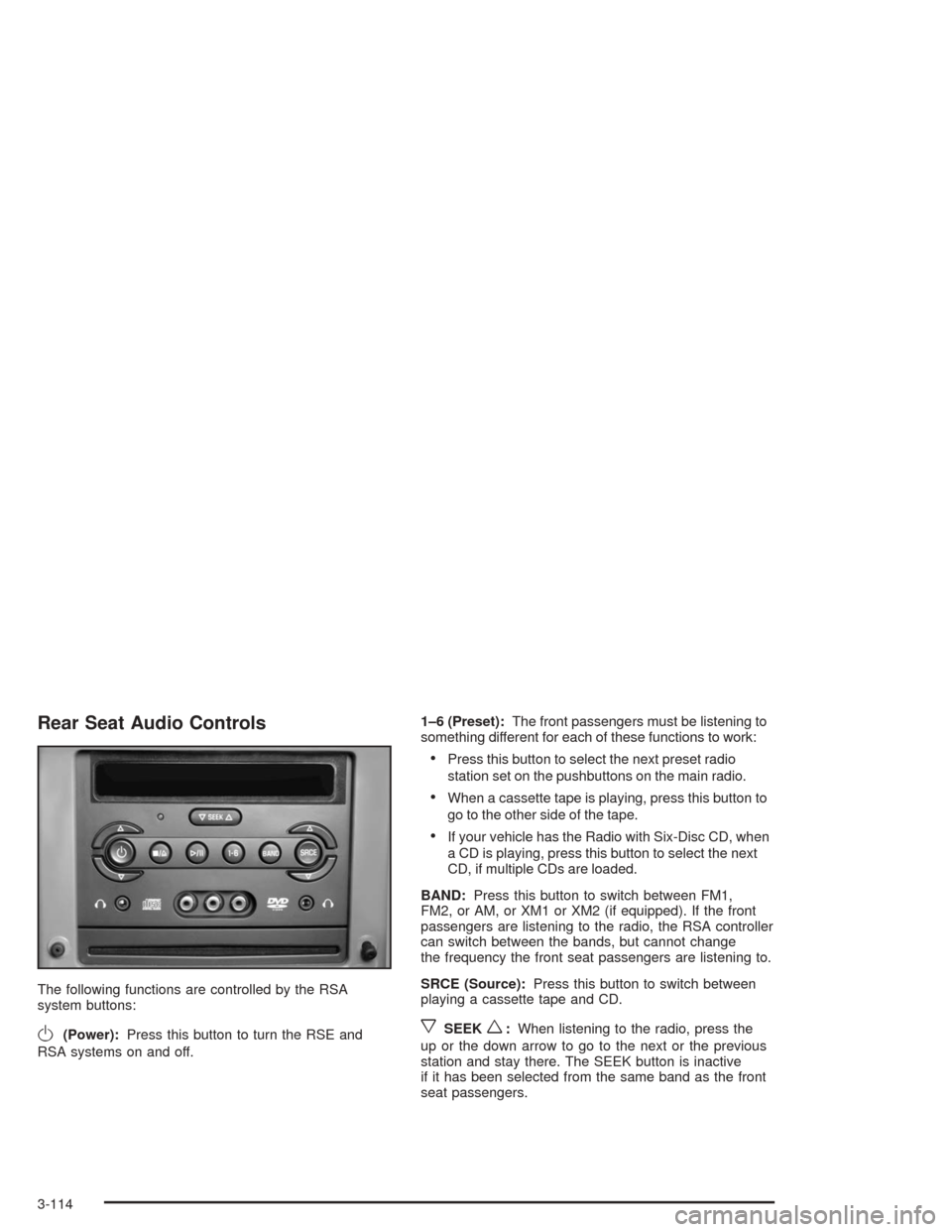
The following functions are controlled by the RSA
system buttons:
O(Power):Press this button to turn the RSE and
RSA systems on and off.1–6 (Preset):The front passengers must be listening to
something different for each of these functions to work:
Press this button to select the next preset radio
station set on the pushbuttons on the main radio.
When a cassette tape is playing, press this button to
go to the other side of the tape.
If your vehicle has the Radio with Six-Disc CD, when
a CD is playing, press this button to select the next
CD, if multiple CDs are loaded.
BAND:Press this button to switch between FM1,
FM2, or AM, or XM1 or XM2 (if equipped). If the front
passengers are listening to the radio, the RSA controller
can switch between the bands, but cannot change
the frequency the front seat passengers are listening to.
SRCE (Source):Press this button to switch between
playing a cassette tape and CD.
xSEEKw:When listening to the radio, press the
up or the down arrow to go to the next or the previous
station and stay there. The SEEK button is inactive
if it has been selected from the same band as the front
seat passengers.
3-114
Page 231 of 426
When listening to a cassette tape, press the up or the
down arrow to go to the next or the previous selection.
The SEEK button is inactive if the tape mode on the
front radio is in use.
When listening to a CD, press the up arrow to hear the
next track on the CD. Press the down arrow to go
back to the start of the current track if more than ve
seconds have played. The SEEK button is inactive if the
CD mode on the front radio is in use.
xw(Volume):Press the up or down arrow to
increase or decrease the volume on the wired
headphones (not included). The arrows on the right is
for the right headphone and the arrows on the left is for
the left headphone.
Theft-Deterrent Feature
THEFTLOCK®is designed to discourage theft of your
radio. The feature works automatically by learning
a portion of the Vehicle Identication Number (VIN).
If the radio is moved to a different vehicle, it will
not operate and LOCKED will appear on the display.
With THEFTLOCK activated, your radio will not
operate if stolen.
Audio Steering Wheel Controls
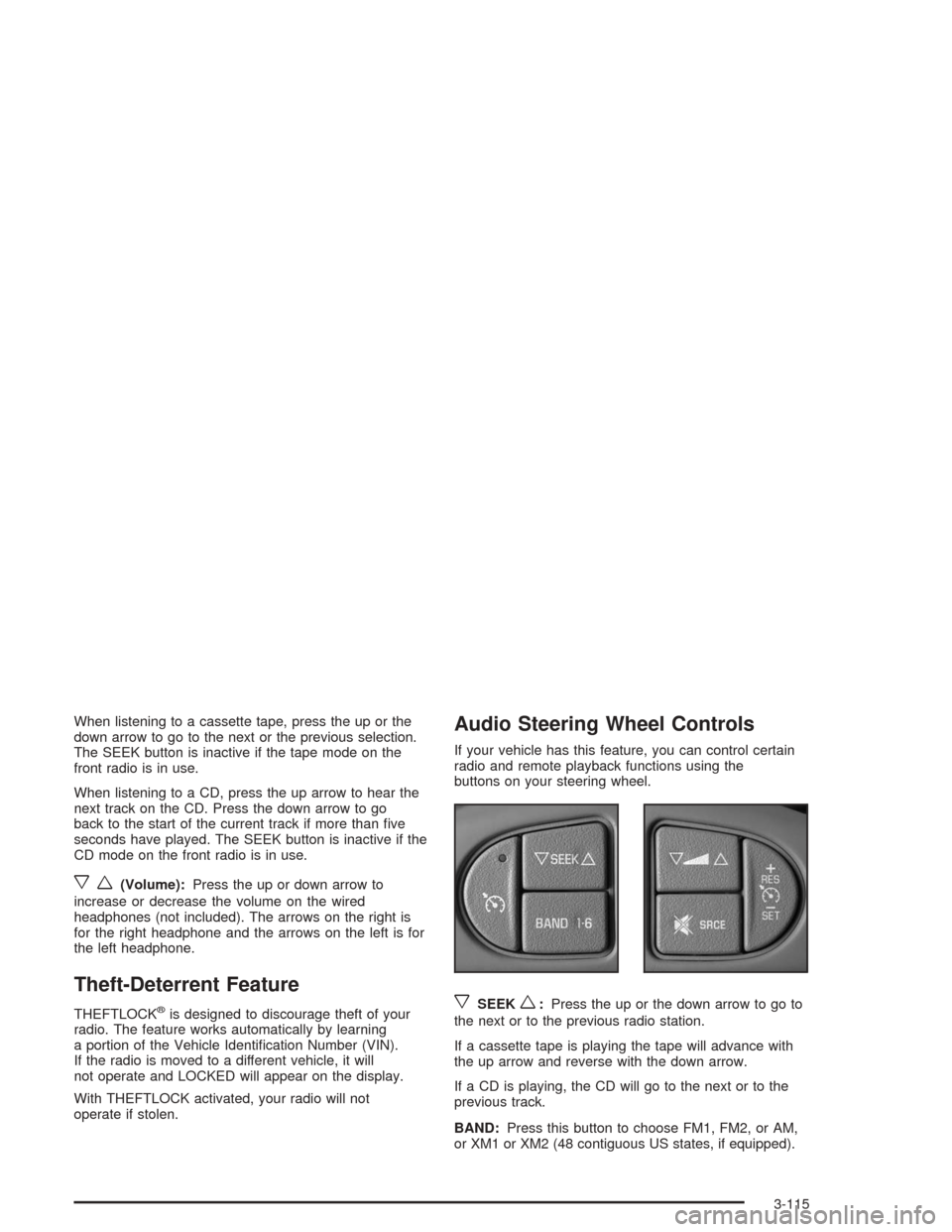
If your vehicle has this feature, you can control certain
radio and remote playback functions using the
buttons on your steering wheel.
xSEEKw:Press the up or the down arrow to go to
the next or to the previous radio station.
If a cassette tape is playing the tape will advance with
the up arrow and reverse with the down arrow.
If a CD is playing, the CD will go to the next or to the
previous track.
BAND:Press this button to choose FM1, FM2, or AM,
or XM1 or XM2 (48 contiguous US states, if equipped).
3-115
Page 232 of 426
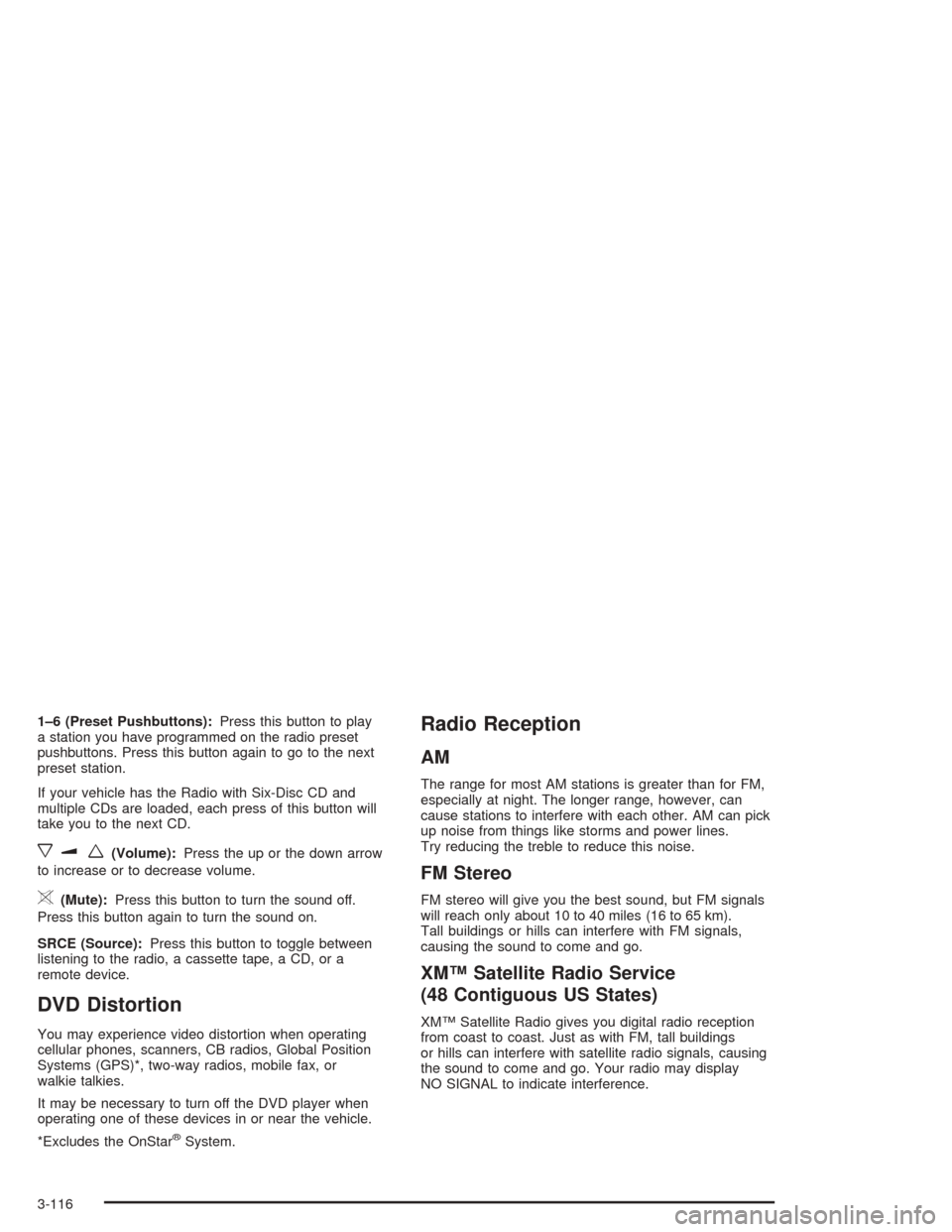
1–6 (Preset Pushbuttons):Press this button to play
a station you have programmed on the radio preset
pushbuttons. Press this button again to go to the next
preset station.
If your vehicle has the Radio with Six-Disc CD and
multiple CDs are loaded, each press of this button will
take you to the next CD.
xuw(Volume):Press the up or the down arrow
to increase or to decrease volume.
>(Mute):Press this button to turn the sound off.
Press this button again to turn the sound on.
SRCE (Source):Press this button to toggle between
listening to the radio, a cassette tape, a CD, or a
remote device.
DVD Distortion
You may experience video distortion when operating
cellular phones, scanners, CB radios, Global Position
Systems (GPS)*, two-way radios, mobile fax, or
walkie talkies.
It may be necessary to turn off the DVD player when
operating one of these devices in or near the vehicle.
*Excludes the OnStar
®System.
Radio Reception
AM
The range for most AM stations is greater than for FM,
especially at night. The longer range, however, can
cause stations to interfere with each other. AM can pick
up noise from things like storms and power lines.
Try reducing the treble to reduce this noise.
FM Stereo
FM stereo will give you the best sound, but FM signals
will reach only about 10 to 40 miles (16 to 65 km).
Tall buildings or hills can interfere with FM signals,
causing the sound to come and go.
XM™ Satellite Radio Service
(48 Contiguous US States)
XM™ Satellite Radio gives you digital radio reception
from coast to coast. Just as with FM, tall buildings
or hills can interfere with satellite radio signals, causing
the sound to come and go. Your radio may display
NO SIGNAL to indicate interference.
3-116