2004 CHEVROLET KODIAK lock
[x] Cancel search: lockPage 110 of 366

Center Console Storage Area
Your vehicle may have a center console compartment
between the bucket or suspension seats.
The back of your center bench seat may also fold
forward to reveal a console compartment.
The release strap for the
center console is located
between the center
seat and passenger’s seat.To expose the storage compartment, pull the strap to
release the seatback. Then fold the seatback forward.
To open the storage compartment, press the release
button and lift the lid rearward. With the lid closed, it can
be used as a clipboard to hold papers in place.
Before returning the seatback to the upright position,
make sure the console is snapped shut. Lift the
seatback all the way up until it clicks. Push and pull on
the seatback to make sure the seat is locked in
place.
2-42
Page 111 of 366

Instrument Panel Overview...............................3-4
Hazard Warning Flashers................................3-5
Other Warning Devices...................................3-6
Horn.............................................................3-6
Tilt Wheel.....................................................3-7
Turn Signal/Multifunction Lever.........................3-7
Exterior Lamps.............................................3-13
Interior Lamps..............................................3-15
Instrument Panel Switchbank..........................3-16
Accessory Power Outlets...............................3-17
Ashtrays and Cigarette Lighter........................3-18
Climate Controls............................................3-19
Climate Control System.................................3-19
Outlet Adjustment.........................................3-22
Rear Heating System....................................3-23
Warning Lights, Gages, and Indicators............3-23
Instrument Panel Cluster................................3-24
Speedometer and Odometer...........................3-25
Tachometer.................................................3-26
Safety Belt Reminder Light.............................3-26
Safety Belt Reminder Tone............................3-26
Air Bag Readiness Light................................3-27
Air Bag Off Light..........................................3-28Charging System Light..................................3-30
Voltmeter Gage............................................3-30
Service Transmission Warning Light................3-31
Range Inhibit Warning Indicator......................3-31
Brake System Warning Light..........................3-31
Parking Brake Warning Light..........................3-34
Anti-Lock Brake System Warning Light.............3-34
Trailer Anti-Lock Brake System
Warning Light...........................................3-35
Engine Coolant Temperature Gage..................3-35
Low Coolant Warning Light............................3-36
Wait to Start Indicator...................................3-36
Malfunction Indicator Lamp.............................3-37
Oil Pressure Gage........................................3-37
Low Oil Level Light.......................................3-38
Change Engine Oil Light................................3-39
Engine Overspeed Warning Light....................3-39
Engine Shutdown Warning Light.....................3-39
Transmission Temperature Gage.....................3-40
Exhaust Brake Indicator Light.........................3-40
Differential Lock Indicator Light.......................3-40
Reduced Engine Power Light.........................3-41
Daytime Running Lamps Indicator Light...........3-41
Section 3 Instrument Panel
3-1
Page 117 of 366

Tilt Wheel
A tilt wheel allows you to adjust the steering wheel
before you drive. You can raise it to the highest level to
give your legs more room when you exit and enter
the vehicle.
The lever that allows you to tilt the steering wheel is
located on the left side of the steering column.
To tilt the wheel, hold the wheel and pull the lever. Then
move the wheel to a comfortable position and release
the lever to lock the wheel in place.
Turn Signal/Multifunction Lever
The lever located on the left side of the steering column
includes the following:
•Turn and Lane-Change Signals
•Headlamp High/Low-Beam Changer
•Windshield Wipers
•Windshield Washer
•Cruise Control (Option)
3-7
Page 119 of 366

8(Mist):For a single wiping cycle, turn the band to
this symbol. Hold it there until the wipers start, then
let go. The wipers will stop after one cycle. If you want
more cycles, hold the band on mist longer.
You can set the wiper speed for a long or short delay
between wipes. This can be very useful in light rain
or snow. Turn the band to one of the four delay settings
to choose the delay time. The further the band is
turned upward, the longer the delay will be. The further
the band is turned downward, the shorter the delay
will be.
6(Low Speed):For steady wiping at low speed,
turn the band toward you to the first solid band
below the delay settings.
1(High Speed):For high-speed wiping, turn the
band further, to the second solid band below the delay
settings. To stop the wipers, move the band to off.
Be sure to clear ice and snow from the wiper blades
before using them. If they are frozen to the windshield,
carefully loosen or thaw them. If your blades do
become worn or damaged, get new blades or blade
inserts. For more information, seeWindshield Wiper
Blade Replacement on page 5-63.Heavy snow or ice can overload your wipers. The
windshield wiper motor is protected from overload by a
circuit breaker and a fuse. If the motor overheats
due to heavy snow or ice the wiper will stop until the
motor cools. Although the circuit is protected from
electrical overload, overload due to heavy snow or ice
may cause wiper linkage damage. Always clear ice and
heavy snow from the windshield before using your
windshield wipers.
Windshield Washer
L
(Washer Fluid):There is a paddle marked with the
windshield washer symbol at the top of the multifunction
lever. To spray washer fluid on the windshield, press
the paddle. The wipers will clear the window and
then either stop or return to your preset speed.
{CAUTION:
In freezing weather, do not use your washer
until the windshield is warmed. Otherwise the
washer uid can form ice on the windshield,
blocking your vision.
3-9
Page 123 of 366

Exterior Lamps
The control located to the left of the steering column
operates the exterior lamps.
The exterior lamp control has four positions:
OFF:Turning the control to this position turns off all
lamps except the Daytime Running Lamps (DRL).
;(Parking Lamps):Turning the control to this
position turns on the parking lamps, together with the
following:
•Marker Lamps
•Taillamps
•License Plate Lamps
•Instrument Panel Lights
O(Headlamps):Turning the control to this position
turns on the headlamps, together with the previously
listed lamps and lights.
You can switch your headlamps from low to high beam
by pulling the turn signal/multifunction lever toward
you. Pull the lever toward you again to return to
low beam.
A circuit breaker protects your headlamps. If you have
an electrical overload, your headlamps will flicker on and
off. Have your headlamp wiring checked right away if
this ever happens.
Headlamps On Reminder
If you have this system, a tone will sound when your
headlamps and/or parking lamps are turned on and your
ignition is in LOCK or ACCESSORY.
3-13
Page 127 of 366

This switchbank is located in the center of the instrument
panel.
e(Marker Lamp Defeat Switch):See “Marker Lamp
Defeat Switch” underExterior Lamps on page 3-13.
j(Manual High Idle Switch):See “Manual High Idle
System” underStarting Your Diesel Engine on
page 2-14.
i(Traction Control Switch):SeeTraction Control
System (TCS) on page 4-11.
f(Outside Heated Mirror Switch):SeeOutside
Heated Mirrors on page 2-41.
g(Power Take Off Switch):SeePower Take-Off
(PTO) on page 4-36.
h(Rear Air Suspension Dump Control
Switch):See “Rear Air Suspension Dump Control”
underTwo-Speed Rear Axle Electric Shift Control
on page 2-26.
k(Rear Axle Shift Control Switch):See “Air Shift
Control” (Automatic Transmission) underTwo-Speed
Rear Axle Electric Shift Control on page 2-26.
Exhaust Brake Switch:SeeDiesel Engine Exhaust
Brake on page 2-25.
l(Differential Lock Control Switch):SeeRear
Axle Differential Lock Control on page 4-10.
cd(Air Bag Off Switch):SeeAir Bag Off Switch
on page 1-55.
If your vehicle does not have some of the features
controlled by these switches, there will be a blank switch
marker in its place.
Accessory Power Outlets
With accessory power outlets, you can plug in auxiliary
electrical equipment such as a cellular telephone or
CB radio.
The accessory power outlets are located on the
passenger’s side of the instrument panel.
To use an outlet, pull the cover down. When not using
it, always cover the outlet with the protective cap.
These circuits are protected by a fuse and have
maximum current levels.
Notice:Leaving electrical equipment on for
extended periods will drain the battery. Always turn
off electrical equipment when not in use and do
not plug in equipment that exceeds the maximum
amperage rating.
3-17
Page 129 of 366
Climate Controls
Climate Control System
With these systems, you can control the heating,
cooling and ventilation for your vehicle.
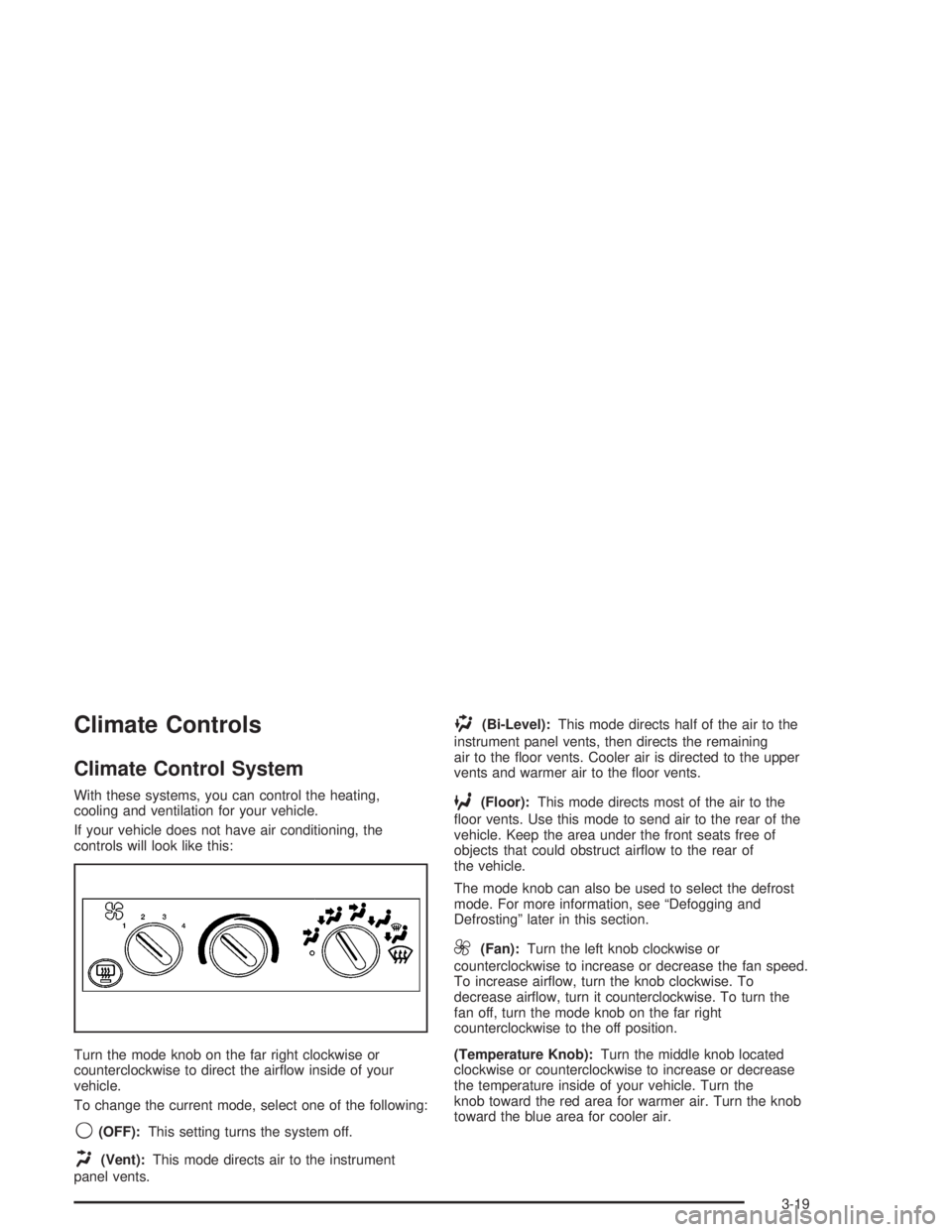
If your vehicle does not have air conditioning, the
controls will look like this:
Turn the mode knob on the far right clockwise or
counterclockwise to direct the airflow inside of your
vehicle.
To change the current mode, select one of the following:
9(OFF):This setting turns the system off.
H(Vent):This mode directs air to the instrument
panel vents.
)(Bi-Level):This mode directs half of the air to the
instrument panel vents, then directs the remaining
air to the floor vents. Cooler air is directed to the upper
vents and warmer air to the floor vents.
6(Floor):This mode directs most of the air to the
floor vents. Use this mode to send air to the rear of the
vehicle. Keep the area under the front seats free of
objects that could obstruct airflow to the rear of
the vehicle.
The mode knob can also be used to select the defrost
mode. For more information, see “Defogging and
Defrosting” later in this section.
9(Fan):Turn the left knob clockwise or
counterclockwise to increase or decrease the fan speed.
To increase airflow, turn the knob clockwise. To
decrease airflow, turn it counterclockwise. To turn the
fan off, turn the mode knob on the far right
counterclockwise to the off position.
(Temperature Knob):Turn the middle knob located
clockwise or counterclockwise to increase or decrease
the temperature inside of your vehicle. Turn the
knob toward the red area for warmer air. Turn the knob
toward the blue area for cooler air.
3-19
Page 144 of 366

Parking Brake Warning Light
Your vehicle has a brake
warning light. When the
ignition is on, this light will
come on when you set
your parking brake.
The light will stay on if
your parking brake doesn’t
release fully.
This light should also come on when you turn the
ignition key to START. If it doesn’t come on then, have
it fixed so it will be ready to remind you if the parking
brake is applied or hasn’t released fully.
Anti-Lock Brake System
Warning Light
With the anti-lock brake
system, this light will come
on when you start your
engine and it may stay on
for several seconds.
That’s normal.
If the light stays on, or comes on when you’re driving,
your vehicle needs service. If the BRAKE or LOW
AIR warning light isn’t on, you still have brakes, but you
don’t have the anti-lock brake feature. If the BRAKE
and/or LOW AIR warning light is on, you don’t
have anti-lock brakes and there’s a problem with your
regular brakes. SeeBrake System Warning Light
on page 3-31.
The anti-lock brake system warning light should come
on briefly when you start the engine. If the light
doesn’t come on then, have it fixed so it will be ready to
warn you if there is a problem.
3-34