2004 CHEVROLET EPICA audio
[x] Cancel search: audioPage 148 of 338
Adjusting the Speakers (Balance/Fade)
SOUND (Balance/Fade):To adjust the balance
between the right and the left speakers, press this button
until BAL appears on the display. Then turn the volume
knob to increase or to decrease the balance between the
right and the left speakers. The display will show the
balance level. When finished making your selection,
press this button to select the balance level.
To adjust the fade between the front and the rear
speakers, press this button until FAD appears on the
display. Then turn the volume knob to increase or to
decrease the fade between the front and the rear
speakers. The display will show the fade level. When
finished making your selection, press this button to
select the fade level.
Playing a CD
Insert a CD partway into the slot, label side up. The
player will pull it in and the CD should begin playing.
You can insert a CD with the ignition off.
When the CD is inserted, CDP will appear on the
display. As the CD is loading Filecheck will appear on
the display. As each new track starts to play, Track
and the track number will appear on the display.
If you turn off the ignition or radio with a CD in the
player, it will stay in the player. When you turn on the
ignition or radio, the CD will start playing where it
stopped, if it was the last selected audio source.The CD player can play the smaller 8 cm single CDs
with an adapter ring. Full-size CDs and the smaller CDs
are loaded in the same manner.
If playing a CD-R the sound quality may be reduced
due to CD-R quality, the method of recording, the quality
of the music that has been recorded, and the way the
CD-R has been handled. You may experience an
increase in skipping, difficulty in finding tracks, and/or
difficulty in loading and ejecting. If these problems occur
try a known good CD.
Do not add paper labels to CDs, they could get caught
in the CD player.
Do not play 3 inch CDs without a standard adapter CD.
If an error appears on the display, see “CD Messages”
later in this section.
2 RPT (Repeat):Press this pushbutton to repeat the
current track. RPT will appear on the display. Press this
pushbutton again to turn off repeat play.
3 INT (SCAN):Press this button to listen to the first few
seconds of each track on each CD inserted. INTRO
will appear on the display. To stop scanning press this
button again. The current track will begin to play.
3-50
Page 150 of 338
Root Directory
The root directory will be treated as a folder. If the root
directory has compressed audio files, the directory
will be displayed as F1 ROOT. All files contained directly
under the root directory will be accessed prior to any
root directory folders. However, playlists (Px) will always
be accessed before root folders or files.
Empty Directory or Folder
If a root directory or a folder exists somewhere in the
file structure that contains only folders/subfolders and no
compressed files directly beneath them, the player will
advance to the next folder in the file structure that
contains compressed audio files and the empty folder
will not be displayed or numbered.
No Folder
When the CD contains only compressed files, the files will
be located under the root folder. The next and previous
folder functions will have no function on a CD that was
recorded without folders or playlists. When displaying the
name of the folder the radio will display ROOT.
When the CD contains only playlists and compressed
audio files, but no folders, all files will be located under
the root folder. The folder down and the folder up buttons
will search playlists (Px) first and then go to the root
folder. When the radio displays the name of the folder the
radio will display ROOT.
Order of Play
Tracks will be played in the following order:
•Play will begin from the first track in the first playlist
and will continue sequentially through all tracks in
each playlist. When the last track of the last playlist
has been played, play will continue from the first
track of the first playlist.
•If the CD does not contain any playlists, then play
will begin from the first track under the root
directory. When all tracks from the root directory
have been played, play will continue from files
according to their numerical listing. After playing the
last track from the last folder, play will begin
again at the first track of the first folder or root
directory.
When play enters a new folder, the display will not
automatically show the new folder name unless
you have chosen the folder mode as the default display,
see DISPL later in this section. The new track name
will be displayed.
3-52
Page 151 of 338
File System and Naming
The song name that will be displayed will be the song
name that is contained in the ID3 tag. If the song name
is not present in the ID3 tag, then the radio will
display the file name without the extension (such
as.mp3) as the track name.
Track names longer than 32 characters or 4 pages
will be shortened. The display will not show parts
of words on the last page of text and the extension of
the filename will not be displayed.
Preprogrammed Playlists
You can access preprogrammed playlists which were
created by WinAmp™, MusicMatch™, or Real
Jukebox™ software, however, you will not have editing
capability. These playlists will be treated as special
folders containing compressed audio song files.
Playing an MP3
With the ignition on, insert a CD partway into the slot,
label side up. The player will pull it in, Loading, then
Filecheck, then MP3 will appear on the display. The
CD should begin playing. You can insert a CD with
the ignition off.As each new track starts to play, F001, the track
number, and the song name will appear on the display.
If you turn off the ignition or radio with a CD in the
player, it will stay in the player. When you turn on the
ignition or radio, the CD will start playing where it
stopped, if it was the last selected audio source.
The CD player can play the smaller 8cm single CDs
with an adapter ring. Full-size CDs and the smaller
CDs are loaded in the same manner.
If playing a CD-R the sound quality may be reduced
due to CD-R quality, the method of recording, the quality
of the music that has been recorded, and the way the
CD-R has been handled. You may experience an
increase in skipping, difficulty in finding tracks and/or
difficulty in loading and ejecting. If these problems occur
try a known good CD.
Do not add paper labels to CDs, they could get caught
in the CD player.
Do not play 3 inch CDs without a standard adapter CD.
If an error appears on the display, see “CD Messages”
later in this section.
3-53
Page 156 of 338
CD Messages
No Maga:An empty magazine is inserted in the CD
changer. Try the magazine again with a CD loaded
in one of the trays.
If the CD is not playing correctly, for any other reason,
try a known good CD.
If any error occurs repeatedly or if an error cannot be
corrected, contact your dealer. If your radio displays an
error message, write it down and provide it to your
dealer when reporting the problem.
Theft-Deterrent Feature
The theft-deterrent system is designed to discourage
theft of your radio. When the radio and vehicle are
turned off, your radio has a blinking red light to indicate
that the theft-deterrent system is activated.
The theft-deterrent system also activates when the
audio system has been disconnected from the battery.
When this occurs, the AF code and security code
will have to be entered in order to operate your radio.
An identification card stamped with the AF code
and security code will be provided with the vehicle.
Keep it in a safe place, not in the vehicle.To enter the security code do the following:
1. Turn the ignition to ACC or ON.
2. Turn the radio on. AF or COdE will flash on the
display. If AF flashes on the display, go to Step
2. If COdE flashes on the display, go to Step 4.
3. Enter the AF code by using the preset pushbuttons.
COdE will flash on the display.
4. Enter the security code by using the preset
pushbuttons. When the complete security code is
entered, the code will flash three times.
If the security code is not entered correctly, Err will
appear on the display for a few seconds. When
COdE appears back on the display, repeat Step 4.
If the incorrect AF code is entered, an incorrect
frequency level may be chosen and the radio
reception may be affected. If this occurs, reset the
audio system by removing and re-installing the
AUDIO fuse. See “Instrument Panel Fuse Block”
underFuses and Circuit Breakers on page 5-79for
more information. Then repeat Steps 1 through 4.
3-58
Page 157 of 338
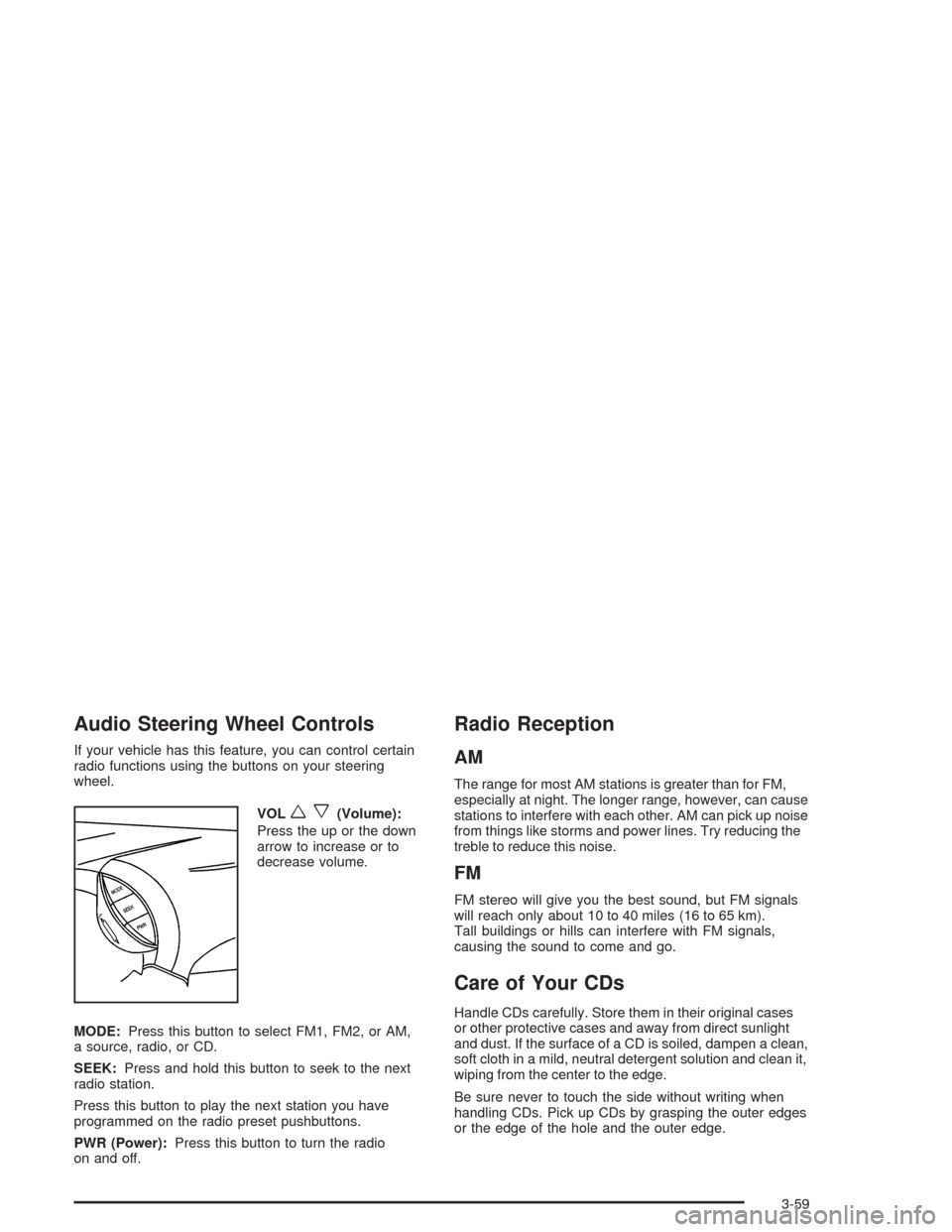
Audio Steering Wheel Controls
If your vehicle has this feature, you can control certain
radio functions using the buttons on your steering
wheel.
VOL
wx(Volume):
Press the up or the down
arrow to increase or to
decrease volume.
MODE:Press this button to select FM1, FM2, or AM,
a source, radio, or CD.
SEEK:Press and hold this button to seek to the next
radio station.
Press this button to play the next station you have
programmed on the radio preset pushbuttons.
PWR (Power):Press this button to turn the radio
on and off.
Radio Reception
AM
The range for most AM stations is greater than for FM,
especially at night. The longer range, however, can cause
stations to interfere with each other. AM can pick up noise
from things like storms and power lines. Try reducing the
treble to reduce this noise.
FM
FM stereo will give you the best sound, but FM signals
will reach only about 10 to 40 miles (16 to 65 km).
Tall buildings or hills can interfere with FM signals,
causing the sound to come and go.
Care of Your CDs
Handle CDs carefully. Store them in their original cases
or other protective cases and away from direct sunlight
and dust. If the surface of a CD is soiled, dampen a clean,
soft cloth in a mild, neutral detergent solution and clean it,
wiping from the center to the edge.
Be sure never to touch the side without writing when
handling CDs. Pick up CDs by grasping the outer edges
or the edge of the hole and the outer edge.
3-59
Page 298 of 338
Part B: Owner Checks and Services
Listed in this part are owner checks and services
which should be performed at the intervals specified
to help ensure the safety, dependability and emission
control performance of your vehicle.
Be sure any necessary repairs are completed at
once. Whenever any fluids or lubricants are added to
your vehicle, make sure they are the proper ones,
as shown in Part D.
At Each Fuel Fill
It is important for you or a service station attendant to
perform these underhood checks at each fuel fill.
Engine Oil Level Check
Check the engine oil level and add the proper oil if
necessary. SeeEngine Oil on page 5-13for further
details.
Engine Coolant Level Check
Check the engine coolant level and add the proper
coolant mixture if necessary. SeeEngine Coolant
on page 5-19for further details.
Windshield Washer Fluid Level Check
Check the windshield washer fluid level in the windshield
washer tank and add the proper fluid if necessary.
SeeWindshield Washer Fluid on page 5-31for further
details.
At Least Once a Month
Tire Ination Check
Visually inspect your tires and make sure tires are
inflated to the correct pressures. Do not forget to check
your spare tire. SeeTires on page 5-48for further
details.
Cassette Tape Player Service
Clean cassette tape player. Cleaning should be done
every 50 hours of tape play. SeeAudio System(s)
on page 3-48for further details.
6-18
Page 323 of 338
A
Accessory Power Outlets.................................3-17
Adaptive Shift Logic........................................2-24
Adding Washer Fluid.......................................5-31
Additional Program Information........................... 7-9
Additives, Fuel................................................. 5-6
Add-On Electrical Equipment............................5-78
Adjusting the Speakers (Balance/Fade)..............3-50
Air Bag
Readiness Light..........................................3-33
Air Bag Systems.............................................1-46
How Does an Air Bag Restrain?....................1-52
Servicing Your Air Bag-Equipped Vehicle.........1-54
What Makes an Air Bag Inflate?....................1-52
What Will You See After an Air Bag
Inflates?..................................................1-53
When Should an Air Bag Inflate?...................1-51
Where Are the Air Bags?..............................1-49
Air Cleaner/Filter, Engine.................................5-17
Airbag Sensing and Diagnostic Module (SDM)....7-10
AM ...............................................................3-59
Antenna, Backglass.........................................3-60
Anti-lock Brake System (ABS)............................ 4-6
Anti-Lock Brake, System Warning Light..............3-36
Appearance Care............................................5-68
Care of Safety Belts....................................5-72
Chemical Paint Spotting...............................5-75Appearance Care (cont.)
Cleaning the Inside of Your Vehicle................5-69
Cleaning the Outside of Your Vehicle..............5-72
Finish Damage............................................5-74
Sheet Metal Damage...................................5-74
Underbody Maintenance...............................5-75
Vehicle Care/Appearance Materials................5-75
Weatherstrips..............................................5-72
Arming the System.........................................2-15
Ashtrays........................................................3-18
Audio System(s).............................................3-48
Audio Steering Wheel Controls......................3-59
Backglass Antenna......................................3-60
Care of Your CD Player...............................3-60
Care of Your CDs........................................3-59
Radio with CD............................................3-48
Theft-Deterrent Feature................................3-58
Trunk-Mounted CD Changer..........................3-55
Understanding Radio Reception.....................3-59
Automatic Climate Control System.....................3-22
Automatic Operation........................................3-22
Automatic Transaxle
Fluid..........................................................5-19
Operation...................................................2-22
Automatic Transaxle Inspection.........................6-19
Automatic Transaxle Shift Lock Control
System Check.............................................6-20
Auto-Off Headlamps........................................3-14
1
Page 335 of 338
Service (cont.)
Engine Soon Light.......................................3-39
Publications Ordering Information...................7-12
Service Bulletins.............................................7-13
Service Manuals.............................................7-12
Setting Preset Stations....................................3-49
Setting the Tone (Bass/Treble)..........................3-49
Sheet Metal Damage.......................................5-74
Shifting Into Park (P).......................................2-27
Shifting Out of Park (P)...................................2-28
Short Trip/City Definition.................................... 6-5
Short Trip/City Intervals..................................... 6-5
Short Trip/City Scheduled Maintenance................ 6-6
Shoulder Belt Height Adjuster...........................1-18
Skidding........................................................4-14
Some Other Rainy Weather Tips.......................4-18
Spare Tire.....................................................5-68
Special Fabric Cleaning Problems.....................5-70
Specifications, Capacities.................................5-85
Speed Sensitive Power Steering (SSPS)
Warning Light.............................................3-36
Speedometer..................................................3-32Starter Switch Check.......................................6-20
Starting Your Engine.......................................2-20
Steering........................................................4-10
Steering in Emergencies..................................4-11
Steering, Suspension and Front Drive Axle
Boot and Seal Inspection..............................6-22
Steering Tips..................................................4-10
Steering Wheel Controls, Audio.........................3-59
Steering Wheel, Tilt Wheel................................. 3-7
Storage Areas
Center Console Storage Area........................2-34
Coinholder(s)..............................................2-33
Cupholder(s)...............................................2-33
Glove Box..................................................2-33
Rear Seat Armrest.......................................2-34
Sunglasses Storage Compartment..................2-34
Storing the Flat Tire and Tools..........................5-67
Storing the Spare Tire and Tools.......................5-68
Stuck in Sand, Mud, Ice or Snow......................4-28
Sun Visors.....................................................2-14
Sunglasses Storage Compartment.....................2-34
Sunroof.........................................................2-35
13