2004 CHEVROLET CORVETTE maintenance reset
[x] Cancel search: maintenance resetPage 166 of 384
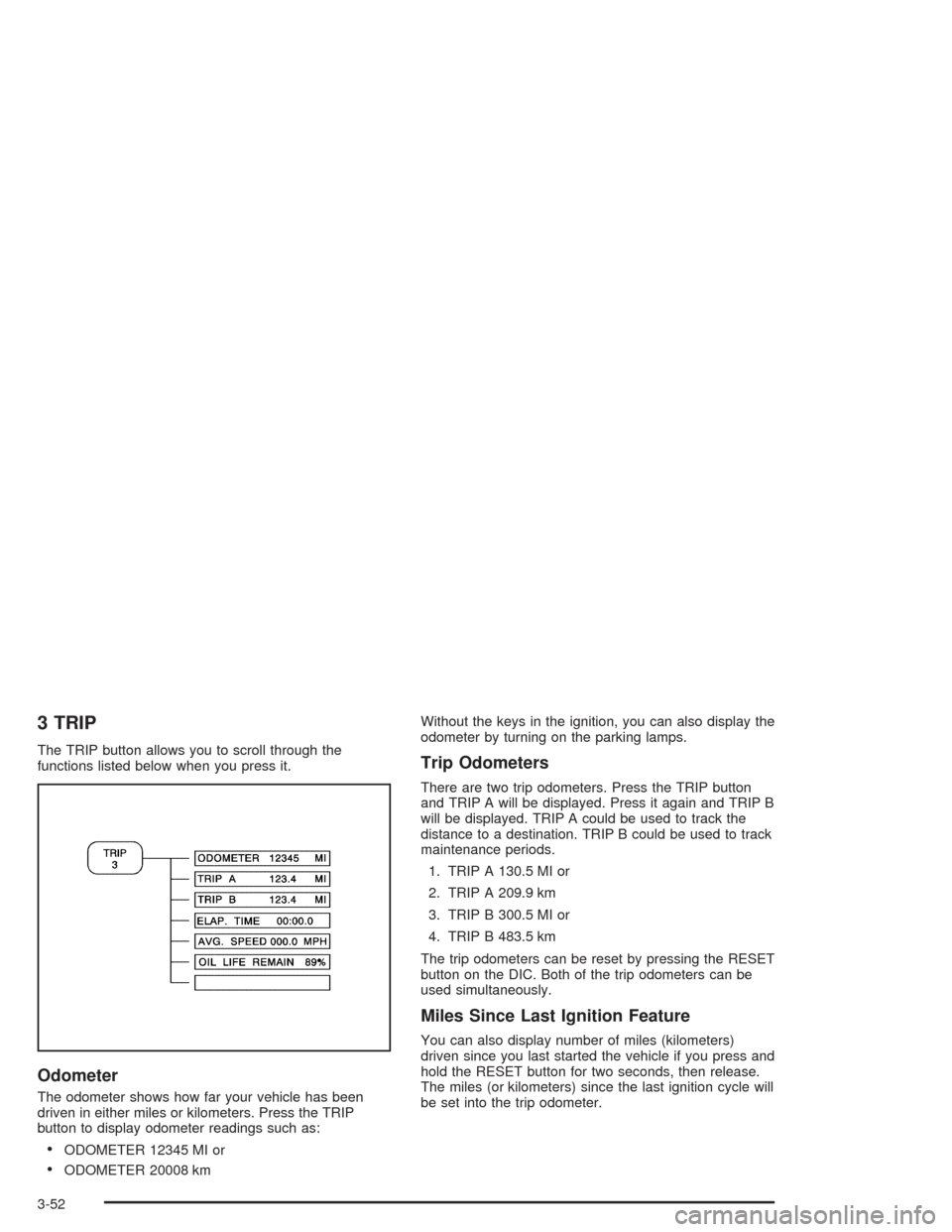
3 TRIP
The TRIP button allows you to scroll through the
functions listed below when you press it.
Odometer
The odometer shows how far your vehicle has been
driven in either miles or kilometers. Press the TRIP
button to display odometer readings such as:
•ODOMETER 12345 MI or
•ODOMETER 20008 kmWithout the keys in the ignition, you can also display the
odometer by turning on the parking lamps.
Trip Odometers
There are two trip odometers. Press the TRIP button
and TRIP A will be displayed. Press it again and TRIP B
will be displayed. TRIP A could be used to track the
distance to a destination. TRIP B could be used to track
maintenance periods.
1. TRIP A 130.5 MI or
2. TRIP A 209.9 km
3. TRIP B 300.5 MI or
4. TRIP B 483.5 km
The trip odometers can be reset by pressing the RESET
button on the DIC. Both of the trip odometers can be
used simultaneously.
Miles Since Last Ignition Feature
You can also display number of miles (kilometers)
driven since you last started the vehicle if you press and
hold the RESET button for two seconds, then release.
The miles (or kilometers) since the last ignition cycle will
be set into the trip odometer.
3-52
Page 167 of 384
Elapsed Time
Press the TRIP button until ELAP. TIME is displayed,
such as ELAP. TIME 00:00:00.00.
When the ignition is in ON, the Driver Information
Center (DIC) can be used as a stopwatch. The display
can show hours, minutes, seconds and hundredths
of a second. The elapsed time indicator will record up to
99 hours, 59 minutes and 59 seconds, then it will
reset to zero and continue counting. (Hundredths are
shown up to 59 minutes, 59 seconds and
99 hundredths). The display appears as ELAP. TIME
00:00:00.00 in the elapsed time function.
You can start or stop the elapsed time by pressing
RESET. To reset the elapsed time to zero, stop the timer
by pressing RESET. Then press and hold RESET
until ELAP. TIME 00:00:00.00 appears in the DIC.
Average Speed
Press the TRIP button until the average speed is
displayed, such as:
•AVERAGE SPEED 62 MPH or
•AVERAGE SPEED 100 km/h
Press reset in this mode to start calculating the average
speed. Press and hold RESET to clear.
Engine Oil Life
Press the TRIP button until the engine oil life is
displayed, such as OIL LIFE REMAIN 89%.
This is an estimate of the engine oil’s remaining useful
life. It will show 100% when the system is reset after
an oil change. It will alert you to change your oil
on a schedule consistent with your driving conditions.
When the remaining oil life is low, the system will
alert you with the message CHANGE OIL SOON.
When the oil life is down to zero, you will receive the
message CHANGE OIL NOW.
Remember, you must reset the OIL LIFE yourself after
each oil change. It will not reset itself. Also, be
careful not to reset the OIL LIFE accidentally at any
time other than when the oil has just been changed. It
can’t be reset accurately until the next oil change.
To reset the system, see “How to Reset the Change Oil
Soon Message” underEngine Oil on page 5-13.
Also, seeEngine Oil on page 5-13andScheduled
Maintenance on page 6-4.
3-53
Page 182 of 384
Other Messages
Here are more messages that you can receive on your
Driver Information Center (DIC). To acknowledge a
message and read another message that may have
come on at the same time, press the RESET button.
•BRAKE BEFORE SHIFT
(See “Automatic Transmissions Only” under
Automatic Transmission Operation on page 2-25.)
•CHANGE OIL NOW
(See “GM Oil Life System™” underEngine Oil on
page 5-13.)
•CHANGE OIL SOON
(See “GM Oil Life System™” underEngine Oil on
page 5-13andScheduled Maintenance on
page 6-4.)
•CRUISE DISENGAGED
(See “Cruise Control” underTurn
Signal/Multifunction Lever on page 3-6.)
•CRUISE SET_MPH (_km/h)
(See “Cruise Control” underTurn
Signal/Multifunction Lever on page 3-6.)
•DOOR AJAR
•ENGINE PROTECTION REDUCE ENGINE RPM
•HATCH AJAR (Coupe)
•HIGH VOLTAGE
(SeeVoltmeter Gage on page 3-37.)
•LOW BRAKE FLUID
(See “Brake Fluid” underBrakes on page 5-37.)
•LOW FUEL
(SeeFuel Gage on page 3-46.)
•LOW VOLTAGE
(SeeVoltmeter Gage on page 3-37.)
•LOW WASHER FLUID
(SeeWindshield Washer Fluid on page 5-36.)
•RESERVE FUEL
(SeeFuel Gage on page 3-46.)
•TONNEAU AJAR (Convertible)
•TRUNK AJAR (Convertible/Z06)
•UPSHIFT NOW
(SeeManual Transmission Operation on
page 2-28.)
3-68
Page 346 of 384
Scheduled Maintenance
When the CHANGE OIL SOON message comes on, it
means that service is required for your vehicle. Have your
vehicle serviced as soon as possible within the next 600
miles (1 000 km). It is possible that, if you are driving
under the best conditions, the engine oil life system may
not indicate that vehicle service is necessary for over a
year. However, your engine oil and filter must be changed
at least once a year and at this time the system must be
reset. Your GM Goodwrench dealer has GM-trained
service technicians who will perform this work using
genuine GM parts and reset the system.
If the engine oil life system is ever reset accidentally,
you must service your vehicle within 3,000 miles
(5 000 km) since your last service. Remember to reset
the oil life system whenever the oil is changed. See
Engine Oil on page 5-13for information on the Engine
Oil Life System and resetting the system.When the CHANGE OIL SOON message appears,
certain services, checks and inspections are required.
Required services are described in the following for
“MaintenanceI” and “MaintenanceII.” Generally,
it is recommended that your first service be
MaintenanceI, your second service be MaintenanceII
and that you alternate MaintenanceIand MaintenanceII
thereafter. However, in some cases, MaintenanceII
may be required more often.
MaintenanceI— Use MaintenanceIif the message
comes on within ten months since vehicle was
purchased or MaintenanceIIwas performed.
MaintenanceII— Use MaintenanceIIif the previous
service performed was MaintenanceI. Always use
MaintenanceIIwhenever the message comes on ten
months or more since the last service or if the message
has not come on at all for one year.
6-4
Page 347 of 384
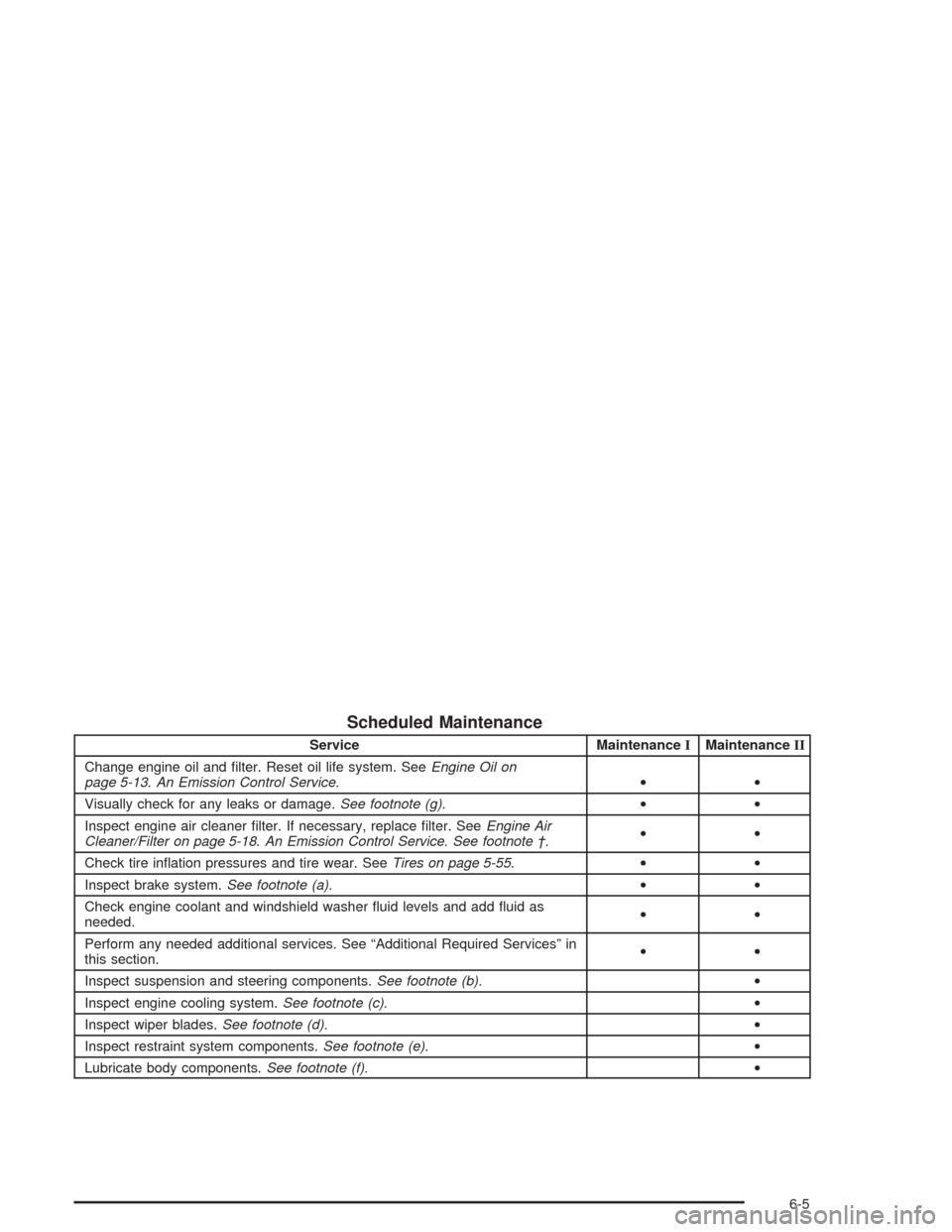
Scheduled Maintenance
Service MaintenanceIMaintenanceII
Change engine oil and filter. Reset oil life system. SeeEngine Oil on
page 5-13.An Emission Control Service.••
Visually check for any leaks or damage.See footnote (g).••
Inspect engine air cleaner filter. If necessary, replace filter. SeeEngine Air
Cleaner/Filter on page 5-18.An Emission Control Service. See footnote †.••
Check tire inflation pressures and tire wear. SeeTires on page 5-55.••
Inspect brake system.See footnote (a).••
Check engine coolant and windshield washer fluid levels and add fluid as
needed.••
Perform any needed additional services. See “Additional Required Services” in
this section.••
Inspect suspension and steering components.See footnote (b).•
Inspect engine cooling system.See footnote (c).•
Inspect wiper blades.See footnote (d).•
Inspect restraint system components.See footnote (e).•
Lubricate body components.See footnote (f).•
6-5
Page 381 of 384
Roof Panel (cont.)
Routing, Engine Drive Belt...............................6-14
Running Your Engine While You Are Parked.......2-36
S
Safety Belt
Reminder Light............................................3-34
Safety Belts
Care of......................................................5-85
Driver Position............................................1-12
How to Wear Safety Belts Properly................1-11
Passenger Position......................................1-19
Questions and Answers About Safety Belts.....1-11
Safety Belt Extender....................................1-19
Safety Belt Use During Pregnancy.................1-18
Safety Belts Are for Everyone......................... 1-6
Safety Warnings and Symbols.............................. iii
Scheduled Maintenance..................................... 6-4
Seatback Latches............................................. 1-5
Seats
Manual........................................................ 1-2
Power Seats................................................. 1-2
Reclining Seatbacks...................................... 1-3
Seatback Latches.......................................... 1-5
Sport Seat................................................... 1-6
Securing a Child Restraint
Designed for the LATCH System...................1-33
Passenger Seat Position...............................1-36Securing a Child Restraint (cont.)
Security Light.................................................3-45
Security While You Travel.................................. 7-6
Selective Ride Control.....................................4-12
Sensors.........................................................3-29
Service........................................................... 5-3
Adding Equipment to the Outside of
Your Vehicle.............................................. 5-4
Doing Your Own Work................................... 5-4
Engine Soon Light.......................................3-41
Publications Ordering Information...................7-11
Service Bulletins.............................................7-11
Service Manuals.............................................7-11
Servicing Your Air Bag-Equipped Vehicle............1-49
Setting Preset Stations............................3-71, 3-77
Setting the Time.............................................3-69
Setting the Tone (Bass/Treble)..................3-72, 3-78
Shift Speeds (Manual Transmission)..................2-29
Shifting Into Park (P).......................................2-32
Shifting Out of Park (P)...................................2-34
Skidding........................................................4-18
Some Other Rainy Weather Tips.......................4-22
Specifications, Capacities.................................5-99
Speedometer..................................................3-34
Sport Seat....................................................... 1-6
Starter Interlock Feature..................................2-23
Starting Your Engine.......................................2-21
Steering........................................................4-14
Steering in Emergencies..................................4-15
Steering Tips..................................................4-14
11