2004 CHEVROLET ASTRO tow
[x] Cancel search: towPage 73 of 382
When Should an Air Bag In¯ate?
An air bag is designed to in¯ate in a moderate to severe
frontal, or near-frontal crash. The air bag will in¯ate
only if the impact speed is above the system's designed
ªthreshold levelº. If your vehicle goes straight into a
wall that doesn't move or deform, the threshold level is
about 9 to 16 mph (14 to 26 mph/h). The threshold
level can vary, however, with speci®c vehicle design, so
that it can be somewhat above or below this range. If
your vehicle strikes something that will move or deform,
such as a parked car, the threshold level will be
higher. The air bag is not designed to in¯ate in rollovers,
rear impacts, or in many side impacts because in¯ation
would not help the occupant.
In any particular crash, no one can say whether an air
bag should have in¯ated simply because of the damage
to a vehicle or because of what the repair costs were.
In¯ation is determined by the angle of the impact
and how quickly the vehicle slows down in frontal or
near-frontal impacts.
What Makes an Air Bag In¯ate?
In an impact of sufficient severity, the air bag sensing
system detects that the vehicle is in a crash. The
sensing system triggers a release of gas from the
in¯ator, which in¯ates the air bag. The in¯ator, air bag,
and related hardware are all part of the air bag
modules inside the steering wheel and in the instrument
panel in front of the right front passenger.
How Does an Air Bag Restrain?
In moderate to severe frontal or near-frontal collisions,
even belted occupants can contact the steering wheel or
the instrument panel. Air bags supplement the
protection provided by safety belts. Air bags distribute
the force of the impact more evenly over the occupant's
upper body, stopping the occupant more gradually.
But air bags would not help you in many types of
collisions, including rollovers, rear impacts and many
side impacts, primarily because an occupant's motion is
not toward those air bags. Air bags should never be
regarded as anything more than a supplement to safety
belts, and then only in moderate to severe frontal or
near-frontal collisions.
1-67
Page 86 of 382
To enter the program mode you need to do the
following:
1. Begin with the ignition in OFF. Then, pull back on
the turn signal/multifunction lever all the way
toward you and hold it while you perform the
next step.
2. Turn your key to RUN and OFF twice. Then, with
the key in OFF, release the turn signal/multifunction
lever. Once you do this, you will hear the lock
switch lock and unlock.
You are now ready to program the automatic door
locks. Select one of the following four programming
options and follow the instructions. You will have thirty
seconds to begin programming. If you exceed the
thirty second limit, the locks will automatically lock and
unlock to indicate that you have left the program
mode. If this occurs, repeat the procedure beginning
with Step 1. You can exit the program mode any time by
turning the ignition to RUN. The locks will automatically
lock and unlock to indicate that you are leaving the
program mode. If the lock/unlock switches are not
pressed while in the programming mode, the auto
lock/unlock setting will not be modi®ed.The following is a list of the available programming
options:
·All doors lock/Only the driver's door unlocks:
Press the lock side of the power lock switch on
the door panel once and then the unlock side once.
·All doors lock/All doors unlock:Press the
lock side of the power lock switch on the door panel
once, and then the unlock side twice.
·All doors lock/None of the doors unlock:Press
the lock side of the power lock switch on the door
panel once, and then the unlock side three times.
·No doors lock/None of the doors unlock:Press
the lock side of the power lock switch on the door
panel twice. This turns off the automatic lock
feature.
For more information, see your dealer.
Leaving Your Vehicle
If you are leaving your vehicle, take your key, open your
door and set the locks from inside. Then get out and
close the door.
2-8
Page 87 of 382
Sliding Side Door
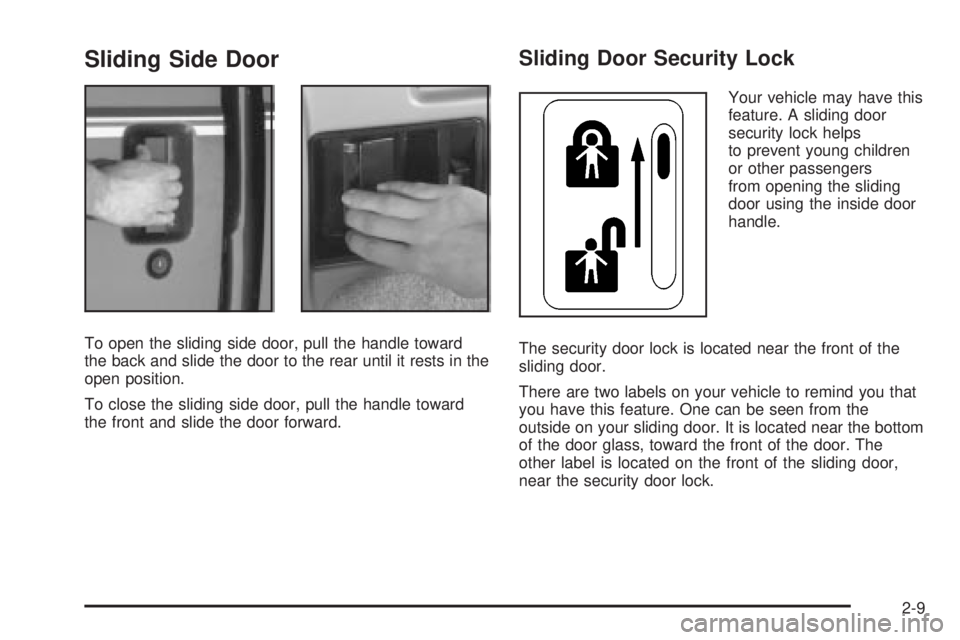
To open the sliding side door, pull the handle toward
the back and slide the door to the rear until it rests in the
open position.
To close the sliding side door, pull the handle toward
the front and slide the door forward.
Sliding Door Security Lock
Your vehicle may have this
feature. A sliding door
security lock helps
to prevent young children
or other passengers
from opening the sliding
door using the inside door
handle.
The security door lock is located near the front of the
sliding door.
There are two labels on your vehicle to remind you that
you have this feature. One can be seen from the
outside on your sliding door. It is located near the bottom
of the door glass, toward the front of the door. The
other label is located on the front of the sliding door,
near the security door lock.
2-9
Page 95 of 382

Starting and Operating Your
Vehicle
New Vehicle Break-In
Notice:Your vehicle does not need an elaborate
ªbreak-in.º But it will perform better in the long run
if you follow these guidelines:
·Keep your speed at 55 mph (88 km/h) or less for
the ®rst 500 miles (805 km).
·Do not drive at any one speed Ð fast or
slow Ð for the ®rst 500 miles (805 km). Do not
make full-throttle starts.
·Avoid making hard stops for the ®rst 200 miles
(322 km) or so. During this time your new
brake linings are not yet broken in. Hard stops
with new linings can mean premature wear
and earlier replacement. Follow this breaking-in
guideline every time you get new brake
linings.
·Do not tow a trailer during break-in. SeeTowing
a Trailer on page 4-35
for more information.
Ignition Positions
With the key in the ignition, you can turn it to ®ve
different positions.
A (ACCESSORY):This position lets you use things like
the radio, power windows and windshield wipers when
the engine is off. To get into ACCESSORY, push in the
key and turn it toward you.
2-17
Page 96 of 382
Notice:Lengthy operation of features such as the
radio in the accessory ignition position may
drain the battery and prevent your vehicle from
starting. Do not operate your vehicle in the
accessory ignition position for a long period
of time.
B (LOCK):This position locks your ignition and
transmission. It's a theft-deterrent feature. You will only
be able to remove your key when the ignition is
turned to LOCK.
Notice:Using a tool to force the key from the
ignition switch could cause damage or break the
key. Use the correct key and turn the key only with
your hand. Make sure the key is all the way in. If
none of this works, then your vehicle needs service.C (OFF):This position lets you turn off the engine. Use
OFF if you must have your vehicle in motion while
the engine is off (for example, if your vehicle is being
towed).
D (RUN):This is the position for driving.
E (START):This position starts your engine.
Retained Accessory Power (RAP)
Your vehicle is equipped with a Retained Accessory
Power (RAP) feature which will allow certain features on
your vehicle to continue to work up to 20 minutes
after the ignition key is turned to OFF.
Your radio, power windows and overhead console will
work when the ignition key is in RUN or ACCESSORY.
Once the key is turned from RUN to OFF, these
features will continue to work for up to 20 minutes or
until a door is opened.
2-18
Page 99 of 382
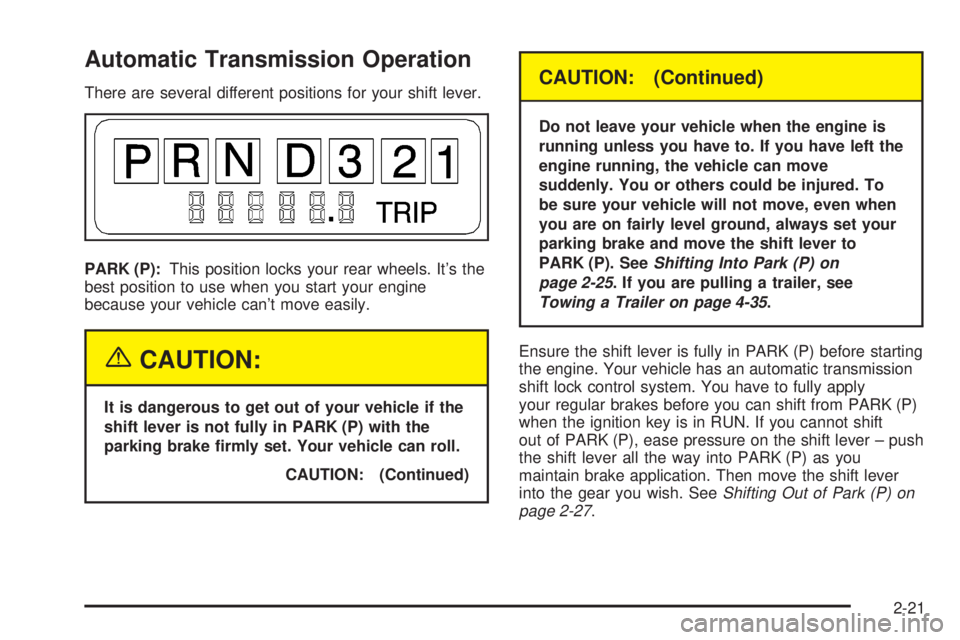
Automatic Transmission Operation
There are several different positions for your shift lever.
PARK (P):This position locks your rear wheels. It's the
best position to use when you start your engine
because your vehicle can't move easily.
{CAUTION:
It is dangerous to get out of your vehicle if the
shift lever is not fully in PARK (P) with the
parking brake ®rmly set. Your vehicle can roll.
CAUTION: (Continued)
CAUTION: (Continued)
Do not leave your vehicle when the engine is
running unless you have to. If you have left the
engine running, the vehicle can move
suddenly. You or others could be injured. To
be sure your vehicle will not move, even when
you are on fairly level ground, always set your
parking brake and move the shift lever to
PARK (P). See
Shifting Into Park (P) on
page 2-25
. If you are pulling a trailer, see
Towing a Trailer on page 4-35.
Ensure the shift lever is fully in PARK (P) before starting
the engine. Your vehicle has an automatic transmission
shift lock control system. You have to fully apply
your regular brakes before you can shift from PARK (P)
when the ignition key is in RUN. If you cannot shift
out of PARK (P), ease pressure on the shift lever ± push
the shift lever all the way into PARK (P) as you
maintain brake application. Then move the shift lever
into the gear you wish. See
Shifting Out of Park (P) on
page 2-27.
2-21
Page 100 of 382

REVERSE (R):Use this gear to back up.
Notice:Shifting to REVERSE (R) while your vehicle
is moving forward could damage the transmission.
The repairs would not be covered by your warranty.
Shift to REVERSE (R) only after your vehicle is
stopped.
To rock your vehicle back and forth to get out of snow,
ice or sand without damaging your transmission,
see If You Are Stuck: In Sand, Mud, Ice or Snow on
page 4-28.
NEUTRAL (N):In this position, your engine doesn't
connect with the wheels. To restart when you're already
moving, use NEUTRAL (N) only. Also, use
NEUTRAL (N) when your vehicle is being towed.
{CAUTION:
Shifting into a drive gear while your engine is
running at high speed is dangerous. Unless
your foot is ®rmly on the brake pedal, your
vehicle could move very rapidly. You could
lose control and hit people or objects. Do not
shift into a drive gear while your engine is
running at high speed.
Notice:Shifting out of PARK (P) or NEUTRAL (N)
with the engine running at high speed may damage
the transmission. The repairs would not be
covered by your warranty. Be sure the engine is not
running at high speed when shifting your vehicle.
DRIVE (D):This position is for normal driving. If
you need more power for passing, and you're:
·Going less than about 35 mph (55 km/h), push your
accelerator pedal about halfway down.
·Going about 35 mph (55 km/h) or more, push the
accelerator pedal all the way down. You'll shift
down to the next gear and have more power.
DRIVE (D) should be used for normal towing.
THIRD (3):This position is also used for normal driving,
however it offers more power and lower fuel economy
than DRIVE (D). You should use THIRD (3) when
carrying a heavy load or driving on steep hills.
SECOND (2):This position gives you more power but
lower fuel economy. You can use SECOND (2) on
hills. It can help control your speed as you go down
steep mountain roads, but then you would also want to
use your brakes off and on.
2-22
Page 101 of 382

If you manually select SECOND (2), the transmission
will drive in second gear. You may use this feature
for reducing torque to the rear wheels when you
are trying to start your vehicle from a stop on slippery
road surfaces.
FIRST (1):This position gives you even more power
(but lower fuel economy) than SECOND (2). You
can use it on very steep hills, or in deep snow or mud.
If the shift selector lever is put in FIRST (1), the
transmission won't shift into ®rst gear until the vehicle is
going slow enough.
Notice:Spinning the tires or holding the vehicle in
one place on a hill using only the accelerator
pedal may damage the transmission. If you are
stuck, do not spin the tires. When stopping on a hill,
use the brakes to hold the vehicle in place.
Tow/Haul Mode Button
Your vehicle is equipped with a tow/haul button. The
button is located on the end of the column shift
lever. You can use this feature to assist when towing or
hauling a heavy load.
To select the tow/haul mode, press in the button. The
TOW/HAUL light on the instrument panel cluster
will come on. To go back to normal operation, press the
button again. The indicator light on the instrument
panel cluster will go out. See
Tow/Haul Mode Light on
page 3-32for more information.
2-23