2003 VOLVO XC70 ECU
[x] Cancel search: ECUPage 200 of 257
2003 VOLVO XC70
l Switch off the ignition.
l Unscrew the cover over the battery. Wait at least 10 minutes after switching off the ignition before
disconnecting the battery so that all information in the car's electrica\
l system can be stored in the control
modules.
l Disconnect the negative (ground) cable first.
l Disconnect the positive cable and pull the ventilation hose* from the ba\
ttery.
l Lift out the old battery and put a new battery into place.
l Connect the positive cable first.
l Connect the negative (ground) cable.
l Be sure that the ventilation hose* is securely connected to the battery \
and that the other end of the
hose is properly routed through the ventilation opening in the floor of \
the battery compartment.
l Reinstall the cover and screw it securely in place.
WARNING!
l Never expose the battery to open flame or electric spark.
l Do not smoke near the battery.
l Battery fluid contains sulfuric acid. Do not allow battery fluid to cont\
act eyes, skin, fabrics or
painted surfaces. If contact occurs, flush the affected area immediately\
with water. Obtain medical
help immediately if eyes are affected.
NOTE: After the battery has been disconnected or replaced, lock and unlock th\
e car with the central
locking system's remote control to reactivate such features as the power\
windows, sunroof, courtesy
lighting, etc. WARNING!
* Ventilation hose: The battery generates hydrogen gas, which is flammab\
le and explosive. The
battery is fitted with a ventilation hose which vents hydrogen gas out o\
f the battery
compartment through a ventilation opening in the bottom of this compartm\
ent. If the battery
must be replaced, it is essential that the ventilation hose is properly \
connected to the battery
and that it is routed through the ventilation opening provided (see ill\
ustration).
Be sure the ventilation hose is free of debris.
Only use replacement batteries equipped with a ventilation hose. Consult\
your Volvo retailer.
pg. 140 Replacing wiper blades
file:///K|/ownersdocs/2003/2003_XC70/03xc70_08b.htm (14 of 16)12/30/20\
06 4:18:04 PM
Page 202 of 257

2003 VOLVO XC70
soapy water as part of a normal car wash.
Replacement of tailgate wiper blade
Pull the wiper arm out away from the glass. Pull off the wiper blade out\
wards toward the tailgate. Press
the new wiper blade into place. Check that it is properly secured.
Headlight wiper blades (certain models)
Pull the wiper blade in the direction indicated by the arrow in the illu\
stration to remove it. Press the new
wiper blade into place. The long section of the blade should point towar\
d the grille. Check that the new
blade is properly attached to the wiper arm.
Contents | Top of Page
file:///K|/ownersdocs/2003/2003_XC70/03xc70_08b.htm (16 of 16)12/30/20\
06 4:18:04 PM
Page 237 of 257
2003 VOLVO XC70
2 0 0 3
VOLVO XC70
HomeLink® Universal Transceiver (option)
pg. 167 HomeLink® Universal Transceiver (option)
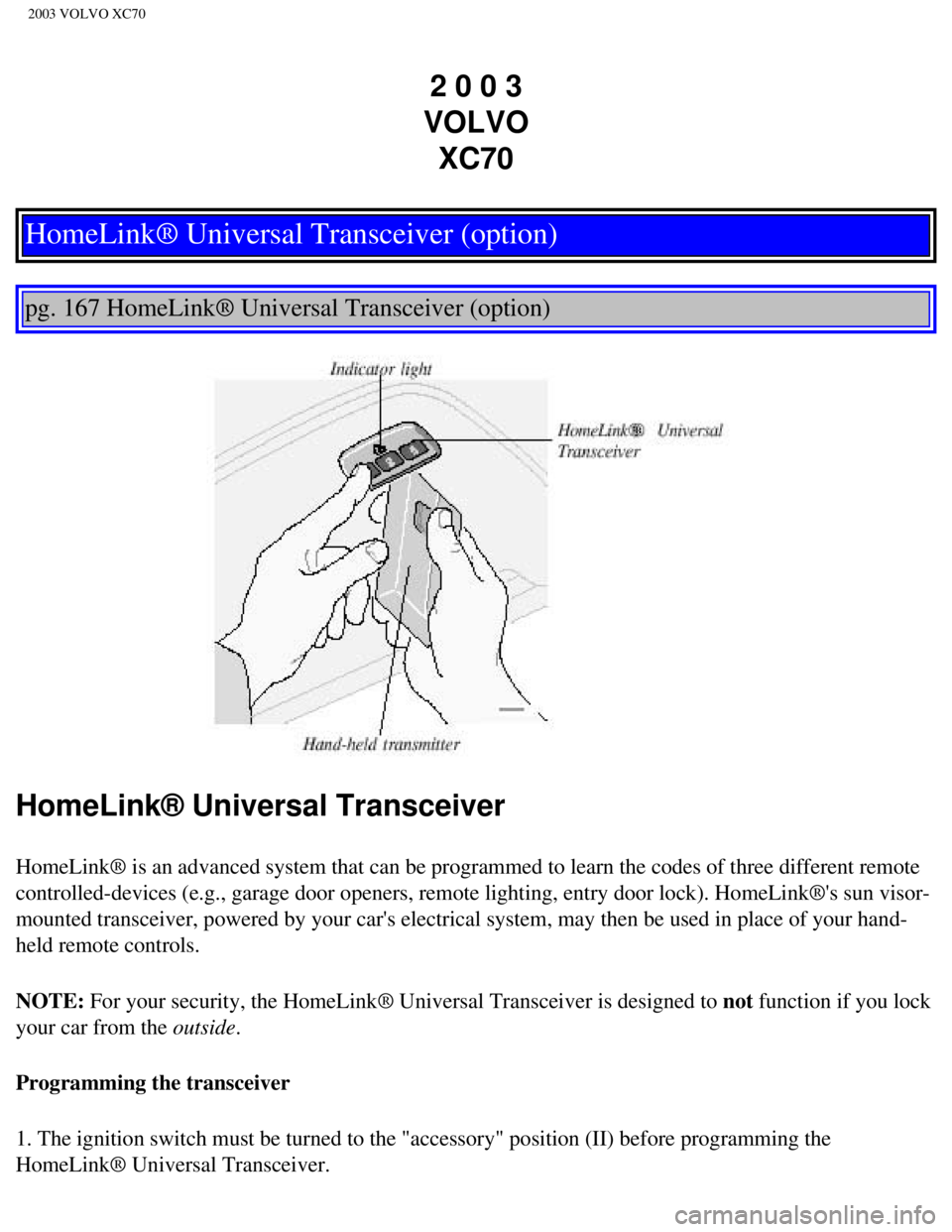
HomeLink® Universal Transceiver
HomeLink® is an advanced system that can be programmed to learn the c\
odes of three different remote
controlled-devices (e.g., garage door openers, remote lighting, entry d\
oor lock). HomeLink®'s sun visor-
mounted transceiver, powered by your car's electrical system, may then b\
e used in place of your hand-
held remote controls.
NOTE: For your security, the HomeLink® Universal Transceiver is designed to\
not function if you lock
your car from the outside.
Programming the transceiver
1. The ignition switch must be turned to the "accessory" position (II)\
before programming the
HomeLink® Universal Transceiver.
file:///K|/ownersdocs/2003/2003_XC70/03xc70_11.htm (1 of 5)12/30/2006 \
4:18:07 PM
Page 239 of 257

2003 VOLVO XC70
your hand-held transmitter's button at two-second intervals until HomeLi\
nk® has learned your
transmitter's code. The HomeLink® indicator light will flash first sl\
owly, and then rapidly to indicate
that the button has been successfully programmed.
Determining if your garage door uses a rolling code
Determine, in one of the following ways, if your garage door uses a roll\
ing code system and is
manufactured after 1996:
l Refer to the garage door opener owner's manual for verification.
l If your hand-held transmitter appears to program the HomeLink® Univer\
sal Transceiver but the
programmed button does not activate the garage door, your garage door op\
ener may have a rolling code.
l Press the programmed HomeLink® button. If the garage door opener has \
the rolling code feature, the
HomeLink® indicator light flashes rapidly and then glows steadily aft\
er approximately 2 seconds.
To train a rolling code garage door opener, follow these instructions after programming the desired
transceiver button according to "Programming the transceiver." The help \
of a second person may make
training easier.
1. Locate the training button on the garage door opener motor head unit. The location and color of the
training button may vary. If you encounter difficulty, refer to the gara\
ge door opener owner's manual or
call toll-free 1-800-355-3515 (Internet:
www.HomeLink.com).
2. Press the "training" button on the garage door opener motor head unit\
until the "training" light comes
on.
3. Press and release the programmed HomeLink® button. Press and relea\
se the programmed
HomeLink® button a second time to complete the training process. Some garage door openers may
require you to do this procedure a third time to complete the training.
The programmed button on your HomeLink® Universal Transceiver should \
now operate your garage
door opener. The original hand-held transmitter can also be used, as des\
ired, to operate the garage door.
The remaining two HomeLink® buttons can be programmed in the same way\
. In the event of any
problems in programming the HomeLink® Universal Transceiver, call tol\
l-free 1-800-355-3515
(Internet:
www.HomeLink.com).
Operating the HomeLink® Universal Transceiver
Once programmed, the HomeLink® Universal Transceiver can be used in p\
lace of your hand-held
transmitters.
To operate, the key must be turned to the "accessory" position (II) or\
the engine must be running. Press
the programmed HomeLink® button to activate the garage door, driveway\
gate, security lighting, home
file:///K|/ownersdocs/2003/2003_XC70/03xc70_11.htm (3 of 5)12/30/2006 \
4:18:07 PM
Page 240 of 257

2003 VOLVO XC70
security system, etc.
Your original hand-held transmitters may, of course, be used at any time\
.
Erasing programmed buttons
Individual buttons cannot be erased. To erase all three programmed butto\
ns:
1. Turn the ignition key to the "accessory" position (II).
2. Hold down the two outside buttons on the HomeLink® Universal Trans\
ceiver for about 20 seconds,
until HomeLink®'s indicator light begins to flash.
3. Release both buttons.
The HomeLink® buttons can be reprogrammed using the procedures descri\
bed on the previous page.
(HomeLink® information continues on the next page)
pg. 169 HomeLink® Universal Transceiver (option)
Reprogramming a single HomeLink® button
1. Press and hold the desired HomeLink® button. Do not release the bu\
tton until step 3 has been
completed.
2. When the indicator light begins to flash slowly (after approximately\
20 seconds), position your hand-
held transmitter 2 to 5 in. (5 to 12 cm) away from the HomeLink® su\
rface.
3. Press and hold the hand-held transmitter button. The HomeLink® ind\
icator light will flash first
slowly, then rapidly. When the indicator light flashes rapidly, release \
both buttons.
The previously programmed device has now been erased and the new device \
can be activated by
pressing the HomeLink® button that has just been programmed. This pro\
cedure will not affect any other
programmed HomeLink® buttons.
NOTE:
l Retain the original transmitter(s) for future programming procedures (\
e.g., if you purchase a new car).
l For your own security, erase all programmed buttons on the HomeLink® \
Universal Transceiver when
you sell your car.
l Metallic sun protection films should not be used on any windows in a car\
equipped with HomeLink®
file:///K|/ownersdocs/2003/2003_XC70/03xc70_11.htm (4 of 5)12/30/2006 \
4:18:07 PM
Page 250 of 257

2003 VOLVO XC70
Rear window - heated 38
Rearview mirror
41
Refrigerant
47
Refueling
86
Remote central locking system and sideview mirrors
system
41
Remote control - keyless entry system
77
Remote control - Homelink® Universal Transceiver
168
Remote keyless entry system
77
Remote keyless entry system - replacing batteries
78
Remote keyless entry system and driver's seat
57
Removing the seat cushion
66
Replacing bulbs
120-125
Replacing fuses
116
Replacing wiper blades
140
Road assistance
149
Roadholding
95
Roof load - maximum
143
Roof racks
97
S
Safety locks - child
82
Seat belt maintenance
17
Seat belts
2, 3, 14
Seat belts - cleaning
128
Seats - front
56
Securing cargo
68
Servicing
133
Shiftlock
87, 90, 92
Side direction indicator - replacing
123
Side impact airbag system (SIPS)
8
Sideview mirrors
41
Sideview mirrors - heated
38
file:///K|/ownersdocs/2003/2003_XC70/03xc70_12.htm (9 of 12)12/30/2006\
4:18:09 PM