Page 102 of 345
’03 TUNDRA_U (L/O 0307)
93
2003 TUNDRA from Jul. ’03 Prod. (OM 34430U)
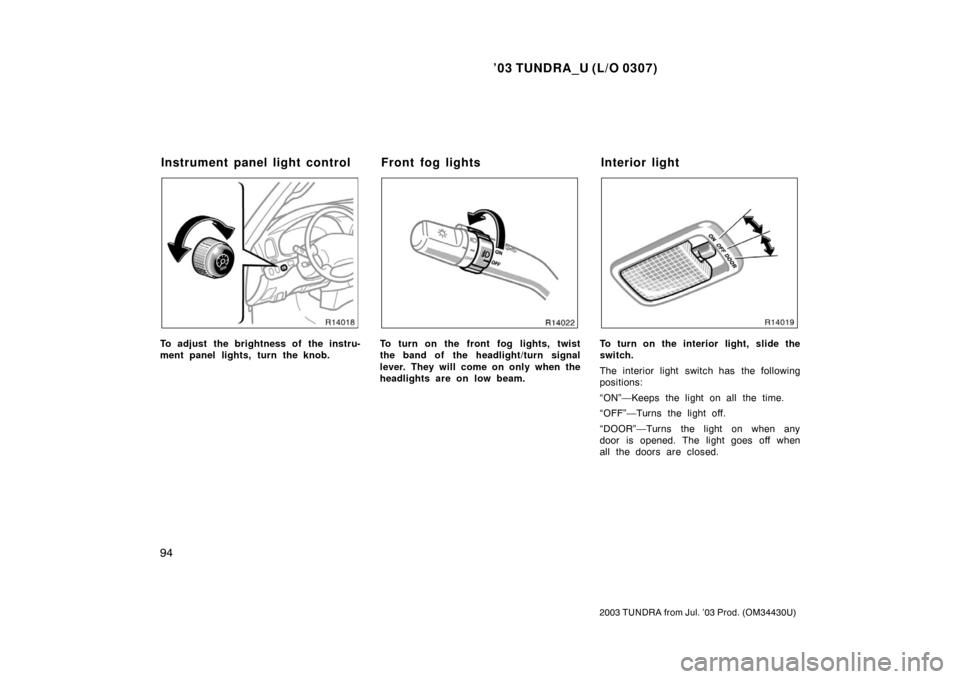
TURN SIGNALS
To signal a turn, push the headlight/
turn signal lever up or down to position
1.
The key must be in the “ON” position.
The lever automatically returns after you
make a turn, but you may have to return
it by hand after you change lanes.
To signal a lane change, move the lever
up or down to the pressure point (position
2) and hold it.
If the turn signal indicator lights (green
lights) on the instrument panel flash faster
than normal, a front or rear turn signal
bulb is burned out.To turn on the emergency flashers,
push the switch.
All the turn signal lights will flash. To turn
them off, push the switch once again.
Turn on the emergency flashers to warn
other drivers if your vehicle must be
stopped where it might be a traffic hazard.
Always pull as far off the road as pos-
sible.
The turn signal light switch will not work
when the emergency flashers are operat-
ing.
NOTICE
To prevent the battery from being dis-
charged, do not leave the switch on
longer than necessary when the en-
gine is not running.
Emergency flashers
Page 103 of 345
’03 TUNDRA_U (L/O 0307)
94
2003 TUNDRA from Jul. ’03 Prod. (OM 34430U)
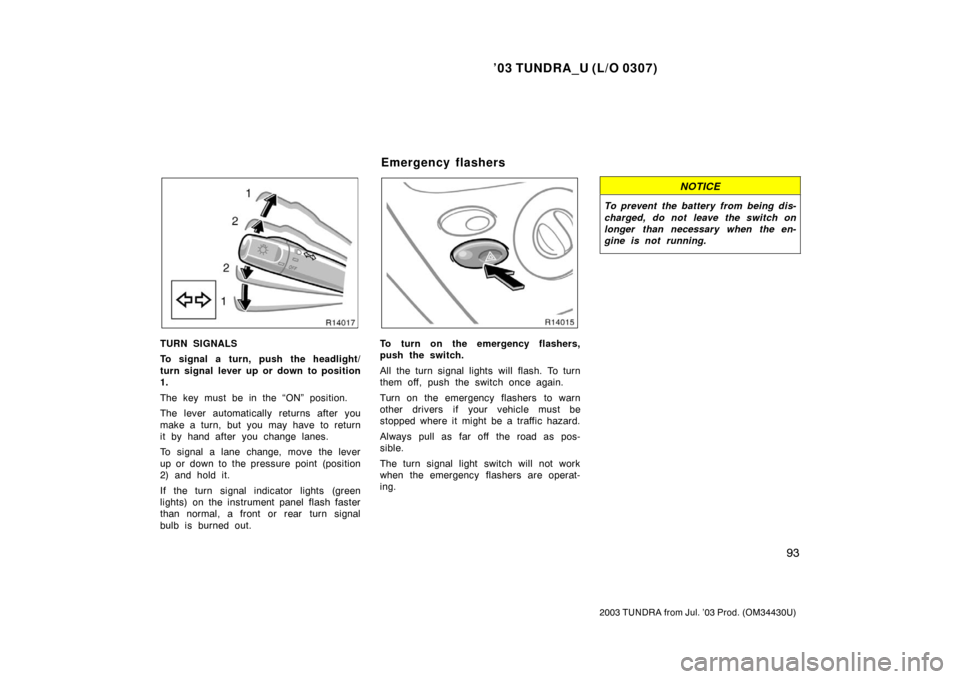
To adjust the brightness of the instru-
ment panel lights, turn the knob.To turn on the front fog lights, twist
the band of the headlight/turn signal
lever. They will come on only when the
headlights are on low beam.To turn on the interior light, slide the
switch.
The interior light switch has the following
positions:
“ON”—Keeps the light on all the time.
“OFF”—Turns the light off.
“DOOR”—Turns the light on when any
door is opened. The light goes off when
all the doors are closed.
Instrument panel light control Front fog lights Interior light
Page 105 of 345
’03 TUNDRA_U (L/O 0307)
96
2003 TUNDRA from Jul. ’03 Prod. (OM 34430U)
The cargo lamp is designed to light up
the rear deck of your vehicle.
CARGO LAMP OPERATION
By pushing “CARGO LAMP” switch
To turn on: Push the “CARGO LAMP”
switch once.
At this time, the indicator light on the
instrument panel will come on.
To turn off: Push the “CARGO LAMP”
switch once again.
By locking and unlocking doors (ve-
hicles with the power door lock system)
You can operate the cargo lump by this
method when all the doors are closed and
the ignition switch is in the “ACC” or
“LOCK” position or the key is removed.
To turn on: Unlock the doors with the key,
the power door lock switch or the remote
keyless entry transmitter.
The cargo lamp will automatically turn off
after 20 seconds.
To turn off: Lock the doors with the key,
the power door lock switch or the remote
keyless entry transmitter. By opening and closing doors
To turn on: Open any of the doors.
To turn off: Close all the doors:
�When the ignition switch is in the “ON”
position, the cargo lamp will go off im-
mediately.
�When the ignition switch is in the
“ACC” or “LOCK” position or the key is
removed, the cargo lamp will automati-
cally go off after 20 seconds.
CARGO LAMP AUTOMATIC POWEROFF
FUNCTION
�When the vehicle speed exceeds
approximately 5 km/h (3 mph), the car-
go lamp will go off.
�To prevent the battery being dis-
charged, the cargo lamp will automati-
cally go off when the lamp remains on
for 30 minutes or more.
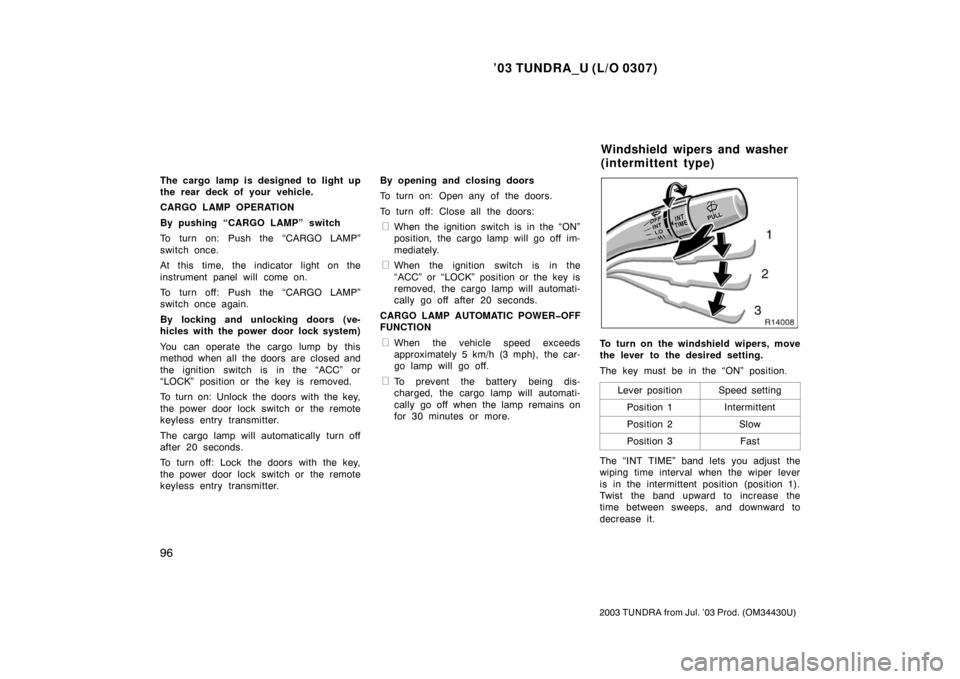
To turn on the windshield wipers, move
the lever to the desired setting.
The key must be in the “ON” position.
Lever position
Speed setting
Position 1Intermittent
Position 2Slow
Position 3Fast
The “INT TIME” band lets you adjust the
wiping time interval when the wiper lever
is in the intermittent position (position 1).
Twist the band upward to increase the
time between sweeps, and downward to
decrease it.
Windshield wipers and washer
(intermittent type)
Page 132 of 345
’03 TUNDRA_U (L/O 0307)
123
2003 TUNDRA from Jul. ’03 Prod. (OM 34430U)
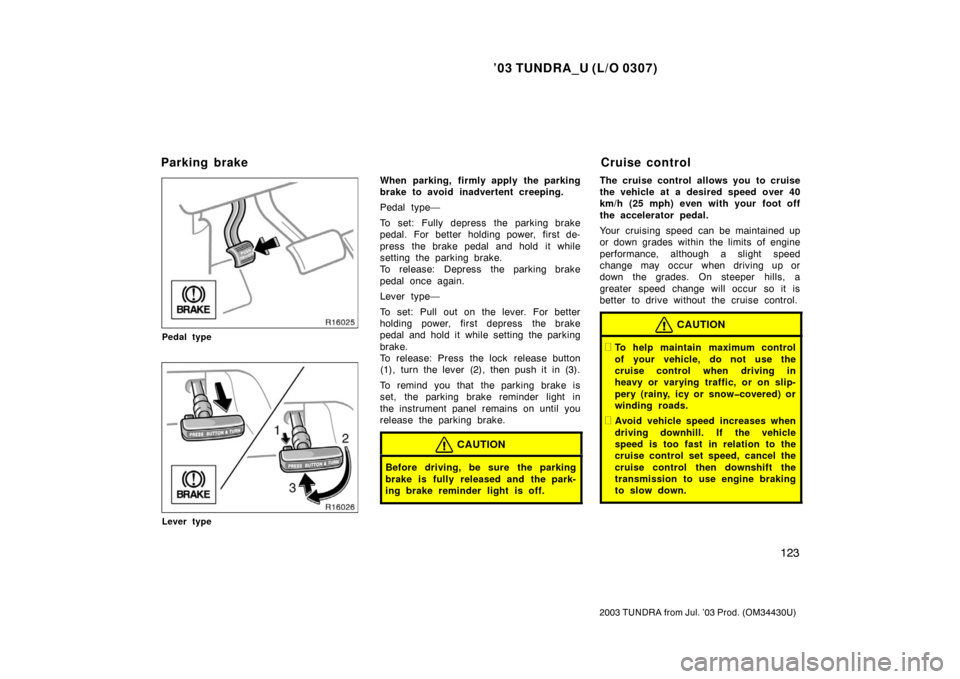
Pedal type
Lever type
When parking, firmly apply the parking
brake to avoid inadvertent creeping.
Pedal type—
To set: Fully depress the parking brake
pedal. For better holding power, first de-
press the brake pedal and hold it while
setting the parking brake.
To release: Depress the parking brake
pedal once again.
Lever type—
To set: Pull out on the lever. For better
holding power, first depress the brake
pedal and hold it while setting the parking
brake.
To release: Press the lock release button
(1), turn the lever (2), then push it in (3).
To remind you that the parking brake is
set, the parking brake reminder light in
the instrument panel remains on until you
release the parking brake.
CAUTION
Before driving, be sure the parking
brake is fully released and the park-
ing brake reminder light is off.
The cruise control allows you to cruise
the vehicle at a desired speed over 40
km/h (25 mph) even with your foot off
the accelerator pedal.
Your cruising speed can be maintained up
or down grades within the limits of engine
performance, although a slight speed
change may occur when driving up or
down the grades. On steeper hills, a
greater speed change will occur so it is
better to drive without the cruise control.
CAUTION
�To help maintain maximum control
of your vehicle, do not use the
cruise control when driving in
heavy or varying traffic, or on slip-
pery (rainy, icy or snowcovered) or
winding roads.
�Avoid vehicle speed increases when
driving downhill. If the vehicle
speed is too fast in relation to the
cruise control set speed, cancel the
cruise control then downshift the
transmission to use engine braking
to slow down.
Parking brake Cruise control
Page 133 of 345
’03 TUNDRA_U (L/O 0307)
124
2003 TUNDRA from Jul. ’03 Prod. (OM 34430U)
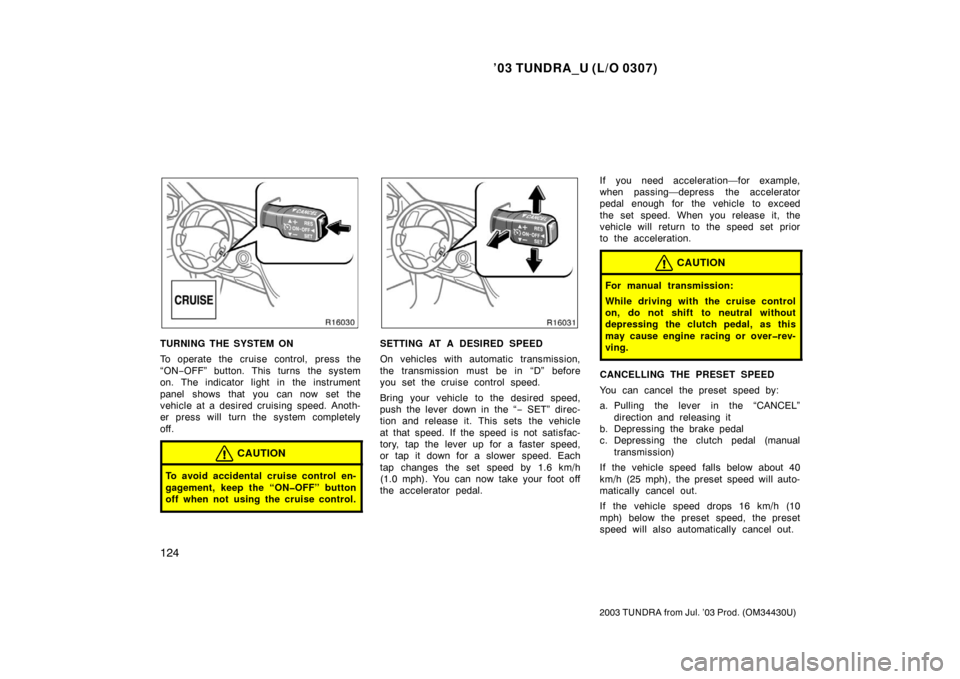
TURNING THE SYSTEM ON
To operate the cruise control, press the
“ON−OFF” button. This turns the system
on. The indicator light in the instrument
panel shows that you can now set the
vehicle at a desired cruising speed. Anoth-
er press will turn the system completely
off.
CAUTION
To avoid accidental cruise control en-
gagement, keep the “ONOFF” button
off when not using the cruise control.
SETTING AT A DESIRED SPEED
On vehicles with automatic transmission,
the transmission must be in “D” before
you set the cruise control speed.
Bring your vehicle to the desired speed,
push the lever down in the “ − SET” direc-
tion and release it. This sets the vehicle
at that speed. If the speed is not satisfac-
tory, tap the lever up for a faster speed,
or tap it down for a slower speed. Each
tap changes the set speed by 1.6 km/h
(1.0 mph). You can now take your foot off
the accelerator pedal. If you need acceleration—for example,
when passing—depress the accelerator
pedal enough for the vehicle to exceed
the set speed. When you release it, the
vehicle will return to the speed set prior
to the acceleration.
CAUTION
For manual transmission:
While driving with the cruise control
on, do not shift to neutral without
depressing the clutch pedal, as this
may cause engine racing or overrev-
ving.
CANCELLING THE PRESET SPEED
You can cancel the preset speed by:
a. Pulling the lever in the “CANCEL”
direction and releasing it
b. Depressing the brake pedal
c. Depressing the clutch pedal (manual
transmission)
If the vehicle speed falls below about 40
km/h (25 mph), the preset speed will auto-
matically cancel out.
If the vehicle speed drops 16 km/h (10
mph) below the preset speed, the preset
speed will also automatically cancel out.
Page 166 of 345
’03 TUNDRA_U (L/O 0307)
157
2003 TUNDRA from Jul. ’03 Prod. (OM 34430U)
OPERATION OF INSTRUMENTS AND
CONTROLS
Air conditioning system
Controls 158
. . . . . . . . . . . . . . . . . . . . . . . . . . . . . . . . . . . . .\
. . . . . . . . . . . . . .
Air flow selector settings 161
. . . . . . . . . . . . . . . . . . . . . . . . . . . . . . . . . . . . \
.
Operating tips 161
. . . . . . . . . . . . . . . . . . . . . . . . . . . . . . . . . . . . \
. . . . . . . . . .
Instrument panel vents 163
. . . . . . . . . . . . . . . . . . . . . . . . . . . . . . . . . . . . \
. .
SECTION 1 8
Page 168 of 345
’03 TUNDRA_U (L/O 0307)
159
2003 TUNDRA from Jul. ’03 Prod. (OM 34430U)
Fan speed selector
Turn the knob to adjust the fan speed—to
the right to increase, to the left to de-
crease.
Temperature selector
Turn the knob to adjust the temperature—
to the right to warm, to the left to cool.
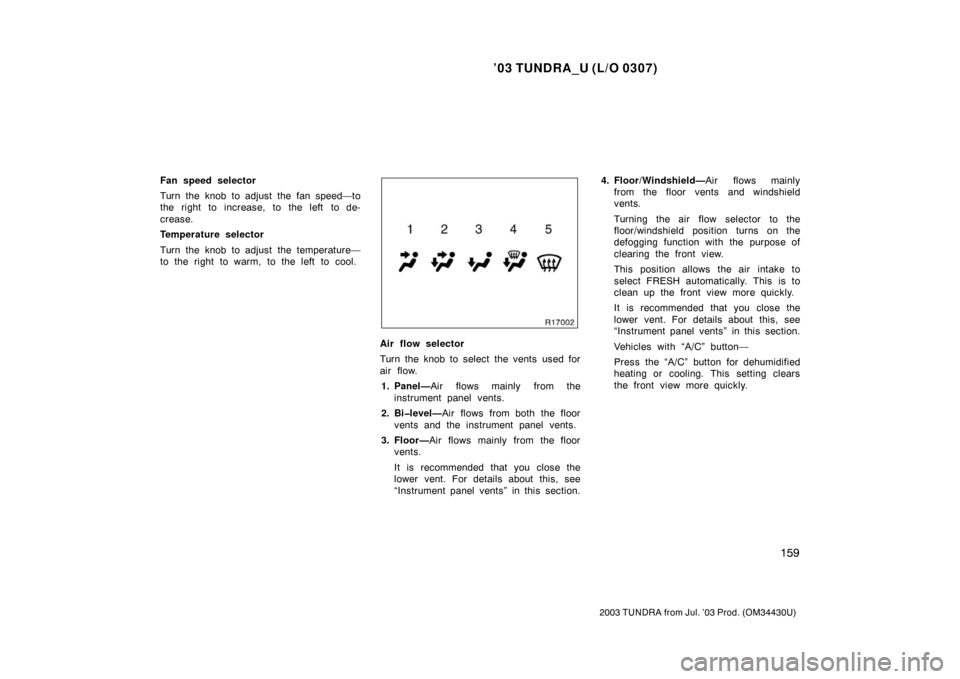
Air flow selector
Turn the knob to select the vents used for
air flow.
1. Panel— Air flows mainly from the
instrument panel vents.
2. Bilevel— Air flows from both the floor
vents and the instrument panel vents.
3. Floor— Air flows mainly from the floor
vents.
It is recommended that you close the
lower vent. For details about this, see
“Instrument panel vents” in this section. 4. Floor/Windshield—
Air flows mainly
from the floor vents and windshield
vents.
Turning the air flow selector to the
floor/windshield position turns on the
defogging function with the purpose of
clearing the front view.
This position allows the air intake to
select FRESH automatically. This is to
clean up the front view more quickly.
It is recommended that you close the
lower vent. For details about this, see
“Instrument panel vents” in this section.
Vehicles with “A/C” button—
Press the “A/C” button for dehumidified
heating or cooling. This setting clears
the front view more quickly.
Page 169 of 345

’03 TUNDRA_U (L/O 0307)
160
2003 TUNDRA from Jul. ’03 Prod. (OM 34430U)
5. Windshield—Air flows mainly from the
windshield vents.
Turning the air flow selector to the
windshield position turns on the defog-
ging function with the purpose of clear-
ing the front view.
This position allows the air intake to
select FRESH automatically. This is to
clean up the front view more quickly.
It is recommended that you close the
lower vent. For details about this, see
“Instrument panel vents” in this section.
Vehicles with “A/C” button—
Press the “A/C” button for dehumidified
heating or cooling. This setting clears
the front view more quickly.
For details about air flow selector settings,
see “Air flow selector settings” described
below. Air intake selector
The air intake selector button is used to
switch the air intake
FRESH mode that
draws outside air into the system and
RECIRCULATED mode that recirculates
the air inside vehicle.
To turn the air source to RECIRCULATED
mode, press the button. The indicator will
come on. To turn the air source to FRESH
mode, press the button again. The indica-
tor will go off.
To prevent fogging up of the windshield,
the air intake mode may change automati-
cally to FRESH depending on the condi-
tion of the air conditioning system.
“A/C” button
To turn on the air conditioning, press the
“A/C” button. The “A/C” button indicator
will come on. To turn the air conditioning
off, press the button again.
Vehicles with 2UZ −FE engine—If the “A/C”
button indicator flashes, there is a prob-
lem in the air conditioning system and the
air conditioning automatically shuts off. If
this happens, take your vehicle to a
Toyota dealer for service.