Page 39 of 181

17-11-2003
YOUR BOXER IN DETAIL43
Regional following mode (REG) When they are part of a network, certain stations broadcast regional programmes in the various areas they serve. With regional following mode you can keep listening to the same programme. Press the "MENU-PS" button to gain access to the menu.
Press button J or Lto display "REG OFF" , then button Kor Mto switch the function on or off.
PTY function This allows you to listen to stations broadcasting a specific type of programme (news, culture, sport, rock etc.).
With FMselected, press the "PTY"button to switch this function on or off.
To search for a PTYprogramme:
Ð select the PTYfunction,
Ð briefly press button Kor Mto scroll down the list of the various types of programmes offered,
Ð when the programme of your choice is displayed, keep button Kor Mpressed for two seconds to carry
out an automatic search (after an automatic search the PTYfunction is switched off).
In PTY mode the different types of programmes can be stored in the memory. To do this, press the preselection buttons "1"
to "6" for more than two seconds. Press the corresponding button for less than two seconds to recall the type of
programme stored in the memory. EON system
This connects stations which are part of the same network. It enables the broadcast of traffic information or of a PTYpro-
gramme, by a station that is part of the same network as the station to which you are listening. This service is available when you have selected the TAtraffic information programme or the PTYfunction.
Press the "PTY"button for more than two seconds to switch this function on or off.
Page 41 of 181
17-11-2003
YOUR BOXER IN DETAIL45
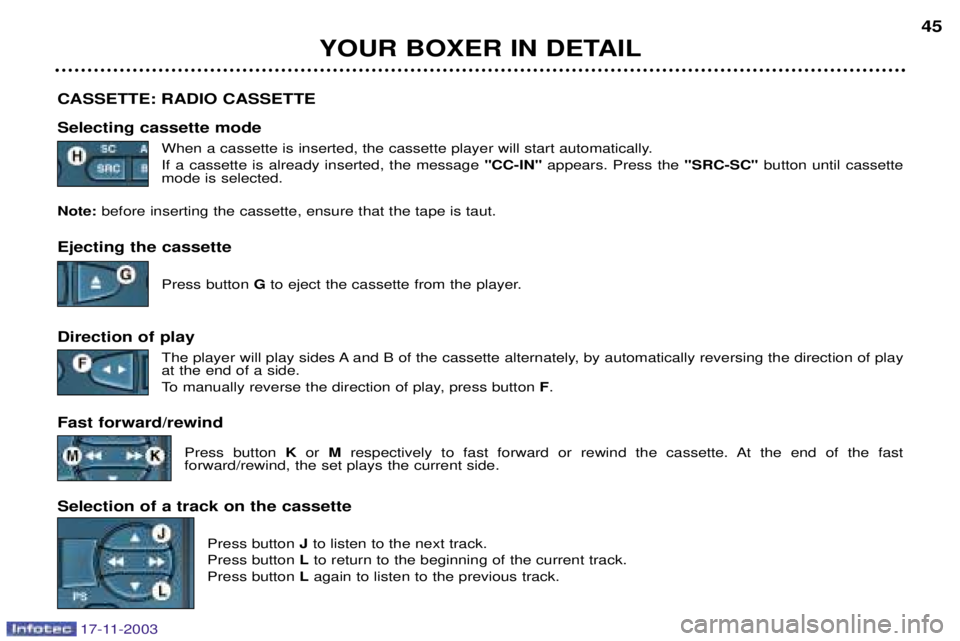
CASSETTE: RADIO CASSETTE Selecting cassette mode When a cassette is inserted, the cassette player will start automatically. If a cassette is already inserted, the message "CC-IN"appears. Press the "SRC-SC"button until cassette
mode is selected.
Note: before inserting the cassette, ensure that the tape is taut.
Ejecting the cassette
Press button Gto eject the cassette from the player.
Direction of play The player will play sides A and B of the cassette alternately, by automatically reversing the direction of play at the end of a side.
To manually reverse the direction of play, press button F.
Fast forward/rewind Press button Kor Mrespectively to fast forward or rewind the cassette. At the end of the fast
forward/rewind, the set plays the current side.
Selection of a track on the cassette Press button Jto listen to the next track.
Press button Lto return to the beginning of the current track.
Press button Lagain to listen to the previous track.
Page 45 of 181
17-11-2003
YOUR BOXER IN DETAIL47
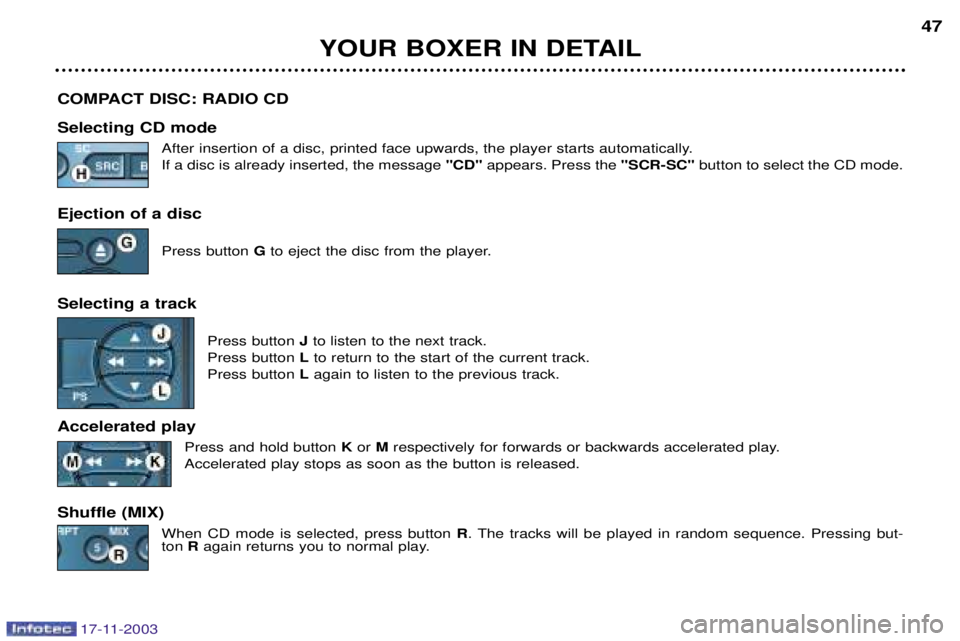
COMPACT DISC: RADIO CD Selecting CD mode After insertion of a disc, printed face upwards, the player starts automatically. If a disc is already inserted, the message "CD" appears. Press the "SCR-SC" button to select the CD mode.
Ejection of a disc Press button Gto eject the disc from the player.
Selecting a track Press button Jto listen to the next track.
Press button Lto return to the start of the current track.
Press button Lagain to listen to the previous track.
Accelerated play Press and hold button K or Mrespectively for forwards or backwards accelerated play.
Accelerated play stops as soon as the button is released.
Shuffle (MIX) When CD mode is selected, press button R. The tracks will be played in random sequence. Pressing but-
ton Ragain returns you to normal play.
Page 48 of 181

Superimposed display In certain cases, when a function
(radio, telephone, trip computer, ...)changes status while another func-tion is displayed, a window opensto inform you of the change, thendisappears.
MULTI-FUNCTION
DISPLAYS Presentation Monochrome display Colour display These two multi-function displays are an integral part of the audio/tele-
phone/GPS . Therefore, they are
controlled by its control keypad andby its steering wheel stalk. They enable you to obtain the follow-ing information:
Ð displaying of the audio sources
(radio, CD),
Ð displaying of the telematic systems (telephone, services, ...),
Ð displaying of the satellite naviga- tion system (see corresponding section),
Ð displaying of the trip computer (see corresponding section),
Ð the warning messages (e.g. "Warning, maximum speedexceeded") or information mes-sages (e.g. "SIM card absent") dis-
played temporarily.
YOUR BOXER IN DETAIL
50
Main screen Press the
"MAIN/DARK" button to
display the main screen , display
the information relating to the active source (radio, CD, tele-phone or navigation) and gainaccess to the following functions:
Ð Voice memory,
Ð Setup. The "Voice Memory" function per-
mits management of the recorded
voice messages. You can listen tothem again or delete them.
The messages are played in sequence,from the oldest to the most recent.
Deleting deletes all of the messages. The "Setup" function permits
modification of the general system parameters (see ¤ "Parameterconfiguration").
17-11-2003
Page 49 of 181
17-11-2003
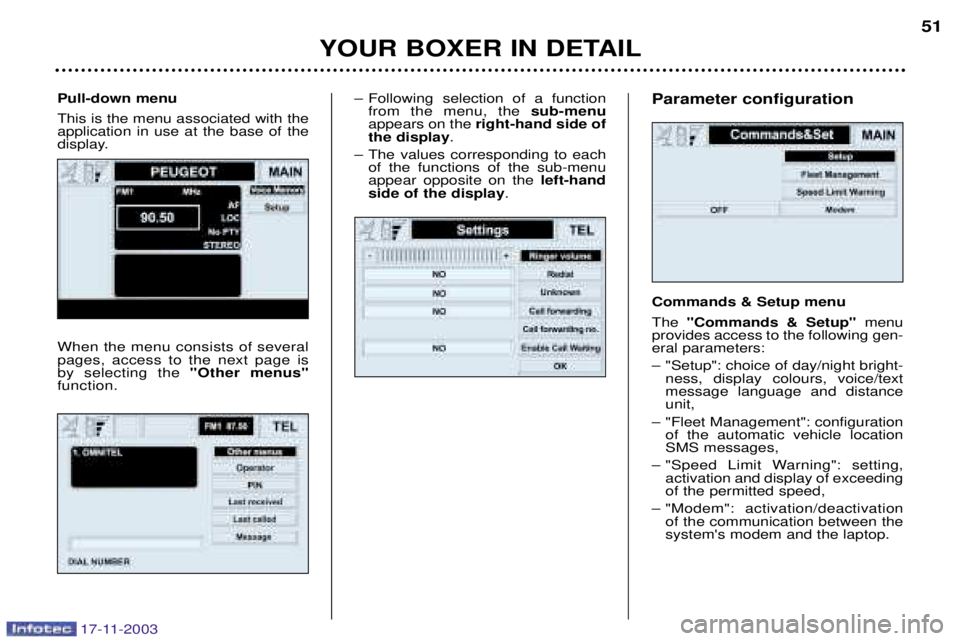
Ð Following selection of a functionfrom the menu, the sub-menu
appears on the right-hand side of
the display .
Ð The values corresponding to each of the functions of the sub-menu appear opposite on the left-hand
side of the display .
YOUR BOXER IN DETAIL 51
Pull-down menu This is the menu associated with the application in use at the base of the
display. When the menu consists of several pages, access to the next page isby selecting the "Other menus"
function.
Parameter configuration Commands & Setup menu The "Commands & Setup" menu
provides access to the following gen- eral parameters:
Ð "Setup": choice of day/night bright- ness, display colours, voice/text message language and distanceunit,
Ð "Fleet Management": configuration of the automatic vehicle locationSMS messages,
Ð "Speed Limit Warning": setting, activation and display of exceedingof the permitted speed,
Ð "Modem": activation/deactivation of the communication between thesystem's modem and the laptop.
Page 59 of 181

17-11-2003
YOUR BOXER IN DETAIL
60
RADIO MODE Radio mode and waveband selection Press the "SRC"button repeatedly to select the required waveband; FM1, FM2, FM3, LW and MW.
The corresponding symbol appears on the display. Manual station search Select the "Frequency" function from the "Radio" audio source menu by turning knob H, then press this knob to confirm.
Turn knob Hto the right to search for a higher frequency or to the left to search for a lower frequency.
Automatic station search Select the "Frequency" function from the "Radio" audio source menu by turning knob H, then press this knob to confirm.
Press respectively button Rto search for a lower frequency or button Tto search for a higher frequency.
The message "SEEK"appears during the search, then scanning stops when the first station is found.
If the traffic information programme TAor the PTYfunction is active, only stations which broadcast this type of programme
are selected. The station search is carried out first with "LOC"sensitivity (selection of the most powerful transmitters) for one scan of the
waveband, then with "DX"sensitivity (selection of the weakest and most distant transmitters).
To carry out a "DX"sensitivity search straight away, select the "LOC/DX"function from the "Radio" source menu by turning
knob H, then press this knob repeatedly to change the sensitivity. The corresponding symbol appears on the display.
Page 60 of 181
17-11-2003
YOUR BOXER IN DETAIL61
Manual station storing Select the required station. Press and hold one of the buttons "1"to "6" for more than one second.
A bleep is heard, confirming that the station has been stored in the memory.
Automatic station storing (Autostore) Select the "Autostore" function from the "Radio" source menu by turning knob H, then press this knob to begin storing.
Your audio/telephone/GPS automatically stores the 6 best transmitters received on the waveband selected. If it was not possible to find 6 transmitters, the remaining memories are not changed. Recalling stored stations On each waveband, a brief press of one of the buttons "1"to "6" recalls the corresponding stored station.
Stereo/Mono receptionSelect the "St/Mono" function from the "Radio" source menu by turning knob H, then press this knob repeatedly to change the
type of reception. The corresponding symbol appears on the screen.
Page 61 of 181

17-11-2003
YOUR BOXER IN DETAIL
62
RDS SYSTEM Using the RDS function on the FM waveband The RDS (Radio Data System) enables you to continue listening to the same station, whatever frequency it is using for the
region you are going through. Select the "TA/AF"function from the "Radio" source menu by turning knob H, then press this knob repeatedly to activate
the AFfunction.
The corresponding symbol appears on the screen.
RDS station following
The display indicates the name of the station selected. The audio/telephone/GPS continuously searches for the transmitter which broadcasts the same programme with the best reception.
Traffic information programme Select the "TA/AF"function from the "Radio" source menu by turning knob H, then press the knob repeatedly to activate the
TA function.
The corresponding symbol appears on the display.
If the station is able to transmit traffic information, the symbol "TP"is displayed following activation of the TAfunction.
All traffic information bulletins will be given priority irrespective of the audio source in use (radio or CD).If you wish to interrupt a message, select the "TA/AF"function by turning knob H, then press this knob repeatedly to deactivate
the TAfunction.
The corresponding symbol appears on the display.Note: the traffic information volume is independent of the normal audio/telephone/GPS volume. You can set it during a mes-
sage by means of knob B.