Page 77 of 183
10-02-2003
YOUR 607 IN DETAIL79
Satellite navigation system with monochrome screen C General remarks regarding the display
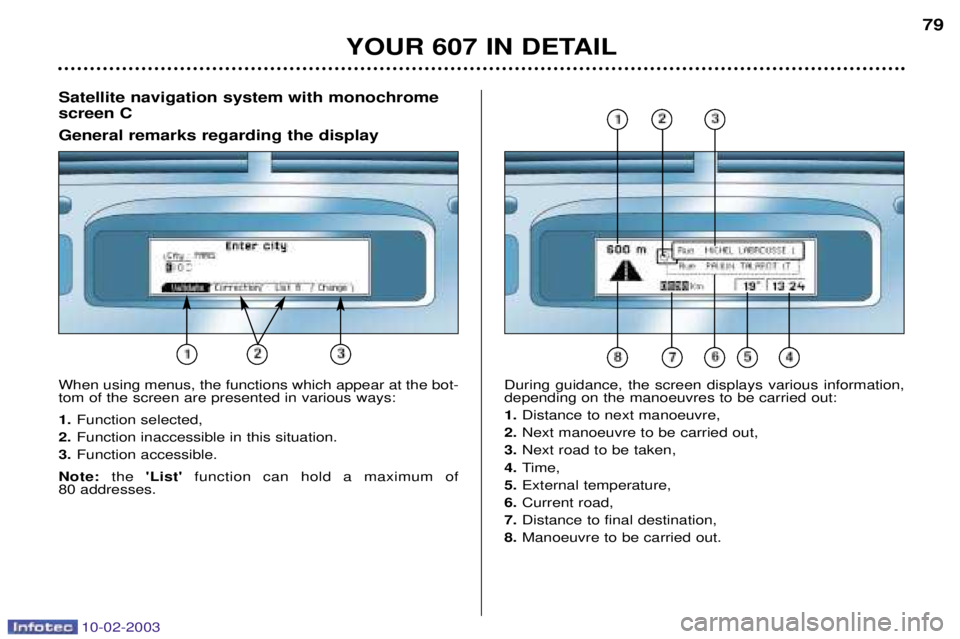
When using menus, the functions which appear at the bot- tom of the screen are presented in various ways: 1. Function selected,
2. Function inaccessible in this situation.
3. Function accessible.
Note: the 'List' function can hold a maximum of
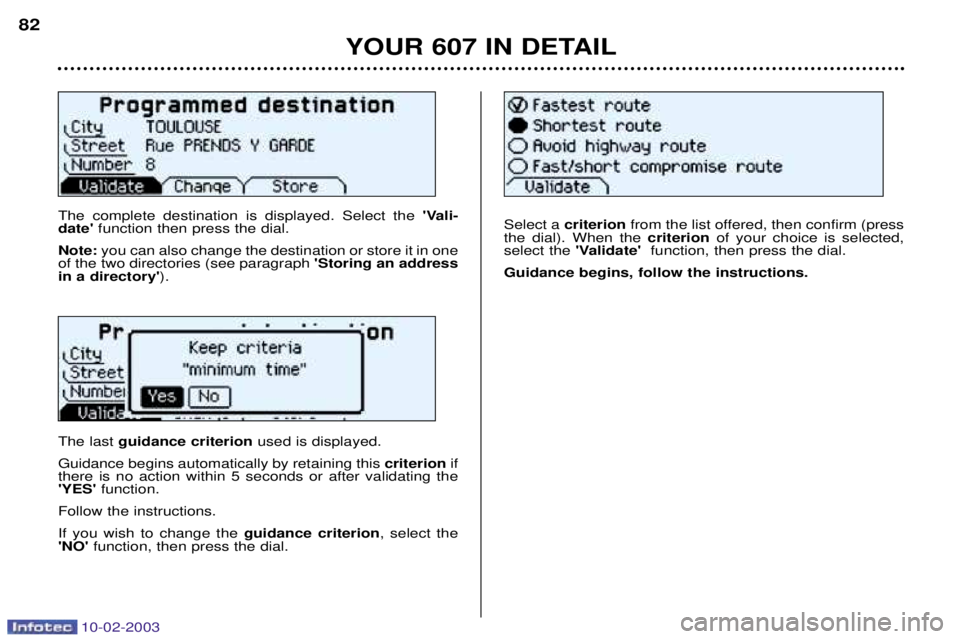
80 addresses. During guidance, the screen displays various information, depending on the manoeuvres to be carried out: 1.
Distance to next manoeuvre,
2. Next manoeuvre to be carried out,
3. Next road to be taken,
4. Time,
5. External temperature,
6. Current road,
7. Distance to final destination,
8. Manoeuvre to be carried out.
Page 79 of 183
10-02-2003
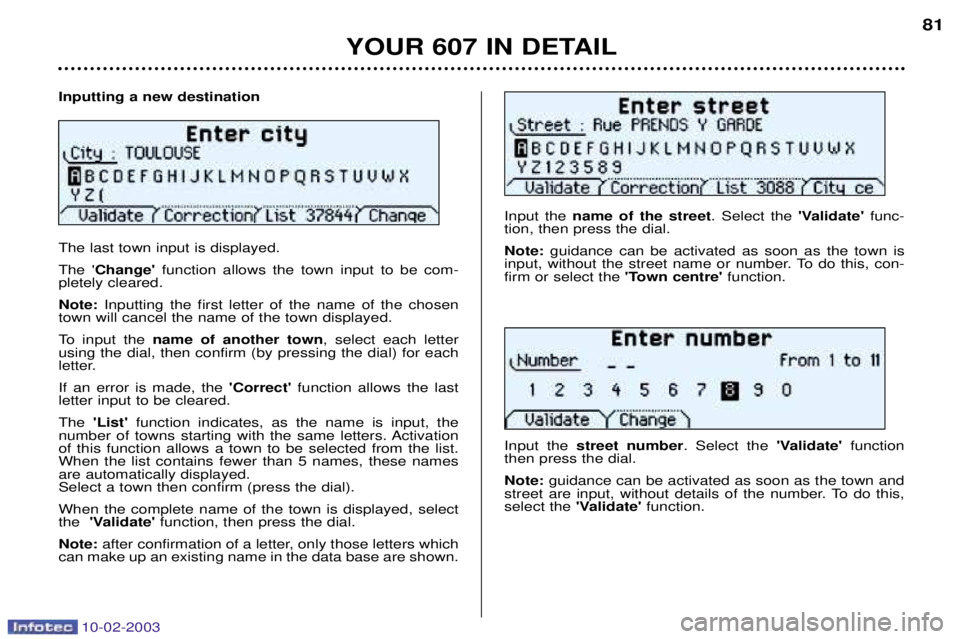
Inputting a new destination The last town input is displayed. The 'Change' function allows the town input to be com-
pletely cleared.Note: Inputting the first letter of the name of the chosen
town will cancel the name of the town displayed.
To input the name of another town , select each letter
using the dial, then confirm (by pressing the dial) for each
letter. If an error is made, the 'Correct' function allows the last
letter input to be cleared.The 'List' function indicates, as the name is input, the
number of towns starting with the same letters. Activation of this function allows a town to be selected from the list.When the list contains fewer than 5 names, these namesare automatically displayed.Select a town then confirm (press the dial). When the complete name of the town is displayed, select the 'Validate' function, then press the dial.
Note: after confirmation of a letter, only those letters which
can make up an existing name in the data base are shown. Input the
name of the street . Select the 'Validate'func-
tion, then press the dial. Note: guidance can be activated as soon as the town is
input, without the street name or number. To do this, con- firm or select the 'Town centre' function.
Input the street number . Select the 'Validate'function
then press the dial. Note: guidance can be activated as soon as the town and
street are input, without details of the number. To do this, select the 'Validate' function.
YOUR 607 IN DETAIL 81
Page 80 of 183
10-02-2003
The complete destination is displayed. Select the 'Vali-
date' function then press the dial.
Note: you can also change the destination or store it in one
of the two directories (see paragraph 'Storing an address
in a directory' ).
The last guidance criterion used is displayed.
Guidance begins automatically by retaining this criterionif
there is no action within 5 seconds or after validating the 'YES' function.
Follow the instructions. If you wish to change the guidance criterion, select the
'NO' function, then press the dial. Select a
criterion from the list offered, then confirm (press
the dial). When the criterionof your choice is selected,
select the 'Validate' function, then press the dial.
Guidance begins, follow the instructions.
YOUR 607 IN DETAIL
82
Page 81 of 183
10-02-2003
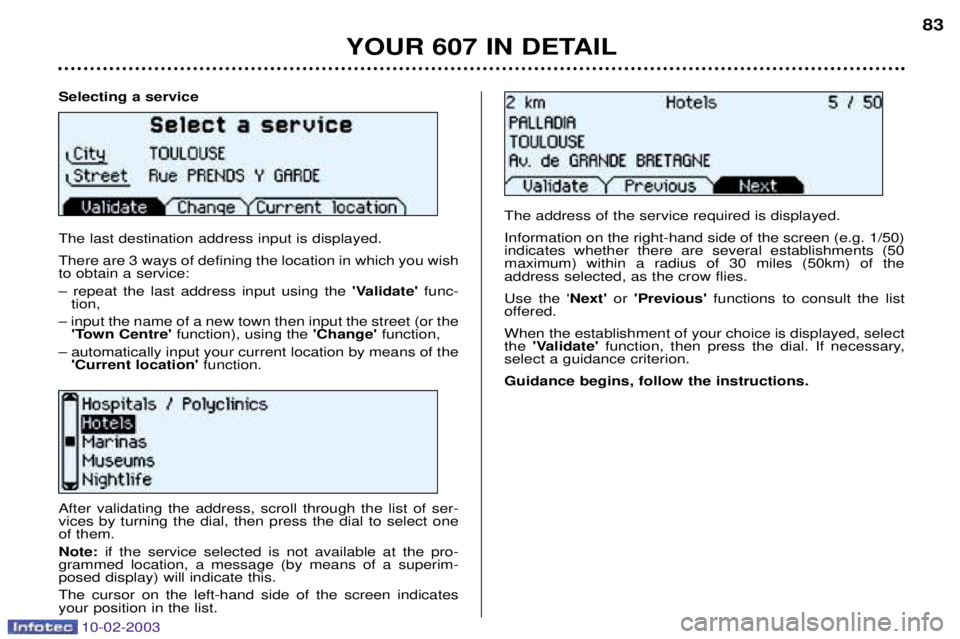
Selecting a service The last destination address input is displayed. There are 3 ways of defining the location in which you wish to obtain a service: Ð repeat the last address input using the'Validate'func-
tion,
Ð input the name of a new town then input the street (or the 'Town Centre' function), using the 'Change'function,
Ð automatically input your current location by means of the 'Current location' function.
YOUR 607 IN DETAIL 83
After validating the address, scroll through the list of ser- vices by turning the dial, then press the dial to select oneof them. Note:
if the service selected is not available at the pro-
grammed location, a message (by means of a superim- posed display) will indicate this. The cursor on the left-hand side of the screen indicates your position in the list. The address of the service required is displayed. Information on the right-hand side of the screen (e.g. 1/50) indicates whether there are several establishments (50maximum) within a radius of 30 miles (50km) of theaddress selected, as the crow flies. Use the '
Next'or 'Previous' functions to consult the list
offered.When the establishment of your choice is displayed, select the 'Validate' function, then press the dial. If necessary,
select a guidance criterion. Guidance begins, follow the instructions.
Page 82 of 183
10-02-2003
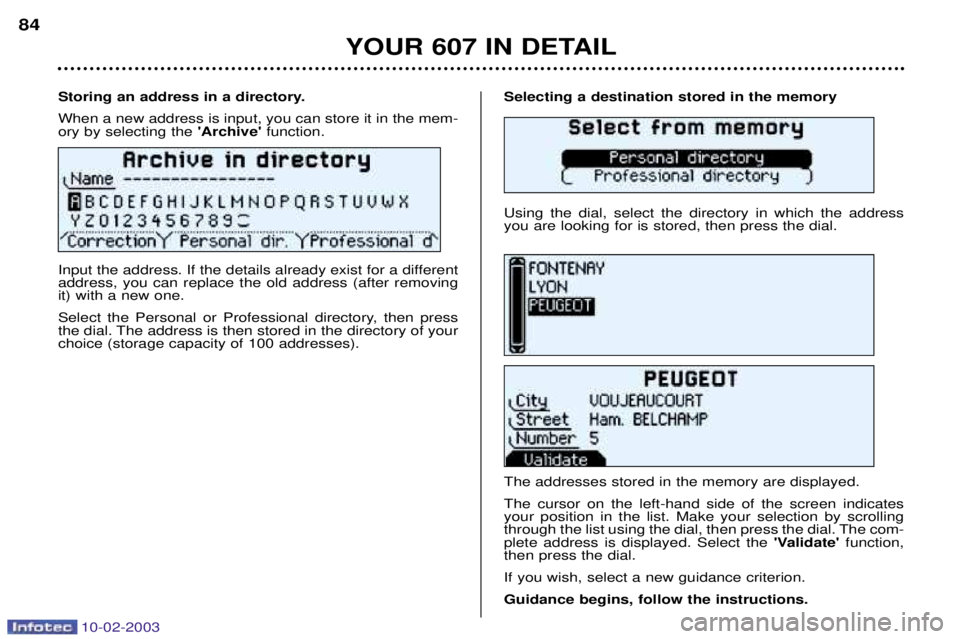
Selecting a destination stored in the memory Using the dial, select the directory in which the address you are looking for is stored, then press the dial. The addresses stored in the memory are displayed. The cursor on the left-hand side of the screen indicates your position in the list. Make your selection by scrolling
through the list using the dial, then press the dial. The com-plete address is displayed. Select the 'Validate'function,
then press the dial. If you wish, select a new guidance criterion.Guidance begins, follow the instructions.
Storing an address in a directory.When a new address is input, you can store it in the mem- ory by selecting the
'Archive' function.
Input the address. If the details already exist for a differentaddress, you can replace the old address (after removingit) with a new one.
Select the Personal or Professional directory, then press
the dial. The address is then stored in the directory of yourchoice (storage capacity of 100 addresses).
YOUR 607 IN DETAIL
84
Page 83 of 183
10-02-2003
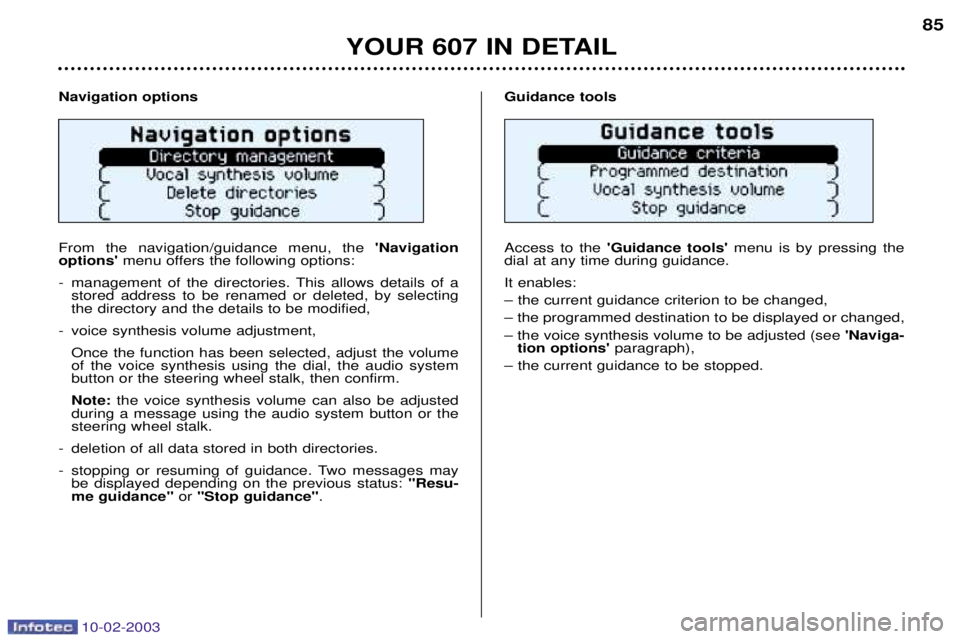
Navigation options From the navigation/guidance menu, the 'Navigation
options' menu offers the following options:
- management of the directories. This allows details of a stored address to be renamed or deleted, by selecting the directory and the details to be modified,
- voice synthesis volume adjustment,
Once the function has been selected, adjust the volumeof the voice synthesis using the dial, the audio systembutton or the steering wheel stalk, then confirm. Note: the voice synthesis volume can also be adjusted
during a message using the audio system button or the steering wheel stalk.
- deletion of all data stored in both directories.
- stopping or resuming of guidance. Two messages may be displayed depending on the previous status: "Resu-
me guidance" or "Stop guidance" . Guidance tools Access to the
'Guidance tools' menu is by pressing the
dial at any time during guidance. It enables: Ð the current guidance criterion to be changed,Ð the programmed destination to be displayed or changed,Ð the voice synthesis volume to be adjusted (see 'Naviga-
tion options' paragraph),
Ð the current guidance to be stopped.
YOUR 607 IN DETAIL 85
Page 84 of 183
10-02-2003
Satellite navigation system with colour screen Updating the software When you receive the system update CD-ROMs:
Ð start the engine to avoid any risk ofswitching to energy economy mode during the operation,
Ð eject the mapping CD-ROM from the drive located in the boot,
Ð insert the software update CD- ROM in the drive (the indicatorlight on the drive comes on perma-nently); after a few seconds thescreen 'management of softwareconfiguration of the systemappears,
YOUR 607 IN DETAIL
86
Ð compare the "System" versionsinstalled (Multi-function display-D or Navigation-D) with those of theCD-Rom in the drive; if a softwareversion of the CD-ROM (or both) islater than the version installed,load the CD-ROM by confirming"YES" ; the red indicator light on
the drive flashes while the data isbeing loaded (a few minutes),
Ð when the message "Software Loading End - Eject CD" appears,remove the software CD-ROM andinsert the mapping CD-ROM in itsplace (the indicator light on thedrive comes on permanently aftergoing out briefly).
General remarks regarding the display When using context menus, the functions are presented in variousways:
Ð function selected (text on coloured background),
Ð function accesible (black text),
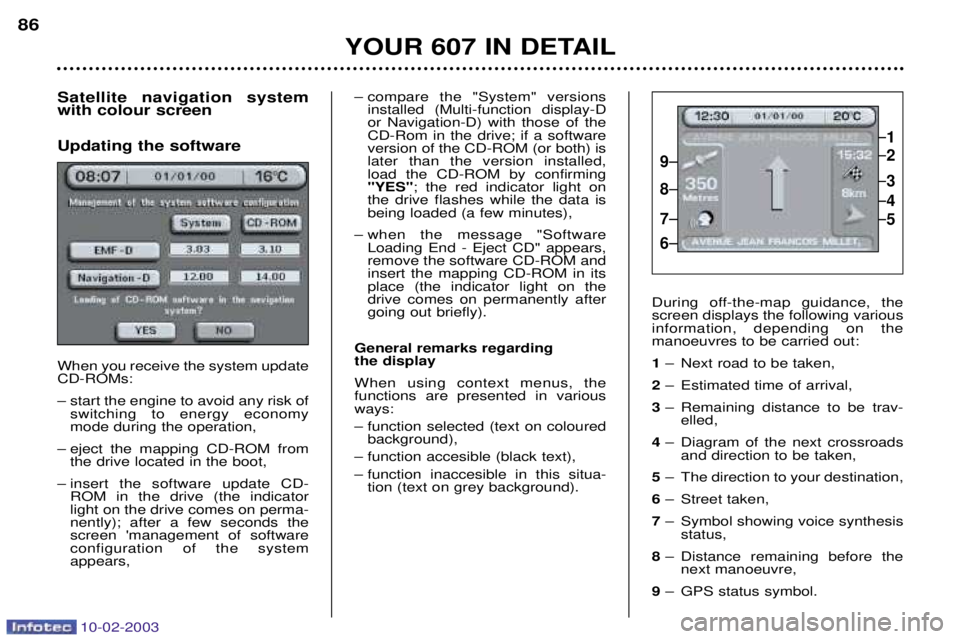
Ð function inaccesible in this situa- tion (text on grey background). During off-the-map guidance, the screen displays the following variousinformation, depending on themanoeuvres to be carried out: 1
Ð Next road to be taken,
2 Ð Estimated time of arrival,
3 Ð Remaining distance to be trav-
elled,
4 Ð Diagram of the next crossroads
and direction to be taken,
5 Ð The direction to your destination,
6 Ð Street taken,
7 Ð Symbol showing voice synthesis
status,
8 Ð Distance remaining before the
next manoeuvre,
9 Ð GPS status symbol.
1
2
3
5
4
9
8
7
6
Page 85 of 183
10-02-2003
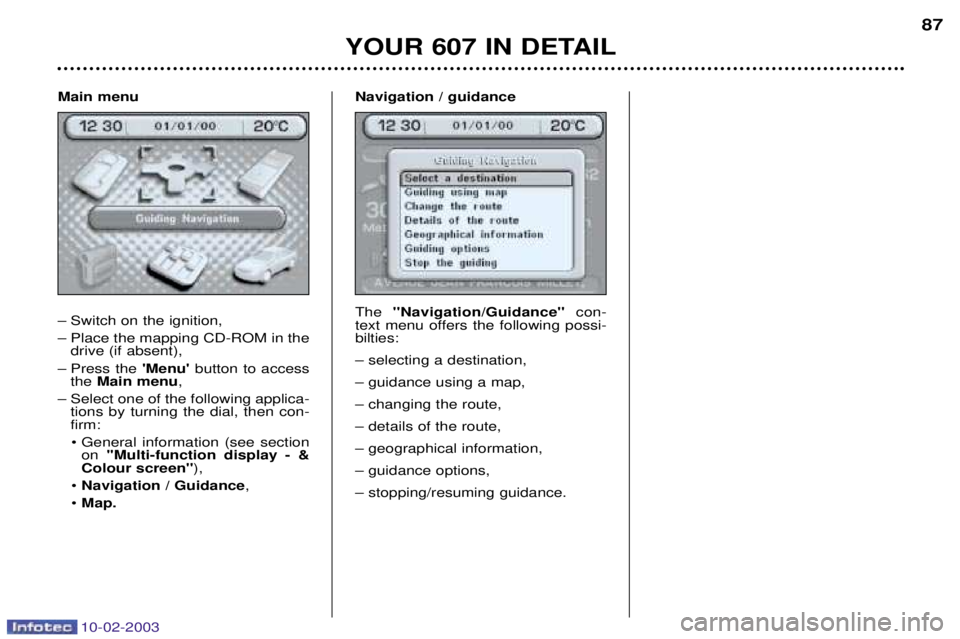
Main menu
Ð Switch on the ignition,
Ð Place the mapping CD-ROM in thedrive (if absent),
Ð Press the 'Menu'button to access
the Main menu ,
Ð Select one of the following applica- tions by turning the dial, then con- firm:
¥ General information (see section on ''Multi-function display - &
Colour screen'' ),
¥ Navigation / Guidance ,
¥ Map. Navigation / guidance The
''Navigation/Guidance'' con-
text menu offers the following possi- bilties: Ð selecting a destination,Ð guidance using a map,Ð changing the route,Ð details of the route,Ð geographical information,Ð guidance options,Ð stopping/resuming guidance.
YOUR 607 IN DETAIL 87