2003 PEUGEOT 607 display
[x] Cancel search: displayPage 64 of 183

10-02-2003
Services This menu gives direct access.Press button O to display the "Services" menu and make a selection from the following three menus, then validate by press-
ing the end of the steering wheel remote control:Ð ''Emergency call''* to automatically send a call containing a mini-message (SMS) which allows you to be identified and
located; vocal communication is established with the help centre,
Ð ''Technical assistance''* for contacting the call centre controlling the PEUGEOT breakdown service,
Ð ''Peugeot Service"* to contact directly the PEUGEOT customer contact centre and access the services offered.
IMPORTANT: as is the case for all telephones, your on-board telephone operates using cellular and terrestrial networks.
Because of this, connection cannot be guaranteed in all cases.Selecting a directory
To consult the various directories, insert your SIM card and input the PIN code.
To access the 'Directories' menu, press the 'MAN'button or press the end of the steering wheel remote
control.
Make a selection from the three directories available: DIRECTORY (SIM), LAST NUMBERS CALLEDor TEL (PEUGEOT
customer contact centre). Storing numbers Last numbers called: your phone stores in the memory the five last numbers called or which were used to call you.
To access these numbers, press the 'OK' button or the end of the steering column remote control and scroll
through these numbers using buttons Mand Lor the knob of the steering column remote control. Then, if
you want to call one of these numbers, press the 'OK' button, or the end of the steering column remote con-
trol.
Telephone directory (SIM): this can store around eighty numbers (if more than 80 numbers are stored on the SIM card
used, only the first 80 will be accessible).
YOUR 607 IN DETAIL 65
* If option and service available.
Page 65 of 183
10-02-2003
YOUR 607 IN DETAIL
66
Storing numbers in the telephone directory (SIM) In the 'PHONEBOOK' menu, validate the 'New Entry' function with the 'OK'button.
Using the alphanumerical keypad input the name, telephone number and address (the memory number) or keep the one suggested. Confirm each operation with the 'OK'button.
To access a number in the memory:
Ð look for and select it in the menu 'Find by name'or 'Find by address ' of the 'PHONEBOOK' menu and
press the 'OK'button to make the call,
Ð or press the end of the steering wheel remote control for more than two seconds, look for and select the number, then press the end of the remote control to make the call,
Ð or enter the memory number using the keypad, then press button Ffollowed by the 'OK' button to make the
call.
Note: the first nine numbers in this list are directly accessible. Hold one of the nine buttons of the keypad down, then press
the 'OK' button to call.
Selecting the previous item of a menu Press button Las many times as necessary to select the required item. Confirm with the 'OK'button.
Selecting the following item of a menu Press button Mas many times as necessary to select the required item. Validate with the 'OK' button.
Accessing mini messages In telephone mode: when the buzzer sounds and the 'envelope' symbol is displayed on the screen, you can access new
messages by pressing the 'MAN' button.
In radio mode: when the symbol appears, you must change to telephone mode (press the "TEL"button) to be able to
access the new messages.Note: the old stored messages are accessible. In the 'SMS'menu, confirm the 'Messages received' function with the 'OK'
button, then select the message using button 'M'or 'L' to consult it.
Page 67 of 183

10-02-2003
YOUR 607 IN DETAIL
68
'CALL SETTINGS'
Network search: if the automatic mode is active, your telephone will automatically select the cellular network available which
is compatible with your SIM card. In manual mode, you must choose from the list of networks the one which matches the operator who supplied you with your SIM card.
Voice mail: allows you to call your voice mail to listen to the latest messages received.
Call broadcast: activates the receipt of information issued by your network (depending on subscription agreement).
Call waiting: in the case of two simultaneous calls, you can go from one to the other.
Call diverting: allows incoming calls to be diverted to your voice mail or to another telephone number.
My phone number: allows three telephone numbers to be stored.
Barring: allows the possibilities of calls from the telephone to be restricted (it is necessary to use PIN 2 code).
Call ID display: allows your number to be disclosed to or withheld from the person being called (depending on subscription
agreement). 'TELEPHONE SETTINGS' Cumulative time: tells you the total duration of incoming and outgoing calls.
Ring tone: allows you to select a call ring from the six options.
Ring volume: allows you to adjust the volume of the incoming call ring.
Operating tone: allows you to activate or disarm the sound signal (bleep) emitted each time a button is pressed, and to
adjust the volume.
TEL position: allows you to select the monitor speakers (left side/right side/both).
Automatic answer: allows you to programme the automatic reply (after five seconds) to an incoming call.
Automatic redial: when your call is not successful, automatic recall (ten times maximum) of the same number.
PIN request: protects your SIM card against any unauthorised use.
PIN change: lets you change your pin code.
Language select: lets you select the displayed language (French/English/German/Spanish/Italian/Dutch).
Master reset: lets you store the initial parameters of your telephone, without erasing the information in the memory.
Page 70 of 183
10-02-2003
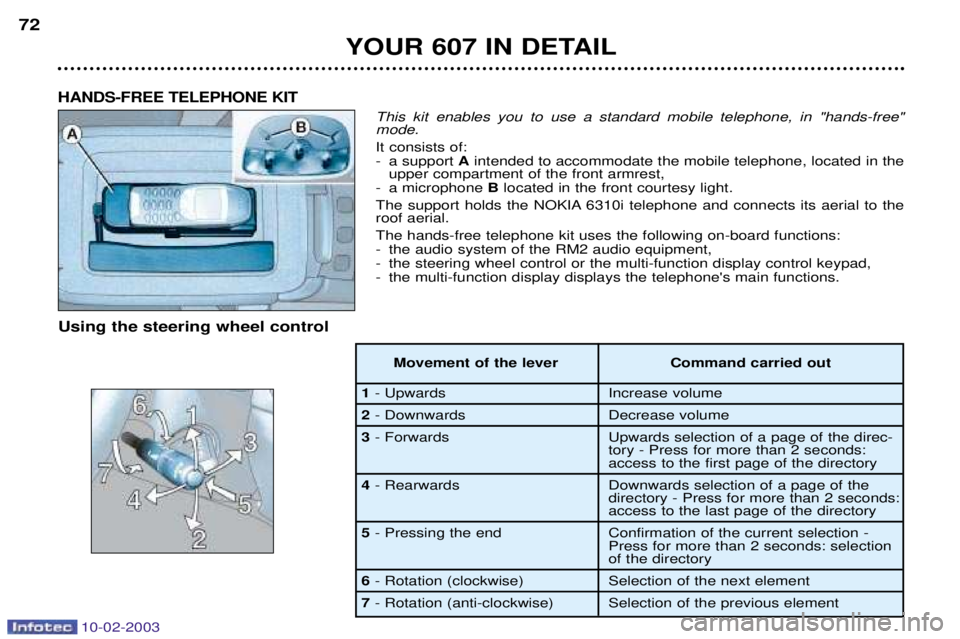
This kit enables you to use a standard mobile telephone, in "hands-free" mode. It consists of:
- a support Aintended to accommodate the mobile telephone, located in the
upper compartment of the front armrest,
- a microphone Blocated in the front courtesy light.
The support holds the NOKIA 6310i telephone and connects its aerial to the roof aerial. The hands-free telephone kit uses the following on-board functions:
- the audio system of the RM2 audio equipment,
- the steering wheel control or the multi-function display control keypad,
- the multi-function display displays the telephone's main functions.
HANDS-FREE TELEPHONE KIT
Using the steering wheel control
Movement of the lever Command carried out
1- Upwards Increase volume
2- Downwards Decrease volume
3 - Forwards Upwards selection of a page of the direc-
tory - Press for more than 2 seconds:
access to the first page of the directory
4 - Rearwards Downwards selection of a page of the
directory - Press for more than 2 seconds:
access to the last page of the directory
5 - Pressing the end Confirmation of the current selection -
Press for more than 2 seconds: selection
of the directory
6- Rotation (clockwise) Selection of the next element
7 - Rotation (anti-clockwise) Selection of the previous element
YOUR 607 IN DETAIL
72
Page 71 of 183

10-02-2003
Information provided by the display A-Indicates receipt of an SMS or voice message.
B - Telephone symbol, indicates:
- if mark Cis present: telephone
ready;
- if mark Cis absent: searching
for network;
- Telephone symbol crossed out, indicates that the telephone is
not ready.
C - Indicates the network signallevel (3 levels).
D - Indicates that the audio equip-ment sound is in "mute" mode.
In addition to the general informa-tion, the multi-function displayenables you to display:
- the directories,
- the incoming and outgoing calls,
- the current communication data (number, name of the caller or of the person called, time counter),
- the second call,
- the name of the operator. Setting up the hands-free telephone kit
If necessary, switch on the mobile telephone, enter the PIN, then switchon the ignition and the RM2 audioequipment. Notes:
if you enter your vehicle
while using your mobile telephone, you may continue your call using thehands-free kit (after a few seconds topermit recognition of the system) byswitching on the ignition (accesso-ries position, 1st notch) and theaudio equipment. If the key is in the accessories posi- tion, the hands-free kit is activatedas soon as the telephone is placedon its support. Making a call
You can make a call:
- by selecting your correspondent from a directory using the steering wheel control or the voice recogni-tion system and then pressing theend of the steering wheel control tomake the call,
- by dialling the number using the telephone keypad (the number willonly be displayed for a fewseconds when the call begins) andthen pressing the telephone's "pickup" button. Receiving a call When an incoming call is received, announced by a ring, you can choose:
- to take the call by validating the
"YES" button of the "Pick up the
call" function, by pressing the end
of the steering wheel control,
- not to take the call by selecting the "NO" button of the "Pick up the
call" function using the steering
wheel control knob and then confir- ming by pressing the end of thesteering wheel control.
Note: automatic pick-up is possible if
your telephone has this function.
YOUR 607 IN DETAIL 73
Page 72 of 183
10-02-2003
Ending a call During, or at the end of, a communi- cation, press the end of the steeringwheel control to display the "Hang
up the call" function, then validate
the "YES" button by pressing the
control again. Second call* This function enables you to:
- receive a second call: you are informed by a bleep and a display,
- make a second call (this function is carried out directly using the tele- phone keypad).
When a second call is receivedduring a call, the message "take/do
not take the call" appears. If you
do not take the second call, youcontinue the first call, but if you takeit, the first call is put on hold.
* If the option and service are available. Switching between calls During a call, press the end of the steering wheel control to display thecontrol button:
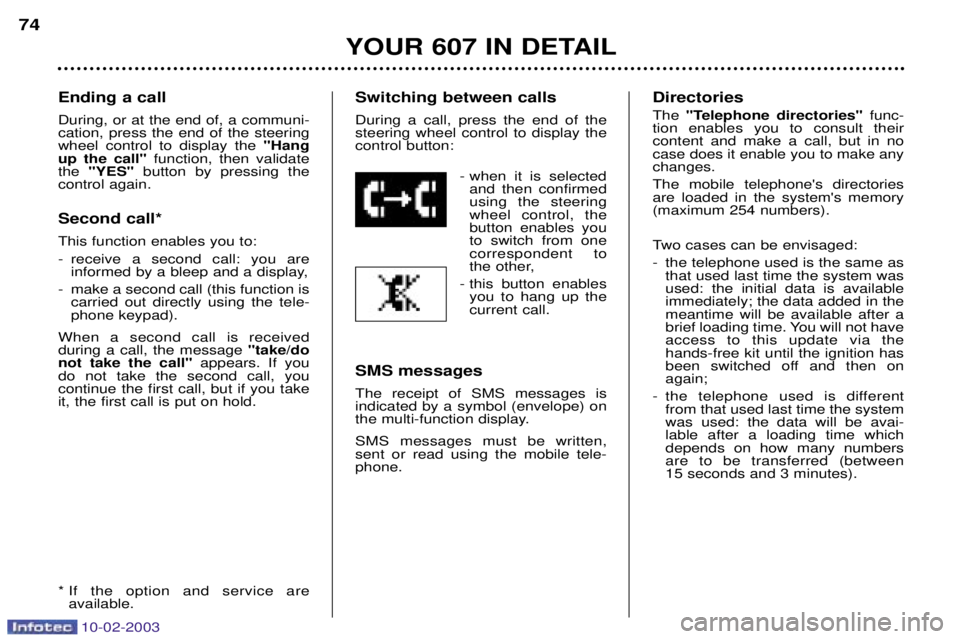
- when it is selectedand then confirmedusing the steeringwheel control, thebutton enables youto switch from onecorrespondent to
the other,
- this button enables you to hang up thecurrent call.
SMS messages The receipt of SMS messages is indicated by a symbol (envelope) on
the multi-function display. SMS messages must be written, sent or read using the mobile tele-phone. Directories The
"Telephone directories" func-
tion enables you to consult their content and make a call, but in nocase does it enable you to make anychanges. The mobile telephone's directories are loaded in the system's memory(maximum 254 numbers).
Two cases can be envisaged:
- the telephone used is the same as that used last time the system was used: the initial data is availableimmediately; the data added in themeantime will be available after a
brief loading time. You will not haveaccess to this update via thehands-free kit until the ignition has
been switched off and then onagain;
- the telephone used is different from that used last time the systemwas used: the data will be avai-lable after a loading time whichdepends on how many numbersare to be transferred (between 15 seconds and 3 minutes).
YOUR 607 IN DETAIL
74
Page 74 of 183

10-02-2003
YOUR 607 IN DETAIL
76
Functions available with telephones which have the Bluetooth system The table below lists the functions available depending on the type of telephone. Functions Nokia
6310i
Operator name Ye s
Network levelYe s
Make a call using the mobile telephone's keypad Yes
Make a call using the GSM voice recognition Yes
Make a call using a known numberYes
Pick up an incoming callYe s
Do not pick up an incoming call Yes
End a callYe s
Read the telephone directory Yes
Read the BIS directories, calls receivedYes
Make a call using a known number Yes
Displaying of the numberYe s
Secrecy modeYe s
Management of a second call Yes
Continuity of service Ye s
Page 75 of 183
10-02-2003
The control pad This lets you select and confirm the functions, controls and programmes dis- played. It is located by the side of the screen.Dial; this has two functions:
Ð Rotation of the dial:This allows you to move roundthe screen and thus select a
function.
It also allows you: Ð with a 'setting' type parameter, after selection, to increase
or decrease the value,
Ð with a 'list'type parameter, to open the list and scroll
through the values.
Ð Pressing the dial: This allows:Ð confirmation of the selected function or the modified value.
Ð selection of a 'setting' or 'list' type parameter for modifica-
tion.
Ð cancelling of a superimposed display.
'MENU' button:This allows access at any time to the general menu.
'MODE' button:
Ð brief press: Ð monochrome screen C: selection of functions (audio sys-
tem, navigation / guidance...),
Ð colour screen: access to the list of controls (context menu)
of the function being displayed.
Ð Pressing for more than two seconds puts the screen on standby. 'ESC' button:
Ð brief press: cancelling of operation in progress and return to the previous screen or erasing of a superimposed display.
Ð pressing for more than two seconds returns to the welcome screen. 77
SATELLITE NAVIGATION SYSTEM Introduction The satellite navigation system guides you, by means of vocal and
visual instructions (graphics), to
your chosen destination. The heart of the system lies in the use of a map data base and GPS
(Global Positioning System). With
this system you can fix the positionof your vehicle by means of a satel-lite network. The system uses the following ele- ments: Ð the control pad,Ð the CD-ROM drive,
Ð the last voice message and route change recall control,
Ð the map data in CD-ROM format,Ð the monochrome or colour screen.
Certain functions or services
described may vary depending
on the version of CD-ROM or the
country where the vehicle is sold.
YOUR 607 IN DETAIL