2003 NISSAN X-TRAIL code
[x] Cancel search: codePage 627 of 3066
TROUBLE DIAGNOSIS
ATC-49
C
D
E
F
G
H
I
K
L
MA
B
AT C
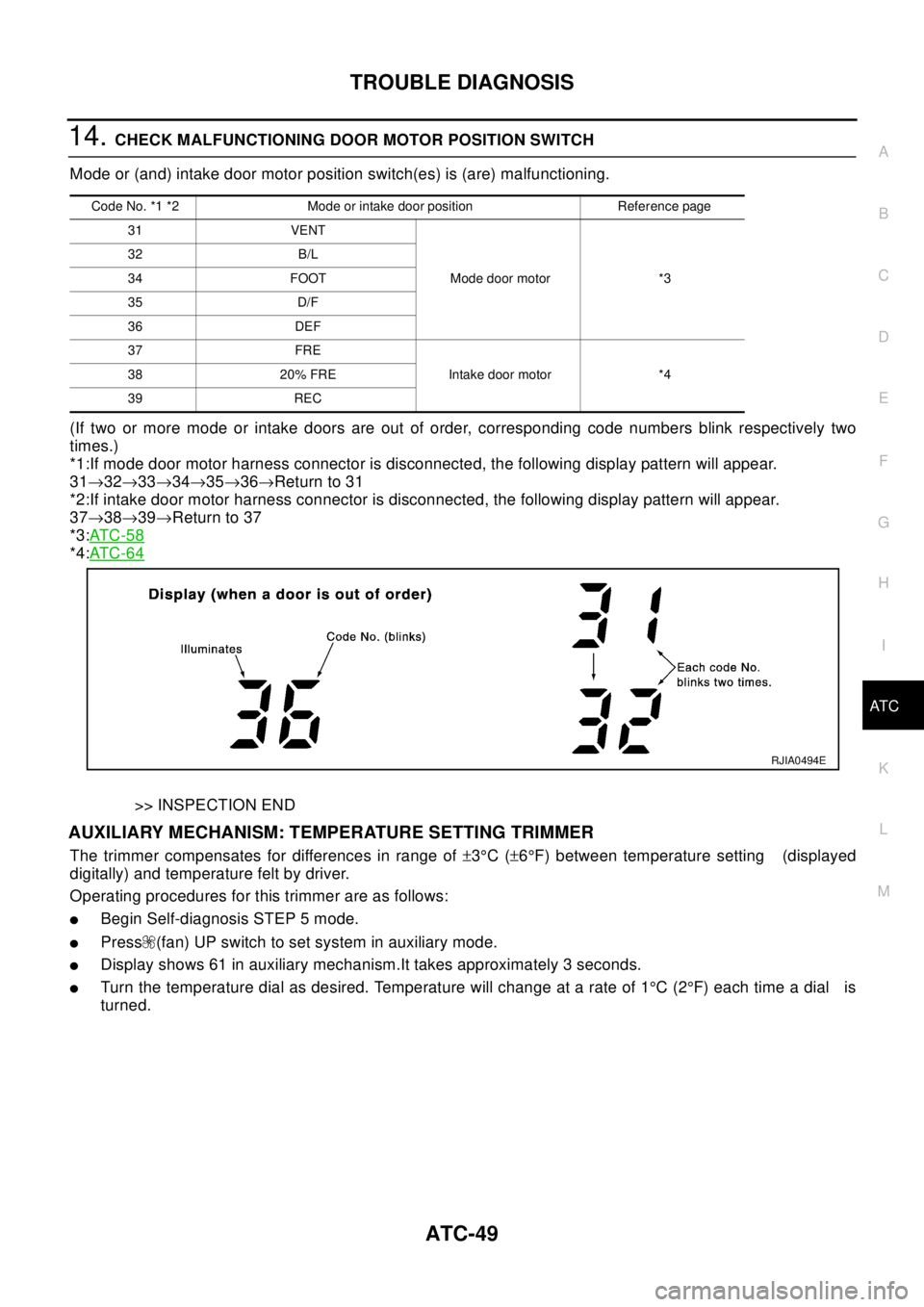
14.CHECK MALFUNCTIONING DOOR MOTOR POSITION SWITCH
Mode or (and) intake door motor position switch(es) is (are) malfunctioning.
(If two or more mode or intake doors are out of order, corresponding code numbers blink respectively two
times.)
*1:If mode door motor harness connector is disconnected, the following display pattern will appear.
31®32®33®34®35®36®Return to 31
*2:If intake door motor harness connector is disconnected, the following display pattern will appear.
37®38®39®Return to 37
*3:AT C - 5 8
*4:AT C - 6 4
>> INSPECTION END
AUXILIARY MECHANISM: TEMPERATURE SETTING TRIMMER
The trimmer compensates for differences in range of±3°C(±6°F) between temperature setting (displayed
digitally) and temperature felt by driver.
Operating procedures for this trimmer are as follows:
lBegin Self-diagnosis STEP 5 mode.
lPress (fan) UP switch to set system in auxiliary mode.
lDisplay shows 61 in auxiliary mechanism.It takes approximately 3 seconds.
lTurn the temperature dial as desired. Temperature will change at a rate of 1°C(2°F)eachtimeadial is
turned.
Code No. *1 *2 Mode or intake door position Reference page
31 VENT
Mode door motor *3 32 B/L
34 FOOT
35 D/F
36 DEF
37 FRE
Intake door motor *4 38 20% FRE
39 REC
RJIA0494E
Page 672 of 3066
ATC-94
TROUBLE DIAGNOSIS
DIAGNOSTIC PROCEDURE
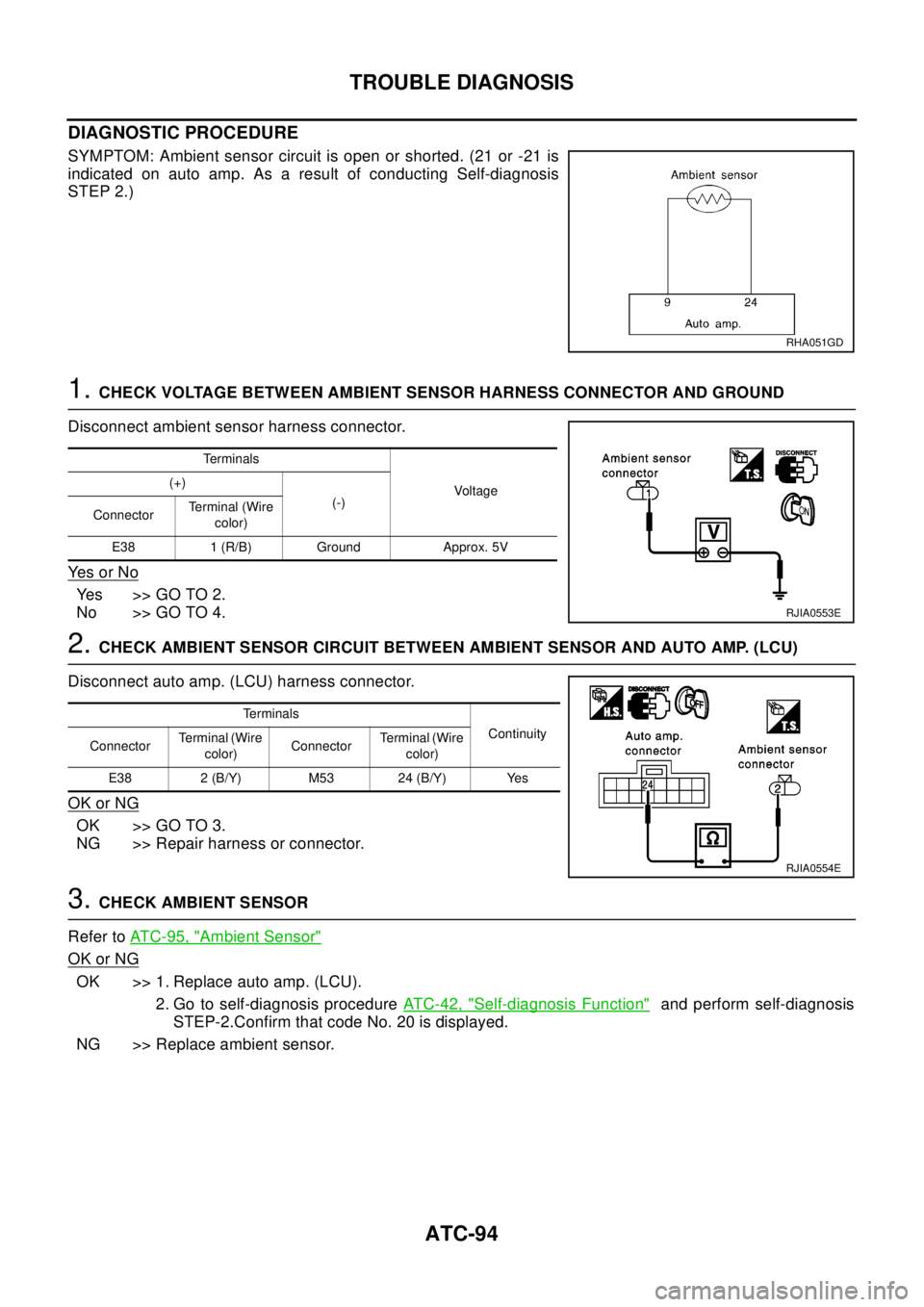
SYMPTOM: Ambient sensor circuit is open or shorted. (21 or -21 is
indicated on auto amp. As a result of conducting Self-diagnosis
STEP 2.)
1.CHECK VOLTAGE BETWEEN AMBIENT SENSOR HARNESS CONNECTOR AND GROUND
Disconnect ambient sensor harness connector.
Ye s o r N o
Yes >>GOTO2.
No >> GO TO 4.
2.CHECK AMBIENT SENSOR CIRCUIT BETWEEN AMBIENT SENSOR AND AUTO AMP. (LCU)
Disconnect auto amp. (LCU) harness connector.
OK or NG
OK >> GO TO 3.
NG >> Repair harness or connector.
3.CHECK AMBIENT SENSOR
Refer toATC-95, "
Ambient Sensor"
OK or NG
OK >> 1. Replace auto amp. (LCU).
2. Go to self-diagnosis procedureATC-42, "
Self-diagnosis Function"and perform self-diagnosis
STEP-2.Confirm that code No. 20 is displayed.
NG >> Replace ambient sensor.
RHA051GD
Te r m i n a l s
Voltag e (+)
(-)
ConnectorTerminal (Wire
color)
E38 1 (R/B) Ground Approx. 5V
RJIA0553E
Te r m i n a l s
Continuity
ConnectorTerminal (Wire
color)ConnectorTerminal (Wire
color)
E38 2 (B/Y) M53 24 (B/Y) Yes
RJIA0554E
Page 673 of 3066
TROUBLE DIAGNOSIS
ATC-95
C
D
E
F
G
H
I
K
L
MA
B
AT C
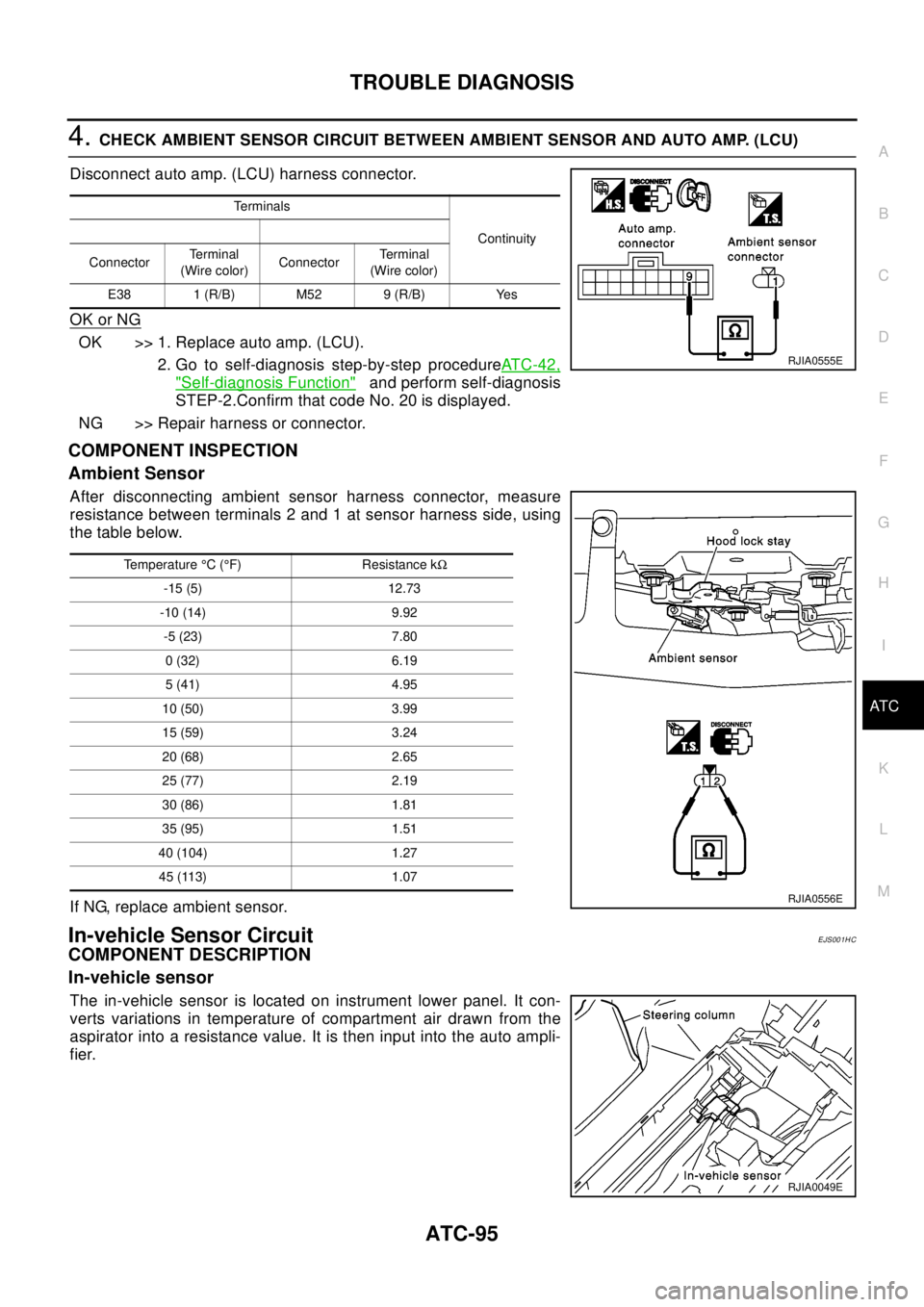
4.CHECK AMBIENT SENSOR CIRCUIT BETWEEN AMBIENT SENSOR AND AUTO AMP. (LCU)
Disconnect auto amp. (LCU) harness connector.
OK or NG
OK >> 1. Replace auto amp. (LCU).
2. Go to self-diagnosis step-by-step procedureAT C - 4 2 ,
"Self-diagnosis Function"and perform self-diagnosis
STEP-2.Confirm that code No. 20 is displayed.
NG >> Repair harness or connector.
COMPONENT INSPECTION
Ambient Sensor
After disconnecting ambient sensor harness connector, measure
resistance between terminals 2 and 1 at sensor harness side, using
the table below.
If NG, replace ambient sensor.
In-vehicle Sensor CircuitEJS001HC
COMPONENT DESCRIPTION
In-vehicle sensor
The in-vehicle sensor is located on instrument lower panel. It con-
verts variations in temperature of compartment air drawn from the
aspirator into a resistance value. It is then input into the auto ampli-
fier.
Te r m i n a l s
Continuity
ConnectorTe r m i n a l
(Wire color)ConnectorTerminal
(Wire color)
E38 1 (R/B) M52 9 (R/B) Yes
RJIA0555E
Temperature°C(°F) Resistance kW
-15 (5) 12.73
-10 (14) 9.92
-5 (23) 7.80
0(32) 6.19
5(41) 4.95
10 (50) 3.99
15 (59) 3.24
20 (68) 2.65
25 (77) 2.19
30 (86) 1.81
35 (95) 1.51
40 (104) 1.27
45 (113) 1.07
RJIA0556E
RJIA0049E
Page 675 of 3066
TROUBLE DIAGNOSIS
ATC-97
C
D
E
F
G
H
I
K
L
MA
B
AT C
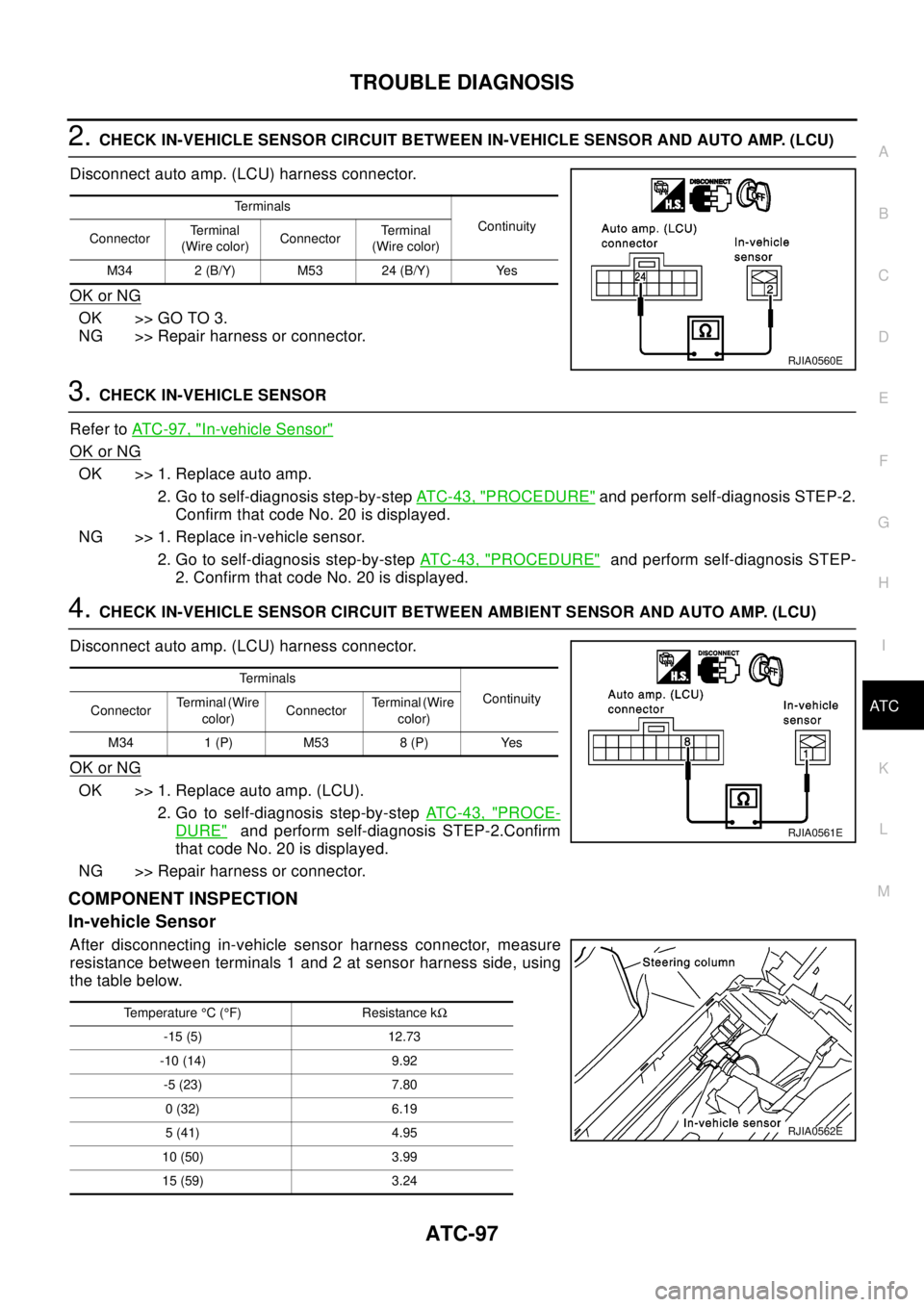
2.CHECK IN-VEHICLE SENSOR CIRCUIT BETWEEN IN-VEHICLE SENSOR AND AUTO AMP. (LCU)
Disconnect auto amp. (LCU) harness connector.
OK or NG
OK >> GO TO 3.
NG >> Repair harness or connector.
3.CHECK IN-VEHICLE SENSOR
Refer toAT C - 9 7 , "
In-vehicle Sensor"
OK or NG
OK >> 1. Replace auto amp.
2. Go to self-diagnosis step-by-stepAT C - 4 3 , "
PROCEDURE"and perform self-diagnosis STEP-2.
Confirm that code No. 20 is displayed.
NG >> 1. Replace in-vehicle sensor.
2. Go to self-diagnosis step-by-stepAT C - 4 3 , "
PROCEDURE"and perform self-diagnosis STEP-
2. Confirm that code No. 20 is displayed.
4.CHECK IN-VEHICLE SENSOR CIRCUIT BETWEEN AMBIENT SENSOR AND AUTO AMP. (LCU)
Disconnect auto amp. (LCU) harness connector.
OK or NG
OK >> 1. Replace auto amp. (LCU).
2. Go to self-diagnosis step-by-stepAT C - 4 3 , "
PROCE-
DURE"and perform self-diagnosis STEP-2.Confirm
that code No. 20 is displayed.
NG >> Repair harness or connector.
COMPONENT INSPECTION
In-vehicle Sensor
After disconnecting in-vehicle sensor harness connector, measure
resistance between terminals 1 and 2 at sensor harness side, using
the table below.
Te r m i n a l s
Continuity
ConnectorTe r m i n a l
(Wire color)ConnectorTe r m i n a l
(Wire color)
M34 2 (B/Y) M53 24 (B/Y) Yes
RJIA0560E
Te r m i n a l s
Continuity
ConnectorTerminal (Wire
color)ConnectorTerminal (Wire
color)
M34 1 (P) M53 8 (P) Yes
RJIA0561E
Temperature°C(°F) Resistance kW
-15 (5) 12.73
-10 (14) 9.92
-5 (23) 7.80
0(32) 6.19
5(41) 4.95
10 (50) 3.99
15 (59) 3.24
RJIA0562E
Page 677 of 3066
TROUBLE DIAGNOSIS
ATC-99
C
D
E
F
G
H
I
K
L
MA
B
AT C
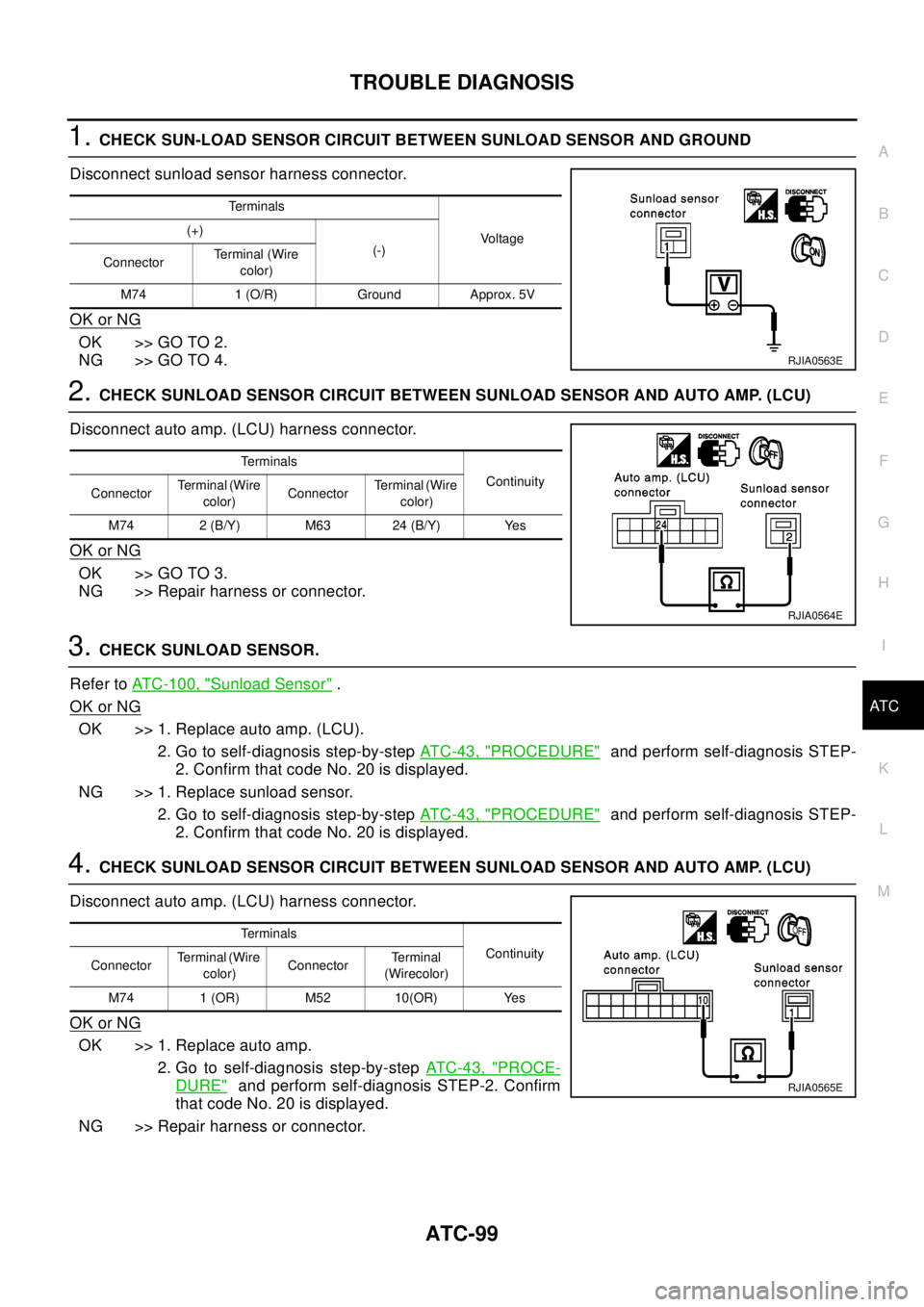
1.CHECK SUN-LOAD SENSOR CIRCUIT BETWEEN SUNLOAD SENSOR AND GROUND
Disconnect sunload sensor harness connector.
OK or NG
OK >> GO TO 2.
NG >> GO TO 4.
2.CHECK SUNLOAD SENSOR CIRCUIT BETWEEN SUNLOAD SENSOR AND AUTO AMP. (LCU)
Disconnect auto amp. (LCU) harness connector.
OK or NG
OK >> GO TO 3.
NG >> Repair harness or connector.
3.CHECK SUNLOAD SENSOR.
Refer toATC-100, "
Sunload Sensor".
OK or NG
OK >> 1. Replace auto amp. (LCU).
2. Go to self-diagnosis step-by-stepAT C - 4 3 , "
PROCEDURE"and perform self-diagnosis STEP-
2. Confirm that code No. 20 is displayed.
NG >> 1. Replace sunload sensor.
2. Go to self-diagnosis step-by-stepAT C - 4 3 , "
PROCEDURE"and perform self-diagnosis STEP-
2. Confirm that code No. 20 is displayed.
4.CHECK SUNLOAD SENSOR CIRCUIT BETWEEN SUNLOAD SENSOR AND AUTO AMP. (LCU)
Disconnect auto amp. (LCU) harness connector.
OK or NG
OK >> 1. Replace auto amp.
2. Go to self-diagnosis step-by-stepAT C - 4 3 , "
PROCE-
DURE"and perform self-diagnosis STEP-2. Confirm
that code No. 20 is displayed.
NG >> Repair harness or connector.
Te r m i n a l s
Vo l ta g e (+)
(-)
ConnectorTerminal (Wire
color)
M74 1 (O/R) Ground Approx. 5V
RJIA0563E
Te r m i n a l s
Continuity
ConnectorTerminal (Wire
color)ConnectorTerminal (Wire
color)
M74 2 (B/Y) M63 24 (B/Y) Yes
RJIA0564E
Te r m i n a l s
Continuity
ConnectorTerminal (Wire
color)ConnectorTe r m i n a l
(Wirecolor)
M74 1 (OR) M52 10(OR) Yes
RJIA0565E
Page 681 of 3066
TROUBLE DIAGNOSIS
ATC-103
C
D
E
F
G
H
I
K
L
MA
B
AT C
3.CHECK INTAKE SENSOR
Refer toATC-101, "
Intake Sensor"
OK or NG
OK >> 1. Replace auto amp.
2. Go to self-diagnosis step-by-stepAT C - 4 3 , "
PROCEDURE"and perform self-diagnosis STEP-
2.Confirm that code No. 20 is displayed.
NG >> 1. Replace intake sensor.
2. Go to self-diagnosis step-by-stepAT C - 4 3 , "
PROCEDURE"and perform self-diagnosis STEP-
2.Confirm that code No. 20 is displayed.
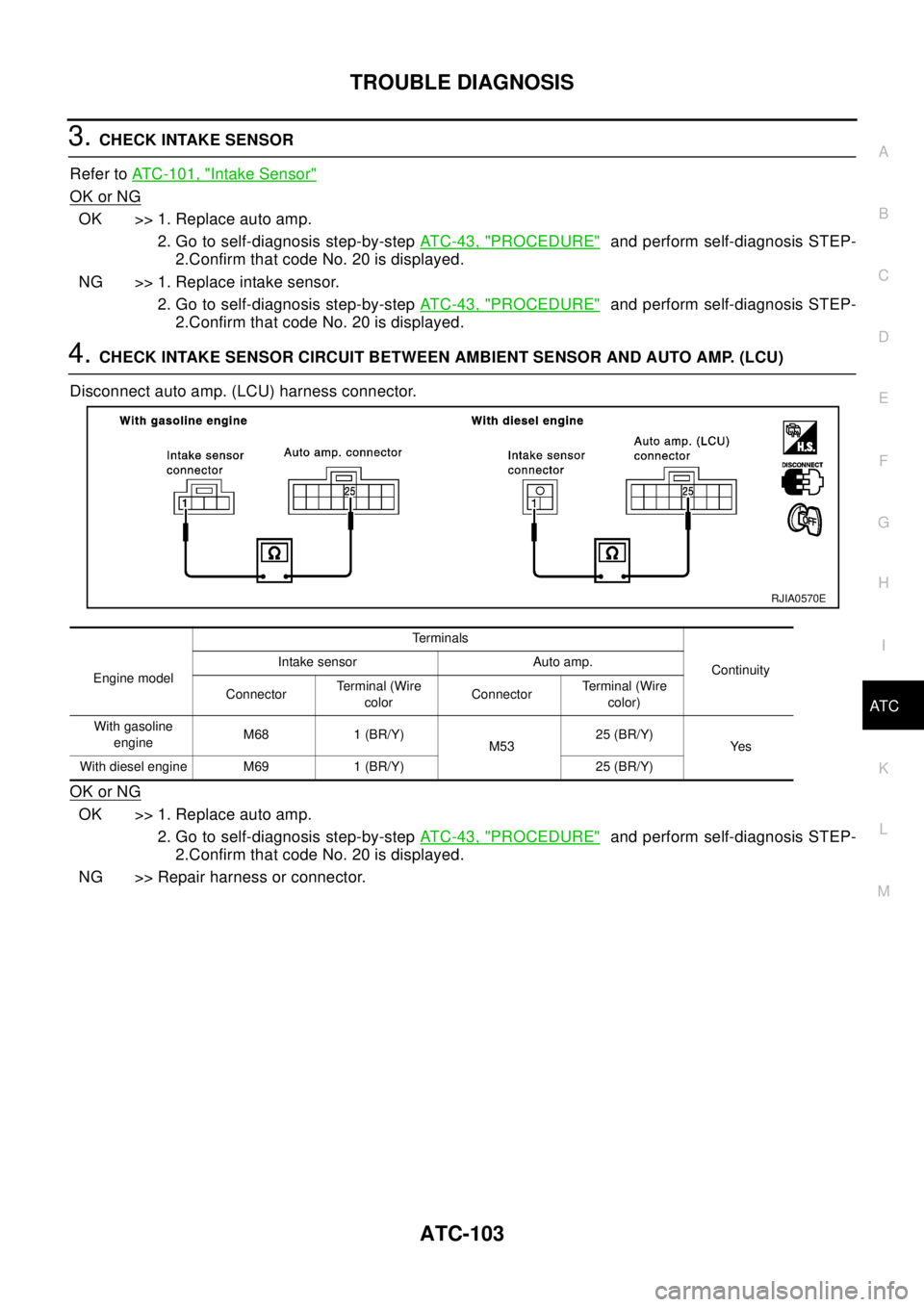
4.CHECK INTAKE SENSOR CIRCUIT BETWEEN AMBIENT SENSOR AND AUTO AMP. (LCU)
Disconnect auto amp. (LCU) harness connector.
OK or NG
OK >> 1. Replace auto amp.
2. Go to self-diagnosis step-by-stepAT C - 4 3 , "
PROCEDURE"and perform self-diagnosis STEP-
2.Confirm that code No. 20 is displayed.
NG >> Repair harness or connector.
Engine modelTerminals
Continuity Intake sensor Auto amp.
ConnectorTerminal (Wire
colorConnectorTerminal (Wire
color)
With gasoline
engineM68 1 (BR/Y)
M5325 (BR/Y)
Ye s
With diesel engine M69 1 (BR/Y) 25 (BR/Y)
RJIA0570E
Page 725 of 3066

AUDIO
AV-3
C
D
E
F
G
H
I
J
L
MA
B
AV
AUDIOP F P : 2 8 111
System DescriptionEKS002F2
Refer to Owner's Manual for audio system operating instructions.
Power is supplied at all times
lthrough 15A fuse (No. 32, located in the fusible link and fuse block)
lto audio unit terminal 3
lto CD auto changer terminal 32.
With the ignition switch in the ACC or ON position, power is supplied
lthrough 10A fuse [No. 4, located in the fuse block (J/B)]
lto audio unit terminal 6,
lto CD auto changer terminal 36
Ground is supplied through the case of the audio unit.
Audio signals are supplied
lthrough audio unit terminals 5, 7, 9, 10, 11, 13, 15, 16
lto terminals 1 and 2 of front door speaker LH and RH,
lto terminals 1 and 2 of rear door speaker LH and RH and
lto terminals 1 and 2 of tweeter LH and RH (with 6 speakers)
NATS AUDIO LINK
Description
The link with the NATS IMMU implies that the audio unit can basically only be operated if connected to the
matching NATS IMMU to which the audio unit was initially fitted on the production line.
Since radio operation is impossible after the link with the NATS is disrupted theft of the audio unit is basically
useless since special equipment is required to reset the audio unit.
Initialization process for audio units that are linked to the NATS IMMU
New audio units will be delivered to the factories in the “NEW” state, i.e. ready to be linked with the vehicle's
NATS. When the audio unit in “NEW” state is first switched on at the factory, it will start up communication with
the vehicle's immobilizer control unit (IMMU) and send a code (the “audio unit Code”) to the IMMU. The IMMU
will then store this code, which is unique to each audio unit, in its (permanent) memory.
Upon receipt of the code by the IMMU, the NATS will confirm correct receipt of the audio unit code to the audio
unit. Hereafter, the audio unit will operate as normal.
During the initialization process, “NEW” is displayed on the audio unit display. Normally though, communica-
tion between audio unit and IMMU takes such a short time (300 ms) that the audio unit seems to switch on
directly without showing “NEW” on its display.
Normal operation
Each time the audio unit is switched on afterwards, the audio unit code will be verified between the audio unit
and the NATS before the audio unit becomes operational. During the code verification process, “WAIT” is
shown on the audio unit display. Again, the communication takes such a short time (300 ms) that the audio
unit seems to switch on directly without showing “WAIT” on its display.
When the radio is locked
In case of a audio unit being linked with the vehicle's NATS (immobilizer system), disconnection of the link
between the audio unit and the IMMU will cause the audio unit to switch into the lock (“SECURE”) mode in
which the audio unit is fully inoperative. Hence, repair of the audio unit is basically impossible, unless the
audio unit is reset to the “NEW” state for which special decoding equipment is required.
Clarion has provided their authorized service representatives with so called “decoder boxes” which can bring
the audio unit back to the “NEW” state, enabling the audio unit to be switched on after which repair can be car-
ried out. Subsequently, when the repaired audio unit is delivered to the final user again, it will be in the “NEW”
state to enable re-linking the audio unit to the vehicle's immobilizer system. As a result of the above, repair of
the audio unit can only be done by an authorized Clarion representative (when the owner of the vehicle
requests repair and can show personal identification).
Page 745 of 3066

BL-1
BODY, LOCK & SECURITY SYSTEM
IBODY
CONTENTS
C
D
E
F
G
H
J
K
L
M
SECTION
A
B
BL
BODY, LOCK & SECURITY SYSTEM
PRECAUTIONS .......................................................... 3
Precautions .............................................................. 3
HOOD ......................................................................... 4
Fitting Adjustment .................................................... 4
FRONT END HEIGHT ADJUSTMENT AND LAT-
ERAL/LONGITUDIAL CLEARANCE ADJUST-
MENT .................................................................... 4
SURFACE HEIGHT ADJUSTMENT ..................... 4
Removal and Installation of Hood Assembly ............ 5
Removal and Installation of Hood Lock Control ....... 6
REMOVAL ............................................................. 6
INSTALLATION ..................................................... 7
Hood Lock Control Inspection .................................. 7
DOOR ......................................................................... 8
Fitting Adjustment .................................................... 8
FRONT DOOR ...................................................... 8
REAR DOOR ........................................................ 8
STRIKER ADJUSTMENT ..................................... 9
Removal and Installation .......................................... 9
Door Weatherstrip .................................................. 10
POWER DOOR LOCK SYSTEM ...............................11
System Description .................................................11
OPERATION ........................................................11
Component Parts and Harness Connector Location....11
Schematic .............................................................. 12
Wiring Diagram — D/LOCK — ............................... 13
Terminal and Reference Value for Time Control Unit... 17
Symptom Chart ...................................................... 17
Power Supply and Ground Circuit Check ............... 18
Door Lock/Unlock Switch Check ............................ 18
Door Key Cylinder Switch Check ........................... 19
Door Lock Actuator Check ..................................... 20
Door Switch Check ................................................. 21
Door Unlock Sensor Check .................................... 22
Key Switch Check .................................................. 23
POWER DOOR LOCK — SUPER LOCK — ............ 24
System Description ................................................ 24
OUTLINE ............................................................. 24
OPERATION ....................................................... 24
Schematic .............................................................. 26Wiring Diagram — S/LOCK — ............................... 27
Terminal and Reference Value for Time Control Unit... 33
Trouble Diagnoses ................................................. 34
PRELIMINARY CHECK ....................................... 34
SYMPTOM CHART ............................................. 35
Power Supply and Ground Circuit Check ............... 36
Door Lock/Unlock Switch Check ............................ 36
Door Key Cylinder Switch Check ............................ 37
Door Lock Actuator Check ...................................... 38
Door Switch Check ................................................. 39
Door Unlock Sensor Check .................................... 40
Key Switch Check ................................................... 41
Super Lock Actuator Check .................................... 42
NATS Release Signal Check .................................. 43
Ignition Switch “ON” Circuit Check ......................... 44
Remote Controller Signal Check ............................ 44
MULTI-REMOTE CONTROL SYSTEM ..................... 45
Component Parts and Harness Connector Location... 45
System Description ................................................. 45
FUNCTION .......................................................... 45
LOCK OPERATION ............................................. 45
UNLOCK OPERATION ........................................ 46
HAZARD REMINDER ......................................... 46
MULTI-REMOTE CONTROLLER ID CODE
ENTRY ................................................................ 46
Wiring Diagram — MULTI — .................................. 47
Terminal and Reference Value for Multi-remote
Control Unit ............................................................. 49
Symptom Chart ....................................................... 49
Remote Controller Battery Check ........................... 49
Power Supply and Ground Circuit Check ............... 50
Hazard Reminder Check ........................................ 51
ID Code Entry Procedure ....................................... 52
Remote Controller Battery Replacement ................ 53
FRONT DOOR LOCK ............................................... 54
Component Parts Location ..................................... 54
Inspection and Adjustment ..................................... 54
OUT SIDE HANDLE ROD ADJUSTMENT .......... 54
Removal and Installation ........................................ 54
REMOVAL ........................................................... 54