Page 2845 of 3502
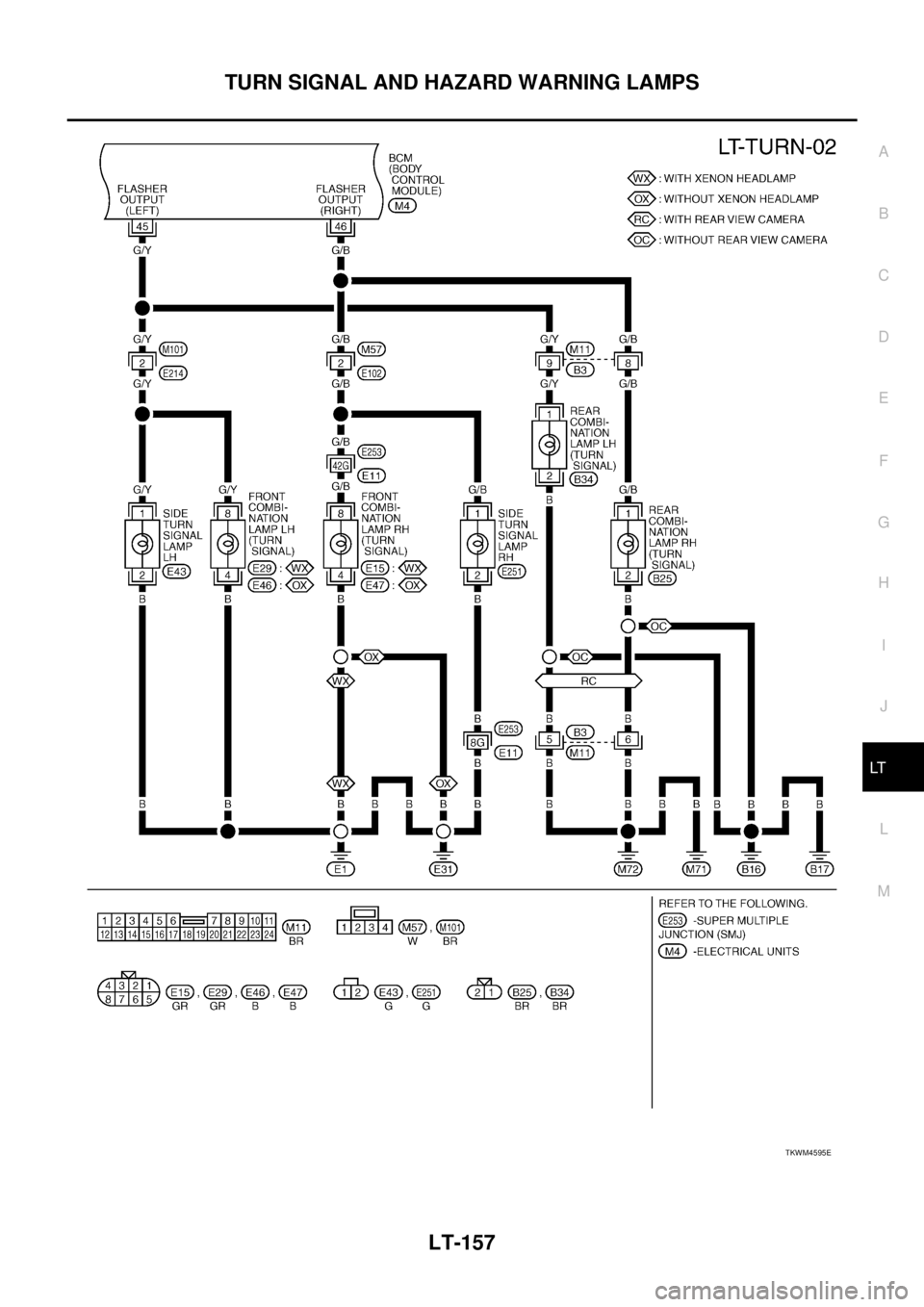
TURN SIGNAL AND HAZARD WARNING LAMPS
LT-157
C
D
E
F
G
H
I
J
L
MA
B
LT
TKWM4595E
Page 2846 of 3502
LT-158
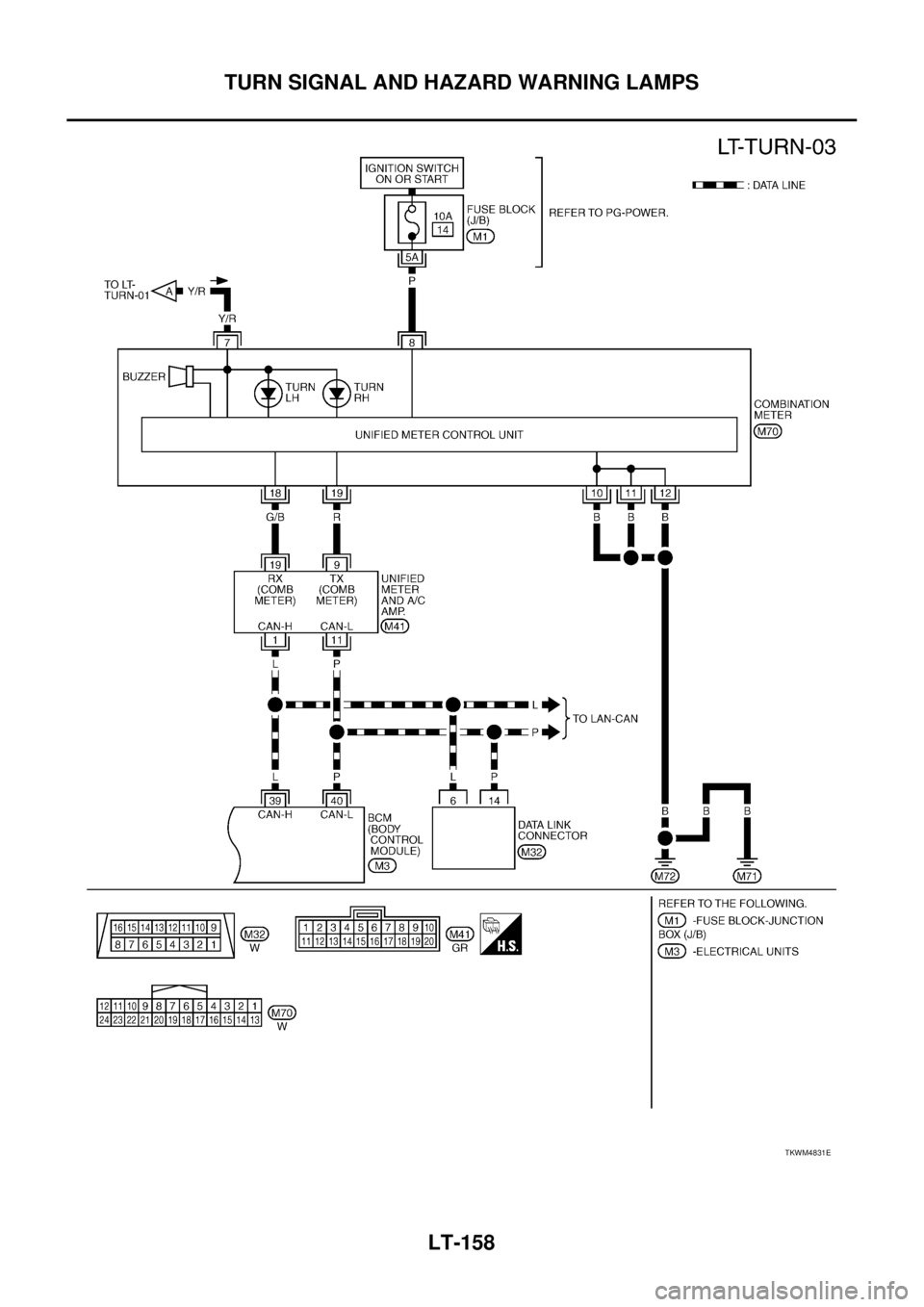
TURN SIGNAL AND HAZARD WARNING LAMPS
TKWM4831E
Page 2847 of 3502
TURN SIGNAL AND HAZARD WARNING LAMPS
LT-159
C
D
E
F
G
H
I
J
L
MA
B
LT
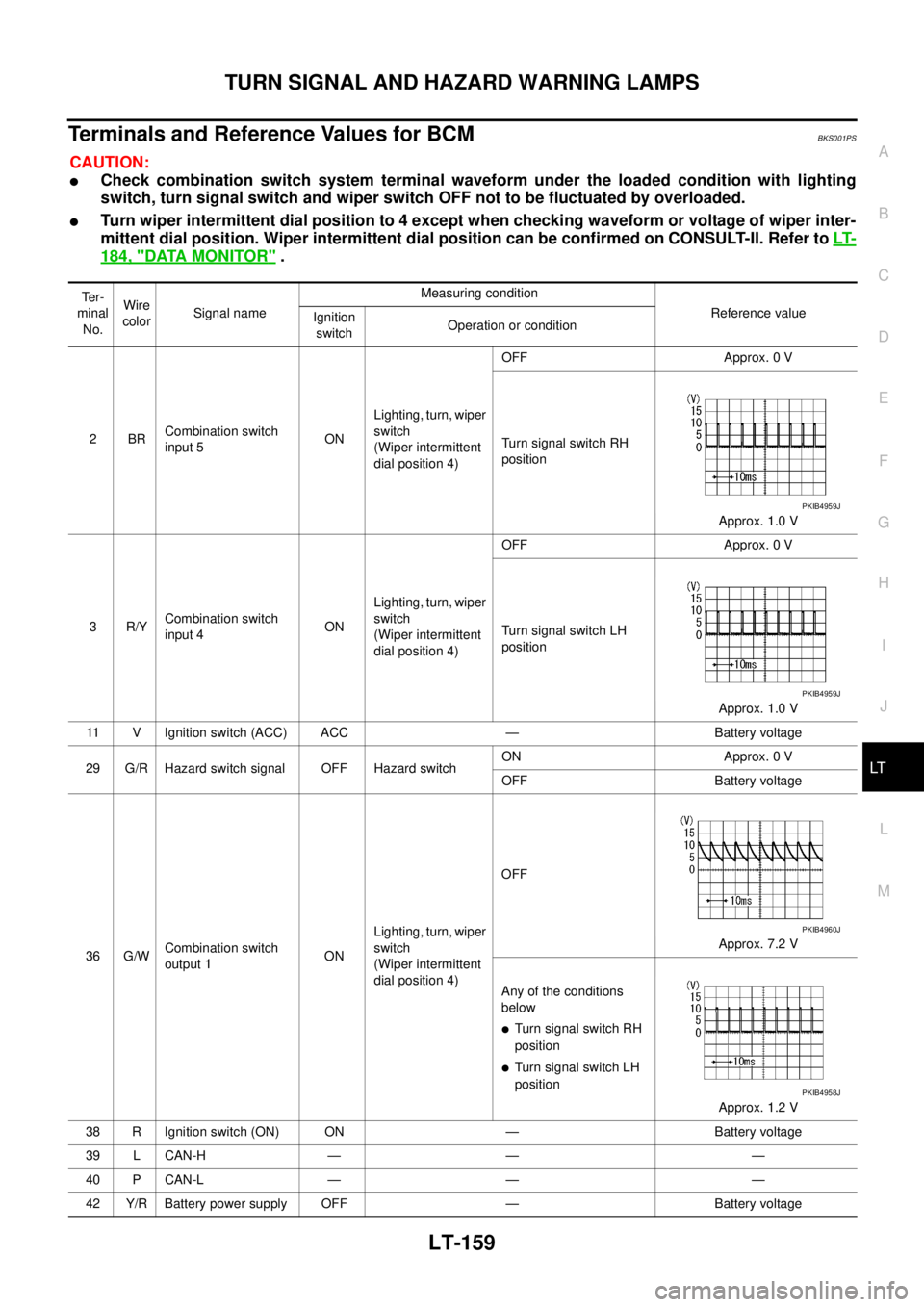
Terminals and Reference Values for BCMBKS001PS
CAUTION:
�Check combination switch system terminal waveform under the loaded condition with lighting
switch, turn signal switch and wiper switch OFF not to be fluctuated by overloaded.
�Turn wiper intermittent dial position to 4 except when checking waveform or voltage of wiper inter-
mittent dial position. Wiper intermittent dial position can be confirmed on CONSULT-II. Refer to LT-
184, "DATA MONITOR" .
Te r -
minal
No.Wire
colorSignal nameMeasuring condition
Reference value
Ignition
switchOperation or condition
2BRCombination switch
input 5ONLighting, turn, wiper
switch
(Wiper intermittent
dial position 4)OFF Approx. 0 V
Turn signal switch RH
position
Approx. 1.0 V
3R/YCombination switch
input 4ONLighting, turn, wiper
switch
(Wiper intermittent
dial position 4)OFF Approx. 0 V
Turn signal switch LH
position
Approx. 1.0 V
11 V Ignition switch (ACC) ACC — Battery voltage
29 G/R Hazard switch signal OFF Hazard switchON Approx. 0 V
OFF Battery voltage
36 G/WCombination switch
output 1ONLighting, turn, wiper
switch
(Wiper intermittent
dial position 4)OFF
Approx. 7.2 V
Any of the conditions
below
�Turn signal switch RH
position
�Turn signal switch LH
position
Approx. 1.2 V
38 R Ignition switch (ON) ON — Battery voltage
39 L CAN-H — — —
40 P CAN-L — — —
42 Y/R Battery power supply OFF — Battery voltage
PKIB4959J
PKIB4959J
PKIB4960J
PKIB4958J
Page 2848 of 3502
LT-160
TURN SIGNAL AND HAZARD WARNING LAMPS
How to Perform Trouble DiagnosesBKS001PT
1. Confirm the symptom or customer complaint.
2. Understand operation description and function description. Refer to LT- 1 5 2 , "
System Description" .
3. Perform the Preliminary Check. Refer to LT- 1 6 1 , "
Preliminary Check" .
4. Check symptom and repair or replace the cause of malfunction.
5. Do turn signal and hazard warning lamps operate normally? If YES, GO TO 6. If NO, GO TO 4.
6. INSPECTION END
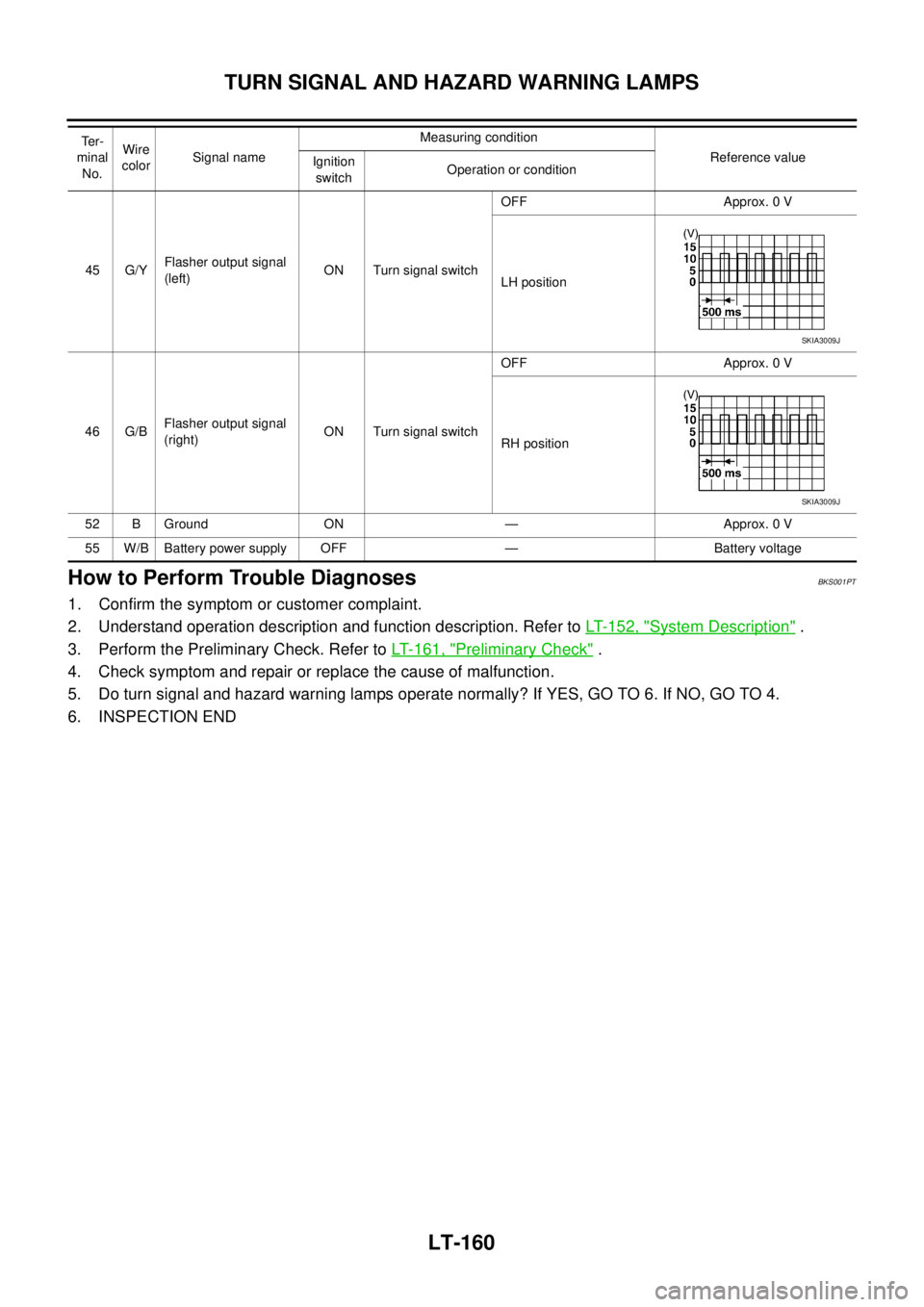
45 G/YFlasher output signal
(left)ON Turn signal switchOFF Approx. 0 V
LH position
46 G/BFlasher output signal
(right)ON Turn signal switchOFF Approx. 0 V
RH position
52 B Ground ON — Approx. 0 V
55 W/B Battery power supply OFF — Battery voltage Te r -
minal
No.Wire
colorSignal nameMeasuring condition
Reference value
Ignition
switchOperation or condition
SKIA3009J
SKIA3009J
Page 2849 of 3502
TURN SIGNAL AND HAZARD WARNING LAMPS
LT-161
C
D
E
F
G
H
I
J
L
MA
B
LT
Preliminary CheckBKS001PU
CHECK POWER SUPPLY AND GROUND CIRCUIT
1. CHECK FUSES AND FUSIBLE LINK
Check for blown fuses and fusible link.
Refer to LT-156, "Wiring Diagram — TURN —" .
OK or NG
OK >> GO TO 2.
NG >> If fuse or fusible link is blown, be sure to eliminate cause of malfunction before installing new fuse
or fusible link. Refer to PG-3, "
POWER SUPPLY ROUTING CIRCUIT" .
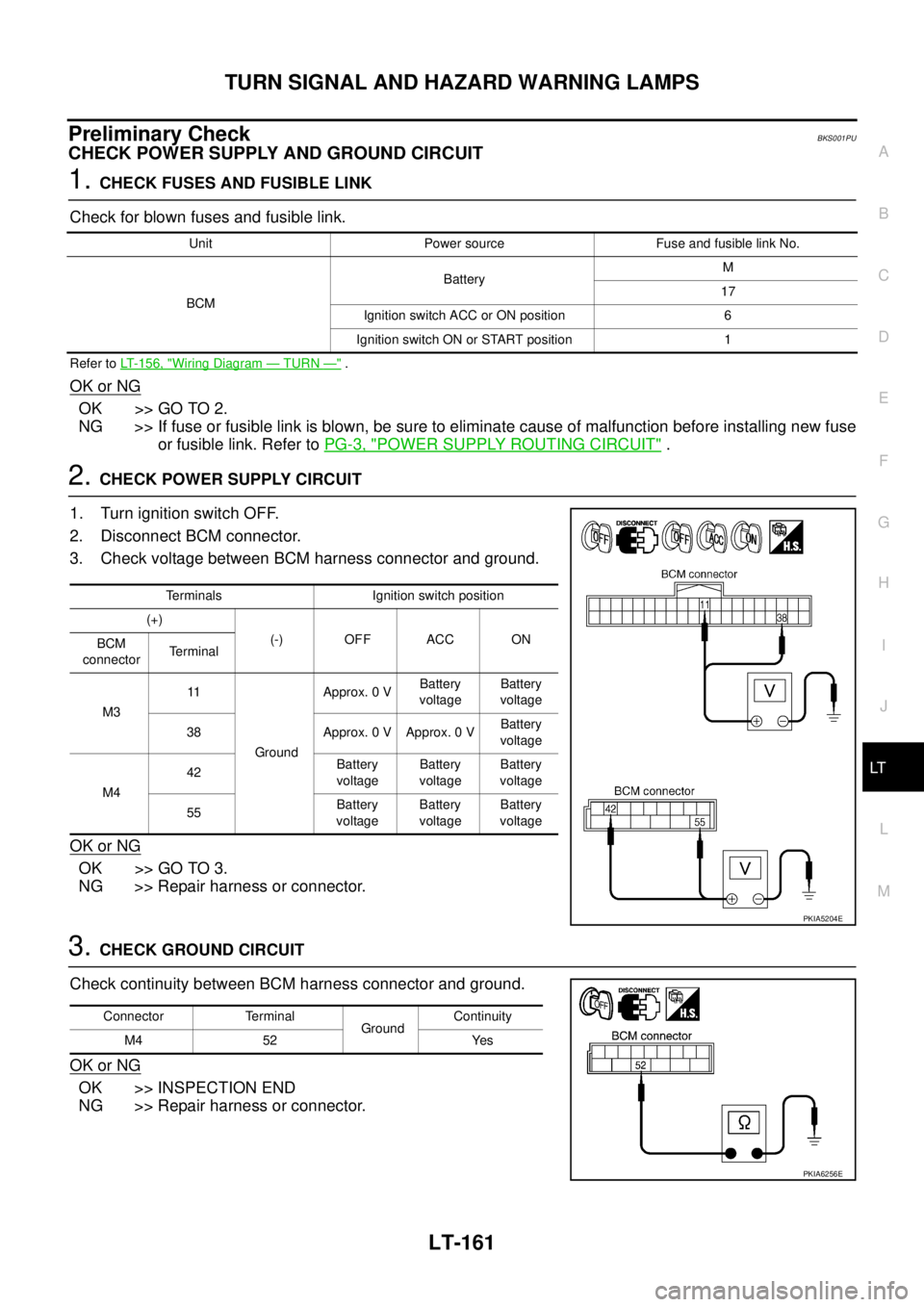
2. CHECK POWER SUPPLY CIRCUIT
1. Turn ignition switch OFF.
2. Disconnect BCM connector.
3. Check voltage between BCM harness connector and ground.
OK or NG
OK >> GO TO 3.
NG >> Repair harness or connector.
3. CHECK GROUND CIRCUIT
Check continuity between BCM harness connector and ground.
OK or NG
OK >> INSPECTION END
NG >> Repair harness or connector.
Unit Power source Fuse and fusible link No.
BCMBatteryM
17
Ignition switch ACC or ON position 6
Ignition switch ON or START position 1
Terminals Ignition switch position
(+)
(-) OFF ACC ON
BCM
connectorTerminal
M311
GroundApprox. 0 VBattery
voltageBattery
voltage
38 Approx. 0 V Approx. 0 VBattery
voltage
M442Battery
voltageBattery
voltageBattery
voltage
55Battery
voltageBattery
voltageBattery
voltage
PKIA5204E
Connector Terminal
GroundContinuity
M4 52 Yes
PKIA6256E
Page 2850 of 3502

LT-162
TURN SIGNAL AND HAZARD WARNING LAMPS
CONSULT-II Functions (BCM)BKS001PV
CONSULT-II can display each diagnostic item using the diagnostic test mode shown following.
CONSULT-II BASIC OPERATION
Refer to GI-34, "CONSULT-II Start Procedure" .
DATA MONITOR
Operation Procedure
1. Touch “FLASHER” on “SELECT TEST ITEM” screen.
2. Touch “DATA MONITOR” on “SELECT DIAG MODE” screen.
3. Touch either “ALL SIGNALS” or “SELECTION FROM MENU” on “SELECT MONITOR ITEM” screen.
4. When “ALL SIGNALS” is selected, all the items will be monitored. When “SELECTION FROM MENU” is
selected, touch individual items to be monitored.
5. Touch “START”.
6. Touch “RECORD” while monitoring, then the status of the monitored item can be recorded. To stop
recording, touch “STOP”.
Display Item List
ACTIVE TEST
Operation Procedure
1. Touch “FLASHER” on “SELECT TEST ITEM” screen.
2. Touch “ACTIVE TEST” on “SELECT DIAG MODE” screen.
3. Touch item to be tested and check operation of the selected item.
4. During the operation check, touching “OFF” deactivates the operation.
Display Item List
BCM diagnosis part Diagnosis mode Description
FLASHERDATA MONITOR Displays BCM input data in real time.
ACTIVE TEST Operation of electrical loads can be checked by sending driving signal to them.
ALL SIGNALS Monitors all the items.
SELECTION FROM MENU Selects items and monitor them.
Monitor item Contents
IGN ON SW “ON/OFF” Displays “IGN position (ON)/OFF, ACC position (OFF)” judged from the ignition switch signal.
HAZARD SW “ON/OFF” Displays “hazard ON (ON)/hazard OFF (OFF)” status, determined from hazard switch signal.
TURN SIGNAL R “ON/OFF” Displays “turn right (ON)/other (OFF)” status, determined from lighting switch signal.
TURN SIGNAL L “ON/OFF” Displays “turn left (ON)/other (OFF)” status, determined from lighting switch signal.
CONSULT-II
screen displayTest item Description
FLASHER Turn signal lamp RH and LH
operation Turn signal lamp RH and LH are operated by switching operation (OFF, RH, LH).
(It is not blinking operation.)
Page 2851 of 3502
TURN SIGNAL AND HAZARD WARNING LAMPS
LT-163
C
D
E
F
G
H
I
J
L
MA
B
LT
Turn Signal Lamp RH Does Not IlluminateBKS002FN
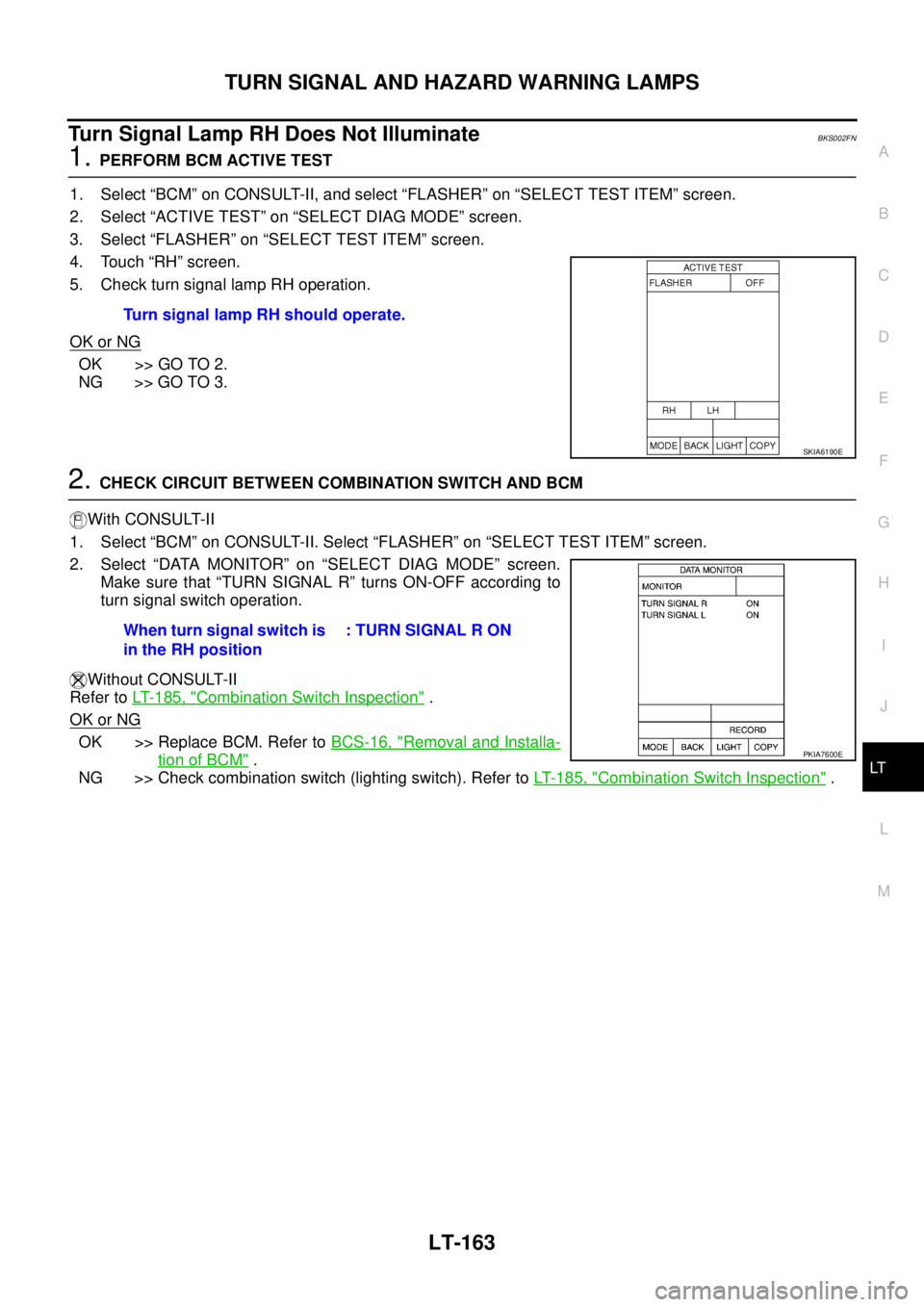
1. PERFORM BCM ACTIVE TEST
1. Select “BCM” on CONSULT-II, and select “FLASHER” on “SELECT TEST ITEM” screen.
2. Select “ACTIVE TEST” on “SELECT DIAG MODE” screen.
3. Select “FLASHER” on “SELECT TEST ITEM” screen.
4. Touch “RH” screen.
5. Check turn signal lamp RH operation.
OK or NG
OK >> GO TO 2.
NG >> GO TO 3.
2. CHECK CIRCUIT BETWEEN COMBINATION SWITCH AND BCM
With CONSULT-II
1. Select “BCM” on CONSULT-II. Select “FLASHER” on “SELECT TEST ITEM” screen.
2. Select “DATA MONITOR” on “SELECT DIAG MODE” screen.
Make sure that “TURN SIGNAL R” turns ON-OFF according to
turn signal switch operation.
Without CONSULT-II
Refer to LT- 1 8 5 , "
Combination Switch Inspection" .
OK or NG
OK >> Replace BCM. Refer to BCS-16, "Removal and Installa-
tion of BCM" .
NG >> Check combination switch (lighting switch). Refer to LT- 1 8 5 , "
Combination Switch Inspection" . Turn signal lamp RH should operate.
SKIA6190E
When turn signal switch is
in the RH position: TURN SIGNAL R ON
PKIA7600E
Page 2852 of 3502
LT-164
TURN SIGNAL AND HAZARD WARNING LAMPS
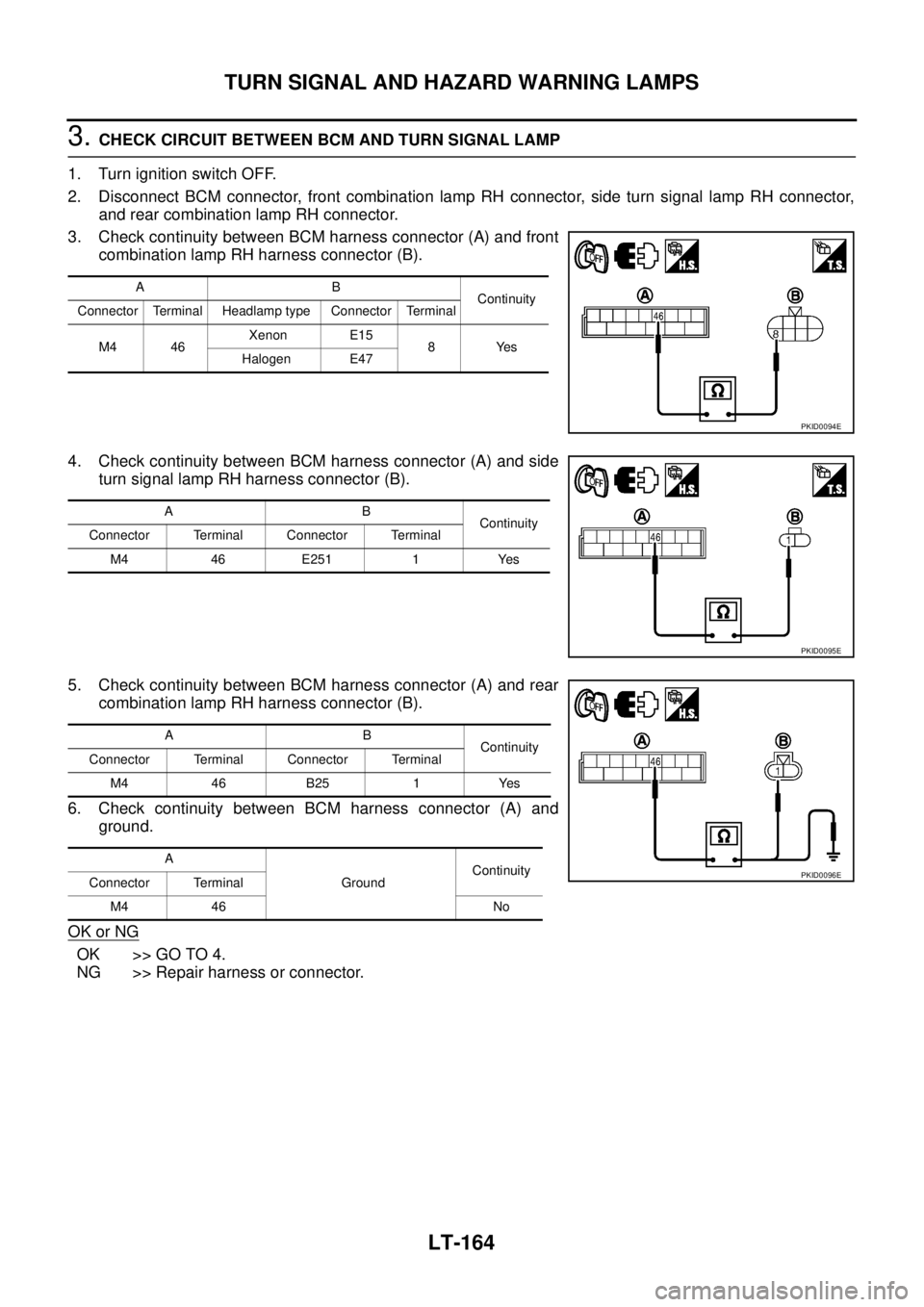
3. CHECK CIRCUIT BETWEEN BCM AND TURN SIGNAL LAMP
1. Turn ignition switch OFF.
2. Disconnect BCM connector, front combination lamp RH connector, side turn signal lamp RH connector,
and rear combination lamp RH connector.
3. Check continuity between BCM harness connector (A) and front
combination lamp RH harness connector (B).
4. Check continuity between BCM harness connector (A) and side
turn signal lamp RH harness connector (B).
5. Check continuity between BCM harness connector (A) and rear
combination lamp RH harness connector (B).
6. Check continuity between BCM harness connector (A) and
ground.
OK or NG
OK >> GO TO 4.
NG >> Repair harness or connector.
AB
Continuity
Connector Terminal Headlamp type Connector Terminal
M4 46 Xenon E15
8Yes
Halogen E47
PKID0094E
AB
Continuity
Connector Terminal Connector Terminal
M4 46 E251 1 Yes
PKID0095E
AB
Continuity
Connector Terminal Connector Terminal
M4 46 B25 1 Yes
A
GroundContinuity
Connector Terminal
M4 46 No
PKID0096E