2003 NISSAN ALTIMA battery
[x] Cancel search: batteryPage 83 of 256
when the ignition key is in the ON position or for
45 seconds after the ignition key is turned to the
OFF position.
Depending on the environment or driving
conditions, the auto-reverse function may
be activated if an impact or load similar to
something being caught in the window oc-
curs.
WARNING
There are some small distances immedi-
ately before the closed position which
cannot be detected. Make sure that all
passengers have their hands, etc., inside
the vehicle before closing the window.
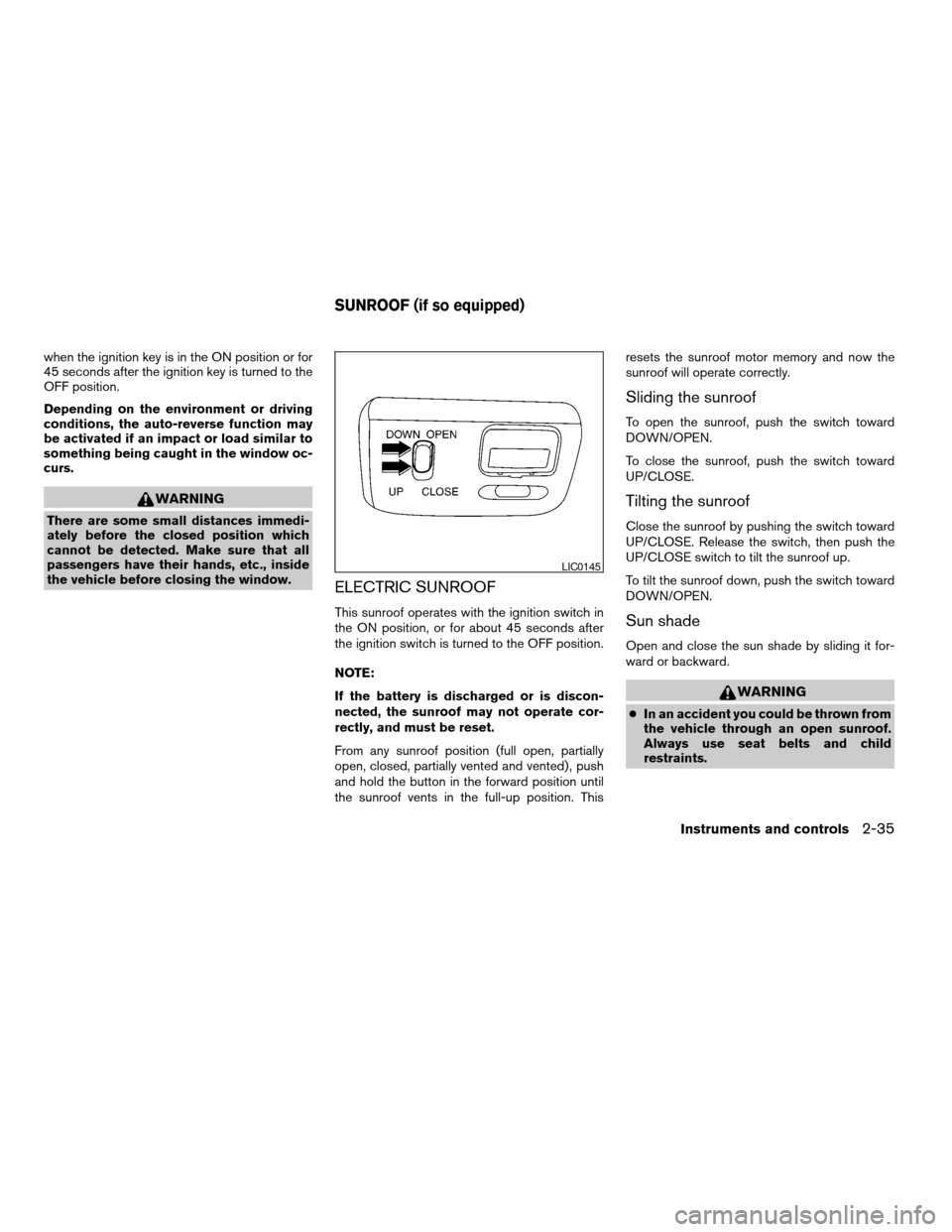
ELECTRIC SUNROOF
This sunroof operates with the ignition switch in
the ON position, or for about 45 seconds after
the ignition switch is turned to the OFF position.
NOTE:
If the battery is discharged or is discon-
nected, the sunroof may not operate cor-
rectly, and must be reset.
From any sunroof position (full open, partially
open, closed, partially vented and vented) , push
and hold the button in the forward position until
the sunroof vents in the full-up position. Thisresets the sunroof motor memory and now the
sunroof will operate correctly.
Sliding the sunroof
To open the sunroof, push the switch toward
DOWN/OPEN.
To close the sunroof, push the switch toward
UP/CLOSE.
Tilting the sunroof
Close the sunroof by pushing the switch toward
UP/CLOSE. Release the switch, then push the
UP/CLOSE switch to tilt the sunroof up.
To tilt the sunroof down, push the switch toward
DOWN/OPEN.
Sun shade
Open and close the sun shade by sliding it for-
ward or backward.
WARNING
cIn an accident you could be thrown from
the vehicle through an open sunroof.
Always use seat belts and child
restraints.
LIC0145
SUNROOF (if so equipped)
Instruments and controls2-35
ZREVIEW COPY:Ð2003 Altima(l30)
Owners Manual(owners)ÐUSA English(nna)
04/21/03Ðdebbie
X
Page 84 of 256
cDo not allow anyone to stand up or
extend any portion of their body out of
the sunroof opening while the vehicle is
in motion or while the sunroof is
closing.
CAUTION
cRemove water drops, snow, ice or sand
from the sunroof before opening.
cDo not place heavy objects on the sun-
roof or surrounding area.
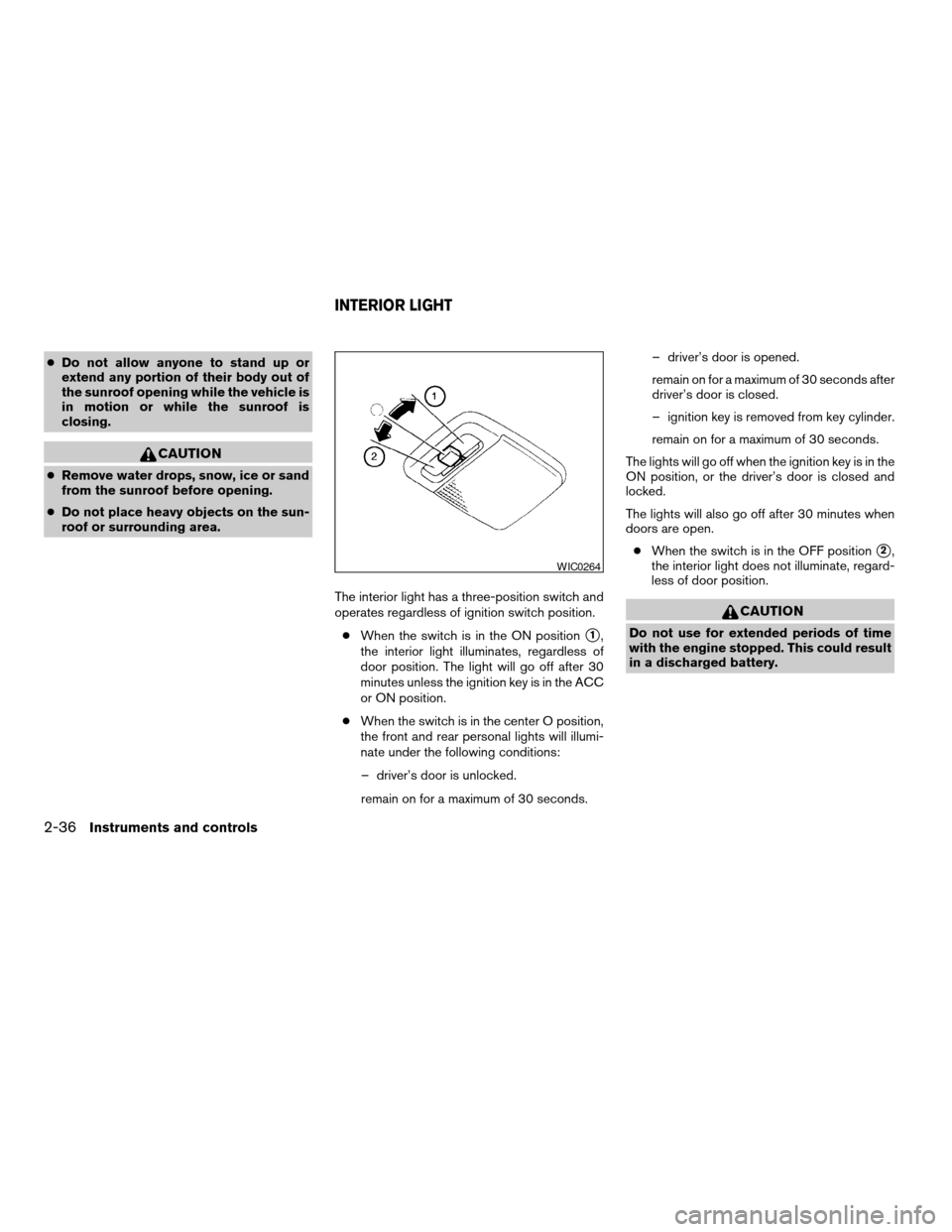
The interior light has a three-position switch and
operates regardless of ignition switch position.
cWhen the switch is in the ON position
s1,
the interior light illuminates, regardless of
door position. The light will go off after 30
minutes unless the ignition key is in the ACC
or ON position.
cWhen the switch is in the center O position,
the front and rear personal lights will illumi-
nate under the following conditions:
– driver’s door is unlocked.
remain on for a maximum of 30 seconds.– driver’s door is opened.
remain on for a maximum of 30 seconds after
driver’s door is closed.
– ignition key is removed from key cylinder.
remain on for a maximum of 30 seconds.
The lights will go off when the ignition key is in the
ON position, or the driver’s door is closed and
locked.
The lights will also go off after 30 minutes when
doors are open.
cWhen the switch is in the OFF position
s2,
the interior light does not illuminate, regard-
less of door position.
CAUTION
Do not use for extended periods of time
with the engine stopped. This could result
in a discharged battery.
WIC0264
INTERIOR LIGHT
2-36Instruments and controls
ZREVIEW COPY:Ð2003 Altima(l30)
Owners Manual(owners)ÐUSA English(nna)
04/21/03Ðdebbie
X
Page 85 of 256
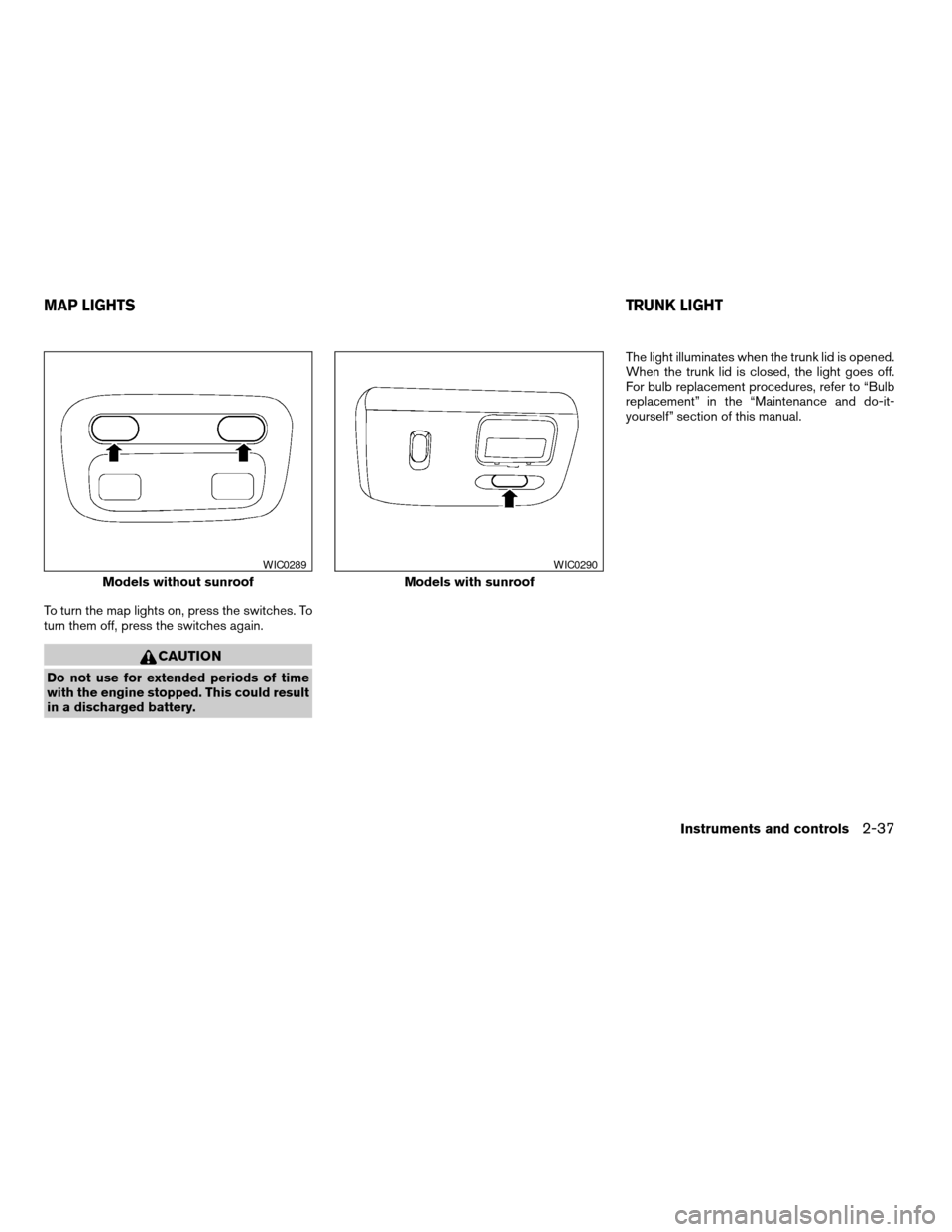
To turn the map lights on, press the switches. To
turn them off, press the switches again.
CAUTION
Do not use for extended periods of time
with the engine stopped. This could result
in a discharged battery.The light illuminates when the trunk lid is opened.
When the trunk lid is closed, the light goes off.
For bulb replacement procedures, refer to “Bulb
replacement” in the “Maintenance and do-it-
yourself” section of this manual.
Models without sunroof
WIC0289
Models with sunroof
WIC0290
MAP LIGHTSTRUNK LIGHT
Instruments and controls2-37
ZREVIEW COPY:Ð2003 Altima(l30)
Owners Manual(owners)ÐUSA English(nna)
04/21/03Ðdebbie
X
Page 86 of 256
The interior lights illuminate when a front or rear
door is opened. Once the doors are closed,
these lights turn off in 30 seconds or turn off
immediately when the key is turned to the ON
position.
BATTERY SAVER
If the vehicle doors are not fully closed and the
interior lights remain illuminated, they eventually
turn off automatically to prevent the battery from
becoming discharged. Interior lights that illumi-
nate when doors are opened turn off after ap-
proximately 30 minutes.The HomeLinkTUniversal Transceiver provides a
convenient way to consolidate the functions of up
to three individual hand-held transmitters into
one built-in device.
HomeLinkTUniversal Transceiver:
cWill operate most Radio Frequency (RF)
devices such as garage doors, gates, home
and office lighting, entry door locks and se-
curity systems.
cIs powered by your vehicle’s battery. No
separate batteries are required. If the vehi-
cle’s battery is discharged or is discon-
nected, HomeLinkTwill retain all program-
ming.
Once the HomeLinkTUniversal Transceiver
is programmed, retain the original trans-
mitter for future programming procedures
(i.e., new vehicle purchases) . Upon sale of
the vehicle, the programmed HomeLinkT
Universal Transceiver buttons should be
erased for security purposes. For addi-
tional information refer to “Programming
the HomeLinkTUniversal Transceiver” later
in this section.
WARNING
cDo not use the HomeLinkTUniversal
Transceiver with any garage door
opener that lacks safety stop and re-
verse features as required by federal
safety standards. (These standards be-
came effective for opener models
manufactured after April 1, 1982) . A ga-
rage door opener which cannot detect
an object in the path of a closing garage
door and then automatically stop and
reverse, does not meet current federal
safety standards. Using a garage door
opener without these features in-
creases the risk of serious injury or
death.
cDuring the programming procedure
your garage door or security gate will
open and close (if the transmitter is
within range) . Make sure that people or
objects are clear of the garage door,
gate, etc. that you are programming.
cYour vehicle’s engine should be turned
off while programming the HomeLinkT
Universal Transceiver.
ILLUMINATED ENTRY SYSTEM HOMELINKTUNIVERSAL
TRANSCEIVER (if so equipped)
2-38Instruments and controls
ZREVIEW COPY:Ð2003 Altima(l30)
Owners Manual(owners)ÐUSA English(nna)
04/21/03Ðdebbie
X
Page 88 of 256

PROGRAMMING TROUBLE-
DIAGNOSIS
If the HomeLinkTdoes not quickly learn the hand-
held transmitter information:
creplace the hand-held transmitter batteries
with new batteries.
cposition the hand-held transmitter with its
battery area facing away from the
HomeLinkTsurface.
cpress and hold both the HomeLinkTand
hand-held transmitter buttons without inter-
ruption.
cposition the hand-held transmitter 1- 3
inches (26 - 76 mm) away from the
HomeLinkTsurface. Hold the transmitter in
that position for up to 15 seconds. If
HomeLinkTis not programmed within that
time, try holding the transmitter in another
position – keeping the indicator light in view
at all times.
If you continue to have programming difficulties,
please contact the NISSAN Consumer Affairs
Department. The phone numbers are located in
the Foreword of this manual.
CLEARING THE PROGRAMMED
INFORMATION
Individual buttons cannot be cleared. However,
to clear all programming, press and hold the two
outside buttons and release when the indicator
light begins to flash (approximately 20 seconds) .
ROLLING CODE PROGRAMMING
Rolling code garage door openers (or other roll-
ing code devices) which are “code protected”
and manufactured after 1996, may be deter-
mined by the following:
cReference the garage door opener Owner’s
Manual for verification.
cThe hand-held transmitter appears to pro-
gram the HomeLinkTUniversal Transceiver
but does not activate the garage door.
cPress and hold the trained HomeLinkTbut-
ton. If the garage door opener has the rolling
code feature, the HomeLinkTindicator light
will flash rapidly, then remains on after 2
seconds.
To program the HomeLinkTUniversal Transceiver
to a garage door opener with the rolling code
feature, follow these instructions after completing
the “Programming HomeLink” (the aid of a sec-
ond person may make the following procedures
quicker and easier) .1. Locate the training button on the garage
door opener motor unit. Exact location and
color of the button may vary by garage door
opener brand. If there is difficulty locating
the training button, reference the garage
door opener Owner’s Manual.
2. Press the training button on the garage door
opener motor until (which may activate a
training light) .
NOTE:
Following step 2, there are 30 seconds in
which to initiate step 3.
3. Firmly press and release the programmed
HomeLinkTbutton a second time to com-
plete the training process. (Some garage
door openers may require you to do this
procedure a third time to complete the train-
ing.)
The garage door opener should now recognize
the HomeLinkTUniversal Transceiver and acti-
vate when the HomeLinkTbutton is pressed. The
remaining two buttons may now be programmed
(if not yet programmed, follow steps 2 through 4
in the “Programming HomeLinkT” procedures
earlier in this section) .
2-40Instruments and controls
ZREVIEW COPY:Ð2003 Altima(l30)
Owners Manual(owners)ÐUSA English(nna)
04/21/03Ðdebbie
X
Page 91 of 256

3 Pre-driving checks and adjustments
Keys .............................................3-2
Nissan vehicle immobilizer system (NVIS)
keys..........................................3-2
Doors............................................3-3
Locking with key................................3-3
Locking with inside lock knob....................3-4
Locking with power door lock switch.............3-4
Child safety rear door lock.......................3-5
Remote keyless entry system (if so equipped).........3-5
How to use remote keyless entry system..........3-5
Battery replacement............................3-8
Hood...........................................3-10
Trunk lid.........................................3-11
Opener operation..............................3-11
Key operation.................................3-12Interior trunk lid release........................3-12
Fuel filler lid......................................3-13
Opener operation..............................3-13
Fuel filler cap..................................3-13
Steering wheel...................................3-14
Tilt operation..................................3-14
Telescopic operation...........................3-15
Sun visors.......................................3-15
Vanity mirrors (if so equipped)...................3-15
Mirrors..........................................3-16
Inside mirror..................................3-16
Automatic anti-glare inside mirror
(if so equipped)...............................3-16
Outside mirror remote control...................3-17
ZREVIEW COPY:Ð2003 Altima(l30)
Owners Manual(owners)ÐUSA English(nna)
04/21/03Ðdebbie
X
Page 98 of 256

Deactivating the horn beep feature does not si-
lence the horn if the alarm is triggered.
Using the interior light
The interior light can be turned off without waiting
30 seconds by inserting the key into the ignition,
locking the doors with the keyfob or pushing the
interior light button to OFF.
Opening windows (if so equipped)
The keyfob allows you to open the front windows
simultaneously.
cTo open the front windows, press the
button on the keyfob forlonger than 3
secondsafter the door is unlocked.
The door windows will open while pressing
the
button on the keyfob.
This opening windows function of the keyfob can
be suspended using a CONSULT-II diagnostic
tool. Please contact a NISSAN dealer.
The door windows cannot be closed by
using the keyfob.
BATTERY REPLACEMENT
Replace the battery in the keyfob as follows:
s1Open the lid using a coin.
s2Remove the battery.
s3Install a new battery with the “+” facing
down.
Recommended battery: Sanyo CR2025 or
equivalent.
s4Close the lid securely.
WPD0136
3-8Pre-driving checks and adjustments
ZREVIEW COPY:Ð2003 Altima(l30)
Owners Manual(owners)ÐUSA English(nna)
04/21/03Ðdebbie
X
Page 99 of 256

5. Press the LOCK button, then the UNLOCK
button two or three times to check the key-
fob operation.
If the battery is removed for any reason
other than replacement, perform step 5.
cAn improperly disposed battery can
hurt the environment. Always confirm
local regulations for battery disposal.
cThe keyfob is water-resistant; how-
ever, if it does get wet, immediately
wipe completely dry.
cThe operational range of the keyfob
extends to approximately 33 ft (10 m)
from the vehicle. This range may vary
with conditions.
FCC Notice:
Changes or modifications not expressly ap-
proved by the manufacturer for compliance
could void the user’s authority to operate
the equipment.
This device complies with Part 15 of the
FCC Rules and RSS-210 of Industry
Canada.Operation is subject to the following two
conditions: (1) This device may not cause
harmful interference, and (2) this device
must accept any interference received, in-
cluding interference that may cause undes-
ired operation of the device.
Pre-driving checks and adjustments3-9
ZREVIEW COPY:Ð2003 Altima(l30)
Owners Manual(owners)ÐUSA English(nna)
04/21/03Ðdebbie
X