2003 NISSAN ALMERA N16 Engine Control
[x] Cancel search: Engine ControlPage 2524 of 3189
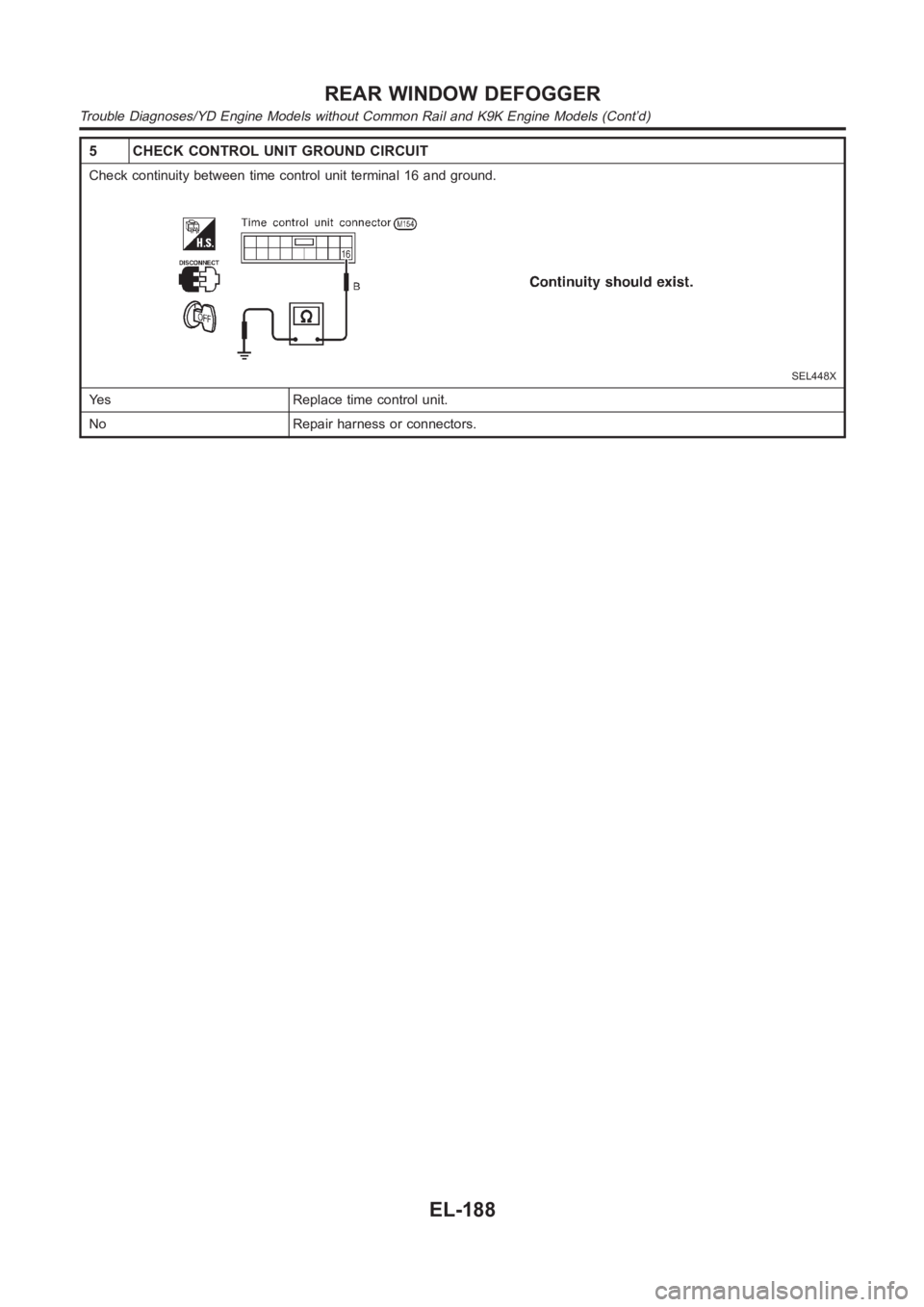
5 CHECK CONTROL UNIT GROUND CIRCUIT
Check continuity between time control unit terminal 16 and ground.
SEL448X
Yes Replace time control unit.
No Repair harness or connectors.
REAR WINDOW DEFOGGER
Trouble Diagnoses/YD Engine Models without Common Rail and K9K Engine Models (Cont’d)
EL-188
Page 2528 of 3189
System Description=NJEL0497AUDIO SYSTEM WITHOUT DISPLAYNJEL0497S08Refer to Owner’s Manual for audio system operating instructions.
Power is supplied at all times
through 15A fuse (No. 40, located in the fusible link and fuse block)
to audio unit terminal 9.
With the ignition switch in the ACC or ON position, power is supplied
through 10A fuse [No. 1, located in the fuse block (J/B)]
to audio unit terminal 3.
Ground is supplied through the case of the audio unit.
Audio signals are supplied
through audio unit terminals 7, 10, 11, 12, 13, 14, 15, 16
to terminals 1 and 2 of front door speaker LH and RH,
to terminals 1 and 2 of rear door speaker LH and RH and
to terminals 1 and 2 of pillar tweeter LH and RH (with 6 speakers)
AUDIO SYSTEM WITH DISPLAYNJEL0497S09Refer to Owner’s Manual for audio system operating instructions.
Power is supplied at all times
through 15A fuse (No. 40, located in the fuse and fusible link box)
to audio unit terminals 3 and 4, and
to display terminals 21 and 23.
With the ignition switch in the ACC or ON position, power is supplied
through 10A fuse [No. 1, located in the fuse block (J/B)]
to audio unit terminal 2,
to multifunction switch terminal 6 and
to display terminal 19.
Ground is supplied through the case of the audio unit.
Ground is also supplied
through body grounds M28, M67 and F118 (QG engine models)
to multifunction switch terminal 1 and
to display terminals 22 and 24.
Audio signals are supplied
through audio unit terminals 5, 6, 7, 8, 9, 10, 11, 12
to terminals 1 and 2 of front door speaker LH and RH
to terminals 1 and 2 of rear door speaker LH and RH
to terminals 1 and 2 of tweeter LH and RH
AV COMMUNICATION LINENJEL0497S10Audio system is contained and the AV communication line is connected as followings.
Display unit terminals 12 and 13, and
Multifunction switch terminals 12 and 14.
Multifunction switch terminals 11 and 13, and
Audio unit terminals 31 and 32.
Audio unit terminals 35 and 36, and
AV and NAVI control unit terminals 47 and 48 (with navigation system).
The operation is controlled by operation signals from multifunction switch, then audio screen is displayed.
NAVIGATION SYSTEM OF GUIDANCE VOICE OPERATIONNJEL0497S11When navigation system is used, guidance voice signal is supplied
from AV and NAVI control unit terminals 7 and 8
to audio unit terminals 35 and 36.
Navigation system of guidance voice will be sounded.
AUDIO
System Description
EL-192
Page 2559 of 3189
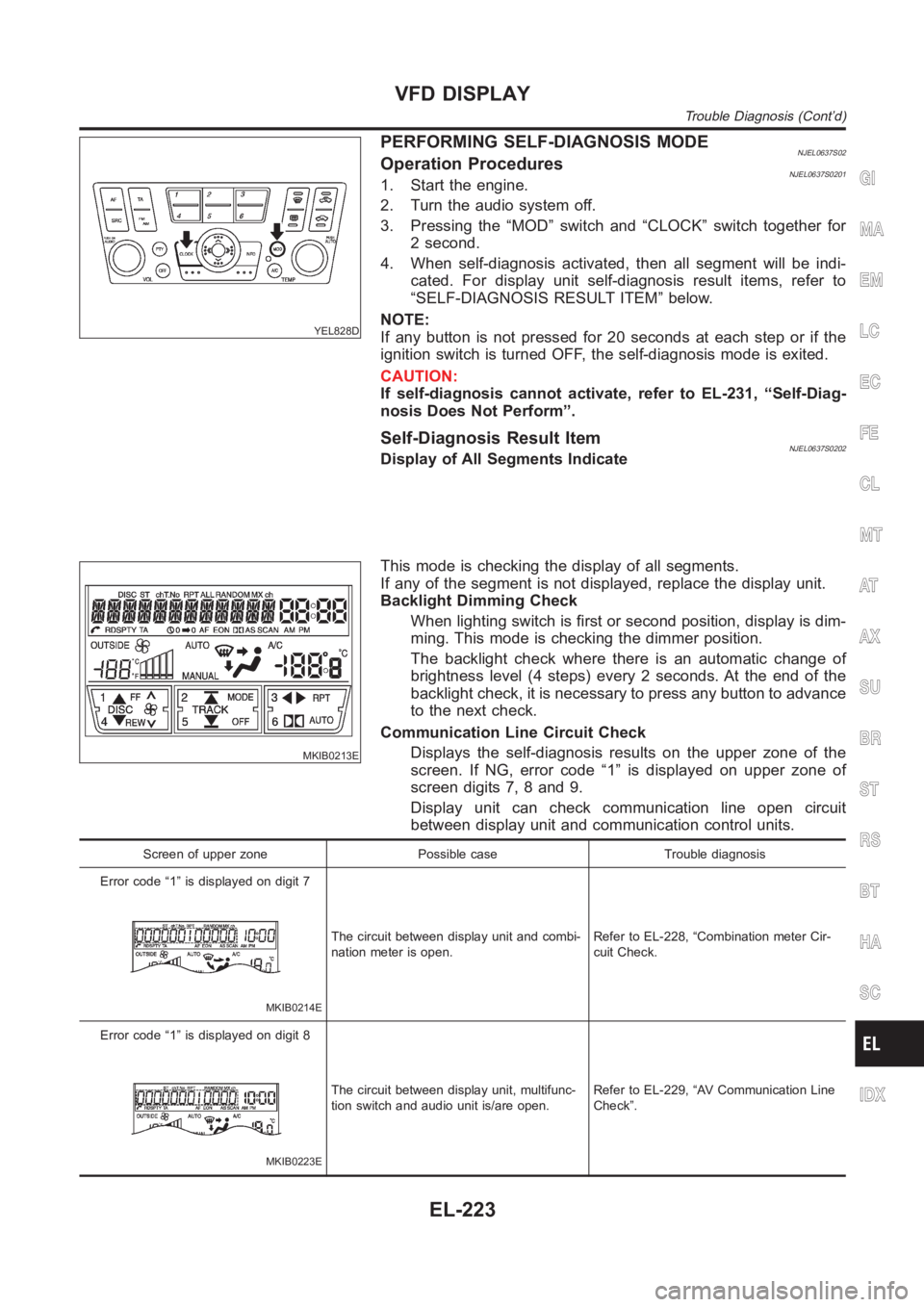
YEL828D
PERFORMING SELF-DIAGNOSIS MODENJEL0637S02Operation ProceduresNJEL0637S02011. Start the engine.
2. Turn the audio system off.
3. Pressing the “MOD” switch and “CLOCK” switch together for
2 second.
4. When self-diagnosis activated, then all segment will be indi-
cated. For display unit self-diagnosis result items, refer to
“SELF-DIAGNOSIS RESULT ITEM” below.
NOTE:
If any button is not pressed for 20 seconds at each step or if the
ignition switch is turned OFF, the self-diagnosis mode is exited.
CAUTION:
If self-diagnosis cannot activate, refer to EL-231, “Self-Diag-
nosis Does Not Perform”.
Self-Diagnosis Result ItemNJEL0637S0202Display of All Segments Indicate
MKIB0213E
This mode is checking the display of all segments.
If any of the segment is not displayed, replace the display unit.
Backlight Dimming Check
When lighting switch is first or second position, display is dim-
ming. This mode is checking the dimmer position.
The backlight check where there is an automatic change of
brightness level (4 steps) every 2 seconds. At the end of the
backlight check, it is necessary to press any button to advance
to the next check.
Communication Line Circuit Check
Displays the self-diagnosis results on the upper zone of the
screen. If NG, error code “1” is displayed on upper zone of
screen digits 7, 8 and 9.
Display unit can check communication line open circuit
between display unit and communication control units.
Screen of upper zone Possible case Trouble diagnosis
Error code “1” is displayed on digit 7
MKIB0214E
The circuit between display unit and combi-
nation meter is open.Refer to EL-228, “Combination meter Cir-
cuit Check.
Error code “1” is displayed on digit 8
MKIB0223E
The circuit between display unit, multifunc-
tion switch and audio unit is/are open.Refer to EL-229, “AV Communication Line
Check”.
GI
MA
EM
LC
EC
FE
CL
MT
AT
AX
SU
BR
ST
RS
BT
HA
SC
IDX
VFD DISPLAY
Trouble Diagnosis (Cont’d)
EL-223
Page 2574 of 3189
System DescriptionNJEL0571MULTIFUNCTION SWITCH SYSTEMNJEL0571S01Refer to Owner′s Manual for multifunction switch operating instruc-
tions.
Using the multifunction switch at the center of the instrument panel,
the controls of the following systems are centralized:
Auto A/C system
Vehicle information system
Audio system
Navigation system
PRECAUTION OF LCD MONITORNJEL0571S02When passenger compartment temperature is low, the LCD
monitor sometimes dims because of the brightness of the back
light (small fluorescent light) integrated into the LCD monitor
decrease. In this case, the refreshing rate of the picture also
becomes low because of the low response of the LCD moni-
tor. When passenger compartment becomes warm, however,
the LCD recovers the normal display.
Sometimes, black or bright dots peculiar to LCD monitor can
be seen on the display.
Back light sometimes flickers or darkens according to the total
consumption hours and the number of ON and OFF switching.
In this case, the back light should be replaced (display unit
assembly).
POWER SUPPLY AND GROUNDNJEL0571S03Power is Supplied at All TimesNJEL0571S0301through 15A fuse (No. 40, located in fuse and fusible link box)
to display unit terminals 21 and 23
to audio unit terminals 3 and 4.
When Ignition Switch is in ACC or ON Position, Power
is Supplied
NJEL0571S0302through 10A fuse [No. 1, located in fuse block (J/B)]
to display unit terminal 19,
to multifunction switch terminal 6 and
to audio unit terminal 2.
When Ignition Switch is in ON or START Position,
Power is Supplied
NJEL0571S0303through 10A fuse [No. 10, located in fuse block (J/B)]
to display unit terminal 27.
Ground is SuppliedNJEL0571S0304to multifunction switch terminal 1 and
to display unit terminals 22 and 24
through body grounds M28, M67 and F118 (QG engine mod-
els).
AV COMMUNICATION LINENJEL0571S04Display unit is controlled by the following unit with AV communica-
tion line.
Multifunction switch
Audio unit
AV and NAVI control unit
LCD DISPLAY
System Description
EL-238
Page 2578 of 3189
![NISSAN ALMERA N16 2003 Electronic Repair Manual Warning indicatorsWarning lamps in
instrument panelWarning detection and cancel conditions Cases of malfunction
DOOR OPEN DoorDetection conditionVehicle is running [approx. 5
km/h (3 MPH) or faster] a](/manual-img/5/57350/w960_57350-2577.png "NISSAN ALMERA N16 2003 Electronic Repair Manual Warning indicatorsWarning lamps in
instrument panelWarning detection and cancel conditions Cases of malfunction
DOOR OPEN DoorDetection conditionVehicle is running [approx. 5
km/h (3 MPH) or faster] a")
Warning indicatorsWarning lamps in
instrument panelWarning detection and cancel conditions Cases of malfunction
DOOR OPEN DoorDetection conditionVehicle is running [approx. 5
km/h (3 MPH) or faster] and door
ajar of any of the doors is
detected.Doorisopen
Cancel conditionVehicle is stopped and all the
doors lock.
ABS ABSDetection conditionWarning lamp ON signal is
detected when engine is running.
ABS control system mal-
function
Cancel conditionWarning lamp OFF signal is
detected.
ESP ELECTRONIC
CONTROL SYSTEMESPDetection conditionWarning lamp ON signal is
detected when engine is running.
ESP system malfunction
Cancel conditionWarning lamp OFF signal is
detected.
CVT ELECTRONIC
CONTROL SYSTEMCVTDetection conditionWarning lamp ON signal is
detected after ignition switch is
turned ON.
TCM system malfunction
Cancel conditionWarning lamp OFF signal is
detected.
CRUISE CONTROL
SYSTEMCRUISEDetection conditionWarning lamp ON signal is
detected after ignition switch is
turned ON.
ICC system malfunction
Cancel conditionWarning lamp OFF signal is
detected.
Precautions for Display Unit ReplacementNJEL0572Record the following memorized contents before replacing the control unit.
Preset frequency
Area for indicating station, selection of overlapped stations
Program status
Volume balance memory set values
Equalizer memory set values
Brightness of light when ON/OFF
Dimming switching
Display color switching
Replace the display unit after disconnecting both battery cables.
Component Parts and Harness Connector and
Harness Connector Location
NJEL0573For details, refer to “ELECTRICAL UNIT LOCATION” (EL-543) and “HARNESS LAYOUT” (EL-550).
LCD DISPLAY
System Description (Cont’d)
EL-242
Page 2608 of 3189
![NISSAN ALMERA N16 2003 Electronic Repair Manual CONSULT-II APPLICATION ITEMSNJEL0580S02Door LockingNJEL0580S0201DATA MONITOR
Monitored Item Description
IGNITION SW Indicates [ON/OFF] condition of ignition switch.
KEY IN DETECT Indicates [ON/OFF] co](/manual-img/5/57350/w960_57350-2607.png "NISSAN ALMERA N16 2003 Electronic Repair Manual CONSULT-II APPLICATION ITEMSNJEL0580S02Door LockingNJEL0580S0201DATA MONITOR
Monitored Item Description
IGNITION SW Indicates [ON/OFF] condition of ignition switch.
KEY IN DETECT Indicates [ON/OFF] co")
CONSULT-II APPLICATION ITEMSNJEL0580S02Door LockingNJEL0580S0201DATA MONITOR
Monitored Item Description
IGNITION SW Indicates [ON/OFF] condition of ignition switch.
KEY IN DETECT Indicates [ON/OFF] condition of key switch.
DOOR SW DR RR Indicates [ON/OFF] condition of rear door switch (driver side).
DOOR SW AS RR Indicates [ON/OFF] condition of rear door switch (passenger side).
AS DOOR SW Indicates [ON/OFF] condition of front door switch (passenger side).
DR DOOR SW Indicates [ON\OFF] condition of front door switch (driver side).
CDL LOCK SW Indicates [ON/OFF] condition of lock signal from door lock/ unlock switch.
CDL UNLOCK SW Indicates [ON/OFF] condition of unlock signal from door lock/ unlock switch.
RKE LOCK Indicates [ON/OFF] condition of lock signal from remote controller.
RKE UNLOCK Indicates [ON/OFF] condition of unlock signal from remote controller.
RKE SEL UNLOCK Indicates [ON/OFF] condition of select unlock signal from remote controller.
WORK SUPPORT
Monitored Item Description
AUTO RE-LOCKAuto re-lock function can be changed in this mode. The re-lock mode will be changed when
“CHANGE MODE” on CONSULT-II screen is touched.
SELECTIVE UNLOCKSelective unlock function can be changed in this mode. The unlock mode willbe changed when
“CHANGE SET” on CONSULT-II screen is touched.
Trunk ReleaseNJEL0580S0202DATA MONITOR
Monitored Item Description
IGNITION SW Indicates [ON/OFF] condition of ignition switch.
TRUNK OPEN SW Indicates [ON/OFF] condition of trunk room lamp switch (sedan) or back door switch (wagon).
INT TRUNK RELIndicates [ON/OFF] condition of internal trunk release switch (sedan) orinternal back door
release switch (wagon).
EXT TRUNK RELIndicates [ON/OFF] condition of external trunk release switch (sedan) orexternal back door
release switch (wagon).
RKE TRUNK RELIndicates [ON/OFF] condition of trunk (sedan) or back door (back door) open signal from trunk
or back door release switch.
WORK SUPPORT
Monitored Item Description
TRUNK OPEN DELAYThis mode can be changed trunk release switch (sedan) or back door (wagon) release switch
operation time.
POWER DOOR LOCK
Trouble Diagnosis/QG and YD Engine Models with Common Rail (Cont’d)
EL-272
Page 2609 of 3189
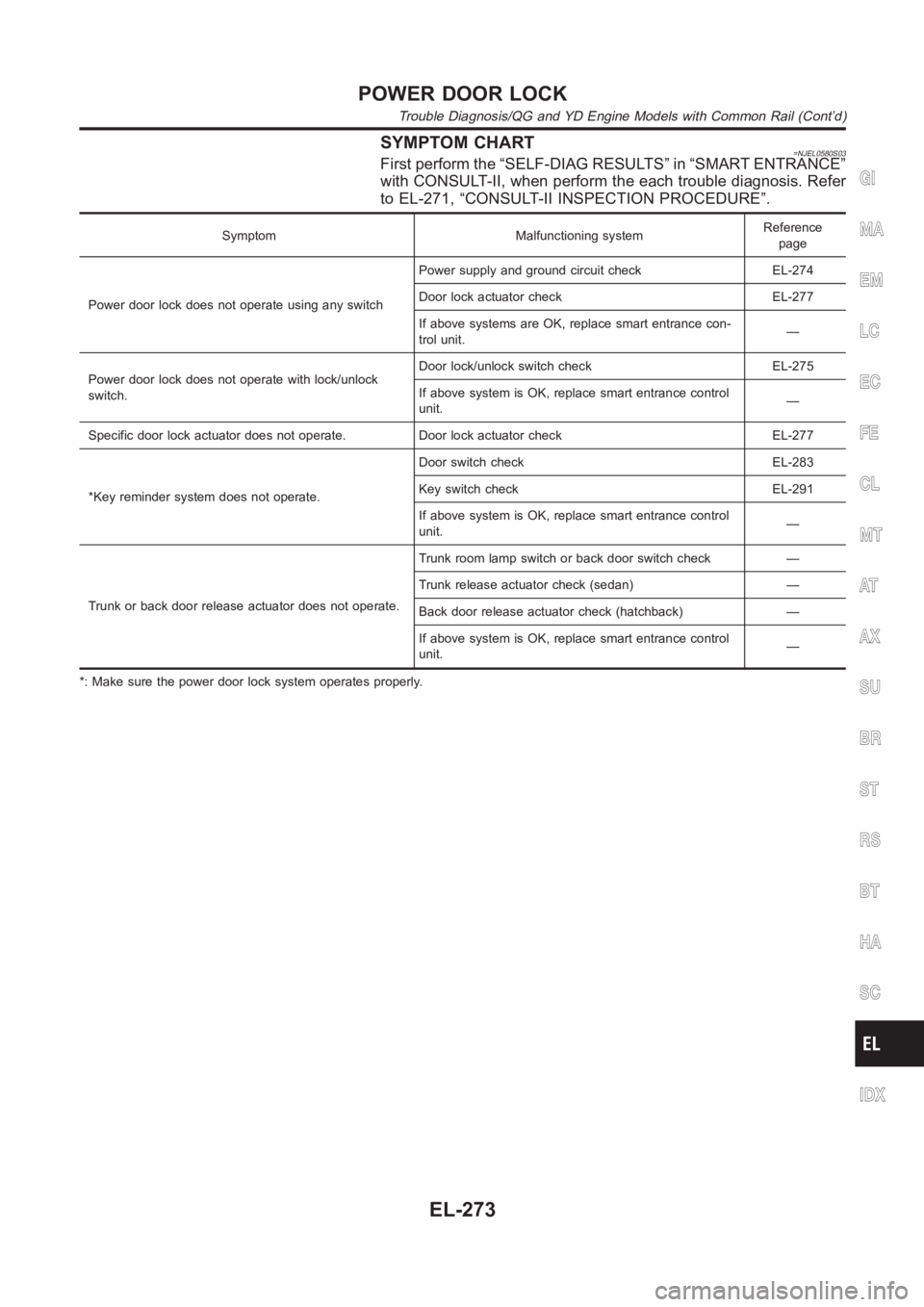
SYMPTOM CHART=NJEL0580S03First perform the “SELF-DIAG RESULTS” in “SMART ENTRANCE”
with CONSULT-II, when perform the each trouble diagnosis. Refer
to EL-271, “CONSULT-II INSPECTION PROCEDURE”.
Symptom Malfunctioning systemReference
page
Power door lock does not operate using any switchPower supply and ground circuit check EL-274
Door lock actuator check EL-277
If above systems are OK, replace smart entrance con-
trol unit.—
Power door lock does not operate with lock/unlock
switch.Door lock/unlock switch check EL-275
If above system is OK, replace smart entrance control
unit.—
Specific door lock actuator does not operate. Door lock actuator check EL-277
*Key reminder system does not operate.Door switch check EL-283
Key switch check EL-291
If above system is OK, replace smart entrance control
unit.—
Trunk or back door release actuator does not operate.Trunk room lamp switch or back door switch check —
Trunk release actuator check (sedan) —
Back door release actuator check (hatchback) —
If above system is OK, replace smart entrance control
unit.—
*: Make sure the power door lock system operates properly.
GI
MA
EM
LC
EC
FE
CL
MT
AT
AX
SU
BR
ST
RS
BT
HA
SC
IDX
POWER DOOR LOCK
Trouble Diagnosis/QG and YD Engine Models with Common Rail (Cont’d)
EL-273
Page 2610 of 3189
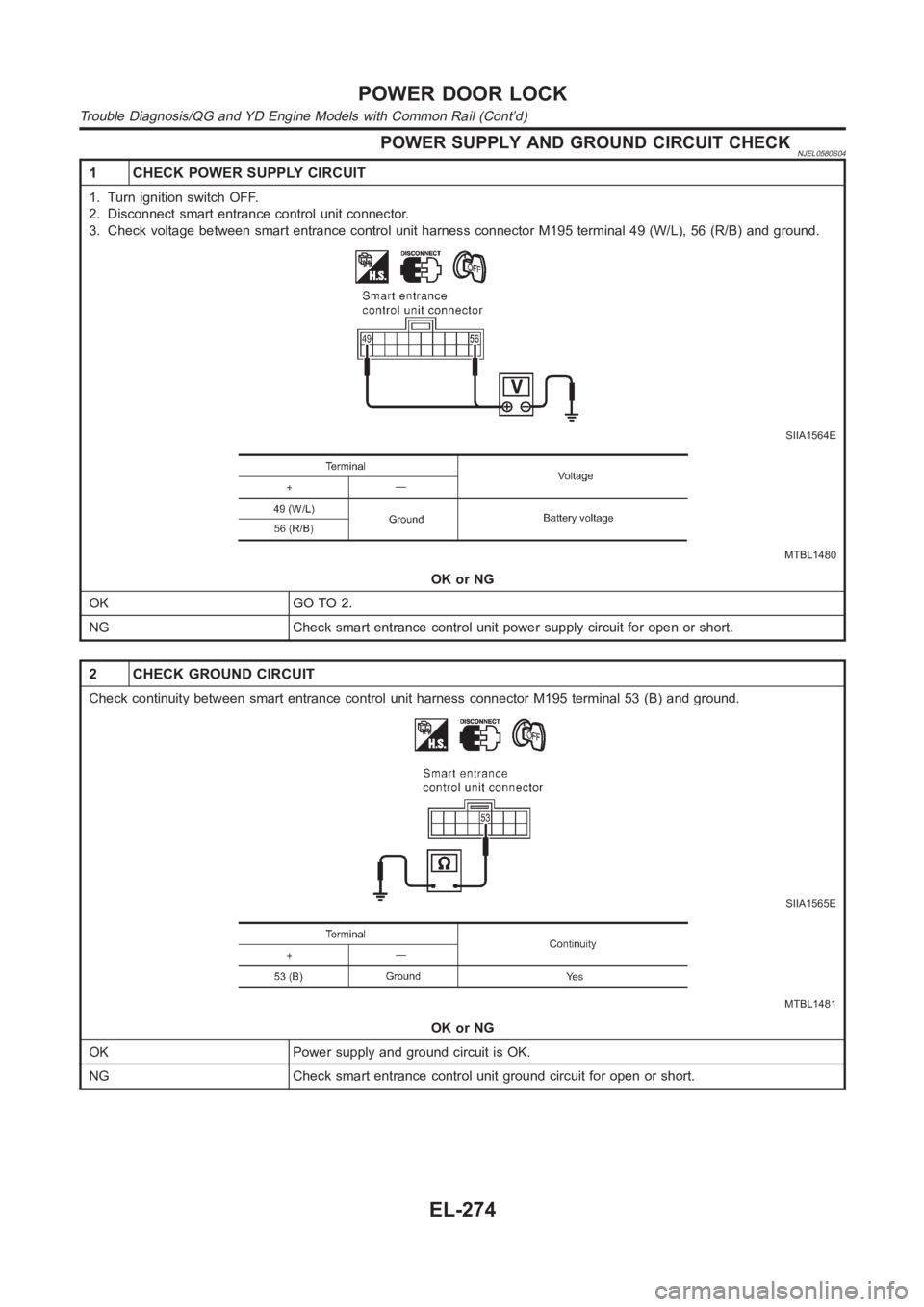
POWER SUPPLY AND GROUND CIRCUIT CHECKNJEL0580S04
1 CHECK POWER SUPPLY CIRCUIT
1. Turn ignition switch OFF.
2. Disconnect smart entrance control unit connector.
3. Check voltage between smart entrance control unit harness connector M195 terminal 49 (W/L), 56 (R/B) and ground.
SIIA1564E
MTBL1480
OK or NG
OK GO TO 2.
NG Check smart entrance control unit power supply circuit for open or short.
2 CHECK GROUND CIRCUIT
Check continuity between smart entrance control unit harness connector M195 terminal 53 (B) and ground.
SIIA1565E
MTBL1481
OK or NG
OK Power supply and ground circuit is OK.
NG Check smart entrance control unit ground circuit for open or short.
POWER DOOR LOCK
Trouble Diagnosis/QG and YD Engine Models with Common Rail (Cont’d)
EL-274