2003 NISSAN 350Z key
[x] Cancel search: keyPage 66 of 227
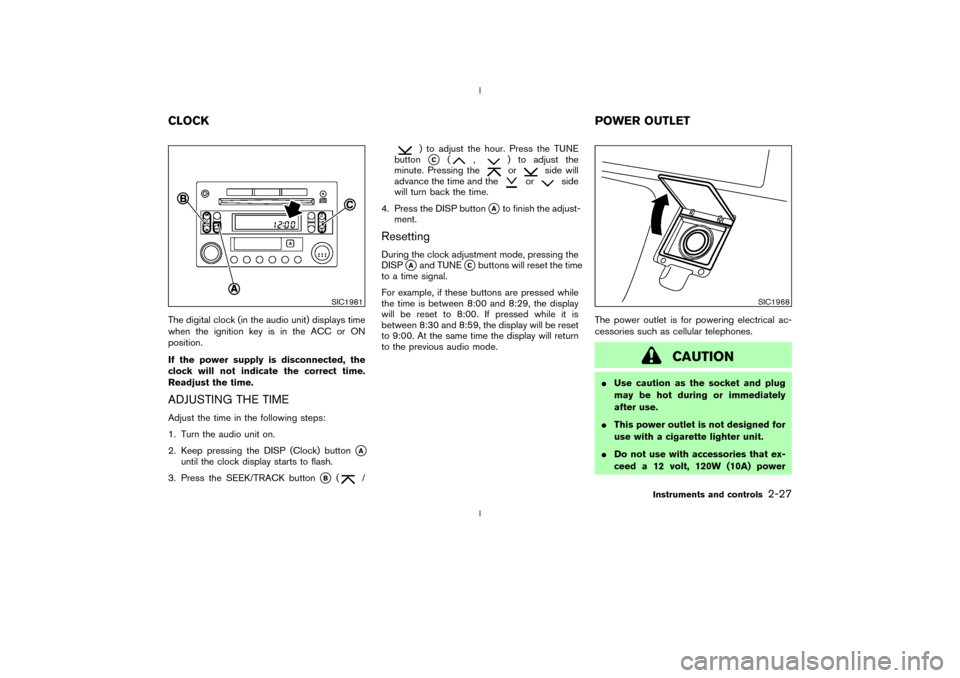
The digital clock (in the audio unit) displays time
when the ignition key is in the ACC or ON
position.
If the power supply is disconnected, the
clock will not indicate the correct time.
Readjust the time.ADJUSTING THE TIMEAdjust the time in the following steps:
1. Turn the audio unit on.
2. Keep pressing the DISP (Clock) button
qA
until the clock display starts to flash.
3. Press the SEEK/TRACK button
qB
(
/
) to adjust the hour. Press the TUNE
buttonqC
(
,
) to adjust the
minute. Pressing theor
side will
advance the time and the
or
side
will turn back the time.
4. Press the DISP button
qAto finish the adjust-
ment.
ResettingDuring the clock adjustment mode, pressing the
DISP
qAand TUNE
qCbuttons will reset the time
to a time signal.
For example, if these buttons are pressed while
the time is between 8:00 and 8:29, the display
will be reset to 8:00. If pressed while it is
between 8:30 and 8:59, the display will be reset
to 9:00. At the same time the display will return
to the previous audio mode.The power outlet is for powering electrical ac-
cessories such as cellular telephones.
CAUTION
IUse caution as the socket and plug
may be hot during or immediately
after use.
IThis power outlet is not designed for
use with a cigarette lighter unit.
IDo not use with accessories that ex-
ceed a 12 volt, 120W (10A) power
SIC1981
SIC1968
CLOCKPOWER OUTLET
Instruments and controls
2-27
Z
02.9.13/Z33-D/V5.0
X
Page 71 of 227
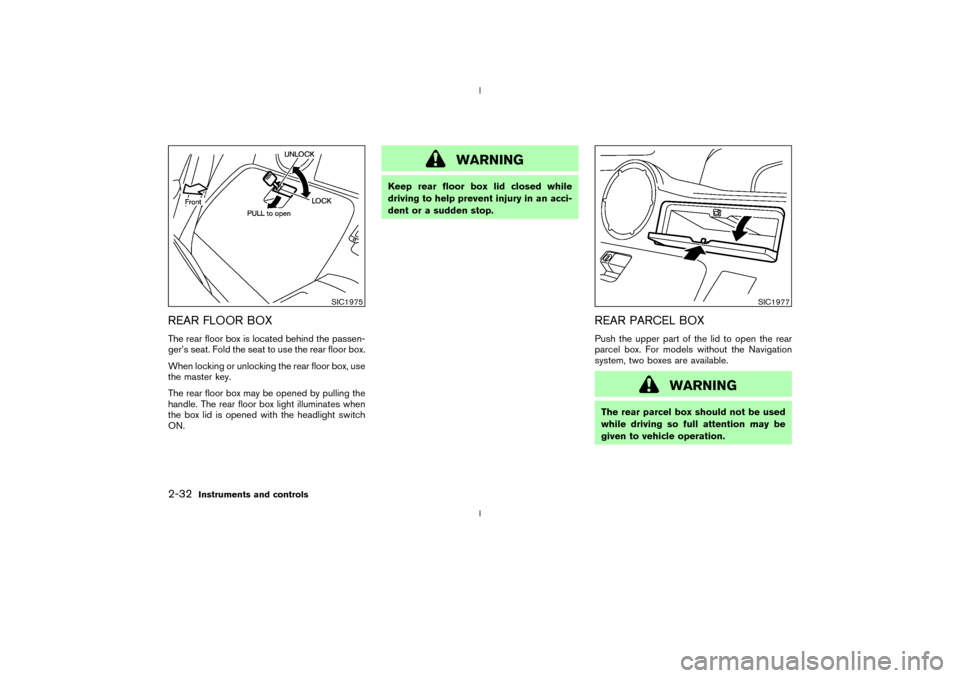
REAR FLOOR BOXThe rear floor box is located behind the passen-
ger's seat. Fold the seat to use the rear floor box.
When locking or unlocking the rear floor box, use
the master key.
The rear floor box may be opened by pulling the
handle. The rear floor box light illuminates when
the box lid is opened with the headlight switch
ON.
WARNING
Keep rear floor box lid closed while
driving to help prevent injury in an acci-
dent or a sudden stop.
REAR PARCEL BOXPush the upper part of the lid to open the rear
parcel box. For models without the Navigation
system, two boxes are available.
WARNING
The rear parcel box should not be used
while driving so full attention may be
given to vehicle operation.
SIC1975
SIC1977
2-32
Instruments and controls
Z
02.9.13/Z33-D/V5.0
X
Page 72 of 227
POWER WINDOWS
WARNING
IMake sure that all passengers have
their hands, etc. inside the vehicle
while it is in motion and before clos-
ing the windows. Use the window
lock switch to prevent unexpected
use of the power windows.
IDo not leave children unattended in-
side the vehicle. They couldunknowingly activate switches or
controls and become trapped in a
window. Unattended children could
become involved in serious acci-
dents.
The power windows operate when the ignition
key is in the ON position and for about 45
seconds, after the ignition key is turned to the
OFF position. If the driver's door or the front
passenger's door is opened during this period of
about 45 seconds, power to the windows is
canceled.
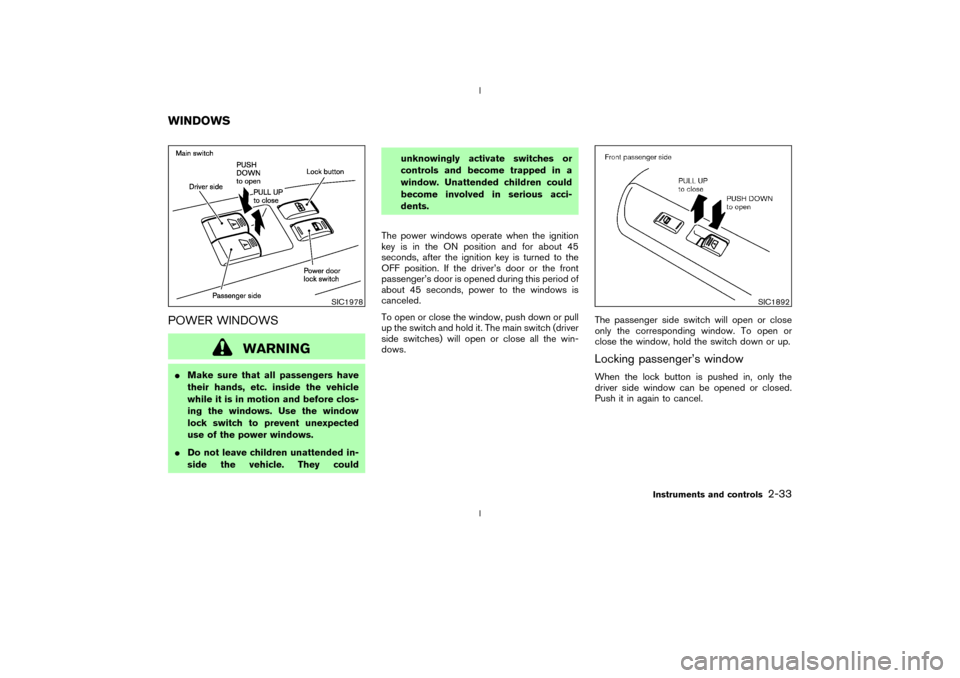
To open or close the window, push down or pull
up the switch and hold it. The main switch (driver
side switches) will open or close all the win-
dows.The passenger side switch will open or close
only the corresponding window. To open or
close the window, hold the switch down or up.
Locking passenger's windowWhen the lock button is pushed in, only the
driver side window can be opened or closed.
Push it in again to cancel.
SIC1978
SIC1892
WINDOWS
Instruments and controls
2-33
Z
02.9.13/Z33-D/V5.0
X
Page 73 of 227
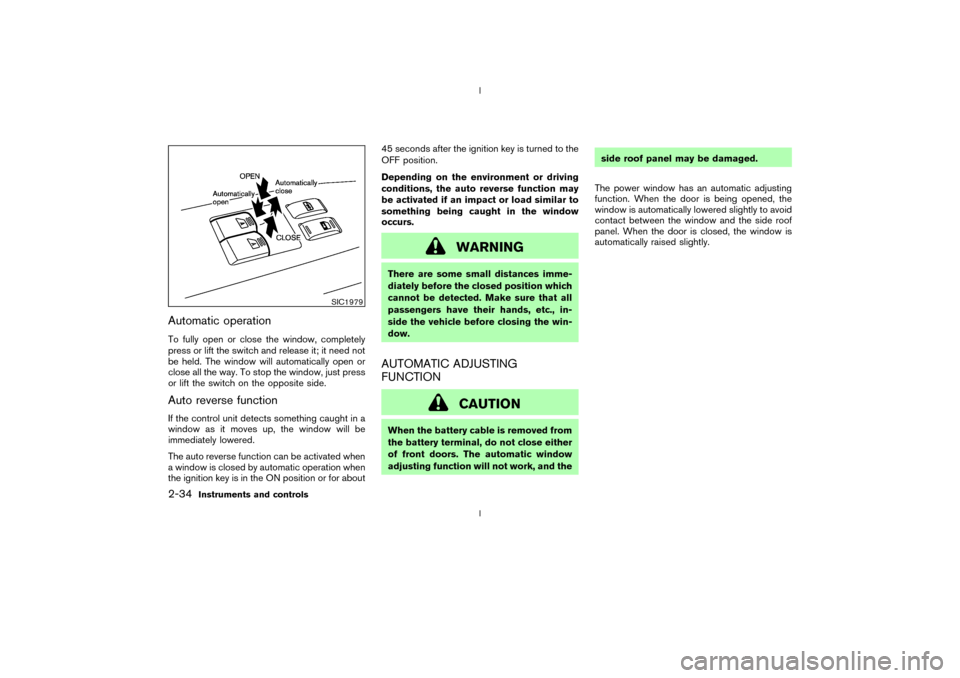
Automatic operationTo fully open or close the window, completely
press or lift the switch and release it; it need not
be held. The window will automatically open or
close all the way. To stop the window, just press
or lift the switch on the opposite side.Auto reverse functionIf the control unit detects something caught in a
window as it moves up, the window will be
immediately lowered.
The auto reverse function can be activated when
a window is closed by automatic operation when
the ignition key is in the ON position or for about45 seconds after the ignition key is turned to the
OFF position.
Depending on the environment or driving
conditions, the auto reverse function may
be activated if an impact or load similar to
something being caught in the window
occurs.
WARNING
There are some small distances imme-
diately before the closed position which
cannot be detected. Make sure that all
passengers have their hands, etc., in-
side the vehicle before closing the win-
dow.AUTOMATIC ADJUSTING
FUNCTION
CAUTION
When the battery cable is removed from
the battery terminal, do not close either
of front doors. The automatic window
adjusting function will not work, and theside roof panel may be damaged.
The power window has an automatic adjusting
function. When the door is being opened, the
window is automatically lowered slightly to avoid
contact between the window and the side roof
panel. When the door is closed, the window is
automatically raised slightly.
SIC1979
2-34
Instruments and controls
Z
02.9.13/Z33-D/V5.0
X
Page 74 of 227
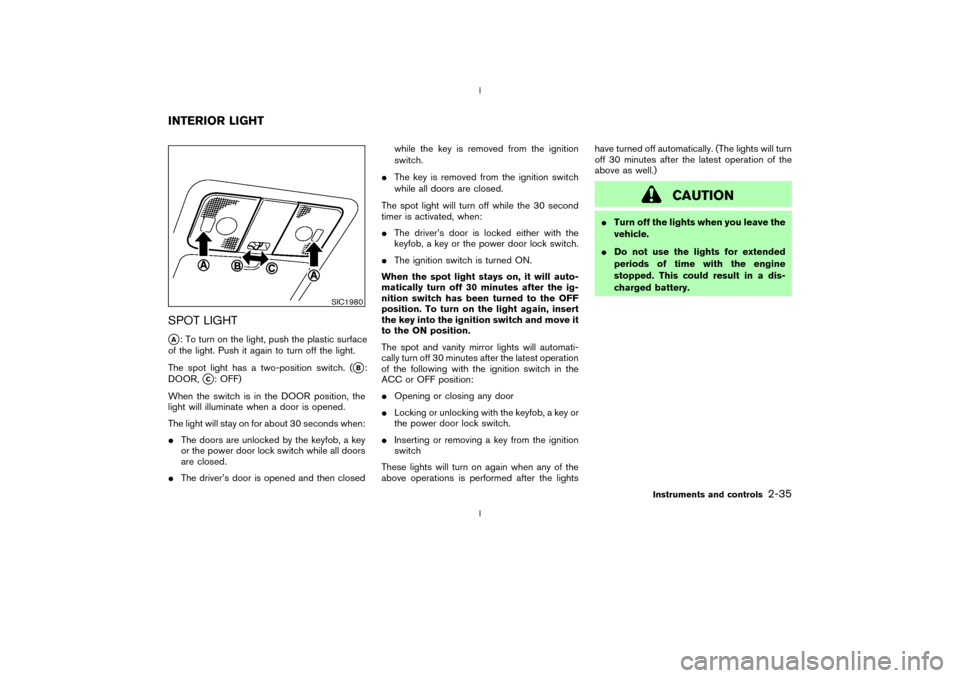
SPOT LIGHTqA: To turn on the light, push the plastic surface
of the light. Push it again to turn off the light.
The spot light has a two-position switch. (
qB:
DOOR,
qC: OFF)
When the switch is in the DOOR position, the
light will illuminate when a door is opened.
The light will stay on for about 30 seconds when:
IThe doors are unlocked by the keyfob, a key
or the power door lock switch while all doors
are closed.
IThe driver's door is opened and then closedwhile the key is removed from the ignition
switch.
IThe key is removed from the ignition switch
while all doors are closed.
The spot light will turn off while the 30 second
timer is activated, when:
IThe driver's door is locked either with the
keyfob, a key or the power door lock switch.
IThe ignition switch is turned ON.
When the spot light stays on, it will auto-
matically turn off 30 minutes after the ig-
nition switch has been turned to the OFF
position. To turn on the light again, insert
the key into the ignition switch and move it
to the ON position.
The spot and vanity mirror lights will automati-
cally turn off 30 minutes after the latest operation
of the following with the ignition switch in the
ACC or OFF position:
IOpening or closing any door
ILocking or unlocking with the keyfob, a key or
the power door lock switch.
IInserting or removing a key from the ignition
switch
These lights will turn on again when any of the
above operations is performed after the lightshave turned off automatically. (The lights will turn
off 30 minutes after the latest operation of the
above as well.)
CAUTION
ITurn off the lights when you leave the
vehicle.
IDo not use the lights for extended
periods of time with the engine
stopped. This could result in a dis-
charged battery.
SIC1980
INTERIOR LIGHT
Instruments and controls
2-35
Z
02.9.13/Z33-D/V5.0
X
Page 82 of 227

3 Pre-driving checks and adjustmentsKeys ........................................................................................... 3-2
Doors......................................................................................... 3-2
Locking with key (Driver's side) ................................... 3-3
Locking with inside lock knob ...................................... 3-3
Locking with power door lock switch ......................... 3-4
Remote keyless entry system ............................................. 3-4
How to use remote keyless entry system.................. 3-5
Battery replacement ........................................................ 3-7
Hood ......................................................................................... 3-8
Rear hatch ............................................................................... 3-9
Opener operation ............................................................. 3-9Secondary rear hatch release .................................... 3-10
Fuel filler lid ........................................................................... 3-10
Opener operation .......................................................... 3-10
Fuel filler cap .................................................................. 3-11
Steering wheel ..................................................................... 3-12
Tilt operation ................................................................... 3-12
Mirrors .................................................................................... 3-13
Inside mirror .................................................................... 3-13
Automatic anti-glare inside mirror
(if so equipped).............................................................. 3-13
Outside mirrors .............................................................. 3-14
Z
02.9.13/Z33-D/V5.0
X
Page 83 of 227
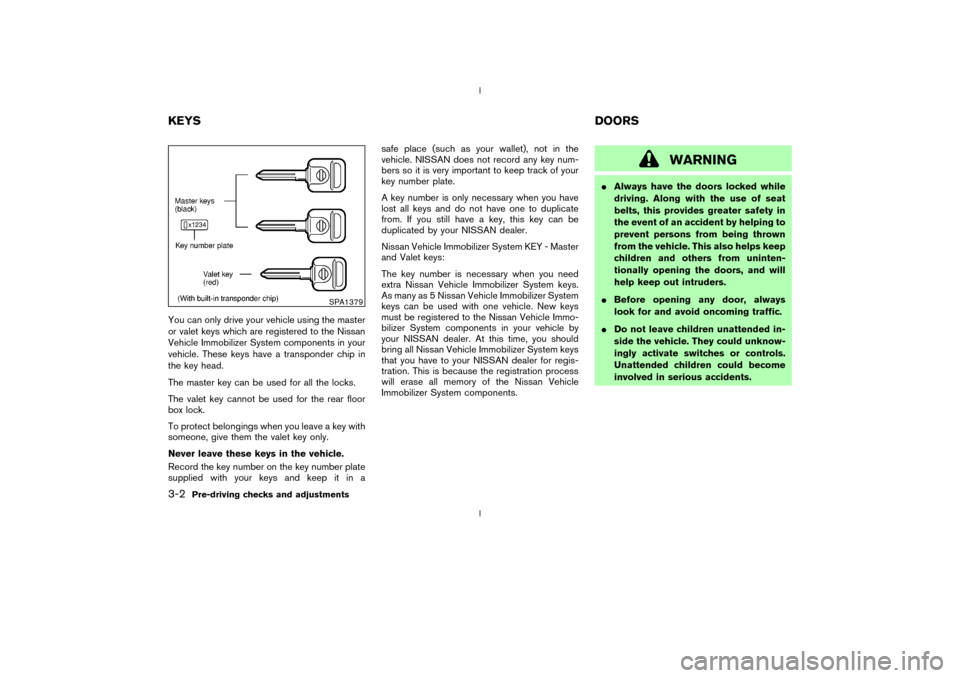
You can only drive your vehicle using the master
or valet keys which are registered to the Nissan
Vehicle Immobilizer System components in your
vehicle. These keys have a transponder chip in
the key head.
The master key can be used for all the locks.
The valet key cannot be used for the rear floor
box lock.
To protect belongings when you leave a key with
someone, give them the valet key only.
Never leave these keys in the vehicle.
Record the key number on the key number plate
supplied with your keys and keep it in asafe place (such as your wallet), not in the
vehicle. NISSAN does not record any key num-
bers so it is very important to keep track of your
key number plate.
A key number is only necessary when you have
lost all keys and do not have one to duplicate
from. If you still have a key, this key can be
duplicated by your NISSAN dealer.
Nissan Vehicle Immobilizer System KEY - Master
and Valet keys:
The key number is necessary when you need
extra Nissan Vehicle Immobilizer System keys.
As many as 5 Nissan Vehicle Immobilizer System
keys can be used with one vehicle. New keys
must be registered to the Nissan Vehicle Immo-
bilizer System components in your vehicle by
your NISSAN dealer. At this time, you should
bring all Nissan Vehicle Immobilizer System keys
that you have to your NISSAN dealer for regis-
tration. This is because the registration process
will erase all memory of the Nissan Vehicle
Immobilizer System components.
WARNING
IAlways have the doors locked while
driving. Along with the use of seat
belts, this provides greater safety in
the event of an accident by helping to
prevent persons from being thrown
from the vehicle. This also helps keep
children and others from uninten-
tionally opening the doors, and will
help keep out intruders.
IBefore opening any door, always
look for and avoid oncoming traffic.
IDo not leave children unattended in-
side the vehicle. They could unknow-
ingly activate switches or controls.
Unattended children could become
involved in serious accidents.
SPA1379
KEYSDOORS3-2
Pre-driving checks and adjustments
Z
02.9.13/Z33-D/V5.0
X
Page 84 of 227

LOCKING WITH KEY (Driver's side)
PowerThe power door lock system allows you to lock
or unlock all doors including the rear hatch
simultaneously.
ITurning the driver's door key to the rear of the
vehicle will lock all doors including the rear
hatch.
ITurning the driver's door key one time to the
front of the vehicle will unlock the driver's
door and rear hatch. From that position,
returning the key to neutral (where the key
can only be removed and inserted) and turn-ing it to the front again within 5 seconds will
unlock the passenger's door.
Opening and closing windowsTurn the driver's door key to the UNLOCK
position and hold for about 1 second, all door
windows will begin to lower.
To stop opening, turn the key to the neutral
position.
To close all door windows, turn the key to the
lock position and hold for about 1 second.
To stop closing, turn the key to the neutral
position.
In the event of a hand in the way, or other
obstruction, the auto reverse function will acti-
vate.
LOCKING WITH INSIDE LOCK
KNOBTo individually lock the doors, move the inside
lock knob to the LOCK position, then close the
door. To unlock, pull up the inside lock knob to
the UNLOCK position.
When locking the door without a key, be
sure not to leave the key inside the vehicle.
SPA1503
SPA1504
Pre-driving checks and adjustments
3-3
Z
02.9.13/Z33-D/V5.0
X