Page 113 of 321
113 Controls in detail
Automatic transmission
Automatic transmission
Information for driving with an automatic
transmission is found in the “Getting start-
ed” section (
�page 44).
Your transmission adapts its gear shifting
process to your individual driving style by
continually adjusting the shift points up or
down. These shift point adjustments are
performed based on current operating and
driving conditions.
If the operating conditions change, the au-
tomatic transmission reacts by adjusting
its gear shift program.
The automatic transmission selects indi-
vidual gears automatically, dependent
upon
�
the selector lever positionD with gear
ranges4, 3, 2, 1
�
the position of the accelerator pedal
(�page 117)
�
the vehicle speedWhen the selector lever is in positionD,
you can influence transmission shifting by
�
limiting the gear range
�
changing gears yourself
One-touch gearshifting
Even with an automatic transmission you
can change the gears yourself when the
selector lever is in positionD.
Downshifting�
Briefly press the selector lever to the
left in the D–direction.
The transmission will shift from the cur-
rent gear to the next lower gear. This
action simultaneously limits the gear
range of the transmission
(�page 114).
Warning!
G
It is dangerous to shift the selector lever out
ofP orN if the engine speed is higher than
idle speed. If your foot is not firmly on the
brake pedal, the vehicle could accelerate
quickly forward or reverse. You could lose
control of the vehicle and hit someone or
something. Only shift into gear when the en-
gine is idling normally and when your right
foot is firmly on the brake pedal.
Warning!
G
On slippery road surfaces, never downshift
in order to obtain braking action. This could
result in drive wheel slip and reduced vehi-
cle control. Your vehicle’s ABS will not pre-
vent this type of loss of control.
Page 114 of 321
114 Controls in detailAutomatic transmissionUpshifting�
Briefly press the selector lever to the
right in the D+direction.
The transmission will shift from the cur-
r e n t g e a r t o t h e n e x t h i g h e r g e a r a s p e r -
mitted by the shift program. This action
simultaneously extends the gear range
of the transmission.Canceling gear range limit
�
Press and hold the selector lever in the
D+direction until D reappears in the
tachometer display field.
Shifting into optimal gear range
�
Press and hold the gear selector lever
in the D– direction.
The transmission will automatically se-
lect the gear range suited for optimal
acceleration and deceleration. This will
involve shifting down one or more
gears.
Gear ranges
With the selector lever in positionD, you
can limit the transmission’s gear range by
pressing the lever to the left (D-), and re-
verse the gear range limit by pressing the
lever to the right (D+).
The selected gear range will appear in the
tachometer display field. If you press on
the accelerator when the engine has
reached its rpm limit, the transmission will
upshift beyond any gear range limit
selected.
iTo avoid overrevving the engine when
the selector lever is moved to the D– di-
rection, the transmission will not shift
to a lower gear if the engine’s max.
speed would be exceeded.
Page 137 of 321
137 Controls in detail
Sliding/pop-up roof*
Sliding/pop-up roof*
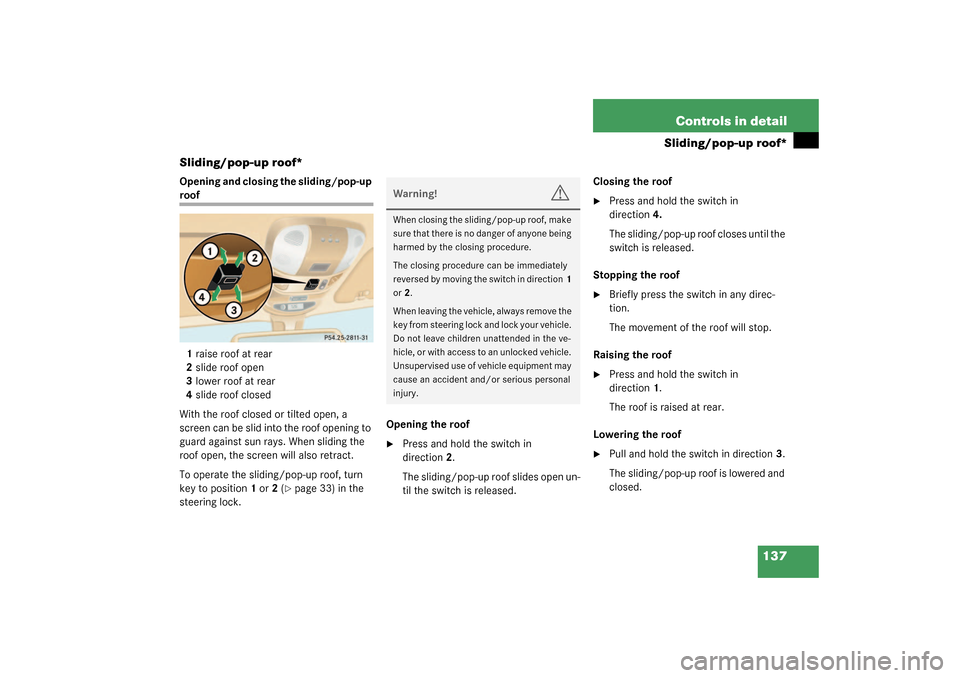
Opening and closing the sliding/pop-up roof
1raise roof at rear
2slide roof open
3lower roof at rear
4slide roof closed
With the roof closed or tilted open, a
screen can be slid into the roof opening to
guard against sun rays. When sliding the
roof open, the screen will also retract.
To operate the sliding/pop-up roof, turn
key to position1 or 2 (
�page 33) in the
steering lock. Opening the roof
�
Press and hold the switch in
direction2.
The sliding/pop-up roof slides open un-
til the switch is released.Closing the roof
�
Press and hold the switch in
direction4.
The sliding/pop-up roof closes until the
switch is released.
Stopping the roof
�
Briefly press the switch in any direc-
tion.
The movement of the roof will stop.
Raising the roof
�
Press and hold the switch in
direction1.
The roof is raised at rear.
Lowering the roof
�
Pull and hold the switch in direction3.
The sliding/pop-up roof is lowered and
closed.
Warning!
G
When closing the sliding/pop-up roof, make
sure that there is no danger of anyone being
harmed by the closing procedure.
The closing procedure can be immediately
reversed by moving the switch in direction1
or2.
When leaving the vehicle, always remove the
key from steering lock and lock your vehicle.
Do not leave children unattended in the ve-
hicle, or with access to an unlocked vehicle.
Unsupervised use of vehicle equipment may
cause an accident and/or serious personal
injury.
Page 138 of 321
138 Controls in detailSliding/pop-up roof*Opening the roof automatically�
Briefly press the switch in direction2.
The roof will not open to the fully open
position.
To open the roof fully, press switch
again in direction2.Synchronizing the sliding / pop-up roof
The power sliding/pop-up roof must be re-
synchronized each time after the battery
has been disconnected, the slid-
ing/pop-up roof has been closed manually
or the sliding/pop-up roof does not open
smoothly or malfunctions (
�page 246).
iTo interrupt procedure, briefly move
switch in any direction.
!To avoid damaging the seals, do not
transport any objects with sharp edges
which can stick out of the slid-
ing/pop-up roof.
The sliding/pop-up roof can be opened
or closed manually should an electrical
malfunction occur (
�page 246).
Page 141 of 321
141 Controls in detail
Loading
Partition net*Use of the partition net is a particularly im-
portant safety factor when the vehicle is
loaded higher than the top of the seat
backrests with smaller objects.
The partition net can be installed behind
the backrests of the front or rear seats.
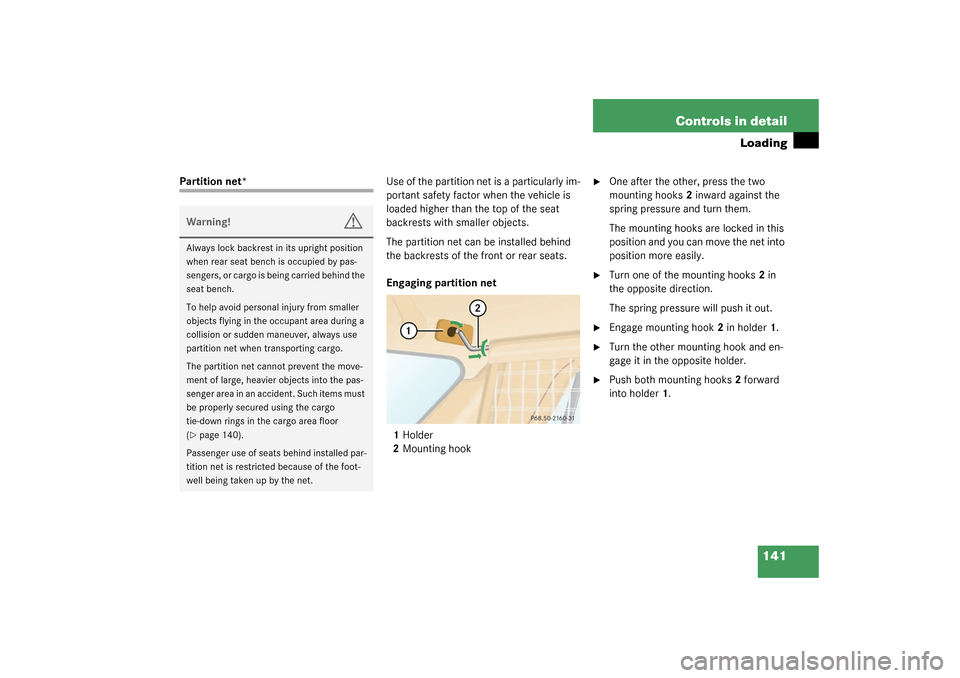
Engaging partition net
1Holder
2Mounting hook
�
One after the other, press the two
mounting hooks2 inward against the
spring pressure and turn them.
The mounting hooks are locked in this
position and you can move the net into
position more easily.
�
Turn one of the mounting hooks2 in
the opposite direction.
The spring pressure will push it out.
�
Engage mounting hook2 in holder1.
�
Turn the other mounting hook and en-
gage it in the opposite holder.
�
Push both mounting hooks2 forward
into holder1.
Warning!
G
Always lock backrest in its upright position
when rear seat bench is occupied by pas-
sengers, or cargo is being carried behind the
seat bench.
To help avoid personal injury from smaller
objects flying in the occupant area during a
collision or sudden maneuver, always use
partition net when transporting cargo.
The partition net cannot prevent the move-
ment of large, heavier objects into the pas-
senger area in an accident. Such items must
be properly secured using the cargo
tie-down rings in the cargo area floor
(�page 140).
Passenger use of seats behind installed par-
tition net is restricted because of the foot-
well being taken up by the net.
Page 148 of 321
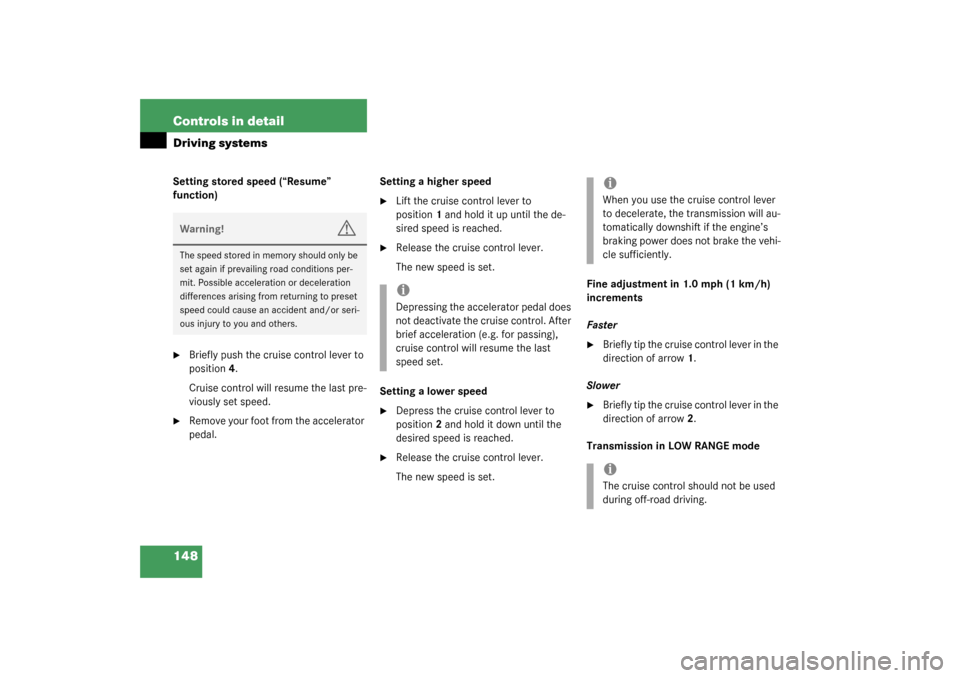
148 Controls in detailDriving systemsSetting stored speed (“Resume”
function)�
Briefly push the cruise control lever to
position4.
Cruise control will resume the last pre-
viously set speed.
�
Remove your foot from the accelerator
pedal.Setting a higher speed
�
Lift the cruise control lever to
position1 and hold it up until the de-
sired speed is reached.
�
Release the cruise control lever.
The new speed is set.
Setting a lower speed
�
Depress the cruise control lever to
position2 and hold it down until the
desired speed is reached.
�
Release the cruise control lever.
The new speed is set.Fine adjustment in 1.0 mph (1 km/h)
increments
Faster
�
Briefly tip the cruise control lever in the
direction of arrow1.
Slower
�
Briefly tip the cruise control lever in the
direction of arrow2.
Transmission in LOW RANGE mode
Warning!
G
The speed stored in memory should only be
set again if prevailing road conditions per-
mit. Possible acceleration or deceleration
differences arising from returning to preset
speed could cause an accident and/or seri-
ous injury to you and others.
iDepressing the accelerator pedal does
not deactivate the cruise control. After
brief acceleration (e.g. for passing),
cruise control will resume the last
speed set.
iWhen you use the cruise control lever
to decelerate, the transmission will au-
tomatically downshift if the engine’s
braking power does not brake the vehi-
cle sufficiently.iThe cruise control should not be used
during off-road driving.
Page 173 of 321
173 Controls in detail
Useful features
Compass
The compass displays the direction the ve-
hicle is traveling. The display3 will show
you N, NE, E, SE, S, SW, W or NW.
To ensure the display is correct, the com-
pass must be set to the proper geographic
zone (
�page 174). It may also be neces-
sary to calibrate the compass
(
�page 174).
Zone map North America Zone map South America
iThe presence of buildings, bridges,
power lines and large antenna masts
can influence the displayed values. Me-
tallic or magnetic objects in or on the
vehicle can influence the accuracy of
the compass.
Page 200 of 321

200 OperationAt the gas station
At the gas stationThe fuel filler flap is located on the
left-hand side of the vehicle towards the
rear. Locking/unlocking the vehicle with
the remote control automatically
locks/unlocks the fuel filler flap.
�
Remove the key from the steering lock.
�
Open the fuel filler flap1 by pulling in
direction of the arrow.
�
Turn the fuel cap2 to the left and hold
on to it until possible pressure is re-
leased.
�
Take off the cap.
�
Only fill your tank until the filler nozzle
unit cut out – do not top up or overfill.
�
Replace the fuel cap by turning it to the
right.
You will hear when the fuel cap is tight-
ened.
�
Close the fuel filler flap.
Warning!
G
Gasoline is highly flammable and poisonous.
It burns violently and can cause serious inju-
ry. Whenever you are around gasoline, avoid
inhaling fumes and skin contact, extinguish
all smoking materials. Never allow sparks,
flame or smoking materials near gasoline!.
!The fuel filler cap is tethered to the fuel
filler neck. Do not drop the cap. It could
damage the vehicle paint finish.!To prevent damaging the lens of the
plastic tail lamp, make certain that no
gasoline comes into contact with it.
Warning!
G
Overfilling of the fuel tank may create pres-
sure in the system which could cause a gas
discharge. This could cause the gas to spray
back out when removing the fuel pump noz-
zle, which could cause personal injury.iUse only premium unleaded gasoline
with a minimum Posted Octane Rating
of 91 (average of 96 RON / 86 MON).
Information on gasoline quality can
normally be found on the fuel pump.
More information on gasoline can be
found in the Factory Approved Service
Products pamphlet.

