Page 63 of 399

63 Safety and Security
Occupant safety
Warning!
G
Damaged seat belts or belts that were highly
stressed in an accident must be replaced
and their anchoring points must also be
checked.
Only use seat belts which have been ap-
proved by Mercedes-Benz.
Do not make any modifications to the seat
belts. This can lead to unintended activation
or to failure.
Have all work carried out only by an autho-
rized Mercedes-Benz Center.
Warning!
G
USE SEAT BELTS PROPERLY�
Seat belts can only work when used
properly. Never wear seat belts in any
other way than as described in this sec-
tion, as that could result in serious inju-
ries in case of an accident.
�
Each occupant should wear their seat
belt at all times, because seat belts help
reduce the likelihood of and potential
severity of injuries in accidents, includ-
ing rollovers. The integrated restraint
system includes SRS (driver airbag,
front passenger airbag, side impact air-
bags, head protection window curtain
airbags for side windows), ETD (seat belt
emergency tensioning device), and front
seat knee bolsters. The system is de-
signed to enhance the protection of-
fered to properly belted occupants in
certain frontal (front airbags) and side
(side impact and window curtain air-
bags) impacts which exceed preset de-
ployment thresholds.
�
Never wear the shoulder belt under your
arm, against your neck or off your shoul-
der. In a crash, your body would move
too far forward. That would increase the
chance of head and neck injuries. The
belt would also apply too much force to
the ribs or abdomen, which could se-
verely injure internal organs such as
your liver or spleen.
�
Never wear belts over rigid or breakable
objects in or on your clothing, such as
eyeglasses, pens, keys etc., as these
might cause injuries.
�
Position the lap belt as low as possible
on your hips and not across the abdo-
men. If the belt is positioned across your
abdomen, it could cause serious injuries
in a crash.
Page 64 of 399

64 Safety and SecurityOccupant safety
Emergency tensioning device (ETD),
seat belt force limiter
The seat belts for the front and rear outer
seats are equipped with emergency ten-
sioning devices and belt force limiters.
The ETD is designed to activate in the fol-
lowing cases when the seat belts are fas-
tened:�
In frontal or rear-end impacts exceed-
ing a preset severity level
�
If the ignition is switched onIn an impact, emergency tensioning devic-
es remove slack from the belts in such a
way that the seat belts fit more snugly
against the body. Belt force limiters reduce
the force exerted by the seat belts on oc-
cupants during a crash.
�
Each seat belt should never be used for
more than one person at a time. Do not
fasten a seat belt around a person and
another person or other objects.
�
Belts should not be worn twisted. In a
crash, you wouldn’t have the full width
of the belt to manage impact forces. The
twisted belt against your body could
cause injuries.
�
Pregnant women should also use a
lap-shoulder belt. The lap belt portion
should be positioned as low as possible
on the hips to avoid any possible pres-
sure on the abdomen.
�
Never place your feet on the instrument
panel or on the seat. Always keep both
feet on the floor in front of the seat.
Warning!
G
An emergency tensioning device (ETD) that
was activated must be replaced.
When scrapping the emergency tensioning
device, our safety instructions must be fol-
lowed. These are available at your autho-
rized Mercedes-Benz Center.
Page 77 of 399
77 Safety and Security
Driving safety systems
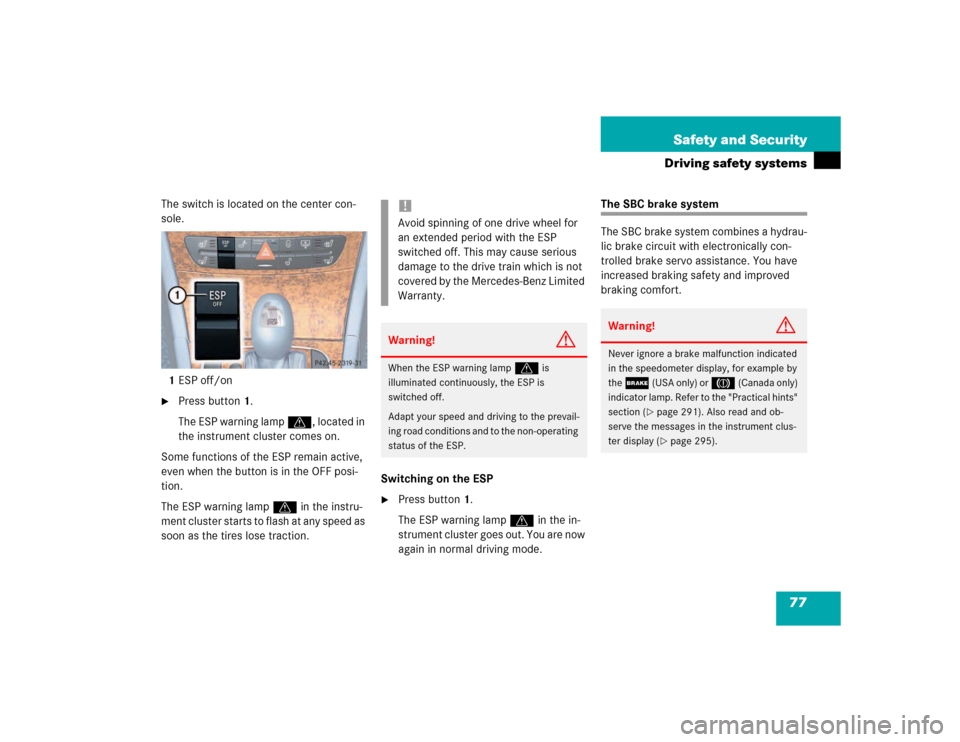
The switch is located on the center con-
sole.
1ESP off/on�
Press button1.
The ESP warning lamp v, located in
the instrument cluster comes on.
Some functions of the ESP remain active,
even when the button is in the OFF posi-
tion.
The ESP warning lamp v in the instru-
ment cluster starts to flash at any speed as
soon as the tires lose traction. Switching on the ESP
�
Press button1.
The ESP warning lamp v in the in-
strument cluster goes out. You are now
again in normal driving mode.
The SBC brake system
The SBC brake system combines a hydrau-
lic brake circuit with electronically con-
trolled brake servo assistance. You have
increased braking safety and improved
braking comfort.
!Avoid spinning of one drive wheel for
an extended period with the ESP
switched off. This may cause serious
damage to the drive train which is not
covered by the Mercedes-Benz Limited
Warranty.Warning!
G
When the ESP warning lamp
v
is
illuminated continuously, the ESP is
switched off.
Adapt your speed and driving to the prevail-
ing road conditions and to the non-operating
status of the ESP.
Warning!
G
Never ignore a brake malfunction indicated
in the speedometer display, for example by
the
;
(USA only) or
3
(Canada only)
indicator lamp. Refer to the "Practical hints"
section (
�page 291). Also read and ob-
serve the messages in the instrument clus-
ter display (�page 295).
Page 119 of 399

119 Controls in detail
Instrument cluster
Coolant temperature displayDuring severe operating conditions and
stop-and-go city traffic, the coolant tem-
perature may rise close to 248°F (120°C).
The engine should not be operated with
the coolant temperature above 248°F
(120°C). Doing so may cause serious en-
gine damage which is not covered by the
Mercedes-Benz Limited Warranty.
Trip odometer�
Check to see that the trip odometer
and main odometer (
�page 121) ap-
pear in the multifunction display.
�
Press and hold the reset knob on the in-
strument cluster (
�page 22) until the
trip odometer is reset.
Warning!
G
�
Driving when your engine is badly over-
heated can cause some fluids which
may have leaked into the engine com-
partment to catch fire. You could be se-
riously burned.
�
Steam from an overheated engine can
cause serious burns and can occur just
by opening the engine hood. Stay away
f r o m t h e e n g i n e i f y o u s e e o r h e a r s t e a m
coming from it.
Turn off the engine, get out of the vehicle
and do not stand near the vehicle until it
cools down.iExcessive coolant temperatures trigger
a warning in the multifunction display.
Page 121 of 399

121 Controls in detail
Control system
Control system
The control system is activated as soon as
the key in the starter switch is turned to
position1. The control system enables you
to�
call up information about your vehicle
�
change vehicle settings.
For example, you can use the control sys-
tem to find out when your vehicle is next
due for service, to set the language for
messages in the instrument cluster dis-
play, and much more.
The control system relays information to
the multifunction display.
Multifunction display
1Segment ring
2Standard display
3Trip odometer
iThe displays for the audio systems (ra-
dio, CD player, cassette player) will ap-
pear in English, regardless of the
language selected.
Warning!
G
A driver’s attention to the road must always
be his /her primary focus when driving.
For your safety and the safety of others, se-
lecting features through the multifunction
steering wheel should only be done by the
driver when traffic and road conditions per-
mit it to be done safely.
Bear in mind that at a speed of just 30 mph
(approximately 50 km/h), your vehicle is
covering a distance of 44 feet (approximate-
ly 13.5 m) every second.
Page 126 of 399

126 Controls in detailControl system
Standard display menu
You can select the functions in the stan-
dard display menu with buttonk
orj.
The following functions are available:
Display digital speedometer�
Press buttonj twice.
The current vehicle speed is shown in
the multifunction display.
AUDIO menu
The functions in the
Audio
menu operate
the audio equipment which you currently
have turned on.
If no audio equipment is currently turned
on, the message
AUDIO OFF
is shown in the
display.
The following functions are available:
iThe headings used in the menus table
are designed to facilitate navigation
within the system and are not neces-
sarily identical to those shown in the
control system displays.
The first function displayed in each
menu will automatically show you
which part of the system you are in.
Function
Page
Call up digital speedometer
see
below
Call up FSS PLUS
275
Check tire pressure*
270
Check engine oil level
262
Function
Page
Select radio station
127
Operate CD player*
127
Operate cassette player
128
Page 132 of 399
132 Controls in detailControl systemThe table below shows what settings can
be changed within the various menus. De-
tailed instructions on making individual
settings can be found on the following pag-
es.INSTRUMENT CLUSTER
TIME/DATE
LIGHTING
VEHICLE
Select temperature display
mode
Set time (hours)
Set daytime running lamp mode
(USA only)
Set automatic locking
Select speedometer display
mode
Set time (minutes)
Set locator lighting
Select language
Set date (month)
Ambient lighting
Select display (speed display or
outside temperature) for status
line
Set date (day)
Exterior lamps delayed
switch-off
Tire pressure unit display*
Set date (year)
Interior lighting delayed
switch-off
Page 134 of 399

134 Controls in detailControl systemInstrument cluster submenu
Access the
Instr. cluster
submenu via
the
Settings
menu. Use the
Instr. clus-
ter
submenu to change the instrument
cluster display settings. The following
functions are available:Selecting temperature display mode
�
Move the selection marker with
theæ orç button to the
Instr.
cluster
submenu.
�
Press buttonj ork repeatedly
until you see this message in the dis-
play:
Temp. indicator
.
The selection marker is on the current
setting.
�
Pressæ orç to set the temper-
ature unit to degrees Celsius (°C) or
degrees Fahrenheit (°F).Selecting speedometer display mode
�
Move the selection marker with
theæ orç button to the
Instr.
cluster
submenu.
�
Press buttonj ork repeatedly
until you see this message in the dis-
play:
Display unit
.
The selection marker is on the current
setting.
�
Press æ or ç to set speedome-
ter unit to
km or
miles
.
Function
Page
Select temperature display
mode
134
Select speedometer display
mode
134
Select language
135
Select display (speed display or
outside temperature) for status
display
135
Select display (speed display or
outside temperature) for basic
display
136
Tire pressure display*
136
