Page 91 of 399
91 Controls in detail
Locking and unlocking
system, the vehicle cannot be locked
or the engine started via the KEY-
LESS-GO system.
�
If the SmartKey with KEYLESS-GO is re-
moved from the vehicle while the igni-
tion is switched on (e.g. if passenger
exits the vehicle with the key), the mes-
sage
Key not recognized!
will appear
in the multifunction display.
Find the key or change its present loca-
tion immediately (e.g. place it on the
front passenger seat or insert it in shirt
pocket).
�
Remember that the engine can be
started by anyone with a SmartKey
with KEYLESS-GO that is left inside the
vehicle. If you leave the card behind
when exiting and locking the vehicle,
the message
Key recognized in vehi-
cle!
will appear in the multifunction
display.Factory setting
Global unlocking
�
Grasp the door handle.
The vehicle will lock again automatically
within approximately 40 seconds if neither
door nor trunk is opened.Global locking
�
Press lock button at door handle
(�page 53) or trunk lid (
�page 92).
iThe vehicle could be inadvertently un-
locked if the SmartKey with KEY-
LESS-GO is within 3 ft. (1 m) of the
vehicle and �
the door handle is splashed with
water, or
�
you attempt to clean the door
handle.
!If you cannot lock or unlock the vehicle
with the SmartKey with KEYLESS-GO,
then either the batteries of the key are
discharged or the key is malfunction-
ing.�
Check the batteries of the Smart-
Key with KEYLESS-GO (
�page 88)
and replace them if necessary
(
�page 328).
�
Use the mechanical key to unlock
the driver’s door (
�page 327) and
trunk lid (
�page 328) as required.
Lock the vehicle using the mechan-
ical key (
�page 328).
If your SmartKey with KEYLESS-GO is
malfunctioning, contact your autho-
rized Mercedes-Benz Center.
ProCarManuals.com
Page 94 of 399

94 Controls in detailLocking and unlocking
Opening the trunk from the inside
You can open the trunk from the inside if
the vehicle is stationary.
A minimum height clearance of 5.75 ft.
(1.75 m) is required to open the trunk lid.
The switch is located on the driver’s door.
1Remote trunk lid release switch with in-
dicator lamp�
Pull remote trunk lid release switch1.
The trunk opens. The indicator lamp in
the switch lights up and remains lit as
long as the trunk is open.The trunk can also be opened using the
SmartKey (
�page 88) or from its inside in
an emergency, see "Trunk lid emergency
release" (
�page 97).
iIf the vehicle has previously been
locked from the outside, opening a
door from the inside will trigger the an-
ti-theft alarm system. To cancel the
alarm, do one of the following:�
Press button Œor ‹on the
SmartKey.
�
Insert the SmartKey in the starter
switch.
!The trunk lid swings open upwards au-
tomatically. Always make sure that
there is sufficient overhead clearance.iIf the vehicle was previously centrally
locked, the trunk lid will lock automati-
cally when closed (
�page 96). The
turn signals will flash three times to
confirm locking.
If the vehicle was previously separately
locked (
�page 98), the trunk lid will re-
main locked.
ProCarManuals.com
Page 95 of 399

95 Controls in detail
Locking and unlocking
Trunk lid opening/closing system*
The switch for opening and closing the
trunk is located on the driver’s door.
1Remote control switch�
Pull remote control switch1 until the
trunk begins to open.
The trunk lid opens automatically.
The indicator lamp in the switch lights
up and remains lit until the trunk is
closed again by pressing remote con-
trol switch1.If the vehicle was previously separately
locked (
�page 98), the trunk lid will re-
main locked.Activating opening height restriction of
trunk lid
If the opening height restriction of trunk lid
is activated, the trunk lid opens to below
the roof line of the vehicle.
1Trunk lid closing switch
�
Press the trunk lid closing switch 1 for
approx. 5 seconds.
The opening height restriction is acti-
vated.
�
Press the trunk lid closing switch 1
again for approx. 5 seconds.
The opening height restriction is deac-
tivated.
iThe trunk lid swings open upwards au-
tomatically. Always make sure that
there is sufficient overhead clearance.
To stop the opening procedure, pull or
press the remote control switch for the
trunk lid.
ProCarManuals.com
Page 96 of 399

96 Controls in detailLocking and unlockingOpening the trunk
A minimum height clearance of 5.75 ft.
(1.75 m) is required to open the trunk lid.
The handle is located above the rear li-
cense plate recess.�
Pull on the handle and lift up the trunk
lid.
The trunk lid swings open upwards au-
tomatically. Always make sure that
there is sufficient overhead clearance.
Closing the trunk
1Handle�
Lower trunk lid using handle1.Vehicles with trunk lid opening/closing
system*
Closing from the inside
�
Press the remote control switch until
the indicator lamp in the switch goes
out and the trunk lid is closed.
When closing, if the trunk lid comes into
contact with an object (e.g. luggage that
has been piled too high) in the upper mo-
tion sequence, the closing procedure is
stopped and the trunk re-opens slightly.
iThe vehicle must be unlocked.
Warning!
G
To prevent possible personal injury, always
keep hands and fingers away from the trunk
opening when closing the trunk. Be espe-
cially careful when small children are
around.
Warning!
G
Monitor the closing procedure carefully to
ensure that no one is in danger of being in-
jured. To prevent possible personal injury,
always keep hands and fingers away from
the trunk opening when closing the trunk.
Be especially careful when small children
are around. To stop the closing procedure,
let go of the remote control switch for the
trunk.
ProCarManuals.com
Page 99 of 399
99 Controls in detail
Locking and unlocking
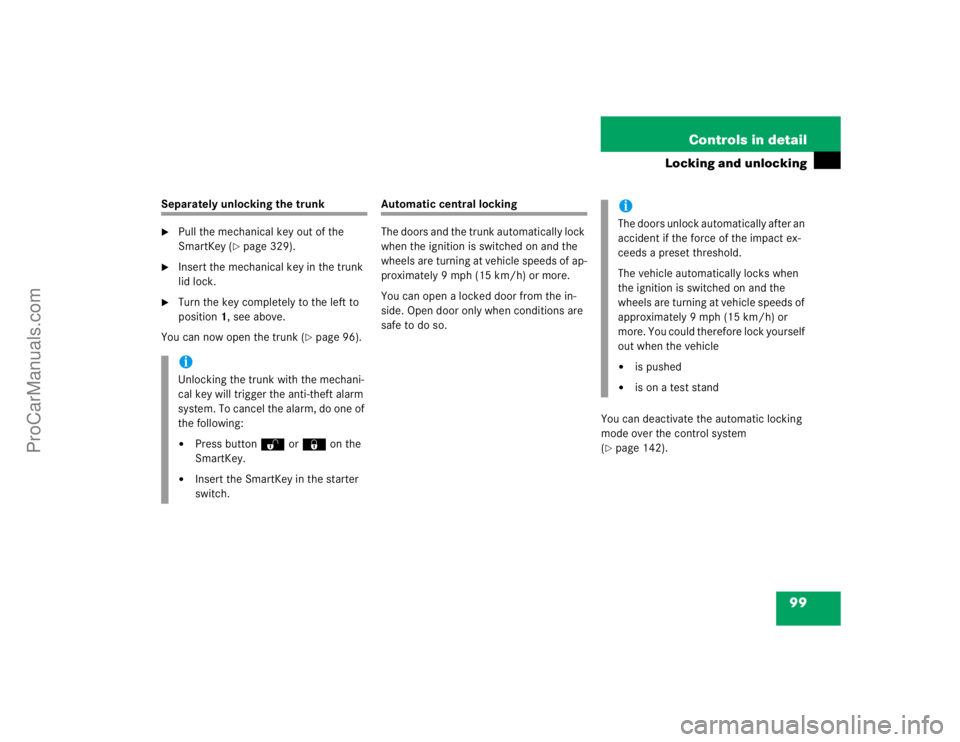
Separately unlocking the trunk�
Pull the mechanical key out of the
SmartKey (
�page 329).
�
Insert the mechanical key in the trunk
lid lock.
�
Turn the key completely to the left to
position1, see above.
You can now open the trunk (
�page 96).
Automatic central locking
The doors and the trunk automatically lock
when the ignition is switched on and the
wheels are turning at vehicle speeds of ap-
proximately 9 mph (15 km/h) or more.
You can open a locked door from the in-
side. Open door only when conditions are
safe to do so.
You can deactivate the automatic locking
mode over the control system
(
�page 142).
iUnlocking the trunk with the mechani-
cal key will trigger the anti-theft alarm
system. To cancel the alarm, do one of
the following:�
Press button Œor ‹on the
SmartKey.
�
Insert the SmartKey in the starter
switch.
iThe doors unlock automatically after an
accident if the force of the impact ex-
ceeds a preset threshold.
The vehicle automatically locks when
the ignition is switched on and the
wheels are turning at vehicle speeds of
approximately 9 mph (15 km/h) or
more. You could therefore lock yourself
out when the vehicle�
is pushed
�
is on a test stand
ProCarManuals.com
Page 101 of 399
101 Controls in detail
Locking and unlocking
Locking the vehicle from the trunk*
Vehicles with trunk lid opening/closing
system* and KEYLESS-GO* can be central-
ly locked using a switch in the trunk lid.
1Central locking�
Press button 1.
The vehicle is centrally locked.
iYou can open a locked door from the
inside. Open door only when conditions
are safe to do so.
If the vehicle was previously centrally
locked using the SmartKey, it will not
unlock using the central locking switch.
If the vehicle was previously locked
with the central locking switch�
while in the selective remote con-
trol mode, only the door opened
from the inside is unlocked.
�
while in the global remote control
mode, the complete vehicle is un-
locked when a door is opened from
the inside.
ProCarManuals.com
Page 106 of 399
106 Controls in detailSeatsActivating�
Press button4.
The indicator lamp in the button lights
up.
Deactivating
�
Press button4 again.
The indicator lamp in the button goes
out.Massage function (PULSE)
The massage function can help prevent
muscle tension during long drives.
�
Press button2.
The indicator lamp in button2 lights
up. The air cushions in the lumbar area
pulsate.
iYou can adjust the characteristics of
the dynamic driving seat using the con-
trol system (
�page 145).
iWhen the engine is turned off, the last
cushion setting is retained in memory,
and the cushion is automatically ad-
justed to this setting when the engine
is restarted.
iThe massage function turns off auto-
matically after approximately 5 min-
utes.
ProCarManuals.com
Page 109 of 399

109 Controls in detail
Memory function
Memory function
You can store up to three different settings
per key.
The following settings are saved for each
stored position:�
Driver’s seat and backrest position
�
Steering wheel position
�
Driver’s side exterior rear view mirror
position
�
Passenger side exterior rear view mir-
ror position
�
Front passenger seat position
These key-dependent memory settings
can be deactivated if desired
(
�page 110).
!Prior to operating the vehicle, the driv-
er should check and adjust the seat
height, seat position fore and aft, and
backrest angle if necessary, to ensure
adequate control, reach and comfort.
The head restraint should also be ad-
justed for proper height. Also see the
section on airbags (
�page 57) for
more information on proper seat posi-
tioning.
In addition, adjust the steering wheel to
ensure adequate control, reach, opera-
tion and comfort. Both the inside and
outside rear view mirrors should be ad-
justed for adequate rear vision.
Fasten seat belts. Infants and small
children should be seated in a properly
secured restraint system that complies
with U.S. Federal Motor Vehicle Safety
Standard 213 and Canadian Motor Ve-
hicle Safety Standard 213.
Warning!
G
Do not activate the memory function while
driving. Activating the memory function
while driving could cause the driver to lose
control of the vehicle.
ProCarManuals.com