Page 47 of 399

47 Getting started
Driving
High beam�
Push the combination switch forward.
The high beam headlights are switched
on.
The high beam symbolA in the
tachometer lights up.
More information can be found in the
"Controls in detail" section (
�page 115).
Windshield wipers
The combination switch is on the left of the
steering column.Combination switch1Single wipe
2Switching on windshield wipers�
Make sure that the ignition is switched
on.
Switching on windshield wipers
�
Turn the combination switch to the de-
sired position depending on the inten-
sity of the rain.0Windshield wipers off
IIntermittent wiping (interval depen-
dent on wetness of windshield)
IINormal wiper speed
IIIFast wiper speed
iThe intermittent wiping interval is de-
pendent on wetness of windshield.
Wiping will not occur with a door open.
Do not leave windshield wipers in inter-
mittent setting when vehicle is taken to
an automatic car wash or during wind-
shield cleaning. Wipers will operate in
the presence of water sprayed on the
windshield, and wipers may be dam-
aged as a result.
The switch should not be left in inter-
mittent setting as the wipers will wipe
the windshield once every time the en-
gine is started. Dust that accumulates
on the windshield might scratch the
glass when wiping occurs on a dry
windshield.
ProCarManuals.com
Page 87 of 399

87 Controls in detail
Locking and unlocking
Factory setting
Global unlocking�
Press buttonŒ.
All turn signal lamps blink once. The
locking knobs in the doors move up.
The vehicle will lock again automatically
within approximately 40 seconds of un-
locking if neither door nor trunk is opened,
the SmartKey is not inserted in the starter
switch, or the central locking switch is not
activated.
Global locking
�
Press button‹.
All turn signal lamps blink three times.
The locking knobs in the doors move
down.Selective setting
If you frequently travel alone, you may wish
to reprogram the key so that
pressingŒ only unlocks the driver’s
door and the fuel filler flap.
�
Press and hold buttonsŒ and‹
simultaneously for about five seconds
until battery check lamp5 blinks twice.
The key will then function as follows:
Unlocking driver’s door and fuel filler
flap�
Press buttonΠonce.
Global unlocking
�
Press buttonΠtwice.
Global locking
�
Press button‹.Restoring to factory setting
�
Press and hold buttonsŒ and‹
simultaneously for about six seconds
until battery check lamp5 blinks twice.Warning!
G
When leaving the vehicle always remove the
key from the starter switch, take the Smart-
Key with KEYLESS-GO (if so equipped) with
you and lock the vehicle. Do not leave chil-
dren unattended in the vehicle, or with ac-
cess to an unlocked vehicle. It is possible for
children to open a looked door from the in-
side, which could result in an accident or se-
rious injury.
ProCarManuals.com
Page 91 of 399
91 Controls in detail
Locking and unlocking
system, the vehicle cannot be locked
or the engine started via the KEY-
LESS-GO system.
�
If the SmartKey with KEYLESS-GO is re-
moved from the vehicle while the igni-
tion is switched on (e.g. if passenger
exits the vehicle with the key), the mes-
sage
Key not recognized!
will appear
in the multifunction display.
Find the key or change its present loca-
tion immediately (e.g. place it on the
front passenger seat or insert it in shirt
pocket).
�
Remember that the engine can be
started by anyone with a SmartKey
with KEYLESS-GO that is left inside the
vehicle. If you leave the card behind
when exiting and locking the vehicle,
the message
Key recognized in vehi-
cle!
will appear in the multifunction
display.Factory setting
Global unlocking
�
Grasp the door handle.
The vehicle will lock again automatically
within approximately 40 seconds if neither
door nor trunk is opened.Global locking
�
Press lock button at door handle
(�page 53) or trunk lid (
�page 92).
iThe vehicle could be inadvertently un-
locked if the SmartKey with KEY-
LESS-GO is within 3 ft. (1 m) of the
vehicle and �
the door handle is splashed with
water, or
�
you attempt to clean the door
handle.
!If you cannot lock or unlock the vehicle
with the SmartKey with KEYLESS-GO,
then either the batteries of the key are
discharged or the key is malfunction-
ing.�
Check the batteries of the Smart-
Key with KEYLESS-GO (
�page 88)
and replace them if necessary
(
�page 328).
�
Use the mechanical key to unlock
the driver’s door (
�page 327) and
trunk lid (
�page 328) as required.
Lock the vehicle using the mechan-
ical key (
�page 328).
If your SmartKey with KEYLESS-GO is
malfunctioning, contact your autho-
rized Mercedes-Benz Center.
ProCarManuals.com
Page 102 of 399
102 Controls in detailSeats
SeatsInformation on seat adjustment can be
found in the "Getting started" section
(�page 35).
Easy-entry/exit feature*
With the easy-entry/exit feature activated,
the steering wheel tilts upwards and the
driver’s seat moves to the rear.
This allows easier entry into and exit from
the vehicle when the driver’s door is
opened. However, the engine must be
turned off.
When the SmartKey is inserted in the start-
er switch and the driver’s door is closed,
the steering wheel and the driver’s seat re-
turn to their last set positions.You can activate the following functions:
�
Steering column:
Only the steering column is adjusted.
�
Steering column and seat:
The steering column and the seat are
adjusted.
The easy-entry/exit feature can be
switched on or off in the individual setting
menu
Convenience
- Easy-entry feature
activate
(�page 143).
Warning!
G
You must ensure that no one can become
trapped or injured by the moving steering
wheel and driver’s seat when the
easy-entry / exit feature is activated, the
driver’s door is being opened and the engine
is turned off or the SmartKey removed from
the starter switch. Do not leave children un-
attended in the vehicle, or with access to an
unlocked vehicle. Unsupervised use of vehi-
cle equipment may cause serious personal
injury.
iTo cancel seat/steering wheel move-
ment, do one of the following:�
Press seat adjustment switch
(�page 28).
�
Move steering column stalk
(�page 38).
�
Press the memory switch
(�page 28).
ProCarManuals.com
Page 106 of 399
106 Controls in detailSeatsActivating�
Press button4.
The indicator lamp in the button lights
up.
Deactivating
�
Press button4 again.
The indicator lamp in the button goes
out.Massage function (PULSE)
The massage function can help prevent
muscle tension during long drives.
�
Press button2.
The indicator lamp in button2 lights
up. The air cushions in the lumbar area
pulsate.
iYou can adjust the characteristics of
the dynamic driving seat using the con-
trol system (
�page 145).
iWhen the engine is turned off, the last
cushion setting is retained in memory,
and the cushion is automatically ad-
justed to this setting when the engine
is restarted.
iThe massage function turns off auto-
matically after approximately 5 min-
utes.
ProCarManuals.com
Page 109 of 399

109 Controls in detail
Memory function
Memory function
You can store up to three different settings
per key.
The following settings are saved for each
stored position:�
Driver’s seat and backrest position
�
Steering wheel position
�
Driver’s side exterior rear view mirror
position
�
Passenger side exterior rear view mir-
ror position
�
Front passenger seat position
These key-dependent memory settings
can be deactivated if desired
(
�page 110).
!Prior to operating the vehicle, the driv-
er should check and adjust the seat
height, seat position fore and aft, and
backrest angle if necessary, to ensure
adequate control, reach and comfort.
The head restraint should also be ad-
justed for proper height. Also see the
section on airbags (
�page 57) for
more information on proper seat posi-
tioning.
In addition, adjust the steering wheel to
ensure adequate control, reach, opera-
tion and comfort. Both the inside and
outside rear view mirrors should be ad-
justed for adequate rear vision.
Fasten seat belts. Infants and small
children should be seated in a properly
secured restraint system that complies
with U.S. Federal Motor Vehicle Safety
Standard 213 and Canadian Motor Ve-
hicle Safety Standard 213.
Warning!
G
Do not activate the memory function while
driving. Activating the memory function
while driving could cause the driver to lose
control of the vehicle.
ProCarManuals.com
Page 110 of 399

110 Controls in detailMemory functionThe memory button is located on the door.
MMemory button
1,2,3Stored positions�
Be sure that the ignition is switched on
or the relevant door is open and the
SmartKey is inserted in the starter
switch.
Storing positions into memory�
Adjust the seats, steering wheel and
rear view mirrors to the desired posi-
tion (
�page 34).
�
Press memory buttonM.
�
Release memory button and press
stored position button 1, 2 or 3 within
three seconds.
All the settings are stored at the select-
ed position.
Recalling positions from memory�
On memory button, press and hold
stored position button1, 2 or3 until
the seat, steering wheel and rear view
mirrors have fully moved to the stored
positions.iReleasing the button immediately
stops movement to the stored posi-
tions.Warning!
G
Do not operate the power seats using the
memory button if the backrest is in an ex-
cessively reclined position. Doing so could
cause damage to front or rear seats.
First move backrest to an upright position.
ProCarManuals.com
Page 111 of 399
111 Controls in detail
Memory function
Storing parking position
For easier parking you can adjust the pas-
senger exterior rear view mirror so that you
can see the right rear wheel as soon as you
engage reverse gearR.
The exterior rear view mirror returns to its
previously stored driving position�
10 seconds after you put the gear se-
lector lever out of positionR
�
immediately once you exceed a speed
of approx. 6 mph (10 km/h)
�
immediately when you press the button
for the driver’s side mirror
You can store a parking position for the
passenger exterior rear view mirror for
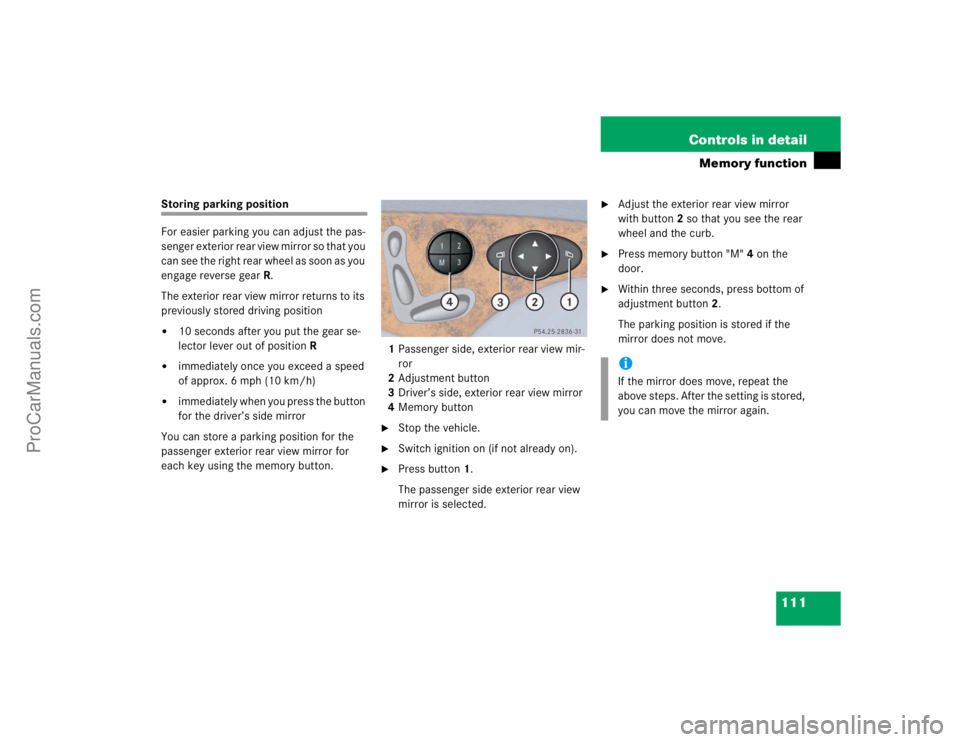
each key using the memory button.1Passenger side, exterior rear view mir-
ror
2Adjustment button
3Driver’s side, exterior rear view mirror
4Memory button
�
Stop the vehicle.
�
Switch ignition on (if not already on).
�
Press button1.
The passenger side exterior rear view
mirror is selected.
�
Adjust the exterior rear view mirror
with button2 so that you see the rear
wheel and the curb.
�
Press memory button "M" 4 on the
door.
�
Within three seconds, press bottom of
adjustment button2.
The parking position is stored if the
mirror does not move.iIf the mirror does move, repeat the
above steps. After the setting is stored,
you can move the mirror again.
ProCarManuals.com